MOTOSHARE 🚗🏍️
Rent Bikes & Cars Directly from Owners
Motoshare connects vehicle owners with people who need bikes and cars on rent. Owners earn from idle vehicles, and renters get flexible ride options.
Visit Motoshare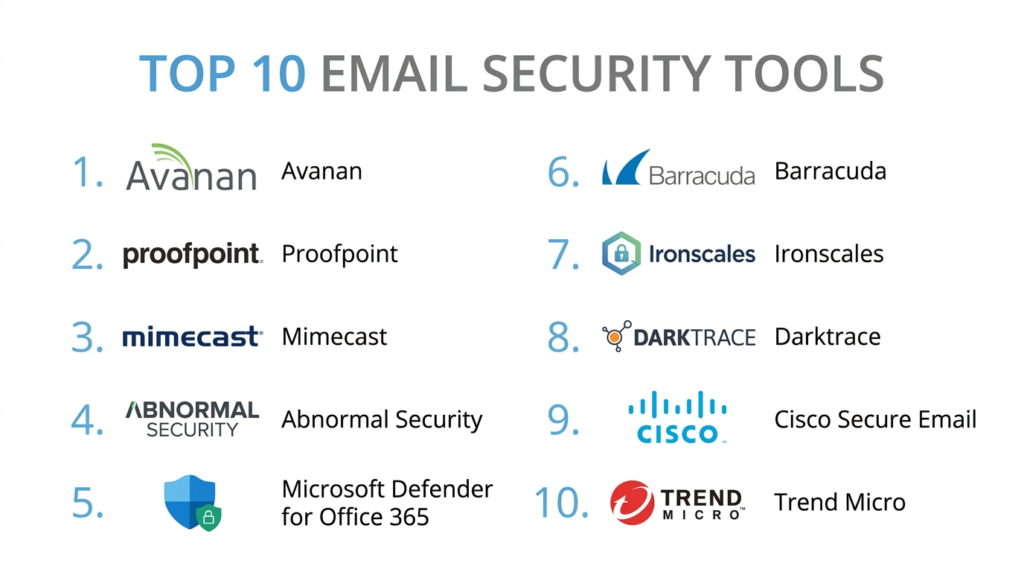
Introduction
Email security tools are specialized software solutions designed to protect electronic communications from unauthorized access, loss, or compromise. In the modern business world, email remains the primary target for cyberattacks. These tools act as a filter, scanning every incoming and outgoing message to identify hidden dangers. They look for malicious links, infected attachments, and deceptive messages that try to trick employees. By blocking these threats before they reach the inbox, email security tools prevent data breaches and financial loss.
In the current digital environment, simple spam filters are no longer enough. Modern threats are highly sophisticated. Attackers use social engineering to mimic high-level executives or trusted vendors. This makes it difficult for a human to spot a fake email. Email security platforms now use advanced technology to verify the identity of the sender and the intent of the message. These tools are essential because a single click on a bad link can compromise an entire company network.
Real-world use cases:
- Phishing Protection: Detecting and blocking emails that lead to fake websites designed to steal login credentials.
- Business Email Compromise (BEC): Identifying messages where an attacker pretends to be a manager to request an urgent wire transfer.
- Data Loss Prevention (DLP): Stopping sensitive information, like credit card numbers or internal secrets, from being sent outside the company.
- Ransomware Prevention: Filtering out attachments that contain malicious code designed to lock a company’s files.
- Email Encryption: Ensuring that sensitive messages are unreadable to anyone except the intended recipient during transit.
What buyers should evaluate:
- Threat Detection Accuracy: The ability of the tool to catch advanced threats with very few false positives.
- Ease of Deployment: Whether the tool can be set up in minutes via an API or if it requires complex mail routing changes.
- Artificial Intelligence Capabilities: How the system uses machine learning to understand “normal” communication patterns.
- Integration with Productivity Suites: How well the tool works with popular platforms like Microsoft 365 or Google Workspace.
- User Awareness Training: The presence of built-in tools to educate employees on how to spot phishing.
- Incident Response Tools: Features that help IT teams quickly remove malicious emails from all user inboxes after a threat is identified.
- Performance and Latency: Ensuring the security scan does not cause a noticeable delay in email delivery.
- Account Takeover Protection: Monitoring for signs that an internal employee’s account has been hacked and is being used to send spam.
- Reporting and Visibility: Clear dashboards that show the types of attacks being blocked and which users are being targeted.
- Scalability and Pricing: How the cost changes as the company grows and more users are added to the system.
Best for: Corporate enterprises, government agencies, financial firms, and any business that handles sensitive client data or large financial transactions.
Not ideal for: Personal email users who only need basic spam protection; very small businesses that do not handle confidential information or high-value payments.
Key Trends in Email Security Tools
- API-Based Deployment: A shift away from traditional gateways toward API-based solutions that sit inside the email environment for better visibility.
- Natural Language Understanding (NLU): Tools are now “reading” the context of an email to detect tone and urgency, which helps spot executive impersonation.
- Human Risk Management: Shifting focus from just blocking “bad” emails to scoring the risk level of specific employees based on their behavior.
- QR Code Phishing (Quishing): New security modules are being designed specifically to scan and block malicious QR codes embedded in images.
- Automated Remediation: Systems are now capable of automatically pulling back a malicious email from every inbox in the company the moment it is detected in one.
- Vendor Risk Monitoring: Monitoring communications from outside partners to ensure their hijacked accounts aren’t being used to attack your team.
- Collaboration Security: Extending email security logic to other messaging platforms like Slack, Microsoft Teams, and Zoom.
- Zero Trust for Email: Applying the principle of “never trust, always verify” to every sender, even if they have a history of safe communication.
How We Selected These Tools (Methodology)
The selection of these top 10 email security tools followed a structured analytical approach to ensure only professional-grade solutions were included.
- Efficacy Ratings: We examined independent lab test results regarding the catch rate for phishing and malware.
- Market Presence: We prioritized tools that are widely adopted by major corporations and government entities.
- Technological Sophistication: We looked for platforms that have moved beyond static rules to dynamic, AI-driven detection.
- Administrative Experience: Evaluation of the “admin” side of the software to ensure it provides actionable data without being overly complex.
- Customer Support Reputation: Analysis of how quickly and effectively the vendors respond to security emergencies.
- Ecosystem Compatibility: Ensuring the tools play well with the broader security stack, such as SIEM and SOAR platforms.
Top 10 Email Security Tools
#1 — Avanan (Check Point)
Short description: A cloud-native security platform that sits inside the inbox via API to block advanced threats that gateways often miss. It is designed for modern cloud email environments.
Key Features
- Inline Protection: Scans emails after the default security layer but before they reach the user’s view.
- BEC Detection: Uses AI to identify subtle indicators of impersonation and financial fraud.
- Collaboration Suite Security: Extends the same email protection to Teams, Slack, and OneDrive.
- Malware Sandboxing: Opens suspicious attachments in a safe virtual environment to see if they are dangerous.
- DLP for SaaS: Scans files and emails for sensitive data to prevent accidental leaks.
- Phishing Simulation: Integrated tools to test and train employees on their security awareness.
Pros
- Extremely fast setup that usually takes less than ten minutes.
- Catches a high percentage of “stealthy” phishing that slips past Microsoft and Google.
Cons
- The interface can be data-heavy for smaller IT teams.
- Requires a modern cloud-native setup to get the full benefit.
Platforms / Deployment
- Web
- Cloud / API-based
Security & Compliance
- SOC 2 Type II, HIPAA, and GDPR compliant.
- Features advanced encryption for administrative access.
Integrations & Ecosystem
Avanan is built to integrate deeply with the modern cloud office experience.
- Microsoft 365
- Google Workspace
- Slack
- Microsoft Teams
Support & Community
Excellent professional support through Check Point’s global network. A large library of documentation and a technical community are available for troubleshooting.
#2 — Proofpoint Email Security
Short description: A massive enterprise-grade security suite that focuses on “people-centric” defense. It is widely considered a market leader for large-scale organizations.
Key Features
- TAP (Targeted Attack Protection): Advanced detection that identifies and tracks the most attacked people in a company.
- NexusAI: A proprietary machine learning engine that analyzes billions of data points to spot threats.
- Email Warning Tags: Adds visible, color-coded banners to suspicious emails to alert the user.
- Automated Response: Automatically moves malicious emails to a quarantine folder based on threat intel.
- DMARC Authentication: Tools to help companies protect their own brand from being spoofed by others.
- Browser Isolation: Opens suspicious links in a secure remote browser to protect the user’s computer.
Pros
- Offers the most comprehensive threat intelligence in the email security market.
- Very strong reporting that shows exactly who is being targeted by attackers.
Cons
- One of the more expensive options on this list.
- The management console is complex and usually requires a dedicated security staff.
Platforms / Deployment
- Web / Windows / Linux
- Cloud / Gateway / Hybrid
Security & Compliance
- FedRAMP, ISO 27001, and HIPAA compliant.
- Strong focus on data privacy and sovereign cloud options.
Integrations & Ecosystem
Proofpoint integrates with almost all major enterprise security tools to share threat data.
- Okta
- CrowdStrike
- Palo Alto Networks
- Splunk
Support & Community
Premium enterprise support is available 24/7. They provide extensive training certifications for IT professionals.
#3 — Mimecast Email Security
Short description: A robust, cloud-based platform that combines security, archiving, and continuity. It is designed to keep email running even during a primary system outage.
Key Features
- Internal Email Protect: Scans emails sent from one employee to another to stop the spread of threats.
- URL Protect: Performs a “scan on click” every time a user opens a link, even if the email is old.
- Attachment Protect: Uses both static and dynamic analysis to strip malicious code from files.
- Mailbox Continuity: Allows employees to send and receive emails even if Microsoft 365 goes down.
- Brand Exploit Protect: Finds and shuts down fake websites that are using your company’s logo.
- Awareness Training: Short, humorous videos designed to engage employees in security education.
Pros
- The continuity feature is a life-saver for businesses that cannot afford any downtime.
- The administration console is very logically organized for daily tasks.
Cons
- The gateway-style setup can be more complex to configure than API tools.
- Some users find the “scan on click” delay to be a minor annoyance.
Platforms / Deployment
- Web / Windows / macOS / iOS / Android
- Cloud / Gateway
Security & Compliance
- SOC 2, FIPS 140-2, and HIPAA compliant.
- Robust audit trails for all administrative actions.
Integrations & Ecosystem
Mimecast has a strong API that allows it to feed data into many other security platforms.
- ServiceNow
- Microsoft Entra ID
- Rapid7
- LogRhythm
Support & Community
Known for high-quality customer service. They maintain an active user community and regular webinars on emerging threats.
#4 — Abnormal Security
Short description: A modern AI-first platform that specializes in stopping Business Email Compromise (BEC). It does not use traditional rules or “bad” lists to find threats.
Key Features
- Behavioral Modeling: Builds a map of every user’s normal relationships and communication style.
- Account Takeover Protection: Detects if an internal account is behaving strangely, suggesting a hack.
- Vendor Risk Management: Monitors the security health of the companies you do business with.
- Zero-Configuration: Connects via API and begins learning without needing manual rules.
- Automated Triage: Automatically manages the “Report Phish” folder to save IT time.
- Contextual Analysis: Understands if a request for money is normal for a specific sender-receiver pair.
Pros
- The best tool for stopping advanced impersonation attacks that have no “malware.”
- Requires almost zero maintenance once it is turned on.
Cons
- Focuses primarily on “social engineering” and may need to be paired with other tools for heavy malware.
- Only works with cloud email environments (Microsoft 365 and Google).
Platforms / Deployment
- Web
- Cloud / API-only
Security & Compliance
- SOC 2 Type II and HIPAA compliant.
- Privacy-first design that minimizes the exposure of sensitive message content.
Integrations & Ecosystem
Abnormal is a specialized “layer” that works alongside existing security.
- Microsoft 365
- Google Workspace
- Okta
- ServiceNow
Support & Community
Provides dedicated “Customer Success Managers” for larger accounts. The documentation is clear and focused on the AI technology.
#5 — Microsoft Defender for Office 365
Short description: The native security solution for Microsoft 365 environments. It provides deep integration and a unified security view for those already using the Microsoft stack.
Key Features
- Safe Links: Scans URLs in real-time across email, Teams, and Office documents.
- Safe Attachments: Protects against unknown malware using virtual environments to test files.
- Threat Explorers: Visual tools for IT teams to hunt for specific attacks across the organization.
- Automated Investigation: Automatically starts a cleanup process when a threat is identified.
- Campaign Views: Identifies when multiple users are being targeted by the same coordinated attack.
- Priority Account Protection: Adds extra security layers for high-value targets like executives.
Pros
- No third-party deployment needed; it is already “there” in your tenant.
- Unified security reporting with the rest of the Microsoft Defender suite.
Cons
- Often targeted by hackers who build specific techniques to bypass Microsoft’s default logic.
- Advanced features require the more expensive E5 license tier.
Platforms / Deployment
- Web / Windows / macOS / iOS / Android
- Cloud / Native
Security & Compliance
- Meets virtually all global compliance standards (FedRAMP, HIPAA, etc.).
- Advanced data residency options for global organizations.
Integrations & Ecosystem
This is the heart of the Microsoft security ecosystem.
- Microsoft Sentinel
- Microsoft Entra ID
- Microsoft Intune
- Azure Logic Apps
Support & Community
Standard Microsoft enterprise support. The community is the largest in the world, with endless forums and third-party experts.
#6 — Barracuda Email Protection
Short description: An all-in-one solution that covers security, backup, and archiving. It is a popular choice for mid-sized businesses looking for a complete package.
Key Features
- AI-Based Phishing Protection: Scans for “intent” to stop impersonation and social engineering.
- Cloud-to-Cloud Backup: Protects your email and OneDrive data from accidental deletion or ransomware.
- Automated Incident Response: Quickly removes malicious emails from user inboxes.
- Link Protection: Redirects suspicious links to a sandbox for safe viewing.
- Account Takeover Defense: Alerts IT when an internal account starts sending suspicious internal mail.
- Web Security: Protects users from malicious websites even when they aren’t in their email.
Pros
- Includes backup and archiving in the same license, offering great value.
- The hardware and virtual gateway options make it good for hybrid setups.
Cons
- The interface can feel a bit fragmented between different modules.
- Some advanced AI features are only available in the top pricing tiers.
Platforms / Deployment
- Web / Windows / Linux
- Cloud / Gateway / Virtual Appliance
Security & Compliance
- SOC 2 and HIPAA compliant.
- Strong focus on data sovereignty for different geographic regions.
Integrations & Ecosystem
Barracuda is designed to be a complete security hub for the mid-market.
- Microsoft 365
- Kaseya
- ConnectWise
- Splunk
Support & Community
Well-regarded 24/7 technical support. They have a strong presence in the Managed Service Provider (MSP) community.
#7 — Ironscales
Short description: A self-learning platform that combines AI with “human intelligence.” It is designed to act fast and involve the user in the security process.
Key Features
- The “Report Phish” Button: A highly advanced tool that feeds user reports into the AI engine.
- Community Intelligence: If one Ironscales customer finds a threat, the system blocks it for everyone.
- Decentralized Protection: The system learns from millions of users to spot new attack patterns.
- Automated Mailbox Remediations: Removes threats instantly without waiting for an admin to wake up.
- Visual Banners: Dynamic warnings that change based on the specific risk found in an email.
- Employee Simulation: Easy-to-use templates for testing your team’s phishing awareness.
Pros
- The “Community Power” feature is very effective at stopping new, global attacks.
- Extremely user-friendly for both employees and IT administrators.
Cons
- Relies heavily on the “API” model, so it is not suitable for old on-premises email servers.
- Reporting could be more detailed for very large enterprise needs.
Platforms / Deployment
- Web / iOS / Android
- Cloud / API-based
Security & Compliance
- SOC 2 Type II and HIPAA compliant.
- GDPR-focused privacy controls are built-in.
Integrations & Ecosystem
Ironscales is designed for quick integration into modern cloud stacks.
- Microsoft 365
- Google Workspace
- Slack
- Microsoft Teams
Support & Community
Very responsive support. They have a growing community of “security champions” who share best practices.
#8 — Darktrace PREVENT/Email
Short description: A unique security tool that uses “Self-Learning AI” to understand the organization’s unique digital DNA. It doesn’t look for “bad” things; it looks for “unusual” things.
Key Features
- Self-Learning AI: Learns the relationship patterns and “normal” language for every single user.
- Autonomous Response: Takes precise action to neutralize a threat without stopping the flow of business.
- Full Context Analysis: Sees the entire lifecycle of an attack across the network and email.
- Preventative Defense: Identifies which employees are most likely to be targeted next.
- Zero-Day Detection: Finds brand-new malware that has never been seen before by other tools.
- Unified View: Part of a larger platform that monitors the whole company network.
Pros
- The most innovative technology on this list for finding “unknown” threats.
- Does not require any “blacklists” or manual threat intelligence updates.
Cons
- The “AI” approach can sometimes feel like a “black box” that is hard to explain to others.
- It is a premium product with a higher price point than basic filters.
Platforms / Deployment
- Web / Windows / Linux
- Cloud / Hybrid
Security & Compliance
- ISO 27001 and SOC 2 compliant.
- Strict data privacy controls to ensure the AI only sees what it needs to.
Integrations & Ecosystem
Darktrace works as a unified “Cyber AI Loop” across the entire business.
- Microsoft 365
- Google Workspace
- AWS
- Cisco
Support & Community
High-level professional support from AI experts. They provide detailed reports for executive leadership.
#9 — Cisco Secure Email
Short description: A powerful and established platform that is part of the broader Cisco security architecture. It is known for its high-capacity handling and deep threat intel.
Key Features
- Talos Threat Intelligence: Powered by one of the largest private threat research teams in the world.
- Advanced Malware Protection (AMP): Tracks a file after it enters the network to catch it if it turns malicious later.
- Data Loss Prevention: Extensive rules to stop accidental data leaks across global teams.
- Email Encryption: High-grade encryption that is easy for the recipient to open.
- Safe Search: Checks the reputation of every link and file against a global database in real-time.
- Spam Filtering: One of the most accurate spam filters in the industry with very low false positives.
Pros
- Ideal for very large organizations that already use Cisco networking gear.
- Can handle incredible volumes of mail without any performance impact.
Cons
- The management interface is older and more complex than modern SaaS tools.
- Setup often requires professional services or a highly trained Cisco engineer.
Platforms / Deployment
- Windows / Linux / Unix
- Cloud / Gateway / Hybrid
Security & Compliance
- FIPS 140-2, Common Criteria, and HIPAA compliant.
- Robust logging and security certifications for government use.
Integrations & Ecosystem
Cisco Secure Email is a key part of the “Cisco SecureX” platform.
- Cisco Secure Endpoint
- Cisco Umbrella
- Splunk
- ServiceNow
Support & Community
World-class global support. The community of Cisco-certified professionals is massive and highly skilled.
#10 — Trend Micro Cloud App Security
Short description: A specialized layer of security that adds advanced threat protection directly to cloud-based office suites. It is designed to be invisible and efficient.
Key Features
- Writing Style DNA: Uses AI to identify if an email was actually written by the person it claims to be from.
- Sandbox Malware Analysis: Detonates suspicious files in a safe environment to observe behavior.
- Direct API Integration: Does not require MX record changes, making it “invisible” to attackers.
- DLP for Cloud Sharing: Protects sensitive data in OneDrive, Box, and Dropbox in addition to email.
- Time-of-Click URL Protection: Re-scans every link every time a user clicks it.
- Computer Vision: Analyzes the visual elements of a website to see if it is a fake login page.
Pros
- Excellent at finding fake login pages that look identical to the real ones.
- Very lightweight and does not interfere with the native user experience.
Cons
- It is a “security layer” and might lack some of the archival features of a full gateway.
- The admin console can be a bit technical for non-security staff.
Platforms / Deployment
- Web
- Cloud / API-based
Security & Compliance
- SOC 2, ISO 27001, and HIPAA compliant.
- Advanced encryption and privacy-preserving AI.
Integrations & Ecosystem
Trend Micro is designed to connect with their broader “Vision One” platform.
- Microsoft 365
- Google Workspace
- Box
- Dropbox
Support & Community
Professional support is available globally. They have a strong history in the antivirus and endpoint security world.
Comparison Table
| Tool Name | Best For | Platform(s) Supported | Deployment | Standout Feature | Public Rating |
| Avanan | Cloud-Native Office | Web, API | API-based | Inline Threat Blocking | 4.8/5 |
| Proofpoint | Large Enterprise | Win, Mac, Linux | Hybrid | People-Centric Intel | 4.7/5 |
| Mimecast | Continuity/Archiving | Win, Mac, iOS | Cloud | Mailbox Continuity | 4.6/5 |
| Abnormal Security | BEC Protection | Web, API | API-only | Behavioral AI | 4.9/5 |
| MS Defender | Microsoft Users | Win, Mac, Web | Native | Unified Security Stack | 4.5/5 |
| Barracuda | SMB All-in-One | Win, Linux, Cloud | Hybrid | Integrated Backup | 4.4/5 |
| Ironscales | Quick Remediation | Web, iOS, Android | API-based | Community Intelligence | 4.7/5 |
| Darktrace | Unknown Threats | Win, Linux, Web | Hybrid | Self-Learning AI | 4.6/5 |
| Cisco Secure | High Volume/Corp | Win, Linux, Unix | Hybrid | Talos Threat Intel | 4.3/5 |
| Trend Micro | Phishing/DLP | Web, API | API-based | Writing Style DNA | 4.5/5 |
Evaluation & Scoring of Email Security Tools
| Tool Name | Core (25%) | Ease (15%) | Int. (15%) | Sec. (10%) | Perf. (10%) | Supp. (10%) | Value (15%) | Weighted Total |
| Avanan | 9 | 10 | 9 | 9 | 10 | 8 | 9 | 9.15 |
| Proofpoint | 10 | 5 | 10 | 9 | 8 | 9 | 6 | 8.15 |
| Mimecast | 9 | 7 | 9 | 9 | 8 | 9 | 7 | 8.15 |
| Abnormal | 10 | 10 | 9 | 8 | 10 | 8 | 8 | 9.05 |
| MS Defender | 8 | 9 | 10 | 9 | 8 | 8 | 9 | 8.60 |
| Barracuda | 7 | 8 | 8 | 8 | 8 | 8 | 9 | 7.85 |
| Ironscales | 8 | 10 | 9 | 8 | 9 | 8 | 9 | 8.65 |
| Darktrace | 10 | 6 | 8 | 9 | 9 | 8 | 6 | 7.85 |
| Cisco Secure | 9 | 4 | 8 | 9 | 9 | 8 | 6 | 7.25 |
| Trend Micro | 8 | 8 | 8 | 8 | 9 | 8 | 8 | 8.00 |
How to interpret the scores:
- Core (25%): The strength of the actual threat detection and AI engine.
- Ease (15%): How simple it is for a standard IT person to deploy and manage.
- Value (15%): The feature-to-price ratio, including extras like backup or continuity.
- Weighted Total: This score provides a balanced view for a typical business buyer in the current market.
Which Email Security Tool Is Right for You?
Solo / Freelancer
If you are a solo operator, you likely don’t need a heavy enterprise tool. Microsoft Defender (included in business plans) or the free layer of Ironscales is often enough to keep you safe without a complex setup.
SMB
For small to medium businesses, Barracuda is a fantastic choice because it includes email backup. If you want the absolute best security with zero work, Abnormal Security or Ironscales are the easiest to manage with a small team.
Mid-Market
Companies with a growing IT team should look at Avanan or Mimecast. These tools offer the depth needed for professional security without the massive management overhead of an enterprise suite.
Enterprise
Large organizations should choose Proofpoint or Cisco Secure Email. These tools have the “firepower” and reporting capabilities needed to manage security for thousands of employees and satisfy global auditors.
Budget vs Premium
- Budget: Microsoft Defender (if already using M365) or Barracuda (for the bundled backup).
- Premium: Abnormal Security and Darktrace represent the high end of the market where you pay for advanced AI capabilities.
Feature Depth vs Ease of Use
If you need deep data archiving and continuity, Mimecast is the winner. If you want a tool that “just works” and you never have to look at, Abnormal Security is the best fit.
Integrations & Scalability
For businesses that are 100% in the cloud, Avanan and Ironscales scale instantly. If you still have office servers, Cisco and Proofpoint offer the best hybrid support.
Security & Compliance Needs
For regulated industries like banking or healthcare, Proofpoint and Mimecast are the safest choices. They have the longest history of meeting strict government security requirements.
Frequently Asked Questions (FAQs)
1. What is the difference between a SEGs and ICES?
A SEG (Secure Email Gateway) sits “outside” your email and redirects mail to scan it. An ICES (Integrated Cloud Email Security) connects via API and sits “inside” your email, allowing it to see internal threats and setup faster.
2. Is Microsoft’s built-in security enough?
For basic spam, yes. However, for “zero-day” malware and advanced impersonation (BEC), most security experts recommend adding a specialized second layer of security.
3. Will an email security tool slow down my email delivery?
Modern API-based tools have virtually zero impact on speed. Gateway tools may add a few seconds of delay for complex file scanning, but it is rarely noticed by users.
4. What is “Business Email Compromise” (BEC)?
BEC is a type of scam where an attacker pretends to be someone you trust (like your boss) to trick you into sending money or sensitive data. It often has no malicious links or files.
5. Can these tools stop phishing on mobile phones?
Yes. Because these tools secure the mailbox at the server or cloud level, the protection works no matter what device the employee is using to read their mail.
6. What happens to an email that is “Quarantined”?
The email is moved to a hidden folder that the user cannot access. The IT admin can then review it and either delete it forever or “release” it if it was a mistake.
7. Do these tools protect Slack and Microsoft Teams too?
Some modern platforms like Avanan and Ironscales offer modules that extend the same AI-driven protection to collaboration apps.
8. How does AI “read” an email?
It uses Natural Language Processing (NLP) to look for “red flags” like urgent requests for money, changes in bank details, or an unusual tone that doesn’t match the sender’s history.
9. Why is “Link Protection” important?
Link protection re-scans a website every time you click it. This is important because a hacker might send a “safe” link and then change it to a “malicious” one after the email is already in your inbox.
10. Can I keep my old email archive if I switch tools?
Most professional tools like Mimecast and Barracuda offer migration services to move your old archived emails into their secure cloud.
Conclusion
Email is the most vulnerable part of any business, but it doesn’t have to be a risk. Whether you choose the AI-powered precision of Abnormal, the comprehensive enterprise depth of Proofpoint, or the native ease of Microsoft Defender, the key is to have a dedicated layer of protection.
The threats are changing every day, moving from simple viruses to complex human-like trickery. We recommend starting with a “Threat Assessment” to see what your current system is missing. Most of the tools on this list offer a free trial where they can scan your inbox and show you the threats that are already hiding there. Don’t wait for a breach to happen; secure your communication today.

Appreciate the effort behind this content.
One area worth adding is post-deployment operations. Email security tools need regular tuning around quarantine rules, VIP impersonation policies, user-reported phishing workflows, and false-positive reviews. Without clear ownership, even strong tools can either block business-critical mail or let risky exceptions become permanent