MOTOSHARE 🚗🏍️
Rent Bikes & Cars Directly from Owners
Motoshare connects vehicle owners with people who need bikes and cars on rent. Owners earn from idle vehicles, and renters get flexible ride options.
Visit Motoshare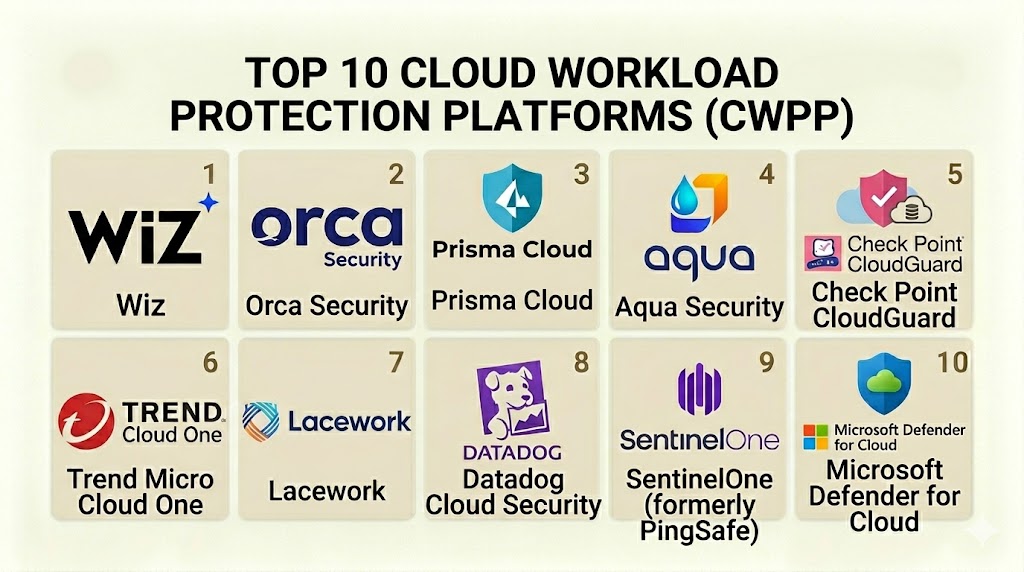
Introduction
Cloud Workload Protection Platforms (CWPP) are security solutions specifically designed to protect “workloads” in a cloud environment. A workload is any resource that performs a task, such as a virtual machine, a container, or a serverless function. Unlike traditional antivirus software that protects a physical laptop, CWPP is built to handle the unique nature of the cloud. It moves with the workload, ensuring that whether a server is running for one hour or one year, it remains secure from attacks. These platforms provide visibility across multiple clouds and help security teams find vulnerabilities, detect malware, and stop unauthorized changes in real-time.
In the modern digital landscape, companies no longer use a single physical server. They use thousands of tiny, temporary pieces of software spread across global data centers. Because these resources are created and deleted constantly, security must be automated. CWPP fills this gap by providing a consistent security layer that works across different providers. It ensures that sensitive data remains private and that the infrastructure running modern applications is shielded from hackers who target cloud-specific weaknesses.
Real-world use cases:
- Container Security: Protecting microservices running in Kubernetes clusters from runtime threats.
- Vulnerability Management: Scanning virtual machine images for known security holes before they are launched.
- Compliance Enforcement: Automatically ensuring that cloud resources meet strict data privacy laws.
- Serverless Protection: Monitoring the execution of code in functions-as-a-service environments where there is no server to manage.
- Incident Response: Providing a detailed log of what happened inside a cloud workload during a security breach.
What buyers should evaluate:
- Support for Multiple Environments: The ability to protect virtual machines, containers, and serverless functions in one place.
- Runtime Protection: How well the tool detects and blocks active attacks while a workload is running.
- Vulnerability Scanning: The accuracy and speed of finding security weaknesses in code and configurations.
- Agentless vs. Agent-based: Whether the tool requires installing software on every server or uses “snapshot” technology.
- Multi-Cloud Visibility: How effectively the platform gathers data from various cloud providers like AWS, Azure, and Google Cloud.
- Automation and APIs: The ease of integrating the platform into existing development pipelines.
- Performance Impact: Whether the security software slows down the applications it is supposed to protect.
- Threat Intelligence: The quality of the data used to identify new and emerging types of malware.
- Ease of Deployment: How much effort is required to get the platform running across a large organization.
- Cost Transparency: How the pricing scales as the number of cloud workloads grows.
Mandatory paragraph
- Best for: Large enterprise organizations, software-as-a-service (SaaS) providers, financial institutions, and companies running complex applications in the cloud.
- Not ideal for: Small businesses with only a single website; companies that do not use cloud infrastructure; or teams without a dedicated security staff to manage alerts.
Key Trends in Cloud Workload Protection Platforms
- The Rise of Agentless Scanning: Many platforms now use snapshot technology to scan cloud disks without needing to install software agents on every single virtual machine.
- AI-Driven Threat Detection: Machine learning is being used to analyze trillions of signals to find subtle signs of an attack that a human might miss.
- Consolidation of Tools: CWPP is merging with other cloud security tools to create “Cloud Native Application Protection Platforms” (CNAPP) for a single view of security.
- Focus on eBPF Technology: New methods are being used to monitor the “heart” of the operating system with almost zero impact on performance.
- Serverless Security Maturity: Protections are becoming more specialized for serverless code, where traditional security tools cannot be installed.
- Shift-Left Security: Scanning for vulnerabilities earlier in the software development process, before the code ever reaches the cloud.
- Identity-Centric Protection: Focusing on who (or what) has permission to access a workload, as identity is now the primary security boundary.
- Automated Remediation: Platforms are moving beyond just finding problems to automatically fixing them, such as closing an open port or stopping a suspicious process.
How We Selected These Tools (Methodology)
The selection of these top 10 tools was based on a comprehensive evaluation of the modern cloud security market.
- Technical Capability: We analyzed the depth of protection offered for various types of workloads, including containers and serverless.
- Market Leadership: We prioritized platforms used by global organizations with the most demanding security requirements.
- Performance Reliability: Evaluation of how these tools operate under high-stress conditions without breaking the applications they protect.
- Innovation: Preference was given to vendors that are leading the way in agentless scanning and AI-driven detection.
- Customer Feedback: Analysis of professional reviews regarding the balance between deep security features and ease of use.
- Ecosystem Integration: How well the tools connect with common cloud providers and developer software.
Top 10 Cloud Workload Protection Platforms (CWPP)
#1 — Palo Alto Networks Prisma Cloud
Prisma Cloud is widely considered the most complete cloud security platform on the market. It provides deep protection for every stage of the application lifecycle, from the moment code is written to when it is running in the cloud.
Key Features
- Full-Stack Protection: Supports virtual machines, containers, Kubernetes, and serverless functions in one interface.
- Runtime Defense: Uses machine learning to build a “baseline” of normal behavior and blocks anything unusual.
- Vulnerability Management: Continuously scans for known weaknesses across all cloud environments.
- Shift-Left Security: Integrates with developer tools to find security issues before code is deployed.
- Compliance Dashboards: Provides over 500 pre-built templates for major global regulations.
- Web Application and API Security (WAAS): Protects the “front door” of your applications as well as the workloads inside.
Pros
- Offers the widest range of features in a single platform.
- Extremely strong at protecting complex, high-scale enterprise environments.
Cons
- The platform can be complex to learn because it has so many features.
- High cost makes it a significant investment for smaller companies.
Platforms / Deployment
- AWS / Azure / GCP / OCI / Alibaba Cloud
- Cloud (SaaS)
Security & Compliance
- SOC 2 Type II, ISO 27001, and FedRAMP compliant.
- Advanced RBAC and data encryption for all stored data.
Integrations & Ecosystem
Prisma Cloud connects to almost every major developer and security tool.
- GitHub / GitLab
- Jenkins
- ServiceNow
- Splunk
Support & Community
Excellent professional support for enterprise customers. Palo Alto Networks provides a massive library of technical documentation and a strong user community.
#2 — Wiz
Wiz is famous for its “agentless” approach to cloud security. It allows companies to scan their entire cloud environment in minutes without having to install any software on their servers.
Key Features
- Wiz Graph: Visually maps out all cloud resources and shows how an attacker could move through the network.
- Agentless Scanning: Uses cloud snapshots to find vulnerabilities, malware, and misconfigurations.
- Prioritized Alerts: Only alerts you on the most dangerous “toxic combinations” of risks.
- Deep Visibility: Sees into every layer of the cloud stack, from the virtual machine down to the secret keys.
- Runtime Monitoring: Tracks active threats without the need for traditional agents.
- Inventory Management: Automatically finds every resource running in your cloud, even those you didn’t know about.
Pros
- Incredibly fast to set up; you can see results in minutes.
- The visual graph makes it very easy to understand complex security risks.
Cons
- Less “preventative” than agent-based tools that can block threats in real-time.
- SaaS-only model might not fit organizations with strict air-gapped requirements.
Platforms / Deployment
- AWS / Azure / GCP / OCI / Alibaba Cloud
- Cloud (SaaS)
Security & Compliance
- SOC 2 Type II and HIPAA compliant.
- Strong focus on data privacy with advanced encryption.
Integrations & Ecosystem
Wiz is built to be the “central nervous system” of cloud security.
- Slack
- Jira
- PagerDuty
- Azure DevOps
Support & Community
Known for excellent customer success and a very modern approach to technical support. The community is growing rapidly among cloud-native companies.
#3 — CrowdStrike Falcon Cloud Security
CrowdStrike is a leader in endpoint protection that has successfully moved into the cloud. Its platform is built for speed and focuses heavily on stopping active breaches using elite threat intelligence.
Key Features
- Unified Agent: Uses the same high-speed agent for cloud workloads that it uses for laptops.
- Indicator of Attack (IOA) Detection: Looks for the behavior of a hacker rather than just a signature of a file.
- Container Security: Specialized tools for protecting Docker and Kubernetes environments.
- Adversary Attribution: Tells you exactly which hacking group is attacking your cloud.
- Cloud Drift Detection: Alerts you if a workload has been changed from its original, secure state.
- Managed Threat Hunting: Offers a service where human experts watch your cloud for threats 24/7.
Pros
- Extremely lightweight agent that does not slow down servers.
- The best threat intelligence in the industry for understanding “who” is attacking you.
Cons
- Requires installing an agent for full protection, which can be a chore at high scale.
- Pricing can be complex based on the number of “compute units” used.
Platforms / Deployment
- Windows / Linux
- Cloud / Hybrid
Security & Compliance
- FIPS 140-2 and SOC 2 compliant.
- Strong audit logging for compliance purposes.
Integrations & Ecosystem
Falcon is designed to integrate deeply with the modern security operations center (SOC).
- Zscaler
- Okta
- Tufin
- ServiceNow
Support & Community
World-class support and a very large community of security professionals. CrowdStrike University offers deep training for all users.
#4 — Trend Micro Cloud One
Trend Micro has one of the longest histories in the security industry. Its Cloud One platform is a robust suite of services designed to protect workloads regardless of where they are running.
Key Features
- Workload Security: Provides virtual patching to protect old servers from new threats.
- Container Security: Scans container images for secrets, malware, and vulnerabilities.
- File Storage Security: Automatically scans files uploaded to cloud storage like Amazon S3.
- Network Security: Provides a cloud-native “shield” to block network-based attacks.
- Application Security: Protects code at the library level for serverless and web apps.
- Compliance Reporting: Automatically maps your cloud security state to various regulatory frameworks.
Pros
- The “virtual patching” feature is a lifesaver for companies running older applications.
- Very reliable and proven in the world’s largest data centers.
Cons
- The interface can feel a bit fragmented because it is a suite of different services.
- Modern cloud-native teams might find it less “snappy” than newer competitors.
Platforms / Deployment
- Windows / Linux / Unix
- Cloud / Self-hosted / Hybrid
Security & Compliance
- ISO 27001 and SOC 2 compliant.
- Long history of supporting government and financial security standards.
Integrations & Ecosystem
Cloud One is built to fit into the standard IT environment.
- AWS Marketplace
- Azure Marketplace
- Chef / Puppet / Ansible
- Splunk
Support & Community
Excellent global support with local teams in almost every country. Documentation is very thorough and easy to find.
#5 — Check Point CloudGuard
CloudGuard is the cloud security arm of Check Point Software. It focuses heavily on “intelligence” and prevention, using a unified platform to manage security across multiple clouds.
Key Features
- Unified Security Management: Manage your cloud security and your office firewalls in the same place.
- Contextual AI: Uses a “Risk Confidence” score to help you focus on the real threats.
- Posture Management: Automatically finds and fixes misconfigured cloud settings.
- Serverless Protection: Provides high-speed security for functions-as-a-service code.
- Intelligent Intrusion Detection: Blocks network-based attacks before they reach the workload.
- Threat Extraction: Removes dangerous content from files before they are opened by a user.
Pros
- Excellent for companies that already use Check Point for their office networks.
- Very strong at preventing attacks rather than just detecting them.
Cons
- The management console can be very complex for new users.
- Requires a high level of expertise to configure perfectly.
Platforms / Deployment
- AWS / Azure / GCP
- Cloud / Hybrid
Security & Compliance
- Common Criteria and FIPS compliant.
- Strong focus on meeting international security regulations.
Integrations & Ecosystem
CloudGuard is designed to be the central security point for the entire company.
- Microsoft Entra ID
- Terraform
- Slack
- PagerDuty
Support & Community
Very high-quality technical support. Check Point has a large global network of certified experts and trainers.
#6 — Microsoft Defender for Cloud
Microsoft’s native security platform for its own cloud (Azure), though it has recently expanded to protect resources on AWS and Google Cloud as well. It is a natural choice for companies heavily invested in the Microsoft ecosystem.
Key Features
- Native Integration: Built directly into the Azure portal for easy access.
- Multi-Cloud Support: Can scan and protect resources on AWS and GCP through a single dashboard.
- Regulatory Compliance: Automatically tracks your progress against standards like SOC and ISO.
- Vulnerability Assessment: Includes a built-in scanner to find weaknesses in your virtual machines.
- Just-In-Time (JIT) Access: Reduces the attack surface by only opening management ports when they are needed.
- Network Map: Provides an interactive map of your cloud network to find hidden risks.
Pros
- If you use Azure, there is nothing easier to turn on and start using.
- Provides excellent value by bundling many security tools into one subscription.
Cons
- Not as deep as specialized tools like Palo Alto for non-Microsoft environments.
- The interface is tied to the Azure portal, which can be confusing for AWS-first teams.
Platforms / Deployment
- Azure / AWS / GCP
- Cloud (SaaS)
Security & Compliance
- Compliant with almost every major global standard.
- Strongly integrated with Microsoft’s global security intelligence network.
Integrations & Ecosystem
Designed to work perfectly with the rest of the Microsoft security stack.
- Microsoft Sentinel
- Microsoft Defender for Endpoint
- GitHub
- Azure DevOps
Support & Community
Massive community and extensive documentation. Professional support is available through standard Microsoft enterprise agreements.
#7 — Sysdig Secure
Sysdig is a cloud-native security platform built on top of “Falco,” a popular open-source project. It is specifically designed for companies that are heavily invested in containers and Kubernetes.
Key Features
- eBPF Runtime Security: Uses the fastest technology available to monitor workload behavior without slowing it down.
- Kubernetes Visibility: Offers the deepest insights into how your container clusters are performing and behaving.
- Vulnerability Management: Scans images in the registry and while they are running.
- Compliance for Containers: Maps container activity to standards like PCI DSS and HIPAA.
- Post-Mortem Analysis: Captures a “recording” of a system during a breach for forensic study.
- Risk Prioritization: Focuses on the vulnerabilities that are actually “in use” to save you time.
Pros
- The absolute best choice for teams that are 100% focused on Kubernetes.
- The “recording” feature for breaches is unique and incredibly helpful.
Cons
- Less focused on traditional virtual machines compared to tools like Trend Micro.
- Requires a more technical team to use effectively.
Platforms / Deployment
- Linux / Containers
- Cloud / Self-hosted / Hybrid
Security & Compliance
- SOC 2 Type II compliant.
- Built on trusted open-source security standards.
Integrations & Ecosystem
Sysdig is built for the modern “DevSecOps” team.
- Prometheus
- Grafana
- GitHub / GitLab
- Slack
Support & Community
Strong community around the Falco project. Professional support is responsive and very knowledgeable about containers.
#8 — Aqua Security
Aqua Security is a pioneer in the “Cloud Native” space. It focuses on the entire lifecycle of an application, from the build stage to the final runtime environment.
Key Features
- Dynamic Threat Analysis: Runs container images in a “sandbox” to see what they do before they go into production.
- Micro-segmentation: Prevents workloads from talking to each other unless they are authorized.
- Supply Chain Security: Checks that the software you are using hasn’t been tampered with.
- Serverless Protection: Specialized security for AWS Lambda and other serverless platforms.
- Incident Response: Provides automated steps to stop a breach the moment it is detected.
- Cloud Posture Management: Finds misconfigurations across your entire cloud account.
Pros
- The “sandbox” testing feature is excellent for finding hidden malware.
- Very strong at managing security across a “multi-stage” development pipeline.
Cons
- Pricing can be high for large organizations with many separate workloads.
- The user interface can be complex for those who are not cloud experts.
Platforms / Deployment
- AWS / Azure / GCP / OCI / VMware
- Cloud / Self-hosted / Hybrid
Security & Compliance
- FIPS 140-2 and SOC 2 compliant.
- Trusted by many large government and banking institutions.
Integrations & Ecosystem
Aqua is designed to be an integral part of the software building process.
- Jenkins
- Bamboo
- CircleCI
- Splunk
Support & Community
Good technical support and an active community of cloud-native developers. Documentation is clear and updated frequently.
#9 — Fortinet Lacework
Lacework is a data-driven cloud security platform that focuses on “automation.” It is designed to handle the massive amounts of data generated by the cloud without needing a large team of people to watch it.
Key Features
- Polygraph Technology: Automatically builds a map of your cloud behavior and alerts you only when something changes.
- Agentless Workload Scanning: Scans for risks without needing to install any software agents.
- Host-Based Security: Provides deep monitoring for Linux and Windows virtual machines.
- Kubernetes Security: Specialized visibility for container clusters.
- In-Line Scanning: Finds secrets and vulnerabilities during the CI/CD build process.
- Attack Path Analysis: Shows you exactly how a hacker could reach your most sensitive data.
Pros
- Reduces “alert fatigue” by only showing you the most important security events.
- The automated behavioral mapping saves hours of manual configuration work.
Cons
- The “black box” nature of its AI can sometimes make it hard to understand why an alert was triggered.
- Not as deep in “prevention” as some traditional agent-based tools.
Platforms / Deployment
- AWS / Azure / GCP
- Cloud (SaaS)
Security & Compliance
- SOC 2 Type II and PCI DSS compliant.
- Strong focus on automated compliance reporting.
Integrations & Ecosystem
Lacework is built to work with modern automation and messaging tools.
- Terraform
- Slack
- Jira
- New Relic
Support & Community
Good support through the Fortinet network. The community is focused on high-scale cloud automation.
#10 — SentinelOne Singularity Cloud
SentinelOne is a high-speed security platform that focuses on “AI” and “Automation.” It is designed to detect and block threats in milliseconds without needing a human to click a button.
Key Features
- Autonomous Protection: The platform can stop an attack and “roll back” changes automatically.
- Runtime Security: High-speed protection for virtual machines and containers.
- Active Threat Hunting: Tools for security teams to search for hidden threats in their cloud data.
- Unified Agent: Use the same agent technology across your cloud and your office computers.
- Binary Analysis: Uses AI to understand what a file does, not just what its name is.
- One-Click Remediation: Allows an analyst to fix a breach with a single click.
Pros
- The “Rollback” feature is a unique way to recover from an attack quickly.
- Very fast detection times compared to traditional security tools.
Cons
- The advanced features require a high-end subscription.
- Requires an agent for the most powerful features.
Platforms / Deployment
- Windows / Linux / macOS
- Cloud / Self-hosted / Hybrid
Security & Compliance
- FedRAMP, SOC 2, and HIPAA compliant.
- High-level encryption for all data and communications.
Integrations & Ecosystem
Singularity is designed to be the core of a modern security stack.
- Mimecast
- Netskope
- Splunk
- ServiceNow
Support & Community
Excellent official support and a large global community. SentinelOne is highly rated for its customer service.
Comparison Table (Top 10)
| Tool Name | Best For | Platform(s) Supported | Deployment | Standout Feature | Public Rating |
| Palo Alto Prisma | Large Enterprise | Multi-Cloud | SaaS | Full-Stack Depth | 4.8/5 |
| Wiz | Quick Visibility | Multi-Cloud | SaaS | Wiz Graph Maps | 4.9/5 |
| CrowdStrike | Threat Hunting | Win, Linux | Hybrid | IOA Behavioral Tech | 4.8/5 |
| Trend Micro | Legacy & Hybrid | Win, Linux, Unix | Hybrid | Virtual Patching | 4.6/5 |
| Check Point | Network Security | Multi-Cloud | Hybrid | Risk Confidence AI | 4.5/5 |
| MS Defender | Microsoft Shops | Azure, AWS, GCP | SaaS | JIT Access Control | 4.7/5 |
| Sysdig | Kubernetes/Dev | Linux, Containers | Hybrid | eBPF Performance | 4.8/5 |
| Aqua Security | Supply Chain | Multi-Cloud | Hybrid | Sandbox Testing | 4.6/5 |
| Fortinet Lacework | Automation | Multi-Cloud | SaaS | Polygraph Mapping | 4.5/5 |
| SentinelOne | AI Protection | Win, Linux, Mac | Hybrid | Breach Rollback | 4.7/5 |
Evaluation & Scoring of Cloud Workload Protection Platforms
| Tool Name | Core (25%) | Ease (15%) | Int. (15%) | Sec. (10%) | Perf. (10%) | Supp. (10%) | Val. (15%) | Weighted Total |
| Palo Alto | 10 | 4 | 10 | 9 | 8 | 9 | 6 | 8.05 |
| Wiz | 8 | 10 | 9 | 8 | 10 | 9 | 7 | 8.45 |
| CrowdStrike | 9 | 7 | 8 | 9 | 10 | 9 | 7 | 8.25 |
| Trend Micro | 9 | 5 | 8 | 8 | 7 | 8 | 7 | 7.40 |
| Check Point | 9 | 5 | 8 | 9 | 8 | 8 | 6 | 7.35 |
| Microsoft | 8 | 8 | 9 | 9 | 8 | 8 | 9 | 8.35 |
| Sysdig | 9 | 6 | 8 | 8 | 10 | 8 | 7 | 7.85 |
| Aqua Security | 9 | 6 | 8 | 8 | 8 | 8 | 7 | 7.65 |
| Fortinet | 8 | 7 | 7 | 7 | 9 | 7 | 8 | 7.45 |
| SentinelOne | 9 | 7 | 9 | 8 | 9 | 8 | 7 | 8.05 |
How to interpret these scores:
- Weighted Total (0–10): Calculated based on the needs of a typical professional security team.
- Core (25%): How deep the protection goes for virtual machines, containers, and serverless.
- Ease (15%): How quickly a team can get results without needing a month of training.
- Performance (10%): The impact the software has on the speed of your cloud applications.
Which Cloud Workload Protection Platform Tool Is Right for You?
Solo / Freelancer
If you are a solo developer, you probably don’t need a heavy enterprise tool. Microsoft Defender for Cloud (if you use Azure) or the free tiers of tools like Wiz or Sysdig are perfect for getting started with basic security.
SMB
For a small to medium business, Wiz is often the best choice because it gives you a complete view of your risks in minutes without needing a dedicated security engineer to install agents on every server.
Mid-Market
Medium-sized companies should look at CrowdStrike or SentinelOne. These tools provide world-class protection with a high degree of automation, which helps a smaller team stay safe without being overwhelmed by alerts.
Enterprise
For giant global organizations, Palo Alto Networks Prisma Cloud is the clear leader. It offers the depth and breadth needed to protect thousands of workloads across multiple continents and cloud providers.
Budget vs Premium
- Budget: Microsoft Defender for Cloud often offers the best value for companies already using the Microsoft stack.
- Premium: Palo Alto and Wiz are premium products that command a higher price but offer the most advanced features in the industry.
Feature Depth vs Ease of Use
If you need absolute depth and every feature possible, choose Palo Alto. If you want a tool that your team will actually enjoy using every day, Wiz or Datadog are better choices.
Integrations & Scalability
If your company is 100% cloud-native and uses a lot of containers, Sysdig and Aqua Security are the best at integrating with your modern development pipeline.
Security & Compliance Needs
Organizations in highly regulated fields like banking or healthcare should prioritize Trend Micro or Palo Alto, as these vendors have the longest history of meeting strict international security audits.
Frequently Asked Questions (FAQs)
1. What is the difference between CWPP and CSPM?
CSPM (Cloud Security Posture Management) finds misconfigured settings in your cloud account. CWPP (Cloud Workload Protection Platform) protects the actual servers and applications running inside that account.
2. Do I really need an agent for cloud security?
Not always. Modern “agentless” tools like Wiz can find most risks without an agent. However, for real-time blocking of attacks, a lightweight agent (like CrowdStrike or Sysdig) is still the most powerful option.
3. How much does a CWPP tool cost?
Pricing varies wildly. Most platforms charge based on the number of “workloads” or “compute units” you protect. Small teams might pay a few thousand dollars, while large firms can pay millions.
4. Can CWPP protect serverless functions like AWS Lambda?
Yes, many top-tier tools like Aqua and Prisma Cloud have specialized features that scan serverless code and monitor it for suspicious behavior while it runs.
5. Will these tools slow down my application?
Older security tools could be slow, but modern CWPP platforms use technology like eBPF or agentless scanning to ensure that the impact on performance is almost zero.
6. What is “Shift-Left” security?
It means checking for security problems as early as possible in the software building process (on the “left” side of the timeline) before the software is ever launched in the cloud.
7. Is cloud security better than on-premises security?
It can be. Cloud security tools are often more automated and provide better visibility than traditional tools. However, they also require a different set of skills to manage correctly.
8. What is a “Container” in cloud security?
A container is a lightweight way to package an application and its dependencies. Because they are temporary and share the same “heart” of the operating system, they require specialized security tools like Sysdig.
9. Can these tools help me pass a PCI or HIPAA audit?
Yes, most CWPP platforms have built-in reports that show auditors exactly how you are protecting sensitive data and meeting security requirements.
10. Do I need a SOC to manage these tools?
For a large company, yes. These platforms generate a lot of data that needs to be watched by security professionals. Smaller companies often use “managed” versions where the vendor watches the alerts for them.
Conclusion
A Cloud Workload Protection Platform is no longer optional for any business running in the cloud. It is the only way to ensure that your virtual machines, containers, and serverless functions are shielded from modern threats. Whether you choose the massive power of Palo Alto Prisma Cloud, the rapid visibility of Wiz, or the specialized container depth of Sysdig, the goal is to make security a natural part of your cloud journey.We recommend starting with a clear audit of your current cloud resources. Then, choose two or three tools from this list to run a pilot program. The best tool is the one that gives your security team the data they need without slowing down your developers.

Great perspective on this topic.
A practical gap in CWPP planning is sensor and coverage drift. As workloads move across Kubernetes clusters, serverless functions, and new cloud accounts, protection can silently become incomplete. Regular coverage checks and ownership mapping are just as important as tool selection.