MOTOSHARE 🚗🏍️
Rent Bikes & Cars Directly from Owners
Motoshare connects vehicle owners with people who need bikes and cars on rent. Owners earn from idle vehicles, and renters get flexible ride options.
Visit Motoshare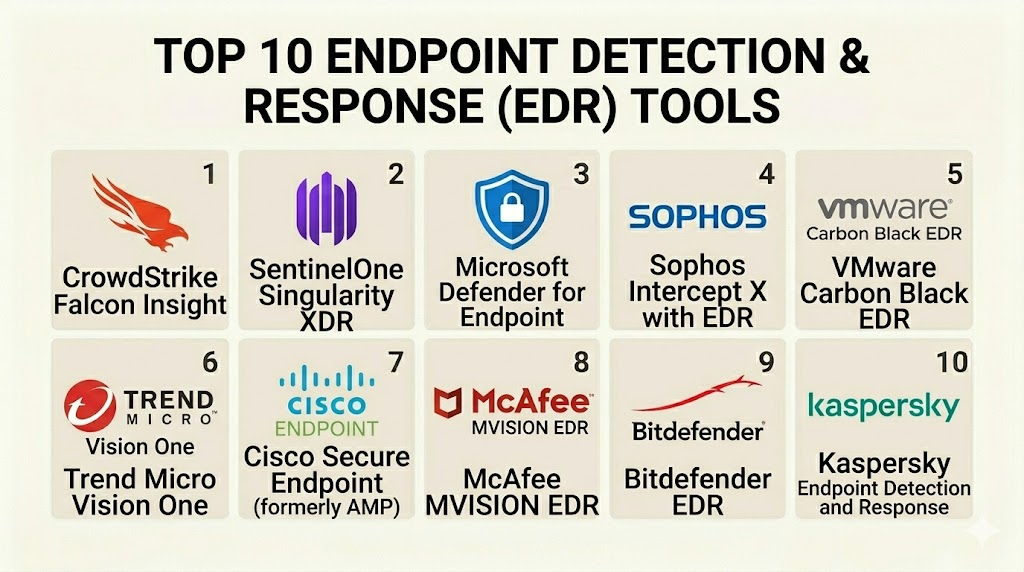
Introduction
Endpoint Detection and Response (EDR) is a cybersecurity solution that constantly monitors end-user devices. These devices, known as endpoints, include laptops, desktops, mobile phones, and servers. The software is designed to find, investigate, and stop malicious activity. Unlike traditional antivirus which looks for known signatures, EDR focuses on behavior. It records everything happening on a device and uses that data to identify suspicious patterns. If a threat is found, the tool can isolate the device or delete the harmful file automatically.
This technology is a critical part of modern security. Hackers have become very skilled at bypassing basic defenses. They often use “fileless” attacks that do not leave a trace on a hard drive. EDR provides the visibility needed to catch these hidden movements. It acts like a flight data recorder for your computer. If a breach happens, security teams can look back at the logs to see exactly how the attacker got in and what they touched.
Real-world use cases:
- Ransomware Prevention: Detecting the moment a process starts encrypting files and killing it instantly.
- Threat Hunting: Searching across thousands of laptops for a specific suspicious file or registry key.
- Incident Response: Remotely wiping a laptop that has been infected while the employee is working from home.
- Root Cause Analysis: Visualizing the entire path of an attack to see if it started from a phishing email or a bad USB drive.
- Behavioral Monitoring: Blocking an application that suddenly tries to steal passwords from a web browser.
What buyers should evaluate:
- Agent Performance: How much memory and CPU the software uses on the user’s computer.
- Detection Accuracy: The ability to find real threats without creating too many false alarms.
- Automated Response: Whether the tool can kill processes or isolate a network automatically.
- Forensic Depth: The amount of historical data stored for investigating old attacks.
- Offline Protection: If the software still works when the device is not connected to the internet.
- Ease of Deployment: How quickly the agent can be installed across a global workforce.
- Cloud Integration: How well it shares data with other security tools like SIEM or SOAR.
- User Interface: The clarity of the dashboard for security analysts during a crisis.
- Support for OS: Whether it protects Windows, macOS, Linux, and mobile devices equally.
- Managed Options: The availability of a team to monitor the alerts for you.
Mandatory paragraph
- Best for: Enterprise IT teams, government agencies, and businesses that handle sensitive data or must follow strict privacy laws.
- Not ideal for: Very small businesses with only a few computers or users who do not have a dedicated person to look at security alerts.
Key Trends in Endpoint Detection & Response (EDR)
- Artificial Intelligence Analysis: Modern tools use machine learning to identify new types of malware that have never been seen before.
- Extended Detection (XDR) Shift: EDR is being merged with network and cloud security to provide a single view of the entire company.
- Automated Remediation: Software can now “roll back” a computer to its state before a ransomware attack started.
- Mobile Endpoint Focus: There is a major push to include tablets and smartphones in the same monitoring dashboard as laptops.
- Identity Integration: Tools are now looking at who is logged in to see if a user’s behavior matches their typical job role.
- Managed Services Growth: Many companies are hiring external experts to monitor their EDR alerts around the clock.
- Lower Memory Footprint: New agents are being built to be “invisible” so they do not slow down the user’s work.
- Privacy-First Logging: Data is being collected in ways that protect the personal privacy of the employee while still catching hackers.
How We Selected These Tools (Methodology)
The selection of these top 10 tools was performed using a structured methodology to ensure professional accuracy.
- Market Share: We prioritized tools that are widely used by the world’s largest companies and government bodies.
- Third-Party Testing: Results from independent security labs were reviewed to verify detection rates.
- Feature Maturity: Only tools with a complete set of detection and response capabilities were considered.
- Integration Density: We looked for software that connects easily to other parts of the IT stack.
- Stability: Preference was given to agents known for not causing “blue screens” or system crashes.
- Ease of Management: We evaluated how simple it is for a small team to manage a large number of endpoints.
Top 10 Endpoint Detection & Response (EDR) Tools
#1 — CrowdStrike Falcon
Short description: A cloud-native platform that is widely considered the leader in the EDR space. It is designed to stop breaches using a single, lightweight agent.
Key Features
- Threat Graph: A powerful engine that analyzes trillions of events to find hidden attacks.
- OverWatch: A human-led threat hunting service that works alongside the software.
- Next-Gen Antivirus: Replaces traditional antivirus with behavioral detection.
- Cloud Workload Protection: Extends EDR features to cloud environments and containers.
- Zero Trust Assessment: Checks the security health of a device before allowing access to apps.
- Managed Hunting: Constant monitoring by experts to find the most advanced hackers.
Pros
- The agent is extremely light and does not slow down the computer.
- The cloud-based console is very fast and easy to navigate.
Cons
- The pricing can be very high for smaller companies.
- Some advanced features are only available in the more expensive tiers.
Platforms / Deployment
- Windows / macOS / Linux / iOS / Android
- Cloud / SaaS
Security & Compliance
- SSO, MFA, and RBAC are standard for the management console.
- Compliant with major global standards like HIPAA and PCI DSS.
Integrations & Ecosystem
CrowdStrike features a massive store for third-party integrations. It is built to be the center of a security operations center.
- ServiceNow
- Zscaler
- Splunk
- Amazon Web Services
Support & Community
Excellent professional support is available. The community of users is one of the largest and most active in the cybersecurity world.
#2 — SentinelOne Singularity
Short description: An AI-powered platform that focuses on automation. It is known for its “One-Click Rollback” feature that can undo the damage of a ransomware attack.
Key Features
- Static and Behavioral AI: Uses two types of AI to find threats both before and after they run.
- Ransomware Rollback: Can restore deleted or encrypted files using a local snapshot.
- Deep Visibility: Provides a detailed map of how an attack moved through the network.
- Star Feature: Allows for custom automated rules to be created for specific threats.
- IoT Discovery: Finds unprotected devices like printers or smart TVs on the network.
- Full API Access: Every feature of the platform can be controlled through code.
Pros
- The rollback feature provides a massive safety net for IT teams.
- The platform is very easy to automate for small teams.
Cons
- The agent can sometimes use more disk space than competitors due to the rollback snapshots.
- The interface can be complex for those who are new to security.
Platforms / Deployment
- Windows / macOS / Linux / iOS / Android
- Cloud / On-premises / Hybrid
Security & Compliance
- Advanced encryption and secure boot protection for the agent.
- FedRAMP and SOC 2 Type II compliant.
Integrations & Ecosystem
SentinelOne is designed to be an open platform that talks to many other vendors.
- Mimecast
- Netskope
- Okta
- Fortinet
Support & Community
Good official documentation. Support is available through a web portal and dedicated technical account managers.
#3 — Microsoft Defender for Endpoint
Short description: A powerful security tool that is built directly into the Windows operating system. it is a top choice for companies that already use the Microsoft ecosystem.
Key Features
- OS Integration: Deep visibility into Windows that other tools cannot match.
- Attack Surface Reduction: Tools to lock down the computer before an attack can start.
- Auto-healing: Automatically cleans up most common infections without human help.
- Threat and Vulnerability Management: Finds outdated software on your computers.
- Conditional Access: Blocks risky devices from opening company emails.
- Microsoft Threat Experts: A managed service that provides extra help during major attacks.
Pros
- No need to install a new agent on Windows devices; it is already there.
- Included in many Microsoft enterprise licenses, which saves money.
Cons
- Management on macOS and Linux is not as deep as it is on Windows.
- The web console can be slow and difficult to search.
Platforms / Deployment
- Windows / macOS / Linux / iOS / Android
- Cloud / SaaS
Security & Compliance
- Uses the high-level security of the Microsoft Azure cloud.
- Meets almost every global compliance requirement.
Integrations & Ecosystem
Works perfectly with every other Microsoft security and productivity tool.
- Microsoft Sentinel
- Azure Active Directory
- Office 365
- Intune
Support & Community
Massive community of IT professionals. Official support is tied to your Microsoft enterprise agreement.
#4 — VMware Carbon Black EDR
Short description: A highly technical tool used by incident responders and threat hunters. It focuses on recording every single event for future analysis.
Key Features
- Continuous Recording: Captures every process start, file change, and network connection.
- Custom Watchlists: Allows analysts to build their own “alarms” for specific behaviors.
- Live Response: Gives IT teams a remote command-line interface to the infected computer.
- Threat Intelligence Feeds: Automatically checks your data against known bad IPs and files.
- Attack Chain Visualization: Shows a tree-style view of how a virus spread.
- API-First Design: Built for developers who want to build their own security tools.
Pros
- The level of forensic detail is among the best in the industry.
- The Live Response feature is incredibly powerful for remote troubleshooting.
Cons
- Can generate a very large amount of data, which requires a skilled person to manage.
- The interface is built for experts and can be difficult for beginners.
Platforms / Deployment
- Windows / macOS / Linux
- Cloud / On-premises
Security & Compliance
- RBAC and audit logging for all admin actions.
- Not publicly stated.
Integrations & Ecosystem
Carbon Black has a long history and integrates with most legacy security tools.
- IBM QRadar
- Splunk
- Palo Alto Networks
- LogRhythm
Support & Community
Very strong support for enterprise customers. The community is focused on high-end threat hunting.
#5 — Trend Vision One (EDR)
Short description: A broad security platform that links endpoint data with email and network signals. It is designed to provide a “single pane of glass” for security.
Key Features
- XDR Sensor: Collects data from endpoints, servers, and email accounts.
- Virtual Patching: Protects old computers from hackers even if they haven’t been updated.
- Root Cause Analysis: Automatically builds a map of the attack timeline.
- Risk Insights: Shows which users are the most likely to be targeted by hackers.
- Sandbox Analysis: Runs suspicious files in a safe environment to see what they do.
- Mobile Security: Strong protection for corporate-owned mobile devices.
Pros
- Excellent at protecting older versions of Windows and Linux.
- The email integration helps catch phishing before it leads to an infection.
Cons
- The dashboard can feel cluttered because it does so many things.
- Some parts of the software feel like separate tools that were joined together.
Platforms / Deployment
- Windows / macOS / Linux / iOS / Android
- Cloud / Hybrid
Security & Compliance
- SOC 2 Type II and ISO 27001 compliant.
- Advanced encryption for all collected logs.
Integrations & Ecosystem
Works well with other Trend Micro products and major cloud providers.
- Check Point
- Microsoft Azure
- Google Cloud
- AWS
Support & Community
Professional support is available 24/7. The community is global and very experienced.
#6 — Sophos Intercept X with EDR
Short description: A user-friendly security tool that combines powerful protection with simple management. It is a favorite for mid-sized companies.
Key Features
- Deep Learning AI: An advanced neural network that finds malware without using signatures.
- Anti-Exploit: Blocks the techniques that hackers use to take over software.
- CryptoGuard: Specifically designed to stop ransomware from encrypting your files.
- Guided Investigations: Shows the IT team exactly what steps to take during a breach.
- Synchronized Security: Laptops can talk to Sophos firewalls to block network access during an attack.
- Clean and Safe: Automatically removes the “leftovers” of a virus after it is killed.
Pros
- The “Guided Investigations” are perfect for teams that are not security experts.
- The anti-ransomware features are very reliable and fast.
Cons
- The agent can sometimes be heavier than CrowdStrike or Microsoft Defender.
- The central management console can be slow when managing thousands of devices.
Platforms / Deployment
- Windows / macOS / Linux / iOS / Android
- Cloud / SaaS
Security & Compliance
- Strong multi-factor authentication for the admin portal.
- Not publicly stated.
Integrations & Ecosystem
Focuses on the “Sophos Central” ecosystem where all their products work together.
- Sophos Firewall
- Sophos Email
- Splunk
- Autotask
Support & Community
Excellent online help and community forums. Support is responsive and helpful.
#7 — Broadcom Symantec Endpoint Security
Short description: A veteran in the security space that provides a massive set of features for large enterprises. It is built for complex, high-security environments.
Key Features
- Intelligent EDR: Uses AI to reduce the number of false alarms in large networks.
- Network Integrity: Checks the security of the Wi-Fi connection the laptop is using.
- Active Directory Defense: Blocks hackers from stealing credentials from your servers.
- Application Control: Allows you to decide exactly which apps are allowed to run.
- Behavioral Isolation: Limits what a suspicious app can do without stopping it completely.
- Targeted Attack Analytics: Finds attacks that are specifically aimed at your industry.
Pros
- Includes many extra features like firewall and web filtering in one agent.
- Very strong protection for large, global corporate networks.
Cons
- Can be very difficult to configure and requires specialized training.
- Support has been criticized since the Broadcom acquisition.
Platforms / Deployment
- Windows / macOS / Linux / iOS / Android
- Cloud / On-premises / Hybrid
Security & Compliance
- Compliant with high-level government security standards.
- Advanced encryption and secure communication.
Integrations & Ecosystem
Integrates deeply with other Broadcom and Symantec enterprise products.
- Symantec Web Gateway
- Symantec DLP
- Broadcom DX
- Splunk
Support & Community
Enterprise support is available, but the community is less active than in previous decades.
#8 — Palo Alto Networks Cortex XDR
Short description: An advanced platform that combines endpoint data with network and cloud logs. It is designed for high-end security operations centers.
Key Features
- Unified Data Lake: Stores all security data in one place for easy searching.
- Behavioral Analytics: Learns what is “normal” for your network to find anomalies.
- Device Control: Manages USB drives and other peripherals on the laptop.
- Host Firewall: Includes a powerful firewall managed from the cloud.
- Automated Stitching: Automatically links a network alert to a specific endpoint.
- Forensic Snapshots: Takes a “picture” of the system memory during an attack for study.
Pros
- The integration between the network and the endpoint is the best in the industry.
- The search speed for investigating old attacks is incredibly fast.
Cons
- Works best if you also use Palo Alto firewalls, which can be expensive.
- The learning curve for the management console is very steep.
Platforms / Deployment
- Windows / macOS / Linux / Android
- Cloud / SaaS
Security & Compliance
- SOC 2 and ISO 27001 compliant.
- High-level encryption for all stored telemetry data.
Integrations & Ecosystem
Acts as a central hub for the Palo Alto security world.
- Cortex XSOAR
- Palo Alto Next-Gen Firewalls
- Prisma Cloud
- Slack
Support & Community
Excellent professional support. The community is technical and very active in the enterprise space.
#9 — Trellix EDR
Short description: A tool formed from the merger of McAfee and FireEye. It focuses on giving analysts a high-level view of how threats are moving through their company.
Key Features
- Threat Intelligence: Uses the combined data from two of the biggest names in security.
- Guided Investigations: Helps junior analysts understand what a specific alert means.
- Low Impact Agent: Designed to not disturb the user while recording data.
- Cloud-Based Console: A single place to manage all security settings.
- Automation Engine: Can trigger custom scripts when a threat is found.
- Historical Search: Allows you to look back at months of data to find hidden breaches.
Pros
- The “Guided Investigations” make it easy to train new security staff.
- Combines the best features of two legendary security companies.
Cons
- Some parts of the software still feel like they are being merged together.
- The setup process can be more complex than cloud-native tools.
Platforms / Deployment
- Windows / macOS / Linux
- Cloud / Hybrid
Security & Compliance
- Standard enterprise security and encryption.
- Compliant with most global privacy laws.
Integrations & Ecosystem
Integrates well with a large variety of IT management and security tools.
- ServiceNow
- IBM QRadar
- Microsoft Active Directory
- Splunk
Support & Community
Professional support is available globally. The community is large and very experienced.
#10 — Cybereason EDR
Short description: A platform built by former military intelligence experts. It focuses on finding the “story” behind an attack rather than just individual alerts.
Key Features
- Malop Detection: Groups many small alerts into one single “Malicious Operation.”
- Visual Attack Tree: Shows the entire lifecycle of an attack in a clear diagram.
- Cross-Machine Correlation: Sees an attack moving from one computer to another in real-time.
- Memory Analysis: Finds hidden threats that only exist in the computer’s RAM.
- Behavioral Whitelisting: Learns your specific apps to reduce false alarms.
- Remote Shell: Allows security teams to fix a computer from anywhere in the world.
Pros
- The “Malop” view makes it much easier to see the big picture during a breach.
- Extremely fast at correlating data across thousands of machines.
Cons
- The agent can sometimes be more visible to the user than competitors.
- The documentation can be less detailed than what Microsoft or CrowdStrike provides.
Platforms / Deployment
- Windows / macOS / Linux / Android / iOS
- Cloud / On-premises / Hybrid
Security & Compliance
- SOC 2 Type II compliant.
- High-level protection for all data stored in the cloud.
Integrations & Ecosystem
Designed to be an open platform that works with many security vendors.
- Okta
- Check Point
- Symantec
- Fortinet
Support & Community
Active user community and responsive professional support tiers.
Comparison Table (Top 10)
| Tool Name | Best For | Platform(s) Supported | Deployment | Standout Feature | Public Rating |
| CrowdStrike Falcon | Enterprise | Win, Mac, Linux, Mob | Cloud | Threat Graph | 4.8/5 |
| SentinelOne Singularity | Automation | Win, Mac, Linux, Mob | Hybrid | Ransomware Rollback | 4.7/5 |
| Microsoft Defender | Windows Shops | Win, Mac, Linux, Mob | Cloud | OS Native Sync | 4.6/5 |
| VMware Carbon Black | Forensics | Win, Mac, Linux | Hybrid | Live Response | 4.5/5 |
| Trend Vision One | Hybrid Teams | Win, Mac, Linux, Mob | Hybrid | Virtual Patching | 4.4/5 |
| Sophos Intercept X | Mid-Market | Win, Mac, Linux, Mob | Cloud | CryptoGuard | 4.6/5 |
| Broadcom Symantec | Large Global Corp | Win, Mac, Linux, Mob | Hybrid | AD Defense | 4.1/5 |
| Palo Alto Cortex XDR | High-end SOC | Win, Mac, Linux, Mob | Cloud | Network Stitching | 4.7/5 |
| Trellix EDR | Mixed IT | Win, Mac, Linux | Hybrid | Guided Investigation | 4.3/5 |
| Cybereason EDR | Fast Visualization | Win, Mac, Linux, Mob | Hybrid | Malop Tracking | 4.6/5 |
Evaluation & Scoring of Endpoint Detection & Response (EDR)
| Tool Name | Core (25%) | Ease (15%) | Int. (15%) | Sec. (10%) | Perf. (10%) | Supp. (10%) | Value (15%) | Weighted Total |
| CrowdStrike | 10 | 8 | 10 | 9 | 10 | 9 | 6 | 8.70 |
| SentinelOne | 9 | 9 | 8 | 9 | 8 | 8 | 8 | 8.45 |
| Microsoft | 8 | 9 | 10 | 9 | 9 | 8 | 10 | 8.85 |
| Carbon Black | 10 | 4 | 8 | 8 | 7 | 8 | 6 | 7.55 |
| Trend Micro | 8 | 7 | 8 | 8 | 8 | 8 | 7 | 7.65 |
| Sophos | 7 | 10 | 7 | 8 | 8 | 9 | 8 | 7.90 |
| Symantec | 9 | 4 | 8 | 9 | 7 | 6 | 6 | 7.05 |
| Palo Alto | 9 | 5 | 10 | 10 | 9 | 8 | 7 | 8.15 |
| Trellix | 8 | 7 | 8 | 8 | 8 | 7 | 7 | 7.55 |
| Cybereason | 9 | 8 | 8 | 8 | 8 | 7 | 8 | 8.15 |
How to interpret these scores:
- Weighted Total (0–10): A higher score indicates a more balanced tool that provides high protection without too much complexity.
- 0–5: The tool is lacking modern features or is very difficult to manage.
- 6–8: Strong professional tools that are excellent for specific needs (like forensics).
- 9–10: These tools are market leaders and provide the best overall experience for large-scale security teams.
Which Endpoint Detection & Response (EDR) Tool Is Right for You?
Solo / Freelancer
If you are an individual professional, you likely do not need a full EDR platform. However, if you manage a small network for clients, Sophos Intercept X is the best choice because it is easy to understand and provides excellent ransomware protection for a reasonable price.
SMB
For a small business, Microsoft Defender for Endpoint is often the best choice. If you already use Microsoft 365, much of the work is already done. If you prefer a non-Microsoft option, Sophos or SentinelOne provide great automation that saves time for a small IT team.
Mid-Market
Medium-sized companies should look for a balance between power and ease of use. CrowdStrike Falcon is an excellent choice because the agent is very light and the cloud console is easy to manage. Trend Vision One is also good if you need to protect a mix of new and old computers.
Enterprise
For giant global corporations, CrowdStrike, Palo Alto Cortex XDR, and Microsoft Defender are the winners. These tools have the scale to manage hundreds of thousands of computers across many different countries and languages.
Budget vs Premium
- Budget: Microsoft Defender is the best value if it is already included in your license. SentinelOne often offers competitive pricing for its core features.
- Premium: CrowdStrike and Palo Alto are premium services that cost more but provide the fastest detection and best integration.
Feature Depth vs Ease of Use
If you need deep forensics and want to see every tiny detail, choose Carbon Black. If you want a tool that tells you exactly what to do and is easy to use, choose Sophos or SentinelOne.
Integrations & Scalability
If your company is 100% on Windows, Microsoft Defender is perfectly integrated. If you have a complex mix of cloud, network, and endpoint tools, CrowdStrike and Palo Alto offer the best ways to tie everything together.
Security & Compliance Needs
For organizations in banking or healthcare, CrowdStrike and Microsoft Defender have the most robust compliance certifications. These vendors invest heavily in making sure their platforms meet the highest government security standards.
Frequently Asked Questions (FAQs)
1. What is the difference between EDR and Antivirus?
Antivirus looks for known files that are bad. EDR looks at the behavior of the computer to find new, unknown threats. Antivirus is a lock on the door; EDR is a motion-sensing camera in the room.
2. Does EDR slow down my computer?
Modern EDR agents are built to be very lightweight. Most users will never even know the software is running. However, some older tools can use more memory during a full scan.
3. Do I need a team to watch the EDR console?
Yes, EDR generates alerts that need to be reviewed by a person. If you do not have a security team, you should choose a “Managed” version where the vendor’s experts watch the alerts for you.
4. Can EDR stop ransomware?
Yes, this is one of the main goals of EDR. It can detect the behavior of a file trying to encrypt your data and kill that process instantly to save your files.
5. What is the “Response” part of EDR?
The response can include isolating a laptop from the internet, killing a bad process, deleting a malicious file, or even rolling back the computer to an earlier time.
6. Does EDR work if the laptop is offline?
Most modern EDR tools have basic protection built into the agent that works offline. However, the advanced AI analysis and remote response features require an internet connection.
7. How long does it take to install EDR?
In a modern cloud environment, you can push the EDR agent to thousands of computers in a few minutes using an automated tool like Microsoft Intune or Jamf.
8. What is a “False Positive” in EDR?
A false positive is when the software thinks a safe business app is a virus. High-quality EDR tools use AI to learn your specific apps and reduce these annoying alarms.
9. Can EDR protect my mobile phone?
Many top-tier vendors like CrowdStrike, SentinelOne, and Microsoft now offer EDR agents for both iOS and Android devices.
10. Why is EDR so much more expensive than Antivirus?
EDR costs more because it stores a massive amount of data and uses advanced AI to analyze that data. It provides a much higher level of protection against modern hackers.
Conclusion
Endpoint Detection and Response is no longer a luxury; it is a necessity for any modern business. The ability to see and stop a hacker before they can steal your data is the only way to stay safe today. Whether you choose the powerful cloud-native approach of CrowdStrike, the automation of SentinelOne, or the deep integration of Microsoft Defender, the most important thing is to have a plan.We recommend starting with a security audit of your most important devices. Download a trial version of two or three tools on this list and see which one fits your team’s skills the best. Cyber threats are always changing, and having the right EDR tool is your best defense against the unknown.

I appreciate how well you explained everything step by step. Nicely written!
A practical gap to add is EDR operational hygiene after deployment. Teams should continuously monitor agent health, policy drift, exclusion sprawl, and offline endpoints, because even a strong EDR stack loses value when coverage gaps quietly grow across laptops, servers, and cloud workloads.