MOTOSHARE 🚗🏍️
Rent Bikes & Cars Directly from Owners
Motoshare connects vehicle owners with people who need bikes and cars on rent. Owners earn from idle vehicles, and renters get flexible ride options.
Visit Motoshare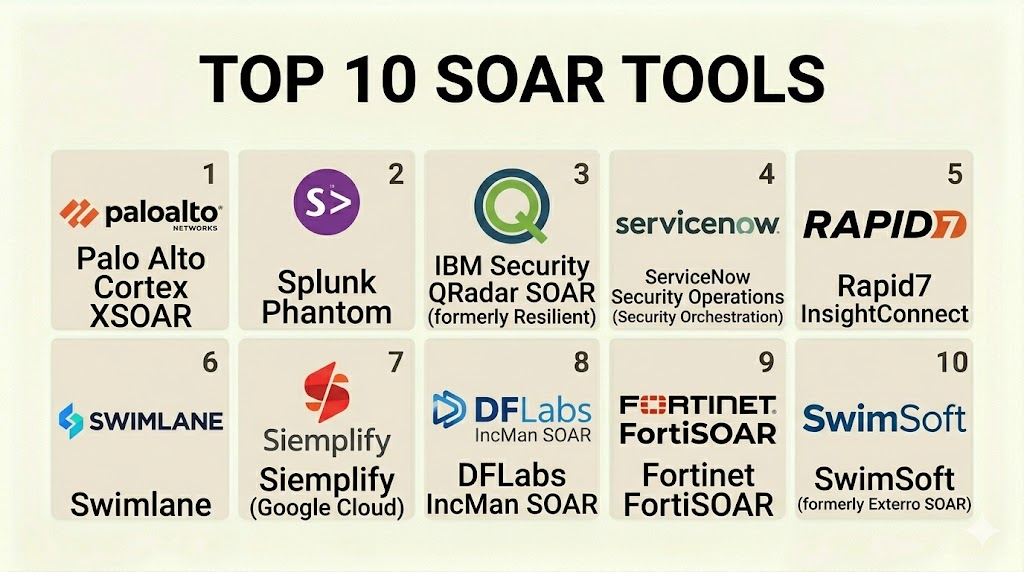
Introduction
Security Orchestration, Automation, and Response (SOAR) is a stack of compatible software programs that allow an organization to collect data about security threats. These tools help security teams respond to low-level security events without human assistance. The goal of a SOAR platform is to take the many different security tools in a company’s network and make them work together in a single, coordinated system. This is known as “orchestration.” Once the tools are connected, the platform uses “playbooks” to automate repetitive tasks. This is known as “automation.” Finally, it provides a place for teams to manage and resolve incidents, which is the “response.”
In the current digital landscape, security teams are overwhelmed by thousands of alerts every day. Many of these alerts are false alarms or minor issues that take up valuable time. SOAR platforms act as a force multiplier. They allow a small team of analysts to handle a massive volume of data by letting the software do the “busy work.” By automating the initial stages of an investigation, these tools help reduce the time a hacker can stay inside a network. This efficiency is critical for modern businesses that face constant and sophisticated cyber attacks.
Real-world use cases:
- Phishing Investigation: Automatically checking suspicious emails and file attachments against threat databases and blocking the sender if a threat is found.
- Vulnerability Management: Scanning systems for weaknesses and automatically opening a ticket for the IT team to apply a patch.
- Case Management: Providing a central location where all data related to a security breach is stored and tracked.
- Threat Hunting: Using automated scripts to search through logs for signs of a specific type of attack.
- Incident Triage: Automatically ranking alerts by their danger level so that human analysts focus on the most important ones first.
What buyers should evaluate:
- Ease of Playbook Creation: Whether the tool uses a visual “drag-and-drop” editor or requires complex coding skills.
- Integration Count: The number of third-party security tools the platform can connect to natively.
- Community and Marketplace: The availability of pre-built playbooks and integrations shared by other users.
- Case Management Depth: How well the tool helps teams track, document, and report on security incidents.
- Scalability: The ability to handle a high volume of automated actions without slowing down.
- Reporting and Dashboards: The quality of the data visualization for showing the value of automation to management.
- Deployment Flexibility: Whether the tool can be hosted on-premises, in the cloud, or as a hybrid model.
- Multi-tenancy: The ability to manage different departments or clients separately within the same platform.
- Security of the Platform: The internal controls like encryption and multi-factor authentication for the SOAR tool itself.
- Vendor Support: The availability of technical assistance and training for the security team.
Best for: Large enterprise security teams, Managed Security Service Providers (MSSPs), and organizations with a mature security operations center (SOC).
Not ideal for: Small businesses with very few security tools; teams that do not have existing security logs to automate; companies looking for a “set it and forget it” tool without a dedicated security staff.
Key Trends in Security Orchestration Automation & Response (SOAR)
- Low-Code and No-Code Adoption: Modern platforms are moving away from Python-heavy requirements toward visual editors that allow anyone to build an automation.
- AI-Enhanced Playbooks: Artificial intelligence is being used to suggest the next step in an investigation based on how similar threats were handled in the past.
- Convergence with SIEM and XDR: The lines are blurring between detection tools (SIEM) and response tools (SOAR), with many vendors combining them into a single platform.
- Cloud-Native Hyper-automation: A shift toward serverless architectures that allow automation to scale instantly during a major security crisis.
- Collaboration and War Rooms: New features allow security teams to chat and collaborate in real-time inside the incident ticket.
- Threat Intelligence Integration: SOAR tools are becoming the primary place where threat intelligence is consumed and acted upon.
- Regulatory Automation: Using playbooks to automatically notify legal teams or government bodies when a data breach involves sensitive personal information.
- Mobile Response: The ability for security managers to approve an automated action, like blocking a user, directly from a smartphone app.
How We Selected These Tools (Methodology)
The selection of these top 10 tools followed a structured evaluation process focused on professional security standards:
- Market Presence: We prioritized tools that are widely recognized as leaders by independent research firms and security professionals.
- Automation Depth: We evaluated how much of the security lifecycle each tool can actually automate without human intervention.
- Connectivity: A high priority was placed on tools with a large library of pre-built integrations for common security hardware and software.
- Reliability: We analyzed data regarding the stability of these platforms during high-pressure production environments.
- Innovator Status: We favored platforms that are leading the move toward AI-driven and low-code security operations.
- User Feedback: Analysis of professional reviews regarding the balance between power and the time required to manage the tool.
Top 10 SOAR Tools
#1 — Palo Alto Networks Cortex XSOAR
Short description: A premier SOAR platform that combines orchestration, case management, and real-time collaboration. It is designed for high-maturity security operations centers.
Key Features
- Visual Playbook Editor: A powerful drag-and-drop interface for building complex automation workflows.
- The War Room: A real-time collaboration space where analysts can chat and run commands simultaneously.
- Marketplace: One of the industry’s largest libraries of pre-built integrations and playbooks.
- Threat Intel Management: Deeply integrates threat intelligence to provide context for every alert.
- Dashboards and Reports: Highly customizable views to track team performance and automation ROI.
- Machine Learning: Suggests owners for incidents and identifies duplicate alerts to save time.
Pros
- Extremely robust marketplace makes it easy to find existing solutions for common problems.
- The War Room feature significantly improves team communication during a major breach.
Cons
- The platform is very complex and usually requires a dedicated engineer to maintain.
- Licensing costs are among the highest in the category.
Platforms / Deployment
- Web / Windows / Linux
- Cloud / Self-hosted / Hybrid
Security & Compliance
- MFA, RBAC, and SOC 2 Type II compliance.
- Advanced data encryption for all stored incident data.
Integrations & Ecosystem
Cortex XSOAR features an extensive ecosystem that connects to virtually any security or IT tool.
- Splunk
- ServiceNow
- CrowdStrike
- Microsoft Office 365
- AWS
- Okta
Support & Community
Excellent professional support tiers. The Live Community forum provides a wealth of shared knowledge and custom scripts from thousands of users.
#2 — Splunk SOAR
Short description: Formerly known as Phantom, Splunk SOAR is built for speed. It is designed to automate the most repetitive tasks so teams can focus on critical issues.
Key Features
- Automated Action Execution: Can run thousands of automated tasks per minute across a global network.
- Visual Editor: Allows users to build playbooks without writing code, though Python is supported for advanced users.
- Case Management: Includes a dedicated workbench for managing the lifecycle of a security incident.
- Mobile App: Allows security leaders to review and approve automated actions on the go.
- On-Platform Collaboration: Analysts can share notes and findings directly within the tool.
- Asset Discovery: Automatically identifies new devices and users to ensure they are covered by security policies.
Pros
- Incredible performance and speed for high-volume automation tasks.
- Very strong integration with the core Splunk SIEM platform.
Cons
- Advanced customization still often requires Python knowledge.
- The interface can feel less modern than some of the newer cloud-native competitors.
Platforms / Deployment
- Web / Windows / Linux
- Cloud / Self-hosted / Hybrid
Security & Compliance
- SSO, SAML, and RBAC support.
- FIPS 140-2 compliance for government and highly regulated environments.
Integrations & Ecosystem
Splunk SOAR is designed to be the “glue” for a diverse security stack.
- Cisco
- Palo Alto Networks
- Carbon Black
- FireEye
- Checkpoint
- Zscaler
Support & Community
Extensive support options through Splunk’s global network. A massive community of users contributes to the “Splunkbase” app store.
#3 — IBM Security QRadar SOAR
Short description: Formerly Resilient, this platform focuses heavily on the “Response” part of SOAR. It is known for its strong privacy and compliance features.
Key Features
- Dynamic Playbooks: Workflows that automatically adjust in real-time as new information about an incident is discovered.
- Privacy Module: A unique tool that helps teams navigate global data breach notification laws.
- Visual Designer: A clean interface for mapping out security processes and response paths.
- Integration Server: Simplifies the process of connecting the platform to on-premises security tools.
- Task Management: Provides clear checklists for analysts to ensure no steps are missed during an investigation.
- Incident Visualization: Graph-based views to show the relationship between different threats and assets.
Pros
- Unmatched features for managing the legal and regulatory side of a data breach.
- Dynamic playbooks reduce the need to build hundreds of separate static workflows.
Cons
- Can feel more like a management tool than a high-speed automation engine.
- Integration with non-IBM tools can sometimes be more difficult than with competitors.
Platforms / Deployment
- Web / Linux
- Cloud / Self-hosted / Hybrid
Security & Compliance
- High-level encryption and RBAC.
- Specifically designed to help with GDPR, HIPAA, and other privacy regulations.
Integrations & Ecosystem
QRadar SOAR integrates deeply with the IBM Security suite and major third-party vendors.
- IBM QRadar SIEM
- ServiceNow
- Symantec
- McAfee
- Qualys
- Ansible
Support & Community
Professional support is available through IBM’s global security services. A strong community exists around the IBM Security App Exchange.
#4 — Google Cloud Chronicle SOAR
Short description: Formerly Siemplify, this platform is built around the “Analyst Experience.” It focuses on grouping related alerts into a single case to reduce fatigue.
Key Features
- Alert Grouping: Uses machine learning to combine multiple alerts from different tools into one story.
- Threat Centricity: Organizes workflows based on the type of threat, not the specific tool that detected it.
- Visual Playbooks: An intuitive builder that allows for rapid automation creation.
- Built-in Case Management: A modern interface for tracking investigations and team tasks.
- Chronicle Integration: Deeply connected to Google’s massive data lake for lightning-fast threat hunting.
- Marketplace: Provides pre-built “blocks” to speed up the creation of new automations.
Pros
- Excellent at reducing “alert noise” by grouping related events together.
- Very fast search and data processing thanks to Google’s backend infrastructure.
Cons
- The transition from Siemplify to Google Cloud is still ongoing for some legacy features.
- Best suited for organizations already using or moving to the Google Cloud ecosystem.
Platforms / Deployment
- Web
- Cloud (Google Cloud Platform)
Security & Compliance
- SOC 2, ISO 27001, and advanced Google Cloud security protocols.
- Strong data isolation and encryption.
Integrations & Ecosystem
Chronicle SOAR is designed to connect cloud-native and on-premises tools.
- CrowdStrike
- Netskope
- Fortinet
- Palo Alto Networks
- Microsoft 365
- Slack
Support & Community
Support is provided through Google Cloud’s enterprise support channels. A growing community is building around the Chronicle security suite.
#5 — Tines
Short description: A “no-code” automation platform that is not strictly a SOAR tool but is used by many top security teams for its extreme flexibility.
Key Features
- No-Code Interface: Allows users to build any automation without writing a single line of code.
- Action-Based Building: Uses a simple set of seven “agents” that can be combined to perform any task.
- Direct API Integration: Can connect to any tool with an API, even if a pre-built connector doesn’t exist.
- Case Management (Tines Cases): A newer module for tracking and responding to security incidents.
- Templates: Hundreds of pre-built “stories” that can be imported and used immediately.
- Visual Execution: Shows exactly how data flows through a workflow in real-time.
Pros
- The most flexible tool on the list; if it has an API, Tines can automate it.
- Very fast learning curve for analysts who are not programmers.
Cons
- Does not come with as many “security-specific” built-in features as a dedicated SOAR.
- Requires a bit more initial work to set up security-specific logic from scratch.
Platforms / Deployment
- Web
- Cloud / Self-hosted
Security & Compliance
- SOC 2 Type II, ISO 27001, and HIPAA compliant.
- Features private tenant options for high-security needs.
Integrations & Ecosystem
Tines focuses on universal connectivity through APIs.
- Any API-enabled tool
- Slack
- Jira
- SentinelOne
- GitHub
- Datadog
Support & Community
Excellent support with a focus on helping users build their first stories. An active community shares “stories” in the Tines library.
#6 — Swimlane Turbine
Short description: A low-code automation platform that aims to go “beyond the SOC.” It is designed to automate security tasks across the entire company.
Key Features
- Turbine Engine: A high-speed automation engine built for massive scale and speed.
- Low-Code Designer: A visual interface for building automations with minimal scripting.
- Extensible Data Model: Allows users to create custom fields and data types for any incident.
- Swimlane Marketplace: Provides a library of applications and playbooks.
- Canvas: A workspace for mapping out complex business and security processes.
- Remote Agents: Lightweight tools for running automations in remote or isolated networks.
Pros
- Highly scalable and can handle very complex data structures.
- Strong focus on “Total Automation,” meaning it can be used for IT and HR tasks too.
Cons
- The flexibility can make the initial setup feel daunting for new users.
- Requires a clear strategy to prevent workflows from becoming overly complex.
Platforms / Deployment
- Web / Linux
- Cloud / Self-hosted / Hybrid
Security & Compliance
- RBAC, MFA, and data encryption.
- Not publicly stated for specific government certifications.
Integrations & Ecosystem
Swimlane is designed to be an open platform that connects to any system.
- Elasticsearch
- Carbon Black
- Nessus
- Microsoft Entra ID
- ServiceNow
- Recorded Future
Support & Community
Good official support and a dedicated user portal. The Swimlane community is active in sharing custom “applets.”
#7 — Fortinet FortiSOAR
Short description: A comprehensive SOAR platform that is particularly strong for Managed Security Service Providers (MSSPs) and large distributed enterprises.
Key Features
- Visual Workflow Builder: A user-friendly interface for creating and managing playbooks.
- Multi-Tenancy: Built-in features to manage different organizations or business units securely.
- Role-Based Dashboards: Specific views for analysts, managers, and executives.
- Asset Management: Tracks all devices and their security status in real-time.
- Audit Trails: Detailed logging of every automated action for compliance purposes.
- Collaboration Tools: Built-in chat and document sharing for security teams.
Pros
- Excellent for service providers due to its native multi-tenancy support.
- Very competitive pricing compared to other enterprise-level SOAR tools.
Cons
- Works best when paired with other Fortinet products, though it supports others.
- The interface can feel a bit more traditional compared to “no-code” startups.
Platforms / Deployment
- Linux (Appliance or Virtual Machine)
- Cloud / Self-hosted / Hybrid
Security & Compliance
- Standard enterprise security controls.
- Designed to meet various international compliance standards.
Integrations & Ecosystem
FortiSOAR has a strong library of connectors for both security and networking tools.
- FortiGate
- Cisco
- Check Point
- AWS
- Office 365
- Splunk
Support & Community
Support is provided through Fortinet’s global technical assistance network. A solid community of professional users exists.
#8 — Rapid7 InsightConnect
Short description: A cloud-based SOAR tool that focuses on “connecting” people and tools. It is designed to be easy to deploy and use right out of the box.
Key Features
- No-Code Workflow Builder: Aimed at analysts who want to build automations quickly without code.
- Human-in-the-Loop: Easy ways to pause an automation and wait for a person to make a decision.
- Pre-built Workflows: Includes hundreds of templates for common security scenarios.
- Integration Library: Features over 300 plugins for various security and IT tools.
- Extension Library: A place to download new actions and triggers.
- Insight Platform Integration: Works seamlessly with other Rapid7 tools like InsightIDR and InsightVM.
Pros
- One of the easiest SOAR tools to get up and running.
- The “Human-in-the-Loop” features are very intuitive for teams that don’t want total automation.
Cons
- Less customizable than “heavy” platforms like Cortex XSOAR or Tines.
- Most effective for organizations already using the Rapid7 ecosystem.
Platforms / Deployment
- Web
- Cloud (SaaS)
Security & Compliance
- SOC 2 Type II compliant.
- Secure data handling within the Rapid7 Insight platform.
Integrations & Ecosystem
InsightConnect focuses on the most common tools used by modern security teams.
- Okta
- Slack
- Jira
- Carbon Black
- Microsoft Teams
- AWS
Support & Community
Very responsive support. Rapid7 has a strong community focus with regular webinars and shared research.
#9 — LogRhythm Axon
Short description: A cloud-native security operations platform that includes strong orchestration and automation features to help teams work smarter.
Key Features
- Automated Case Management: Automatically gathers evidence and creates a timeline for an incident.
- Visual Playbooks: A simplified way to build automation for common security tasks.
- Cloud-Native Search: Uses a high-speed search engine to find threats across cloud logs.
- Observed Activity: Provides a clear view of exactly what a user or device did during a breach.
- Compliance Templates: Built-in reporting for various global security standards.
- Collaborative Investigation: Tools for team members to share findings in real-time.
Pros
- Very modern, fast interface that is easy to navigate.
- Combines detection and response in a way that feels very natural.
Cons
- Newer platform with fewer integrations than the established market leaders.
- Automation depth is still growing compared to dedicated SOAR tools.
Platforms / Deployment
- Web
- Cloud (SaaS)
Security & Compliance
- Standard cloud security certifications.
- Strong focus on data privacy and encryption.
Integrations & Ecosystem
Axon is building out its connector library to support a modern cloud stack.
- AWS
- Azure
- Google Workspace
- Cisco
- Microsoft Entra ID
- SentinelOne
Support & Community
Professional support through LogRhythm’s global team. The LogRhythm community is well-known for being helpful and technical.
#10 — Microsoft Sentinel (Automation Features)
Short description: Microsoft’s cloud-native SIEM that includes powerful SOAR features called “Automation Rules” and “Playbooks.”
Key Features
- Logic Apps Integration: Uses the power of Azure Logic Apps to build massive, complex automations.
- Automation Rules: Simple ways to automate common tasks like changing an incident’s status.
- Visual Designer: A powerful tool for building playbooks using hundreds of pre-built Microsoft connectors.
- Managed Identity: Securely connects to other Azure services without needing to manage passwords.
- Community GitHub: One of the world’s largest collections of free, shared security automations.
- Unified Dashboard: Manage detection, investigation, and automation in a single cloud console.
Pros
- Best choice for companies already heavily invested in Azure and Microsoft 365.
- The massive scale of Azure allows for incredible automation speed and power.
Cons
- Can be more difficult to integrate with non-Microsoft, on-premises tools.
- The cost can be difficult to predict as it is based on data and automation runs.
Platforms / Deployment
- Web
- Cloud (Azure)
Security & Compliance
- FedRAMP, HIPAA, SOC 2, and many other global certifications.
- State-of-the-art Microsoft security architecture.
Integrations & Ecosystem
Microsoft Sentinel has an enormous ecosystem, especially within the cloud world.
- All Azure Services
- ServiceNow
- Slack
- Palo Alto Networks
- Zscaler
- Symantec
Support & Community
Support is provided through Microsoft’s global enterprise channels. The GitHub community for Sentinel is highly active and professional.
Comparison Table (Top 10)
| Tool Name | Best For | Platform(s) Supported | Deployment | Standout Feature | Public Rating |
| Cortex XSOAR | Mature SOCs | Win, Linux, Web | Hybrid | War Room Collab | 4.7/5 |
| Splunk SOAR | High-Speed Work | Win, Linux, Web | Hybrid | Automation Speed | 4.5/5 |
| QRadar SOAR | Privacy & Legal | Linux, Web | Hybrid | Privacy Module | 4.4/5 |
| Chronicle SOAR | Analyst Experience | Web | Cloud | Alert Grouping | 4.5/5 |
| Tines | Pure Flexibility | Web | Cloud | No-Code Agents | 4.8/5 |
| Swimlane Turbine | Total Automation | Linux, Web | Hybrid | Scalability | 4.4/5 |
| FortiSOAR | MSSPs | Linux | Hybrid | Multi-Tenancy | 4.3/5 |
| InsightConnect | Quick Deployment | Web | Cloud | Human-in-the-Loop | 4.5/5 |
| LogRhythm Axon | Cloud-Native Ops | Web | Cloud | Modern Interface | 4.2/5 |
| MS Sentinel | Microsoft Shops | Web | Cloud | Azure Logic Apps | 4.6/5 |
Evaluation & Scoring of SOAR Tools
| Tool Name | Core (25%) | Ease (15%) | Int. (15%) | Sec. (10%) | Perf. (10%) | Supp. (10%) | Value (15%) | Weighted Total |
| Cortex XSOAR | 10 | 4 | 10 | 9 | 9 | 9 | 6 | 8.25 |
| Splunk SOAR | 9 | 5 | 9 | 8 | 10 | 8 | 6 | 7.75 |
| QRadar SOAR | 8 | 6 | 8 | 9 | 7 | 8 | 7 | 7.50 |
| Chronicle SOAR | 8 | 7 | 8 | 8 | 9 | 8 | 8 | 7.85 |
| Tines | 7 | 10 | 10 | 9 | 8 | 9 | 8 | 8.25 |
| Swimlane | 9 | 5 | 9 | 7 | 9 | 7 | 8 | 7.70 |
| FortiSOAR | 7 | 7 | 8 | 8 | 7 | 8 | 9 | 7.50 |
| InsightConnect | 6 | 9 | 8 | 8 | 7 | 8 | 8 | 7.40 |
| LogRhythm Axon | 6 | 8 | 7 | 8 | 8 | 8 | 8 | 7.25 |
| MS Sentinel | 8 | 7 | 10 | 9 | 9 | 9 | 8 | 8.35 |
How to interpret the scores:
- 0–5: The tool is either missing critical features or is too difficult for a standard team to use.
- 6–8: A professional tool that is very good but may have a few gaps in connectivity or ease of use.
- 9–10: An industry-leading tool that offers the highest level of performance, security, and support.
- Weighted Total: This score considers that core features and integrations are the most important things for a SOAR tool to have.
Which SOAR Tool Is Right for You?
Solo / Freelancer
If you are a solo security consultant, Tines is an incredible tool. It has a free tier and allows you to build any automation you can dream of without needing to be a Python expert. It is perfect for automating small tasks for different clients.
SMB
For small and medium businesses, Rapid7 InsightConnect or LogRhythm Axon are the best fits. They are cloud-native, easy to set up, and do not require you to have a team of developers on staff to build playbooks.
Mid-Market
Medium-sized companies with a growing SOC should look at Google Cloud Chronicle SOAR or Swimlane Turbine. These tools offer more depth and scalability while still being approachable for a team that is just starting with high-level automation.
Enterprise
For large, global organizations, Palo Alto Networks Cortex XSOAR and Splunk SOAR are the standard. They provide the extreme power and massive integration libraries needed to protect a complex global network.
Budget vs Premium
- Budget: FortiSOAR and Microsoft Sentinel (if you are already on Azure) offer the best value for money. They provide high-end features at a lower cost than the specialized market leaders.
- Premium: Cortex XSOAR is the premium choice where you are paying for the absolute best marketplace and collaboration features in the industry.
Feature Depth vs Ease of Use
If you need absolute flexibility and have a team of coders, Tines is the winner. If you want a tool that comes with thousands of pre-built security rules so you don’t have to build them yourself, Cortex XSOAR is the better choice.
Integrations & Scalability
If your network is 100% in the cloud, Microsoft Sentinel and Chronicle SOAR are built to scale with you. If you have a lot of office hardware and data centers, Swimlane and Splunk SOAR are better at managing that hybrid complexity.
Security & Compliance Needs
Organizations in the government or legal sectors should prioritize IBM Security QRadar SOAR. Its unique “Privacy Module” is a massive time-saver for meeting strict data breach laws.
Frequently Asked Questions (FAQs)
1. What is the difference between SIEM and SOAR?
A SIEM tool is mostly for finding threats by looking at logs. A SOAR tool is for taking action on those threats. Today, many companies use both tools together to detect and then immediately stop attacks.
2. Do I need to know how to code to use a SOAR tool?
It depends on the tool. Modern tools like Tines and InsightConnect are “no-code,” meaning you don’t need to write scripts. Older or more complex tools like Splunk SOAR often require a basic understanding of Python.
3. Can a SOAR tool replace my security analysts?
No. A SOAR tool is meant to help analysts, not replace them. It handles the boring, repetitive tasks so the human analysts can focus on high-level decision-making and creative threat hunting.
4. How long does it take to set up a SOAR platform?
A cloud-native tool can be up in a few days, but building and testing your playbooks usually takes 3 to 6 months of steady work to get the best results.
5. What is a “Playbook”?
A playbook is a digital recipe. It is a set of instructions that the SOAR tool follows to handle a specific threat, such as “If a user fails to log in 10 times, block their account and send a Slack message to the manager.”
6. Is SOAR software only for large companies?
Historically yes, because of the cost and complexity. However, newer cloud-based tools have made it much more affordable for smaller teams to start using automation.
7. What is “Orchestration”?
Orchestration is the act of making different software products talk to each other. For example, if your firewall detects a threat, orchestration allows the SOAR tool to tell the email system to block that threat’s sender.
8. What are the risks of automation in security?
The biggest risk is “automated mistakes.” If a playbook is built poorly, it might accidentally block a CEO’s account or shut down a critical server. This is why testing is very important.
9. What is “Human-in-the-Loop”?
This is a feature where the automation pauses and asks a human for permission before taking a major action, like deleting a file or blocking a user.
10. Can I build my own SOAR tool?
Some very advanced teams build their own using Python and open-source tools, but for 99% of companies, buying a professional platform is much safer and faster.
Conclusion
SOAR is no longer just a luxury for the world’s biggest companies; it is becoming a requirement for any business that wants to survive the modern threat landscape. Whether you choose a high-power platform like Cortex XSOAR or a flexible no-code tool like Tines, the goal is the same: reduce the work on your humans and increase the speed of your response.The best way to start is by automating one simple task, like looking up suspicious IP addresses. Once you see the time you save, you can slowly build more complex playbooks. Remember that automation is a journey, not a destination. Constantly review and update your workflows to ensure they are keeping your company safe.

Really enjoyed reading this blog. The points were explained in a very simple and practical way.
A practical gap to add is playbook governance after SOAR goes live. Automation rules need version control, testing, approval gates, and rollback plans, because one poorly tuned response action can block users, isolate systems, or escalate noise during a real incident.