MOTOSHARE 🚗🏍️
Rent Bikes & Cars Directly from Owners
Motoshare connects vehicle owners with people who need bikes and cars on rent. Owners earn from idle vehicles, and renters get flexible ride options.
Visit Motoshare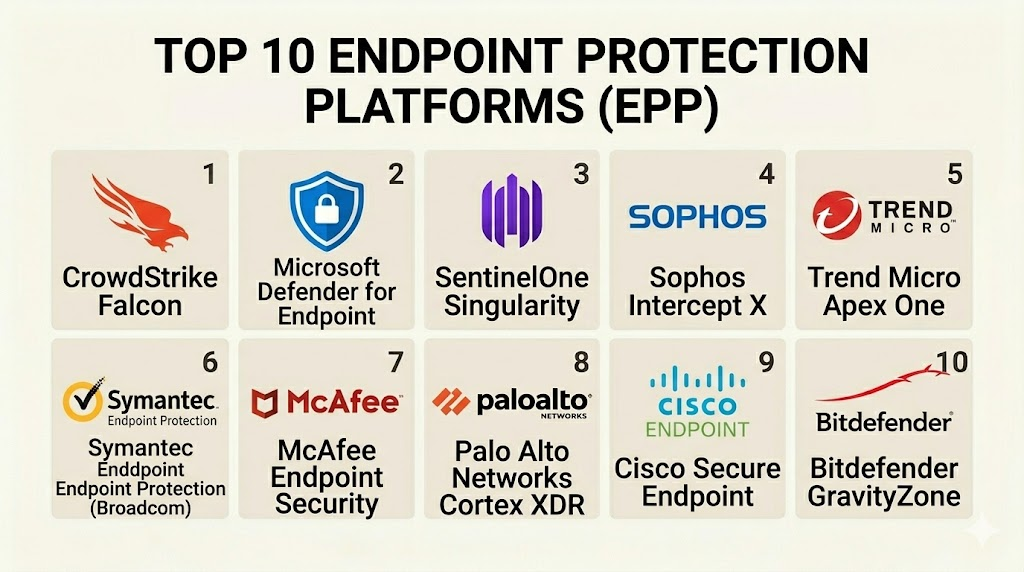
Introduction
Endpoint Protection Platforms (EPP) are security solutions designed to prevent file-based malware, detect malicious activity, and provide the investigation and remediation capabilities needed to respond to dynamic security incidents. An “endpoint” refers to any device that connects to a business network—laptops, desktops, smartphones, tablets, and even servers. In the modern workspace, these devices are the front line of defense. EPP software works by scanning files as they enter the network and monitoring system behavior to block threats like ransomware, phishing, and zero-day attacks.
In the current landscape, the traditional office perimeter has vanished. Employees work from various locations, often using home networks that are less secure than corporate ones. This shift makes endpoint security a top priority for businesses. Modern EPP solutions have evolved from simple antivirus programs into comprehensive platforms that use artificial intelligence and behavioral analysis to stop threats before they can cause damage. Without a robust EPP, a single infected laptop could lead to a massive data breach or a total system lockout.
Real-world use cases:
- Ransomware Mitigation: Automatically detecting and stopping a process that is attempting to encrypt files without authorization.
- Remote Workforce Security: Protecting company laptops while employees are using public Wi-Fi at airports or coffee shops.
- Mobile Device Management: Securing smartphones that carry sensitive company emails and internal applications.
- Malware Prevention: Blocking traditional viruses and advanced fileless malware that bypasses legacy signatures.
- Device Control: Managing the use of USB drives and other peripherals to prevent unauthorized data transfers.
What buyers should evaluate:
- Detection Accuracy: The platform’s ability to identify both known and unknown threats with a low rate of false positives.
- Performance Impact: Whether the security agent slows down the user’s computer during scans or daily tasks.
- Deployment Model: The choice between cloud-native management, on-premises servers, or a hybrid setup.
- Automation Level: How much of the response (like isolating an infected device) happens automatically without IT help.
- Integration Ease: How well the EPP connects with existing tools like firewalls and identity management systems.
- Offline Protection: Whether the device remains protected even when it is not connected to the internet.
- Scalability: The ability to add or remove thousands of devices as the company grows.
- Reporting and Visibility: The quality of the central dashboard and the level of detail provided in security logs.
- Support for Multiple OS: Full protection across Windows, macOS, Linux, iOS, and Android.
- Regulatory Compliance: Built-in tools to help meet standards like GDPR, HIPAA, or SOC 2.
Best for: Enterprises with large fleets of remote devices, healthcare organizations handling sensitive data, and financial institutions.
Not ideal for: Small businesses with only 2–3 computers that can be managed with basic consumer antivirus.
Key Trends in Endpoint Protection Platforms (EPP)
- AI-Native Defense: Platforms now use agentic AI to not only detect threats but also coordinate autonomous response workflows.
- Convergence of EPP and EDR: The line between protection (EPP) and response (EDR) has disappeared, with most tools now offering a unified “XDR” experience.
- Identity-Centric Security: EPP tools are now monitoring user logins and behavior to stop attackers who use stolen credentials.
- Ransomware Rollback: If a file is encrypted, the software can automatically restore the original version from a secure local cache.
- Managed Detection and Response (MDR): Many EPP vendors now offer 24/7 human “threat hunters” as an add-on service.
- Focus on Hybrid Work: Specialized protection for devices that frequently switch between home and office networks.
- Mobile Threat Defense (MTD): High-level security for mobile phones is now being integrated directly into the main endpoint console.
- Preemptive Cybersecurity: Moving from reactive blocking to proactive vulnerability patching and attack surface reduction.
How We Selected These Tools (Methodology)
The selection of these top 10 platforms was based on a structured evaluation of market leading technology and user feedback.
- Independent Lab Results: We prioritized tools that consistently score high in testing by organizations like AV-TEST and SE Labs.
- AI Sophistication: We looked for platforms that rely on machine learning rather than just old-fashioned signatures.
- Ease of Management: Evaluation of how simple it is for an IT admin to manage thousands of devices from one screen.
- Response Capabilities: High priority was given to tools that can automatically isolate threats and roll back changes.
- Compliance Features: We verified the presence of certifications like SOC 2 and support for regional data laws.
- Platform Versatility: Ensuring the list includes tools for enterprise, SMB, and specialized cloud environments.
Top 10 Endpoint Protection Platforms (EPP)
#1 — SentinelOne Singularity
Short description: A fully autonomous EPP that uses AI instead of human-written rules. It is designed to provide a “set-it-and-forget-it” security experience for modern businesses.
Key Features
- Static and Behavioral AI: Analyzes file traits and active behaviors to stop threats in real-time.
- 1-Click Rollback: Automatically restores files to their healthy state after a ransomware attack.
- Device Discovery: Finds every unmanaged device on the network to ensure total coverage.
- Automated Remediation: Isolates infected machines and kills malicious processes without human help.
- Storyline Technology: Connects all related events in an attack into a single, easy-to-read visual map.
- Native XDR: Integrates with firewalls and cloud data for a broader view of the attack surface.
Pros
- Extremely high automation reduces the workload on IT security teams.
- The rollback feature is a lifesaver for businesses targeted by ransomware.
Cons
- The advanced features come at a premium price compared to basic tools.
- Can be complex for very small businesses without any IT staff.
Platforms / Deployment
- Web / Windows / macOS / Linux / iOS / Android
- Cloud / On-premises / Hybrid
Security & Compliance
- SOC 2 Type II, ISO 27001, and HIPAA compliant.
- FedRAMP authorized for government use.
Integrations & Ecosystem
SentinelOne features an open API and a large marketplace for connecting to other security apps.
- Okta
- ServiceNow
- Splunk
- Slack
Support & Community
Professional support is available 24/7. The company offers a “Vigilance” service where their experts monitor your network for you.
#2 — CrowdStrike Falcon
Short description: A cloud-native platform famous for its lightweight agent and high-performance threat hunting. It is the preferred choice for large enterprises with rapid growth.
Key Features
- Falcon OverWatch: A built-in team of human threat hunters that watch your network 24/7.
- Cloud-Native Architecture: The agent is very small and does not slow down the user’s PC.
- Identity Protection: Stops attacks that use compromised passwords and unauthorized logins.
- Managed Detection: Options for fully managed security where CrowdStrike handles everything.
- Threat Intelligence: Provides detailed data on exactly which hacking group is targeting you.
- Single Agent System: One piece of software handles everything from antivirus to firewall management.
Pros
- Minimal impact on system performance, keeping users productive.
- Excellent for large-scale deployments across thousands of global endpoints.
Cons
- Expensive, especially for smaller companies that do not need every module.
- Requires a high level of technical expertise to use the full feature set.
Platforms / Deployment
- Web / Windows / macOS / Linux / iOS / Android
- Cloud
Security & Compliance
- SOC 2, ISO 27001, and GDPR compliant.
- Offers high-level certifications for financial and healthcare industries.
Integrations & Ecosystem
CrowdStrike has a massive ecosystem of partners and a dedicated “Falcon Fund” to invest in security startups.
- Zscaler
- Netskope
- AWS / Azure / GCP
- Proofpoint
Support & Community
Extensive support tiers and a professional community of security researchers.
#3 — Microsoft Defender for Endpoint
Short description: A deep security solution built directly into the Windows ecosystem. It is ideal for companies already committed to Microsoft 365.
Key Features
- Attack Surface Reduction: Blocks specific behaviors like malicious Office macros or unauthorized scripts.
- Auto-Remediation: Automatically investigates alerts and fixes complex issues.
- Endpoint DLP: Prevents sensitive company data from being leaked or stolen.
- Conditional Access: Blocks devices from the network if they do not meet security standards.
- Threat & Vulnerability Management: Finds missing patches and outdated software on all PCs.
- Native Integration: Works seamlessly with the rest of the Microsoft security stack.
Pros
- Often included in existing Microsoft 365 licenses, providing great value.
- No extra software needs to be installed on Windows devices as it is built-in.
Cons
- The management console is tied to the Azure portal, which can be complex.
- Support for macOS and Linux is good but not as deep as the Windows support.
Platforms / Deployment
- Windows / macOS / Linux / iOS / Android
- Cloud
Security & Compliance
- Highly compliant with FedRAMP, HIPAA, and GDPR.
- Backed by Microsoft’s massive global security infrastructure.
Integrations & Ecosystem
Deeply integrated with the world of Microsoft and enterprise IT.
- Microsoft 365
- Azure
- Sentinel (SIEM)
- ServiceNow
Support & Community
Massive community of IT professionals. Support is provided through standard Microsoft enterprise channels.
#4 — Sophos Intercept X
Short description: A highly-rated EPP that focuses on stopping modern techniques like exploit-based attacks and ransomware. It is a favorite for mid-market businesses.
Key Features
- Anti-Exploit Technology: Blocks the tools and techniques hackers use to distribute malware.
- Deep Learning AI: An advanced neural network that identifies new malware without signatures.
- CryptoGuard: Specifically detects and stops the spontaneous encryption of files.
- Managed Response: A 24/7 service where Sophos experts manage your security for you.
- Root Cause Analysis: Shows exactly how a threat got in and what it tried to do.
- Synchronized Security: Shares info with Sophos firewalls to automatically isolate infected PCs.
Pros
- Very strong at stopping “zero-day” attacks that have never been seen before.
- The “Sophos Central” dashboard is very user-friendly and easy to navigate.
Cons
- The agent can sometimes be heavier on system resources than CrowdStrike.
- Configuring advanced policies can take some time to get right.
Platforms / Deployment
- Windows / macOS / Linux / iOS / Android
- Cloud / On-premises
Security & Compliance
- SOC 2, ISO 27001, and HIPAA compliant.
- Maintains a strong Trust Center with detailed compliance guides.
Integrations & Ecosystem
Sophos focuses on an integrated security “heartbeat” across all its products.
- Sophos Firewall
- Splunk
- LogRhythm
- ConnectWise
Support & Community
Active user forums and excellent 24/7 technical support for business customers.
#5 — Bitdefender GravityZone
Short description: A high-performance security platform known for its light footprint and high detection rates. It is the best overall choice for small and medium businesses.
Key Features
- Photon Technology: Adapts to the device’s hardware to ensure the best performance.
- Ransomware Mitigation: Creates instant backups of files when a threat is detected.
- HyperDetect: A tunable layer of protection specifically for finding stealthy attacks.
- Risk Management: Analyzes human behavior and software gaps to find security risks.
- Unified Management: One console for endpoints, servers, and cloud workloads.
- Patch Management: Automatically updates outdated software to close security holes.
Pros
- Incredible detection rates in almost every independent security lab test.
- Very affordable for SMBs while still offering enterprise-grade features.
Cons
- The interface can look a bit technical for users who are not IT professionals.
- The reporting tools could be more customizable for large enterprise needs.
Platforms / Deployment
- Windows / macOS / Linux / iOS / Android
- Cloud / On-premises / Hybrid
Security & Compliance
- GDPR and HIPAA compliant.
- SOC 2 and ISO 27001 certifications held.
Integrations & Ecosystem
Bitdefender works well with a variety of MSP tools and security platforms.
- Datto
- ConnectWise
- VMware
- Citrix
Support & Community
Responsive support via ticket and phone. Solid library of documentation for self-service.
#6 — Trend Vision One (Endpoint Security)
Short description: A consolidated security platform that provides deep visibility across endpoints, servers, and cloud workloads.
Key Features
- High-Fidelity Machine Learning: Filters out common noise to find real threats.
- Behavioral Analysis: Watches for suspicious activity patterns in real-time.
- Virtual Patching: Protects vulnerable systems even before an official patch is applied.
- Data Loss Prevention: Built-in tools to prevent sensitive files from being shared.
- XDR Capabilities: Correlates endpoint data with network and email signals.
- Ransomware Rollback: Can undo unauthorized file encryption automatically.
Pros
- Excellent for companies with a mix of old (legacy) and new (cloud) systems.
- Strong focus on “pre-infection” protection through vulnerability management.
Cons
- The platform has many modules, which can make the licensing feel complex.
- Can require more manual tuning than autonomous tools like SentinelOne.
Platforms / Deployment
- Windows / macOS / Linux / iOS / Android
- Cloud / On-premises / Hybrid
Security & Compliance
- SOC 2, ISO 27001, and GDPR compliant.
- Maintains a wide range of industry-specific certifications.
Integrations & Ecosystem
Trend Micro has one of the oldest and most mature partner ecosystems in security.
- AWS / Azure
- Splunk
- ServiceNow
- IBM QRadar
Support & Community
Large global support team and a dedicated knowledge base for technical users.
#7 — Symantec Endpoint Security Complete
Short description: A comprehensive security suite from Broadcom that protects the entire attack chain. It is a long-standing choice for traditional large enterprises.
Key Features
- Active Directory Defense: Protects the heart of the corporate network from credential theft.
- Intrusion Prevention: Scans network traffic to block attacks before they reach the OS.
- Behavioral Isolation: Limits what a suspicious app can do without blocking it entirely.
- Mobile Threat Defense: High-level protection specifically for company smartphones.
- Network Integrity: Checks if a Wi-Fi network is safe before allowing a connection.
- AI-Guided Management: Uses AI to help admins configure the best security policies.
Pros
- Very deep protection that covers everything from mobile to the mainframe.
- Long track record of reliability in the world’s largest companies.
Cons
- Can be difficult to manage without a dedicated security team.
- Some users have expressed concern about support quality since the Broadcom acquisition.
Platforms / Deployment
- Windows / macOS / Linux / iOS / Android
- Cloud / On-premises / Hybrid
Security & Compliance
- Fully compliant with global enterprise standards like SOC 2 and ISO.
- Strong focus on meeting government and financial regulations.
Integrations & Ecosystem
Deeply integrated with the Symantec and Broadcom security portfolios.
- Symantec Web Gateway
- DLP systems
- CASB tools
Support & Community
Professional support is available through Broadcom’s enterprise channels.
#8 — Check Point Harmony Endpoint
Short description: A unified endpoint solution that focuses on preventing breaches. It is designed for the modern remote workforce.
Key Features
- Zero-Phishing Protection: Scans and blocks phishing sites in real-time.
- Anti-Ransomware: Automatically restores files and kills encryption processes.
- Safe Browsing: Protects users from malicious web downloads and scripts.
- Full Disk Encryption: Secures the data on a laptop even if the device is stolen.
- VPN Integration: Includes secure remote access directly in the security agent.
- Automated Forensics: Provides a detailed report on every blocked attack.
Pros
- One of the best tools for preventing phishing attacks on employees.
- Includes many extra features like VPN and encryption in one package.
Cons
- The management console can feel a bit cluttered compared to newer rivals.
- The initial deployment can be more time-consuming than cloud-only tools.
Platforms / Deployment
- Windows / macOS / Linux / iOS / Android
- Cloud / On-premises
Security & Compliance
- GDPR, HIPAA, and PCI DSS compliant.
- SOC 2 Type II certified.
Integrations & Ecosystem
Harmony is part of the broader Check Point security architecture.
- Check Point Firewalls
- Azure / AWS
- Splunk
Support & Community
Highly professional support and a dedicated user community known as “Check Point CheckMates.”
#9 — Fortinet FortiClient
Short description: A security agent that acts as a “Fabric Agent,” gathering data and providing protection as part of a larger network security system.
Key Features
- Endpoint Visibility: Provides deep data on the security status of every device.
- ZTA (Zero Trust Access): Checks device health before granting access to apps.
- Automated Quarantining: Automatically isolates infected devices from the network.
- Vulnerability Scanning: Finds missing patches and security holes.
- Web Filtering: Blocks dangerous websites and unauthorized content.
- VPN Support: Built-in secure tunnel for remote employees.
Pros
- Excellent value if you already use Fortinet firewalls and networking gear.
- Provides a very clear view of your entire network’s security health.
Cons
- Most effective when used with other Fortinet products; less powerful as a standalone.
- The interface is very technical and geared toward network engineers.
Platforms / Deployment
- Windows / macOS / Linux / iOS / Android
- Cloud / On-premises / Hybrid
Security & Compliance
- SOC 2 and GDPR compliant.
- Meets various industry standards for network and data security.
Integrations & Ecosystem
The core of the “Fortinet Security Fabric” ecosystem.
- FortiGate Firewall
- FortiSIEM
- FortiAnalyzer
Support & Community
Solid support for enterprise customers and a large community of certified engineers.
#10 — Trellix Endpoint Security Suite
Short description: Formed from the merger of McAfee and FireEye, Trellix provides a high-level security suite with advanced threat detection and analytics.
Key Features
- Adaptive Protection: Changes security levels based on the current threat environment.
- Behavioral Blocking: Stops malicious actions before the malware is fully identified.
- Expert Analysis: Tools for security teams to investigate complex attacks.
- Unified Console: Manages endpoint, cloud, and email security in one place.
- Guided Investigation: AI helps analysts understand and fix security alerts faster.
- Device Control: Strict management of USB ports and external devices.
Pros
- Incredible depth of analytics for large security operations teams.
- Combines the strengths of two of the most famous names in security.
Cons
- The transition from old McAfee/FireEye systems can be complex.
- Can be overkill for businesses that just want simple, automated protection.
Platforms / Deployment
- Windows / macOS / Linux / iOS / Android
- Cloud / On-premises / Hybrid
Security & Compliance
- Compliant with all major global standards including FedRAMP.
- Heavy focus on healthcare and government security needs.
Integrations & Ecosystem
Trellix features an “XConsole” designed to integrate hundreds of third-party tools.
- AWS / Azure
- ServiceNow
- Splunk
- IBM QRadar
Support & Community
Enterprise-grade support and a large global network of security consultants.
Comparison Table (Top 10)
| Tool Name | Best For | Platform(s) Supported | Deployment | Standout Feature | Public Rating |
| SentinelOne Singularity | Automation | Win, Mac, Linux, Mobile | Hybrid | 1-Click Rollback | 4.8/5 |
| CrowdStrike Falcon | Rapid Growth | Win, Mac, Linux, Mobile | Cloud | OverWatch Hunting | 4.9/5 |
| Microsoft Defender | Microsoft 365 Users | Win, Mac, Linux, Mobile | Cloud | Built-in Windows | 4.7/5 |
| Sophos Intercept X | Mid-Market | Win, Mac, Linux, Mobile | Hybrid | Anti-Exploit Tech | 4.7/5 |
| Bitdefender GravityZone | SMBs | Win, Mac, Linux, Mobile | Hybrid | Photon Tech | 4.8/5 |
| Trend Vision One | Hybrid Systems | Win, Mac, Linux, Mobile | Hybrid | Virtual Patching | 4.6/5 |
| Symantec Complete | Large Enterprise | Win, Mac, Linux, Mobile | Hybrid | AD Defense | 4.5/5 |
| Check Point Harmony | Phishing Defense | Win, Mac, Linux, Mobile | Hybrid | Zero-Phishing | 4.6/5 |
| Fortinet FortiClient | Network Visibility | Win, Mac, Linux, Mobile | Hybrid | Security Fabric | 4.4/5 |
| Trellix Suite | Advanced Analytics | Win, Mac, Linux, Mobile | Hybrid | Adaptive Protection | 4.5/5 |
Evaluation & Scoring of Endpoint Protection Platforms (EPP)
| Tool Name | Core (25%) | Ease (15%) | Int. (15%) | Sec. (10%) | Perf. (10%) | Supp. (10%) | Value (15%) | Weighted Total |
| SentinelOne | 10 | 8 | 9 | 9 | 8 | 9 | 7 | 8.65 |
| CrowdStrike | 10 | 7 | 10 | 9 | 10 | 9 | 6 | 8.60 |
| Microsoft | 8 | 10 | 10 | 9 | 9 | 8 | 9 | 8.85 |
| Sophos | 9 | 8 | 8 | 9 | 7 | 8 | 8 | 8.15 |
| Bitdefender | 8 | 9 | 8 | 8 | 10 | 8 | 10 | 8.60 |
| Trend Micro | 9 | 6 | 9 | 9 | 7 | 8 | 7 | 7.85 |
| Symantec | 9 | 4 | 8 | 8 | 7 | 7 | 6 | 7.00 |
| Check Point | 8 | 6 | 8 | 9 | 7 | 8 | 7 | 7.40 |
| Fortinet | 7 | 5 | 10 | 8 | 8 | 8 | 8 | 7.50 |
| Trellix | 9 | 4 | 9 | 9 | 7 | 8 | 6 | 7.30 |
How to interpret the scores:
- 0–5: Basic tools that lack modern AI detection or response features.
- 6–8: Professional tools that are strong in specific areas but may have a higher learning curve.
- 9–10: Market leaders that offer a complete, automated, and high-performance solution.
- Weighted Total: A comparative score where 10 is the perfect balance for a modern business.
Which Endpoint Protection Platform Tool Is Right for You?
#1 Solo / Freelancer
For a single person, Bitdefender GravityZone is excellent because it is very light on your laptop and does not require complex setup. If you are a freelancer already using Microsoft 365 Business, Microsoft Defender is already there and offers high-level protection for no extra cost.
#2 SMB
If you have 10–100 employees, Bitdefender or Sophos Intercept X are the best choices. They are easy to manage from one screen and provide great “anti-ransomware” features that protect your business from total data loss.
#3 Mid-Market
For companies with 100–500 employees, SentinelOne is the winner. Its autonomous AI means you don’t need a huge IT team to watch every alert—the software handles most of the work for you.
#4 Enterprise
Large global firms should look at CrowdStrike or Microsoft Defender for Endpoint. These platforms are built to scale across tens of thousands of devices and provide the deep data that professional security teams need to hunt for hackers.
#5 Budget vs Premium
- Budget: Microsoft Defender (if already on M365) and Bitdefender offer the best bang for your buck.
- Premium: CrowdStrike and SentinelOne are more expensive but offer the most advanced AI and human-led threat hunting.
#6 Feature Depth vs Ease of Use
If you want deep, technical data and analytics, Trellix or Symantec are the deepest. If you want something that “just works” and is easy for a non-expert to use, Sophos or Bitdefender are better.
#7 Integrations & Scalability
If your company is growing very fast, CrowdStrike is the easiest to scale up. If you are already deep in the Fortinet ecosystem, using FortiClient provides the best visibility across your entire network.
#8 Security & Compliance Needs
For businesses in healthcare or finance, SentinelOne, CrowdStrike, and Microsoft provide the best built-in tools for passing security audits and meeting strict data laws.
Frequently Asked Questions (FAQs)
1. Is EPP just a new word for Antivirus?
No. Traditional antivirus only looked for known viruses using signatures. EPP uses AI, behavioral analysis, and response tools to stop new threats that have never been seen before.
2. Do these tools work on mobile phones?
Yes, most modern EPP suites like CrowdStrike and SentinelOne include agents for iOS and Android to protect company phones and tablets.
3. What is “Ransomware Rollback”?
This is a feature where the security software takes a secret “snapshot” of your files. If ransomware manages to encrypt a file, the software kills the threat and instantly restores the original file.
4. Will EPP slow down my computer?
Legacy tools used to, but modern “cloud-native” agents like CrowdStrike Falcon are extremely lightweight and usually have less than a 1% impact on your PC’s speed.
5. What is the difference between EPP and EDR?
EPP focuses on preventing threats from getting in. EDR (Endpoint Detection and Response) focuses on finding and fixing threats that have already managed to bypass the initial defense.
6. Can I manage home computers with these tools?
Yes, many companies use these platforms to manage “Bring Your Own Device” (BYOD) policies, ensuring that even personal laptops meet security standards before accessing work data.
7. Do I need an internet connection to stay protected?
Modern EPP tools use “on-agent AI,” which means they can still identify and block malicious behavior even if the laptop is completely offline.
8. What is “Vulnerability Management”?
This is a feature in EPP tools that finds outdated software (like an old version of Chrome or Zoom) that has known security holes and alerts you to update it.
9. How do these tools help with compliance?
They generate detailed reports that show auditors your devices are encrypted, patched, and monitored, which is required for standards like HIPAA or GDPR.
10. Should I get a “Managed” service?
If you don’t have a 24/7 IT security team, getting a managed service (MDR) is a great idea. It means the vendor’s experts are watching your network while you sleep.
Conclusion
Endpoint protection is no longer optional in a world of remote work and advanced ransomware. Whether you choose the high-level automation of SentinelOne, the lightweight power of CrowdStrike, or the built-in value of Microsoft Defender, the goal is the same: to stop threats before they can reach your data.We recommend starting by auditing your current devices. See how many are currently unmanaged or running old software. Then, shortlist 2–3 tools from this list and run a pilot on a few laptops. Pay attention to how easy it is to deploy the agent and how much information the dashboard provides. A strong EPP is the most important insurance policy your business can have today

Thanks for sharing such useful insights. Looking forward to more blogs like this.
A practical gap to add is EPP policy rollout strategy. Prevention rules, application control, and exclusions should be tested in phases before full deployment, because an aggressive policy can break business apps just as easily as a weak policy can miss threats.