MOTOSHARE 🚗🏍️
Rent Bikes & Cars Directly from Owners
Motoshare connects vehicle owners with people who need bikes and cars on rent. Owners earn from idle vehicles, and renters get flexible ride options.
Visit Motoshare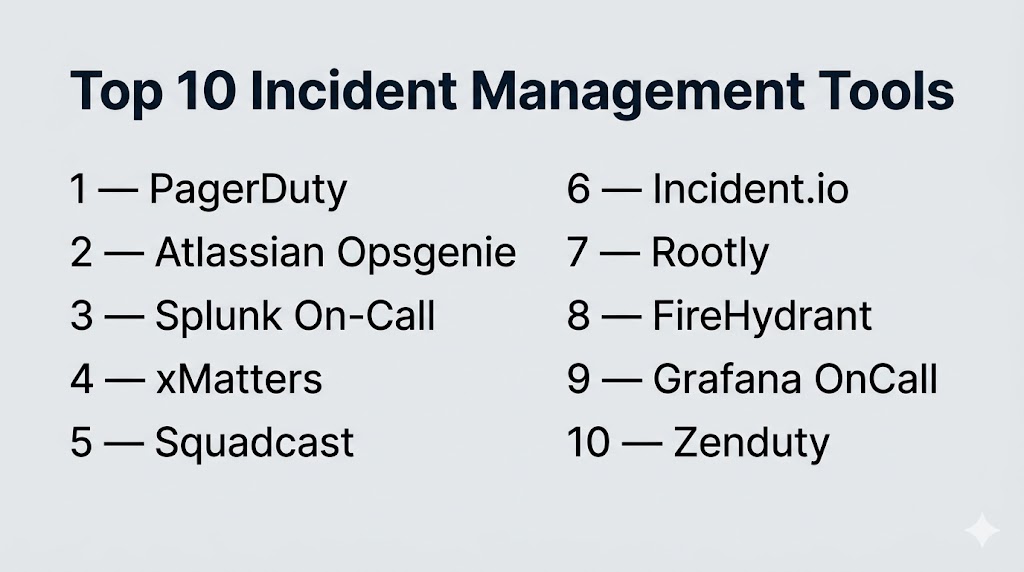
Introduction
When production breaks, nothing else matters.Not your roadmap. Not your sprint. Not your backlog.What matters is how fast you detect, respond, and recover.That’s exactly what Incident Management Tools are built for. They act as your command center during chaos—routing alerts, waking up the right engineers, coordinating response, and helping you resolve incidents before they escalate into outages.
In modern systems where uptime equals revenue, incident management is no longer optional—it’s mission-critical infrastructure.
The difference between teams that panic and teams that perform?
Process + automation + the right tools.
Where these tools make a real difference:
- Instantly alerting the right engineer when something breaks
- Automating escalation so nothing gets missed
- Coordinating response across distributed teams
- Reducing MTTR (mean time to resolution)
- Turning incidents into learnings, not repeated failures
What you should evaluate before choosing:
- Alert routing and escalation logic
- On-call scheduling and rotations
- Real-time collaboration (Slack, Teams, etc.)
- Incident timelines and visibility
- Automation and runbooks
- Noise reduction and alert deduplication
- Integration with monitoring/observability tools
- Reporting and postmortem workflows
- Security and access controls
- Pricing based on users or usage
Best for: DevOps teams, SREs, platform engineers, and IT operations managing production-critical systems.
Not ideal for: Small teams without on-call processes or low-risk internal tools.
Key Trends in Incident Management Tools
- AI-assisted incident response reducing manual triage
- Alert fatigue reduction becoming a top priority
- Automation-first workflows replacing manual coordination
- ChatOps (Slack-first tools) dominating workflows
- Deep observability integrations (logs, metrics, traces)
- Runbook automation for faster resolution
- SLO-based alerting replacing threshold-based alerts
- Unified platforms (alerting + response + analytics)
- Developer-first tools replacing legacy ITSM-heavy systems
- Post-incident intelligence driving continuous improvement
How We Selected These Tools (Methodology)
- Prioritized tools trusted in real production incidents
- Evaluated alerting accuracy and escalation capabilities
- Assessed ease of use under pressure (critical factor)
- Reviewed automation and workflow orchestration
- Analyzed integration depth with monitoring tools
- Compared on-call management capabilities
- Considered security and compliance readiness
- Included enterprise and modern developer-first tools
- Evaluated support quality and ecosystem maturity
- Ensured coverage across startup to enterprise teams
Top 10 Incident Management Tools
#1 — PagerDuty
Short description: The industry benchmark for incident response—built for teams that cannot afford downtime.
Key Features
- Intelligent alert routing and escalation
- On-call scheduling automation
- Incident workflows and runbooks
- Event intelligence (noise reduction)
- Real-time analytics and reporting
- Extensive integrations
Pros
- Extremely reliable at scale
- Best-in-class alerting system
Cons
- Expensive
- Complex pricing tiers
Platforms / Deployment
Web / Cloud
Security & Compliance
SSO, RBAC (others not publicly stated)
Integrations & Ecosystem
PagerDuty sits at the center of most enterprise incident workflows.
- Monitoring tools
- Slack, Teams
- APIs
Support & Community
Massive ecosystem and enterprise-grade support.
#2 — Atlassian Opsgenie
Short description: A flexible alerting and on-call tool deeply integrated with the Atlassian ecosystem.
Key Features
- Alert routing and escalation
- On-call scheduling
- Multi-channel notifications
- Jira integration
- Incident tracking
Pros
- Strong Atlassian integration
- Easy to configure
Cons
- Product direction evolving
- Dependency on Atlassian stack
Platforms / Deployment
Web / Cloud
Security & Compliance
SSO, RBAC (others not publicly stated)
Integrations & Ecosystem
- Jira
- Confluence
- APIs
Support & Community
Strong ecosystem with ongoing transitions.
#3 — Splunk On-Call
Short description: A data-driven incident management tool designed for teams already invested in observability.
Key Features
- Real-time alerting
- Incident timelines
- Collaboration workflows
- Automation
- Post-incident analytics
Pros
- Strong analytics
- Deep observability integration
Cons
- Best within Splunk ecosystem
- Enterprise pricing
Platforms / Deployment
Web / Cloud
Security & Compliance
RBAC (others not publicly stated)
Integrations & Ecosystem
- Splunk stack
- APIs
Support & Community
Enterprise-grade support.
#4 — xMatters
Short description: A workflow-driven incident orchestration platform focused on automation at scale.
Key Features
- Event-driven automation
- Alert routing
- Workflow orchestration
- Collaboration tools
- Integration support
Pros
- Powerful automation
- Enterprise-ready
Cons
- Complex setup
- UI learning curve
Platforms / Deployment
Cloud
Security & Compliance
SSO, RBAC (others not publicly stated)
Integrations & Ecosystem
- DevOps tools
- APIs
Support & Community
Strong enterprise presence.
#5 — Squadcast
Short description: A modern, SRE-focused incident platform with strong reliability and usability.
Key Features
- Incident alerting
- On-call scheduling
- SLO tracking
- Automation workflows
- Incident timelines
Pros
- Cost-effective
- Clean, modern UI
Cons
- Smaller ecosystem
- Limited enterprise depth
Platforms / Deployment
Cloud
Security & Compliance
Not publicly stated
Integrations & Ecosystem
- Monitoring tools
- APIs
Support & Community
Growing adoption.
#6 — Incident.io
Short description: A Slack-first incident management platform designed for speed and collaboration.
Key Features
- Slack-native workflows
- Automated incident tracking
- Runbooks
- Real-time collaboration
- Reporting
Pros
- Fast and intuitive
- Excellent for collaboration
Cons
- Slack-dependent
- Limited outside ecosystem
Platforms / Deployment
Cloud
Security & Compliance
Not publicly stated
Integrations & Ecosystem
- Slack
- APIs
Support & Community
Strong developer adoption.
#7 — Rootly
Short description: A modern automation-first incident platform built for high-performance engineering teams.
Key Features
- Incident automation
- Runbooks
- Slack integration
- Postmortem tools
- Workflow orchestration
Pros
- Strong automation capabilities
- Modern UX
Cons
- Premium pricing
- Smaller ecosystem
Platforms / Deployment
Cloud
Security & Compliance
Not publicly stated
Integrations & Ecosystem
- Slack
- APIs
Support & Community
Rapidly growing ecosystem.
#8 — FireHydrant
Short description: A reliability-focused incident platform designed to improve response and learning cycles.
Key Features
- Incident tracking
- Response workflows
- Analytics
- Runbooks
- Post-incident reviews
Pros
- Strong reliability focus
- Developer-friendly
Cons
- Limited integrations
- Smaller ecosystem
Platforms / Deployment
Cloud
Security & Compliance
Not publicly stated
Integrations & Ecosystem
- APIs
- DevOps tools
Support & Community
Growing adoption.
#9 — Grafana OnCall
Short description: An open-source-friendly incident tool built for teams already using Grafana.
Key Features
- Alert routing
- On-call scheduling
- Notifications
- Incident tracking
- Grafana integration
Pros
- Flexible and customizable
- Open-source-friendly
Cons
- Requires setup
- Limited advanced automation
Platforms / Deployment
Cloud / Self-hosted
Security & Compliance
RBAC (others not publicly stated)
Integrations & Ecosystem
- Grafana
- Prometheus
Support & Community
Strong open-source community.
#10 — Zenduty
Short description: A cost-effective incident management solution focused on alerting and escalation.
Key Features
- Alerting and escalation
- On-call scheduling
- Incident tracking
- Automation workflows
- Reporting
Pros
- Affordable
- Easy to use
Cons
- Limited enterprise features
- Smaller ecosystem
Platforms / Deployment
Cloud
Security & Compliance
Not publicly stated
Integrations & Ecosystem
- APIs
- Monitoring tools
Support & Community
Growing community.
Comparison Table (Top 10)
| Tool Name | Best For | Platform(s) Supported | Deployment | Standout Feature | Public Rating |
|---|---|---|---|---|---|
| PagerDuty | Enterprise | Web | Cloud | Advanced alerting | N/A |
| Opsgenie | Atlassian users | Web | Cloud | Jira integration | N/A |
| Splunk | Observability teams | Web | Cloud | Deep analytics | N/A |
| xMatters | Automation | Web | Cloud | Workflow orchestration | N/A |
| Squadcast | SRE teams | Web | Cloud | SLO tracking | N/A |
| Incident.io | Slack teams | Web | Cloud | ChatOps workflows | N/A |
| Rootly | Automation | Web | Cloud | Slack-native | N/A |
| FireHydrant | Reliability | Web | Cloud | Incident analytics | N/A |
| Grafana | Open-source | Web | Cloud/Self-hosted | Flexibility | N/A |
| Zenduty | SMB | Web | Cloud | Cost-effective | N/A |
Evaluation & Scoring of Incident Management Tools
| Tool Name | Core | Ease | Integrations | Security | Performance | Support | Value | Weighted Total |
|---|---|---|---|---|---|---|---|---|
| PagerDuty | 10 | 7 | 10 | 9 | 10 | 10 | 6 | 8.9 |
| Opsgenie | 8 | 8 | 9 | 8 | 8 | 8 | 8 | 8.2 |
| Splunk | 9 | 7 | 9 | 9 | 9 | 9 | 6 | 8.4 |
| xMatters | 9 | 6 | 8 | 8 | 9 | 8 | 6 | 8.0 |
| Squadcast | 8 | 8 | 8 | 7 | 8 | 7 | 8 | 8.0 |
| Incident.io | 8 | 9 | 7 | 7 | 8 | 8 | 8 | 8.1 |
| Rootly | 8 | 8 | 7 | 7 | 8 | 7 | 7 | 7.8 |
| FireHydrant | 8 | 8 | 7 | 7 | 8 | 7 | 7 | 7.8 |
| Grafana | 7 | 7 | 8 | 6 | 7 | 8 | 9 | 7.7 |
| Zenduty | 7 | 8 | 7 | 6 | 7 | 7 | 9 | 7.6 |
How to interpret scores:
These scores compare tools across key criteria, not absolute rankings. Higher scores indicate stronger overall capability, but the right tool depends on your team size, complexity, and incident maturity.
Which Incident Management Tool Is Right for You?
Solo / Freelancer
Use Zenduty or Grafana OnCall for simplicity and cost control.
SMB
Choose Squadcast or Incident.io for ease and collaboration.
Mid-Market
Opsgenie or Rootly provide strong balance and integrations.
Enterprise
PagerDuty, Splunk, xMatters deliver scale, automation, and reliability.
Budget vs Premium
- Budget: Zenduty, Grafana
- Premium: PagerDuty, Splunk
Feature Depth vs Ease of Use
- Advanced: PagerDuty, xMatters
- Easy: Incident.io, Squadcast
Integrations & Scalability
PagerDuty leads in ecosystem depth.
Security & Compliance Needs
Prioritize tools with RBAC and audit controls.
Frequently Asked Questions (FAQs)
1. What is incident management software?
It helps detect, respond to, and resolve system issues quickly.
2. Why is it critical?
Because downtime directly impacts revenue and trust.
3. Who uses these tools?
DevOps, SRE, and IT operations teams.
4. What is on-call scheduling?
Assigning responsibility for incident response.
5. How do alerts work?
They notify the right person using escalation rules.
6. Are these tools expensive?
Pricing varies based on features and usage.
7. Can startups use them?
Yes, many tools offer affordable options.
8. What is alert fatigue?
Too many alerts causing teams to ignore them.
9. Do they integrate with Slack?
Yes, most tools support ChatOps workflows.
10. Can they reduce downtime?
Yes, by enabling faster detection and response.
Conclusion
Incident management tools are no longer just support utilities—they are a critical layer of modern system reliability, enabling teams to detect issues instantly, coordinate responses efficiently, and recover from failures with minimal impact on users and business operations. As systems grow more complex and distributed, the ability to automate alerting, streamline on-call workflows, and reduce response time becomes essential for maintaining uptime and trust. The tools covered in this guide range from lightweight, easy-to-use platforms for smaller teams to enterprise-grade solutions with advanced automation and analytics capabilities, each designed to handle different levels of scale and operational complexity. There is no single best tool—only the one that aligns with your workflows, infrastructure, and team maturity. The most effective next step is to shortlist a few options, simulate real incident scenarios, and evaluate how well they improve response speed, coordination, and overall system reliability.

Good work on this article. The content feels genuine and well researched.
A practical gap is incident governance after the tool is deployed. Teams should define severity criteria, incident commander ownership, handoff rules, postmortem action tracking, and regular process reviews; otherwise the tool may improve alerting but not actually improve response qualit