MOTOSHARE 🚗🏍️
Rent Bikes & Cars Directly from Owners
Motoshare connects vehicle owners with people who need bikes and cars on rent. Owners earn from idle vehicles, and renters get flexible ride options.
Visit Motoshare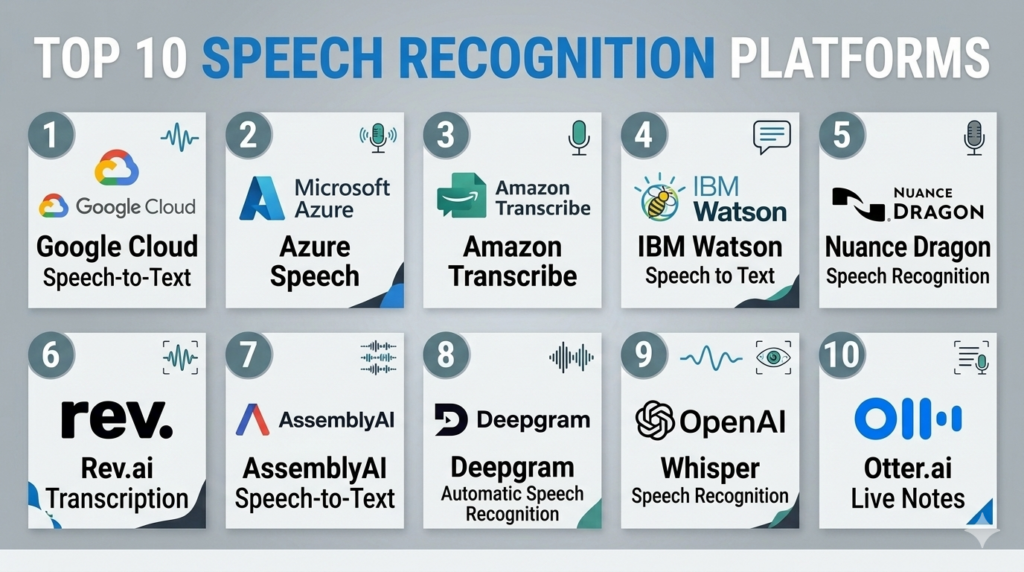
Introduction
Speech recognition platforms are advanced software systems that use artificial intelligence and machine learning to convert spoken language into written text. This technology, often called Automated Speech Recognition (ASR), allows machines to understand human speech, enabling a wide range of hands-free and automated interactions. In the current digital landscape, these platforms have moved from being a niche accessibility tool to a core component of enterprise operations. They power everything from virtual assistants on smartphones to massive call center transcription systems that analyze thousands of hours of customer interactions every day.
The importance of these platforms cannot be overstated. As businesses strive for better efficiency, speech recognition provides a way to capture data that was previously lost in unrecorded conversations. It allows for faster documentation, better customer service through sentiment analysis, and improved accessibility for individuals with hearing or motor impairments. By automating the transcription process, organizations can save significant time and money that would otherwise be spent on manual data entry.
Real-world use cases:
- Customer Support Centers: Automatically transcribing support calls to monitor agent performance and identify common customer complaints through keyword spotting.
- Medical Documentation: Enabling doctors to dictate patient notes directly into electronic health records, reducing administrative burnout and improving record accuracy.
- Media and Subtitling: Generating instant captions for live broadcasts, social media videos, and online courses to reach a wider, global audience.
- Voice-Controlled Applications: Powering smart home devices, automotive interfaces, and mobile apps that allow users to perform tasks via voice commands.
- Meeting Transcription: Providing real-time summaries and searchable text logs for corporate meetings, ensuring that every decision and action item is documented.
Buyer evaluation criteria:
- Word Error Rate (WER): The primary metric for accuracy, measuring how often the system misidentifies words.
- Language and Dialect Support: The number of languages and specific regional accents the platform can accurately process.
- Real-time vs. Batch Processing: Whether the tool can transcribe live audio or only works on pre-recorded files.
- Noise Robustness: The ability of the software to accurately capture speech in loud or crowded environments.
- Speaker Diarization: The capability to distinguish between different speakers in a single audio stream and label them correctly.
- Deployment Flexibility: Support for cloud-based APIs, on-premise installations, or edge computing for privacy-sensitive data.
- Vocabulary Customization: The ability to teach the system specialized industry jargon, technical terms, or brand names.
- Latency: The speed at which speech is processed, which is critical for real-time interactive applications.
Best for:
Enterprise organizations, software developers, and healthcare providers who need to process large volumes of voice data for analytics, automation, or accessibility compliance. It is also essential for content creators who require fast, high-quality transcription for global distribution.
Not ideal for:
Small businesses with very basic needs that can be met by free, built-in operating system tools, or for scenarios where privacy requirements are so extreme that any cloud-based processing is strictly forbidden, regardless of encryption.
Key Trends in Speech Recognition Platforms
- Emotion and Sentiment Analysis: Modern platforms are moving beyond just identifying words to understanding the tone, pitch, and speed of the speaker to gauge their emotional state.
- Multilingual Switching: Newer systems can detect when a speaker switches languages mid-sentence and continue transcribing accurately without manual intervention.
- Edge AI Processing: To improve privacy and reduce latency, more platforms are allowing speech recognition to happen directly on the user’s device rather than in the cloud.
- Generative AI Integration: Platforms are now combining ASR with Large Language Models to provide instant summaries, action items, and even rewritten versions of spoken text for better clarity.
- Noise-Cancellation Innovations: Advanced algorithms are better at isolating a single human voice from heavy background noise, such as traffic, wind, or office chatter.
- Speaker Verification: Increasing use of voice biometrics within speech platforms to verify a user’s identity based on their unique vocal characteristics.
- Personalized Vocabulary Models: Systems are becoming better at learning an individual user’s specific speaking style and preferred terminology over time.
- Domain-Specific Tuning: A surge in models pre-trained for specific industries like legal, medical, and industrial engineering to provide higher out-of-the-box accuracy.
How We Selected These Tools (Methodology)
- Accuracy Benchmarks: We looked for platforms that consistently demonstrate low Word Error Rates across diverse audio qualities.
- Scalability: The tools selected must be capable of handling enterprise-level loads, from a few minutes of audio to thousands of hours simultaneously.
- Developer Experience: We prioritized platforms that offer robust APIs, clear documentation, and easy-to-use software development kits.
- Commercial Viability: Each tool is backed by a reputable company or a strong open-source community, ensuring long-term support and updates.
- Feature Breadth: We selected tools that offer advanced features like diarization, punctuation, and multi-language support.
- Security Standards: Only platforms that provide enterprise-grade security features and compliance certifications were considered.
- Global Reach: We focused on tools that support a wide array of global languages and regional dialects.
- Pricing Transparency: We favored platforms that offer clear, predictable pricing models for various usage levels.
Top 10 Speech Recognition Platforms Tools
#1 — Google Cloud Speech-to-Text
Short description:
Google Cloud Speech-to-Text is a powerful API that enables developers to convert audio to text by applying neural network models. It supports over 125 languages and variants and is built on the same technology that powers Google’s own voice search and assistant. It is ideal for large-scale applications that require high accuracy and global language coverage.
Key Features
- Multi-Channel Recognition: Can recognize speech from different audio channels and provide separate transcriptions.
- Model Selection: Allows users to choose between models optimized for specific use cases like phone calls or video.
- Auto-Punctuation: Automatically adds periods, commas, and question marks to the generated text.
- Phrase Hints: Users can provide a list of words or phrases to help the system recognize niche terminology.
- Streaming Recognition: Provides real-time results as the user is speaking, ideal for live captioning.
Pros
- Incredible language support and accuracy for global dialects.
- High reliability and uptime as part of the Google Cloud ecosystem.
Cons
- Pricing can be complex for very high-volume users.
- Privacy-conscious users may be wary of sending all audio data to Google’s servers.
Platforms / Deployment
- Cloud / API
- Web / Android / iOS
Security & Compliance
- SSO/SAML, MFA, Encryption at rest, RBAC.
- SOC 2, ISO 27001, GDPR, HIPAA.
Integrations & Ecosystem
Integrates natively with the entire Google Cloud platform and various third-party developer tools.
- Google Cloud Storage.
- BigQuery for data analytics.
- Pub/Sub for event-driven architectures.
Support & Community
Professional support through Google Cloud tiers. Extensive documentation and a massive community of developers worldwide.
#2 — Microsoft Azure Speech
Short description:
Azure Speech is a comprehensive suite of speech-to-text, text-to-speech, and speech translation services. It is designed for enterprise developers who need a highly customizable and secure environment. It allows for the creation of custom speech models that can be tailored to specific industry vocabularies and acoustic environments.
Key Features
- Custom Speech: Allows users to train the platform on their specific data to improve accuracy for technical terms.
- Speaker Recognition: Can identify who is speaking based on their unique voice profile.
- Real-time Translation: Transcribes and translates speech into different languages simultaneously.
- Batch Transcription: Efficiently processes large amounts of pre-recorded audio stored in Azure containers.
- Pronunciation Assessment: Evaluates the speech of a user, which is highly useful for language learning applications.
Pros
- Exceptional integration for companies already using the Microsoft ecosystem.
- Superior customization options for specialized industrial or medical jargon.
Cons
- The management portal can be complex for first-time cloud users.
- Custom model training requires a significant amount of high-quality data.
Platforms / Deployment
- Cloud / Hybrid / Edge
- Windows / Linux / Web
Security & Compliance
- SSO/SAML, Azure AD integration, MFA, Audit logs.
- SOC 2, ISO 27001, GDPR, HIPAA, FedRAMP.
Integrations & Ecosystem
Part of the Azure AI services, it works seamlessly with Microsoft’s enterprise stack.
- Microsoft Teams.
- Power BI for visualization.
- Azure Cognitive Search.
Support & Community
Enterprise-grade support plans available. Deep technical documentation and a strong network of Microsoft-certified partners.
#3 — Amazon Transcribe
Short description:
Amazon Transcribe uses deep learning to add speech-to-text capabilities to any application. It is built to be easy to use, allowing developers to quickly ingest audio files and receive accurate transcripts with timestamps. It is particularly strong in the call center and medical sectors, offering specialized versions for those specific use cases.
Key Features
- Automatic Content Redaction: Automatically identifies and removes sensitive PII (Personally Identifiable Information).
- Amazon Transcribe Medical: A HIPAA-eligible service specifically trained on medical terminology.
- Call Analytics: Built-in features to identify caller sentiment, non-talk time, and interruptions.
- Vocabulary Filtering: Allows users to mask or remove specific profane or unwanted words.
- Channel Identification: Separates audio from multiple callers into individual transcript streams.
Pros
- Seamlessly connects with other AWS services for automated workflows.
- Strong specialized models for regulated industries like healthcare and finance.
Cons
- The output format can sometimes require extra processing to make it “human-readable.”
- Latency for real-time streaming can vary depending on the AWS region.
Platforms / Deployment
- Cloud / API
- Web / Windows / Linux
Security & Compliance
- MFA, KMS encryption, IAM roles, RBAC.
- SOC 2, ISO 27001, GDPR, HIPAA, PCI-DSS.
Integrations & Ecosystem
Deeply integrated with the Amazon Web Services portfolio.
- Amazon S3 for storage.
- AWS Lambda for serverless processing.
- Amazon Connect for call centers.
Support & Community
Support provided via AWS support plans. Extensive library of developer tutorials and community forums.
#4 — IBM Watson Speech to Text
Short description:
IBM Watson Speech to Text is a mature AI service that provides fast and accurate speech recognition across several languages. It is highly valued for its enterprise-level flexibility, offering various deployment models including public cloud, private cloud, and on-premise through IBM Cloud Pak for Data. It is designed for businesses that prioritize data control and governance.
Key Features
- Acoustic Adaptation: Allows the system to adapt to specific environments like car cabins or noisy factories.
- Language Adaptation: Enables the addition of custom words for better recognition of brands or technical terms.
- Smart Formatting: Automatically converts dates, times, and currencies into a standardized written format.
- Speaker Labels: Identifies and labels different participants in a conversation accurately.
- Low-Latency Models: Specialized models optimized for fast-paced, real-time interactions.
Pros
- Industry-leading deployment flexibility for hybrid and on-premise needs.
- Very strong performance on low-quality audio, such as telephone recordings.
Cons
- IBM’s commercial offerings can be significantly more expensive than competitors.
- The setup process for custom models is more involved than in serverless alternatives.
Platforms / Deployment
- Cloud / Self-hosted / Hybrid
- Windows / Linux / Unix
Security & Compliance
- SSO, MFA, Advanced encryption, Audit logging, RBAC.
- SOC 2, ISO 27001, GDPR, HIPAA.
Integrations & Ecosystem
Works within the IBM Cloud and Watson ecosystem.
- IBM Watson Assistant.
- IBM Cloud Pak for Data.
- Cognos Analytics.
Support & Community
High-level enterprise support. Access to IBM’s global network of consultants and extensive professional documentation.
#5 — Nuance Dragon
Short description:
Nuance, now a Microsoft company, is the creator of Dragon, one of the most famous speech recognition brands in history. Dragon is a desktop and cloud-based solution focused primarily on professional dictation. It is the gold standard for lawyers, doctors, and law enforcement officers who need to produce high-volumes of text with extreme accuracy and speed.
Key Features
- Deep Learning Technology: Adapts to the user’s specific voice and accent over time.
- Voice Macros: Allows users to insert large blocks of text or perform complex tasks with a single voice command.
- Specialized Versions: Dedicated editions for Legal, Medical, and Law Enforcement industries.
- Mobile Synchronization: Dictate on a mobile device and have the text appear on a desktop in real-time.
- Step-by-Step Commands: Enables the automation of multi-step computer tasks using voice.
Pros
- Unrivaled accuracy for individual users after a short training period.
- Deep integration into professional software like legal databases and EHR systems.
Cons
- Very high cost per license compared to API-based models.
- Primarily focused on dictation rather than building custom applications.
Platforms / Deployment
- Windows / iOS / Android
- Cloud / Self-hosted
Security & Compliance
- SSO, MFA, Encryption at rest and in transit.
- HIPAA, GDPR (Medical/Professional versions).
Integrations & Ecosystem
Strong focus on productivity software and medical records systems.
- Microsoft Office Suite.
- Epic and Cerner (EHR systems).
- Case management software for legal professionals.
Support & Community
Professional support through Nuance and its resellers. Extensive training materials and user manuals.
#6 — Rev.ai
Short description:
Rev.ai is the developer-facing platform of Rev, a company famous for its human transcription services. Rev.ai uses the massive amounts of data from its human-transcribed files to train world-class ASR models. It is designed for businesses that need high-accuracy transcription for media, research, and communication applications with minimal technical friction.
Key Features
- Global Vocabulary: A massive pre-built dictionary that includes slang and modern pop-culture terms.
- Asynchronous API: Simple workflow for uploading files and receiving text via webhooks.
- Streaming API: Low-latency real-time transcription for live events.
- Sentiment Analysis: Built-in ability to determine the tone of the transcribed text.
- Topic Extraction: Automatically identifies the main themes discussed in an audio file.
Pros
- Consistently ranks among the top platforms for accuracy on diverse accents.
- Extremely simple and developer-friendly API design.
Cons
- Fewer enterprise “platform” features compared to AWS or Azure.
- Language support is robust but not as deep as Google Cloud.
Platforms / Deployment
- Cloud / API
- Web
Security & Compliance
- MFA, SSL encryption, RBAC.
- SOC 2, GDPR.
Integrations & Ecosystem
Focused on connecting with storage and communication platforms.
- AWS S3 / Google Cloud Storage.
- Zapier for workflow automation.
- Zoom and Slack integrations.
Support & Community
Standard ticketing support. Good developer documentation and a clear, functional API playground for testing.
#7 — AssemblyAI
Short description:
AssemblyAI is a modern, AI-first platform that provides a simple API for transcribing and understanding audio. It is popular among startups and high-growth tech companies because it offers not just transcription, but “Audio Intelligence” features like summarization, content moderation, and PII redaction out of the box. It is built for a new generation of AI-integrated apps.
Key Features
- Auto Summarization: Uses LLMs to provide a concise summary of the audio content.
- Entity Detection: Identifies people, places, and organizations within the text.
- Content Moderation: Flags hate speech, sensitive topics, or violent language.
- LeMUR: A specialized framework for applying LLMs to spoken data at scale.
- Dual-Channel Ingestion: Optimized for processing call-center data where audio is split.
Pros
- The easiest platform for integrating advanced AI features alongside transcription.
- Very fast processing times and high reliability for cloud-native apps.
Cons
- On-premise deployment options are limited.
- The focus on AI intelligence can make it more expensive than “pure” transcription tools.
Platforms / Deployment
- Cloud / API
- Web
Security & Compliance
- MFA, SSO, Encryption, RBAC.
- SOC 2 Type II, GDPR.
Integrations & Ecosystem
Highly focused on the modern developer stack.
- Python, Node.js, and Go SDKs.
- GitHub Actions integration.
- Webhooks for real-time notifications.
Support & Community
Excellent developer support and a very active Slack community. Documentation is exceptionally clear and modern.
#8 — Deepgram
Short description:
Deepgram is a specialized speech recognition platform built on an end-to-end deep learning architecture. Unlike many competitors that use older hybrid models, Deepgram’s approach allows it to process audio much faster and with higher accuracy in difficult acoustic environments. It is the preferred choice for companies that need massive scalability and real-time performance.
Key Features
- End-to-End Neural Network: Faster and more accurate than traditional speech-to-text engines.
- On-Premise Deployment: Offers a robust self-hosted option for maximum data privacy.
- High Concurrency: Can handle thousands of simultaneous audio streams on a single cluster.
- Smart Formatting: Native handling of acronyms, dates, and numbers.
- Custom Training: Deepgram can build custom models for clients based on their unique data in weeks.
Pros
- Unrivaled processing speed and extremely low latency.
- Lower infrastructure costs for high-volume users due to efficient architecture.
Cons
- The API is powerful but may require more configuration than simpler tools.
- Focuses primarily on the engine, meaning fewer “out-of-the-box” UI tools.
Platforms / Deployment
- Cloud / Self-hosted / Hybrid
- Linux / Windows / Web / API
Security & Compliance
- MFA, SSO, RBAC, Encryption-at-rest.
- SOC 2, GDPR, HIPAA (on-prem).
Integrations & Ecosystem
Strongly targeted at engineers and specialized voice-tech firms.
- Kubernetes for scaling.
- Python, Java, and C# SDKs.
- Integration with Twilio and Daily.co.
Support & Community
High-quality technical support. Very strong presence in the specialized speech-science community.
#9 — OpenAI Whisper
Short description:
Whisper is an open-source speech recognition model developed by OpenAI. While it is a model rather than a “platform” in the traditional sense, several providers offer managed Whisper APIs (like Groq, Hugging Face, or OpenAI itself). It is world-famous for its incredible accuracy and ability to transcribe in nearly any language with human-like performance.
Key Features
- Massive Dataset Training: Trained on 680,000 hours of multilingual and multitask supervised data.
- Multi-Tasking: Can perform transcription, translation, and language identification.
- Open Source: The model can be downloaded and run on local hardware for free.
- Robustness: Exceptional at handling accents and poor recording quality.
- Managed APIs: Available as a high-speed service through several cloud providers.
Pros
- The highest out-of-the-box accuracy for many non-English languages.
- Completely free to use if you have your own hardware to run it.
Cons
- Does not natively include features like speaker diarization in the base model.
- Running it locally requires significant GPU resources for the “large” model.
Platforms / Deployment
- Cloud / Self-hosted
- Linux / macOS / Windows / Python
Security & Compliance
- Varies by provider (OpenAI API offers SOC 2 and GDPR).
- Not publicly stated for open-source local usage.
Integrations & Ecosystem
The core of many new AI-driven transcription apps.
- Python ecosystem (PyTorch).
- Hugging Face Transformers.
- Integrated into hundreds of open-source projects.
Support & Community
Massive global community of developers. Support is community-driven unless using a managed provider.
#10 — Otter.ai
Short description:
Otter.ai is a collaborative transcription platform designed for teams and individuals. It is unique on this list because it is a consumer-facing application that people use directly for meetings and interviews. It uses its own proprietary ASR technology to provide real-time, searchable notes that can be edited and shared across an organization.
Key Features
- Otter Assistant: Automatically joins Zoom, Google Meet, and Microsoft Teams calls to transcribe.
- Live Transcript: Users can highlight and comment on the transcript as it is happening.
- Automated Summaries: Generates a summary and action items at the end of every meeting.
- Shared Folders: Allows teams to organize meeting notes into collaborative spaces.
- Keyword Extraction: Automatically identifies the most important terms discussed.
Pros
- The best user interface for non-technical users.
- Incredible value for individuals and small teams who need to document meetings.
Cons
- Not designed for developers to build their own apps.
- Accuracy can be lower than specialized enterprise APIs in noisy environments.
Platforms / Deployment
- Web / iOS / Android
- Cloud
Security & Compliance
- SSO, MFA, Encryption in transit and at rest.
- SOC 2, GDPR.
Integrations & Ecosystem
Focused on the modern workspace and communication tools.
- Zoom / Microsoft Teams / Google Meet.
- Dropbox and Google Drive.
- Slack for notification sharing.
Support & Community
Email-based support and a large knowledge base. Strong following among journalists, students, and project managers.
Comparison Table (Top 10)
| Tool Name | Best For | Platform(s) Supported | Deployment | Standout Feature | Public Rating |
| #1 Google Cloud | Global Reach | Web, Mobile | Cloud | 125+ Languages | N/A |
| #2 Azure Speech | Enterprise Stack | Win, Linux, Web | Hybrid | Custom Training | N/A |
| #3 Amazon Transcribe | Call Centers | Win, Linux, Web | Cloud | PII Redaction | N/A |
| #4 IBM Watson | Data Sovereignty | Win, Linux, Unix | Hybrid | Hybrid Cloud Support | N/A |
| #5 Nuance Dragon | Professional Dictation | Win, iOS, Android | Local/Cloud | Voice Macros | 4.6/5 |
| #6 Rev.ai | Media Transcription | Web, API | Cloud | Accents/Slang Accuracy | 4.7/5 |
| #7 AssemblyAI | Audio Intelligence | Web, API | Cloud | LLM Summarization | N/A |
| #8 Deepgram | High-Speed Apps | Linux, Win, Web | On-prem/Cloud | Real-time Speed | 4.8/5 |
| #9 OpenAI Whisper | Global Accuracy | Python, Linux, Win | Local/Cloud | Open Source Model | N/A |
| #10 Otter.ai | Meeting Productivity | Web, iOS, Android | Cloud | Meeting Assistant | 4.5/5 |
Evaluation & Scoring of Speech Recognition Platforms
| Tool Name | Core (25%) | Ease (15%) | Integrations (15%) | Security (10%) | Performance (10%) | Support (10%) | Value (15%) | Weighted Total |
| Google Cloud | 10 | 7 | 10 | 9 | 9 | 9 | 8 | 8.90 |
| Azure Speech | 9 | 6 | 10 | 10 | 9 | 9 | 8 | 8.55 |
| Amazon Transcribe | 9 | 8 | 10 | 10 | 8 | 9 | 8 | 8.70 |
| IBM Watson | 9 | 5 | 8 | 10 | 9 | 9 | 6 | 7.75 |
| Nuance Dragon | 10 | 8 | 7 | 9 | 10 | 8 | 6 | 8.15 |
| Rev.ai | 9 | 10 | 8 | 8 | 9 | 7 | 9 | 8.60 |
| AssemblyAI | 8 | 9 | 9 | 9 | 9 | 9 | 8 | 8.55 |
| Deepgram | 10 | 7 | 8 | 9 | 10 | 8 | 9 | 8.65 |
| OpenAI Whisper | 10 | 6 | 9 | 7 | 8 | 5 | 10 | 8.05 |
| Otter.ai | 6 | 10 | 9 | 8 | 7 | 7 | 9 | 7.85 |
Scoring Interpretation:
- 8.5 – 9.0: Industry leaders that provide a perfect balance of accuracy, developer flexibility, and enterprise security.
- 8.0 – 8.4: Highly capable tools that are world-class in specific areas, such as professional dictation or open-source research.
- 7.5 – 7.9: Specialized tools that excel in specific deployment scenarios or user-facing productivity niches.
Which Speech Recognition Platforms Tool Is Right for You?
Solo / Freelancer
If you are an individual researcher or freelancer, Otter.ai is the most practical choice. It gives you a ready-to-use interface for transcribing interviews and meetings without needing any coding skills. If you are a developer working alone, OpenAI Whisper or Rev.ai offer the best combination of accuracy and ease of use.
SMB
Small and medium businesses that want to add voice features to their product should look at AssemblyAI. Its built-in AI features like summarization save you the time of building your own LLM pipelines. If you need simple, reliable transcription for business records, Rev.ai is a great, low-maintenance option.
Mid-Market
Companies that are scaling and have a growing volume of voice data should evaluate Deepgram. Its superior speed and lower infrastructure costs for high-volume processing make it very attractive as you move beyond a few thousand hours of audio.
Enterprise
Large global corporations should choose between Google Cloud Speech-to-Text, Azure Speech, or Amazon Transcribe. These platforms offer the multi-language depth, regional availability, and massive security compliance required for global operations. For those with strict on-premise requirements, IBM Watson or Deepgram are the leaders.
Budget vs Premium
If budget is the primary concern and you have technical skills, OpenAI Whisper (run locally) is essentially free. On the premium side, Nuance Dragon is expensive but offers specialized professional accuracy that generalized APIs cannot match.
Feature Depth vs Ease of Use
Amazon Transcribe and Azure Speech have incredible feature depth but can be intimidating. Otter.ai is the opposite; it is very easy to use but doesn’t allow for deep technical customization or API-driven application building.
Integrations & Scalability
Google Cloud and AWS are the winners for scalability. They can handle virtually any volume of data you throw at them. For integrations into existing professional workflows, Nuance Dragon and Azure Speech are the strongest.
Security & Compliance Needs
For healthcare, Amazon Transcribe Medical and Azure Speech are top-tier for HIPAA compliance. For law enforcement or legal sectors, Nuance Dragon and IBM Watson (on-prem) provide the most robust data sovereignty options.
Frequently Asked Questions (FAQs)
1. What is the difference between ASR and Speech-to-Text?
Automated Speech Recognition (ASR) is the technical name for the underlying technology that identifies spoken words. Speech-to-Text is the common term for the application of that technology that results in a written transcript. In the industry, these terms are used interchangeably.
2. How accurate are these speech recognition platforms?
Top-tier platforms currently achieve accuracy levels between 90 percent and 98 percent for clear audio in major languages. However, accuracy can drop significantly if there is heavy background noise, strong accents, or if multiple people are talking over each other.
3. Do I need a high-quality microphone for good results?
Yes, the quality of the audio input is the biggest factor in transcription accuracy. While modern AI models are good at cleaning up background noise, a clear recording from a high-quality microphone will always yield better results than a recording from a distant laptop or phone microphone.
4. Can these platforms transcribe multiple languages at once?
Most advanced platforms like Google Cloud and Azure can detect a change in language and switch models automatically. However, some older or simpler systems require you to specify the language of the audio file before you begin the transcription process.
5. How much does it cost to use a speech recognition API?
Most cloud providers charge per minute of audio processed. Prices typically range from one cent to five cents per minute for standard transcription. High-volume users can often negotiate lower rates, while specialized services like medical transcription are usually more expensive.
6. Is my voice data being used to train the AI models?
This depends on the provider and the specific terms of service. Most enterprise-grade platforms (Azure, AWS, Google Cloud) allow you to opt out of data collection for training purposes. Open-source or consumer tools may have different policies, so it is important to read the privacy agreement.
7. What is “Speaker Diarization” and why do I need it?
Speaker diarization is the process of partitioning an audio stream into segments according to the speaker’s identity. This is essential for transcribing meetings or interviews where you need to know exactly who said what, rather than just having a giant wall of text.
8. Can I use speech recognition for real-time translation?
Yes, platforms like Microsoft Azure and Google Cloud offer integrated speech-to-speech or speech-to-text translation. This allows a user to speak in one language while the system displays the text or speaks the output in another language almost instantly.
9. Why do some platforms struggle with technical or medical terms?
General-purpose models are trained on common language. Specialized fields like law or medicine have unique vocabularies that the model may not have encountered often. This is why many platforms allow for “Custom Vocabulary” training to improve accuracy for specific industries.
10. Can these systems recognize different accents and dialects?
Modern AI models are trained on diverse datasets that include many regional accents. However, very thick accents or localized slang can still be a challenge. Platforms like Google and Rev.ai are particularly well-known for their robustness across different global accents.
Conclusion
The speech recognition landscape has transformed from a simple utility into a sophisticated intelligence layer that defines how humans and machines interact. Whether you are looking for an enterprise-grade API like Google Cloud or Azure to power a global application, or a productivity tool like Otter.ai to streamline your daily meetings, the technology is now accurate enough to be a reliable business partner. The shift toward incorporating Large Language Models means these platforms are no longer just transcribing words; they are understanding the context, emotion, and intent behind the speech.
When choosing a platform, remember that accuracy is just the starting point. You must also consider the security of your data, the ease with which you can integrate the tool into your existing systems, and the long-term scalability as your voice data grows. The next step for any organization is to run a small pilot with a few of these tools using your own specific audio files—whether they are call center recordings, medical dictations, or meeting notes—to see which engine handles your unique acoustic environment and terminology with the highest precision.

The information shared here is both useful and well-organized.