MOTOSHARE 🚗🏍️
Rent Bikes & Cars Directly from Owners
Motoshare connects vehicle owners with people who need bikes and cars on rent. Owners earn from idle vehicles, and renters get flexible ride options.
Visit Motoshare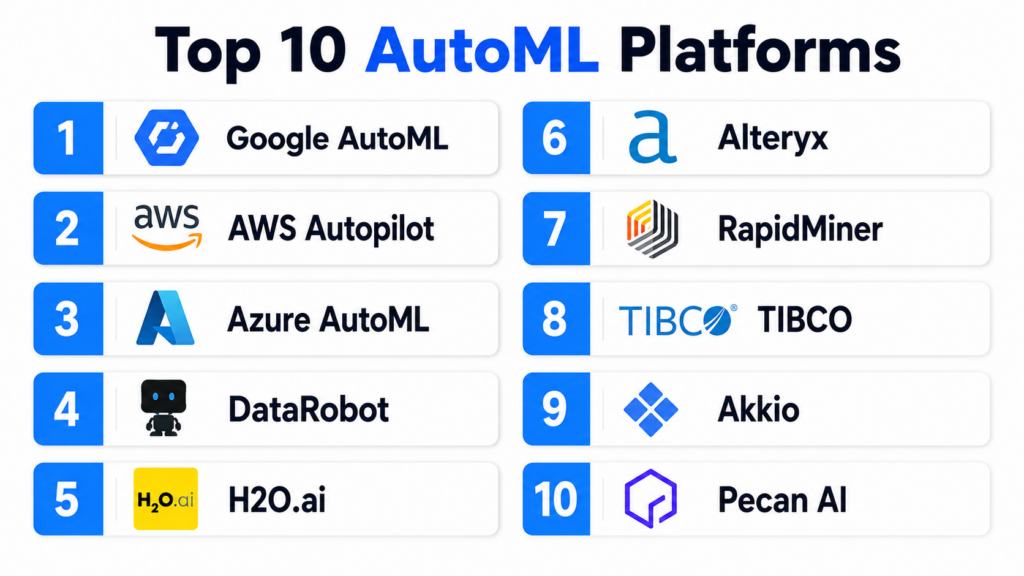
Introduction
Automated Machine Learning, commonly known as AutoML, represents a paradigm shift in how artificial intelligence is developed. In plain English, these platforms automate the time-consuming and complex manual tasks required to build machine learning models—such as data cleaning, selecting the right algorithm, and fine-tuning mathematical parameters. By providing a bridge between raw data and predictive insights, AutoML allows non-experts to generate high-quality models while enabling data scientists to focus on higher-level strategic problems.
In the current technological climate, the demand for AI outpaces the supply of specialized talent. Organizations no longer have months to wait for a data science team to manually iterate through hundreds of models. Efficiency and speed to market are the primary drivers for adoption. AutoML platforms matter now because they democratize predictive power, allowing business analysts and engineers to deploy intelligence into production environments with minimal friction. This evolution is critical for maintaining operational agility in a data-saturated world.
Real-world use cases:
- Predictive Lead Scoring: Sales teams use AutoML to identify which prospective customers are most likely to convert based on historical interaction data.
- Inventory Forecasting: Retailers automate the prediction of stock requirements to reduce overhead while preventing out-of-stock scenarios.
- Churn Mitigation: Subscription services identify users showing signs of cancellation intent, allowing for proactive retention campaigns.
- Quality Control: Manufacturers use automated computer vision models to detect defects on assembly lines without manual inspection.
- Financial Underwriting: Banks automate credit risk assessments to provide instant loan approvals while maintaining strict risk thresholds.
Buyer evaluation criteria:
- Automation Depth: Does the tool handle the entire pipeline from raw data ingestion to deployment?
- Model Transparency: Does the platform provide “Explainable AI” (XAI) features to show why a prediction was made?
- Data Support: Ability to handle tabular, text, image, and time-series data formats.
- Deployment Options: Ease of pushing models to the edge, cloud, or on-premise servers.
- Integration Capabilities: Native connections to data warehouses and business intelligence tools.
- Customization Freedom: Can experienced users override automated decisions to inject domain expertise?
- Resource Efficiency: The compute cost required to run searches for the best-performing model.
- Compliance Features: Built-in tools for auditing models and detecting bias in datasets.
Mandatory paragraph
- Best for: Small to medium-sized businesses without large data science teams, as well as enterprise engineering departments looking to accelerate the delivery of internal AI projects. It is also ideal for business analysts who are comfortable with data but not with advanced Python or R coding.
- Not ideal for: Pure academic researchers who need to invent entirely new neural network architectures, or organizations with extremely niche, data-sparse problems where off-the-shelf automated algorithms cannot find meaningful patterns.
Key Trends in AutoML Platforms
- Generative AI Integration: Platforms are increasingly using Large Language Models to allow users to describe their machine learning goals in plain natural language, which the system then translates into technical pipelines.
- Focus on Small Data: New techniques are being integrated to allow AutoML to find accurate patterns even in smaller datasets, reducing the dependency on massive “Big Data” repositories.
- End-to-End MLOps: AutoML is no longer just about building a model; it is merging with MLOps to automate the monitoring, retraining, and governance of models after they are deployed.
- Multi-Modal Learning: The ability for a single automated pipeline to combine different data types—such as processing a customer’s text review alongside their numerical purchase history—to improve accuracy.
- Explainable AI (XAI) as Standard: Moving away from “black box” models, modern platforms are making visual explainability a non-negotiable feature for regulatory compliance.
- Serverless and Edge Optimization: Platforms are focusing on creating “tiny” models that can run on low-power IoT devices or within browser environments without heavy cloud dependency.
- Bias Detection Automation: Automated checks for fairness are being integrated into the model-building phase to ensure algorithms do not discriminate against protected groups.
- Collaborative Development: Shared “ML Workspaces” that allow business stakeholders and technical developers to iterate on the same automated project in real-time.
How We Selected These Tools (Methodology)
To identify the top 10 AutoML platforms, we utilized a comprehensive evaluation logic based on the following pillars:
- Market Adoption & Mindshare: We prioritized tools that are widely utilized in production environments and recognized by major industry analysts.
- Feature Completeness: We looked for platforms that cover the full spectrum of machine learning tasks, from feature engineering to hyperparameter optimization.
- Security & Posture Signals: We evaluated the native security protocols, including encryption standards and identity management integrations.
- Reliability & Performance: We analyzed how these platforms handle high-concurrency workloads and large-scale dataset searches.
- Integrations & Ecosystem: The breadth of third-party connectors for data sources (Snowflake, BigQuery) and targets (Tableau, PowerBI).
- User Experience (UX): We focused on the accessibility of the interface for both non-coders and technical professionals.
- Economic Value: We assessed the pricing models to ensure they provide a fair return on investment relative to manual data science costs.
Top 10 AutoML Platforms
1. Google Cloud AutoML (Vertex AI)
Short description:
Google Cloud AutoML is a core component of the Vertex AI suite, providing a highly integrated environment for building custom machine learning models. It leverages Google’s world-class research in neural architecture search to automatically find the best models for vision, video, translation, and tabular data. It is specifically built for teams that want the power of Google’s AI without needing to write complex code.
Key Features
- Neural Architecture Search: Automatically explores thousands of model architectures to find the best fit for specific data.
- Vertex AI Integration: Seamlessly moves models into a managed MLOps pipeline for deployment and monitoring.
- AutoML Video: Specialized capability for classifying and tracking objects within video files.
- Edge Export: Allows users to export trained models to run on mobile devices or IoT hardware via TensorFlow Lite.
- Tabular Data Optimization: Advanced feature engineering and selection specifically for structured business data.
Pros
- Access to the same AI infrastructure that powers Google’s core products.
- Incredible performance for image and language-based tasks.
- Deep integration with BigQuery for “Zero-ETL” machine learning.
Cons
- Can be expensive for very long training runs on massive datasets.
- Limited ability for advanced users to “peek under the hood” of certain automated processes.
Platforms / Deployment
- Web / API / CLI
- Cloud (GCP)
Security & Compliance
- SSO/SAML, MFA, VPC Service Controls, Data encryption at rest and in transit.
- SOC 2, ISO 27001, HIPAA, GDPR, FedRAMP.
Integrations & Ecosystem
Vertex AI acts as a central hub within the Google Cloud ecosystem, connecting to a wide array of data and analytics services.
- BigQuery and Cloud Storage.
- Looker for business intelligence.
- TensorFlow, PyTorch, and Scikit-learn support.
Support & Community
Standard and Premium Google Cloud support packages. It benefits from one of the largest developer communities in the world and extensive technical documentation.
2. Amazon SageMaker Autopilot
Short description:
Amazon SageMaker Autopilot is a feature of the SageMaker platform that automates the process of building, training, and tuning the best machine learning models based on your data. Unlike other black-box solutions, Autopilot provides full visibility into the code it generates, allowing data scientists to inspect and refine the automated results. It is ideal for organizations deeply embedded in the AWS ecosystem.
Key Features
- Full Visibility: Automatically generates the Python code used for the model, providing a “glass box” approach.
- Automatic Data Cleaning: Handles missing values and performs feature engineering without manual intervention.
- Algorithm Selection: Automatically chooses from a wide range of algorithms like XGBoost, Linear Learner, and Deep Learning.
- Integration with SageMaker Studio: A unified visual interface for managing the entire model lifecycle.
- Scalability: Leverages AWS’s elastic compute to handle datasets of virtually any size.
Pros
- High level of transparency and control for experienced data scientists.
- Seamlessly transitions from automation to manual tuning.
- Excellent integration with the broader AWS data stack.
Cons
- The SageMaker Studio interface can be complex and intimidating for absolute beginners.
- Cost management can be tricky if users leave high-powered training instances running.
Platforms / Deployment
- Web / Windows / macOS / Linux
- Cloud (AWS)
Security & Compliance
- IAM roles, VPC isolation, KMS encryption, MFA.
- SOC 2, ISO 27001, HIPAA, FedRAMP, PCI-DSS.
Integrations & Ecosystem
SageMaker Autopilot is part of the extensive AWS machine learning and data ecosystem.
- Amazon S3, Redshift, and Athena.
- AWS Glue for data preparation.
- AWS Lambda for serverless model triggers.
Support & Community
AWS Enterprise Support tiers. It has a massive market share and a very large community of certified AWS professionals.
3. Microsoft Azure AutoML
Short description:
Azure AutoML is a service within Azure Machine Learning that automates the development of machine learning models. It is designed to accelerate the productivity of both data scientists and non-developers. It offers a user-friendly drag-and-drop interface alongside a robust SDK for Python users, making it a highly versatile choice for Microsoft-centric enterprises.
Key Features
- Automated Feature Engineering: Performs scaling, normalization, and missing data handling automatically.
- Ensemble Modeling: Combines multiple models (Voting and Stacking) to achieve higher accuracy.
- Time-Series Forecasting: Specialized automated workflows for predicting future trends based on historical data.
- Designer Interface: A no-code, visual drag-and-drop tool for building ML pipelines.
- Model Explanations: Built-in dashboards to understand feature importance and model behavior.
Pros
- Exceptional integration with Excel and Power BI for business analysts.
- Highly flexible, catering to both no-code and pro-code users.
- Strongest focus on enterprise security and “Responsible AI” guardrails.
Cons
- The transition between different Azure AI portals can sometimes be confusing for new users.
- Some advanced automation features are only available in specific regions.
Platforms / Deployment
- Web / Windows / macOS / Linux
- Cloud (Azure)
Security & Compliance
- Entra ID (Azure AD), RBAC, VNET support, Encryption.
- SOC 2, ISO 27001, HIPAA, FedRAMP High.
Integrations & Ecosystem
Azure AutoML is deeply integrated with the Microsoft Intelligent Data Platform and external tools.
- Azure Data Lake and Synapse Analytics.
- Power BI and Microsoft 365.
- GitHub Actions for ML CI/CD.
Support & Community
Microsoft Enterprise Support tiers. Huge corporate presence with extensive training resources and a large network of partners.
4. DataRobot
Short description:
DataRobot is widely considered the pioneer of the AutoML category. It provides a comprehensive enterprise AI platform that automates the end-to-end process of building, deploying, and managing machine learning. It is built for speed and ROI, targeting organizations that want to deploy models into production in days rather than months.
Key Features
- Continuous AI: Automatically retrains models in production to prevent performance drift.
- No-Code App Builder: Allows users to turn a machine learning model into a functional business application without coding.
- Massive Library of Models: Automatically tests data against hundreds of open-source and proprietary algorithms.
- Explainable AI (XAI): Industry-leading tools for understanding the “why” behind every prediction.
- Bias Mitigation: Automated tools to detect and correct unfairness in models.
Pros
- Extremely high degree of automation and speed to value.
- Strongest governance and compliance features for regulated industries.
- Highly polished, intuitive user interface.
Cons
- High cost of entry compared to basic cloud-native services.
- Less flexibility for researchers who want to build entirely custom algorithm architectures.
Platforms / Deployment
- Web
- Cloud / Self-hosted / Hybrid
Security & Compliance
- SSO/SAML, RBAC, Encryption-at-rest.
- SOC 2 Type II, ISO 27001.
Integrations & Ecosystem
DataRobot focuses on becoming the central hub for enterprise AI, connecting to all major data sources.
- Snowflake, BigQuery, and Databricks.
- Tableau and Looker for visualization.
- Alteryx and Informatica integration.
Support & Community
High-touch customer success and technical support models. It has a strong community of business analysts and “citizen” data scientists.
5. H2O.ai (Driverless AI)
Short description:
H2O.ai’s “Driverless AI” is an enterprise-grade AutoML platform that automates many of the most difficult parts of data science. It is famous for its “automatic feature engineering,” which can derive complex insights from raw data that humans might miss. It is highly favored by financial services and insurance companies that require high-performance, explainable models.
Key Features
- Genetic Algorithm-based Feature Engineering: Automatically creates and tests thousands of new features.
- Machine Learning Interpretability (MLI): Comprehensive visual reports that explain model global and local behavior.
- Automatic Documentation: Generates a “technical report” for every model, saving data scientists hours of manual work.
- Multi-Cloud Support: Can be deployed across any major cloud provider or on-premise hardware.
- BYOR (Bring Your Own Recipe): Allows expert data scientists to upload their own custom code into the automated pipeline.
Pros
- Arguably the best automated feature engineering in the industry.
- Extreme performance on structured and tabular datasets.
- Strong focus on transparency and regulatory compliance documentation.
Cons
- Requires a more solid understanding of data science principles than some other “no-code” tools.
- Pricing can be complex based on the number of concurrent experiments.
Platforms / Deployment
- Web / Linux / Windows / macOS
- Cloud / Self-hosted / Hybrid
Security & Compliance
- LDAP/Active Directory, SSO, Encryption.
- Varies / Not publicly stated for all cloud tiers.
Integrations & Ecosystem
H2O.ai has a deep presence in the open-source and enterprise data science stack.
- Python and R SDKs.
- Sparkling Water (Spark integration).
- Scikit-learn and TensorFlow compatibility.
Support & Community
Commercial support is available for enterprise subscribers. It has a very active open-source community through its H2O-3 core engine.
6. Alteryx (Auto Insights & Machine Learning)
Short description:
Alteryx is a leader in “Analytic Process Automation” (APA). Its AutoML capabilities are designed for the business analyst who is already using Alteryx for data preparation. It offers a guided experience that helps users build, validate, and deploy models without requiring a deep background in statistics.
Key Features
- Education Mode: Guides the user through the “why” of each step in the machine learning process.
- Auto Insights: Automatically finds stories and trends in your data without manual querying.
- Feature Engineering: Intelligent suggestions for how to improve your dataset for modeling.
- Model Comparison: A side-by-side view of different automated models to help you pick the best one.
- Seamless Integration: Directly connects to Alteryx Designer for a complete end-to-end data workflow.
Pros
- Ideal for existing Alteryx users who want to add AI to their current pipelines.
- Very strong focus on data preparation and cleaning (the hardest part of ML).
- User-friendly for non-technical business professionals.
Cons
- Less suited for teams that don’t already use the Alteryx ecosystem.
- Limited support for advanced deep learning or complex computer vision tasks.
Platforms / Deployment
- Windows / Web
- Cloud / Self-hosted
Security & Compliance
- SSO, RBAC, Encryption-at-rest.
- SOC 2, ISO 27001.
Integrations & Ecosystem
Alteryx is known for its “Universal Connector” philosophy.
- Snowflake, SQL Server, and Oracle.
- Tableau and Power BI.
- Salesforce and Adobe Analytics.
Support & Community
Robust enterprise support and one of the most passionate and helpful user communities (Alteryx Community) in the data industry.
7. RapidMiner (Altair)
Short description:
RapidMiner, now part of Altair, provides a “Turbo Prep” and “Auto Model” experience that automates data preparation and model building. It is unique in that it offers a unified visual workflow where users can switch between fully automated and manually designed pipelines in a single screen.
Key Features
- Turbo Prep: A visual data preparation tool that automates the cleaning and transformation of datasets.
- Auto Model: Automatically builds and compares models, providing visual explanations of performance.
- Model Ops: Centrally manages the deployment and health of models in production.
- Explainable AI: Provides “impact” and “correlation” charts to demystify model predictions.
- Collaboration: Shared repositories for teams to work together on automated projects.
Pros
- One of the most mature and stable visual data science platforms.
- Excellent balance between automation and deep technical control.
- Very strong in industrial and manufacturing use cases (due to Altair integration).
Cons
- The interface can feel a bit dated compared to newer cloud-native startups.
- Performance on extremely large datasets can sometimes be a bottleneck for the desktop version.
Platforms / Deployment
- Windows / macOS / Linux / Web
- Cloud / Self-hosted
Security & Compliance
- SSO, LDAP, RBAC, Encryption.
- SOC 2.
Integrations & Ecosystem
RapidMiner has long focused on being an open platform.
- Python and R integration.
- Cloud data warehouses (Snowflake, AWS, Azure).
- Industrial IoT (Altair ecosystem).
Support & Community
Professional support through Altair. Large legacy community of data science professionals and extensive documentation.
8. TIBCO Data Science (ModelOps)
Short description:
TIBCO Data Science provides an enterprise-scale platform that automates the machine learning lifecycle with a focus on governance and operationalization. Its AutoML features are designed to help teams quickly build and deploy models while ensuring they meet strict corporate and regulatory standards.
Key Features
- Automated Pipeline Generation: Builds end-to-end data processing and modeling workflows automatically.
- ModelOps Hub: A centralized location for managing all models, regardless of where they were built.
- Real-time Scoring: Optimized for deploying automated models into high-speed streaming data environments.
- Collaboration Tools: Roles-based access and shared projects for data engineers and business users.
- Statistical Controls: Deep integration with TIBCO’s legacy of high-end statistical analysis.
Pros
- Best-in-class for organizations that need to deploy models into real-time streaming data.
- Very strong governance and auditing capabilities.
- Excellent for complex, multi-layered enterprise environments.
Cons
- High complexity and a steeper learning curve than pure “no-code” startups.
- Primarily targeted at large enterprises with significant budgets.
Platforms / Deployment
- Web / Windows / Linux
- Cloud / Self-hosted / Hybrid
Security & Compliance
- SSO, MFA, Advanced RBAC, Audit logging.
- SOC 2, ISO 27001.
Integrations & Ecosystem
Deeply integrated with TIBCO’s broader analytics and data stack.
- TIBCO Spotfire for visualization.
- TIBCO Streaming for real-time data.
- Integration with open-source R and Python.
Support & Community
Global enterprise support services. A mature community centered around high-end data engineering and analytics.
9. Akkio
Short description:
Akkio is a modern, cloud-native AutoML platform designed specifically for business users rather than data scientists. It focuses on the “speed-to-insight,” allowing users to upload a spreadsheet and get predictive results in minutes. It is the go-to solution for marketing, sales, and finance teams that need quick answers without technical overhead.
Key Features
- Predictive Lead Scoring: Specialized automated workflows for sales pipelines.
- Chat Explorer: A generative AI interface that allows you to query your data and models in plain English.
- One-Click Deployment: Turn any automated model into a live web endpoint or a Zapier automation instantly.
- Automatic Feature Engineering: Handles complex date and text transformations without user input.
- Integrated Dashboards: Built-in visualizations to track the performance of your predictions.
Pros
- One of the fastest and easiest AutoML tools to learn.
- Extremely affordable for small teams and startups.
- Very strong integration with the “No-Code” stack (Zapier, etc.).
Cons
- Lacks the deep technical customization features required by expert data scientists.
- Limited to tabular and text data; no advanced computer vision capabilities.
Platforms / Deployment
- Web
- Cloud (SaaS)
Security & Compliance
- SSO, Encryption-at-rest.
- SOC 2 Type II.
Integrations & Ecosystem
Akkio focuses on the modern SaaS and productivity stack.
- Snowflake, Google Sheets, and Airtable.
- Zapier and Make.com for automation.
- HubSpot and Salesforce.
Support & Community
Responsive chat-based support and a growing community of no-code AI enthusiasts.
10. Pecan AI
Short description:
Pecan AI is an AutoML platform focused squarely on “Predictive Analytics” for business outcomes. It automates the generation of SQL-based models for common business problems like customer lifetime value, churn, and demand forecasting. It is designed to be used by data analysts who are comfortable with SQL but may not have machine learning expertise.
Key Features
- Business Outcome Templates: Pre-built automated workflows for specific metrics like CLV and Churn.
- SQL-First Interface: Allows analysts to define their problems and data using standard SQL.
- Automated Data Preparation: Handles the complex restructuring of data required for predictive modeling.
- Always-On Predictions: Automatically updates scores for your customers as new data arrives in your warehouse.
- Impact Analysis: Shows the direct business value and ROI generated by the automated models.
Pros
- Perfect for data analysts who want to move from “what happened” to “what will happen.”
- Extremely strong focus on actionable business metrics.
- Very fast implementation for standard e-commerce and retail use cases.
Cons
- Niche focus on tabular business data; not for general-purpose AI research.
- Dependent on a well-structured data warehouse for the best results.
Platforms / Deployment
- Web
- Cloud (SaaS)
Security & Compliance
- SSO, MFA, Encryption-at-rest.
- SOC 2 Type II, GDPR.
Integrations & Ecosystem
Deeply integrated with the modern data stack.
- Snowflake, BigQuery, and Redshift.
- S3 and Azure Blob Storage.
- Salesforce and HubSpot.
Support & Community
Dedicated customer success managers for enterprise clients. A strong presence in the e-commerce and gaming analytics sectors.
Comparison Table (Top 10)
| Tool Name | Best For | Platform(s) Supported | Deployment | Standout Feature | Public Rating |
| 1. Google AutoML | Vision & NLP | Web, API | Cloud | Neural Arch. Search | N/A |
| 2. AWS Autopilot | AWS Power Users | Web, Win, Mac | Cloud | Generates Python Code | N/A |
| 3. Azure AutoML | MSFT Ecosystem | Web, Win, Mac | Cloud | Power BI Integration | N/A |
| 4. DataRobot | Enterprise ROI | Web | Hybrid | Continuous AI | 4.7/5 |
| 5. H2O.ai | FinServ/Healthcare | Win, Mac, Linux | Hybrid | Feature Engineering | 4.5/5 |
| 6. Alteryx | Business Analysts | Win, Web | Hybrid | Education Mode | 4.6/5 |
| 7. RapidMiner | Industrial IoT | Win, Mac, Linux | Hybrid | Turbo Prep | 4.4/5 |
| 8. TIBCO | Real-time Streaming | Win, Linux | Hybrid | ModelOps Hub | N/A |
| 9. Akkio | Small Teams/No-Code | Web | Cloud | Chat Explorer | 4.8/5 |
| 10. Pecan AI | Predictive SQL | Web | Cloud | Outcome Templates | 4.7/5 |
Evaluation & Scoring of AutoML Platforms
| Tool Name | Core (25%) | Ease (15%) | Integrations (15%) | Security (10%) | Performance (10%) | Support (10%) | Value (15%) | Weighted Total |
| Google AutoML | 10 | 7 | 9 | 10 | 10 | 9 | 8 | 8.95 |
| AWS Autopilot | 9 | 6 | 10 | 10 | 10 | 9 | 8 | 8.60 |
| Azure AutoML | 9 | 7 | 10 | 10 | 9 | 9 | 8 | 8.60 |
| DataRobot | 10 | 9 | 9 | 9 | 9 | 8 | 7 | 8.85 |
| H2O.ai | 9 | 6 | 8 | 8 | 10 | 8 | 8 | 7.95 |
| Alteryx | 7 | 10 | 9 | 8 | 7 | 10 | 7 | 7.95 |
| RapidMiner | 8 | 8 | 8 | 8 | 8 | 8 | 8 | 8.00 |
| TIBCO | 9 | 5 | 8 | 10 | 9 | 8 | 7 | 7.90 |
| Akkio | 6 | 10 | 8 | 8 | 7 | 8 | 10 | 7.70 |
| Pecan AI | 7 | 9 | 9 | 8 | 8 | 8 | 8 | 8.00 |
Interpret scores as follows: Core (Automation depth), Ease (Usability), Integrations (Connector breadth), Security (Compliance), Performance (Speed/Scaling), Support (Service quality), Value (ROI). Scoring is comparative and reflects the state of the market without specific year references.
Which AutoML Platforms Tool Is Right for You?
Solo / Freelancer
If you are an individual consultant or a small freelancer, Akkio is the most practical choice. It provides the fastest route from raw data to a predictive model without requiring you to manage a complex cloud cluster. If you have some technical skill and want a free option to start, the open-source version of H2O-3 is a powerful alternative.
SMB
Small and medium businesses that need to deliver results quickly should look at DataRobot or Pecan AI. DataRobot offers the most “hands-off” experience for a wide range of tasks, while Pecan AI is a perfect fit if your primary goal is improving standard business metrics like churn or demand forecasting using your existing SQL skills.
Mid-Market
For companies that have a growing data team but need to scale their output, Alteryx or RapidMiner are excellent options. They provide a familiar environment for data preparation while introducing powerful automated modeling capabilities that can be audited and customized as the team’s skills mature.
Enterprise
Global enterprises with massive data volumes and strict security requirements should choose between Google Cloud AutoML, AWS Autopilot, or Azure AutoML. These platforms offer the compliance, multi-region availability, and deep integration with existing cloud data lakes that large-scale operations demand.
Budget vs Premium
Akkio and Pecan AI represent excellent value for the money for specific use cases. On the premium end, DataRobot and TIBCO are more significant investments but provide the enterprise-wide governance and automation that justify their price tags in complex corporate environments.
Feature Depth vs Ease of Use
Google AutoML and H2O.ai provide the most technical depth, particularly for complex computer vision and custom feature engineering. On the opposite side, Akkio and Alteryx are the leaders in ease of use, ensuring that users can get results without spending weeks in training.
Integrations & Scalability
For organizations that prioritize integration with their cloud infrastructure, the native tools from AWS, Azure, and Google are the winners. For organizations that prioritize integration with business intelligence and data preparation tools, Alteryx and DataRobot are the strongest contenders.
Security & Compliance Needs
Azure AutoML and DataRobot lead the pack in security and compliance features, providing the most detailed “Responsible AI” dashboards and automated auditing tools necessary for regulated sectors like finance and healthcare.
Frequently Asked Questions (FAQs)
1. Does AutoML replace the need for a Data Scientist?
No, AutoML is a productivity multiplier, not a replacement. While it handles the repetitive and technical tasks like hyperparameter tuning, a human is still required to define the business problem, ensure the data is ethically sourced, and interpret the results to make strategic decisions.
2. Is AutoML as accurate as a manually built machine learning model?
In many standard business cases, AutoML can match or even exceed the accuracy of a manual model because it can test thousands of combinations in a fraction of the time a human would take. However, for extremely unique or highly experimental scientific research, a custom-coded model may still have the edge.
3. How long does it take to train an automated machine learning model?
Training time depends on the size of your dataset and the “search space” you allow the tool to explore. Small datasets can be modeled in minutes, while complex searches through petabytes of data can take several hours. Most platforms allow you to set a “time budget” to control costs.
4. What is the difference between “Black Box” and “Glass Box” AutoML?
Black Box AutoML provides the final prediction but hides the underlying logic or code. Glass Box AutoML (like AWS Autopilot or H2O.ai) provides the full code and transparency into how the model was built, which is essential for auditing and regulatory compliance.
5. Can AutoML work with unstructured data like images and videos?
Yes, several top-tier platforms like Google Cloud AutoML and Azure AutoML have specialized automated pipelines for “Computer Vision” that can recognize objects in images or track motion in videos without requiring the user to understand neural network architecture.
6. What is “Explainable AI” in the context of AutoML?
Explainable AI (XAI) is a set of tools that help you understand which factors most influenced a model’s prediction. For example, if a model denies a loan, XAI will show that “Credit Score” and “Debt-to-Income Ratio” were the primary reasons, which is often a legal requirement.
7. Do I need to be able to code in Python or R to use AutoML?
Most modern AutoML platforms offer a “No-Code” or “Low-Code” interface that allows you to build models using a visual dashboard or drag-and-drop tools. However, having basic SQL or Python knowledge can help you better prepare your data before you upload it to the platform.
8. Are there any hidden costs associated with AutoML platforms?
The primary “hidden” cost is often the compute resources used during the model search phase. Since the platform is testing many models at once, it can consume a significant amount of cloud processing power. Always monitor your “compute credits” or set limits on training duration.
9. What is a “Materialized View” in some AutoML data preparation?
In the context of data preparation for AutoML, a materialized view is a pre-computed dataset that has already been cleaned and formatted for machine learning. This saves the platform from having to re-process raw data every time you want to test a new automated experiment.
10. How do I know if my dataset is large enough for AutoML to work?
Most AutoML tools can work with as few as a few hundred rows of data for simple classification tasks. However, the more complex the problem, the more data you need. A general rule of thumb is to have at least 10 to 20 examples for every feature you are trying to analyze.
Conclusion
The rise of AutoML platforms has fundamentally changed the barrier to entry for artificial intelligence. We are moving toward a world where the ability to predict the future is no longer reserved for those with advanced degrees in mathematics, but is available to any business professional with a clean dataset and a clear question. Whether you choose the massive scale of Google and Amazon or the nimble, business-focused interfaces of Akkio and Pecan AI, the key is to start with a specific operational problem that can be solved with a prediction.
Success in automated machine learning depends less on the complexity of the algorithm and more on the quality of the data and the clarity of the business objective. As these tools continue to evolve with generative AI and better explainability, the competitive gap will widen between those who use automated intelligence to drive their decisions and those who continue to rely on intuition. Your next step should be to identify a high-value, repetitive decision in your organization and run a pilot project with one of the platforms listed above to prove the ROI of automated intelligence.

Great insights shared here, really helpful!