MOTOSHARE 🚗🏍️
Rent Bikes & Cars Directly from Owners
Motoshare connects vehicle owners with people who need bikes and cars on rent. Owners earn from idle vehicles, and renters get flexible ride options.
Visit Motoshare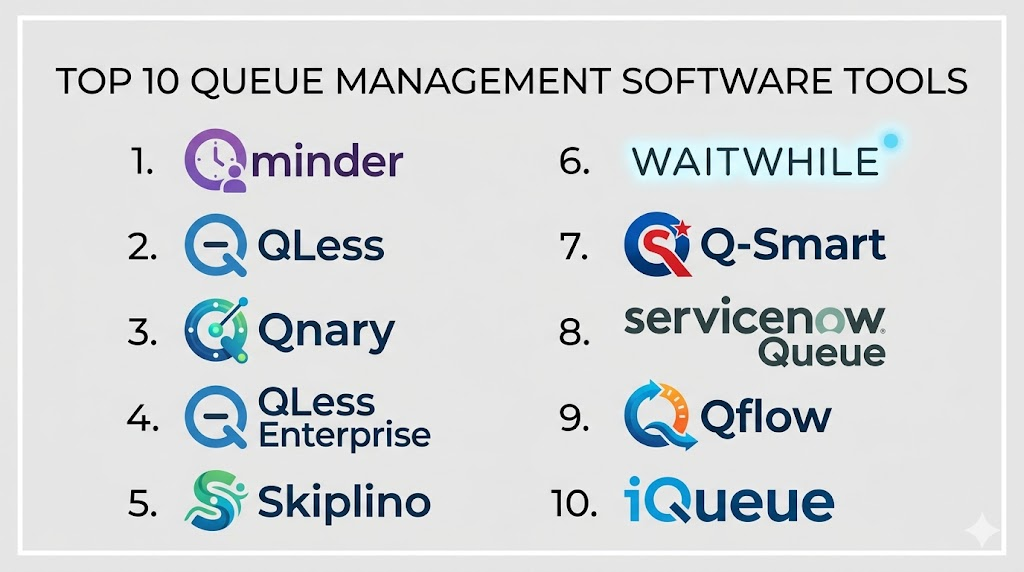
Introduction
Queue Management Software (QMS) helps businesses streamline the flow of customers, visitors, or tasks across service points by organizing waiting lines, providing digital tickets, estimating wait times, and delivering analytics on throughput and service performance. Used across retail stores, banks, hospitals, government offices, service centers, and hospitality environments, QMS minimizes physical congestion, enhances customer experience, and improves operational efficiency.
Real‑world use cases include issuing digital queue numbers via kiosks or mobile apps, notifying customers of their turn via SMS or display screens, estimating wait times, assigning visitors to appropriate service agents, tracking service times for performance optimization, and generating reports for process improvements. Buyers should evaluate features such as kiosk support, mobile queuing, digital signage, SMS notifications, analytics dashboards, integration with CRM or POS systems, customization, reporting, scalability, and vendor support.
Best for: Customer experience teams, operations managers, facility supervisors, retail and service center managers, healthcare administrators, and organizations with high footfall.
Not ideal for: Businesses with very low walk‑in traffic or purely appointment‑based customer processes.
Key Trends in Queue Management Software
- Mobile and remote queuing allowing customers to join queues via smartphone
- AI‑driven wait time estimation to set realistic expectations
- Digital signage and self‑service kiosks to reduce physical lines
- SMS and push notifications to alert customers when their turn is near
- Integration with appointment systems and POS or CRM platforms
- Analytics dashboards for performance and bottleneck insights
- Cloud‑based deployment with remote administration
- Multi‑location and multi‑service routing for complex environments
- Contactless and touchless queuing for health safety
- Role‑based access and automated reporting for compliance
How We Selected These Tools (Methodology)
- Evaluated market adoption across diverse industries
- Assessed feature completeness including mobile, SMS, and analytics
- Reviewed user experience and ease of deployment
- Verified integration with calendars, POS/CRM, and digital signage
- Considered scalability for single and multi‑location deployments
- Prioritized real‑time wait estimation and routing features
- Evaluated configuration flexibility and customization
- Examined reporting and analytics capabilities
- Reviewed security features including access controls and logs
- Assessed vendor support, documentation, and onboarding resources
Top 10 Queue Management Software Tools
#1 — Qminder
Short description: Qminder offers cloud‑based queue management that enables customers to join queues through kiosks, web apps, or mobile devices while providing digital signage and real‑time analytics to track service performance.
Key Features
- Cloud‑based queue dashboards
- Mobile and kiosk check‑in
- Real‑time wait time updates
- Digital signage support
- Analytics and reports
- SMS and email notifications
Pros
- Simple setup with intuitive interface
- Real‑time dashboards for staff
Cons
- Fewer advanced integrations
- Some features tied to higher plans
Platforms / Deployment
- Web, iOS, Android
- Cloud
Security & Compliance
- Not publicly stated
Integrations & Ecosystem
- CRM/POS systems via API
- SMS and notification gateways
- Digital signage systems
Support & Community
Documentation, responsive customer support, and onboarding guides
#2 — QLess
Short description: QLess enables walk‑in customers to join queues remotely via mobile or web, receive wait time estimates, and get notified when their service is ready. It offers strong analytics and multi‑branch support.
Key Features
- Mobile queue entry
- Remote wait time estimates
- SMS/audio notifications
- Multi‑location support
- Analytics dashboards
- Appointment and walk‑in blending
Pros
- Excellent mobile queueing options
- Strong analytics
Cons
- Initial setup requires configuration
- Subscription pricing
Platforms / Deployment
- Web, iOS, Android
- Cloud
Security & Compliance
- Not publicly stated
Integrations & Ecosystem
- POS/CRM connectors
- Appointment systems
- Digital signage
Support & Community
Support portal, account management, and online training
#3 — Qnary
Short description: Qnary provides queue management, digital kiosks, SMS updates, and analytics for retail and service environments. It supports both appointment and walk‑in scenarios.
Key Features
- Digital kiosks for check‑in
- SMS notifications
- Dashboard analytics
- Wait‑time estimation
- Redeployment and routing rules
Pros
- Good hybrid queue and appointment handling
- Easy kiosk configuration
Cons
- Basic on advanced features
- Limited deep analytics
Platforms / Deployment
- Web, iOS, Android
- Cloud
Security & Compliance
- Not publicly stated
Integrations & Ecosystem
- CRM and POS systems
- SMS platforms
- Digital signage
Support & Community
Documentation and support channels
#4 — QLess Enterprise
Short description: QLess Enterprise extends QLess with higher‑end features such as advanced analytics, multi‑service routing, and integrations for large and distributed environments.
Key Features
- Multi‑service queue routing
- Advanced analytics
- Multi‑branch support
- API ecosystem
- Custom notifications
- SLA monitoring
Pros
- Suited for complex environments
- Strong reporting
Cons
- Higher configuration needs
- Premium pricing
Platforms / Deployment
- Web, iOS, Android
- Cloud
Security & Compliance
- Not publicly stated
Integrations & Ecosystem
- Enterprise CRM/POS
- Digital signage
- Workflow automation tools
Support & Community
Enterprise support and documentation
#5 — Skiplino
Short description: Skiplino offers queue management with SMS alerts, digital signage, and service performance reports targeted at retail, banks, and service counters.
Key Features
- SMS queue alerts
- Digital signage integration
- Kiosk and registration
- Real‑time reporting
- Wait‑time display dashboards
Pros
- Affordable option for SMBs
- Easy admin setup
Cons
- Limited enterprise analytics
- Basic integration options
Platforms / Deployment
- Web, iOS, Android
- Cloud
Security & Compliance
- Not publicly stated
Integrations & Ecosystem
- CRM/ERP systems via API
- SMS gateways
- Display signage
Support & Community
Documentation and responsive support
#6 — Waitwhile
Short description: Waitwhile combines queue and appointment management with personalized notifications, analytics dashboards, and integrations for modern service environments.
Key Features
- Online and kiosk check‑in
- Personalized SMS/email alerts
- Appointment and queue blending
- Analytics and reporting
- Estimated wait times
- API access
Pros
- Excellent appointment + queue management
- Flexible templates
Cons
- Advanced analytics require higher tiers
- Some features not as intuitive
Platforms / Deployment
- Web, iOS, Android
- Cloud
Security & Compliance
- Not publicly stated
Integrations & Ecosystem
- POS/CRM systems
- Calendar and booking tools
- SMS/email gateways
Support & Community
Support center and online guides
#7 — Q‑Smart
Short description: Q‑Smart provides digital queue management with kiosk check‑in, digital signage, notifications, and analytics, focusing on retail, clinics, and banks.
Key Features
- Kiosk and web check‑in
- SMS/notification alerts
- Analytics dashboards
- Wait time prediction
- Multi‑counter routing
Pros
- Good for multi‑counter environments
- Clear UI
Cons
- Mid‑level analytics
- Integration support limited
Platforms / Deployment
- Web, iOS, Android
- Cloud
Security & Compliance
- Not publicly stated
Integrations & Ecosystem
- CRM/POS connectors
- Notification services
- Signage systems
Support & Community
Documentation and support desk
#8 — ServiceNow Queue Management
Short description: ServiceNow provides queue and case routing capabilities within its broader service management suite, enabling enterprises to integrate customer wait‑handling with workflow automation.
Key Features
- Intelligent queue routing
- Integrated service workflows
- Analytics and dashboards
- Case management linkage
- SLA tracking
Pros
- Strong enterprise workflows
- Deep automation
Cons
- Requires broader ServiceNow use
- Higher complexity
Platforms / Deployment
- Web, iOS, Android
- Cloud
Security & Compliance
- Not publicly stated
Integrations & Ecosystem
- Enterprise systems
- CRM and workforce tools
- Analytics platforms
Support & Community
Professional support and extensive documentation
#9 — Qflow
Short description: Qflow offers queue and ritual workflow management with SMS alerts, check‑in through kiosk or mobile, and analytics for service level optimization.
Key Features
- Mobile/kiosk check‑in
- SMS alerts
- Analytics dashboards
- Service time tracking
- Digital signage
Pros
- Simple and effective for SMB
- Good real‑time reports
Cons
- Limited advanced features
- Medium integration support
Platforms / Deployment
- Web, iOS, Android
- Cloud
Security & Compliance
- Not publicly stated
Integrations & Ecosystem
- SMS notification gateways
- CRM systems
- Display signage
Support & Community
Documentation and support
#10 — iQueue
Short description: iQueue combines queue and appointment management with real‑time monitoring, SMS alerts, and analytics designed for clinics, banks, and government counters.
Key Features
- Appointment and queue blending
- SMS notifications
- Wait estimation
- Reporting dashboards
- Customer feedback
Pros
- Integrated appointment support
- Customer feedback loops
Cons
- Analytics not deep
- Integration options limited
Platforms / Deployment
- Web, iOS, Android
- Cloud
Security & Compliance
- Not publicly stated
Integrations & Ecosystem
- CRM/ERP
- SMS gateways
- POS interfaces
Support & Community
Documentation and support
Comparison Table (Top 10)
| Tool Name | Best For | Platform(s) Supported | Deployment | Standout Feature | Public Rating |
|---|---|---|---|---|---|
| Qminder | Retail & service floors | Web, iOS, Android | Cloud | Real‑time dashboards | N/A |
| QLess | Mobile queueing focus | Web, iOS, Android | Cloud | Remote queue entry | N/A |
| Qnary | Hybrid appointment/queue | Web, iOS, Android | Cloud | Kiosk workflows | N/A |
| QLess Enterprise | Distributed & large | Web, iOS, Android | Cloud | Routing & analytics | N/A |
| Skiplino | SMB centers | Web, iOS, Android | Cloud | Affordable option | N/A |
| Waitwhile | Appointment + queue | Web, iOS, Android | Cloud | Blended booking | N/A |
| Q‑Smart | Multi‑counter settings | Web, iOS, Android | Cloud | Routing features | N/A |
| ServiceNow Queue | Enterprise workflows | Web, iOS, Android | Cloud | Workflow automation | N/A |
| Qflow | SMB & clinics | Web, iOS, Android | Cloud | Real‑time reports | N/A |
| iQueue | Clinics & counters | Web, iOS, Android | Cloud | Appointment blend | N/A |
Evaluation & Scoring of Queue Management Software
| Tool Name | Core (25%) | Ease (15%) | Integrations (15%) | Security (10%) | Performance (10%) | Support (10%) | Value (15%) | Weighted Total |
|---|---|---|---|---|---|---|---|---|
| Qminder | 8 | 8 | 7 | 7 | 8 | 8 | 7 | 7.8 |
| QLess | 8 | 7 | 8 | 7 | 8 | 8 | 7 | 7.7 |
| Qnary | 7 | 8 | 7 | 7 | 7 | 7 | 6 | 7.1 |
| QLess Enterprise | 9 | 7 | 8 | 7 | 8 | 8 | 6 | 7.6 |
| Skiplino | 7 | 9 | 6 | 7 | 7 | 8 | 8 | 7.6 |
| Waitwhile | 8 | 8 | 8 | 7 | 8 | 7 | 7 | 7.8 |
| Q‑Smart | 7 | 8 | 7 | 7 | 7 | 7 | 6 | 7.1 |
| ServiceNow Queue | 9 | 7 | 9 | 7 | 9 | 8 | 6 | 8.0 |
| Qflow | 7 | 8 | 6 | 7 | 7 | 7 | 7 | 7.1 |
| iQueue | 7 | 8 | 6 | 7 | 7 | 7 | 7 | 7.1 |
Interpretation: Weighted totals show relative strengths across core queue features, ease of use, integrations, performance, and overall value. Higher scores indicate strong suitability for demanding environments like enterprise workflows and combined appointment/queue operations.
Which Queue Management Software Tool Is Right for You?
Solo / Small Service Counters
- Skiplino, Qflow, or iQueue for straightforward queueing and alerts.
SMB Shops & Retail
- Qminder or Waitwhile for blended appointment + queue flows with analytics.
Mid‑Market & Multi‑Counter
- QLess or Q‑Smart for structured routing and SMS notifications.
Enterprise & High Volume
- ServiceNow Queue or QLess Enterprise for workflow automation and multi‑location analytics.
Budget vs Premium
- Budget: Skiplino, Qflow, iQueue
- Premium: ServiceNow Queue, QLess Enterprise
Feature Depth vs Ease of Use
- Feature depth: ServiceNow Queue, QLess Enterprise
- Easy deployment: Skiplino, Waitwhile
Integrations & Scalability
- ServiceNow Queue excels with enterprise systems and workflows.
Security & Compliance Needs
- Enterprise tools with roles and logs support compliance reporting.
Frequently Asked Questions (FAQs)
1. What pricing models are common?
Subscription models per location or per user are most common, with tiered access to analytics or SLA features.
2. Can customers join queues remotely?
Yes, many tools allow queue joining via mobile apps or web without physical presence.
3. Do these systems support SMS notifications?
Yes, alerting customers by SMS or email is standard.
4. Can data integrate with POS and CRM?
Some tools provide API and connector support for CRM or POS workflows.
5. Are appointment bookings supported?
Platforms like Waitwhile and iQueue blend appointments with walk‑in queues.
6. Is real‑time waiting time estimation included?
Most modern QMS include dynamic wait time estimates based on flow and load.
7. Do queue systems help reduce crowding?
Yes, remote queueing and SMS alerts reduce physical line congestion.
8. Can managers get analytics?
All top platforms provide dashboards and reporting for service optimization.
9. Are multi‑site deployments supported?
Yes, enterprise tools support multiple branches and centralized dashboards.
10. How do queue systems help customer satisfaction?
By reducing wait times, offering notifications, and streamlining service flow.
Conclusion
Queue Management Software transforms crowded reception areas and service counters into organized, measurable, and efficient operations. Retailers and small service counters may find tools like Skiplino, Qflow, or iQueue sufficient for basic queue control, while blended appointment + queue tools like Waitwhile and Qminder offer better visibility and operations metrics. Mid‑market setups benefit from QLess and Q‑Smart’s routing and SMS features, and enterprises with complex workflows and integrations gain significant value from ServiceNow Queue and QLess Enterprise. Buyers should assess ease of deployment, integration capabilities, analytics needs, and mobile or kiosk support before choosing a solution. A recommended next step is to pilot two to three platforms in real customer flow scenarios to validate performance and operational fit prior to full implementation.

Thanks for making such a complex topic so approachable.
Organizing comprehensive unique retail customer waiting line digital tracking notification software optimizes global physical service facility throughput mechanics, ensuring rapid decentralized visitor check-in validation auditing and frictionless commercial branch lobby flow optimization administration methodologies.