MOTOSHARE 🚗🏍️
Rent Bikes & Cars Directly from Owners
Motoshare connects vehicle owners with people who need bikes and cars on rent. Owners earn from idle vehicles, and renters get flexible ride options.
Visit Motoshare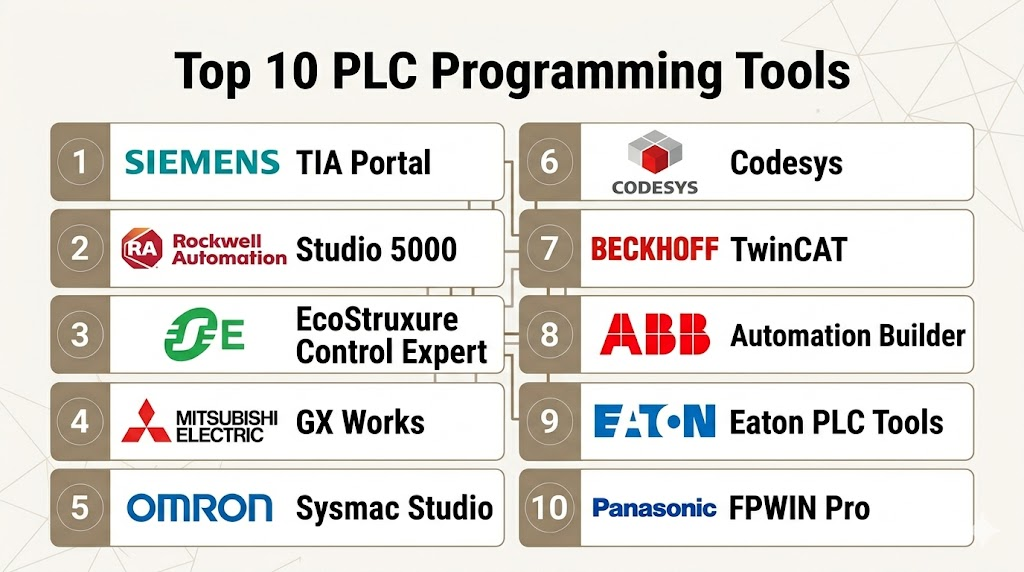
Introduction
PLC (Programmable Logic Controller) Programming Tools are software platforms used to develop, test, debug, and deploy control logic for industrial automation systems. PLCs are the backbone of modern automated factories, process lines, material handling systems, energy management, and many other electromechanical systems. Programming tools help engineers translate automation requirements into executable control code that manages digital and analog I/O, sequential logic, timers, counters, motion axes, communication protocols, and safety interlocks.
In the world of Industry 4.0, PLC programming has evolved from simple ladder logic to include structured text, function blocks, sequential function charts, and integrated simulation environments that support hardware‑in‑the‑loop (HIL) testing, debugging, and real‑time monitoring. With the proliferation of distributed control systems, edge devices, and IoT connectivity, the quality and flexibility of PLC programming tools influence deployment speed, maintainability, and ongoing performance of industrial systems.
Real‑world use cases include:
- Factory automation: Programming and maintaining assembly line logic, stamping machines, conveyors, and robotics.
- Process control: Managing batch processes, temperature/pressure loops, mixing, and safety interlocks.
- Packaging and material handling: Controlling actuators, sensors, vision systems, and HMI interaction.
- Building automation: HVAC logic, elevator controls, lighting routines, and access systems.
- Energy systems: Load balancing, generator control, and smart grid automation.
Evaluation Criteria for Buyers:
- Support for industry standards (IEC 61131‑3 languages)
- Visualization, debugging, and simulation capabilities
- Hardware vendor support and driver ecosystem
- Code versioning and documentation tools
- Ease of use and developer productivity
- Integration with SCADA, MES, and IoT networks
- Offline editing and hardware‑in‑the‑loop (HIL) simulation
- Security and access controls
- Support for distributed/multi‑controller systems
- Licensing and cost models
Best for: Control systems engineers, automation programmers, maintenance teams, integrators, and OEM design teams across manufacturing, energy, utilities, transportation, and building systems.
Not ideal for: Simple on/off logic solutions with no future expandability, or organizations without structured maintenance processes where scripting or relay logic may suffice.
Key Trends in PLC Programming Tools
- IEC 61131‑3 standard adoption with structured text, ladder logic, function block diagrams, and more.
- Unified engineering environments that combine SCADA, PLC, motion, and safety logic.
- Simulation and virtual commissioning reducing physical commissioning time.
- Collaborative development with version control (Git, SVN) and team workflows.
- Cloud‑assisted toolchains for remote access and multi‑site configuration management.
- Integrated diagnostics and analytics for runtime performance insights.
- Support for PID, motion, robotics, and sequential function charts beyond simple digital logic.
- Security features for signed firmware, role‑based access, and encrypted communications.
- Standardized communication stacks (OPC UA, Modbus, EtherNet/IP, Profinet).
How We Selected These Tools (Methodology)
- Market adoption across OEM, machine builders, and industrial integrators.
- Feature completeness across languages, simulation, debugging, and vendor support.
- Reliability and performance in heterogeneous industrial environments.
- Security posture including access controls, project encryption, and secure firmware deployment.
- Integration and ecosystem support with SCADA, historians, ERP/MES, and IoT.
- Usability and productivity for new and experienced automation engineers.
- Documentation, training, and community engagement quality.
- Scalability from single machine to distributed multi‑controller systems.
Top 10 PLC Programming Tools
#1 — Siemens TIA Portal (Totally Integrated Automation Portal)
Short description:
Siemens TIA Portal is a comprehensive engineering suite for programming, configuring, and diagnosing Siemens PLCs, HMIs, drives, and plant networks. It consolidates multiple toolchains into one integrated environment, enabling streamlined automation engineering.
Key Features
- Single environment for PLCs, visualization, and motion
- IEC 61131‑3 language support
- Advanced simulation and offline testing
- Integrated diagnostics and system visualization
- Version control support and documentation tools
Pros
- Extremely deep ecosystem for Siemens automation
- Strong diagnostics and simulation
- Unified engineering workflows
Cons
- Steeper learning curve
- Licensing complexity
Platforms / Deployment
- Windows (Engineering)
Security & Compliance
- Role‑based access, project encryption, signed firmware
Integrations & Ecosystem
- Siemens PLCs, SCADA, drives
- OPC, Profinet/Ethernet/IP
- Teamcenter/PLM connectors
Support & Community
- Siemens support, online training, global partner network
#2 — Rockwell Automation Studio 5000
Short description:
Studio 5000 is Rockwell’s flagship PLC programming and automation design suite for Allen‑Bradley ControlLogix and CompactLogix platforms. It emphasizes structured design, modular code, and enterprise integration.
Key Features
- Structured text, ladder logic, function block support
- Reusable code modules and libraries
- Integrated motion and safety configuration
- Simulation and debugging tools
- Version control and documentation
Pros
- Industry‑standard for North American OEMs
- Excellent integration with Rockwell hardware
- Strong safety and motion programming
Cons
- Licensing can be costly
- Primarily tied to Rockwell ecosystem
Platforms / Deployment
- Windows
Security & Compliance
- Role‑based access, change tracking
Integrations & Ecosystem
- Allen‑Bradley PLCs, RSLogix libraries
- FactoryTalk and SCADA products
- EtherNet/IP ecosystem
Support & Community
- Rockwell support, Academy training, partner ecosystem
#3 — Schneider Electric EcoStruxure Control Expert (Unity Pro)
Short description:
EcoStruxure Control Expert (formerly Unity Pro) is Schneider Electric’s PLC programming environment designed for Modicon PLCs, with extensive logic, debugging, and simulation capabilities.
Key Features
- Full IEC 61131‑3 language support
- Online/offline simulation
- Integrated diagnostics and visualization
- Redundancy and safety integration
- Modular code libraries
Pros
- Strong support for process and discrete control
- Scalable from small to large installations
- Good multi‑controller diagnostics
Cons
- Less widespread outside EcoStruxure users
- Licenses contribute to cost
Platforms / Deployment
- Windows
Security & Compliance
- Role‑based access, encrypted project formats
Integrations & Ecosystem
- Modicon PLCs, Wonderware/AVEVA suite
- OPC UA, Modbus, Ethernet
Support & Community
- Schneider support, community forums, webinars
#4 — Mitsubishi GX Works
Short description:
GX Works is Mitsubishi Electric’s primary PLC development tool for its MELSEC series controllers, offering logic, simulation, and project management features tailored for factory automation.
Key Features
- Ladder logic, structured text support
- Built‑in simulator
- Project libraries and templates
- Online debugging tools
- Communication configuring
Pros
- Clean interface for Mitsubishi systems
- Good simulation support
- Effective for mid‑range automation
Cons
- Best performance with Mitsubishi devices
- Fewer advanced analytics
Platforms / Deployment
- Windows
Security & Compliance
- Not publicly stated
Integrations & Ecosystem
- MELSEC PLCs, network drivers
- OPC, Ethernet, fieldbus support
Support & Community
- Mitsubishi support, partner resources
#5 — Omron CX‑Programmer / Sysmac Studio
Short description:
Omron’s CX‑Programmer and newer Sysmac Studio provide PLC programming for Omron family controllers, with synchronous motion, safety, and logic design for factory automation.
Key Features
- Ladder, structured text, function block
- Integrated motion and safety logic
- Debugging and monitoring
- Simulation tools
- Project synchronization
Pros
- Unified development for Omron controllers
- Strong motion and safety integration
- Intuitive interface
Cons
- Primarily for Omron hardware
- Licensing tiers vary
Platforms / Deployment
- Windows
Security & Compliance
- Not publicly stated
Integrations & Ecosystem
- Omron PLCs, NJ/CP series
- EtherNet/IP, EtherCAT
Support & Community
- Omron support lines, webinars
#6 — Codesys
Short description:
Codesys is a hardware‑agnostic, IEC 61131‑3 compliant development environment used across multiple PLC brands. It supports a wide range of controllers and fieldbus protocols, making it a popular choice for system integrators and OEMs.
Key Features
- Full IEC 61131‑3 language suite
- Library and reuse support
- Simulation and testing tools
- Protocol drivers (Modbus, CANopen, EtherCAT)
- Visualization and HMI integration
Pros
- Vendor‑neutral and flexible
- Strong library ecosystem
- Multi‑platform support
Cons
- Some learning curve for large systems
- HMI tools may require additional modules
Platforms / Deployment
- Windows
Security & Compliance
- Project encryption, user roles
Integrations & Ecosystem
- Many PLC vendors (Beckhoff, WAGO, etc.)
- Fieldbus drivers built‑in
- HMI/SCADA partnerships
Support & Community
- Codesys store, online documentation, forums
#7 — Beckhoff TwinCAT
Short description:
TwinCAT is Beckhoff’s automation suite converting a standard PC into a real‑time PLC, motion controller, and HMI platform, integrating IEC 61131‑3 languages with PC control flexibility.
Key Features
- Real‑time control on PC/edge hardware
- PLC, motion, robotics programming
- Soft‑PLC and distributed I/O support
- Debugging and analytics views
- Integration with EtherCAT
Pros
- PC‑centric performance and flexibility
- Deep motion and robotics support
- Scalable from single axis to complex machines
Cons
- Requires strong engineering skill
- Hardware requirements influence deployment
Platforms / Deployment
- Windows, Industrial PC
Security & Compliance
- User roles, access control
Integrations & Ecosystem
- EtherCAT, OPC UA
- MES/SCADA connectors
Support & Community
- Beckhoff support, user forums
#8 — ABB Automation Builder
Short description:
ABB Automation Builder is the integrated engineering suite for ABB PLCs and industrial controllers, consolidating PLC, motion, safety, and visualization configuration.
Key Features
- IEC 61131‑3 languages
- Motion and drive integration
- Safety system configuration
- Simulation and debugging
- Modular project templates
Pros
- Unified environment for ABB control systems
- Good motion and safety workflows
- Enterprise integration with ABB ecosystem
Cons
- Best with ABB hardware
- Licensing considerations
Platforms / Deployment
- Windows
Security & Compliance
- Not publicly stated
Integrations & Ecosystem
- ABB PLCs, drives
- OPC UA, fieldbus
Support & Community
- ABB support and training
#9 — Eaton PLC Tools
Short description:
Eaton PLC Tools provide programming environments for Eaton automation controllers, emphasizing industrial automation and power‑focused logic design.
Key Features
- Ladder and structured text
- Simulation environment
- Monitoring and diagnostics
- Project libraries
- Communication configuration
Pros
- Solid integration with Eaton controllers
- Good diagnostic capabilities
- Suitable for industrial automation
Cons
- Smaller ecosystem than major vendors
- Less extensive training materials
Platforms / Deployment
- Windows
Security & Compliance
- Not publicly stated
Integrations & Ecosystem
- Eaton automation gear
- Modbus, fieldbus drivers
Support & Community
- Vendor support, documentation
#10 — Panasonic FPWIN Pro
Short description:
Panasonic FPWIN Pro is the programming suite for Panasonic PLCs, offering core logic editing, debugging, and simulation for mid‑range automation systems.
Key Features
- Ladder logic and structured text
- On‑line editing and debugging
- Simulation tools
- Communication setup
- Project libraries
Pros
- Easy to use for mid‑range applications
- Good simulation and debugging
- Cost‑effective
Cons
- Tightest fit with Panasonic hardware
- Smaller ecosystem
Platforms / Deployment
- Windows
Security & Compliance
- Not publicly stated
Integrations & Ecosystem
- Panasonic PLCs
- Communication drivers
Support & Community
- Panasonic resources
Comparison Table (Top 10)
| Tool Name | Best For | Platform(s) Supported | Deployment | Standout Feature | Public Rating |
|---|---|---|---|---|---|
| Siemens TIA Portal | Siemens automation | Windows | On‑prem | Unified engineering | N/A |
| Rockwell Studio 5000 | North American OEMs | Windows | On‑prem | Structured design modules | N/A |
| Schneider EcoStruxure Control Expert | Process & discrete | Windows | On‑prem | Multi‑controller diagnostics | N/A |
| Mitsubishi GX Works | Factory automation | Windows | On‑prem | Integrated simulator | N/A |
| Omron Sysmac Studio | Synchronous control | Windows | On‑prem | Motion & safety integration | N/A |
| Codesys | Vendor‑neutral systems | Windows | On‑prem | Multi‑vendor support | N/A |
| Beckhoff TwinCAT | PC‑based real‑time control | Windows | On‑prem | PC control flexibility | N/A |
| ABB Automation Builder | ABB ecosystem | Windows | On‑prem | Unified ABB control | N/A |
| Eaton PLC Tools | Industrial automation | Windows | On‑prem | Diagnostics & monitoring | N/A |
| Panasonic FPWIN Pro | Mid‑range PLCs | Windows | On‑prem | Cost‑effective dev suite | N/A |
Evaluation & Scoring of PLC Programming Tools
| Tool Name | Core (25%) | Ease (15%) | Integrations (15%) | Security (10%) | Performance (10%) | Support (10%) | Value (15%) | Weighted Total (0–10) |
|---|---|---|---|---|---|---|---|---|
| Siemens TIA Portal | 9 | 7 | 9 | 7 | 8 | 8 | 7 | 8.2 |
| Rockwell Studio 5000 | 9 | 7 | 8 | 7 | 8 | 8 | 7 | 8.0 |
| Schneider EcoStruxure | 8 | 7 | 8 | 7 | 8 | 7 | 7 | 7.6 |
| Mitsubishi GX Works | 7 | 8 | 7 | 7 | 7 | 7 | 8 | 7.6 |
| Omron Sysmac Studio | 8 | 8 | 7 | 7 | 8 | 7 | 7 | 7.7 |
| Codesys | 8 | 7 | 9 | 7 | 7 | 8 | 8 | 8.0 |
| Beckhoff TwinCAT | 8 | 7 | 8 | 7 | 8 | 7 | 7 | 7.7 |
| ABB Automation Builder | 7 | 7 | 7 | 7 | 7 | 7 | 7 | 7.1 |
| Eaton PLC Tools | 7 | 8 | 7 | 7 | 7 | 7 | 7 | 7.3 |
| Panasonic FPWIN Pro | 7 | 8 | 6 | 7 | 7 | 7 | 8 | 7.4 |
Interpretation: Higher weighted totals indicate stronger overall PLC programming support, integration breadth, and ecosystem flexibility. Scores are comparative.
Which PLC Programming Tool Is Right for You?
Solo / Freelancer
Lightweight platforms like Panasonic FPWIN Pro, Mitsubishi GX Works, or Eaton PLC Tools are great for small projects or rapid prototyping.
SMB
Tools like Codesys and Omron Sysmac Studio offer vendor‑neutral or synchronized motion/safety design with intuitive UIs and scalable options.
Mid‑Market
Rockwell Studio 5000 and Beckhoff TwinCAT provide structured logic, motion, and distributed I/O support for mid‑tier industrial automation.
Enterprise
Siemens TIA Portal, Rockwell Studio 5000, and Schneider EcoStruxure Control Expert deliver broad features, deep integration, and enterprise‑scale capabilities.
Budget vs Premium
Open platforms like Codesys reduce cost barriers, while premium suites provide extensive diagnostics, simulation, and vendor support.
Feature Depth vs Ease of Use
Tools like Studio 5000 and TIA Portal offer deep engineering capabilities; simpler tools like FPWIN Pro boost productivity for mid‑range systems.
Integrations & Scalability
Vendor‑agnostic tools support wide PLC ecosystems; vendor‑specific tools deliver optimized drivers, presets, and automation templates.
Security & Compliance Needs
Enterprise systems should leverage project encryption, access roles, and secure firmware workflows.
Frequently Asked Questions (FAQs)
1. What is a PLC programming tool?
A PLC programming tool is software used to write, test, simulate, and deploy control logic on PLC hardware that runs industrial automation systems.
2. Which programming languages do these tools support?
Most tools support IEC 61131‑3 languages such as ladder logic, structured text, function block diagrams, and sequential function charts.
3. Do PLC tools support simulation?
Yes — many platforms (TIA Portal, Studio 5000, Codesys) have built‑in simulation capabilities to test logic before deployment.
4. How do I choose a PLC programming tool?
Evaluate based on the PLC hardware you use, required languages, integration needs, and whether vendor‑agnostic development is important.
5. Can I use version control with PLC projects?
Yes — many environments support Git, SVN, or project file versioning workflows for collaborative teams.
6. What about remote commissioning?
Cloud‑assisted toolchains and remote editing features support commissioning across multiple locations securely.
7. Are PLC tools secure?
Modern toolchains include role‑based access, project encryption, secure firmware signing, and authentication controls.
8. Do these tools integrate with SCADA systems?
Yes — most tools provide drivers, tags, and runtime export options to integrate with SCADA, historians, and dashboard platforms.
9. Can I use third‑party PLCs with generic tools?
Vendor‑neutral environments like Codesys support many third‑party PLCs with a consistent engineering interface.
10. How hard is it to learn PLC programming?
Entry‑level ladder logic is approachable, while advanced structured text and motion logic require deeper training; many vendors provide courses.
Conclusion
PLC Programming Tools are essential in translating automation requirements into executable control logic that drives machines, processes, and industrial systems. Choosing the right tool depends on your hardware ecosystem, complexity of control, simulation needs, scalability requirements, and long‑term maintenance strategy. Vendor‑specific tools like Siemens TIA Portal or Rockwell Studio 5000 provide deep integration and industry support, while vendor‑neutral platforms like Codesys offer flexibility across hardware. For successful deployments, define your control architecture early, validate logic with simulations and version control, and align engineering tools with SCADA, analytics, and production monitoring systems to maximize automation ROI.

Great information shared here
I appreciate the clear writing and practical approach.