MOTOSHARE 🚗🏍️
Rent Bikes & Cars Directly from Owners
Motoshare connects vehicle owners with people who need bikes and cars on rent. Owners earn from idle vehicles, and renters get flexible ride options.
Visit Motoshare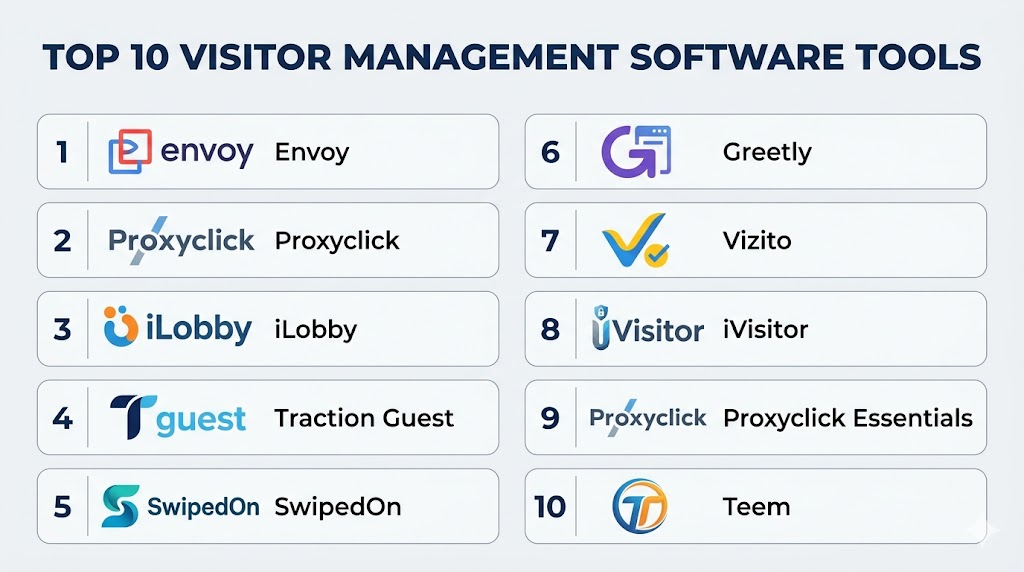
Introduction
Visitor Management Software (VMSW) helps organizations track, screen, and manage visitors as they enter and exit physical locations. These systems replace paper logs and manual check‑ins with digital processes that improve security, reduce wait times, capture audit trails, and enhance compliance. VMSW is used across offices, schools, healthcare facilities, government buildings, co‑working spaces, and industrial sites. It enables pre‑registration, badge printing, watchlist screening, emergency notifications, and touchless check‑ins.
Real‑world use cases include pre‑registering guests for streamlined entry, capturing visitor photos and signatures, automatically notifying hosts upon arrival, enforcing policy and NDA acceptance, limiting access based on clearance levels, and maintaining digital logs for safety, legal, and compliance audits. Buyers should evaluate ease of use, device support (kiosks, tablets, phones), integration with access control or calendar systems, visitor screening features, customization, reporting and analytics, security, deployment options, and vendor support.
Best for: Security teams, reception staff, facilities and HR managers, compliance officers, and organizations with moderate to high visitor traffic.
Not ideal for: Very low visitor‑volume sites where manual sign‑in suffices, or environments without reliable network connectivity.
Key Trends in Visitor Management Software
- Touchless and contactless check‑in using QR codes and mobile credentials
- Pre‑registration workflows with host notifications
- Watchlist screening for enhanced safety
- Integration with access control systems for gated visitor access
- AI‑powered identity verification and document scanning
- Digital consent and policy signing at check‑in
- Mobile and tablet‑first kiosk experiences
- Automated badge printing and NFC/RFID tags
- Emergency evacuation lists and alerts
- Analytics & reporting for compliance and space utilization
How We Selected These Tools (Methodology)
- Evaluated market adoption and relevance across SMB and enterprise
- Assessed feature completeness (pre‑registration, screening, notifications)
- Reviewed usability and mobile/kiosk experiences
- Verified integrations with calendars, access control, and identity systems
- Examined analytics and reporting capabilities
- Prioritized security (audit trails, encryption, role controls)
- Considered deployment flexibility (cloud, hybrid, on‑premise)
- Checked scalability for multiple sites
- Reviewed vendor support, onboarding, and documentation
- Focused on real‑world operational efficiency and compliance benefits
Top 10 Visitor Management Software Tools
#1 — Envoy
Short description: Envoy is a widely adopted visitor management platform that streamlines sign‑in, badges, host notifications, and compliance workflows. It supports touchless check‑in and integrates with access control, calendars, and communication tools.
Key Features
- Digital sign‑in with pre‑registration
- Host notifications and badge printing
- Watchlist screening
- Touchless QR code check‑in
- Integration with calendars and access control
- Visitor analytics and reporting
Pros
- Strong ecosystem integrations
- Excellent UX and mobile support
Cons
- Advanced features require paid plans
- Customization may need support
Platforms / Deployment
- iOS, Android, Web
- Cloud / Hybrid
Security & Compliance
- Not publicly stated
Integrations & Ecosystem
- Calendars (Outlook, Google)
- Access control systems
- Messaging platforms
Support & Community
Documentation, responsive support, and onboarding resources
#2 — Proxyclick
Short description: Proxyclick offers a secure visitor platform with compliance controls, watchlist screening, pre‑registration, and customizable workflows suited for global enterprises and regulated industries.
Key Features
- GDPR‑compliant visitor data handling
- Pre‑registration and QR check‑in
- Watchlist & risk screening
- Badge and document printing
- Notifications and reminders
Pros
- Strong compliance focus
- Global deployment ready
Cons
- Steeper learning curve
- Higher pricing tiers
Platforms / Deployment
- Web, iOS, Android
- Cloud
Security & Compliance
- Not publicly stated
Integrations & Ecosystem
- Access control
- Visitor screening services
- Identity verification providers
Support & Community
Enterprise support, documentation, and training
#3 — iLobby
Short description: iLobby is an enterprise visitor management solution focused on security workflows, background checks, digital forms, and incident tracking. It offers configurable policies for complex organizations.
Key Features
- Background check integration
- Custom workflows and forms
- Badge printing
- Incident management
- Host notifications
Pros
- Deep security workflow support
- Highly configurable
Cons
- Complex setup for smaller teams
- Requires training
Platforms / Deployment
- Web, iOS, Android
- Cloud / Hybrid
Security & Compliance
- Not publicly stated
Integrations & Ecosystem
- Access control
- Screening partners
- Directory and HR systems
Support & Community
Documentation, setup support, and enterprise services
#4 — Traction Guest
Short description: Traction Guest focuses on compliance and visitor identity verification for regulated industries. It supports global deployments, customizable workflows, pre‑registration, and API integrations.
Key Features
- Identity verification
- Customizable flows and policies
- Pre‑registration and check‑in
- Badge printing
- Compliance reporting
Pros
- Strong identity and compliance tools
- Highly customizable
Cons
- Requires configuration expertise
- Pricing for advanced modules
Platforms / Deployment
- Web, iOS, Android
- Cloud
Security & Compliance
- Not publicly stated
Integrations & Ecosystem
- HR and directory systems
- Access control
- Enterprise tools via API
Support & Community
Enterprise support and documentation
#5 — SwipedOn
Short description: SwipedOn is a simple yet powerful visitor sign‑in system with host notifications, badges, analytics, and compliance tools designed for SMBs and offices.
Key Features
- Easy digital sign‑in
- Host alerts
- Badge printing
- Basic screening questions
- Touchless options
Pros
- Simple setup
- Excellent UX for SMBs
Cons
- Limited analytics for large enterprises
- Advanced screening requires add‑ons
Platforms / Deployment
- iOS, Android, Web
- Cloud
Security & Compliance
- Not publicly stated
Integrations & Ecosystem
- Calendar systems
- Email notifications
- Basic access control linking
Support & Community
Responsive support and guides
#6 — Greetly
Short description: Greetly’s visitor management combines professional welcome messages, digital sign‑in, badge printing, and custom workflows. It suits offices, healthcare, and medium‑sized locations.
Key Features
- Custom sign‑in experience
- Pre‑registration
- Badge printing
- Host notifications
- Visitor logs and analytics
Pros
- Professional and polished check‑in UX
- Flexible customizations
Cons
- Mid‑tier pricing
- Less enterprise screening
Platforms / Deployment
- iOS, Android, Web
- Cloud / Hybrid
Security & Compliance
- Not publicly stated
Integrations & Ecosystem
- Calendars
- Email and SMS alerts
- Access control connectors
Support & Community
Documentation and support team
#7 — Vizito
Short description: Vizito provides a modern visitor sign‑in experience with pre‑registration, host alerts, badge printing, and analytics designed for SMBs and large offices alike.
Key Features
- Pre‑registration
- Host notifications
- Badge generation
- Reporting dashboard
- Touchless sign‑in
Pros
- Clean interface
- Smooth host notifications
Cons
- Fewer enterprise compliance tools
- Basic analytics
Platforms / Deployment
- iOS, Android, Web
- Cloud
Security & Compliance
- Not publicly stated
Integrations & Ecosystem
- Calendar sync
- Email alerts
- Basic access control linking
Support & Community
Customer support and online guides
#8 — iVisitor
Short description: iVisitor delivers a cost‑effective visitor management solution with check‑in, badges, screening, and reporting suitable for educational and small business environments.
Key Features
- Digital sign‑in
- Badge printing
- Watchlist screening
- Host notifications
- Data reporting
Pros
- Affordable entry point
- Basic screening included
Cons
- Limited advanced workflows
- UI feels basic
Platforms / Deployment
- Web, iOS, Android
- Cloud
Security & Compliance
- Not publicly stated
Integrations & Ecosystem
- Calendars
- Email alerts
- Basic access control
Support & Community
Support and documentation
#9 — Proxyclick Essentials
Short description: Proxyclick Essentials offers a streamlined visitor management experience focusing on essential sign‑in, pre‑registration, QR check‑in, and host notifications for SMB and mid‑size deployments.
Key Features
- Essential sign‑in and pre‑registration
- QR and badge check‑in
- Host alerts
- Reporting
- Touchless workflows
Pros
- Clear, simple workflow
- Affordable for mid‑market
Cons
- No advanced compliance module
- Basic analytics
Platforms / Deployment
- Web, iOS, Android
- Cloud
Security & Compliance
- Not publicly stated
Integrations & Ecosystem
- Calendars
- Email notifications
- Basic access links
Support & Community
Documentation and online support
#10 — Teem (by iOFFICE)
Short description: Teem Visitor Management integrates with iOFFICE for full workplace experience management, providing sign‑in, room booking, badges, host notifications, and analytics for hybrid workplaces.
Key Features
- Visitor sign‑in
- Workplace analytics
- Calendar and room booking sync
- Host notifications
- Reporting dashboards
Pros
- Part of broader workplace suite
- Good analytics
Cons
- Best with iOFFICE suite
- Higher complexity for small teams
Platforms / Deployment
- Web, iOS, Android
- Cloud / Hybrid
Security & Compliance
- Not publicly stated
Integrations & Ecosystem
- iOFFICE suite
- Calendars
- Alerts and slack/email
Support & Community
Documentation and workplace support
Comparison Table (Top 10)
| Tool Name | Best For | Platform(s) Supported | Deployment | Standout Feature | Public Rating |
|---|---|---|---|---|---|
| Envoy | Offices and global HQs | Web, iOS, Android | Cloud / Hybrid | Integration ecosystem | N/A |
| Proxyclick | Compliance‑focused enterprises | Web, iOS, Android | Cloud | Screening & compliance | N/A |
| iLobby | Security‑centric workflows | Web, iOS, Android | Cloud / Hybrid | Background checks | N/A |
| Traction Guest | Regulated industries | Web, iOS, Android | Cloud | Identity verification | N/A |
| SwipedOn | SMB/Office | Web, iOS, Android | Cloud | Easy setup | N/A |
| Greetly | Medium offices | Web, iOS, Android | Cloud / Hybrid | Custom UX | N/A |
| Vizito | Mid‑size spaces | Web, iOS, Android | Cloud | Host alerts | N/A |
| iVisitor | Education/affordable | Web, iOS, Android | Cloud | Entry‑level screening | N/A |
| Proxyclick Essentials | Mid‑market simple | Web, iOS, Android | Cloud | QR workflows | N/A |
| Teem | Workplace suites | Web, iOS, Android | Cloud / Hybrid | Workplace synergy | N/A |
Evaluation & Scoring of Visitor Management Software
| Tool Name | Core (25%) | Ease (15%) | Integrations (15%) | Security (10%) | Performance (10%) | Support (10%) | Value (15%) | Weighted Total |
|---|---|---|---|---|---|---|---|---|
| Envoy | 9 | 8 | 9 | 7 | 8 | 8 | 7 | 8.2 |
| Proxyclick | 8 | 7 | 8 | 8 | 8 | 7 | 7 | 7.7 |
| iLobby | 8 | 7 | 7 | 8 | 8 | 7 | 7 | 7.6 |
| Traction Guest | 8 | 7 | 7 | 8 | 8 | 7 | 7 | 7.6 |
| SwipedOn | 7 | 9 | 7 | 7 | 8 | 8 | 8 | 7.8 |
| Greetly | 7 | 8 | 7 | 7 | 7 | 7 | 7 | 7.3 |
| Vizito | 7 | 8 | 7 | 7 | 7 | 7 | 7 | 7.2 |
| iVisitor | 6 | 8 | 6 | 7 | 7 | 7 | 8 | 7.0 |
| Proxyclick Essentials | 7 | 9 | 7 | 7 | 8 | 8 | 8 | 7.8 |
| Teem | 8 | 7 | 8 | 7 | 8 | 7 | 7 | 7.7 |
Interpretation: Weighted totals provide a snapshot of how well each tool serves visitor management needs across core functionality, ease of use, integrations, security, performance, support, and value. Higher scores indicate strong overall capability for mid‑market and enterprise use.
Which Visitor Management Software Tool Is Right for You?
Solo / Small Offices
- SwipedOn or Proxyclick Essentials for quick setup, simplicity, and essential workflows.
SMB / Co‑Working Spaces
- Envoy, Vizito, or Greetly for streamlined experiences with host notifications and touchless options.
Mid‑Market & Multi‑Site
- Proxyclick, Traction Guest, or iLobby for stronger compliance workflows and screening.
Enterprise & Regulated Industries
- Proxyclick or Traction Guest for advanced identity and compliance focus.
Budget vs Premium
- Budget: iVisitor, SwipedOn, Proxyclick Essentials
- Premium: Envoy, iLobby, Traction Guest
Feature Depth vs Ease of Use
- Feature Depth: Envoy, Traction Guest
- Ease of Use: SwipedOn, Proxyclick Essentials
Integrations & Scalability
- Envoy and Proxyclick for strong enterprise integration ecosystems.
Security & Compliance Needs
- Proxyclick and iLobby for deeper compliance and screening workflows.
Frequently Asked Questions (FAQs)
1. What pricing models are common for visitor management?
Most platforms use subscription pricing per location or user, with tiers for advanced analytics or compliance features.
2. Do visitor systems support touchless check‑in?
Yes, QR code or mobile‑based touchless check‑in is supported by many systems for safety and efficiency.
3. Can I pre‑register guests?
Pre‑registration is a standard feature in most visitor management platforms, enabling hosts to streamline visitor entry.
4. Are badges and security passes supported?
Yes, badge printing and digital credentials are commonly supported for workplace security.
5. Do these tools integrate with access control?
Many integrate with access control systems so visitors can be granted temporary entry credentials.
6. Is visitor screening included?
Watchlist and screening capabilities vary, with enterprise tools offering stronger compliance features.
7. Can multiple hosts receive alerts?
Yes, host notifications and alerts can be customized and shared with multiple recipients.
8. Do these platforms support analytics?
Visitor logs and analytics dashboards are common for auditing and utilization insights.
9. Are mobile apps available?
Most tools offer mobile or tablet apps to manage visitor workflows remotely.
10. Can visitor logs support compliance reporting?
Yes, detailed digital logs help with audits, safety compliance, and incident investigation.
Conclusion
Visitor Management Software transforms manual sign‑ins into secure, efficient digital workflows that improve tracking, safety, and compliance. Small offices and co‑working spaces benefit from simple and fast systems like SwipedOn or Proxyclick Essentials, while mid‑market and enterprise environments gain value from platforms like Envoy, iLobby, or Traction Guest that support identity screening, complex workflows, and integrations. Buyers should evaluate ease of use, integrations with access control and calendars, mobile support, analytics, and customization options before committing. Shortlist two to three tools for pilots, test their workflows in real‑world reception scenarios, and validate reporting and host notification performance before full deployment.

Really like how actionable the advice is in this article.
Tracking comprehensive unique corporate facility guest registration security badge generation platform software optimizes international office building lobby check-in mechanics, ensuring rapid decentralized physical site visitor validation auditing and frictionless enterprise workplace security administration methodologies.