MOTOSHARE 🚗🏍️
Rent Bikes & Cars Directly from Owners
Motoshare connects vehicle owners with people who need bikes and cars on rent. Owners earn from idle vehicles, and renters get flexible ride options.
Visit Motoshare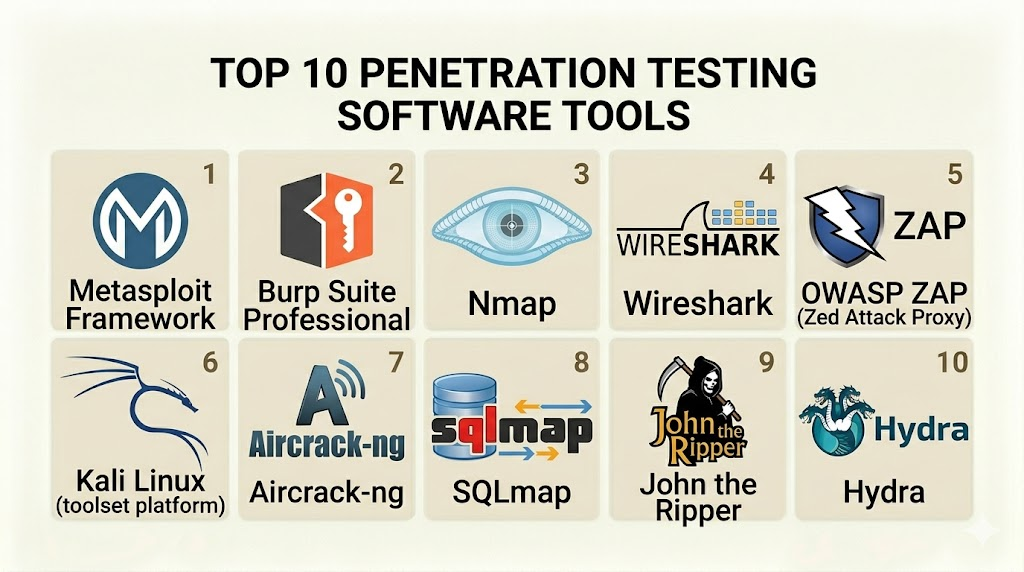
Introduction
Penetration testing software, often referred to as ethical hacking tools, consists of specialized applications designed to identify and exploit security vulnerabilities within a digital environment. These tools simulate the methods and techniques used by malicious actors to provide organizations with a practical assessment of their security posture. Unlike automated vulnerability scanners that merely flag potential issues, penetration testing tools are often used by human experts to perform deep-dives into systems, moving laterally through networks and attempting to gain unauthorized access to sensitive data to prove that a risk is exploitable.
In the modern cybersecurity landscape, the role of these tools has expanded from seasonal “check-the-box” audits to becoming a continuous part of the security lifecycle. As infrastructure becomes more complex—incorporating hybrid clouds, microservices, and massive API networks—the attack surface has grown exponentially. Organizations utilize these tools to validate their defenses, train their incident response teams, and meet stringent regulatory requirements.
Real-world use cases:
- Infrastructure Auditing: Identifying open ports and misconfigured services in a corporate network.
- Web Application Testing: Finding flaws like SQL injection or Cross-Site Scripting (XSS) in customer-facing portals.
- Wireless Security: Testing the strength of Wi-Fi encryption and checking for rogue access points.
- Cloud Security Assessments: Evaluating the permissions and configurations of resources in public cloud environments.
- Social Engineering Simulations: Testing employee awareness by simulating phishing or credential-harvesting attacks.
Evaluation criteria for buyers:
- Exploitation Depth: Does the tool just find the door, or can it help you walk through it?
- Ease of Automation: Can the tool be scripted or integrated into a CI/CD pipeline?
- Reporting Quality: Does it produce professional-grade documentation for stakeholders?
- Community and Plugin Support: Is there a large ecosystem of custom scripts and extensions?
- Learning Curve: How much training is required for a security professional to be effective with it?
- Operating System Compatibility: Does it run on Linux, Windows, and macOS?
- Reliability: Does the tool maintain stability during high-intensity network scanning?
- Cost of Licensing: Is the price justifiable compared to open-source alternatives?
- Integration Patterns: How well does it connect with bug tracking and project management software?
- Silent Execution: Can the tool operate without triggering basic intrusion detection systems?
Mandatory paragraph
- Best for: Security analysts, ethical hackers, DevSecOps engineers, and internal “Red Teams” focused on uncovering exploitable risks in an organization’s infrastructure.
- Not ideal for: General IT staff without security training, or businesses looking only for a static compliance report without active exploitation.
Key Trends in Penetration Testing Software
- AI-Assisted Exploitation: Machine learning is being integrated to predict successful exploit paths and automate the discovery of complex vulnerabilities that traditional logic might miss.
- Shift-Left Integration: Pentesting tools are becoming more lightweight and modular, allowing them to be triggered during the software development build phase.
- Cloud-Native Attack Modules: Modern suites are adding specialized modules for attacking containers, Kubernetes clusters, and serverless functions.
- Living-off-the-Land (LotL) Focus: Tools are increasingly utilizing native system commands to avoid detection, mimicking how sophisticated attackers operate.
- Adversary Emulation: A move toward platforms that don’t just find bugs but simulate the specific behaviors and patterns of known Advanced Persistent Threat (APT) groups.
- Frictionless Reporting: The automation of the “write-up” phase, allowing pentesters to generate detailed, remediation-focused reports with a single click.
- Continuous Security Validation: The transition from point-in-time testing to platforms that constantly probe for weaknesses as the network environment changes.
- Low-Code Scripting: The ability to create custom attack sequences using visual or simplified scripting languages, making the tools accessible to a wider range of security staff.
How We Selected These Tools (Methodology)
To select the top 10 penetration testing tools, we used a multi-faceted methodology designed to highlight the most effective and reliable software currently available. The criteria included:
- Market Mindshare: Preference was given to tools that are considered “standard” in the industry and required for professional certifications.
- Functional Versatility: We selected tools that cover different niches, such as network scanning, web application testing, and wireless auditing.
- Reliability Signals: We evaluated the historical uptime and update frequency of the developers.
- Exploitation Power: The ability to perform actual post-exploitation and lateral movement was weighted heavily.
- Integration Ecosystem: We looked for tools that can “talk” to other software in a standard security stack.
- Professional Peer Review: We analyzed feedback from active practitioners in the global cybersecurity community.
Top 10 Penetration Testing Software Tools
#1 — Metasploit Framework
Short description: The most widely used penetration testing framework in the world, Metasploit helps security teams verify vulnerabilities and manage security assessments.
Key Features
- Massive Exploit Database: Access to thousands of high-quality, tested exploits for various operating systems and applications.
- Meterpreter Payload: An advanced, dynamically extensible payload that allows for post-exploitation control.
- Seamless Integration: Works natively with tools like Nmap and Nexpose for a unified workflow.
- Automation via MSFconsole: Command-line interface for scripting and automating complex attack sequences.
- Post-Exploitation Modules: Specialized tools for privilege escalation, data harvesting, and lateral movement.
- Payload Generator: Easily create custom encoders to bypass basic anti-virus signatures.
Pros
- Sets the industry standard; if a vulnerability exists, there is likely a Metasploit module for it.
- Extremely modular and extensible for specialized research.
Cons
- The “Pro” version is quite expensive for small businesses.
- Can be detected by modern EDR (Endpoint Detection and Response) solutions without custom encoding.
Platforms / Deployment
- Windows / Linux / macOS
- Self-hosted / Cloud
Security & Compliance
- SSO/SAML (Pro version), RBAC, encryption of stored data.
- Not publicly stated.
Integrations & Ecosystem
Metasploit is the cornerstone of the pentesting ecosystem.
- Nmap
- Burp Suite
- Nessus
- Rapid7 Insight platform
Support & Community
Massive community support via GitHub and official forums. Professional 24/7 support is available for the “Pro” commercial version.
#2 — Burp Suite
Short description: The leading software for web application security testing, used by experts to find vulnerabilities in websites and web services.
Key Features
- Interception Proxy: Inspect and modify the raw traffic between your browser and the target application.
- Burp Intruder: A powerful tool for automating custom attacks against web applications.
- Repeater: Manually modify and re-issue individual HTTP requests to test specific behaviors.
- Automated Vulnerability Scanner: Highly accurate scanner designed specifically for the modern web (SPA, APIs).
- Extender API: Allows users to add custom functionality via hundreds of community-written plugins.
- Sequencer: A tool for analyzing the quality of randomness in an application’s session tokens.
Pros
- The absolute gold standard for web application security.
- The “BApp Store” provides nearly infinite extensibility for new attack vectors.
Cons
- The automated scanner is only available in the Professional and Enterprise tiers.
- Requires a significant amount of manual effort to master for complex apps.
Platforms / Deployment
- Windows / macOS / Linux
- Cloud / Self-hosted
Security & Compliance
- MFA, SSO (Enterprise), audit logs.
- Not publicly stated.
Integrations & Ecosystem
Deeply integrated with dev and security tools.
- Jira
- Jenkins
- Selenium
- Standard CI/CD pipelines
Support & Community
Excellent documentation, a dedicated training academy (Web Security Academy), and responsive technical support.
#3 — Nmap (Network Mapper)
Short description: A free and open-source utility for network discovery and security auditing, used to map networks and identify open ports.
Key Features
- Host Discovery: Identify live systems on a network using various ping and scanning techniques.
- Port Scanning: Determine which ports are open, closed, or filtered by a firewall.
- Service Version Detection: Probe open ports to determine the service name and version number.
- OS Fingerprinting: Use TCP/IP stack behavior to guess the operating system of the target.
- Nmap Scripting Engine (NSE): Automate a wide range of networking tasks, from vulnerability detection to advanced discovery.
- Flexible Output: Export results in XML, grepable, or “normal” text formats for easy analysis.
Pros
- Lightweight, extremely fast, and completely free.
- The most reliable tool for network mapping in existence.
Cons
- Command-line only (though Zenmap provides a GUI for those who need it).
- Can be “noisy” on a network and easily detected if not tuned correctly.
Platforms / Deployment
- Windows / Linux / macOS / BSD
- Self-hosted
Security & Compliance
- Not publicly stated (Open source).
Integrations & Ecosystem
Works with almost every other security tool in this list.
- Metasploit
- Zenmap (GUI)
- Ndiff (Scan comparison)
- Standard terminal pipes
Support & Community
The community is massive; most network security professionals are experts in Nmap. Documentation is comprehensive and translated into many languages.
#4 — Wireshark
Short description: The world’s foremost network protocol analyzer, allowing you to see what’s happening on your network at a microscopic level.
Key Features
- Deep Inspection: Support for hundreds of protocols with live capture and offline analysis.
- Powerful Filters: Use display and capture filters to isolate the exact traffic you are looking for.
- Decryption Support: Decrypt protocols like IPsec, ISAKMP, Kerberos, SNMPv3, and TLS/SSL.
- Coloring Rules: Apply colors to the packet list for quick, intuitive analysis.
- VoIP Analysis: Specialized tools for capturing and analyzing voice-over-IP traffic.
- Multi-Platform: Runs on virtually any modern desktop operating system.
Pros
- Unrivaled detail; if a packet passed through the wire, Wireshark can see it.
- Essential for troubleshooting and forensic analysis during a pentest.
Cons
- Not an “attack” tool; it is purely for analysis and observation.
- Can be overwhelming for beginners due to the massive amount of data it displays.
Platforms / Deployment
- Windows / macOS / Linux / Solaris
- Self-hosted
Security & Compliance
- Not publicly stated.
Integrations & Ecosystem
Integrates with other capture tools and command-line utilities.
- Tcpdump
- Tshark (Command-line version)
- Aircrack-ng
- Standard PCAP format
Support & Community
Highly active developer community. Training is widely available through various third-party cybersecurity platforms.
#5 — Nessus
Short description: A widely adopted vulnerability scanner that provides a solid foundation for penetration testers to find entry points.
Key Features
- Extensive Plugin Library: Over 150,000 plugins covering a vast array of vulnerabilities.
- Configuration Auditing: Check systems against security standards like CIS benchmarks.
- Web App Scanning: Basic scanning for web-related flaws alongside infrastructure.
- Cloud Infrastructure Scanning: Audit configurations for AWS, Azure, and Google Cloud.
- Low False Positive Rate: Known for its high accuracy and reliable results.
- Custom Reporting: Generate polished reports in various formats for different stakeholders.
Pros
- The industry’s most accurate vulnerability scanner.
- Easy-to-use interface that allows for rapid scanning of large networks.
Cons
- Professional version is expensive for individual consultants.
- The license restricts use in certain service provider environments.
Platforms / Deployment
- Windows / macOS / Linux
- Cloud / Self-hosted
Security & Compliance
- RBAC, SSO, MFA (via Tenable platform).
- Not publicly stated.
Integrations & Ecosystem
Part of the Tenable ecosystem.
- Metasploit
- Tenable.io / Tenable.sc
- ServiceNow
- Various SIEMs
Support & Community
Excellent professional support and a mature knowledge base.
#6 — SQLmap
Short description: An open-source penetration testing tool that automates the process of detecting and exploiting SQL injection flaws.
Key Features
- Database Support: Works with MySQL, Oracle, PostgreSQL, Microsoft SQL Server, and many others.
- Six Injection Techniques: Supports boolean-based, error-based, UNION-based, and more.
- Data Extraction: Automatically dump entire database tables, users, and passwords.
- Command Execution: Execute arbitrary commands on the database server’s underlying OS.
- Bypass Tamper Scripts: Includes scripts to bypass common WAF and IDS signatures.
- Password Cracking: Can identify and crack password hashes found in databases.
Pros
- The most powerful and efficient tool for SQL injection tasks.
- Saves hours of manual work through its intelligent automation.
Cons
- Extremely dangerous; improper use can corrupt or delete production data.
- Command-line interface only, which can be daunting for novices.
Platforms / Deployment
- Windows / Linux / macOS
- Self-hosted
Security & Compliance
- Not publicly stated.
Integrations & Ecosystem
Typically used alongside a proxy.
- Burp Suite
- OWASP ZAP
- Nmap
Support & Community
Active development on GitHub. It is the de-facto standard for SQLi testing in the security community.
#7 — Aircrack-ng
Short description: A complete suite of tools to assess Wi-Fi network security, focusing on monitoring, attacking, testing, and cracking.
Key Features
- Packet Capture: Export data to text files for further processing by third-party tools.
- WPA/WPA2-PSK Cracking: Attack Wi-Fi passwords using dictionary and brute-force methods.
- Deauthentication Attacks: Force clients to disconnect from an access point to capture handshakes.
- Fake Access Points: Create rogue APs to lure clients into connecting.
- Packet Injection: Test the capability of your wireless card to inject frames.
- Airgraph-ng: Graph the relationships between access points and clients.
Pros
- The most comprehensive toolset for wireless security auditing.
- Completely free and open-source.
Cons
- Requires specific wireless chipsets that support monitor mode and injection.
- Can be difficult to set up on certain modern operating systems.
Platforms / Deployment
- Linux / Windows / macOS / FreeBSD
- Self-hosted
Security & Compliance
- Not publicly stated.
Integrations & Ecosystem
Part of the wireless auditor’s toolkit.
- Wireshark
- Hashcat
- Kismet
Support & Community
Mature documentation and a long-standing presence in the security world.
#8 — John the Ripper
Short description: A fast and flexible password cracker that supports hundreds of hash and cipher types.
Key Features
- Auto-Detection: Automatically identifies the hash type being analyzed.
- Multiple Cracking Modes: Includes dictionary, brute-force, and “mask” attacks.
- GPU Acceleration: Can utilize the power of graphics cards to speed up cracking.
- Customizable Rules: Create complex rules for password permutations.
- Extensive Hash Support: Supports everything from Windows LM hashes to macOS and Unix types.
- Distributed Cracking: Can be run across multiple machines for massive tasks.
Pros
- Extremely fast and resource-efficient.
- Available in both a free open-source version and a feature-rich Pro version.
Cons
- The free version lacks some of the automated features found in the Pro version.
- No native GUI, which can slow down some users.
Platforms / Deployment
- Windows / Linux / macOS / Android
- Self-hosted
Security & Compliance
- Not publicly stated.
Integrations & Ecosystem
Works with any tool that can dump password hashes.
- Kali Linux
- Metasploit
- Mimikatz
Support & Community
Huge community base and extensive online documentation provided by Openwall.
#9 — Kali Linux
Short description: An advanced penetration testing Linux distribution used as a platform for security auditing and digital forensics.
Key Features
- Pre-installed Tools: Over 600 penetration testing tools ready for use out of the box.
- Custom Kernel: Includes patches for wireless injection and advanced networking.
- Live Boot: Can be run from a USB stick without modifying the host hard drive.
- Kali NetHunter: A specialized version for mobile penetration testing on Android devices.
- ARM Support: Versions available for Raspberry Pi and other low-power hardware.
- Accessibility: Includes tools for blind or visually impaired security professionals.
Pros
- Saves hours of configuration time by having every tool you need in one place.
- Highly stable and optimized for security workloads.
Cons
- Not intended for use as a general-purpose daily operating system.
- Requires a strong understanding of Linux to use effectively.
Platforms / Deployment
- x86 / ARM / Cloud / Mobile
- Self-hosted / Virtualized
Security & Compliance
- Full disk encryption support, secure boot.
- Not publicly stated.
Integrations & Ecosystem
Essentially the ecosystem itself, hosting all other tools in this list.
- Metasploit
- Burp Suite
- Wireshark
- Standard Linux utilities
Support & Community
One of the largest communities in tech. Comprehensive documentation and official certification (OSCP) available.
#10 — Cobalt Strike
Short description: A specialized platform for adversary simulation and Red Team operations, designed to mimic advanced persistent threats.
Key Features
- Beacon Payload: A stealthy, asynchronous post-exploitation agent.
- Malleable C2: Change the look and feel of your network traffic to mimic legitimate services.
- Browser Pivoting: Use a compromised user’s browser to access internal web applications.
- Spear Phishing: Built-in tools for creating and managing targeted email attacks.
- Collaboration: Allows multiple Red Team members to work on the same target in real-time.
- Reporting: Generates high-level executive reports on the success of the simulation.
Pros
- The absolute best tool for stealthy, long-term post-exploitation.
- Highly realistic emulation of real-world sophisticated attackers.
Cons
- Very expensive and restricted to legitimate security organizations.
- Frequently targeted by defensive tools, requiring constant customization.
Platforms / Deployment
- Windows / Linux / macOS
- Cloud / Self-hosted
Security & Compliance
- Encrypted communication channels, RBAC.
- Not publicly stated.
Integrations & Ecosystem
Integrates with other high-end exploitation tools.
- Metasploit
- Empire
- BloodHound
Support & Community
Excellent professional support from Fortra. Community support is limited to licensed users.
Comparison Table (Top 10)
| Tool Name | Best For | Platform(s) Supported | Deployment | Standout Feature | Public Rating |
| Metasploit | General Exploitation | Windows, Linux, macOS | Hybrid | Meterpreter Payload | 4.8/5 |
| Burp Suite | Web App Security | Windows, Linux, macOS | Hybrid | Interception Proxy | 4.9/5 |
| Nmap | Network Discovery | Windows, Linux, macOS | Self-hosted | Scripting Engine (NSE) | 4.8/5 |
| Wireshark | Packet Analysis | Windows, Linux, macOS | Self-hosted | Protocol Decryption | 4.7/5 |
| Nessus | Vulnerability Scanning | Windows, Linux, macOS | Hybrid | 150k+ Vulnerability Plugins | 4.6/5 |
| SQLmap | Database Injection | Windows, Linux, macOS | Self-hosted | Automated Exploitation | 4.7/5 |
| Aircrack-ng | Wireless Security | Windows, Linux, macOS | Self-hosted | Packet Injection | 4.5/5 |
| John the Ripper | Password Cracking | Windows, Linux, macOS | Self-hosted | GPU Acceleration | 4.6/5 |
| Kali Linux | Pentesting Platform | x86, ARM, Cloud | Self-hosted | 600+ Pre-installed Tools | 4.9/5 |
| Cobalt Strike | Red Team Ops | Windows, Linux, macOS | Hybrid | Malleable C2 | N/A |
Evaluation & Scoring of Penetration Testing Tools
The following scoring model is weighted based on the requirements of professional security teams in the current threat landscape.
| Tool Name | Core (25%) | Ease (15%) | Integrations (15%) | Security (10%) | Performance (10%) | Support (10%) | Value (15%) | Weighted Total |
| Metasploit | 10 | 6 | 10 | 8 | 9 | 9 | 8 | 8.70 |
| Burp Suite | 10 | 7 | 9 | 9 | 10 | 9 | 7 | 8.65 |
| Nmap | 9 | 8 | 10 | 7 | 10 | 8 | 10 | 8.85 |
| Wireshark | 8 | 6 | 8 | 7 | 9 | 9 | 10 | 7.95 |
| Nessus | 8 | 9 | 9 | 9 | 8 | 9 | 7 | 8.35 |
| SQLmap | 10 | 5 | 8 | 6 | 9 | 7 | 10 | 8.05 |
| Aircrack-ng | 9 | 5 | 7 | 6 | 9 | 7 | 10 | 7.75 |
| John the Ripper | 9 | 6 | 8 | 7 | 10 | 8 | 9 | 8.20 |
| Kali Linux | 9 | 8 | 10 | 9 | 9 | 9 | 10 | 9.20 |
| Cobalt Strike | 10 | 4 | 9 | 9 | 9 | 8 | 6 | 7.95 |
How to interpret these scores:
- Core Feature Score: Represents the technical power and exploitation capability of the tool.
- Weighted Total: A score above 8.5 indicates an essential, “must-have” tool for a professional security department. Kali Linux scores highest because it provides the foundational environment for all other activities.
Which Penetration Testing Software Tool Is Right for You?
Solo / Freelancer
For the independent consultant, Burp Suite Professional and Kali Linux are the primary investments. These two provide enough coverage for most web and infrastructure jobs without a massive overhead.
SMB
Small businesses with limited security staff should focus on Nessus for automated scanning and Metasploit for verifying findings. This combination provides high accuracy with manageable complexity.
Mid-Market
Companies that are scaling their security operations should adopt Burp Suite Enterprise to automate web testing across their portfolio and use Nmap scripts for continuous network monitoring.
Enterprise
Large-scale organizations with dedicated Red Teams will require Cobalt Strike for advanced simulations and Kali Linux as the standard OS for their analysts. They should also prioritize tools like Metasploit Pro for multi-user collaboration and detailed reporting.
Budget vs Premium
- Budget: Nmap, SQLmap, Aircrack-ng (Free).
- Premium: Cobalt Strike, Burp Suite Enterprise, Metasploit Pro.
Feature Depth vs Ease of Use
- Deep Depth: Metasploit, Cobalt Strike, Burp Suite.
- Easy to Use: Nessus, Kali Linux (Pre-configured).
Integrations & Scalability
- Top Integrations: Metasploit, Burp Suite.
- Top Scalability: Nessus, Burp Suite Enterprise.
Security & Compliance Needs
Organizations focused on compliance (SOC 2, PCI DSS) should prioritize Nessus and Burp Suite, as they provide the specific audit logs and professional reports required by auditors.
Frequently Asked Questions (FAQs)
- What is the difference between a vulnerability scanner and a penetration testing tool?
A vulnerability scanner (like Nessus) identifies potential weaknesses but does not usually exploit them. A penetration testing tool (like Metasploit) is used to actually exploit the flaw to prove its risk and impact.
- Is it legal to use these tools?
It is only legal to use these tools on systems you own or have explicit, written permission to test. Unauthorized use can result in severe legal consequences under computer crime laws.
- Can these tools damage a production system?
Yes. Tools like SQLmap or Metasploit can crash services or corrupt data if used incorrectly. Always perform testing in a staging environment first if possible, and use a “safe” scanning mode on production.
- Do I need to be a programmer to use pentesting software?
While not strictly required for every tool, knowing a language like Python, Ruby, or Bash will significantly enhance your ability to automate tasks and customize attack scripts.
- Which operating system is best for penetration testing?
Linux, specifically Kali Linux, is the industry standard because it has the best support for security tools and wireless hardware. However, many tools also run on Windows and macOS.
- How much do professional penetration testing tools cost?
Open-source tools are free, but professional licenses for software like Burp Suite or Nessus can range from $400 to over $4,000 per user per year. Enterprise platforms like Cobalt Strike can cost significantly more.
- How often should I run these tools on my network?
High-risk organizations should run automated scans weekly and perform deep manual penetration tests at least once or twice a year, or after any significant infrastructure change.
- Can penetration testing tools find every security flaw?
No. No tool is perfect. Pentesting software is designed to find known vulnerabilities. “Zero-day” flaws or complex logic errors often require manual research and creative thinking by a human expert.
- What hardware do I need for penetration testing?
A high-performance laptop with at least 16GB of RAM and a modern multi-core CPU is recommended. If you are testing wireless, you will also need a Wi-Fi adapter that supports monitor mode.
- Is there a single “best” tool for penetration testing?
No. Penetration testing is a process that requires a “multi-tool” approach. A typical pentester will use Nmap for discovery, Burp Suite for web flaws, and Metasploit for exploitation during a single assessment.
Conclusion
Building an effective penetration testing toolkit requires a balance of automated speed and manual depth. While Nmap and Wireshark provide the necessary visibility, tools like Burp Suite and Metasploit empower security professionals to validate risks through active exploitation. For organizations looking to mature their security, the goal is not just to own these tools, but to integrate them into a continuous validation process that keeps pace with the ever-evolving threat landscape.

Thanks for sharing such useful information.
A practical area to add is test governance during real penetration testing. Tool choice matters, but scope approval, safe testing windows, rollback plans, and clear communication with operations teams are what prevent valid security testing from turning into production disruption.