MOTOSHARE 🚗🏍️
Rent Bikes & Cars Directly from Owners
Motoshare connects vehicle owners with people who need bikes and cars on rent. Owners earn from idle vehicles, and renters get flexible ride options.
Visit Motoshare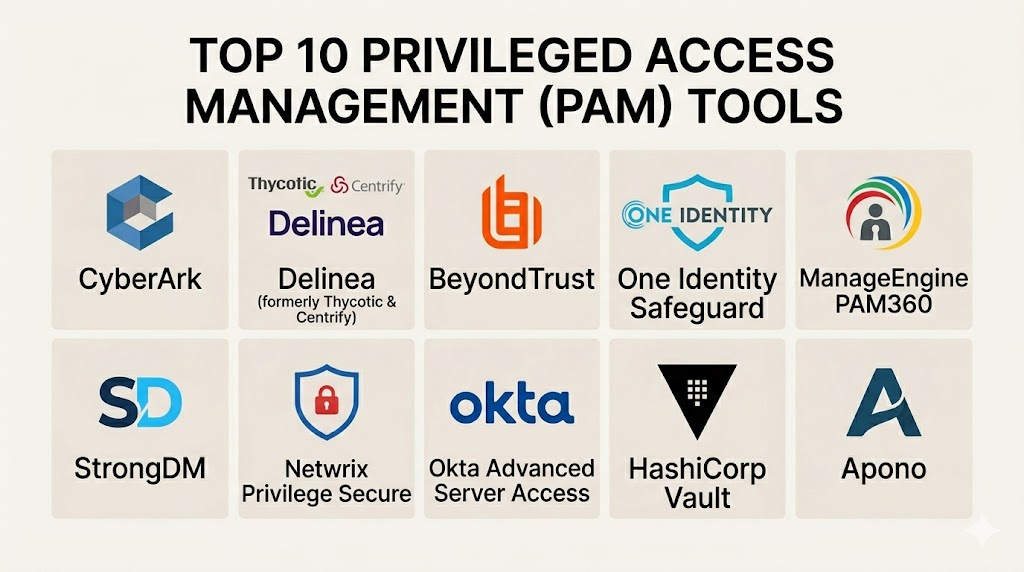
Introduction
Privileged Access Management (PAM) is a security strategy used to protect high-level accounts within an organization. These accounts are often called “privileged” because they have more power than a standard user. They can change system settings, access sensitive databases, or delete entire servers. PAM software acts as a secure gateway. It ensures that only authorized people can use these powerful accounts. It also tracks every action they take while they are logged in.
This software is a critical part of modern cybersecurity. Hackers often target administrative accounts to move through a network undetected. By using a PAM solution, a company can lock away these credentials in a digital vault. Access is granted only when it is strictly necessary. This reduces the risk of internal mistakes and external attacks. It also helps companies meet strict legal requirements for data protection.
Real-world use cases:
- Third-Party Access: Giving temporary access to an outside consultant to fix a server without giving them a permanent password.
- Compliance Auditing: Providing a full recording of everything an admin did during a high-stakes system update for a government audit.
- Automated Rotations: Automatically changing passwords for service accounts every few hours to prevent them from being stolen.
- Just-in-Time (JIT) Access: Granting a developer admin rights for only one hour to deploy a specific piece of code.
- Emergency Access: Allowing a security team to “break glass” and enter a system during a cyberattack while logging all activity.
What buyers should evaluate:
- Credential Vaulting: How securely the software stores and encrypts passwords and keys.
- Session Monitoring: The ability to record and play back live sessions of privileged users.
- Ease of Deployment: How long it takes to install the software across a large network.
- Integration Support: Whether it works with existing tools like Active Directory or cloud platforms.
- Multi-Factor Authentication (MFA): The strength of the extra security layers required to log in.
- Just-in-Time Access: The capability to grant temporary rights instead of permanent ones.
- Automation Features: How well the tool handles password rotations without human help.
- Reporting and Analytics: The quality of the dashboards for finding suspicious behavior.
- User Experience: Whether the interface is simple enough for admins to use every day.
- Scalability: The ability to handle thousands of users and systems as the company grows.
Best for: Large banks, healthcare providers, government agencies, and technology firms with complex IT environments.
Not ideal for: Very small businesses with only one or two servers; companies that do not have sensitive data or strict compliance rules.
Key Trends in Privileged Access Management (PAM)
- Zero Standing Privileges: Organizations are moving away from permanent admin accounts. Instead, access is created and deleted on the fly.
- AI and Machine Learning: AI is being used to look at user behavior. If an admin logs in at an odd hour, the system can automatically block them.
- Cloud-Native PAM: More companies are moving to SaaS-based PAM tools that do not require hardware to be installed.
- IT and OT Convergence: PAM is now being used to protect industrial machines and factory robots, not just office computers.
- Passwordless Access: Systems are using biometric data or hardware keys to log in, removing the need for a typed password entirely.
- Identity Security Integration: PAM is becoming a part of a larger “Identity Fabric” that connects all types of user access in one place.
- Automated Remediation: If a PAM tool sees a security breach, it can now automatically shut down a server or lock a user out.
- Developer-First PAM: New tools focus on making it easy for coders to get access through APIs without slowing down their work.
How We Selected These Tools (Methodology)
The top 10 tools were selected based on a detailed evaluation of the current security market. We focused on reliability and feature depth.
- Market Presence: We looked at which tools are most trusted by the world’s largest companies.
- Feature Completeness: Each tool must offer a vault, session recording, and automated password rotation.
- Security Strength: We evaluated the encryption standards and the history of the vendor’s security patches.
- Interoperability: Tools were chosen based on how well they work with both old systems and modern cloud environments.
- Customer Support: We checked for the availability of 24/7 technical help and training materials.
- Implementation Speed: Preference was given to tools that offer a clear path to deployment.
Top 10 Privileged Access Management (PAM) Tools
#1 — CyberArk Privileged Access Manager
CyberArk is widely seen as the leader in the PAM market. It provides a massive suite of tools for protecting identities across a whole enterprise. It is used by some of the world’s largest banks and government agencies to stop data breaches.
Key Features
- Digital Vault: A highly secure place to store and manage all credentials.
- Session Management: Records every keystroke and mouse movement for audits.
- Threat Analytics: Uses AI to find and alert on abnormal user behavior.
- Secrets Manager: Protects the passwords used by machines and applications.
- Least Privilege: Ensures users only have the bare minimum access they need.
- Endpoint Privilege Manager: Blocks local admin rights on laptops to stop ransomware.
- Conjur Cloud: A specialized tool for securing modern DevOps pipelines.
Pros
- Offers the most comprehensive security features of any tool on the list.
- Deeply trusted by high-security industries like finance and defense.
Cons
- The system is very complex and usually requires a dedicated team to manage.
- The pricing is at the high end of the market.
Platforms / Deployment
- Windows / Linux / macOS / Unix
- Cloud / Self-hosted / Hybrid
Security & Compliance
- MFA, SSO, RBAC, and FIPS-validated encryption.
- SOC 2, ISO 27001, and HIPAA compliant.
Integrations & Ecosystem
CyberArk has a huge partner network. It integrates with almost every enterprise software tool.
- ServiceNow
- Azure / AWS / GCP
- Splunk
- SailPoint
Support & Community
The company offers top-tier professional support. There is a massive global community of certified CyberArk engineers available for hire.
#2 — Delinea Platform (Secret Server)
Delinea was formed by joining Thycotic and Centrify. Its core product, Secret Server, is known for being powerful yet very easy to use. It is a top choice for companies that want a PAM tool that doesn’t require months of training.
Key Features
- Automated Discovery: Finds all the privileged accounts on your network automatically.
- Password Vaulting: Securely stores and rotates passwords for all systems.
- Session Recording: Captures video of all remote desktop and SSH sessions.
- Workflow Engine: Allows for custom approval steps before access is granted.
- Cloud Architecture: Built as a modern SaaS platform for easy updates.
- Mobile App: Lets admins approve access requests while they are on the go.
Pros
- Regarded as one of the most user-friendly interfaces in the PAM space.
- Much faster to set up and deploy than some of its larger competitors.
Cons
- Some advanced customization options are harder to find than in Maya-style suites.
- Pricing can increase quickly as you add more specialized modules.
Platforms / Deployment
- Windows / Linux / Unix / macOS
- Cloud / Self-hosted
Security & Compliance
- SAML, MFA, and strong encryption at rest.
- SOC 2 and ISO 27001 compliant.
Integrations & Ecosystem
Delinea has a strong focus on connecting with modern IT tools.
- Microsoft Active Directory
- Okta
- Ping Identity
- Terraform
Support & Community
Delinea provides an excellent knowledge base and active community forums. Professional support is responsive and highly rated.
#3 — BeyondTrust Privileged Access Management
BeyondTrust focuses heavily on “Least Privilege” and remote access. They are known for helping companies remove local admin rights from employee laptops. This is one of the most effective ways to stop malware from spreading.
Key Features
- Privileged Remote Access: Securely connects employees and vendors without a VPN.
- Endpoint Privilege Management: Removes local admin rights while allowing apps to run.
- Password Safe: A high-end vault for managing and rotating credentials.
- Cloud Security: Specialized tools for protecting AWS, Azure, and Google Cloud.
- Vulnerability Management: Checks systems for weaknesses before granting access.
- Audit and Compliance: Provides detailed reports for GDPR and other rules.
Pros
- Excellent at managing remote workers and outside vendors.
- Very strong at protecting employee laptops (endpoints).
Cons
- Managing multiple products within the suite can sometimes feel fragmented.
- The reporting tools can be complex for new users to set up.
Platforms / Deployment
- Windows / macOS / Linux / iOS / Android
- Cloud / Self-hosted / Physical Appliance
Security & Compliance
- MFA, SSO, and hardware token support.
- SOC 2, ISO 27001, and FedRAMP authorized.
Integrations & Ecosystem
BeyondTrust has a broad range of integrations for IT service management.
- Jira / ServiceNow
- Microsoft Sentinel
- SailPoint
- Okta
Support & Community
Professional support tiers are available 24/7. They offer a large library of technical training videos and webinars.
#4 — ManageEngine PAM360
ManageEngine is known for offering tools that are very affordable for mid-sized businesses. PAM360 is their enterprise-grade solution. it combines password vaulting with identity governance and session monitoring.
Key Features
- Centralized Vault: A single place to store all system and application passwords.
- Just-in-Time Access: Grants elevation of privileges for a limited time.
- SSH Key Management: Protects the keys used by Linux servers and developers.
- Database Credential Security: Rotates passwords for SQL, Oracle, and other databases.
- Session Shadowing: Lets an admin watch a live session and terminate it if needed.
- Customizable Dashboards: Visual reports on the health of the privileged environment.
Pros
- One of the most affordable options for the number of features provided.
- Integrates perfectly with the rest of the ManageEngine IT suite.
Cons
- The interface can sometimes feel cluttered compared to more modern SaaS tools.
- Not as many advanced AI-driven threat detection features as the top leaders.
Platforms / Deployment
- Windows / Linux
- Self-hosted / Hybrid
Security & Compliance
- MFA, RBAC, and standard encryption.
- Helps with GDPR and HIPAA compliance reports.
Integrations & Ecosystem
Works well with other ManageEngine tools and standard IT systems.
- Active Directory
- ServiceDesk Plus
- SIEM tools
- Ticketing systems
Support & Community
Large community and plenty of documentation. Technical support is available through email and phone.
#5 — Wallix PAM4ALL
Wallix is a European-based company that focuses on simplicity and compliance. Their PAM4ALL solution is designed to be lean and efficient. It is popular in industrial and manufacturing sectors where system downtime must be zero.
Key Features
- Session Manager: A lightweight tool for recording and controlling sessions.
- Password Manager: Rotates and hides passwords from the end user.
- Access Manager: Provides a single portal for all remote connections.
- Least Privilege: Manages rights on servers and workstations.
- Agentless Architecture: Does not require software to be installed on every target.
- Industrial Support: Specialized tools for OT and SCADA systems.
Pros
- Very fast to install due to its agentless design.
- Strong focus on European data privacy standards like GDPR.
Cons
- The ecosystem of third-party plugins is smaller than CyberArk’s.
- Less focus on high-end DevOps secrets management.
Platforms / Deployment
- Windows / Linux / Unix
- Self-hosted / Virtual Appliance / Cloud
Security & Compliance
- MFA and RBAC support.
- ANSSI certified (French cybersecurity agency).
Integrations & Ecosystem
Wallix focuses on core IT and industrial integrations.
- Active Directory / LDAP
- Syslog
- Various SIEM platforms
Support & Community
Good technical documentation. Support is mostly handled through their partner network and professional services.
#6 — Saviynt Privileged Access Management
Saviynt is a cloud-native platform that combines PAM with Identity Governance and Administration (IGA). It is built for the modern world where identities are spread across many different cloud services.
Key Features
- Identity-First PAM: Links privileged access directly to the person’s identity.
- Cloud Infrastructure Entitlement Management (CIEM): Manages rights in AWS and Azure.
- Just-in-Time Elevation: Temporary access that expires automatically.
- Automated Review: Regularly asks managers to verify that people still need access.
- BYO-Vault: Can integrate with your existing password vaults.
- Risk-Based Analytics: Scores users based on how risky their behavior is.
Pros
- The best choice for companies that want to manage identity and PAM in one tool.
- Built natively for the cloud, making it very easy to scale.
Cons
- Can be overkill for companies that only need a simple password vault.
- The initial configuration of governance rules can be time-consuming.
Platforms / Deployment
- Web / Cloud / SaaS
Security & Compliance
- SSO, MFA, and RBAC.
- SOC 2, ISO 27001, and HIPAA compliant.
Integrations & Ecosystem
Saviynt is designed to connect to the entire cloud world.
- ServiceNow
- Salesforce
- Workday
- AWS / Azure / GCP
Support & Community
Professional support is available for enterprise clients. The community is focused on the identity governance space.
#7 — One Identity Safeguard
One Identity Safeguard is part of the Quest Software family. It is a robust solution that is often used alongside their other identity management tools. It focuses on providing a secure, hardened appliance for PAM tasks.
Key Features
- Hardened Appliance: The software runs on a secure, dedicated operating system.
- Session Recording: High-quality capture of all admin activity.
- Entitlement Management: Tracks who is allowed to do what across the system.
- Approval Workflows: Multi-step approvals for high-risk access requests.
- Password Vaulting: Securely handles credential storage and rotation.
- Audit-Ready Reports: Quickly generates reports for compliance officers.
Pros
- The hardened appliance approach makes the software itself very hard to attack.
- Strong integration with Microsoft-heavy environments.
Cons
- Can feel less flexible than pure SaaS-based competitors.
- The user interface is functional but lacks a modern aesthetic.
Platforms / Deployment
- Windows / Linux / Unix
- Physical Appliance / Virtual Appliance / Cloud
Security & Compliance
- MFA and hardware-based security.
- SOC 2 and HIPAA compliant.
Integrations & Ecosystem
Designed to work with the Quest and One Identity product line.
- Active Directory
- Starling (Identity Cloud)
- SIEM platforms
Support & Community
Established professional support network. Plenty of training materials and user forums are available.
#8 — HashiCorp Vault (Boundary)
HashiCorp Vault is a favorite among developers and DevOps teams. It is not a traditional PAM tool in the “human” sense, but it is the leader in managing machine secrets. Their newer tool, Boundary, adds more human PAM features.
Key Features
- Secrets Management: Securely stores API keys, tokens, and passwords.
- Dynamic Secrets: Creates a password on the fly and deletes it when the job is done.
- Encryption as a Service: Allows apps to encrypt data without seeing the keys.
- Identity-Based Access: Connects to GitHub, Okta, or AWS for authentication.
- Leasing and Renewal: Every secret has a timer and must be renewed.
- Boundary Integration: Provides secure remote access for humans to servers.
Pros
- The absolute best choice for modern, automated cloud environments.
- Developers love it because it can be controlled entirely through code (APIs).
Cons
- Very high technical barrier for traditional IT teams.
- Lacks some of the “video recording” features found in standard PAM tools.
Platforms / Deployment
- Linux / Windows / macOS
- Cloud / Self-hosted / Managed Service
Security & Compliance
- Advanced encryption and RBAC.
- FIPS 140-2 and SOC 2 compliant.
Integrations & Ecosystem
HashiCorp has the best ecosystem for infrastructure-as-code.
- Terraform
- Kubernetes
- Docker
- GitHub / GitLab
Support & Community
Massive community of developers. Professional support is available through HashiCorp Cloud Platform.
#9 — Broadcom (Symantec) Privileged Access Management
Symantec PAM (now owned by Broadcom) is a mature and powerful solution. It is often used by very large organizations that have a mix of old mainframe systems and new cloud apps.
Key Features
- Credential Manager: A central vault for all types of admin passwords.
- Server Control: Deeply manages what users can do once they log into a server.
- Session Recording: Captures visual and text-based logs of all sessions.
- Mainframe Support: One of the few tools with deep support for IBM Z systems.
- Threat Detection: Alerts on unusual patterns of account usage.
- Password Auto-Rotation: Handles complex rotations across large networks.
Pros
- Excellent for hybrid environments with very old and very new technology.
- Deep integration with other Symantec security products.
Cons
- Can be very complex to manage and update.
- Broadcom’s licensing model can be difficult for some customers.
Platforms / Deployment
- Windows / Linux / Unix / Mainframe
- Cloud / Physical Appliance / Virtual Appliance
Security & Compliance
- MFA, RBAC, and high-level encryption.
- Meets global banking and government standards.
Integrations & Ecosystem
Part of the massive Broadcom/Symantec security suite.
- SiteMinder
- DLP (Data Loss Prevention)
- ServiceNow
Support & Community
Professional support for enterprise-scale customers. Documentation is vast but can be hard to navigate.
#10 — ARCON Privileged Access Management
ARCON is a growing player in the global market, particularly in Asia and the Middle East. It is known for offering a very high number of features at a competitive price.
Key Features
- Password Vault: A secure repository for all administrative credentials.
- Session Management: Full recording and live monitoring of all sessions.
- Privileged Identity Management: Tracks the lifecycle of administrative users.
- Just-in-Time Access: On-demand privilege elevation.
- Endpoint Privilege Management: Controls rights on local user machines.
- Governance and Risk: Provides a risk score for every privileged user.
Pros
- Very competitive pricing compared to Western market leaders.
- Includes many extra features like endpoint management in the base tool.
Cons
- The partner and support network is smaller in some Western regions.
- The UI can feel less polished than Delinea or Saviynt.
Platforms / Deployment
- Windows / Linux / Unix
- Self-hosted / Cloud
Security & Compliance
- MFA and RBAC.
- SOC 2 and ISO 27001 compliant.
Integrations & Ecosystem
Connects well with standard IT security and monitoring tools.
- Active Directory
- Splunk
- IBM QRadar
Support & Community
Support is provided directly and through regional partners. Documentation is available in multiple languages.
Comparison Table (Top 10)
| Tool Name | Best For | Platform(s) Supported | Deployment | Standout Feature | Public Rating |
| CyberArk | Large Enterprise | Win, Linux, Unix | Hybrid | Secrets Manager | 4.8/5 |
| Delinea | Ease of Use | Win, Linux, Mac | Cloud | User Interface | 4.7/5 |
| BeyondTrust | Remote Access | Win, Mac, Linux | Hybrid | Endpoint Management | 4.7/5 |
| ManageEngine | Mid-Market Value | Win, Linux | Self-hosted | Affordability | 4.4/5 |
| Wallix | Industrial/OT | Win, Linux | Hybrid | Agentless Design | 4.5/5 |
| Saviynt | Cloud Identity | Web/Cloud | SaaS | Identity Governance | 4.6/5 |
| One Identity | Hardened Security | Win, Linux | Appliance | Hardened OS | 4.4/5 |
| HashiCorp Vault | DevOps/Machine | Win, Mac, Linux | Hybrid | Dynamic Secrets | 4.9/5 |
| Broadcom | Hybrid/Mainframe | Win, Linux, Mainframe | Hybrid | Mainframe Support | 4.3/5 |
| ARCON | Feature Richness | Win, Linux | Hybrid | Risk Scoring | 4.4/5 |
Evaluation & Scoring of PAM Software
| Tool Name | Core (25%) | Ease (15%) | Int. (15%) | Sec. (10%) | Perf. (10%) | Supp. (10%) | Val. (15%) | Weighted Total |
| CyberArk | 10 | 4 | 10 | 10 | 9 | 9 | 6 | 8.30 |
| Delinea | 9 | 9 | 9 | 8 | 8 | 8 | 7 | 8.35 |
| BeyondTrust | 9 | 7 | 9 | 9 | 8 | 8 | 7 | 8.10 |
| ManageEngine | 7 | 8 | 7 | 7 | 7 | 7 | 10 | 7.40 |
| Wallix | 7 | 9 | 6 | 7 | 8 | 7 | 8 | 7.30 |
| Saviynt | 8 | 7 | 10 | 8 | 8 | 8 | 7 | 7.95 |
| One Identity | 8 | 6 | 7 | 9 | 8 | 8 | 7 | 7.45 |
| HashiCorp Vault | 10 | 3 | 10 | 10 | 10 | 8 | 9 | 8.45 |
| Broadcom | 8 | 5 | 8 | 9 | 7 | 7 | 6 | 7.05 |
| ARCON | 8 | 7 | 7 | 7 | 8 | 7 | 9 | 7.60 |
How to interpret the scores:
- 0–5: The tool is missing critical features or is too difficult for a professional team.
- 6–8: Strong professional tools that work well but may have one specific weakness.
- 9–10: Market leaders that offer the best possible security and performance.
- Weighted Total: A final number that shows which tool provides the best overall package for a modern security team.
Which PAM Tool Is Right for You?
Solo / Freelancer
If you are an individual managing a few cloud servers, HashiCorp Vault (Open Source) is the best choice. It allows you to manage your API keys and passwords for free.
SMB
Small and medium businesses should focus on ManageEngine PAM360. It gives you all the core features like vaulting and session recording without the massive price tag of an enterprise tool.
Mid-Market
For a growing company with several hundred employees, Delinea is often the best fit. It is powerful enough to handle your growth but easy enough for a small IT team to manage.
Enterprise
Large organizations with thousands of users and complex compliance needs must look at CyberArk or BeyondTrust. These tools are built to scale and provide the deepest security logs for auditors.
Budget vs Premium
- Budget: ManageEngine and ARCON are excellent choices for companies that need to save money but still want good security.
- Premium: CyberArk and Saviynt are premium choices that offer the most advanced cloud and identity features.
Feature Depth vs Ease of Use
If you need deep technical control, HashiCorp Vault is the winner. If you want something that your team can learn in one afternoon, Delinea is the better option.
Integrations & Scalability
For companies that are moving everything to the cloud, Saviynt and CyberArk Cloud are the best at scaling. They can manage thousands of cloud permissions automatically.
Security & Compliance Needs
If you work in a highly regulated field like banking, One Identity and Broadcom provide specialized, hardened hardware that meets the highest security standards.
Frequently Asked Questions (FAQs)
1. What is the difference between IAM and PAM?
IAM (Identity and Access Management) is for everyone in the company, like a standard employee. PAM (Privileged Access Management) is only for powerful accounts like admins who can change the system.
2. Why is session recording important in PAM?
Session recording creates a video of everything an admin does. If something breaks or data is stolen, the company can watch the recording to see exactly what happened and who did it.
3. What does “Just-in-Time” access mean?
It means a user has no privileges by default. When they need to do a task, the system gives them access for a short time (like 30 minutes) and then takes it away automatically.
4. Can PAM help stop ransomware?
Yes. Ransomware needs administrative rights to encrypt files. PAM tools like BeyondTrust remove those rights from employee laptops, making it much harder for the virus to spread.
5. Is it hard to install a PAM solution?
It depends on the tool. Modern SaaS tools like Delinea can be set up in days. Complex on-premise tools like CyberArk can take several months to fully configure.
6. What is a “break-glass” account?
This is an emergency account that is only used when the main system fails or during a major cyberattack. It is kept in a digital vault and its use triggers an immediate alert.
7. Do I need PAM if I am 100% in the cloud?
Yes. Cloud accounts (like AWS Root) are even more powerful than local ones. A hacker with cloud admin rights can delete your entire company in seconds.
8. How does password rotation work?
The PAM tool log into your servers and changes the passwords automatically every few hours or days. The human user never even knows what the real password is.
9. Can PAM protect social media accounts?
Yes. Many companies use PAM to store the passwords for corporate Twitter or Facebook accounts so that only the marketing manager can use them without knowing the password.
10. Does PAM replace my existing antivirus?
No. PAM is one layer of security. It stops account abuse. You still need antivirus to stop malware and firewalls to block bad network traffic.
Conclusion
Privileged Access Management is no longer an optional luxury for businesses. It is a fundamental requirement for staying secure. Whether you choose the user-friendly approach of Delinea, the cloud-native power of Saviynt, or the developer-focused style of HashiCorp Vault, the goal is the same: reduce your risk by locking up the keys to your system.We recommend starting with an audit of your current privileged accounts. You will likely find that many people have more access than they truly need. Once you have a clear picture, run a trial with two tools from this list to see which one fits your team’s workflow. Protecting your administrative accounts today is the best way to prevent a disaster tomorrow.

Excellent breakdown of the topic. It made complex things feel simple.
One area worth adding is the operational rollout plan. PAM selection is important, but long-term success depends on ownership, access review cadence, break-glass testing, SIEM integration, and how service accounts are migrated without breaking production workloads.