MOTOSHARE 🚗🏍️
Rent Bikes & Cars Directly from Owners
Motoshare connects vehicle owners with people who need bikes and cars on rent. Owners earn from idle vehicles, and renters get flexible ride options.
Visit Motoshare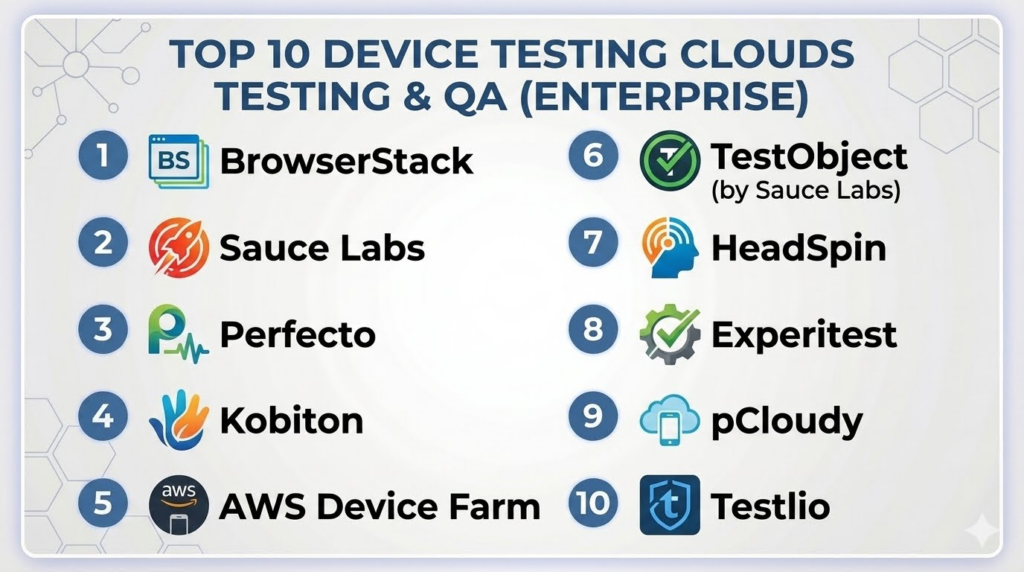
Introduction
Device Testing Clouds are platforms that provide cloud-based access to real mobile and desktop devices for automated and manual testing. They allow development and QA teams to validate app performance, compatibility, and functionality across multiple devices without maintaining an in-house lab. These platforms are essential for ensuring consistent user experiences across diverse devices, operating systems, and screen sizes.In with the proliferation of devices and operating system versions, manual device testing is no longer feasible at scale. Device Testing Clouds accelerate testing cycles, reduce hardware costs, and improve app quality while enabling continuous integration and deployment practices.
Real-world use cases include:
- Cross-device functional testing for mobile apps.
- Performance and load testing on real devices.
- Regression testing across OS updates and device types.
- Automated UI testing with integration to CI/CD pipelines.
- Debugging device-specific issues remotely without physical hardware.
Evaluation criteria for buyers:
- Number and variety of devices available.
- Real device access versus emulators/simulators.
- Support for automation frameworks (Appium, Selenium).
- Parallel testing and concurrency options.
- Performance and network simulation capabilities.
- Integration with CI/CD and reporting tools.
- Security and compliance standards.
- Ease of test script deployment and execution.
- Scalability for large development teams.
- Pricing and subscription flexibility.
Best for: QA engineers, mobile developers, DevOps teams, and enterprises managing multiple apps across diverse devices.
Not ideal for: Small teams with limited apps or those only targeting a single device/OS combination.
Key Trends in Device Testing Clouds
- AI-assisted test optimization and defect prediction.
- Support for real and virtual devices with network and OS simulation.
- Integration with CI/CD pipelines for continuous testing.
- Cloud-native solutions for global access and scalability.
- Parallel and concurrent device testing to reduce execution time.
- Real-time monitoring of app performance across devices.
- Cross-platform support for mobile, tablet, and desktop devices.
- Enhanced security with encrypted device sessions and access controls.
- Usage-based and subscription pricing models.
- Advanced analytics and reporting dashboards.
How We Selected These Tools (Methodology)
- Evaluated device variety and OS coverage.
- Assessed automation and manual testing support.
- Checked integration with CI/CD and development tools.
- Reviewed performance and network simulation capabilities.
- Evaluated scalability and concurrency options.
- Examined security, compliance, and session isolation.
- Considered ease of test deployment and execution.
- Verified reliability and uptime performance.
- Analyzed pricing flexibility and subscription models.
- Assessed support and documentation quality.
Top 10 Device Testing Clouds
#1 — BrowserStack
Short description:
BrowserStack provides cloud access to real devices for automated and manual testing. It supports multiple OS versions and browsers. Ideal for developers needing fast cross-device testing. Integrates with CI/CD pipelines and popular automation frameworks.
Key Features
- Real device and browser testing.
- Cross-platform OS and browser coverage.
- Integration with Appium, Selenium, and CI/CD tools.
- Parallel and automated testing capabilities.
- Real-time device interaction and debugging.
Pros
- Extensive device coverage.
- Easy integration with developer workflows.
Cons
- Premium pricing for enterprise features.
- Limited offline testing options.
Platforms / Deployment
- Web / iOS / Android / Cloud
Security & Compliance
- SOC 2, GDPR, encryption
Integrations & Ecosystem
- Jira, GitHub, Jenkins
- REST API and SDK
- CI/CD and automation frameworks
Support & Community
- Documentation, tutorials, and enterprise support
#2 — Sauce Labs
Short description:
Sauce Labs offers a cloud platform for testing mobile and web apps on real devices and emulators. It enables automated and live testing. Ideal for teams needing cross-browser and device coverage. Integrates with major CI/CD pipelines and frameworks.
Key Features
- Automated and live device testing.
- Cross-browser and OS support.
- Real device cloud for mobile testing.
- Parallel test execution.
- CI/CD pipeline integration.
Pros
- Broad device and OS coverage.
- Supports various automation frameworks.
Cons
- High learning curve for beginners.
- Enterprise pricing may be expensive.
Platforms / Deployment
- Web / iOS / Android / Cloud
Security & Compliance
- SOC 2, GDPR, ISO 27001
Integrations & Ecosystem
- Jenkins, GitHub, Jira
- REST API and SDKs
- CI/CD and test automation tools
Support & Community
- Enterprise support, documentation, webinars
#3 — Perfecto
Short description:
Perfecto provides cloud-based testing for mobile and web applications with real devices. It supports automated and manual testing and performance monitoring. Ideal for enterprise teams requiring reliable device access. Offers integration with CI/CD and reporting tools.
Key Features
- Real device cloud for mobile apps.
- Automation support with Appium and Selenium.
- Performance and network testing.
- Parallel execution for faster testing.
- CI/CD and DevOps integration.
Pros
- High-quality real device access.
- Advanced automation features.
Cons
- Premium pricing structure.
- May require training for full platform use.
Platforms / Deployment
- Web / iOS / Android / Cloud
Security & Compliance
- SOC 2, GDPR, ISO 27001
Integrations & Ecosystem
- Jenkins, Jira, GitHub
- REST API and SDKs
- CI/CD pipelines
Support & Community
- Enterprise support and documentation
#4 — Kobiton
Short description:
Kobiton provides cloud access to real devices for manual and automated mobile testing. Offers real-time device interaction and performance testing. Suitable for SMBs and enterprises targeting multi-device testing. Integrates with CI/CD pipelines.
Key Features
- Real device testing cloud.
- Automation with Appium and Selenium.
- Network simulation and performance testing.
- Session recording and debugging.
- CI/CD integration.
Pros
- Easy to use with real devices.
- Affordable plans for small teams.
Cons
- Limited advanced analytics.
- Smaller device library than some competitors.
Platforms / Deployment
- iOS / Android / Web / Cloud
Security & Compliance
- GDPR, encryption, Not publicly stated
Integrations & Ecosystem
- Jira, GitHub, Jenkins
- REST API and SDKs
- CI/CD pipelines
Support & Community
- Documentation and ticket support
#5 — AWS Device Farm
Short description:
AWS Device Farm allows testing on a large selection of real mobile devices. Supports automated and manual tests, including Appium scripts. Ideal for enterprise-grade mobile testing at scale. Integrates with AWS ecosystem and CI/CD workflows.
Key Features
- Real device cloud for iOS and Android.
- Automated testing with popular frameworks.
- Remote debugging and performance metrics.
- Parallel test execution.
- Integration with AWS services and CI/CD pipelines.
Pros
- Scalable enterprise-grade platform.
- Extensive device library.
Cons
- Usage-based pricing can become costly.
- AWS ecosystem knowledge required.
Platforms / Deployment
- iOS / Android / Cloud
Security & Compliance
- SOC 2, GDPR, HIPAA
Integrations & Ecosystem
- CI/CD pipelines
- Jenkins, GitHub, AWS services
- REST API
Support & Community
- AWS enterprise support and documentation
#6 — TestObject (Sauce Labs)
Short description:
TestObject provides cloud-based access to real mobile devices for automated and live testing. Suitable for SMBs and enterprises needing device diversity. Supports integration with CI/CD and automation frameworks.
Key Features
- Real device cloud access.
- Automation with Appium, Selenium, and Espresso.
- Manual device testing capabilities.
- Parallel execution support.
- CI/CD integration.
Pros
- Large device coverage.
- Easy to integrate with existing frameworks.
Cons
- Limited offline testing options.
- Enterprise features require subscription.
Platforms / Deployment
- iOS / Android / Web / Cloud
Security & Compliance
- SOC 2, GDPR
Integrations & Ecosystem
- Jira, GitHub, Jenkins
- REST API and SDKs
- CI/CD integration
Support & Community
- Documentation, ticket support
#7 — HeadSpin
Short description:
HeadSpin provides a cloud platform for real device testing and performance monitoring. Offers network simulation, automated testing, and detailed diagnostics. Ideal for enterprise apps with global device coverage.
Key Features
- Real devices and network simulation.
- Automated test execution.
- Performance and UX monitoring.
- CI/CD pipeline integration.
- Multi-platform SDK support.
Pros
- Global device coverage.
- Advanced performance monitoring.
Cons
- Premium pricing for full features.
- Learning curve for new users.
Platforms / Deployment
- iOS / Android / Web / Cloud
Security & Compliance
- SOC 2, GDPR, encryption
Integrations & Ecosystem
- Jira, GitHub, Jenkins
- REST API and SDKs
- CI/CD integration
Support & Community
- Enterprise support and documentation
#8 — Experitest
Short description:
Experitest provides cloud-based mobile and web app testing on real devices. Supports automated and manual testing with detailed performance metrics. Suitable for enterprise and mid-market development teams.
Key Features
- Real device cloud access.
- Automated testing with Appium and Selenium.
- Performance and network monitoring.
- CI/CD pipeline integration.
- Session recording and debugging.
Pros
- Detailed performance analytics.
- Multi-platform device access.
Cons
- Higher cost for smaller teams.
- Enterprise-level setup complexity.
Platforms / Deployment
- iOS / Android / Web / Cloud
Security & Compliance
- SOC 2, GDPR
Integrations & Ecosystem
- Jira, Jenkins, GitHub
- REST API
- CI/CD pipelines
Support & Community
- Documentation and enterprise support
#9 — pCloudy
Short description:
pCloudy provides cloud access to real devices for testing mobile apps. Enables automated and manual tests with performance and network insights. Ideal for global QA teams needing scalable device coverage.
Key Features
- Real device cloud for mobile testing.
- Automation with Appium and Selenium.
- Network simulation and performance metrics.
- Parallel testing and session recording.
- CI/CD integration.
Pros
- Wide device library.
- Easy parallel testing.
Cons
- Advanced analytics limited in basic plans.
- Enterprise features require subscription.
Platforms / Deployment
- iOS / Android / Web / Cloud
Security & Compliance
- GDPR, encryption, Not publicly stated
Integrations & Ecosystem
- Jira, GitHub, Jenkins
- REST API
- CI/CD pipelines
Support & Community
- Documentation, tutorials, ticket support
#10 — Testlio
Short description:
Testlio is a managed cloud platform providing access to real devices and human QA testers. Combines automated testing with expert manual QA. Suitable for enterprises and SMBs needing hybrid testing solutions.
Key Features
- Real device access for mobile apps.
- Automated and manual testing.
- Performance and crash monitoring.
- CI/CD integration.
- QA workflow management.
Pros
- Combines automation and human testing.
- Managed service reduces team overhead.
Cons
- Pricing can be higher than pure automation tools.
- Limited SDK analytics compared to full MPM platforms.
Platforms / Deployment
- iOS / Android / Web / Cloud
Security & Compliance
- SOC 2, GDPR
Integrations & Ecosystem
- Jira, GitHub, CI/CD pipelines
- REST API and SDK
- Workflow integrations
Support & Community
- Documentation and enterprise support
Comparison Table (Top 10)
| Tool Name | Best For | Platform(s) Supported | Deployment | Standout Feature | Public Rating |
|---|---|---|---|---|---|
| BrowserStack | Developers, QA | iOS/Android/Web | Cloud | Real device coverage | N/A |
| Sauce Labs | Enterprises | iOS/Android/Web | Cloud | Automation + real devices | N/A |
| Perfecto | Enterprises | iOS/Android/Web | Cloud | Parallel execution | N/A |
| Kobiton | SMBs, mid-market | iOS/Android | Cloud | Real device access | N/A |
| AWS Device Farm | Enterprises | iOS/Android | Cloud | Scalable device farm | N/A |
| TestObject | SMBs | iOS/Android/Web | Cloud | Automation integration | N/A |
| HeadSpin | Enterprises | iOS/Android/Web | Cloud | Global device coverage | N/A |
| Experitest | Enterprises | iOS/Android/Web | Cloud | Performance monitoring | N/A |
| pCloudy | Global QA teams | iOS/Android/Web | Cloud | Parallel testing | N/A |
| Testlio | SMBs/Enterprises | iOS/Android/Web | Cloud | Managed QA + automation | N/A |
Evaluation & Scoring of Device Testing Clouds
| Tool Name | Core (25%) | Ease (15%) | Integrations (15%) | Security (10%) | Performance (10%) | Support (10%) | Value (15%) | Weighted Total |
|---|---|---|---|---|---|---|---|---|
| BrowserStack | 9 | 9 | 9 | 9 | 9 | 8 | 8 | 8.8 |
| Sauce Labs | 9 | 8 | 9 | 9 | 9 | 8 | 7 | 8.5 |
| Perfecto | 9 | 7 | 8 | 9 | 8 | 8 | 7 | 8.0 |
| Kobiton | 8 | 9 | 7 | 8 | 8 | 7 | 8 | 7.9 |
| AWS Device Farm | 9 | 7 | 8 | 9 | 9 | 8 | 7 | 8.1 |
| TestObject | 8 | 8 | 7 | 8 | 8 | 7 | 8 | 7.8 |
| HeadSpin | 9 | 7 | 8 | 9 | 9 | 8 | 7 | 8.2 |
| Experitest | 8 | 8 | 7 | 8 | 8 | 7 | 8 | 7.9 |
| pCloudy | 8 | 8 | 7 | 8 | 8 | 7 | 8 | 7.9 |
| Testlio | 8 | 7 | 8 | 9 | 8 | 8 | 7 | 7.9 |
Which Device Testing Clouds Tool Is Right for You?
Solo / Freelancer
Kobiton and TestObject are lightweight and easy to integrate for small teams.
SMB
BrowserStack and Testlio offer both automation and access to multiple devices for small development teams.
Mid-Market
Experitest, pCloudy, and Kobiton support scalable automated testing and CI/CD integration.
Enterprise
Perfecto, HeadSpin, Sauce Labs, and AWS Device Farm provide enterprise-level device coverage, performance monitoring, and global scaling.
Budget vs Premium
TestObject and Kobiton are budget-friendly; Perfecto, HeadSpin, and AWS Device Farm are premium enterprise platforms.
Feature Depth vs Ease of Use
Enterprise tools provide advanced analytics and device coverage but require onboarding; lightweight tools are easier to deploy with fewer features.
Integrations & Scalability
Enterprise platforms support CI/CD pipelines, automation frameworks, and large-scale test execution.
Security & Compliance Needs
AWS Device Farm, HeadSpin, Perfecto, and Sauce Labs comply with SOC 2 and GDPR standards; lightweight tools rely on encryption and session security.
Frequently Asked Questions (FAQs)
1. How much do device testing clouds cost?
Pricing varies by device count, concurrency, and usage. Lightweight platforms like Kobiton or TestObject are affordable, while enterprise solutions like AWS Device Farm and Perfecto require premium subscriptions.
2. Can I test both mobile and web apps?
Yes, most platforms provide real device clouds for iOS, Android, and major browsers for web apps, supporting multi-platform QA.
3. Do these clouds support automated testing frameworks?
Yes, they integrate with Appium, Selenium, Espresso, and CI/CD pipelines to automate regression, functional, and performance tests.
4. Can I perform manual testing remotely?
Yes, live access to devices allows QA teams to interact with real devices, reproduce issues, and debug in real time.
5. How scalable are device clouds?
Enterprise solutions handle hundreds to thousands of concurrent devices globally, while SMB platforms support smaller concurrency levels.
6. Can I simulate network and performance conditions?
Yes, many platforms allow throttling network speed, latency simulation, and performance profiling for realistic testing.
7. How secure is testing on cloud devices?
Enterprise-grade platforms offer encrypted sessions, SOC 2 and GDPR compliance, and isolated environments for safe testing.
8. Can I integrate device clouds with CI/CD?
Yes, REST APIs and native integrations allow automated test execution during build and deployment pipelines.
9. Can I record test sessions?
Most platforms support session recording, screenshots, and video capture for debugging and reporting purposes.
10. Can I switch platforms if needed?
Yes, device clouds typically allow migration or parallel testing, but historical test data may require export before switching.
Conclusion
Device Testing Clouds are crucial for validating mobile and web applications across multiple devices and OS versions. Lightweight solutions like Kobiton and TestObject are ideal for small teams and startups, while enterprise-grade platforms such as Perfecto, HeadSpin, AWS Device Farm, and Sauce Labs provide comprehensive device coverage, advanced automation, and performance monitoring. Buyers should shortlist tools, pilot device tests, validate integrations with CI/CD pipelines, and ensure scalability, security, and compliance before full deployment.
