MOTOSHARE 🚗🏍️
Rent Bikes & Cars Directly from Owners
Motoshare connects vehicle owners with people who need bikes and cars on rent. Owners earn from idle vehicles, and renters get flexible ride options.
Visit Motoshare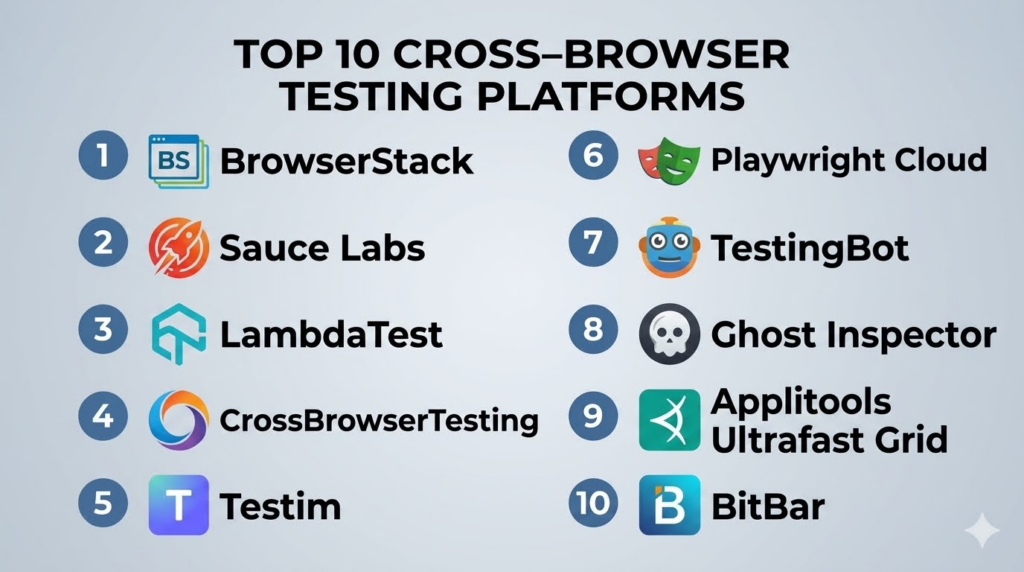
Introduction
Cross‑browser testing platforms allow developers, QA engineers, and product teams to verify that web applications function correctly across multiple browsers, browser versions, operating systems, and devices. These tools provide cloud‑based real environments or simulated browser sessions to ensure consistent behavior, layout rendering, and functionality regardless of user environment.In web complexity has grown immensely with new browser engines, progressive web apps, and single‑page applications. Ensuring compatibility across edge cases, legacy browser versions, and emerging platforms is critical for user satisfaction, accessibility compliance, and revenue continuity. Cross‑browser testing platforms help teams automate validation, reduce bugs in production, and improve release velocity.
Real‑world use cases include:
- Verifying UI/UX consistency across Chrome, Safari, Firefox, and Edge.
- Automating regression tests after feature releases.
- Compatibility testing on legacy browsers required by enterprise clients.
- Responsive layout testing across multiple viewport sizes.
- Debugging environment‑specific bugs without maintaining physical device labs.
Evaluation criteria for buyers:
- Breadth of browser & OS coverage
- Real device vs simulated environment support
- Automation framework support (Selenium, Playwright, Cypress)
- Parallel and concurrent test execution
- Integration with CI/CD pipelines
- Visual regression testing capabilities
- Real‑time debugging and session replay
- Security and compliance standards
- Performance & rendering accuracy
- Pricing flexibility and usage models
Best for: Developers, QA/Testing teams, DevOps engineers, product teams, and enterprises with broad user demographics.
Not ideal for: Very small teams targeting a narrow set of browsers where manual testing alone can suffice.
Key Trends in Cross‑Browser Testing Platforms
- AI‑assisted visual regression detection and Flaky test reduction.
- Full support for modern automation frameworks like Playwright and Cypress.
- Real device and real browser execution for accuracy.
- Integration with observability and error monitoring tools for faster feedback loops.
- Cloud‑native architecture for scalable concurrent sessions.
- Support for accessibility testing alongside functional tests.
- Enhanced network simulation and geo‑region testing.
- Real‑time session logs, video capture, and network traces.
- Flexible usage‑based pricing alongside subscription models.
- Security and compliance capabilities for enterprise testing needs.
How We Selected These Tools (Methodology)
- Evaluated browser & OS coverage breadth.
- Assessed automation and manual test support.
- Reviewed integration with CI/CD and development workflows.
- Measured real device and real browser rendering accuracy.
- Considered parallel execution and scalability.
- Reviewed security posture and compliance signals.
- Examined SDKs, APIs, and extensibility.
- Evaluated ease of onboarding and documentation quality.
- Compared pricing transparency.
- Assessed support channels and community engagement.
Top 10 Cross‑Browser Testing Platforms
#1 — BrowserStack
Short description:
BrowserStack provides cloud‑based real browsers and devices for testing across multiple environments. Designed for both manual and automated testing teams. It supports popular automation frameworks and integrates with CI/CD. Ideal for verifying real‑world compatibility without local infrastructure.
Key Features
- Real browsers and OS combinations.
- Automated testing with Selenium, Playwright, and Cypress.
- Parallel test execution.
- Visual regression testing.
- Real‑time logs, video capture, and debugging.
Pros
- Broadest real browser coverage.
- Excellent integration with developer workflows.
Cons
- Premium pricing for advanced features.
- Setup complexity for first‑time users.
Platforms / Deployment
- Web / Cloud
Security & Compliance
- SOC 2, GDPR, encryption
Integrations & Ecosystem
Highly extensible with CI/CD and workflow tools:
- Jira, GitHub, GitLab
- Jenkins, CircleCI
- REST APIs and SDKs
- Automation frameworks (Selenium, Playwright, Cypress)
Support & Community
- Enterprise and ticket support
- Community forums and detailed documentation
#2 — Sauce Labs
Short description:
Sauce Labs provides a comprehensive cloud platform for automated and live cross‑browser testing. It supports real browsers, emulators, simulators, and mobile devices. Ideal for teams focused on scalable automation and parallel execution.
Key Features
- Real browser and device cloud.
- Automated testing support with Selenium & Appium.
- Parallel test execution.
- Test analytics and historical reports.
- Visual testing and performance insights.
Pros
- Strong automation focus.
- Excellent scalability and analytics.
Cons
- Can be expensive for high concurrency.
- Learning curve for full feature set.
Platforms / Deployment
- Web / Cloud
Security & Compliance
- SOC 2, GDPR, ISO 27001
Integrations & Ecosystem
Works with modern dev workflows:
- CI/CD pipelines
- GitHub, Bitbucket, Jenkins
- REST APIs
- Test orchestration tools
Support & Community
- Tiered support plans
- Tutorials, webinars, and documentation
#3 — LambdaTest
Short description:
LambdaTest offers cloud‑based cross‑browser testing on real browsers and OS combinations. It supports automated testing with Selenium, Cypress, and other frameworks. Good choice for teams requiring parallel sessions and visual regression capabilities.
Key Features
- Real browser and OS combinations.
- Automated tests with Selenium & Cypress.
- Visual regression testing.
- Parallel and concurrent sessions.
- Debug logs and performance insights.
Pros
- User‑friendly interface.
- Flexible pricing plans for SMB and enterprise.
Cons
- Some advanced features require add‑ons.
- Device list smaller than some competitors.
Platforms / Deployment
- Web / Cloud
Security & Compliance
- GDPR, encryption, Not publicly stated
Integrations & Ecosystem
Supports common developer tools:
- Jira, GitHub, Jenkins
- REST API
- CI/CD plugins
Support & Community
- Documentation and tutorials
- Ticket support
#4 — CrossBrowserTesting (SmartBear)
Short description:
CrossBrowserTesting by SmartBear provides real browser and device testing with live and automated scripts. It supports robust parallel testing and integrates with test frameworks. Designed for teams needing comprehensive compatibility checks.
Key Features
- Live testing on real browsers.
- Automated testing with Selenium and Appium.
- Parallel execution.
- Visual regression comparisons.
- Debugging tools with logs and video.
Pros
- Good balance of manual and automated testing.
- Strong reporting capabilities.
Cons
- Interface can feel dated.
- Pricing less flexible for SMB.
Platforms / Deployment
- Web / Cloud
Security & Compliance
- SOC 2, GDPR
Integrations & Ecosystem
Extends into dev workflows:
- CI/CD integrations
- Jira, Slack support
- REST API
- Test orchestration
Support & Community
- Professional support tiers
- Documentation and guides
#5 — Testim
Short description:
Testim provides AI‑powered cross‑browser automation with visual validation and adaptive learning. It allows teams to build robust automated tests faster. Suitable for dynamic applications and frequent UI changes.
Key Features
- AI‑driven test creation.
- Visual validation and auto‑healing tests.
- Cross‑browser support.
- CI/CD pipeline integration.
- Real‑time test analytics.
Pros
- Faster test authoring.
- Resilient tests with self‑healing.
Cons
- Premium pricing.
- Requires learning for AI features.
Platforms / Deployment
- Web / Cloud
Security & Compliance
- SOC 2, GDPR, encryption
Integrations & Ecosystem
Supports modern workflows:
- GitHub, Azure DevOps
- Jenkins, CircleCI
- REST APIs
Support & Community
- Enterprise support
- Documentation and community engagement
#6 — Playwright Cloud
Short description:
Playwright Cloud offers cloud‑based cross‑browser testing using the Playwright framework. It supports parallel test execution and integrates with automation pipelines. Built for teams adopting modern testing practices.
Key Features
- Native Playwright support.
- Parallel and concurrent test runs.
- Multi‑browser coverage.
- CI/CD integration.
- Test orchestration and scheduling.
Pros
- Seamless Playwright automation.
- Efficient parallel execution.
Cons
- Limited legacy browser support compared to older platforms.
- May require Playwright expertise.
Platforms / Deployment
- Web / Cloud
Security & Compliance
- Not publicly stated
Integrations & Ecosystem
Designed for modern test stacks:
- CI/CD pipelines
- GitHub, GitLab
- REST APIs
Support & Community
- Documentation and community resources
- Limited support tiers
#7 — TestingBot
Short description:
TestingBot provides real browser and mobile browser testing with automated and manual capabilities. Offers multiple browser versions and concurrency. Designed for teams needing affordable cloud testing.
Key Features
- Real cross‑browser testing.
- Automation with Selenium and Appium.
- Parallel sessions and concurrency.
- Visual regression and logs.
- Manual interactive sessions.
Pros
- Affordable plans.
- Good browser coverage.
Cons
- Smaller ecosystem than larger clouds.
- Limited advanced analytics.
Platforms / Deployment
- Web / Cloud
Security & Compliance
- GDPR, encryption, Not publicly stated
Integrations & Ecosystem
Supports common tools:
- Jenkins, GitHub
- REST API
- CI/CD pipelines
Support & Community
- Ticket support
- Documentation
#8 — Ghost Inspector
Short description:
Ghost Inspector provides end‑to‑end cross‑browser testing with browser automation and visual assertions. It is suitable for teams that want scripting and codeless test creation combined. Integrates with CI/CD and reporting tools.
Key Features
- Browser automation with codeless options.
- Visual assertions for UI validation.
- Cross‑browser testing.
- CI/CD integration.
- Test scheduling and reporting.
Pros
- Codeless test creation.
- Visual regression testing.
Cons
- Less suited for large automation pipelines.
- Limited advanced debugging.
Platforms / Deployment
- Web / Cloud
Security & Compliance
- GDPR, encryption, Not publicly stated
Integrations & Ecosystem
Integrates with:
- CI/CD tools
- Slack, Jira
- REST APIs
Support & Community
- Documentation and support forums
#9 — Applitools Ultrafast Grid
Short description:
Applitools Ultrafast Grid provides visual cross‑browser testing with pixel‑accurate rendering. Uses AI to detect visual differences across browsers. Ideal for teams that prioritize visual consistency and UI testing at scale.
Key Features
- AI‑driven visual testing.
- Ultrafast parallel browser testing.
- Visual regression detection.
- Intelligent difference classification.
- CI/CD integration.
Pros
- Best‑in‑class visual testing.
- Reduces false positives.
Cons
- Premium pricing.
- Not focused on functional automation.
Platforms / Deployment
- Web / Cloud
Security & Compliance
- SOC 2, GDPR
Integrations & Ecosystem
Integrates with test stacks:
- Selenium, Cypress
- CI/CD pipelines
- REST APIs
Support & Community
- Enterprise support
- Documentation and examples
#10 — BitBar
Short description:
BitBar provides cloud‑based device and browser testing with automated and manual sessions. It combines cross‑browser web testing with mobile device clouds. Suitable for teams needing unified web and mobile testing.
Key Features
- Real browser and mobile device testing.
- Automation with Selenium and Appium.
- Parallel execution.
- Network simulation.
- CI/CD integration.
Pros
- Unified web + mobile testing.
- Strong device coverage.
Cons
- Device cloud focus may dilute browser depth.
- UI can be less intuitive for newcomers.
Platforms / Deployment
- Web / iOS / Android / Cloud
Security & Compliance
- GDPR, encryption, Not publicly stated
Integrations & Ecosystem
Supports:
- Jenkins, GitHub
- REST APIs
- CI/CD pipelines
Support & Community
- Documentation and ticket support
Comparison Table (Top 10)
| Tool Name | Best For | Platform(s) Supported | Deployment | Standout Feature | Public Rating |
|---|---|---|---|---|---|
| BrowserStack | Developers, QA | Web | Cloud | Real browser coverage | N/A |
| Sauce Labs | Enterprises | Web | Cloud | Scalable automation | N/A |
| LambdaTest | SMBs, Teams | Web | Cloud | Visual regression | N/A |
| CrossBrowserTesting | QA teams | Web | Cloud | Manual + automated tests | N/A |
| Testim | Modern Dev teams | Web | Cloud | AI‑driven automation | N/A |
| Playwright Cloud | Modern frameworks | Web | Cloud | Playwright native support | N/A |
| TestingBot | SMBs | Web | Cloud | Affordable concurrency | N/A |
| Ghost Inspector | Small teams | Web | Cloud | Codeless test creation | N/A |
| Applitools Ultrafast Grid | Visual QA | Web | Cloud | AI visual testing | N/A |
| BitBar | Web + Mobile | Web/iOS/Android | Cloud | Unified web + mobile | N/A |
Evaluation & Scoring of Cross‑Browser Testing Platforms
| Tool Name | Core (25%) | Ease (15%) | Integrations (15%) | Security (10%) | Performance (10%) | Support (10%) | Value (15%) | Weighted Total |
|---|---|---|---|---|---|---|---|---|
| BrowserStack | 9 | 9 | 9 | 9 | 9 | 8 | 8 | 8.8 |
| Sauce Labs | 9 | 8 | 9 | 9 | 9 | 8 | 7 | 8.5 |
| LambdaTest | 8 | 9 | 8 | 8 | 8 | 8 | 8 | 8.1 |
| CrossBrowserTesting | 8 | 8 | 8 | 9 | 8 | 8 | 8 | 8.1 |
| Testim | 8 | 7 | 8 | 9 | 8 | 8 | 7 | 7.9 |
| Playwright Cloud | 8 | 8 | 7 | 8 | 8 | 7 | 8 | 7.8 |
| TestingBot | 7 | 8 | 7 | 8 | 7 | 7 | 8 | 7.5 |
| Ghost Inspector | 7 | 8 | 7 | 8 | 7 | 7 | 8 | 7.6 |
| Applitools Ultrafast Grid | 8 | 7 | 9 | 9 | 8 | 8 | 7 | 8.0 |
| BitBar | 8 | 7 | 8 | 8 | 8 | 7 | 8 | 7.9 |
Interpretation: Scores reflect a combination of breadth of browser coverage, ease of automation integration, security posture, performance, and value. Higher weighted totals indicate more enterprise‑ready and feature‑complete solutions.
Which Cross‑Browser Testing Platforms Tool Is Right for You?
Solo / Freelancer
TestingBot, Ghost Inspector, and LambdaTest offer affordable, easy‑to‑use environments for basic compatibility checks.
SMB
BrowserStack, LambdaTest, and CrossBrowserTesting provide extensive browser coverage and automation without overwhelming complexity.
Mid‑Market
Sauce Labs, Applitools Ultrafast Grid, and Testim help balance automation depth, visual testing, and performance metrics.
Enterprise
BrowserStack, Sauce Labs, and Applitools deliver enterprise scalability, highest accuracy across browsers, and robust integrations.
Budget vs Premium
TestingBot and Ghost Inspector are budget‑friendly; BrowserStack, Sauce Labs, Applitools, and Testim are premium, feature‑rich platforms.
Feature Depth vs Ease of Use
Enterprise tools offer advanced automation and analytics but require onboarding; simpler tools favor rapid start‑ups and SMBs.
Integrations & Scalability
Enterprise platforms integrate with CI/CD, bug trackers, and automation frameworks, supporting large test suites and global teams.
Security & Compliance Needs
BrowserStack, Sauce Labs, and Applitools maintain SOC 2 and GDPR compliance; others focus on core encryption measures.
Frequently Asked Questions (FAQs)
1. How much do cross‑browser testing platforms cost?
Costs vary based on usage, concurrency, and device/browser coverage. Lightweight tools are more affordable, while enterprise platforms require premium subscriptions.
2. Can these platforms test both desktop and mobile browsers?
Yes, most support major desktop browsers and mobile browser environments for comprehensive compatibility.
3. Do they support automated testing frameworks?
Yes, top platforms integrate with Selenium, Playwright, Cypress, and CI/CD pipelines for automated test execution.
4. Can I run tests in parallel?
Yes, many solutions offer parallel and concurrent sessions to reduce execution time and accelerate pipelines.
5. How accurate are cloud browser environments?
Platforms use real browsers or highly accurate virtual environments to ensure behavior matches user experiences.
6. Do these tools support visual regression testing?
Several tools provide visual testing capabilities to detect pixel‑level UI differences across browsers.
7. How do I debug test failures?
Platforms offer logs, screenshots, video capture, and network traces to diagnose issues quickly.
8. Are these testing sessions secure?
Enterprise vendors provide encryption, SOC 2, GDPR compliance, and session isolation for secure testing.
9. Can I integrate them with my CI/CD?
Yes, REST APIs and native integrations allow seamless CI/CD orchestration for automated testing.
10. Can I switch platforms later?
Yes, most allow migration, but exporting historical test data may require upfront planning.
Conclusion
Cross‑browser testing platforms are essential for delivering consistent, reliable web experiences across diverse environments. Lightweight tools such as TestingBot and Ghost Inspector help start‑ups and SMBs get started quickly, while enterprise platforms like BrowserStack, Sauce Labs, and Applitools lead in breadth of coverage, automation depth, and visual testing. The best solution depends on browser coverage needs, automation frameworks, team size, and budget. Buyers should shortlist platforms, pilot test suites, evaluate CI/CD integration, and validate security/compliance before scaling across development workflows.
