MOTOSHARE 🚗🏍️
Rent Bikes & Cars Directly from Owners
Motoshare connects vehicle owners with people who need bikes and cars on rent. Owners earn from idle vehicles, and renters get flexible ride options.
Visit Motoshare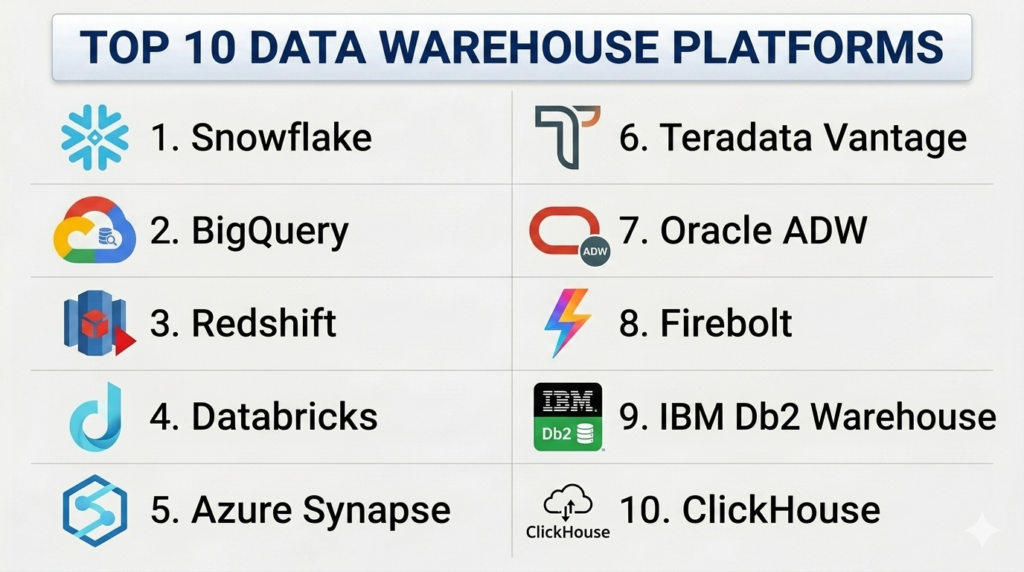
Introduction
A Data Warehouse platform is a centralized repository designed specifically for analytical processing rather than day-to-day transactional tasks. In plain English, while a standard database might handle the recording of a single sale, a data warehouse is where you store millions of those sales records from various sources—like your website, physical stores, and marketing apps—to find patterns, predict future trends, and create complex business reports. It serves as the “single source of truth” for an entire organization.
In the current data landscape, these platforms have become indispensable. As businesses generate exponentially more data from IoT devices, customer interactions, and cloud applications, the ability to store this information cost-effectively and query it at lightning speed is the difference between leading the market and falling behind. Modern data warehouses have moved away from expensive hardware appliances to elastic cloud environments that allow companies to pay only for what they use while supporting advanced artificial intelligence and machine learning initiatives.
Real-World Use Cases:
- Retail Personalization: Aggregating years of purchase history and real-time clickstream data to deliver hyper-targeted product recommendations to millions of customers simultaneously.
- Financial Fraud Detection: Consolidating global transaction data to run complex anomaly detection algorithms that identify suspicious activity in milliseconds.
- Healthcare Outcome Analysis: Integrating patient records, clinical trial data, and pharmacy logs to identify which treatments are most effective across diverse demographics.
- Supply Chain Optimization: Combining weather data, logistics updates, and inventory levels to predict stockouts and reroute shipments automatically.
Buyer Evaluation Criteria:
- Separation of Compute and Storage: The ability to scale processing power independently from data storage to optimize costs.
- Concurrency Support: How the platform handles hundreds or thousands of users running complex queries at the same time without performance degradation.
- Data Ingestion Speed: The efficiency of moving data from source systems into the warehouse (ETL/ELT performance).
- SQL Compliance: Support for standard SQL dialects to ensure existing analysts and tools can work with the system immediately.
- Multi-Cloud Capability: Whether the platform can operate across AWS, Azure, and Google Cloud to avoid vendor lock-in.
- Security & Governance: Granular access controls, end-to-end encryption, and built-in data masking features.
- Serverless Options: The availability of “pay-per-query” models to reduce the burden of infrastructure management.
- Ecosystem Integrations: Native connectivity with popular BI tools like Tableau, PowerBI, and Looker.
Mandatory paragraph
- Best for: Large-scale enterprises, data-heavy technology companies, and business intelligence teams requiring a unified view of disparate data sources for high-level decision-making.
- Not ideal for: Small businesses with very simple data needs that can be handled by a standard spreadsheet or a basic operational database; organizations that do not require historical trend analysis.
Key Trends in Data Warehouse Platforms
- Zero-ETL Evolution: A massive shift toward direct data sharing and streaming where data moves from operational databases to warehouses without the need for complex, manual transformation pipelines.
- Generative AI Integration: The rise of “Text-to-SQL” features, allowing non-technical business users to ask questions in natural language and receive immediate data visualizations from the warehouse.
- The Rise of the Data Lakehouse: The merging of data warehouses (structured data) and data lakes (unstructured data) into a single architectural layer that supports both BI and AI.
- FinOps & Cost Governance: Advanced built-in tools for tracking query costs at the individual user or department level to prevent “runaway” cloud bills.
- Serverless Dominance: A move away from provisioned clusters toward fully automated, serverless environments that scale up and down instantly based on demand.
- Edge Data Warehousing: Extending analytical capabilities closer to where data is generated (IoT devices) to reduce latency and bandwidth costs.
- Data Mesh Support: Features designed to allow different departments to own their own data “domains” while still participating in a centralized, governed warehouse ecosystem.
- In-Database Machine Learning: The ability to train and run ML models directly where the data lives, eliminating the risks and costs of moving sensitive data between platforms.
How We Selected These Tools (Methodology)
To select the top 10 data warehouse platforms for this guide, we followed a rigorous evaluation logic:
- Market Adoption: We prioritized platforms that are recognized as leaders by major industry analysts and have a significant global customer base.
- Feature Completeness: Only tools offering full ACID compliance, columnar storage, and advanced indexing were considered.
- Cloud Maturity: We looked for platforms with established, high-availability track records across public cloud regions.
- Integration Density: We evaluated the number of third-party connectors available for popular BI and ETL tools.
- Performance Signals: We assessed the platforms’ ability to handle petabyte-scale data and high-concurrency workloads based on technical benchmarks.
- Security Posture: Preference was given to tools with native, enterprise-grade security features like row-level security and dynamic data masking.
- Ease of Management: We favored “as-a-service” models that reduce the need for manual database administration tasks.
- Pricing Transparency: We analyzed the clarity of pricing models to ensure buyers can predict costs accurately.
Top 10 Data Warehouse Platforms Tools
#1 — Snowflake
Short description:
Snowflake is a cloud-native data platform that revolutionized the industry by pioneering the complete separation of compute and storage. It allows organizations to store all their data in one place and run an unlimited number of concurrent workloads without performance interference. It is built as a fully managed SaaS, meaning there is virtually no hardware or software to manage, making it a favorite for teams that want to focus on data rather than infrastructure.
Key Features
- Multi-Cluster Shared Data: Enables multiple compute clusters to access the same data simultaneously without contention.
- Snowpark: A developer framework that allows users to write code in Python, Java, or Scala directly within Snowflake.
- Secure Data Sharing: Allows companies to share data with partners or customers instantly without moving or copying files.
- Zero-Copy Cloning: Creates instant copies of databases for testing or development without taking up extra storage.
- Time Travel: Enables users to query data as it existed at any point in the past (up to 90 days).
Pros
- Near-zero maintenance required for indexing, partitioning, or vacuuming.
- Highly elastic; you can scale compute power up or down in seconds.
- Operates seamlessly across AWS, Azure, and Google Cloud for a unified experience.
Cons
- Compute costs are calculated by “credits,” which can lead to high bills if queries are not optimized.
- Bulk data loading can sometimes be more expensive than native cloud provider options.
Platforms / Deployment
- Web / Windows / macOS / Linux
- Cloud (AWS, Azure, GCP)
Security & Compliance
- SSO/SAML, MFA, RBAC, Always-on encryption, Dynamic Data Masking.
- SOC 2 Type II, ISO 27001, HIPAA, GDPR, FedRAMP.
Integrations & Ecosystem
Snowflake has one of the most robust partner ecosystems in the data industry, acting as the hub for modern data stacks.
- Native connectors for Tableau, PowerBI, and Looker.
- Deep integration with ETL tools like Fivetran, Matillion, and dbt.
- Support for Python, Spark, and R for data science workflows.
Support & Community
Offers multiple support tiers including Premier and 24/7 Priority support. It has a massive community of certified professionals and a highly active online forum for troubleshooting.
#2 — Google BigQuery
Short description:
Google BigQuery is a serverless, highly scalable, and cost-effective multi-cloud data warehouse designed for business agility. Because it is serverless, there are no resources to provision and no infrastructure to manage. It uses a specialized columnar storage format and Google’s massive distributed processing power to query petabytes of data in seconds, making it ideal for organizations that want to leverage AI and machine learning without the complexity of traditional database management.
Key Features
- Serverless Execution: Google manages the underlying compute clusters automatically based on the complexity of your query.
- BigQuery ML: Allows data scientists to create and execute machine learning models using standard SQL directly in the warehouse.
- BigQuery Omni: A multi-cloud analytics solution that allows you to analyze data across AWS and Azure without moving data.
- BigLake: Provides a unified interface for querying data in data lakes (S3/GCS) and the warehouse simultaneously.
- Real-time Analytics: High-speed streaming ingestion allows data to be queried the moment it is generated.
Pros
- Predictable pricing with a “pay-per-query” model or flat-rate options.
- Extremely fast performance on massive, unstructured, or semi-structured datasets.
- Superior integration with the Google Cloud AI/ML and marketing ecosystem.
Cons
- Lack of traditional database indices can make very small, specific lookups slower than other platforms.
- The web UI can be overwhelming for users who are not already familiar with the Google Cloud Console.
Platforms / Deployment
- Web
- Cloud (GCP)
Security & Compliance
- MFA, SSO, Customer-Managed Encryption Keys (CMEK), VPC Service Controls.
- SOC 2, ISO 27001, HIPAA, GDPR, FedRAMP.
Integrations & Ecosystem
Deeply embedded in the Google Cloud ecosystem, it is the primary destination for Google Ads and Analytics data.
- Native integration with Looker and Data Studio.
- Connects with TensorFlow and Vertex AI for advanced modeling.
- Support for standard JDBC/ODBC drivers for third-party BI.
Support & Community
Standard Google Cloud support tiers apply. It is backed by an enormous global community of data engineers and has extensive technical documentation.
#3 — Amazon Redshift
Short description:
Amazon Redshift is the most widely used cloud data warehouse, specifically optimized for the AWS ecosystem. It uses machine learning to deliver high performance through automated tuning and hardware-accelerated processing. Redshift is designed for organizations that need a powerful, traditional SQL-based warehouse that integrates deeply with other AWS services like S3, Glue, and SageMaker.
Key Features
- Redshift Serverless: Automatically provisions and scales warehouse capacity to handle unpredictable workloads.
- AQUA (Advanced Query Accelerator): A hardware-accelerated cache that speeds up queries by up to 10x compared to other cloud warehouses.
- Redshift Spectrum: Enables users to query data directly from Amazon S3 data lakes without loading it into the warehouse.
- Concurrency Scaling: Automatically adds additional cluster capacity to support virtually unlimited concurrent users.
- Data Sharing: Allows for secure, read-only access to live data across different Redshift clusters.
Pros
- Exceptional value and price-performance ratio for AWS-centric organizations.
- Supports highly complex SQL joins and traditional relational database patterns.
- Seamless migration tools (AWS Schema Conversion Tool) for moving from on-premise databases.
Cons
- Can require more manual “DBA” work (vacuuming, distribution keys) than Snowflake or BigQuery.
- Cluster resizing, while improved, is not always as instantaneous as serverless competitors.
Platforms / Deployment
- Web / Windows / macOS / Linux
- Cloud (AWS)
Security & Compliance
- MFA, SSL/TLS, VPC isolation, IAM roles, HSM support.
- SOC 2, ISO 27001, HIPAA, PCI-DSS, FedRAMP.
Integrations & Ecosystem
Central to the AWS data strategy, it integrates with almost every service in the Amazon catalog.
- Native integration with AWS Glue, S3, and Kinesis.
- Works with Amazon QuickSight, Tableau, and MicroStrategy.
- Direct connection to Amazon SageMaker for ML.
Support & Community
AWS Enterprise Support is available with 24/7 access to experts. Given its market share, there is a vast community of AWS-certified consultants and developers.
#4 — Databricks (SQL Warehouse)
Short description:
Databricks, originally known for its data engineering and machine learning capabilities, has expanded into the warehouse space with its SQL Warehouse functionality. It is built on top of the “Lakehouse” architecture, which combines the performance of a warehouse with the low-cost storage of a data lake. It is designed for companies that want a single platform for their data scientists (using Spark) and their BI analysts (using SQL).
Key Features
- Delta Lake: An open-source storage layer that brings ACID transactions and reliability to data lakes.
- Unity Catalog: A unified governance layer for all data and AI assets across the platform.
- Photon Engine: A high-performance vectorized query engine built from the ground up for speed.
- Serverless SQL: Provides instant compute resources for SQL queries without cluster management.
- Collaborative Notebooks: Shared workspace for data engineers and analysts to build pipelines together.
Pros
- The best choice for organizations that need to do both advanced ML and heavy BI on the same data.
- Based on open-source standards (Apache Spark), reducing long-term vendor lock-in.
- Incredible performance on large-scale data transformation (ETL) tasks.
Cons
- Can have a steeper learning curve for teams that only know traditional SQL.
- Management of clusters and notebooks can be more complex than a “pure” warehouse like Snowflake.
Platforms / Deployment
- Web
- Cloud (AWS, Azure, GCP)
Security & Compliance
- SSO/SAML, MFA, Encryption-at-rest, SCIM provisioning.
- SOC 2 Type II, ISO 27001, HIPAA, GDPR.
Integrations & Ecosystem
Deeply integrated with cloud providers and the modern data stack.
- Azure Databricks (a first-party service on Microsoft Azure).
- Integrates with dbt, Fivetran, and PowerBI.
- Native support for MLflow for model tracking.
Support & Community
Strong enterprise support plans. It is backed by the massive Apache Spark open-source community, providing a wealth of resources and plugins.
#5 — Azure Synapse Analytics
Short description:
Azure Synapse is an integrated analytics service that accelerates time to insight across data warehouses and big data systems. It brings together the best of SQL technologies used in enterprise data warehousing, Spark technologies used for big data, and Pipelines for data integration (ETL). It is the premier choice for organizations already committed to the Microsoft ecosystem and PowerBI.
Key Features
- Synapse SQL: Offers both provisioned and serverless SQL pools for flexible workload management.
- Synapse Spark: Deeply integrated Apache Spark for data preparation and machine learning.
- Synapse Pipelines: An ETL engine based on Azure Data Factory for moving data across 90+ sources.
- Synapse Link: Provides near real-time analytics for operational databases like Cosmos DB.
- Synapse Studio: A single web UI for data preparation, management, exploration, and BI.
Pros
- Unified workspace for all data tasks, reducing the need to jump between different tools.
- Deepest integration with PowerBI for seamless reporting.
- Flexible pricing that allows you to mix and match provisioned and serverless compute.
Cons
- The “all-in-one” approach can result in a complex user interface that is intimidating for beginners.
- Provisioned SQL pools can be slow to pause or resume compared to cloud-native alternatives.
Platforms / Deployment
- Web / Windows
- Cloud (Azure)
Security & Compliance
- SSO, Entra ID (Active Directory), Row-level security, Data masking, VPC endpoints.
- SOC 2, ISO 27001, HIPAA, GDPR, FedRAMP High.
Integrations & Ecosystem
The cornerstone of the Microsoft Intelligent Data Platform.
- Native integration with Azure Data Lake Storage (ADLS Gen2).
- Deepest connectivity with PowerBI and Microsoft 365.
- Works with Azure Machine Learning and Cognitive Services.
Support & Community
Microsoft Enterprise Support is widely available. It has a massive community of Azure-certified professionals and MVPs globally.
#6 — Teradata Vantage
Short description:
Teradata Vantage is a multi-cloud data platform built for enterprise-scale analytics. Known for its history of handling the world’s most complex and massive datasets, Vantage excels in “hybrid cloud” environments where data might live both on-premise and in the public cloud. It is designed for large global corporations that require sophisticated workload management and the ability to run millions of queries per day without fail.
Key Features
- Advanced Workload Management: Automatically prioritizes critical business queries over background tasks.
- Native Object Store Integration: Allows users to query data in S3, Azure Blob, or Google Cloud Storage alongside warehouse data.
- 4D Analytics: Specialized support for time-series and geospatial data at massive scale.
- QueryGrid: A high-speed data fabric that allows for federated queries across different platforms.
- ClearScape Analytics: A powerful, in-database AI/ML toolset for large-scale modeling.
Pros
- Unmatched performance for extremely complex SQL joins on petabytes of data.
- Highest degree of flexibility for hybrid-cloud and on-premise deployment.
- Consistent and predictable performance under high concurrency.
Cons
- Can be more expensive than newer, cloud-only startups for small-scale projects.
- The administrative toolset requires specialized knowledge compared to simpler SaaS tools.
Platforms / Deployment
- Windows / Linux
- Cloud / Self-hosted / Hybrid
Security & Compliance
- SSO/SAML, Kerberos, LDAP integration, Advanced encryption, RBAC.
- SOC 2 Type II, ISO 27001, HIPAA, GDPR.
Integrations & Ecosystem
Focused on enterprise interoperability and large-scale data architectures.
- Connectors for SAP, Oracle, and Microsoft applications.
- Works with MicroStrategy, Tableau, and SAS.
- Rich Python and R SDKs for data science.
Support & Community
Offers white-glove enterprise support with dedicated account managers. The community is comprised of highly experienced enterprise data architects.
#7 — Oracle Autonomous Data Warehouse
Short description:
Oracle Autonomous Data Warehouse (ADW) is a self-driving, self-securing, and self-repairing cloud database service. It uses machine learning to eliminate human labor and error from database tuning, security, and backups. It is the natural choice for organizations that have a long history with Oracle databases and want to move to a cloud environment that manages itself.
Key Features
- Automated Tuning: Uses AI to automatically create indices, partition data, and optimize query plans.
- Auto-Scaling: Automatically increases or decreases compute resources in response to query load without downtime.
- Integrated Data Tools: Built-in web tools for data loading, transformations, and business modeling.
- Spatial and Graph Analytics: Native, high-performance support for relationship-based and location-based data.
- Data Safe: An integrated security console to identify sensitive data and assess security risks.
Pros
- Massively reduces the operational burden on Database Administrators (DBAs).
- High performance for mixed workloads (analytical and light transactional).
- Strongest security posture out-of-the-box with automated patching.
Cons
- Best performance and value are tied specifically to the Oracle Cloud Infrastructure (OCI).
- Can be difficult to integrate with non-Oracle cloud services compared to Snowflake.
Platforms / Deployment
- Web / Windows / Linux
- Cloud (OCI)
Security & Compliance
- MFA, SSO, Always-on encryption, Data Redaction, Audit Vault.
- SOC 2, ISO 27001, HIPAA, GDPR, PCI-DSS.
Integrations & Ecosystem
Tightest integration with Oracle’s business application suite.
- Native integration with Oracle Analytics Cloud.
- Connectors for Oracle Fusion ERP, CRM, and HCM.
- Standard JDBC/ODBC support for third-party BI.
Support & Community
Oracle Global Support provides 24/7 technical assistance. Backed by decades of Oracle expertise and a massive network of certified professionals.
#8 — Firebolt
Short description:
Firebolt is a relatively new but extremely fast cloud data warehouse designed specifically for high-performance, data-intensive applications. It targets the “sub-second” query market—powering customer-facing dashboards and real-time operational analytics where other warehouses might struggle with latency. It is built on a specialized indexing and vectorized processing architecture to deliver extreme speed with lower hardware costs.
Key Features
- Sparse Indexing: Highly efficient indexing that allows the engine to skip unnecessary data during a scan.
- Vectorized Execution: Processes data in blocks rather than row-by-row, maximizing CPU efficiency.
- Separation of Compute and Storage: Allows for multi-workload isolation and independent scaling.
- Aggregating Indexes: Pre-calculates aggregations as data is ingested to provide instant reporting results.
- F-JSON: A specialized format for ultra-fast querying of nested JSON data.
Pros
- Unbeatable query speeds for high-concurrency, dashboard-style workloads.
- Lower total cost of ownership (TCO) for high-performance use cases.
- Very efficient at handling large-scale semi-structured data.
Cons
- Requires more manual “indexing” configuration than Snowflake or BigQuery to get the best results.
- The partner ecosystem and third-party connector list are smaller than the established giants.
Platforms / Deployment
- Web / API
- Cloud (AWS)
Security & Compliance
- SSO, MFA, RBAC, Encryption-at-rest/in-transit.
- SOC 2 Type II (Publicly stated).
Integrations & Ecosystem
Rapidly growing but still focused on the developer and modern data engineer community.
- Native connectors for Tableau, Looker, and Superset.
- Integrates with dbt, Airbyte, and Fivetran.
- Python and Node.js SDKs for custom app building.
Support & Community
Offers high-touch support for early adopters and enterprises. The community is active on Slack and developer-focused forums.
#9 — IBM Db2 Warehouse
Short description:
IBM Db2 Warehouse is a client-managed or cloud-based data warehouse designed for high-performance analytics. It features “BLU Acceleration,” which uses in-memory processing and columnar storage to deliver results without the need for complex indexing. It is an ideal platform for organizations that require a hybrid data strategy and want to leverage IBM’s Netezza heritage for analytical power.
Key Features
- BLU Acceleration: A suite of in-memory technologies for faster analytical processing.
- Netezza Compatibility: Allows for easy migration from legacy Netezza appliances to a modern warehouse.
- In-Database ML: Native support for training and running machine learning models within the database engine.
- Hybrid Deployment: Can be deployed as a managed cloud service, as software on-prem, or in private clouds.
- Advanced Compression: Uses actionable compression to reduce storage costs while improving performance.
Pros
- Incredible reliability for mission-critical enterprise workloads.
- Consistent performance across on-premise and cloud environments.
- Strong integration with IBM’s AI (Watson) and Data Governance tools.
Cons
- The cloud management interface feels less “modern” than Snowflake or BigQuery.
- Setup and configuration for on-premise versions can be quite complex.
Platforms / Deployment
- Windows / Linux / AIX
- Cloud / Self-hosted / Hybrid
Security & Compliance
- MFA, SSO/SAML, Column-level encryption, Audit logging.
- SOC 2, ISO 27001, HIPAA, GDPR.
Integrations & Ecosystem
Centered around the IBM Cloud Pak for Data and enterprise application stack.
- Integrates with IBM Watson Studio and Cognos Analytics.
- Works with Informatica, Talend, and SAS.
- Support for Python, Spark, and R.
Support & Community
IBM Expert Support provides high-level technical guidance. Backed by a long legacy of enterprise data management expertise.
#10 — ClickHouse (Cloud)
Short description:
ClickHouse is an open-source, columnar database management system that is famous for being arguably the fastest analytical database in the world. Originally developed for log analytics, the ClickHouse Cloud offering has turned it into a full-fledged enterprise data warehouse. It is designed for engineers who need to process trillions of rows and generate analytical reports in real-time with millisecond latencies.
Key Features
- Vectorized Processing: Uses modern CPU instructions to process millions of rows simultaneously.
- Materialized Views: Automatically calculates and stores aggregates as data is ingested.
- Data Compression: Sophisticated codecs that can compress data up to 10x-20x.
- Distributed Processing: Queries are automatically parallelized across all nodes in the cluster.
- Native Kafka Integration: Directly ingests data from streaming platforms without the need for separate ETL tools.
Pros
- Blistering query speed that often beats all other platforms in raw benchmarks.
- Extremely resource-efficient; you can run huge workloads on relatively small hardware.
- Open-source core prevents vendor lock-in and allows for complete transparency.
Cons
- Lacks support for traditional transactional features (no multi-row UPDATE/DELETE statements).
- Can be challenging to configure and manage without deep technical expertise.
Platforms / Deployment
- Windows / macOS / Linux
- Cloud / Self-hosted / Hybrid
Security & Compliance
- RBAC, SSL/TLS, IP whitelisting, Encryption-at-rest.
- SOC 2 Type II (ClickHouse Cloud).
Integrations & Ecosystem
Rapidly growing in the developer and “Modern Data Stack” communities.
- Native connectors for Grafana, Superset, and Metabase.
- Integrates with dbt-clickhouse and Airbyte.
- Python, Go, and Node.js client libraries.
Support & Community
One of the most vibrant open-source communities on GitHub. Commercial support is available through ClickHouse Inc. and Altinity.
Comparison Table (Top 10)
| Tool Name | Best For | Platform(s) Supported | Deployment | Standout Feature | Public Rating |
| Snowflake | Multi-Cloud Enterprise | Win, Mac, Linux | Cloud | Zero-Copy Cloning | N/A |
| BigQuery | Serverless / ML Integration | Web | Cloud | BigQuery ML (SQL-based) | N/A |
| Redshift | AWS Native Ecosystem | Win, Mac, Linux | Cloud | AQUA Hardware Acceleration | N/A |
| Databricks | Unified AI & BI | Web | Cloud | Delta Lake Storage Layer | N/A |
| Azure Synapse | Microsoft Power Users | Win, Web | Cloud | Native PowerBI Integration | N/A |
| Teradata Vantage | Hybrid Global Scale | Win, Linux | Hybrid | Advanced Workload Mgmt | N/A |
| Oracle ADW | Automated DB Admin | Win, Linux, Web | Cloud | Self-Driving Automation | N/A |
| Firebolt | Sub-second Dashboards | Web, API | Cloud | Sparse Indexing Speed | N/A |
| IBM Db2 Wh. | Enterprise Reliability | Win, Linux, AIX | Hybrid | BLU Acceleration | N/A |
| ClickHouse | Raw Speed & Logs | Win, Mac, Linux | Hybrid | Vectorized Execution | N/A |
Evaluation & Scoring of Data Warehouse Platforms
| Tool Name | Core (25%) | Ease (15%) | Integrations (15%) | Security (10%) | Performance (10%) | Support (10%) | Value (15%) | Weighted Total |
| Snowflake | 10 | 10 | 10 | 9 | 9 | 9 | 7 | 9.15 |
| BigQuery | 9 | 10 | 9 | 9 | 9 | 8 | 9 | 9.05 |
| Redshift | 9 | 7 | 10 | 9 | 9 | 9 | 9 | 8.80 |
| Databricks | 10 | 6 | 9 | 9 | 10 | 8 | 8 | 8.65 |
| Azure Synapse | 9 | 7 | 10 | 10 | 8 | 9 | 8 | 8.55 |
| Teradata | 10 | 5 | 7 | 9 | 10 | 10 | 6 | 8.05 |
| Oracle ADW | 9 | 10 | 7 | 10 | 8 | 8 | 7 | 8.30 |
| Firebolt | 7 | 6 | 7 | 8 | 10 | 7 | 9 | 7.55 |
| IBM Db2 Wh. | 9 | 6 | 8 | 9 | 8 | 9 | 7 | 8.00 |
| ClickHouse | 8 | 5 | 8 | 8 | 10 | 7 | 10 | 7.80 |
Interpretation:
- Core Features (25%): Measures the robustness of SQL support, ACID compliance, and scalability.
- Ease of Use (15%): Evaluates the “SaaS” factor—how much work is automated versus requiring a DBA.
- Integrations (15%): Assesses how well the tool fits into the broader data ecosystem.
- Weighted Total: A score out of 10 representing the platform’s overall market utility and technical strength. Scores above 8.5 represent top-tier, versatile leaders.
Which Data Warehouse Platforms Tool Is Right for You?
Solo / Freelancer
If you are working alone or as a consultant, Google BigQuery is almost always the right choice. Because it is serverless and offers a generous free tier (1TB of queries per month), you can build powerful dashboards without ever paying a cent for idle infrastructure. There is nothing to install and no clusters to manage.
SMB
Small and mid-sized businesses with limited engineering resources should look at Snowflake. The “near-zero maintenance” promise is real; you won’t need to hire a full-time database administrator to keep it running fast. It also allows you to scale up for heavy month-end reporting and scale back down instantly to save costs.
Mid-Market
Companies that are already heavily invested in a specific cloud provider should stick to the native choice: Amazon Redshift for AWS users, or Azure Synapse for Microsoft shops. These tools offer the best “price-performance” within their respective ecosystems and simplify security through native IAM and Active Directory integrations.
Enterprise
Large global organizations with complex regulatory needs and data spread across on-premise data centers and multiple clouds should choose Teradata Vantage or Snowflake. Teradata is the gold standard for hybrid architectures, while Snowflake offers the best cross-cloud data sharing capabilities for global business units.
Budget vs Premium
- Budget: ClickHouse (self-hosted) or Google BigQuery (pay-as-you-go) provide the lowest entry costs for high-speed analytics.
- Premium: Snowflake and Oracle ADW represent premium services where you pay for the convenience of extreme automation and high-touch support.
Feature Depth vs Ease of Use
If you need absolute feature depth—specifically for data engineering and machine learning—Databricks is unrivaled. However, if your team primarily consists of SQL analysts who just want to run reports, Snowflake or BigQuery provide a much easier path to success.
Integrations & Scalability
Snowflake and Amazon Redshift have the most mature integration markets. If you plan on connecting dozens of third-party SaaS apps, these platforms will have the most “one-click” connectors available.
Security & Compliance Needs
For industries like healthcare and finance where security is the #1 priority, Oracle Autonomous Data Warehouse and IBM Db2 Warehouse provide the most sophisticated, automated security features and deep histories of meeting rigid compliance standards.
Frequently Asked Questions (FAQs)
1. How is a Data Warehouse different from a Data Lake?
A data warehouse is designed for structured data that has been cleaned and transformed for specific analytical purposes (schema-on-write). A data lake is a vast repository that stores data in its raw, native format (structured, semi-structured, and unstructured) without a predefined schema (schema-on-read). Modern “Lakehouse” architectures, like Databricks, attempt to combine the benefits of both.
2. Why should I separate compute from storage?
Separating compute from storage means you don’t have to pay for a powerful processor when you are just storing data, and you don’t have to pay for massive storage when you are just running a quick query. It allows you to scale your processing power up for a heavy 10-minute task and then turn it off completely, significantly reducing cloud costs.
3. Do I still need a Database Administrator (DBA)?
For modern cloud-native platforms like Snowflake and BigQuery, the need for a traditional DBA is greatly reduced because tasks like patching, backups, and indexing are automated. However, you still need “Data Engineers” or “Analytics Engineers” to manage data modeling, security permissions, cost governance, and the logic of your data pipelines.
4. What is the difference between ETL and ELT?
ETL (Extract, Transform, Load) transforms data before it reaches the warehouse. ELT (Extract, Load, Transform) loads raw data into the warehouse first and then uses the warehouse’s own processing power to transform it. ELT is the modern standard because cloud warehouses are now powerful enough to handle transformations much faster than external ETL servers.
5. Is SQL the only language used in a Data Warehouse?
SQL remains the primary language for 90% of warehouse tasks. However, modern platforms like Snowflake and Databricks now support Python, Java, and Scala through frameworks like Snowpark and Spark. This allows developers and data scientists to build complex logic and machine learning models using their preferred programming languages.
6. Can I use a Data Warehouse for real-time data?
Yes, but with caveats. Most modern warehouses support streaming ingestion (like Snowpipe or BigQuery Streaming). However, if your application requires true “sub-millisecond” real-time response times (like high-frequency trading), a specialized real-time database like ClickHouse or a streaming engine like Apache Flink is often more appropriate.
7. How does a Data Warehouse handle semi-structured data like JSON?
Unlike older databases, modern data warehouses have native support for “variant” or “JSON” data types. They can store raw JSON in a column and allow you to query it using standard SQL as if it were a structured table, providing a perfect balance between flexibility and performance.
8. What are the biggest hidden costs in a Data Warehouse?
The most common hidden costs include “Data Egress” (paying to move data out of the cloud), unoptimized queries that run for hours, and storing unnecessary “Zero-Copy” clones for too long. Proper monitoring and query timeouts are essential to keep these costs under control in a consumption-based pricing model.
9. Can I migrate an on-premise warehouse to the cloud easily?
Migration is a major project, but most cloud providers offer specialized tools to help. AWS has the Schema Conversion Tool (SCT), and Google Cloud has the BigQuery Migration Service. These tools can automatically translate up to 80-90% of your legacy SQL code into the new cloud-compliant dialect.
10. Is data in a cloud warehouse secure?
Cloud warehouses are often more secure than on-premise systems because they include automated patching, “always-on” encryption, and multi-factor authentication by default. Furthermore, major providers invest billions in security compliance (SOC 2, HIPAA, etc.) that most individual companies cannot match on their own.
Conclusion
Choosing the right Data Warehouse platform is a foundational decision that will dictate the speed and accuracy of your business intelligence for years to come. Whether you prioritize the absolute automation of Snowflake, the AI-first approach of Google BigQuery, or the extreme raw speed of ClickHouse, the modern market offers a solution for every architectural need and budget.Ultimately, the “best” platform is the one that integrates most seamlessly with your existing data sources and the technical skills of your team. For most organizations, the journey begins with a focused “Pilot” or “Proof of Concept” (PoC) using a real-world dataset. By testing how a platform handles your most complex queries and assessing its true cost under pressure, you can move forward with the confidence that your data warehouse will truly serve as the engine of your company’s growth.

Wow, I never thought about it that way before.