MOTOSHARE 🚗🏍️
Rent Bikes & Cars Directly from Owners
Motoshare connects vehicle owners with people who need bikes and cars on rent. Owners earn from idle vehicles, and renters get flexible ride options.
Visit Motoshare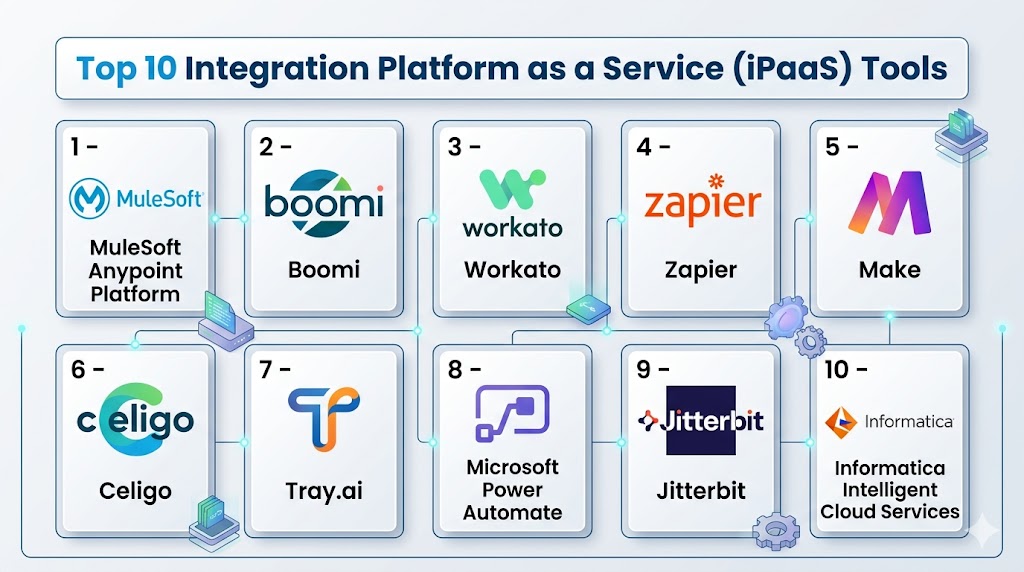
Introduction
Integration Platform as a Service (iPaaS) is cloud-based software that helps businesses connect apps, databases, APIs, and workflows without building every integration from scratch. Instead of managing dozens of custom scripts or point-to-point connections, teams use iPaaS platforms to automate data movement, synchronize systems, and orchestrate business processes from one central platform.
As organizations adopt more SaaS tools, hybrid infrastructure, and AI-powered applications, integration has become a strategic priority. Sales teams need CRM data connected to marketing tools. Finance teams need billing systems synced with ERP platforms. Support teams need ticketing data linked to customer records. iPaaS helps make these systems work together efficiently.
Common use cases include:
- Syncing CRM and marketing automation data
- Automating HR onboarding workflows
- Connecting eCommerce platforms with inventory systems
- Building API-based internal automations
- Managing real-time data pipelines between apps
What buyers should evaluate:
- Connector library and app coverage
- Ease of workflow building
- API management capabilities
- Scalability and performance
- Security controls and governance
- Error handling and monitoring
- Pricing flexibility
- Support quality
- Customization options
- Low-code vs developer-friendly depth
Best for: IT teams, operations leaders, digital transformation teams, developers, SaaS-heavy businesses, and enterprises managing multiple systems.
Not ideal for: Very small businesses using only a few apps, or teams needing only simple one-step automations where lightweight tools may be enough.
Key Trends in Integration Platform as a Service (iPaaS)
- AI-assisted workflow creation is reducing manual integration setup.
- Real-time event-driven integrations are replacing batch sync jobs.
- Low-code builders are expanding access beyond developers.
- Embedded integrations are becoming common in SaaS products.
- Stronger governance tools are helping enterprises control sprawl.
- API management and iPaaS platforms are converging.
- Hybrid deployment models remain important for regulated industries.
- Usage-based pricing is growing alongside seat-based pricing.
- Data observability and alerting are becoming standard requirements.
- Composable architecture is driving demand for flexible connectors.
How We Selected These Tools (Methodology)
We evaluated leading iPaaS platforms using practical business criteria:
- Market recognition and enterprise adoption
- Breadth of connectors and integrations
- Workflow automation capabilities
- Reliability and uptime reputation
- Security and governance features
- API and developer extensibility
- Ease of onboarding and usability
- Fit for SMB, mid-market, and enterprise needs
- Support ecosystem and training resources
- Long-term scalability for growing organizations
Top 10 Integration Platform as a Service (iPaaS) Tools
#1 — MuleSoft Anypoint Platform
Short description: A leading enterprise-grade integration platform used for APIs, automation, and large-scale system connectivity. Best for complex enterprise environments.
Key Features
- API design and lifecycle management
- Prebuilt connectors for enterprise systems
- Hybrid and cloud deployment options
- Data transformation tools
- Workflow orchestration
- Governance and policy controls
- Monitoring dashboards
Pros
- Excellent for enterprise integration complexity
- Strong API management capabilities
- Scales well across departments
Cons
- Higher cost than SMB-focused tools
- Can require skilled implementation teams
- More complex learning curve
Platforms / Deployment
Web / Cloud / Hybrid
Security & Compliance
SSO, RBAC, encryption, audit tools, enterprise governance. Additional certifications vary by plan.
Integrations & Ecosystem
Strong ecosystem with enterprise systems, databases, and APIs.
- Salesforce
- SAP
- Oracle
- Workday
- AWS
- Custom APIs
Support & Community
Large global ecosystem, partners, certifications, enterprise support tiers, extensive documentation.
#2 — Boomi
Short description: Popular low-code integration platform focused on application connectivity, automation, and data synchronization.
Key Features
- Drag-and-drop integration builder
- Extensive connector marketplace
- B2B/EDI capabilities
- Master data management options
- API management tools
- Real-time integrations
- Monitoring console
Pros
- Easy to adopt compared to enterprise-heavy tools
- Broad connector support
- Good balance of power and usability
Cons
- Advanced customization may need expertise
- Pricing can rise with scale
- UI preferences vary by user
Platforms / Deployment
Web / Cloud / Hybrid
Security & Compliance
Encryption, access controls, SSO options, governance tools. Certifications vary.
Integrations & Ecosystem
Strong SaaS and enterprise app coverage.
- NetSuite
- Salesforce
- SAP
- ServiceNow
- Databases
- APIs
Support & Community
Well-known vendor support, training programs, partner ecosystem.
#3 — Workato
Short description: Automation-first iPaaS platform combining integrations with business workflow automation. Strong for cross-functional teams.
Key Features
- Recipe-based automation builder
- Large connector library
- AI workflow assistance
- Real-time triggers
- Governance controls
- Embedded automation options
- Analytics dashboards
Pros
- Excellent user experience
- Fast automation deployment
- Strong business-user appeal
Cons
- Premium pricing for advanced use
- Complex governance needed at scale
- Some advanced logic requires training
Platforms / Deployment
Web / Cloud
Security & Compliance
SSO, encryption, access roles, audit logs. Compliance details vary.
Integrations & Ecosystem
Strong SaaS ecosystem.
- Slack
- Salesforce
- HubSpot
- NetSuite
- Jira
- APIs
Support & Community
Strong onboarding resources, documentation, active customer community.
#4 — Zapier
Short description: Widely used automation platform ideal for simple to mid-level integrations across business apps.
Key Features
- Massive app directory
- Trigger-action workflows
- Multi-step automations
- AI workflow helpers
- Filters and logic paths
- Webhooks support
- Team collaboration features
Pros
- Very easy to use
- Great for non-technical teams
- Fast setup time
Cons
- Less ideal for deep enterprise workflows
- Costs can grow with task volume
- Complex processes may hit limits
Platforms / Deployment
Web / Cloud
Security & Compliance
Encryption, access controls, admin tools on higher tiers.
Integrations & Ecosystem
Excellent SMB SaaS app ecosystem.
- Google Workspace
- Shopify
- HubSpot
- Slack
- Trello
- Webhooks
Support & Community
Huge knowledge base, templates, strong community presence.
#5 — Make
Short description: Visual automation platform known for flexible workflow design and strong value for growing teams.
Key Features
- Visual scenario builder
- Advanced branching logic
- Hundreds of connectors
- Scheduling and triggers
- Webhooks
- Data mapping tools
- Templates
Pros
- Powerful visual builder
- Good pricing flexibility
- Better control than simple automation tools
Cons
- Can become complex quickly
- Enterprise governance lighter than large platforms
- Some learning required
Platforms / Deployment
Web / Cloud
Security & Compliance
Encryption, user permissions, security controls vary by plan.
Integrations & Ecosystem
Strong modern SaaS integrations.
- Airtable
- Shopify
- Slack
- Notion
- HubSpot
- APIs
Support & Community
Helpful documentation and growing creator community.
#6 — Celigo
Short description: Integration platform with strong focus on business process automation and NetSuite-centric environments.
Key Features
- Prebuilt integration apps
- Flow builder
- Error management tools
- Data sync automation
- ERP-focused connectors
- Governance controls
- Analytics
Pros
- Strong for NetSuite users
- Faster deployment with templates
- Good operational automation fit
Cons
- Best value in certain ecosystems
- Smaller mindshare than top giants
- Advanced needs may require customization
Platforms / Deployment
Web / Cloud
Security & Compliance
Access controls, encryption, admin tools.
Integrations & Ecosystem
Good ERP and commerce focus.
- NetSuite
- Shopify
- Salesforce
- Amazon
- APIs
Support & Community
Responsive support reputation, implementation guidance.
#7 — Tray.ai
Short description: Flexible automation and integration platform built for advanced workflows and embedded use cases.
Key Features
- Low-code builder
- API integrations
- Embedded integrations
- AI automation support
- Branching logic
- Reusable workflows
- Monitoring tools
Pros
- Strong flexibility
- Great for SaaS companies
- Good advanced automation depth
Cons
- Can be overkill for simple needs
- Learning curve for new users
- Pricing may target larger teams
Platforms / Deployment
Web / Cloud
Security & Compliance
Enterprise-grade controls vary by contract.
Integrations & Ecosystem
Strong API-centric ecosystem.
- CRM tools
- Marketing apps
- Support tools
- Custom APIs
Support & Community
Good customer success model and technical guidance.
#8 — Microsoft Power Automate
Short description: Automation and integration platform tightly connected with the Microsoft ecosystem.
Key Features
- Flow automation builder
- Microsoft 365 integration
- Robotic process automation
- AI builder features
- Desktop automation
- Approval workflows
- Templates
Pros
- Excellent for Microsoft users
- Strong enterprise familiarity
- Good value in bundled environments
Cons
- Best experience inside Microsoft stack
- Cross-platform complexity can vary
- Licensing can be confusing
Platforms / Deployment
Web / Windows / Cloud
Security & Compliance
Enterprise security, identity controls, audit tools, Microsoft governance features.
Integrations & Ecosystem
Best with Microsoft tools plus external apps.
- Teams
- SharePoint
- Dynamics
- Excel
- SAP
- APIs
Support & Community
Large documentation base and global community.
#9 — Jitterbit
Short description: Longstanding integration platform with API and workflow capabilities for mid-market and enterprise teams.
Key Features
- API integration tools
- Workflow automation
- EDI support
- Connector library
- Data transformation
- Monitoring
- Reusable templates
Pros
- Good mid-market fit
- Balanced feature set
- Supports varied use cases
Cons
- Lower mindshare than leaders
- UI may feel dated to some users
- Advanced scaling depends on architecture
Platforms / Deployment
Web / Cloud / Hybrid
Security & Compliance
Encryption, controls, governance tools vary.
Integrations & Ecosystem
Broad business app support.
- Salesforce
- Oracle
- SAP
- Databases
- APIs
Support & Community
Commercial support with implementation options.
#10 — Informatica Intelligent Cloud Services
Short description: Enterprise platform combining integration, data management, and governance capabilities.
Key Features
- Data integration
- Application integration
- API management
- Data quality tools
- Governance features
- Hybrid deployment
- Enterprise scalability
Pros
- Excellent data-centric enterprise fit
- Strong governance capabilities
- Broad enterprise portfolio
Cons
- Complexity for smaller teams
- Premium pricing
- Best value for large organizations
Platforms / Deployment
Web / Cloud / Hybrid
Security & Compliance
Enterprise controls, encryption, governance. Certifications vary by offering.
Integrations & Ecosystem
Strong enterprise ecosystem.
- SAP
- Oracle
- Salesforce
- Databases
- Cloud platforms
- APIs
Support & Community
Enterprise support model, training resources, partner network.
Comparison Table
| Tool Name | Best For | Platform(s) Supported | Deployment | Standout Feature | Public Rating |
|---|---|---|---|---|---|
| MuleSoft | Enterprises | Web | Cloud/Hybrid | API + integration depth | N/A |
| Boomi | Mid-market | Web | Cloud/Hybrid | Low-code enterprise integrations | N/A |
| Workato | Cross-functional teams | Web | Cloud | Workflow automation UX | N/A |
| Zapier | SMBs | Web | Cloud | Huge app marketplace | N/A |
| Make | Growing teams | Web | Cloud | Visual workflow flexibility | N/A |
| Celigo | NetSuite users | Web | Cloud | ERP automation templates | N/A |
| Tray.ai | SaaS companies | Web | Cloud | Embedded integrations | N/A |
| Power Automate | Microsoft users | Web/Windows | Cloud | Microsoft ecosystem power | N/A |
| Jitterbit | Mid-market | Web | Cloud/Hybrid | Balanced integration suite | N/A |
| Informatica | Large enterprises | Web | Cloud/Hybrid | Data governance strength | N/A |
Evaluation & Scoring of Integration Platform as a Service (iPaaS)
| Tool | Core | Ease | Integrations | Security | Performance | Support | Value | Weighted Total |
|---|---|---|---|---|---|---|---|---|
| MuleSoft | 10 | 6 | 10 | 9 | 9 | 9 | 6 | 8.45 |
| Boomi | 9 | 8 | 9 | 8 | 8 | 8 | 7 | 8.15 |
| Workato | 9 | 9 | 8 | 8 | 8 | 8 | 7 | 8.20 |
| Zapier | 7 | 10 | 9 | 7 | 7 | 8 | 9 | 8.15 |
| Make | 8 | 8 | 8 | 7 | 7 | 7 | 9 | 7.90 |
| Celigo | 8 | 8 | 7 | 8 | 8 | 8 | 8 | 7.95 |
| Tray.ai | 8 | 7 | 8 | 8 | 8 | 8 | 7 | 7.80 |
| Power Automate | 8 | 8 | 8 | 9 | 8 | 8 | 8 | 8.10 |
| Jitterbit | 8 | 7 | 7 | 8 | 8 | 7 | 8 | 7.65 |
| Informatica | 9 | 6 | 8 | 9 | 9 | 8 | 6 | 7.95 |
These scores are comparative, not absolute. A lower-priced tool may rank better for SMBs, while an enterprise-grade platform may score higher on governance and scale. Use scoring as a shortlist tool, then validate with your real integrations, workflows, and team skill level.
Which iPaaS Tool Is Right for You?
Solo / Freelancer
Choose Zapier or Make for affordable and fast automation.
SMB
Boomi, Zapier, Make, or Power Automate offer strong value with manageable complexity.
Mid-Market
Workato, Celigo, Jitterbit, and Boomi are strong choices.
Enterprise
MuleSoft, Informatica, Boomi, and Workato fit complex governance-heavy environments.
Budget vs Premium
- Budget: Zapier, Make
- Mid-range: Power Automate, Celigo
- Premium: MuleSoft, Informatica, Workato
Feature Depth vs Ease of Use
- Easiest: Zapier, Workato
- Deepest: MuleSoft, Informatica
Integrations & Scalability
Prioritize Boomi, MuleSoft, Workato, and Microsoft ecosystems for scale.
Security & Compliance Needs
Enterprises with strict governance should shortlist MuleSoft, Informatica, Power Automate, and Boomi.
Frequently Asked Questions (FAQs)
What does iPaaS stand for?
It stands for Integration Platform as a Service, a cloud solution for connecting apps, data, and workflows.
Is iPaaS only for enterprises?
No. Many SMB-friendly tools exist, especially low-code platforms like Zapier and Make.
How is iPaaS different from Zapier?
Zapier is one type of automation platform. Broader iPaaS tools often include governance, API management, and enterprise controls.
Do I need developers?
Not always. Many platforms support low-code builders, though complex integrations may need technical help.
Can iPaaS connect legacy systems?
Yes, depending on available connectors, APIs, databases, or middleware support.
Is iPaaS secure?
Most leading platforms offer encryption, permissions, logging, and enterprise controls. Validate your exact compliance needs.
How long does implementation take?
Simple automations can be live in hours. Large enterprise programs may take weeks or months.
What affects pricing?
Task volume, connectors, users, environments, workflow complexity, and support tiers.
Can I switch platforms later?
Yes, but migration effort depends on how many workflows and custom integrations you built.
What is the best iPaaS tool?
There is no universal winner. The best tool depends on ecosystem, budget, complexity, and governance needs.
Conclusion
iPaaS platforms help modern businesses eliminate data silos, automate operations, and scale digital systems faster. Some tools prioritize ease of use, while others focus on enterprise governance and deep architecture control. The best choice depends on your systems, budget, technical resources, and future growth plans. Shortlist two or three platforms, test your most important integrations, and validate security and pricing before making a final decision.

One aspect worth adding is that the long-term success of an iPaaS platform depends on how well it supports integration lifecycle management rather than just rapid workflow creation. As organizations scale, API version changes, schema evolution, connector deprecations, and dependency updates can silently break critical business processes. Evaluating capabilities such as version-controlled integration assets, automated regression testing, end-to-end observability, lineage tracking, and rollback mechanisms is essential for reducing operational risk. These engineering capabilities often have a greater impact on platform sustainability than the number of prebuilt connectors or low-code features alone.