MOTOSHARE 🚗🏍️
Rent Bikes & Cars Directly from Owners
Motoshare connects vehicle owners with people who need bikes and cars on rent. Owners earn from idle vehicles, and renters get flexible ride options.
Visit Motoshare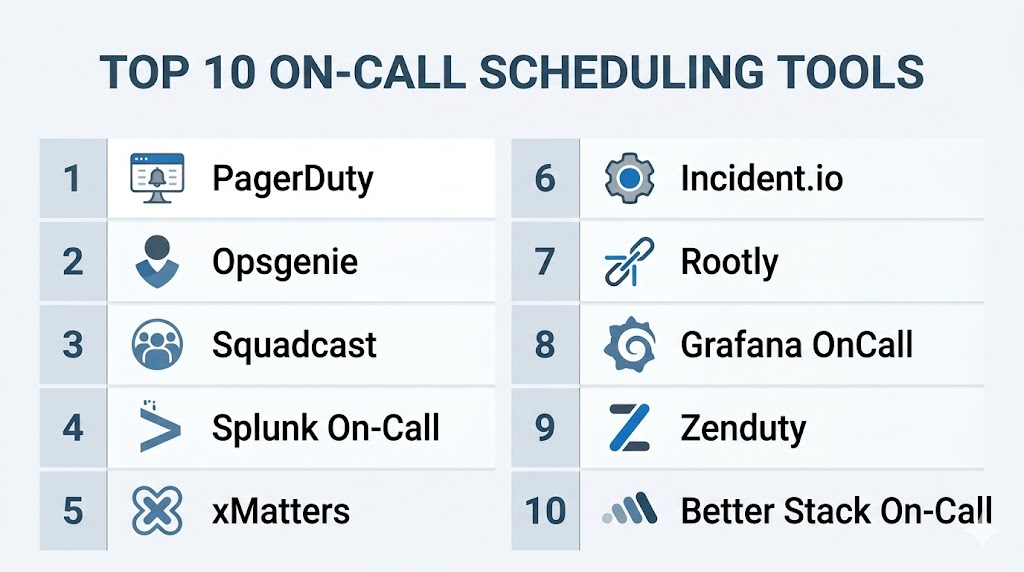
Introduction
When systems fail at midnight, weekends, or during peak traffic, somebody has to respond fast. The question is not if incidents happen—it is who gets alerted, how quickly they respond, and whether the process is organized or chaotic.
That is where On-call Scheduling Tools become mission-critical.
These platforms automate rotations, escalations, shift handoffs, availability calendars, and alert delivery so engineering and operations teams always know who owns the response. Instead of spreadsheets, manual rosters, or missed notifications, teams get structured coverage, faster response times, and healthier workloads.
In always-on digital businesses, poor on-call processes lead to burnout, missed incidents, and long outages. Strong scheduling tools create accountability without creating chaos.
Where on-call scheduling tools deliver real value:
- Automatically routing alerts to the right responder
- Managing rotating shifts across teams and regions
- Reducing missed pages and escalation delays
- Handling vacations, swaps, overrides, and handoffs
- Improving reliability while reducing burnout
What buyers should evaluate:
- Rotation flexibility and recurring schedules
- Escalation chains and fallback logic
- Multi-channel alert delivery (SMS, voice, push, email)
- Calendar sync and availability management
- Time zone support for global teams
- Shift swap and override workflows
- Analytics and response reporting
- Integrations with monitoring tools
- Mobile experience
- Pricing per user or per team
Best for: DevOps teams, SREs, IT operations, NOC teams, SaaS platforms, and global engineering organizations.
Not ideal for: Small teams with no 24/7 systems or organizations with no after-hours support requirement.
Key Trends in On-call Scheduling Tools
- AI-based alert routing reducing false escalations
- Burnout analytics measuring unhealthy rotations
- Slack-first workflows for acknowledgements and collaboration
- Self-service shift swaps improving flexibility
- Global follow-the-sun scheduling for distributed teams
- Integrated incident response + on-call platforms growing fast
- Mobile-first response experiences becoming standard
- Noise reduction through alert deduplication
- SLO-based paging policies replacing raw threshold alerts
- Workload fairness metrics improving team retention
How We Selected These Tools (Methodology)
- Prioritized real-world adoption in engineering teams
- Evaluated rotation and scheduling flexibility
- Assessed alert reliability and escalation depth
- Reviewed mobile usability during real incidents
- Analyzed integration ecosystems
- Compared ease of setup and admin management
- Considered global team support and timezone handling
- Included enterprise and budget-friendly options
- Evaluated reporting and analytics maturity
- Ensured coverage from startups to enterprises
Top 10 On-Call Scheduling Tools
#1 — PagerDuty
Short description: The industry benchmark for on-call scheduling and alert response, trusted by enterprises that cannot afford downtime.
Key Features
- Advanced rotations and recurring schedules
- Intelligent escalation policies
- Multi-channel paging (SMS, push, voice, email)
- Overrides, swaps, and temporary coverage
- Analytics and response reports
- Strong mobile app experience
Pros
- Extremely reliable alert delivery
- Deep enterprise-grade scheduling logic
Cons
- Premium pricing
- Can be overpowered for small teams
Platforms / Deployment
Web / iOS / Android / Cloud
Security & Compliance
SSO/SAML, RBAC, audit logs (others not publicly stated)
Integrations & Ecosystem
PagerDuty integrates deeply across modern monitoring ecosystems.
- Datadog
- Splunk
- Prometheus
- Slack
- APIs
Support & Community
Excellent documentation, enterprise support, large community.
#2 — Opsgenie
Short description: A strong scheduling and alerting platform especially attractive for Atlassian-centric organizations.
Key Features
- Rotations and escalations
- Team schedules and overrides
- Multi-channel notifications
- Jira integration
- Quiet hours and maintenance windows
Pros
- Strong Atlassian ecosystem fit
- Easy policy creation
Cons
- Product roadmap changes may matter
- Best value when using Atlassian stack
Platforms / Deployment
Web / iOS / Android / Cloud
Security & Compliance
SSO, RBAC (others not publicly stated)
Integrations & Ecosystem
- Jira
- Confluence
- Slack
- APIs
Support & Community
Strong user base and documentation.
#3 — Squadcast
Short description: A modern on-call and incident platform focused on SRE workflows and ease of use.
Key Features
- Flexible schedules
- Escalation policies
- Shift overrides
- Incident timelines
- Alert deduplication
Pros
- Modern clean interface
- Strong value for money
Cons
- Smaller ecosystem than leaders
- Fewer enterprise modules
Platforms / Deployment
Web / Mobile / Cloud
Security & Compliance
Not publicly stated
Integrations & Ecosystem
- Monitoring tools
- Slack
- APIs
Support & Community
Growing support presence and active adoption.
#4 — Splunk On-Call
Short description: A scheduling and response tool ideal for organizations already using Splunk observability products.
Key Features
- On-call rotations
- Real-time alerting
- Incident collaboration
- Escalation chains
- Reporting dashboards
Pros
- Strong observability linkage
- Rich incident context
Cons
- Best inside Splunk ecosystem
- Enterprise pricing
Platforms / Deployment
Web / Mobile / Cloud
Security & Compliance
RBAC (others not publicly stated)
Integrations & Ecosystem
- Splunk products
- APIs
- Slack
Support & Community
Enterprise-grade support.
#5 — xMatters
Short description: A powerful scheduling and workflow automation platform built for complex enterprise operations.
Key Features
- Multi-team scheduling
- Escalations and response flows
- Workflow automation
- Approval chains
- Enterprise controls
Pros
- Excellent for complex orgs
- Strong automation depth
Cons
- Steeper learning curve
- More admin overhead
Platforms / Deployment
Web / Mobile / Cloud
Security & Compliance
SSO, RBAC (others not publicly stated)
Integrations & Ecosystem
- ITSM tools
- Monitoring tools
- APIs
Support & Community
Strong enterprise support.
#6 — Incident.io
Short description: A collaboration-first platform with growing on-call capabilities for modern engineering teams.
Key Features
- On-call rosters
- Slack-native workflows
- Ownership visibility
- Escalations
- Incident coordination
Pros
- Excellent collaboration UX
- Fast adoption for Slack teams
Cons
- Slack-centric model
- Smaller scheduling depth than leaders
Platforms / Deployment
Web / Cloud
Security & Compliance
Not publicly stated
Integrations & Ecosystem
- Slack
- APIs
- Monitoring tools
Support & Community
Popular with modern software teams.
#7 — Rootly
Short description: A modern reliability platform with scheduling, response automation, and strong workflow design.
Key Features
- Rotations and ownership mapping
- Slack workflows
- Escalations
- Runbooks
- Post-incident tools
Pros
- Great automation experience
- Strong modern UI
Cons
- Premium pricing
- Smaller ecosystem
Platforms / Deployment
Web / Cloud
Security & Compliance
Not publicly stated
Integrations & Ecosystem
- Slack
- APIs
- Monitoring tools
Support & Community
Growing rapidly.
#8 — Grafana OnCall
Short description: A strong option for teams already using Grafana and Prometheus.
Key Features
- Rotations and schedules
- Alert routing
- Escalations
- Open-source-friendly flexibility
- Grafana integration
Pros
- Great for existing Grafana users
- Flexible deployment options
Cons
- More setup required
- Simpler than premium suites
Platforms / Deployment
Web / Cloud / Self-hosted
Security & Compliance
RBAC (others not publicly stated)
Integrations & Ecosystem
- Grafana
- Prometheus
- APIs
Support & Community
Strong open-source community.
#9 — Zenduty
Short description: A budget-friendly on-call and incident platform for growing teams.
Key Features
- Rotations
- Escalation chains
- Alerting
- Incident timelines
- Team schedules
Pros
- Affordable pricing
- Easy onboarding
Cons
- Smaller ecosystem
- Fewer advanced enterprise controls
Platforms / Deployment
Web / Mobile / Cloud
Security & Compliance
Not publicly stated
Integrations & Ecosystem
- APIs
- Monitoring tools
- Slack
Support & Community
Growing community.
#10 — Better Stack On-Call
Short description: A modern reliability platform combining monitoring, alerting, and on-call scheduling.
Key Features
- On-call schedules
- Alert routing
- Incident notifications
- Integrated uptime monitoring
- Team ownership mapping
Pros
- Great all-in-one value
- Fast modern experience
Cons
- Smaller enterprise footprint
- Less mature than leaders
Platforms / Deployment
Web / Mobile / Cloud
Security & Compliance
Not publicly stated
Integrations & Ecosystem
- APIs
- Slack
- Monitoring tools
Support & Community
Growing ecosystem.
Comparison Table (Top 10)
| Tool Name | Best For | Platform(s) Supported | Deployment | Standout Feature | Public Rating |
|---|---|---|---|---|---|
| PagerDuty | Enterprise teams | Web/Mobile | Cloud | Best-in-class paging | N/A |
| Opsgenie | Atlassian users | Web/Mobile | Cloud | Jira integration | N/A |
| Squadcast | SRE teams | Web/Mobile | Cloud | Strong value | N/A |
| Splunk On-Call | Splunk users | Web/Mobile | Cloud | Observability linkage | N/A |
| xMatters | Large enterprises | Web/Mobile | Cloud | Workflow automation | N/A |
| Incident.io | Slack teams | Web | Cloud | Collaboration UX | N/A |
| Rootly | Modern engineering teams | Web | Cloud | Automation | N/A |
| Grafana OnCall | Open-source users | Web | Cloud/Self-hosted | Flexibility | N/A |
| Zenduty | SMB teams | Web/Mobile | Cloud | Affordable pricing | N/A |
| Better Stack | Growing teams | Web/Mobile | Cloud | All-in-one value | N/A |
Evaluation & Scoring of On-Call Scheduling Tools
| Tool Name | Core | Ease | Integrations | Security | Performance | Support | Value | Weighted Total |
|---|---|---|---|---|---|---|---|---|
| PagerDuty | 10 | 8 | 10 | 9 | 10 | 10 | 6 | 9.0 |
| Opsgenie | 8 | 8 | 9 | 8 | 8 | 8 | 8 | 8.2 |
| Squadcast | 8 | 9 | 8 | 7 | 8 | 8 | 9 | 8.3 |
| Splunk On-Call | 8 | 7 | 8 | 8 | 8 | 8 | 6 | 7.7 |
| xMatters | 9 | 6 | 8 | 8 | 9 | 8 | 6 | 7.9 |
| Incident.io | 7 | 9 | 7 | 7 | 8 | 8 | 8 | 7.8 |
| Rootly | 8 | 8 | 7 | 7 | 8 | 8 | 7 | 7.7 |
| Grafana OnCall | 7 | 7 | 8 | 6 | 8 | 8 | 9 | 7.7 |
| Zenduty | 7 | 8 | 7 | 6 | 7 | 7 | 9 | 7.4 |
| Better Stack | 8 | 8 | 7 | 6 | 8 | 7 | 8 | 7.6 |
How to interpret scores:
These scores are comparative benchmarks, not absolute truth. Higher totals indicate stronger all-around capability, while the best fit depends on your team size, operational maturity, budget, and ecosystem.
Which On-Call Scheduling Tool Is Right for You?
Solo / Freelancer
Use Better Stack or Zenduty for simplicity and lower cost.
SMB
Choose Squadcast or Opsgenie for strong features without enterprise overhead.
Mid-Market
PagerDuty or Squadcast offer balance between scale and usability.
Enterprise
PagerDuty and xMatters are strongest for complex scheduling and automation.
Budget vs Premium
- Budget: Zenduty, Better Stack, Grafana OnCall
- Premium: PagerDuty, xMatters
Feature Depth vs Ease of Use
- Advanced: PagerDuty, xMatters
- Easy: Squadcast, Better Stack
Integrations & Scalability
PagerDuty leads overall, Opsgenie strong for Atlassian shops.
Security & Compliance Needs
Prioritize tools with SSO, RBAC, audit trails, and admin controls.
Frequently Asked Questions (FAQs)
1. What is an on-call scheduling tool?
It automates rotations, paging, escalations, and responder ownership for after-hours or incident response coverage.
2. Why not use spreadsheets?
Spreadsheets fail during real incidents because they lack alerts, escalations, swaps, auditability, and real-time ownership visibility.
3. What is escalation logic?
If the first responder does not acknowledge, alerts automatically route to backups or managers.
4. Do these tools support mobile alerts?
Yes, most platforms support push, SMS, phone calls, and email notifications.
5. Can teams swap shifts easily?
Most modern tools support self-service swaps, overrides, and temporary schedule changes.
6. How does timezone support help?
Global teams can hand off coverage efficiently and avoid overnight burnout.
7. Are these tools only for engineers?
No. IT ops, security teams, NOC teams, and customer support teams also use them.
8. What is alert fatigue?
Too many unnecessary alerts causing slow response or ignored notifications.
9. Can these tools integrate with monitoring systems?
Yes, they commonly integrate with Datadog, Splunk, Prometheus, Grafana, and more.
10. What is the biggest buying mistake?
Choosing based only on price instead of reliability, mobile delivery quality, and escalation depth.
Conclusion
On-call scheduling tools are no longer optional admin software—they are a core layer of operational resilience for any business that depends on always-available systems. The right platform ensures alerts reach the right person immediately, rotations stay fair, handoffs remain smooth, and teams avoid burnout while maintaining strong response coverage. The tools in this guide range from lightweight budget-friendly options to enterprise-grade platforms built for global engineering operations, each serving different levels of complexity and scale. There is no universal winner; the best solution depends on your team structure, incident volume, integration needs, and reliability expectations. The smartest next step is to shortlist two or three tools, simulate real paging scenarios, and choose the one that improves response speed, ownership clarity, and long-term team sustainability.

The blog was informative without being too complicated. Really liked it.
A useful addition would be testing the on-call process itself, not just configuring schedules. Teams should run periodic paging drills, validate escalation paths, check backup responder availability, and review missed/late acknowledgements so the rotation works reliably during real incidents.