MOTOSHARE 🚗🏍️
Rent Bikes & Cars Directly from Owners
Motoshare connects vehicle owners with people who need bikes and cars on rent. Owners earn from idle vehicles, and renters get flexible ride options.
Visit Motoshare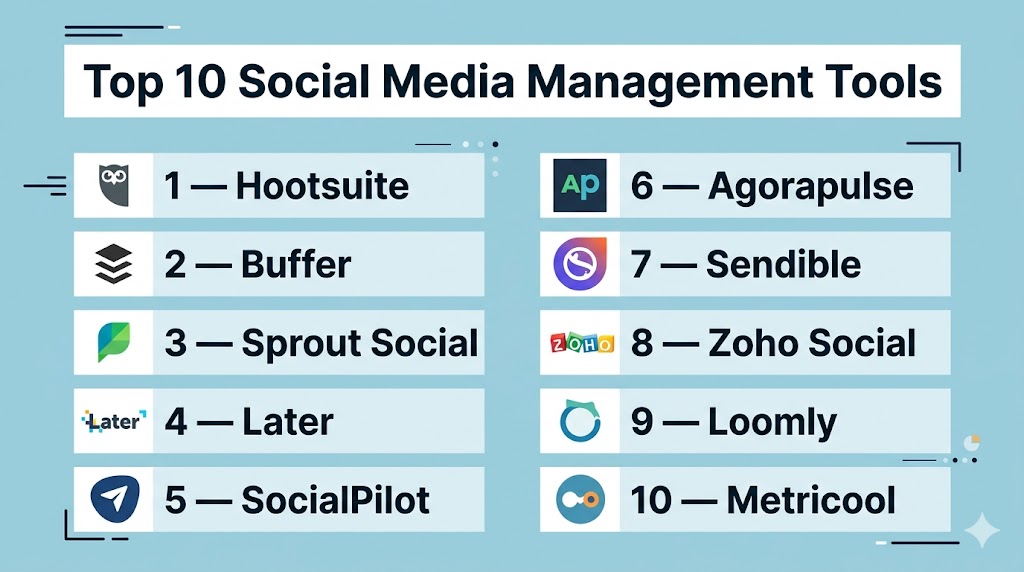
Introduction
Social Media Management Tools help businesses plan, publish, monitor, analyze, and optimize content across multiple social platforms from one centralized workspace. Instead of logging into each network separately, teams can manage campaigns, schedule posts, track engagement, collaborate internally, and measure performance more efficiently.
As brands compete for attention across crowded feeds, speed, consistency, and data-driven decisions matter more than ever. Modern social media tools now include AI caption writing, content calendars, approval workflows, listening tools, competitor insights, inbox management, reporting dashboards, and multi-platform scheduling. They help teams save time while improving brand visibility and engagement.
Common use cases include:
- Scheduling posts across channels
- Managing content calendars
- Responding to comments and messages
- Team collaboration and approvals
- Social listening and brand monitoring
- Analytics and performance reporting
- Campaign planning
- Multi-brand management
What buyers should evaluate:
- Supported social networks
- Scheduling flexibility
- Analytics depth
- Collaboration tools
- Approval workflows
- Social listening features
- Ease of use
- Integrations
- Scalability
- Pricing and ROI
Best for: Agencies, creators, ecommerce brands, startups, marketing teams, enterprises, nonprofits, and businesses managing multiple social channels consistently.
Not ideal for: Very small teams posting occasionally on one platform with no need for analytics or collaboration workflows.
Key Trends in Social Media Management Tools and Beyond
- AI content assistants are speeding up captions and ideas.
- Short-form video workflows are becoming essential.
- Unified inboxes are replacing scattered message handling.
- Approval automation is helping distributed teams move faster.
- Social listening is becoming more accessible to SMBs.
- Performance attribution is improving beyond vanity metrics.
- Cross-platform analytics is a major buying factor.
- Creator collaboration features are expanding.
- First-party audience insights are growing in importance.
- Automation + human creativity is the winning balance.
How We Selected These Tools (Methodology)
We selected these tools using practical business criteria:
- Strong market reputation
- Multi-platform publishing capabilities
- Reporting and analytics quality
- Team collaboration features
- Ease of use across team sizes
- Social listening and monitoring value
- Integration ecosystem strength
- Scalability for agencies and brands
- Support and onboarding quality
- Overall business value
Top 10 Social Media Management Tools
#1 — Hootsuite
Short description: Hootsuite is one of the most recognized platforms for scheduling, analytics, monitoring, and enterprise social management.
Key Features
- Multi-platform scheduling
- Content calendar
- Analytics dashboards
- Social listening
- Team collaboration
- Inbox management
- Approval workflows
Pros
- Broad feature set
- Strong enterprise reputation
- Supports many channels
Cons
- Premium pricing for advanced tiers
- Interface can feel busy
- Smaller teams may not need full depth
Platforms / Deployment
Cloud
Security & Compliance
SSO, permissions, enterprise controls vary by plan.
Integrations & Ecosystem
Large ecosystem for marketing operations.
- CRM tools
- Content tools
- Analytics tools
- APIs
- Ad tools
Support & Community
Strong documentation and business support options.
#2 — Buffer
Short description: Buffer is known for simplicity, clean scheduling workflows, and ease of use for creators and SMB teams.
Key Features
- Post scheduling
- Content calendar
- Link tracking
- Analytics
- Team collaboration
- Draft workflows
- Engagement tools
Pros
- Very easy to use
- Great for lean teams
- Clean interface
Cons
- Less enterprise depth
- Advanced listening features limited
- Some analytics depend on plan
Platforms / Deployment
Cloud
Security & Compliance
Standard business security features vary.
Integrations & Ecosystem
Good for streamlined content operations.
- Canva
- APIs
- Link tools
- Social platforms
- Workflow tools
Support & Community
Helpful resources and strong user goodwill.
#3 — Sprout Social
Short description: Sprout Social offers premium analytics, listening, reporting, and collaboration for growing brands and enterprises.
Key Features
- Publishing tools
- Advanced analytics
- Social listening
- Smart inbox
- Team workflows
- Competitor insights
- CRM-style profiles
Pros
- Strong reporting depth
- Excellent user experience
- Great for serious teams
Cons
- Higher pricing
- More than casual users need
- Advanced tiers for deeper insights
Platforms / Deployment
Cloud
Security & Compliance
Enterprise-grade controls vary by plan.
Integrations & Ecosystem
Strong for professional social teams.
- CRM tools
- Helpdesk apps
- APIs
- BI tools
- Social networks
Support & Community
Excellent support reputation and onboarding.
#4 — Later
Short description: Later is popular for visual planning, creator workflows, and social scheduling focused on content-first brands.
Key Features
- Visual planner
- Scheduling
- Link in bio tools
- Analytics
- Media library
- Collaboration
- Content previews
Pros
- Excellent for visual brands
- Easy planning workflows
- Great creator fit
Cons
- Less enterprise depth
- Advanced listening limited
- Some channels stronger than others
Platforms / Deployment
Cloud
Security & Compliance
Standard security controls vary.
Integrations & Ecosystem
Useful for creator and ecommerce brands.
- Canva
- Ecommerce tools
- APIs
- Social networks
- Media tools
Support & Community
Good tutorials and creator-friendly support.
#5 — SocialPilot
Short description: SocialPilot is a value-focused platform for agencies and SMBs managing multiple accounts.
Key Features
- Bulk scheduling
- Client management
- Analytics
- Content calendar
- Team roles
- White-label reports
- Approval workflows
Pros
- Strong agency value
- Good multi-account support
- Affordable compared to premium suites
Cons
- UI less polished than premium leaders
- Advanced listening limited
- Enterprise depth lower
Platforms / Deployment
Cloud
Security & Compliance
Standard controls vary by plan.
Integrations & Ecosystem
Good for agencies and growing teams.
- Canva
- APIs
- URL tools
- Social platforms
- Collaboration tools
Support & Community
Helpful support and agency-friendly onboarding.
#6 — Agorapulse
Short description: Agorapulse combines publishing, inbox management, reporting, and collaboration in a practical interface.
Key Features
- Scheduling
- Unified inbox
- Reporting
- Social listening
- Team approvals
- ROI tracking
- Content queues
Pros
- Strong inbox workflows
- Good reporting balance
- Easy team collaboration
Cons
- Premium features cost more
- Less broad brand awareness
- Some advanced enterprise needs may vary
Platforms / Deployment
Cloud
Security & Compliance
Business-grade controls vary.
Integrations & Ecosystem
Useful for multi-channel operations.
- CRM tools
- APIs
- Social platforms
- Workflow tools
- Analytics tools
Support & Community
Well-regarded customer support.
#7 — Sendible
Short description: Sendible is designed for agencies needing scheduling, client workflows, and multi-brand management.
Key Features
- Scheduling
- Approval workflows
- Client dashboards
- Reports
- Content suggestions
- Collaboration
- Queue management
Pros
- Strong for agencies
- Client management tools
- Good workflow structure
Cons
- Less known than larger brands
- Listening depth limited
- UI preference may vary
Platforms / Deployment
Cloud
Security & Compliance
Standard controls vary.
Integrations & Ecosystem
Agency-focused ecosystem.
- Canva
- Google tools
- APIs
- Social networks
- Workflow apps
Support & Community
Helpful onboarding for agencies.
#8 — Zoho Social
Short description: Zoho Social fits businesses already using the Zoho ecosystem and wanting affordable social management.
Key Features
- Scheduling
- Monitoring
- Reports
- Team roles
- CRM integration
- Content calendar
- Collaboration
Pros
- Great with Zoho stack
- Good value pricing
- Useful SMB features
Cons
- Best within Zoho ecosystem
- Advanced enterprise depth limited
- Some UX preferences vary
Platforms / Deployment
Cloud
Security & Compliance
Business security controls vary by plan.
Integrations & Ecosystem
Best for Zoho users.
- Zoho CRM
- Zoho apps
- APIs
- Social platforms
- Collaboration tools
Support & Community
Strong ecosystem support resources.
#9 — Loomly
Short description: Loomly focuses on easy collaboration, calendars, and approval workflows for content teams.
Key Features
- Content calendar
- Scheduling
- Approval workflows
- Brand assets
- Analytics
- Team collaboration
- Post ideas
Pros
- Great team workflows
- Easy to learn
- Strong content planning
Cons
- Less deep listening features
- Enterprise analytics lighter than premium tools
- Some advanced needs may require add-ons
Platforms / Deployment
Cloud
Security & Compliance
Standard controls vary.
Integrations & Ecosystem
Good for collaborative content teams.
- Canva
- APIs
- Social networks
- Media tools
- Workflow apps
Support & Community
Helpful documentation and support.
#10 — Metricool
Short description: Metricool combines social scheduling, analytics, ads tracking, and planning in one practical platform.
Key Features
- Scheduling
- Analytics
- Ad tracking
- Competitor insights
- Calendar
- Reporting
- Link tools
Pros
- Strong analytics value
- Useful multi-channel view
- Good pricing options
Cons
- Less enterprise depth
- Some advanced workflows limited
- Brand awareness smaller than leaders
Platforms / Deployment
Cloud
Security & Compliance
Standard security controls vary.
Integrations & Ecosystem
Useful for performance-focused teams.
- Ad platforms
- APIs
- Social networks
- Analytics tools
- Link tools
Support & Community
Growing community and practical support resources.
Comparison Table (Top 10)
| Tool Name | Best For | Platform(s) Supported | Deployment | Standout Feature | Public Rating |
|---|---|---|---|---|---|
| Hootsuite | Enterprise teams | Web | Cloud | Broad management suite | N/A |
| Buffer | Creators & SMBs | Web | Cloud | Simplicity | N/A |
| Sprout Social | Premium analytics teams | Web | Cloud | Advanced reporting | N/A |
| Later | Visual brands | Web | Cloud | Visual planner | N/A |
| SocialPilot | Agencies | Web | Cloud | Multi-account value | N/A |
| Agorapulse | Team inbox workflows | Web | Cloud | Unified inbox | N/A |
| Sendible | Agencies | Web | Cloud | Client workflows | N/A |
| Zoho Social | Zoho users | Web | Cloud | Native ecosystem fit | N/A |
| Loomly | Content collaboration | Web | Cloud | Approval workflows | N/A |
| Metricool | Analytics-focused teams | Web | Cloud | Ads + social analytics | N/A |
Evaluation & Scoring of Social Media Management Tools
| Tool Name | Core (25%) | Ease (15%) | Integrations (15%) | Security (10%) | Performance (10%) | Support (10%) | Value (15%) | Weighted Total |
|---|---|---|---|---|---|---|---|---|
| Hootsuite | 9 | 7 | 8 | 8 | 8 | 8 | 6 | 7.8 |
| Buffer | 7 | 9 | 7 | 7 | 8 | 8 | 8 | 7.8 |
| Sprout Social | 9 | 8 | 8 | 8 | 8 | 9 | 6 | 8.1 |
| Later | 8 | 8 | 7 | 7 | 8 | 8 | 7 | 7.6 |
| SocialPilot | 8 | 8 | 7 | 7 | 8 | 8 | 9 | 8.0 |
| Agorapulse | 8 | 8 | 7 | 7 | 8 | 8 | 8 | 7.8 |
| Sendible | 7 | 8 | 7 | 7 | 7 | 8 | 8 | 7.5 |
| Zoho Social | 7 | 8 | 8 | 7 | 7 | 8 | 9 | 7.8 |
| Loomly | 7 | 8 | 7 | 7 | 7 | 8 | 8 | 7.4 |
| Metricool | 8 | 8 | 7 | 7 | 8 | 7 | 8 | 7.7 |
These scores are comparative, not absolute.
The best tool depends on whether you value analytics, ease of use, agency workflows, or enterprise governance.
Smaller teams may prefer simplicity, while larger teams need approvals and deeper reporting.
Use trials to test publishing workflows and reporting quality.
Real ROI comes from execution consistency, not features alone.
Which Social Media Management Tool Is Right for You?
Solo / Freelancer
Choose Buffer, Later, or Metricool for ease and quick publishing.
SMB
SocialPilot, Buffer, and Zoho Social offer strong value and usability.
Mid-Market
Sprout Social, Agorapulse, and Hootsuite provide stronger reporting and collaboration.
Enterprise
Hootsuite and Sprout Social are stronger for scale, governance, and advanced workflows.
Budget vs Premium
Budget tools can perform very well for publishing needs. Premium tools justify cost through analytics and team controls.
Feature Depth vs Ease of Use
Choose simpler tools for fast adoption. Choose deeper tools for large teams and reporting demands.
Integrations & Scalability
Prioritize CRM, analytics, design, and workflow integrations for long-term growth.
Security & Compliance Needs
Review permissions, approval logs, team roles, and vendor controls before rollout.
Frequently Asked Questions (FAQs)
1. What is a social media management tool?
It is software used to schedule, manage, monitor, and analyze social media activity across platforms.
2. Why use one instead of posting manually?
It saves time, improves consistency, and provides analytics and collaboration tools.
3. Which tool is best for beginners?
Buffer and Later are beginner-friendly options.
4. Which tool is best for agencies?
SocialPilot, Sendible, and Hootsuite are strong agency choices.
5. Do these tools support all networks?
Support varies by vendor and by network API availability.
6. Can I reply to messages inside these tools?
Many platforms offer unified inbox or engagement features.
7. How are these tools priced?
Pricing may depend on users, brands, profiles, features, or reporting needs.
8. Are analytics accurate?
They are useful, but metrics can depend on platform data access and attribution models.
9. Can small businesses benefit?
Yes. Even simple scheduling and analytics can save time and improve consistency.
10. What is the biggest mistake teams make?
Buying advanced software but failing to maintain a strong content strategy.
Conclusion
Social Media Management Tools help businesses turn scattered posting into organized, measurable growth systems. Some platforms excel in simplicity, others in analytics, agency workflows, or enterprise governance. There is no single best option for everyone. The right choice depends on your team size, content volume, reporting needs, channels, and budget. Shortlist two or three tools, test daily workflows, compare reporting quality, and choose the platform that helps your team stay consistent and grow faster.

Social media management platforms simplify publishing and collaboration, but large-scale adoption introduces operational challenges that are often overlooked. When multiple teams manage hundreds of accounts, maintaining consistent permissions, approval workflows, brand compliance, and audit visibility becomes as important as scheduling features. Engineering teams should consider API reliability, integration monitoring, failed publishing recovery, and data synchronization issues because third-party platform changes can directly impact business communication workflows. Another important area is connecting social engagement data with CRM, customer support, and product analytics systems to convert conversations into actionable insights. Future social media management platforms will likely evolve toward intelligent workflow orchestration, where automation handles repetitive tasks while strong governance, observability, and data quality controls ensure reliable operations.