MOTOSHARE 🚗🏍️
Rent Bikes & Cars Directly from Owners
Motoshare connects vehicle owners with people who need bikes and cars on rent. Owners earn from idle vehicles, and renters get flexible ride options.
Visit Motoshare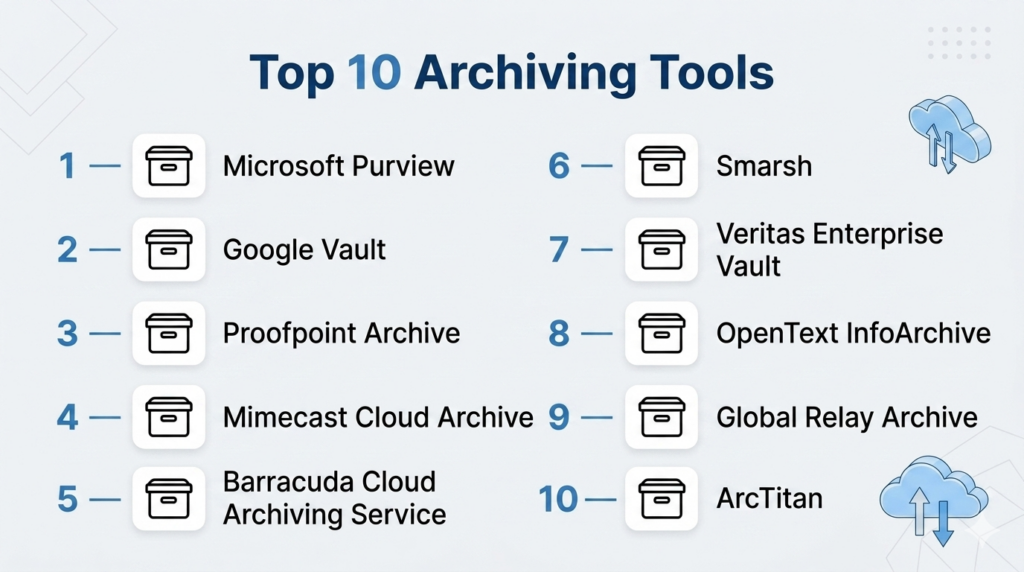
Introduction
Archiving Tools are software solutions designed to store, manage, and preserve inactive data for long-term retention, compliance, and easy retrieval. Unlike backup systems, which focus on short-term recovery, archiving tools ensure that historical data remains secure, searchable, and compliant with regulatory requirements.
In today’s data-driven world, organizations generate massive volumes of emails, files, and communication records across platforms. Managing this data efficiently is critical for compliance, legal discovery, and cost optimization. Archiving tools help reduce storage costs, improve system performance, and ensure that critical records are preserved for audits and investigations.
Common Use Cases
- Long-term email and file retention
- Regulatory compliance and audit readiness
- Legal hold and eDiscovery workflows
- Reducing primary storage costs
- Managing legacy data and systems
What Buyers Should Evaluate
- Supported data sources (email, files, chat, etc.)
- Retention policies and legal hold capabilities
- Search and retrieval speed
- Security features (encryption, access control)
- Deployment options (cloud, hybrid, on-premise)
- Integration with existing systems
- Scalability for large data volumes
- Compliance and audit reporting
- Ease of use and administration
- Cost and storage pricing model
Best for: IT administrators, compliance officers, legal teams, and enterprises managing large volumes of historical data across multiple systems.
Not ideal for: Small teams with minimal data retention needs or those requiring only basic backup functionality.
Key Trends in Archiving Tools for and Beyond
- AI-powered data classification and search
- Increased demand for multi-channel communication archiving
- Cloud-first archiving replacing legacy systems
- Integration with compliance and governance platforms
- Automation of retention policies
- Faster eDiscovery workflows
- Growth in SaaS-based archiving tools
- Enhanced security and data immutability
- Cost optimization through tiered storage
- API-first architecture for integrations
How We Selected These Tools
- Evaluated market adoption and vendor reputation
- Assessed feature completeness across archiving workflows
- Reviewed security and compliance capabilities
- Compared scalability and performance
- Analyzed integration ecosystems
- Included tools for SMB and enterprise use cases
- Considered ease of deployment and usability
- Evaluated support and documentation quality
- Focused on modern cloud-based solutions
Top 10 Archiving Tools
#1 — Microsoft Purview
Short description: A comprehensive data governance and archiving solution integrated with Microsoft 365, ideal for enterprises managing large-scale compliance and retention policies.
Key Features
- Retention policies and labels
- Archive mailboxes
- Legal hold and eDiscovery
- Data lifecycle management
- Policy automation
- Compliance integration
Pros
- Deep Microsoft ecosystem integration
- Strong compliance capabilities
Cons
- Complex configuration
- Best for Microsoft environments
Platforms / Deployment
- Web
- Cloud
Security & Compliance
- SSO/SAML, MFA, encryption, RBAC
- GDPR support
Integrations & Ecosystem
Strong integration with Microsoft services.
- Microsoft 365
- Exchange Online
- SharePoint
- Teams
- APIs
Support & Community
Extensive documentation and enterprise support.
#2 — Google Vault
Short description: A native archiving and eDiscovery tool for Google Workspace users.
Key Features
- Data retention and legal hold
- Search and export tools
- eDiscovery workflows
- Centralized policy management
- Audit logging
Pros
- Easy to use within Google ecosystem
- Native integration
Cons
- Limited outside Google Workspace
- Fewer advanced features
Platforms / Deployment
- Web
- Cloud
Security & Compliance
- Encryption, RBAC
- Not publicly stated
Integrations & Ecosystem
Works best with Google tools.
- Gmail
- Google Drive
- Google Workspace apps
- APIs
Support & Community
Good documentation and support.
#3 — Proofpoint Archive
Short description: A secure cloud-based archiving solution focused on compliance and legal discovery.
Key Features
- Centralized data repository
- Advanced search capabilities
- Legal hold support
- Compliance workflows
- User access controls
Pros
- Strong compliance features
- Scalable architecture
Cons
- Premium pricing
- Complex setup
Platforms / Deployment
- Web
- Cloud
Security & Compliance
- Encryption, RBAC
- Not publicly stated
Integrations & Ecosystem
Enterprise integrations supported.
- Email systems
- Compliance tools
- APIs
Support & Community
Enterprise-level support.
#4 — Mimecast Cloud Archive
Short description: A cloud archiving platform designed for email and communication data retention.
Key Features
- Email and file archiving
- Fast search capabilities
- Retention management
- eDiscovery support
- User access
Pros
- Easy to deploy
- Reliable search
Cons
- Communication-focused
- Limited broader data support
Platforms / Deployment
- Web
- Cloud
Security & Compliance
- Encryption, RBAC
- Not publicly stated
Integrations & Ecosystem
Supports integrations with messaging platforms.
- Microsoft 365
- Email systems
- APIs
Support & Community
Strong documentation and support.
#5 — Barracuda Cloud Archiving Service
Short description: A cloud-based email archiving solution suitable for SMBs and mid-market organizations.
Key Features
- Unlimited storage
- Email archiving
- eDiscovery tools
- Policy management
- Centralized control
Pros
- Affordable pricing
- Easy deployment
Cons
- Email-focused
- Limited advanced features
Platforms / Deployment
- Web
- Cloud
Security & Compliance
- Encryption, RBAC
- Not publicly stated
Integrations & Ecosystem
Supports common integrations.
- Microsoft 365
- Google Workspace
- APIs
Support & Community
Good support for SMB users.
#6 — Smarsh
Short description: A compliance-focused archiving platform for multi-channel communications.
Key Features
- Multi-channel data capture
- Compliance monitoring
- Search and analytics
- Data retention
- Audit workflows
Pros
- Wide channel coverage
- Strong compliance features
Cons
- Complex setup
- Higher cost
Platforms / Deployment
- Web
- Cloud
Security & Compliance
- Encryption, RBAC
- Not publicly stated
Integrations & Ecosystem
Supports multiple communication platforms.
- Slack
- Teams
- Voice and messaging tools
- APIs
Support & Community
Enterprise-level support.
#7 — Veritas Enterprise Vault
Short description: A mature enterprise archiving solution supporting email and file system data.
Key Features
- Email and file archiving
- Policy-based retention
- Data indexing
- Search capabilities
- Legacy system support
Pros
- Strong enterprise capabilities
- Supports legacy environments
Cons
- Complex deployment
- Older interface
Platforms / Deployment
- Windows
- Hybrid
Security & Compliance
- Encryption, RBAC
- Not publicly stated
Integrations & Ecosystem
Enterprise integrations supported.
- File systems
- Email platforms
- APIs
Support & Community
Strong enterprise support.
#8 — OpenText InfoArchive
Short description: A data archiving solution designed for long-term storage and legacy system retirement.
Key Features
- Structured and unstructured data archiving
- Compliance management
- Data accessibility
- Policy automation
- Reporting
Pros
- Strong for legacy systems
- Scalable architecture
Cons
- Complex setup
- Enterprise-focused
Platforms / Deployment
- Web
- Cloud / Hybrid
Security & Compliance
- Encryption, RBAC
- Not publicly stated
Integrations & Ecosystem
Supports enterprise integrations.
- Enterprise apps
- APIs
- Data systems
Support & Community
Enterprise-level support.
#9 — Global Relay Archive
Short description: A compliance-driven archiving platform for regulated industries.
Key Features
- Secure data archiving
- Audit trails
- Legal hold support
- Search and retrieval
- Compliance workflows
Pros
- Strong compliance focus
- Audit-ready
Cons
- Expensive
- Complex workflows
Platforms / Deployment
- Web
- Cloud
Security & Compliance
- Encryption, RBAC
- Not publicly stated
Integrations & Ecosystem
Supports integrations with communication tools.
- Messaging platforms
- APIs
- Compliance systems
Support & Community
Enterprise support.
#10 — ArcTitan
Short description: A cloud-based email archiving solution focused on simplicity and performance.
Key Features
- Email archiving
- Fast search
- Role-based access
- Policy management
- Reporting
Pros
- Easy to use
- Affordable
Cons
- Limited scope
- Email-focused
Platforms / Deployment
- Web
- Cloud
Security & Compliance
- Encryption, RBAC
- Not publicly stated
Integrations & Ecosystem
Supports common integrations.
- Microsoft 365
- Google Workspace
- APIs
Support & Community
Good documentation and support.
Comparison Table
| Tool Name | Best For | Platform(s) Supported | Deployment | Standout Feature | Public Rating |
|---|---|---|---|---|---|
| Microsoft Purview | Enterprise | Web | Cloud | Compliance & governance | N/A |
| Google Vault | SMB/Mid-market | Web | Cloud | Google integration | N/A |
| Proofpoint Archive | Enterprise | Web | Cloud | Legal discovery | N/A |
| Mimecast Cloud Archive | SMB/Enterprise | Web | Cloud | Email archiving | N/A |
| Barracuda Cloud Archiving Service | SMB | Web | Cloud | Unlimited storage | N/A |
| Smarsh | Enterprise | Web | Cloud | Multi-channel archiving | N/A |
| Veritas Enterprise Vault | Enterprise | Windows | Hybrid | Legacy support | N/A |
| OpenText InfoArchive | Enterprise | Web | Hybrid | Data archiving | N/A |
| Global Relay Archive | Enterprise | Web | Cloud | Compliance workflows | N/A |
| ArcTitan | SMB | Web | Cloud | Fast search | N/A |
Evaluation & Scoring of Archiving Tools
| Tool Name | Core (25%) | Ease (15%) | Integrations (15%) | Security (10%) | Performance (10%) | Support (10%) | Value (15%) | Weighted Total (0–10) |
|---|---|---|---|---|---|---|---|---|
| Microsoft Purview | 9 | 7 | 9 | 9 | 8 | 8 | 7 | 8.3 |
| Google Vault | 8 | 8 | 7 | 8 | 8 | 8 | 8 | 7.9 |
| Proofpoint Archive | 9 | 7 | 8 | 9 | 8 | 8 | 6 | 8.0 |
| Mimecast Cloud Archive | 9 | 8 | 8 | 8 | 8 | 8 | 7 | 8.0 |
| Barracuda Cloud Archiving Service | 7 | 9 | 7 | 7 | 8 | 8 | 9 | 7.9 |
| Smarsh | 9 | 6 | 9 | 9 | 8 | 8 | 6 | 8.0 |
| Veritas Enterprise Vault | 8 | 5 | 8 | 8 | 8 | 7 | 6 | 7.1 |
| OpenText InfoArchive | 8 | 6 | 8 | 8 | 8 | 7 | 6 | 7.3 |
| Global Relay Archive | 9 | 6 | 8 | 9 | 8 | 8 | 6 | 8.0 |
| ArcTitan | 7 | 9 | 7 | 7 | 8 | 8 | 9 | 7.9 |
These scores are comparative and help identify strengths across tools. Higher scores indicate better balance across features, usability, and value.
Which Archiving Tool Is Right for You?
Solo / Freelancer
Basic cloud retention tools are usually enough.
SMB
Barracuda Cloud Archiving Service or ArcTitan are good choices.
Mid-Market
Mimecast Cloud Archive or Google Vault provide balanced features.
Enterprise
Microsoft Purview, Smarsh, or Proofpoint Archive are ideal.
Budget vs Premium
- Budget: ArcTitan, Barracuda
- Premium: Smarsh, Proofpoint
Feature Depth vs Ease of Use
- Feature-rich: Microsoft Purview, Smarsh
- Easy to use: ArcTitan, Google Vault
Integrations & Scalability
Microsoft Purview leads in integration.
Security & Compliance Needs
Global Relay Archive and Smarsh are strong choices.
Frequently Asked Questions
What is an archiving tool?
It is software that stores and manages long-term data securely.
How is archiving different from backup?
Archiving focuses on long-term storage, while backup focuses on recovery.
Do I need archiving for compliance?
Yes, many industries require long-term data retention.
Are archiving tools cloud-based?
Most modern tools are cloud-based or hybrid.
Can I search archived data?
Yes, most tools provide fast search capabilities.
Are archiving tools secure?
They use encryption and access controls to protect data.
Can I archive emails and files?
Yes, most tools support both.
Are archiving tools scalable?
Yes, they support growing data volumes.
Do they support legal hold?
Yes, most tools include legal hold features.
Can small businesses use archiving tools?
Yes, many tools offer SMB-friendly solutions.
Conclusion
Archiving tools play a crucial role in managing long-term data retention, compliance, and operational efficiency. As data volumes continue to grow, organizations need reliable solutions to store, secure, and retrieve information without impacting performance. The tools listed above offer a wide range of capabilities, from simple email archiving to enterprise-grade compliance platforms. Choosing the right solution depends on your business size, data complexity, and regulatory requirements. Instead of focusing on a single best tool, evaluate how each solution aligns with your workflows and infrastructure. Shortlist a few options, test their capabilities, and ensure they meet your retention and compliance needs before making a final decision.

One area that would add significant value to this comparison is the challenge of balancing long-term retention requirements with data accessibility and governance. Many organizations implement archiving solutions to reduce storage costs and meet compliance obligations, but over time they encounter issues related to data discoverability, retention policy conflicts, and growing eDiscovery demands. It would be useful to compare how these platforms handle automated classification, legal hold management, auditability, and integration with broader data governance frameworks. From an engineering and compliance operations perspective, the real success of an archiving platform is often measured not by how much data it stores, but by how efficiently organizations can locate, validate, and retrieve critical information years after it was archived. As regulatory requirements continue to evolve, policy automation and lifecycle governance are becoming increasingly important differentiators.