MOTOSHARE 🚗🏍️
Rent Bikes & Cars Directly from Owners
Motoshare connects vehicle owners with people who need bikes and cars on rent. Owners earn from idle vehicles, and renters get flexible ride options.
Visit Motoshare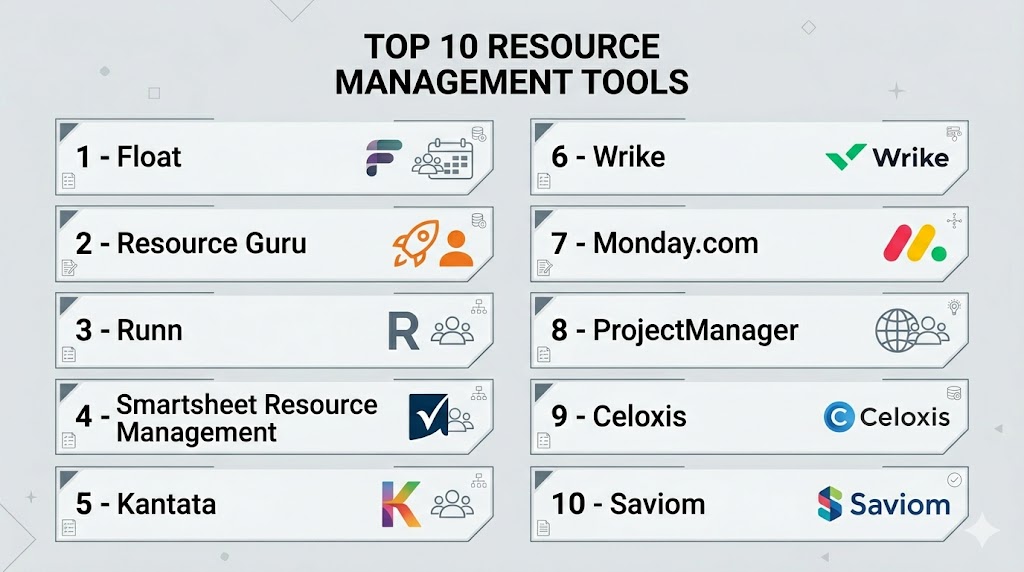
Introduction
Resource Management Tools help businesses plan, allocate, schedule, and optimize resources such as employees, contractors, budgets, equipment, and time. Instead of managing workloads through spreadsheets or disconnected systems, these tools provide one centralized view of availability, capacity, utilization, project demand, and future planning needs.
As organizations become more distributed and project timelines become tighter, resource visibility is no longer optional. Teams need to know who is available, what skills exist internally, where workloads are unbalanced, and how future demand will impact delivery. Modern resource management platforms now include automation, forecasting, AI recommendations, scenario planning, integrations, and real-time dashboards.
Real-world use cases:
- Team capacity planning
- Staff scheduling across projects
- Utilization tracking for billable teams
- Skills-based workforce allocation
- Budget and labor planning
- Equipment booking and scheduling
- Cross-department planning
- Forecasting future hiring needs
What buyers should evaluate:
- Scheduling and allocation tools
- Capacity planning depth
- Forecasting and scenario modeling
- Utilization analytics
- Time tracking
- Integrations and APIs
- Ease of use
- Security controls
- Scalability
- Pricing model
Best for: PMOs, agencies, consulting firms, IT departments, operations teams, engineering leaders, and businesses managing shared resources across multiple projects.
Not ideal for: Solo users or very small teams with simple task lists. In those cases, lightweight project tools may be sufficient.
Key Trends in Resource Management Tools
- AI is helping identify overload risks and better staffing matches.
- Predictive planning supports hiring and future capacity decisions.
- Skills-based allocation is replacing role-only scheduling.
- Hybrid and remote work scheduling is now standard.
- Real-time dashboards are replacing spreadsheet reporting.
- Workflow automation reduces admin tasks and manual updates.
- Deeper finance integrations improve labor cost visibility.
- Mobile access supports remote and field teams.
- Scenario planning is becoming a core feature.
- Cloud-first deployment remains the dominant model.
How We Selected These Tools (Methodology)
We selected these tools using the following criteria:
- Strong market reputation and customer adoption
- Core resource planning functionality
- Ease of scheduling and workload management
- Forecasting and reporting quality
- Integration ecosystem strength
- Security and admin controls
- Scalability across team sizes
- Value for money
- Industry fit across services, IT, operations, and enterprise teams
- Product maturity and ongoing innovation
Top 10 Resource Management Tools
#1 — Float
Short description: Float is a dedicated resource planning platform built for scheduling, capacity planning, and utilization tracking. It is especially popular with agencies, consultancies, and fast-moving project teams.
Key Features
- Drag-and-drop scheduling
- Capacity planning
- Utilization reporting
- Time tracking
- Availability management
- Forecasting tools
- Scenario planning
Pros
- Excellent user experience
- Fast to implement
- Strong focus on planning workflows
Cons
- Limited deep project management features
- Premium pricing for large teams
- Less suited for highly complex enterprise governance
Platforms / Deployment
Web / iOS / Android
Cloud
Security & Compliance
SSO, admin controls, permissions. Other certifications not publicly stated.
Integrations & Ecosystem
Float integrates with common productivity and project tools to support connected planning workflows.
- Jira
- Asana
- Slack
- Calendar apps
- API access
Support & Community
Strong documentation, helpful onboarding, and responsive customer support.
#2 — Resource Guru
Short description: Resource Guru is a lightweight and visual scheduling tool for people, rooms, equipment, and shared resources. Best for organizations that need quick booking and conflict-free planning.
Key Features
- Visual scheduling calendar
- Clash management
- Leave management
- Availability tracking
- Equipment booking
- Utilization reporting
- Custom fields
Pros
- Easy to learn
- Great for shared resources beyond staff
- Fast deployment
Cons
- Limited advanced forecasting
- Basic portfolio analytics
- Less suited for complex enterprises
Platforms / Deployment
Web
Cloud
Security & Compliance
Permissions, role controls. Additional certifications not publicly stated.
Integrations & Ecosystem
Focused integration options for scheduling and workflow automation.
- Calendar tools
- API access
- Import/export tools
- Automation connectors
Support & Community
Well regarded for customer support and ease of onboarding.
#3 — Runn
Short description: Runn focuses on capacity forecasting, staffing, and resource planning for professional services, IT, and consulting teams.
Key Features
- Capacity forecasting
- Project staffing
- Utilization analytics
- Financial planning
- Scenario modeling
- Pipeline planning
- Timesheets
Pros
- Strong forecasting tools
- Excellent for services businesses
- Clear demand vs capacity visibility
Cons
- Smaller ecosystem than market leaders
- Less ideal for equipment scheduling
- Niche fit for some industries
Platforms / Deployment
Web
Cloud
Security & Compliance
Not publicly stated.
Integrations & Ecosystem
Designed to connect with delivery, finance, and planning workflows.
- HR systems
- Finance tools
- APIs
- CSV import/export
Support & Community
Growing platform with focused customer success support.
#4 — Smartsheet Resource Management
Short description: Smartsheet Resource Management combines resource planning with portfolio visibility and reporting inside the broader Smartsheet ecosystem.
Key Features
- Capacity planning
- Cross-project visibility
- Timesheets
- Resource scheduling
- Portfolio dashboards
- Reporting tools
- Workflow automation
Pros
- Strong reporting and dashboards
- Good enterprise scalability
- Broad business use cases
Cons
- Best value comes with wider Smartsheet usage
- Can require setup effort
- Pricing may rise with scale
Platforms / Deployment
Web / iOS / Android
Cloud
Security & Compliance
SSO, admin controls, permissions, governance features.
Integrations & Ecosystem
Broad integrations across collaboration and productivity ecosystems.
- Microsoft 365
- Google Workspace
- Jira
- Slack
- APIs
Support & Community
Large customer base with strong training resources.
#5 — Kantata
Short description: Kantata is a professional services automation platform with strong resource planning, staffing, financial visibility, and utilization management.
Key Features
- Skills-based staffing
- Capacity planning
- Revenue forecasting
- Utilization tracking
- Project financials
- Dashboards
- Timesheets
Pros
- Excellent for agencies and consulting firms
- Strong financial planning features
- Good for multi-team operations
Cons
- More than needed for simple teams
- Learning curve for beginners
- Premium pricing for smaller businesses
Platforms / Deployment
Web
Cloud
Security & Compliance
SSO, permissions, enterprise controls. Other certifications vary / not publicly stated.
Integrations & Ecosystem
Strong ecosystem for services businesses and operations teams.
- CRM systems
- Accounting tools
- Collaboration apps
- APIs
Support & Community
Strong onboarding and vendor-led implementation support.
#6 — Wrike
Short description: Wrike is a work management platform with resource planning, workload balancing, collaboration, and automation features.
Key Features
- Workload management
- Resource allocation
- Dashboards
- Automation
- Reporting
- Custom workflows
- Time tracking
Pros
- Strong collaboration tools
- Flexible for many departments
- Scales well for mid-market teams
Cons
- Advanced features require higher plans
- Setup can take time
- Not resource-first software
Platforms / Deployment
Web / Windows / macOS / iOS / Android
Cloud
Security & Compliance
SSO, MFA, permissions, enterprise controls.
Integrations & Ecosystem
Broad ecosystem across business apps and productivity tools.
Support & Community
Strong documentation, onboarding, and enterprise support tiers.
#7 — Monday.com
Short description: Monday.com offers visual workload management, planning dashboards, and customizable workflows for teams of all sizes.
Key Features
- Workload views
- Capacity planning
- Dashboards
- Time tracking
- Automation
- Templates
- Custom workflows
Pros
- Very easy to adopt
- Flexible across use cases
- Attractive visual interface
Cons
- Deep resource planning may need customization
- Costs increase with advanced tiers
- Governance setup required for scale
Platforms / Deployment
Web / Windows / macOS / iOS / Android
Cloud
Security & Compliance
SSO, permissions, enterprise governance features.
Integrations & Ecosystem
Large app marketplace and no-code automation options.
Support & Community
Large user base with active help resources.
#8 — ProjectManager
Short description: ProjectManager combines project planning, workload management, dashboards, and time tracking in one platform.
Key Features
- Workload charts
- Resource scheduling
- Time tracking
- Dashboards
- Gantt charts
- Reports
- Cost tracking
Pros
- Good balance of PM and resource tools
- Real-time reporting
- Easy to understand interface
Cons
- Smaller ecosystem than larger rivals
- Less enterprise governance depth
- Limited niche customization compared with specialists
Platforms / Deployment
Web / iOS / Android
Cloud
Security & Compliance
Permissions, admin controls. Additional certifications not publicly stated.
Integrations & Ecosystem
Supports common project and productivity integrations.
Support & Community
Helpful onboarding and responsive support.
#9 — Celoxis
Short description: Celoxis is a project and portfolio management platform with strong resource planning, budgeting, and cross-project visibility.
Key Features
- Capacity planning
- Scheduling
- Portfolio dashboards
- Budget tracking
- Risk management
- Reporting
- Custom workflows
Pros
- Strong value for advanced teams
- Good cross-project control
- Broad planning capabilities
Cons
- More complex than lightweight tools
- Setup needed for best results
- Smaller brand awareness
Platforms / Deployment
Web
Cloud / Self-hosted
Security & Compliance
Permissions, admin controls. Other certifications not publicly stated.
Integrations & Ecosystem
Supports APIs and enterprise integrations.
Support & Community
Strong reputation among PM-focused buyers.
#10 — Saviom
Short description: Saviom is an enterprise resource management solution focused on workforce forecasting, scheduling, and optimization.
Key Features
- Enterprise scheduling
- Capacity forecasting
- Utilization analytics
- Skills management
- Scenario planning
- Dashboards
- Reporting
Pros
- Strong enterprise planning depth
- Good forecasting capabilities
- Useful cross-department visibility
Cons
- Less mainstream brand recognition
- UI preferences vary by user
- Best for structured organizations
Platforms / Deployment
Web
Cloud / Hybrid
Security & Compliance
Not publicly stated.
Integrations & Ecosystem
Supports enterprise workflows and data integrations.
Support & Community
Vendor-led support with enterprise onboarding options.
Comparison Table (Top 10)
| Tool Name | Best For | Platform(s) Supported | Deployment | Standout Feature | Public Rating |
|---|---|---|---|---|---|
| Float | Agencies & planners | Web / Mobile | Cloud | Visual scheduling | N/A |
| Resource Guru | Shared resource booking | Web | Cloud | Clash prevention | N/A |
| Runn | Consulting & IT teams | Web | Cloud | Capacity forecasting | N/A |
| Smartsheet RM | Enterprise planning | Web / Mobile | Cloud | Portfolio dashboards | N/A |
| Kantata | Services firms | Web | Cloud | Financial + staffing visibility | N/A |
| Wrike | Mid-market teams | Multi-platform | Cloud | Collaborative workload planning | N/A |
| Monday.com | Flexible teams | Multi-platform | Cloud | Visual workload boards | N/A |
| ProjectManager | PM teams | Web / Mobile | Cloud | Resource + time tracking | N/A |
| Celoxis | Complex portfolios | Web | Cloud / Self-hosted | Advanced planning | N/A |
| Saviom | Large enterprises | Web | Cloud / Hybrid | Workforce forecasting | N/A |
Evaluation & Scoring of Resource Management Tools
| Tool Name | Core | Ease | Integrations | Security | Performance | Support | Value | Weighted Total |
|---|---|---|---|---|---|---|---|---|
| Float | 9.0 | 9.1 | 8.3 | 8.0 | 8.7 | 8.5 | 8.4 | 8.6 |
| Resource Guru | 8.2 | 9.0 | 7.5 | 7.8 | 8.4 | 8.5 | 8.8 | 8.4 |
| Runn | 8.8 | 8.3 | 7.8 | 7.8 | 8.5 | 8.1 | 8.5 | 8.3 |
| Smartsheet RM | 8.8 | 8.1 | 8.8 | 8.6 | 8.6 | 8.4 | 7.8 | 8.4 |
| Kantata | 9.0 | 7.6 | 8.4 | 8.4 | 8.5 | 8.2 | 7.5 | 8.2 |
| Wrike | 8.5 | 8.1 | 8.5 | 8.5 | 8.4 | 8.3 | 7.8 | 8.3 |
| Monday.com | 8.3 | 8.9 | 8.5 | 8.3 | 8.4 | 8.2 | 7.9 | 8.3 |
| ProjectManager | 8.6 | 8.2 | 7.9 | 7.9 | 8.4 | 8.2 | 8.4 | 8.2 |
| Celoxis | 8.8 | 7.8 | 8.0 | 8.0 | 8.4 | 8.0 | 8.6 | 8.2 |
| Saviom | 8.7 | 7.3 | 7.5 | 7.8 | 8.3 | 7.8 | 8.0 | 8.0 |
These scores are comparative, not absolute. The highest score may not be the best choice for every business. Evaluate fit based on complexity, integrations, budget, reporting needs, and user adoption.
Which Resource Management Tool Is Right for You?
Solo / Freelancer
Simple planning needs are often best served by lightweight tools. Monday.com or basic scheduling tools may be enough.
SMB
Float, Resource Guru, Runn, and ProjectManager offer strong value with faster implementation.
Mid-Market
Wrike, Smartsheet Resource Management, Kantata, and Celoxis are strong options.
Enterprise
Saviom, Smartsheet, Kantata, and Celoxis fit complex planning environments.
Budget vs Premium
- Budget: Resource Guru, ProjectManager
- Mid-range: Float, Runn, Monday.com
- Premium: Kantata, Smartsheet, Celoxis
Feature Depth vs Ease of Use
- Easiest: Float, Resource Guru, Monday.com
- Deepest: Kantata, Celoxis, Saviom
Integrations & Scalability
Smartsheet, Wrike, Monday.com, Kantata, and Float perform well.
Security & Compliance Needs
Choose vendors with strong SSO, permissions, audit logs, governance, and admin controls.
Frequently Asked Questions (FAQs)
What are resource management tools?
They help businesses allocate people, time, budgets, and assets efficiently across projects and operations.
Who uses resource management software?
PMOs, agencies, consultancies, IT teams, engineering departments, and growing businesses commonly use them.
How is it different from project management software?
Project tools focus on tasks and deadlines. Resource tools focus on capacity, staffing, utilization, and scheduling.
Can small teams use these tools?
Yes. Some tools are specifically designed for smaller teams and simple planning workflows.
Do these tools support forecasting?
Many modern platforms include future demand forecasting and scenario planning.
Is time tracking included?
Often yes, especially in services-focused and project-based platforms.
Can these tools manage equipment too?
Some tools support rooms, devices, and other shared assets in addition to people.
What integrations matter most?
Project tools, HR systems, CRM, finance platforms, calendars, and collaboration apps are common priorities.
How long does implementation take?
Basic setups may take days, while enterprise deployments can take weeks or months.
How do I choose the right tool?
Choose based on team size, planning complexity, reporting needs, integrations, and budget.
Conclusion
Resource Management Tools help organizations make smarter decisions about staffing, scheduling, capacity, and delivery. Some tools focus on simplicity and fast adoption, while others offer enterprise-grade forecasting, governance, and financial visibility. The best platform depends on your workflows, scale, and internal maturity. Shortlist two or three tools, run a pilot, validate integrations and reporting needs, and choose the platform your team will consistently use.

One aspect I’d add is the importance of maintaining planning accuracy after implementation. Resource management tools are only as effective as the quality of the allocation data they receive, especially when employees work across multiple concurrent projects. It would be valuable to evaluate how each platform handles resource conflicts, changing priorities, stale allocations, and forecast accuracy over time. Features such as automated conflict detection, audit trails for allocation changes, utilization trend analysis, and alerts for outdated schedules can significantly improve decision-making. In my experience, organizations achieve the best results when they treat resource planning as an ongoing operational process rather than a one-time scheduling exercise.