MOTOSHARE 🚗🏍️
Rent Bikes & Cars Directly from Owners
Motoshare connects vehicle owners with people who need bikes and cars on rent. Owners earn from idle vehicles, and renters get flexible ride options.
Visit Motoshare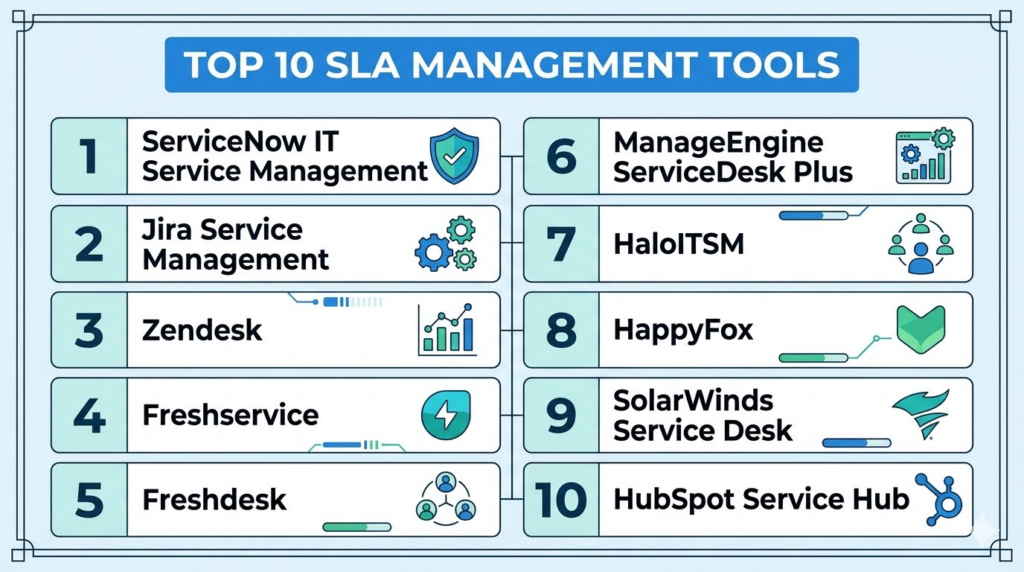
Introduction
SLA Management Tools help businesses define, track, monitor, and enforce service level agreements across customer support, IT service management, vendor management, managed services, and internal operations. In simple terms, these tools make sure teams respond to and resolve issues within promised timelines, while giving managers visibility into SLA breaches, escalations, workload, and service performance.
SLA management matters because customers expect faster service, enterprise buyers demand measurable accountability, and support teams need structured ways to prioritize urgent issues. Without SLA tracking, requests can get delayed, high-priority customers may be missed, and service quality becomes difficult to measure.
Real world use cases include customer support SLA tracking, IT incident response, helpdesk escalation management, managed service provider contracts, vendor performance monitoring, enterprise service desk operations, customer success workflows, and internal employee support.
Buyers should evaluate:
- SLA policy creation and customization
- Response and resolution time tracking
- Escalation automation
- Priority and severity rules
- Reporting and SLA breach analytics
- Ticketing and ITSM integrations
- Multi-team and multi-region support
- Customer-specific SLA rules
- Role-based access and audit logs
- Ease of configuration and administration
Best for: SLA Management Tools are best for customer support leaders, IT service desk teams, managed service providers, enterprise operations teams, customer success managers, vendor management teams, and businesses that need measurable service commitments across customers, teams, or contracts.
Not ideal for: Very small teams with low request volume and informal service expectations may not need a dedicated SLA management platform. If a business only handles a few support requests and does not offer formal response or resolution commitments, a simple ticketing system or shared inbox may be enough.
Key Trends in SLA Management Tools
- AI-driven SLA risk prediction: Modern platforms are beginning to identify tickets likely to breach SLA before the deadline, helping teams act earlier.
- Automated escalation workflows: Teams want rules that automatically notify managers, reassign tickets, or trigger urgent workflows when SLA risk increases.
- Customer-specific SLA policies: Businesses increasingly need different SLA commitments by customer tier, contract, region, product, or support package.
- Real-time SLA dashboards: Managers want live visibility into active breaches, upcoming breaches, backlog, response times, and agent workload.
- Omnichannel SLA tracking: SLA rules must work across email, chat, phone, web forms, social channels, and customer portals.
- ITSM and customer support convergence: SLA management is now important for both IT service operations and customer-facing support teams.
- Contract-aware service operations: Enterprise support teams are linking SLA rules with customer contracts, entitlements, and service plans.
- Integration with incident management: Technical teams need SLA tracking connected with incident response, uptime commitments, on-call workflows, and status updates.
- Stronger audit and compliance reporting: Regulated industries need historical SLA reports, breach reasons, resolution notes, and approval trails.
- Self-service and automation impact: Knowledge bases and AI support are reducing simple tickets, allowing SLA tracking to focus on complex and urgent issues.
How We Selected These Tools
The tools below were selected using a practical buyer-focused evaluation approach:
- Market adoption and recognition in customer support, IT service management, helpdesk operations, and enterprise service workflows.
- Feature completeness across SLA policy creation, ticket tracking, escalation, reporting, and workflow automation.
- Customer fit across segments, including SMBs, mid-market companies, enterprises, MSPs, and IT teams.
- Ease of SLA configuration, including support for business hours, priority rules, customer tiers, and escalation paths.
- Integration ecosystem with ticketing systems, CRM, collaboration tools, monitoring platforms, and ITSM workflows.
- Automation depth, including routing, reminders, breach alerts, escalation rules, and AI-assisted prioritization.
- Security posture signals, including role-based access, SSO, MFA, audit logs, and enterprise administration.
- Scalability for multiple teams, service lines, regions, brands, and customer groups.
- Reporting quality, including SLA compliance, breach trends, agent performance, queue health, and contract-level reporting.
- Implementation practicality, including setup effort, admin usability, support resources, and long-term maintainability.
Top 10 SLA Management Tools
1- ServiceNow IT Service Management
Short description:
ServiceNow IT Service Management is an enterprise-grade platform for IT service operations, incident management, request management, problem management, change workflows, and SLA tracking. It is widely used by large organizations that need structured service delivery and measurable accountability across complex IT environments. ServiceNow is especially strong for enterprises with multiple support teams, business units, regions, and service commitments. Its SLA management capabilities are part of a broader ITSM and workflow automation ecosystem.
Key Features
- SLA definition and tracking
- Incident, problem, change, and request management
- Automated escalations and notifications
- Service catalog and workflow automation
- Real-time dashboards and analytics
- Business rules and entitlement-based workflows
- Enterprise integrations with IT and business systems
Pros
- Strong enterprise scalability and workflow depth
- Excellent fit for complex IT service operations
- Broad ecosystem for ITSM, ITOM, HR, security, and enterprise workflows
Cons
- Implementation can be complex and resource-intensive
- May be too advanced for small teams
- Requires admin expertise for customization and governance
Platforms / Deployment
Web-based platform.
Cloud deployment.
Mobile access available through ServiceNow mobile capabilities.
Security & Compliance
Supports enterprise security capabilities such as role-based access, SSO, MFA, audit logs, encryption, administrative controls, and workflow governance. Specific certifications and compliance coverage should be validated during vendor review.
Integrations & Ecosystem
ServiceNow has a broad enterprise integration ecosystem and connects with IT operations, monitoring, identity, collaboration, security, HR, and business platforms. It is often used as a central workflow layer for enterprise service management.
- Monitoring and observability tools
- Identity and access management systems
- Microsoft Teams
- Slack
- Jira
- Enterprise data and reporting systems
Support & Community
ServiceNow provides enterprise support, implementation partner services, documentation, training, certification programs, and a large professional community. Support levels vary by contract and success package.
2- Jira Service Management
Short description:
Jira Service Management by Atlassian is a flexible service management platform used for IT support, DevOps, internal helpdesk, incident management, and customer service workflows. It provides SLA tracking, queues, request portals, automation, escalation rules, and strong collaboration with development teams. It is especially useful for technology teams that need support workflows connected with Jira Software and Confluence. Jira Service Management is a strong choice for mid-market and enterprise teams that want ITSM capabilities without losing agile collaboration.
Key Features
- SLA rules and breach tracking
- Request queues and service desk workflows
- Incident, problem, and change management
- Automation rules and escalation workflows
- Knowledge base integration with Confluence
- DevOps and engineering collaboration
- Reporting dashboards and service metrics
Pros
- Strong fit for IT, DevOps, and technical support teams
- Deep integration with Atlassian tools
- Flexible and configurable SLA workflows
Cons
- May feel technical for non-IT teams
- Workflow setup requires careful planning
- Advanced enterprise governance may need admin expertise
Platforms / Deployment
Web-based platform.
Cloud deployment.
Data Center options may be available for enterprise environments.
Security & Compliance
Supports role-based permissions, SSO options, audit logs, admin controls, and enterprise security settings depending on plan and deployment. Buyers should validate compliance coverage based on requirements.
Integrations & Ecosystem
Jira Service Management integrates strongly with the Atlassian ecosystem and many IT, DevOps, monitoring, and collaboration tools. It is particularly valuable when service issues need engineering involvement.
- Jira Software
- Confluence
- Bitbucket
- Slack
- Microsoft Teams
- Monitoring and incident tools
Support & Community
Atlassian provides documentation, community forums, partner implementation support, training resources, and enterprise support options. Its community is especially strong among software, IT, and DevOps teams.
3- Zendesk
Short description:
Zendesk is a mature customer support ticketing platform with strong SLA management capabilities for customer service teams. It helps businesses define response and resolution targets based on priority, customer type, channel, or support plan. Zendesk is especially useful for companies that need omnichannel customer support with structured ticket routing, escalations, and reporting. It fits SMB, mid-market, and enterprise teams that want SLA tracking inside a broader support platform.
Key Features
- SLA policies for support tickets
- Omnichannel ticket management
- Priority-based routing and escalation
- Automations, triggers, and macros
- Customer satisfaction reporting
- Help center and self-service
- SLA dashboards and support analytics
Pros
- Strong all-around support platform
- Good SLA tracking for customer service teams
- Large integration ecosystem
Cons
- Advanced SLA setup may require admin knowledge
- Costs can increase with add-ons and larger teams
- Complex workflows may need careful configuration
Platforms / Deployment
Web-based platform.
Cloud deployment.
Mobile apps available for iOS and Android.
Security & Compliance
Supports enterprise security capabilities such as role-based access, SSO, permissions, audit logs, and data controls. Specific certifications and compliance details should be validated during vendor evaluation.
Integrations & Ecosystem
Zendesk integrates with CRM, communication, ecommerce, analytics, collaboration, and productivity tools. It is often used as the main customer support hub for service operations.
- Salesforce
- Slack
- Shopify
- Jira
- Microsoft Teams
- Telephony and chat tools
Support & Community
Zendesk offers documentation, training resources, onboarding options, support plans, and a large customer community. Support depth may vary by plan and agreement.
4- Freshservice
Short description:
Freshservice by Freshworks is an IT service management platform designed for IT teams that need ticketing, SLA management, incident tracking, asset management, change workflows, and service request automation. It is known for being easier to adopt than many traditional enterprise ITSM systems. Freshservice is especially useful for SMB and mid-market IT teams that want strong SLA tracking without overly complex implementation. It also works for internal employee support and service desk operations.
Key Features
- SLA policy creation and monitoring
- Incident and service request management
- Automated escalations and alerts
- Asset and change management
- Service catalog workflows
- Knowledge base support
- Reporting and IT service analytics
Pros
- Easy to adopt for IT teams
- Good balance of ITSM depth and usability
- Strong fit for SMB and mid-market service desks
Cons
- Complex enterprise workflows may need higher plans
- Advanced customization may be limited compared with larger ITSM suites
- Best experience is within the Freshworks ecosystem
Platforms / Deployment
Web-based platform.
Cloud deployment.
Mobile apps available for iOS and Android.
Security & Compliance
Supports role-based access, SSO options, permissions, audit-related controls, and security administration features. Buyers should confirm current compliance documentation during review.
Integrations & Ecosystem
Freshservice integrates with collaboration tools, identity systems, monitoring tools, asset management workflows, and Freshworks products. It is suitable for IT teams that need practical service operations connectivity.
- Microsoft Teams
- Slack
- Google Workspace
- Azure Active Directory
- Monitoring tools
- Freshworks ecosystem
Support & Community
Freshservice provides documentation, onboarding resources, support plans, training content, and customer success options. Support levels vary by plan and business need.
5- Freshdesk
Short description:
Freshdesk is a customer support ticketing platform with SLA management capabilities for support teams handling emails, chats, calls, social messages, and web requests. It helps businesses define response and resolution targets, assign tickets, automate reminders, and escalate unresolved issues. Freshdesk is especially useful for SMB and mid-market companies that want customer service SLA tracking in an easy-to-use platform. It balances affordability, usability, and practical support automation.
Key Features
- SLA policy management
- Multichannel ticketing
- Escalation rules and reminders
- Automation for routing and assignment
- Knowledge base and self-service
- Agent collaboration tools
- Reporting and support dashboards
Pros
- User-friendly for growing support teams
- Strong value for SMB and mid-market businesses
- Good practical SLA automation features
Cons
- Advanced enterprise workflows may require higher-tier plans
- Customization depth may not match larger enterprise suites
- Some integrations may need additional setup
Platforms / Deployment
Web-based platform.
Cloud deployment.
Mobile apps available for iOS and Android.
Security & Compliance
Supports roles, permissions, SSO options, access controls, and security administration features depending on plan. Buyers should validate current compliance and security documentation.
Integrations & Ecosystem
Freshdesk integrates with CRM, ecommerce, communication, collaboration, telephony, and analytics tools. It works especially well for companies already using Freshworks products.
- Freshsales
- Slack
- Microsoft Teams
- Shopify
- Salesforce
- Telephony tools
Support & Community
Freshdesk offers documentation, support resources, onboarding materials, community guidance, and plan-based customer support. Support depth may vary by subscription tier.
6- ManageEngine ServiceDesk Plus
Short description:
ManageEngine ServiceDesk Plus is an IT helpdesk and service management platform with SLA management, incident tracking, asset management, change management, and reporting capabilities. It is commonly used by IT teams that need structured service desk operations at a practical cost. ServiceDesk Plus is especially useful for organizations that want ITSM functionality with flexible deployment options. It is a good fit for SMB, mid-market, education, public sector, and enterprise IT teams.
Key Features
- SLA tracking and escalation rules
- Incident and request management
- Asset management
- Change and problem management
- Service catalog
- Knowledge base
- IT service desk reporting
Pros
- Strong IT helpdesk feature set
- Flexible deployment options
- Good value for IT teams needing SLA management
Cons
- Interface and configuration may require learning
- Advanced workflows may need admin setup
- Some enterprise needs may require additional ManageEngine products
Platforms / Deployment
Web-based platform.
Cloud and self-hosted deployment options may be available.
Mobile access may vary by environment.
Security & Compliance
Supports roles, permissions, access controls, audit-related capabilities, and security administration features. Specific certifications and compliance details should be validated directly during vendor review.
Integrations & Ecosystem
ManageEngine ServiceDesk Plus integrates with IT management, identity, endpoint, monitoring, and business tools. It is useful for teams already using ManageEngine products.
- Active Directory
- Microsoft 365
- Endpoint management tools
- Monitoring tools
- ManageEngine ecosystem
- Collaboration tools
Support & Community
ManageEngine provides documentation, support resources, training materials, and customer support options. Community and ecosystem strength are strong among IT administrators.
7- HaloITSM
Short description:
HaloITSM is an IT service management platform with strong SLA management, ticketing, asset management, change management, service catalog, automation, and reporting capabilities. It is designed for IT service teams that need configurable workflows and modern service desk operations. HaloITSM is especially useful for organizations that want a flexible ITSM tool with clear SLA tracking and service delivery visibility. It can support internal IT, enterprise service management, and managed service workflows.
Key Features
- SLA policy and breach tracking
- Incident and request management
- Service catalog and workflows
- Change and problem management
- Asset and configuration management
- Automation and approvals
- Reporting dashboards
Pros
- Flexible ITSM workflow configuration
- Strong fit for IT service teams
- Useful for both internal IT and service operations
Cons
- Setup may require careful process design
- Advanced use cases may need implementation support
- Market awareness may be lower than larger enterprise brands
Platforms / Deployment
Web-based platform.
Cloud deployment.
Deployment options may vary by customer requirements.
Security & Compliance
Supports role-based access, permissions, admin controls, and security-focused configuration options. Specific certifications and compliance documents should be validated during procurement.
Integrations & Ecosystem
HaloITSM integrates with IT, collaboration, identity, monitoring, and service management tools. It is designed to fit into broader IT operations workflows.
- Microsoft Teams
- Azure Active Directory
- Monitoring systems
- Asset tools
- Email and collaboration tools
- API-based integrations
Support & Community
HaloITSM provides implementation assistance, documentation, onboarding, and customer support. Support depth may vary by plan, region, and deployment scope.
8- HappyFox
Short description:
HappyFox is a helpdesk and customer support platform with SLA management, ticketing, automation, knowledge base, and reporting capabilities. It is suitable for customer support teams, IT helpdesks, education support teams, and operations teams that need structured ticket handling. HappyFox is especially useful for organizations that want clean ticket workflows and practical SLA tracking without excessive complexity. It can support both internal and external support use cases.
Key Features
- SLA management and breach alerts
- Ticket categorization and assignment
- Automation rules and workflows
- Knowledge base support
- Customer portal
- Reporting and dashboards
- Multi-channel support intake
Pros
- Clean and practical helpdesk experience
- Suitable for customer support and internal teams
- Good automation and SLA tracking capabilities
Cons
- Advanced enterprise customization may need validation
- Ecosystem may be smaller than larger platforms
- Some features may depend on plan selection
Platforms / Deployment
Web-based platform.
Cloud deployment.
Mobile access may vary by configuration.
Security & Compliance
Supports permissions, access controls, and administrative settings. Specific security certifications and compliance documentation should be verified during vendor review.
Integrations & Ecosystem
HappyFox integrates with business, collaboration, CRM, ecommerce, and productivity tools to support helpdesk workflows.
- Slack
- Microsoft Teams
- Salesforce
- Shopify
- Jira
- Productivity tools
Support & Community
HappyFox provides documentation, customer support, onboarding resources, and help materials. Support levels may vary by subscription and business requirements.
9- SolarWinds Service Desk
Short description:
SolarWinds Service Desk is an IT service management platform that includes incident management, SLA tracking, asset management, change management, service catalog, and reporting. It is designed for IT teams that need structured helpdesk operations and visibility into service performance. SolarWinds Service Desk is especially useful for businesses that want ITSM features with practical configuration and reporting. It fits SMB and mid-market IT teams, as well as organizations already familiar with SolarWinds products.
Key Features
- SLA monitoring and alerts
- Incident and request management
- Service catalog workflows
- Asset management
- Change management
- Knowledge base
- Reporting and analytics
Pros
- Good fit for IT service desk teams
- Practical SLA and asset management combination
- Useful reporting for IT operations
Cons
- May not fit non-IT customer support workflows as well
- Advanced enterprise customization should be validated
- Best value may depend on broader IT operations needs
Platforms / Deployment
Web-based platform.
Cloud deployment.
Security & Compliance
Supports user permissions, access controls, and administrative security settings. Buyers should validate current compliance documentation and security controls directly.
Integrations & Ecosystem
SolarWinds Service Desk connects with IT operations, monitoring, asset, identity, and collaboration tools. It can be useful for teams already using SolarWinds solutions.
- SolarWinds ecosystem
- Microsoft tools
- Identity systems
- Monitoring platforms
- Collaboration tools
- IT asset workflows
Support & Community
SolarWinds provides documentation, support resources, onboarding assistance, and customer support options. Community strength is notable among IT operations professionals.
10- HubSpot Service Hub
Short description:
HubSpot Service Hub is a customer service platform with ticketing, customer communication, automation, knowledge base, feedback, and CRM-connected service workflows. It supports SLA-style tracking through ticket pipelines, automation, reporting, and service workflows, making it useful for customer-facing teams already using HubSpot CRM. HubSpot Service Hub is especially practical for SMB and mid-market businesses that want support operations connected with sales and marketing data. It is best for teams that value ease of use and customer context.
Key Features
- Ticket pipeline management
- Workflow automation
- Shared inbox and customer conversations
- Knowledge base support
- Customer feedback tools
- CRM-connected customer history
- Reporting and dashboards
Pros
- Strong CRM-connected support experience
- Easy to use for SMB and mid-market teams
- Good fit for companies already using HubSpot
Cons
- Deep SLA management may require configuration
- Not as ITSM-focused as dedicated service desk tools
- Advanced features may require higher plans
Platforms / Deployment
Web-based platform.
Cloud deployment.
Mobile apps available for iOS and Android.
Security & Compliance
Supports role-based access, permissions, SSO options on certain plans, and security administration features. Buyers should validate specific compliance needs during evaluation.
Integrations & Ecosystem
HubSpot Service Hub integrates with the broader HubSpot CRM platform and many third-party tools. It is strongest when support, sales, marketing, and customer data need to work together.
- HubSpot CRM
- Gmail
- Outlook
- Slack
- Salesforce
- Productivity and reporting tools
Support & Community
HubSpot provides documentation, academy resources, community forums, onboarding services, customer support, and partner support. Support access may vary by plan.
Comparison Table
| Tool Name | Best For | Platform Supported | Deployment | Standout Feature | Public Rating |
|---|---|---|---|---|---|
| ServiceNow IT Service Management | Large enterprise IT service teams | Web, mobile options | Cloud | Enterprise-grade SLA and workflow automation | N/A |
| Jira Service Management | IT, DevOps, and technical support | Web | Cloud, Data Center options vary | SLA tracking connected with engineering workflows | N/A |
| Zendesk | Customer support SLA management | Web, iOS, Android | Cloud | Omnichannel SLA tracking for support teams | N/A |
| Freshservice | SMB and mid-market IT service desks | Web, iOS, Android | Cloud | Easy-to-use ITSM and SLA management | N/A |
| Freshdesk | Customer support teams | Web, iOS, Android | Cloud | Practical SLA automation for support tickets | N/A |
| ManageEngine ServiceDesk Plus | IT helpdesk and service operations | Web, mobile options vary | Cloud, self-hosted options vary | ITSM with flexible deployment options | N/A |
| HaloITSM | Configurable ITSM workflows | Web | Cloud options vary | Flexible SLA and service desk workflows | N/A |
| HappyFox | Helpdesk and support teams | Web, mobile options vary | Cloud | Clean ticketing with SLA breach alerts | N/A |
| SolarWinds Service Desk | IT service desk teams | Web | Cloud | ITSM with asset and SLA management | N/A |
| HubSpot Service Hub | CRM-connected customer support | Web, iOS, Android | Cloud | Support workflows connected with CRM data | N/A |
Evaluation & Scoring of SLA Management Tools
| Tool Name | Core 25% | Ease 15% | Integrations 15% | Security 10% | Performance 10% | Support 10% | Value 15% | Weighted Total 0–10 |
|---|---|---|---|---|---|---|---|---|
| ServiceNow IT Service Management | 9.6 | 7.4 | 9.3 | 9.2 | 9.2 | 8.8 | 7.3 | 8.61 |
| Jira Service Management | 8.9 | 8.0 | 9.2 | 8.8 | 8.7 | 8.4 | 8.2 | 8.59 |
| Zendesk | 8.7 | 8.4 | 9.0 | 8.6 | 8.8 | 8.5 | 8.0 | 8.58 |
| Freshservice | 8.5 | 8.8 | 8.4 | 8.3 | 8.5 | 8.2 | 8.5 | 8.47 |
| Freshdesk | 8.2 | 8.9 | 8.3 | 8.1 | 8.4 | 8.1 | 8.7 | 8.38 |
| ManageEngine ServiceDesk Plus | 8.6 | 8.0 | 8.2 | 8.2 | 8.4 | 8.0 | 8.6 | 8.34 |
| HaloITSM | 8.6 | 8.2 | 8.1 | 8.2 | 8.4 | 8.1 | 8.3 | 8.32 |
| HappyFox | 8.0 | 8.7 | 8.0 | 7.9 | 8.2 | 8.0 | 8.4 | 8.20 |
| SolarWinds Service Desk | 8.2 | 8.2 | 8.0 | 8.0 | 8.3 | 8.0 | 8.2 | 8.16 |
| HubSpot Service Hub | 7.8 | 9.0 | 8.4 | 8.2 | 8.3 | 8.2 | 8.3 | 8.31 |
The scores are comparative and should be used as a decision-support guide rather than a universal ranking. Enterprise IT teams may prioritize workflow depth, scalability, audit controls, and integrations more heavily. SMBs may value ease of use, fast setup, and price more than advanced customization. Customer support teams may prefer Zendesk, Freshdesk, or HubSpot, while technical service teams may prefer ServiceNow, Jira Service Management, Freshservice, or ManageEngine. Always test SLA configuration, escalation logic, reporting, and integration fit before final selection.
Which SLA Management Tool Is Right for You?
Solo / Freelancer
Solo professionals rarely need a dedicated SLA management platform. If service commitments are informal and request volume is low, a simple task manager, shared inbox, or lightweight ticketing tool may be enough.
However, freelancers managing support contracts or client retainers may benefit from basic SLA tracking. In that case, a simple helpdesk with due dates, reminders, and status tracking is usually more practical than a full ITSM suite.
SMB
SMBs should prioritize fast setup, easy SLA configuration, simple escalation rules, and clear reporting. Freshdesk, Freshservice, HappyFox, HubSpot Service Hub, and Zoho-style helpdesk alternatives can work well for smaller teams.
The best SMB option depends on whether the use case is customer support or IT support. Customer-facing support teams may prefer Freshdesk or Zendesk, while internal IT teams may prefer Freshservice or ManageEngine ServiceDesk Plus.
Mid-Market
Mid-market companies often need stronger routing, customer-specific SLA rules, role-based permissions, and dashboard reporting. Jira Service Management, Zendesk, Freshservice, ManageEngine ServiceDesk Plus, HaloITSM, and HappyFox are practical options.
These teams should focus on workflow flexibility and integration fit. If technical teams are involved in resolution, Jira Service Management may be strong. If customer service is the main need, Zendesk or Freshdesk may be better.
Enterprise
Enterprises need strong SLA governance, multi-team workflows, audit trails, advanced reporting, entitlement logic, escalation chains, and integrations with business systems. ServiceNow, Jira Service Management, Zendesk, Salesforce-connected support environments, and ManageEngine enterprise deployments may be relevant.
Large organizations should also evaluate global business hours, region-specific SLAs, vendor obligations, customer tiers, and service ownership. Implementation planning is critical because SLA rules can become difficult to maintain without governance.
Budget vs Premium
Budget-conscious teams should start with basic SLA rules inside an existing helpdesk or ITSM platform. Freshdesk, Freshservice, ManageEngine ServiceDesk Plus, HappyFox, and HubSpot Service Hub may offer strong value depending on use case.
Premium tools are better when SLA management is tied to enterprise service commitments, complex workflows, compliance reporting, or multiple service lines. ServiceNow, Jira Service Management, and Zendesk can deliver strong value when complexity justifies the investment.
Feature Depth vs Ease of Use
Feature-rich tools offer advanced SLA rules, approval flows, breach analytics, incident workflows, entitlement management, and integration depth. These are valuable for larger teams but may require more setup and administration.
Ease-of-use tools help smaller teams launch quickly and avoid overcomplicated workflows. The right choice depends on whether the team needs simple response tracking or advanced service governance.
Integrations & Scalability
SLA Management Tools should integrate with ticketing systems, CRM, monitoring tools, incident platforms, communication apps, identity systems, and reporting tools. Strong integrations reduce manual work and improve service visibility.
Scalability matters when support expands across products, customers, regions, teams, and service levels. Buyers should test whether SLA policies can handle business hours, holidays, customer tiers, priorities, escalation paths, and multiple queues.
Security & Compliance Needs
SLA tools often contain customer issues, internal incidents, operational data, contracts, attachments, and service records. Security should be reviewed carefully before implementation.
Buyers should evaluate SSO, MFA, RBAC, audit logs, data retention, encryption, admin controls, and reporting access. Enterprises and regulated industries should involve IT, legal, and compliance teams during vendor evaluation.
Frequently Asked Questions
1. What is an SLA Management Tool?
An SLA Management Tool helps businesses define, monitor, and manage service level agreements. These agreements usually specify how quickly a team must respond to or resolve a request. The tool tracks ticket deadlines, alerts teams before breaches, escalates overdue issues, and reports on SLA compliance. It is commonly used in customer support, IT service desks, managed services, and vendor management. A good SLA tool improves accountability, service consistency, and operational visibility.
2. How is SLA management different from ticket management?
Ticket management focuses on capturing, assigning, tracking, and resolving requests. SLA management adds time-based service commitments to those tickets. For example, a ticketing system may show who owns a request, while SLA management shows whether the team is meeting promised response and resolution times. Many ticketing platforms include SLA features, but more advanced teams may need deeper policy rules, escalation workflows, and compliance reporting. SLA management is especially important when service commitments are contractual or customer-tier based.
3. What pricing models do SLA Management Tools use?
Most SLA Management Tools are priced as part of helpdesk, ITSM, customer support, or service desk platforms. Pricing may depend on the number of agents, selected modules, automation depth, support channels, reporting features, and enterprise security requirements. Some tools charge per user, while others use tiered platform plans. Buyers should also consider implementation, configuration, training, integrations, and support costs. The best pricing model depends on team size, workflow complexity, and required SLA reporting depth.
4. How long does SLA tool implementation usually take?
Implementation time depends on the number of teams, service categories, SLA policies, integrations, and escalation rules. A small support team can often configure basic SLA rules quickly. Larger organizations may need more time to define customer tiers, business hours, regional calendars, priorities, breach rules, approval flows, and reporting dashboards. The most important step is documenting current service commitments before configuring the tool. A phased rollout is usually best, starting with core ticket types and expanding gradually.
5. What are common mistakes when setting up SLA management?
A common mistake is creating too many SLA policies too early. This makes the system difficult to manage and confuses agents. Another mistake is defining unrealistic response and resolution targets without considering staffing, workload, business hours, and ticket complexity. Teams also fail when escalation rules notify too many people or do not identify clear ownership. SLA management works best when policies are simple, measurable, aligned with customer promises, and reviewed regularly. Reporting should be used to improve processes, not only to measure failures.
6. Are SLA Management Tools secure?
SLA Management Tools can be secure, but buyers should review vendor security carefully. These tools may store customer issues, internal incidents, service records, attachments, user activity, and operational data. Important security features include SSO, MFA, role-based access, encryption, audit logs, admin controls, and reporting permissions. Regulated businesses should also review data retention, regional hosting, and compliance documentation. Security review should happen before rollout, especially when SLA data is tied to customer contracts or sensitive services.
7. Can SLA tools integrate with monitoring and incident systems?
Yes, many SLA management platforms can integrate with monitoring, observability, incident response, IT operations, and collaboration systems. These integrations are useful when alerts from infrastructure or applications need to become trackable incidents with SLA deadlines. Integration with tools like monitoring platforms, on-call systems, and chat apps can help teams respond faster. Buyers should confirm whether integrations are native, marketplace-based, API-based, or custom. Strong integration is especially important for IT, DevOps, and managed service teams.
8. Do SLA Management Tools support AI and automation?
Many modern service platforms support automation for SLA tracking, routing, reminders, escalation, and breach alerts. Some tools also use AI to classify tickets, suggest priorities, summarize issues, recommend responses, or predict tickets at risk of breaching SLA. AI can be useful, but it should not replace clear service policies and human ownership. Buyers should test AI recommendations with real ticket scenarios. Automation works best when ticket categories, priorities, and escalation rules are well defined.
9. When should a business move from manual SLA tracking to a dedicated tool?
A business should move to an SLA Management Tool when manual tracking creates missed deadlines, unclear ownership, poor reporting, or customer dissatisfaction. Warning signs include teams relying on spreadsheets, managers manually checking overdue tickets, and customers complaining about inconsistent response times. A dedicated tool becomes more important when support volume grows or service commitments become contractual. It also helps when multiple teams share responsibility for resolution. Automation reduces manual follow-up and gives leaders better visibility.
10. What alternatives exist if we do not need a full SLA platform?
Alternatives include basic ticketing tools, shared inboxes with reminders, project management boards, spreadsheets, CRM tasks, or simple helpdesk workflows. These may work for small teams with informal service commitments. However, they become difficult to manage when ticket volume grows, multiple priorities exist, or customers expect formal response times. A dedicated SLA-capable platform is better when breach tracking, escalation, reporting, and accountability matter. The right alternative depends on request volume and service complexity.
Conclusion
SLA Management Tools help businesses turn service promises into measurable, trackable, and enforceable workflows. The best platform depends on whether your organization needs customer support SLA tracking, IT service desk governance, managed service contract visibility, or enterprise service management. ServiceNow is a strong choice for large enterprise IT operations, while Jira Service Management is ideal for technical and DevOps-connected teams. Zendesk and Freshdesk are practical for customer support SLA tracking, while Freshservice, ManageEngine ServiceDesk Plus, HaloITSM, and SolarWinds Service Desk fit IT service management needs. HappyFox and HubSpot Service Hub can be strong choices for teams that want simpler support workflows with useful SLA visibility. There is no single universal winner because SLA requirements depend on request volume, service commitments, customer tiers, team structure, integrations, and budget.
