MOTOSHARE 🚗🏍️
Rent Bikes & Cars Directly from Owners
Motoshare connects vehicle owners with people who need bikes and cars on rent. Owners earn from idle vehicles, and renters get flexible ride options.
Visit Motoshare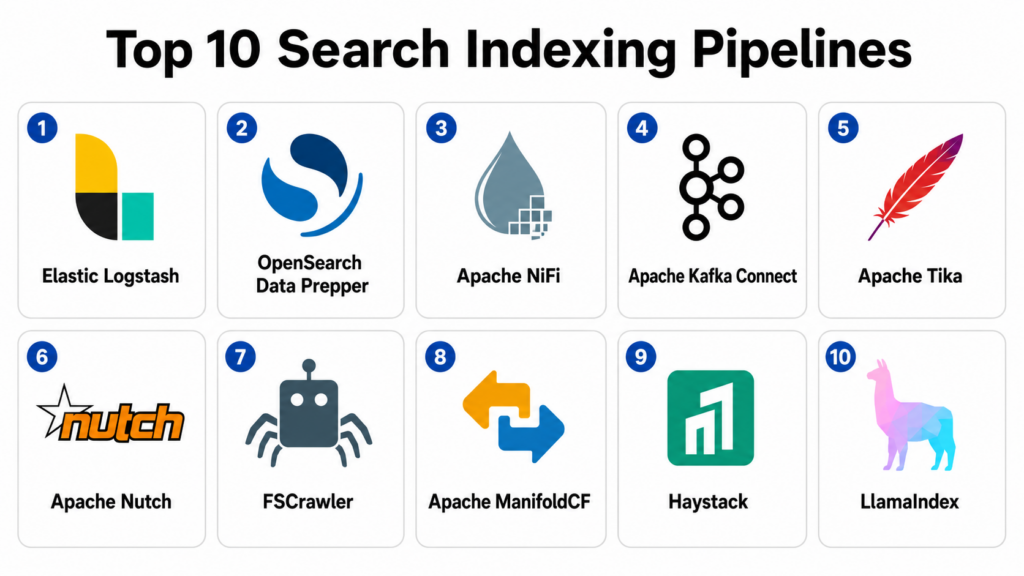
Introduction
Search Indexing Pipelines help teams collect, clean, enrich, transform, chunk, embed, and send data into search systems such as Elasticsearch, OpenSearch, Solr, vector databases, enterprise search platforms, and AI retrieval systems. In simple terms, these pipelines prepare content so users can search it quickly, accurately, and securely.
Search indexing matters because raw content is rarely ready for search. Documents may be in PDFs, HTML pages, logs, databases, cloud storage, APIs, tickets, product catalogs, emails, or knowledge bases. Before search works well, that content must be extracted, normalized, deduplicated, enriched with metadata, secured with permissions, and indexed into the right search backend.
Real world use cases include website crawling, document indexing, enterprise search ingestion, log indexing, ecommerce catalog indexing, knowledge base search, RAG document ingestion, semantic search indexing, metadata enrichment, and real-time search updates.
Buyers should evaluate connector coverage, file parsing, crawling, transformation logic, indexing speed, retry handling, data quality, permission sync, metadata enrichment, monitoring, scalability, security, vector support, and integration with search backends.
Best for: Search Indexing Pipelines are best for search engineers, data engineers, AI teams, knowledge management teams, ecommerce teams, enterprise search teams, DevOps teams, observability teams, content teams, and organizations building reliable keyword, hybrid, or semantic search systems.
Not ideal for: These tools may not be necessary for very small websites, simple CMS search, or small document collections that can be indexed manually. In those cases, built-in CMS search, basic database indexing, or a hosted search plugin may be enough.
Key Trends in Search Indexing Pipelines
- Hybrid search indexing is becoming standard: Pipelines now prepare data for both keyword search and vector search, often combining text fields, metadata, embeddings, filters, and ranking signals.
- RAG pipelines are driving new demand: AI teams need pipelines that can extract documents, chunk content, generate embeddings, preserve metadata, and keep indexes fresh for retrieval-augmented generation.
- Permission-aware indexing is now critical: Enterprise search must respect document-level access, user groups, tenant boundaries, and source permissions during indexing and retrieval.
- Real-time and incremental indexing matter more: Users expect new documents, product updates, tickets, policies, and content changes to appear quickly in search results.
- Document parsing is more complex: Pipelines increasingly need to parse PDFs, slides, spreadsheets, scanned files, HTML, Markdown, JSON, XML, emails, and attachments.
- Metadata enrichment improves relevance: Search quality improves when pipelines add source, author, date, language, entity, category, product, permission, and freshness metadata.
- Vector indexing needs quality control: Poor chunking, duplicate embeddings, missing metadata, and inconsistent text extraction can reduce semantic search quality.
- Observability is becoming essential: Teams need visibility into failed documents, queue lag, duplicate records, indexing latency, source errors, and malformed content.
- Open-source pipelines remain popular: Tools such as Logstash, NiFi, Kafka Connect, Apache Tika, Nutch, and Haystack are widely used as flexible indexing building blocks.
- Managed search platforms are adding ingestion layers: Search vendors increasingly provide built-in connectors and ingestion tools to reduce custom pipeline work.
How We Selected These Tools
The tools in this list were selected based on their relevance to search ingestion, crawling, parsing, transformation, indexing, dataflow management, semantic indexing, and enterprise search pipeline operations.
Selection logic included:
- Recognition in search indexing, data ingestion, crawling, parsing, ETL, log indexing, or AI retrieval workflows.
- Ability to collect data from files, databases, APIs, websites, streams, logs, SaaS tools, or cloud storage.
- Support for transformation, enrichment, filtering, parsing, routing, retries, and error handling.
- Integration with search backends such as Elasticsearch, OpenSearch, Solr, vector databases, or enterprise search platforms.
- Suitability for keyword search, semantic search, hybrid search, RAG, log search, website search, and document search.
- Support for batch, streaming, scheduled, incremental, and event-driven indexing workflows.
- Security and governance features such as secrets handling, access control, encrypted communication, auditability, and permission-aware indexing.
- Scalability across SMB, mid-market, enterprise, cloud-native, and open-source environments.
- Developer experience, documentation, ecosystem maturity, and community strength.
- Overall value for improving index freshness, reliability, search relevance, and operational control.
Top 10 Search Indexing Pipelines
1- Elastic Logstash
Short description:
Elastic Logstash is a widely used data processing pipeline that collects, transforms, enriches, and ships data into Elasticsearch and other destinations. It is especially common in log indexing, observability, security analytics, and search ingestion workflows. Logstash supports a large plugin ecosystem for inputs, filters, and outputs, making it flexible for many indexing use cases. It is a strong fit for teams using Elasticsearch or Elastic Stack for search and analytics.
Key Features
- Data collection from many input sources.
- Filter plugins for parsing, enrichment, and transformation.
- Output plugins for Elasticsearch and other systems.
- Support for logs, events, documents, and structured data.
- Grok parsing, date handling, mutation, and enrichment filters.
- Pipeline configuration and routing.
- Integration with Elastic Stack monitoring workflows.
Pros
- Mature and widely adopted in Elastic environments.
- Strong plugin ecosystem for log and event indexing.
- Flexible for parsing and transforming messy data.
Cons
- Pipeline configuration can become complex at scale.
- Resource usage needs monitoring for high-volume workloads.
- Best value is strongest when paired with Elasticsearch or Elastic Stack.
Platforms / Deployment
Linux / Windows / macOS / Java-based runtime
Self-hosted / Cloud deployment options may vary
Security & Compliance
Logstash security depends on deployment configuration, secrets management, TLS setup, pipeline permissions, and target system controls. When used with Elastic Stack, access control and compliance depend on Elastic deployment and license features.
Integrations & Ecosystem
Logstash integrates with many data sources and destinations through plugins. It is useful when indexing pipelines need parsing, enrichment, and routing before data enters Elasticsearch or other platforms.
- Elasticsearch
- OpenSearch through compatible outputs or plugins
- Kafka
- File and syslog sources
- Databases through JDBC
- Cloud and observability pipelines
Support & Community
Elastic provides documentation, commercial support, training resources, and a large community around Elastic Stack. Community knowledge is especially strong for log parsing and search indexing.
2- OpenSearch Data Prepper
Short description:
OpenSearch Data Prepper is a server-side data collector and processor used to prepare data for OpenSearch and related observability or search workloads. It can receive, transform, filter, enrich, and route data into OpenSearch indexes. Data Prepper is especially useful for teams using OpenSearch for logs, traces, security analytics, and search data ingestion. It is a strong fit for OpenSearch-centered environments that want an ingestion layer aligned with the OpenSearch ecosystem.
Key Features
- Data ingestion and processing for OpenSearch.
- Pipeline-based source, processor, and sink model.
- Support for logs, traces, and event data.
- Filtering, transformation, and enrichment capabilities.
- Integration with OpenSearch indexes.
- Useful for observability and security analytics indexing.
- Open-source ecosystem alignment.
Pros
- Strong fit for OpenSearch users.
- Useful for structured ingestion into OpenSearch.
- Open-source and aligned with OpenSearch pipelines.
Cons
- Ecosystem is narrower than some general-purpose ETL tools.
- Best suited for OpenSearch-oriented workflows.
- Advanced connector needs may require complementary tools.
Platforms / Deployment
Linux / Containers / Java-based runtime
Self-hosted / Cloud deployment options may vary
Security & Compliance
Data Prepper security depends on deployment model, TLS configuration, authentication setup, secrets handling, and OpenSearch cluster controls. Compliance depends on hosting and operational governance.
Integrations & Ecosystem
Data Prepper integrates with OpenSearch and common observability-style sources. It is useful when teams want a pipeline that feeds OpenSearch with transformed and enriched events.
- OpenSearch
- OpenTelemetry
- Logs and traces
- Security analytics workflows
- Container environments
- Observability pipelines
Support & Community
OpenSearch Data Prepper has open-source documentation and community support through the OpenSearch ecosystem. Enterprise support depends on selected managed service or vendor support model.
3- Apache NiFi
Short description:
Apache NiFi is a visual dataflow platform for building, managing, and monitoring data pipelines across many systems. It is useful for search indexing because it can ingest content from files, databases, APIs, message queues, cloud storage, and network sources, then transform and route it to search engines. NiFi provides backpressure, provenance, visual flow design, and operational control. It is a strong fit for teams that need governed and visible indexing pipelines across many sources.
Key Features
- Visual drag-and-drop pipeline design.
- Large processor library for sources and destinations.
- Backpressure, prioritization, and flow control.
- Data provenance and lineage visibility.
- Batch and near-real-time ingestion support.
- Transformation, routing, filtering, and enrichment.
- Integration with search engines, queues, files, APIs, and databases.
Pros
- Strong visual pipeline management.
- Good for complex ingestion and routing workflows.
- Helpful provenance features for troubleshooting and governance.
Cons
- Large flows can become difficult to organize without standards.
- Requires operational tuning for high-volume production workloads.
- Search-specific relevance logic may need custom processors or scripts.
Platforms / Deployment
Web / Java / Linux / Windows / macOS
Self-hosted / Container deployment options may vary
Security & Compliance
NiFi supports authentication, authorization, encrypted communication, secrets handling patterns, provenance, and admin controls depending on configuration. Compliance depends on deployment design and operational governance.
Integrations & Ecosystem
NiFi integrates with many enterprise systems and can serve as the central movement layer before indexing into search platforms.
- Elasticsearch and OpenSearch
- Solr
- Kafka
- Databases
- Cloud storage
- REST APIs and file systems
Support & Community
Apache NiFi has strong open-source documentation, community support, and commercial ecosystem options through vendors and service providers. It is widely known among dataflow and ingestion teams.
4- Apache Kafka Connect
Short description:
Apache Kafka Connect is a framework for streaming data between Kafka and external systems using connectors. It is useful for search indexing pipelines when data needs to move from databases, applications, event streams, logs, and CDC systems into Elasticsearch, OpenSearch, or other search backends. Kafka Connect is especially strong for real-time and event-driven indexing. It is a strong fit for teams already using Kafka as their data backbone.
Key Features
- Connector framework for Kafka-based data movement.
- Source and sink connectors for many systems.
- Real-time and event-driven indexing support.
- Scalable distributed worker architecture.
- Support for CDC and streaming data pipelines.
- Offset tracking and fault tolerance.
- Integration with Kafka ecosystem and schema tools.
Pros
- Strong for real-time indexing from event streams.
- Good fit for CDC and streaming architectures.
- Scales well in Kafka-centered environments.
Cons
- Requires Kafka operational expertise.
- Document parsing and enrichment may require additional stream processing.
- Connector quality varies by source and vendor.
Platforms / Deployment
Linux / Containers / Kafka environments
Self-hosted / Cloud managed options may vary
Security & Compliance
Kafka Connect security depends on Kafka authentication, authorization, TLS, secrets management, connector permissions, and deployment controls. Compliance depends on the Kafka platform and operational model.
Integrations & Ecosystem
Kafka Connect integrates with many source and sink systems through connectors. It is useful when search indexes must stay fresh from event streams or database changes.
- Elasticsearch and OpenSearch sink connectors
- Kafka topics
- Debezium CDC
- Databases
- Cloud platforms
- Stream processing systems
Support & Community
Kafka Connect has strong open-source community support through the Apache Kafka ecosystem, plus commercial support from Kafka platform vendors and managed services.
5- Apache Tika
Short description:
Apache Tika is a content detection and extraction toolkit used to parse text and metadata from many file formats. It is not a complete indexing pipeline by itself, but it is a key component in many document search and enterprise search pipelines. Tika can extract content from PDFs, Office files, HTML, XML, emails, and other document types before the extracted text is indexed. It is a strong fit for teams building document search, legal search, enterprise search, and RAG ingestion workflows.
Key Features
- Text extraction from many document formats.
- Metadata extraction and file type detection.
- Support for PDFs, Office files, HTML, XML, and more.
- Java library and server deployment options.
- Useful for search indexing and content analysis.
- Integration with crawlers, ETL tools, and search platforms.
- Open-source and widely adopted.
Pros
- Excellent document parsing foundation.
- Useful across many search and AI ingestion pipelines.
- Open-source and highly flexible.
Cons
- Not a full pipeline or search platform by itself.
- OCR and complex document layout may require extra tooling.
- Extraction quality varies by file type and document structure.
Platforms / Deployment
Java / Server / Library / Linux / Windows / macOS
Self-hosted
Security & Compliance
Tika security depends on deployment controls, file handling, sandboxing, access permissions, and processing isolation. Teams should handle untrusted files carefully and validate security controls around uploaded documents.
Integrations & Ecosystem
Tika is commonly embedded into crawlers, ETL systems, RAG pipelines, and document search platforms to extract searchable text and metadata.
- Apache Solr
- Elasticsearch and OpenSearch pipelines
- Apache Nutch
- FSCrawler
- RAG ingestion pipelines
- Custom Java and Python workflows
Support & Community
Apache Tika has open-source documentation, Apache community support, and broad adoption in search, content extraction, and document processing workflows.
6- Apache Nutch
Short description:
Apache Nutch is an open-source web crawler designed for crawling websites and preparing web content for indexing. It is useful when teams need a customizable crawler that can fetch, parse, filter, and process large volumes of web pages. Nutch is often used with Solr, Elasticsearch, or other search systems. It is a strong fit for technical teams building website search, domain-specific search engines, content discovery systems, or research crawlers.
Key Features
- Open-source web crawling framework.
- URL fetching, parsing, filtering, and crawling workflows.
- Plugin-based architecture for customization.
- Integration with search backends and parsing tools.
- Scalable crawling architecture depending on setup.
- Support for crawl rules and content filtering.
- Useful for website and web-scale indexing projects.
Pros
- Strong open-source foundation for web crawling.
- Highly customizable for technical teams.
- Useful for search engines and large website indexing.
Cons
- Requires crawler engineering and operational expertise.
- Not as simple as hosted site search crawlers.
- Politeness, deduplication, and crawl quality require careful setup.
Platforms / Deployment
Java / Linux / Cross-platform
Self-hosted
Security & Compliance
Nutch security depends on deployment, crawl scope, network controls, data handling, and administrative practices. Teams should follow legal, robots, permission, and privacy requirements when crawling content.
Integrations & Ecosystem
Nutch integrates with parsing tools and search platforms to index crawled web content. It is useful when teams need full control over crawling behavior.
- Apache Solr
- Elasticsearch
- Apache Tika
- Hadoop ecosystem
- Custom parsers
- Web indexing workflows
Support & Community
Apache Nutch has open-source documentation and community support. Production success depends on internal search and crawler engineering expertise.
7- FSCrawler
Short description:
FSCrawler is a file system crawler commonly used to index local and network file content into Elasticsearch. It can crawl directories, extract text from documents using Apache Tika, and send structured content into search indexes. FSCrawler is especially useful for small to mid-sized document search projects, internal file search, and proof-of-concept indexing. It is a practical choice when the main source is files and the target is Elasticsearch.
Key Features
- File system crawling and indexing.
- Integration with Elasticsearch.
- Apache Tika-based text extraction.
- Support for many document formats.
- Metadata extraction and indexing.
- Directory monitoring and incremental indexing.
- Simple configuration for file-based search.
Pros
- Practical for local and shared file indexing.
- Easier than building a custom file crawler.
- Good fit for Elasticsearch document search prototypes.
Cons
- Best suited for file system sources.
- Enterprise permission-aware search may require extra design.
- Large-scale or complex workflows may need more robust pipeline tools.
Platforms / Deployment
Java / Linux / Windows / macOS
Self-hosted
Security & Compliance
FSCrawler security depends on file access permissions, Elasticsearch security, deployment controls, and how extracted content is handled. Sensitive file indexing requires careful access and permission design.
Integrations & Ecosystem
FSCrawler integrates primarily with Elasticsearch and Apache Tika for file-based document extraction and indexing.
- Elasticsearch
- Apache Tika
- Local file systems
- Network shares
- Document search pipelines
- Internal knowledge search
Support & Community
FSCrawler has open-source documentation and community support. It is especially useful for teams that need a lightweight file-to-search pipeline.
8- Apache ManifoldCF
Short description:
Apache ManifoldCF is an open-source framework for connecting content repositories to search indexes while preserving access control information. It is especially useful for enterprise search scenarios where documents live in repositories and user permissions must be respected. ManifoldCF can crawl repositories, manage connectors, and send content to search systems such as Solr or Elasticsearch. It is a strong fit for enterprise document indexing and permission-aware search pipelines.
Key Features
- Repository crawling and content ingestion.
- Permission-aware indexing support.
- Connectors for content repositories and search systems.
- Job scheduling and crawling controls.
- Metadata extraction and routing.
- Enterprise search ingestion patterns.
- Open-source framework for content indexing.
Pros
- Strong fit for permission-aware enterprise search.
- Useful for repository-to-search indexing workflows.
- Open-source and customizable.
Cons
- Connector availability and maintenance should be validated.
- Setup can be complex for non-technical teams.
- Modern RAG and vector workflows may require additional components.
Platforms / Deployment
Java / Web / Linux / Windows
Self-hosted
Security & Compliance
ManifoldCF is designed to help preserve access control metadata during indexing, but security depends on connector configuration, repository permissions, target search platform controls, and deployment governance.
Integrations & Ecosystem
ManifoldCF integrates with content repositories and search engines to build enterprise search indexing pipelines.
- Apache Solr
- Elasticsearch
- File repositories
- Enterprise content systems
- Permission metadata workflows
- Document indexing pipelines
Support & Community
Apache ManifoldCF has open-source documentation and community support. Production deployments require internal expertise or external service support.
9- Haystack
Short description:
Haystack is an open-source framework for building search, question answering, and RAG pipelines. It helps teams connect document stores, retrievers, rankers, embedding models, LLMs, and indexing components. Haystack is especially useful when search indexing is part of semantic search or AI assistant workflows. It is a strong fit for AI teams building document ingestion, chunking, embedding, and retrieval pipelines.
Key Features
- Pipeline framework for search and RAG.
- Document ingestion and preprocessing components.
- Retriever, ranker, reader, and generator workflows.
- Integration with vector databases and search engines.
- Support for embedding and LLM-based applications.
- Modular pipeline design.
- Useful for AI-powered document search.
Pros
- Strong fit for RAG and semantic search indexing.
- Flexible integration with search engines and vector stores.
- Developer-friendly for AI retrieval experiments and production pipelines.
Cons
- Not a traditional enterprise ETL platform.
- Requires AI engineering knowledge for best results.
- Access control and governance may need additional architecture.
Platforms / Deployment
Python / APIs / Containers
Self-hosted / Cloud deployment options may vary
Security & Compliance
Haystack security depends on deployment environment, model providers, document stores, secrets management, and application controls. Compliance depends on how pipelines handle sensitive documents and user access.
Integrations & Ecosystem
Haystack integrates with vector databases, search engines, embedding models, LLMs, and document stores for semantic indexing and retrieval.
- Elasticsearch and OpenSearch
- Weaviate, Pinecone, Milvus, and Qdrant
- Hugging Face and model providers
- Python data workflows
- RAG applications
- Document stores
Support & Community
Haystack has open-source documentation, community resources, examples, and vendor ecosystem support through deepset. Its community is strong among AI search and RAG developers.
10- LlamaIndex
Short description:
LlamaIndex is a data framework for building LLM-powered applications, especially RAG and semantic search systems. It helps teams connect data sources, parse documents, create indexes, manage embeddings, and retrieve context for AI applications. LlamaIndex is useful when search indexing pipelines are designed specifically for AI assistants, enterprise copilots, or natural language retrieval. It is a strong fit for teams building semantic indexing and retrieval over documents, databases, APIs, and knowledge bases.
Key Features
- Data connectors for LLM and RAG applications.
- Document parsing, chunking, indexing, and retrieval.
- Integration with vector stores and search backends.
- Embedding model and LLM integration.
- Query engines and retrieval workflows.
- Support for structured and unstructured data.
- Useful for AI assistant indexing pipelines.
Pros
- Strong fit for LLM and RAG indexing workflows.
- Broad connector and vector store ecosystem.
- Developer-friendly for AI search applications.
Cons
- Not a general-purpose enterprise ETL tool.
- Production governance and permissions need careful design.
- Rapid ecosystem changes require ongoing maintenance attention.
Platforms / Deployment
Python / TypeScript support may vary / APIs
Self-hosted / Application framework deployment
Security & Compliance
LlamaIndex security depends on application architecture, data connectors, vector stores, model providers, secrets management, and access-control design. Sensitive enterprise search deployments require permission-aware retrieval and careful data handling.
Integrations & Ecosystem
LlamaIndex integrates with many data sources, vector databases, search engines, LLMs, and embedding providers. It is especially useful for building AI-first indexing and retrieval systems.
- Pinecone, Weaviate, Qdrant, Milvus, and other vector stores
- Elasticsearch and OpenSearch
- OpenAI and other model providers
- Databases and file systems
- Cloud storage
- RAG and AI assistant workflows
Support & Community
LlamaIndex has strong documentation, examples, an active developer community, and commercial ecosystem support options. It is widely used among AI application and RAG builders.
Comparison Table Top 10
| Tool Name | Best For | Platform Supported | Deployment | Standout Feature | Public Rating |
|---|---|---|---|---|---|
| Elastic Logstash | Elasticsearch ingestion and log indexing | Linux, Windows, macOS, Java runtime | Self-hosted / Cloud options may vary | Plugin-based parsing, enrichment, and indexing | N/A |
| OpenSearch Data Prepper | OpenSearch ingestion pipelines | Linux, containers, Java runtime | Self-hosted / Cloud options may vary | OpenSearch-aligned data preparation pipelines | N/A |
| Apache NiFi | Visual enterprise dataflow indexing | Web, Java, Linux, Windows, macOS | Self-hosted / Container options may vary | Visual flows with provenance and backpressure | N/A |
| Apache Kafka Connect | Real-time event-driven indexing | Linux, containers, Kafka environments | Self-hosted / Cloud managed options may vary | Connector-based streaming into search indexes | N/A |
| Apache Tika | Document text and metadata extraction | Java, server, library | Self-hosted | Parses many file formats for indexing | N/A |
| Apache Nutch | Web crawling and website indexing | Java, cross-platform | Self-hosted | Extensible open-source web crawler | N/A |
| FSCrawler | File system to Elasticsearch indexing | Java, Linux, Windows, macOS | Self-hosted | Simple file crawling with Tika extraction | N/A |
| Apache ManifoldCF | Permission-aware enterprise content indexing | Java, web, Linux, Windows | Self-hosted | Repository crawling with access control metadata | N/A |
| Haystack | AI search and RAG indexing pipelines | Python, APIs, containers | Self-hosted / Cloud options may vary | Modular semantic search and RAG pipelines | N/A |
| LlamaIndex | LLM-focused document indexing and retrieval | Python, TypeScript support may vary, APIs | Application framework deployment | Connectors, chunking, embeddings, and RAG retrieval | N/A |
Evaluation and Scoring of Search Indexing Pipelines
The scoring below is comparative and based on indexing pipeline depth, ease of use, integrations, security posture signals, performance, support expectations, and overall value. These are not public ratings and should be used as directional evaluation scores only.
| Tool Name | Core 25% | Ease 15% | Integrations 15% | Security 10% | Performance 10% | Support 10% | Value 15% | Weighted Total 0–10 |
|---|---|---|---|---|---|---|---|---|
| Elastic Logstash | 9 | 7 | 10 | 8 | 8 | 9 | 9 | 8.60 |
| OpenSearch Data Prepper | 8 | 7 | 8 | 8 | 8 | 7 | 9 | 7.90 |
| Apache NiFi | 9 | 8 | 9 | 8 | 8 | 8 | 9 | 8.50 |
| Apache Kafka Connect | 8 | 7 | 10 | 8 | 9 | 8 | 9 | 8.50 |
| Apache Tika | 8 | 7 | 8 | 7 | 8 | 7 | 10 | 7.95 |
| Apache Nutch | 8 | 6 | 8 | 7 | 8 | 7 | 9 | 7.55 |
| FSCrawler | 7 | 8 | 6 | 7 | 7 | 6 | 9 | 7.20 |
| Apache ManifoldCF | 8 | 6 | 8 | 8 | 7 | 7 | 9 | 7.60 |
| Haystack | 8 | 8 | 9 | 7 | 8 | 8 | 9 | 8.15 |
| LlamaIndex | 8 | 9 | 9 | 7 | 8 | 8 | 9 | 8.30 |
These scores should be interpreted by use case. Logstash is strong for Elastic indexing and event pipelines, while OpenSearch Data Prepper fits OpenSearch users. NiFi is strong for visual governed dataflows, and Kafka Connect is strong for streaming and CDC-driven indexing. Tika, Nutch, FSCrawler, and ManifoldCF are useful document and content indexing building blocks. Haystack and LlamaIndex are stronger when indexing supports semantic search and RAG.
Which Search Indexing Pipeline Is Right for You?
Solo / Freelancer
Solo developers usually need simple indexing with minimal infrastructure. FSCrawler, Apache Tika, Haystack, or LlamaIndex can be practical for document search prototypes, website search tests, and RAG experiments. If the target is Elasticsearch, FSCrawler and Logstash may be useful. If the goal is AI search, LlamaIndex or Haystack can help with chunking, embeddings, and retrieval workflows. The priority should be fast setup and easy debugging.
SMB
SMBs should prioritize simple configuration, broad connectors, clear monitoring, and low operational overhead. Logstash, NiFi, FSCrawler, Haystack, and LlamaIndex can all fit depending on the use case. If the company mainly indexes logs or structured events, Logstash is practical. If it indexes documents or knowledge base content for AI search, Haystack or LlamaIndex may be better. If many systems feed one search platform, NiFi can offer better visual control.
Mid-Market
Mid-market organizations often need incremental indexing, error handling, access control, metadata enrichment, monitoring, and multiple source connectors. Apache NiFi, Kafka Connect, Logstash, OpenSearch Data Prepper, ManifoldCF, Haystack, and LlamaIndex are strong candidates. Streaming workloads may favor Kafka Connect. Enterprise document indexing may favor ManifoldCF or NiFi. AI search workflows may favor Haystack or LlamaIndex combined with a vector store.
Enterprise
Enterprises need secure, permission-aware, observable, scalable, and resilient indexing pipelines. NiFi, Kafka Connect, Logstash, ManifoldCF, OpenSearch Data Prepper, Haystack, and LlamaIndex can support different parts of the architecture. Enterprises should evaluate SSO, audit logs, source permissions, data masking, retry handling, dead-letter queues, pipeline monitoring, and index freshness. Large enterprises may need more than one indexing approach for logs, documents, websites, and AI search.
Budget vs Premium
Budget-focused teams can use open-source tools such as Logstash, NiFi, Kafka Connect, Tika, Nutch, FSCrawler, ManifoldCF, Haystack, and LlamaIndex. These reduce licensing cost but require engineering and operational ownership. Premium managed services or vendor-supported search platforms may justify cost when uptime, support, security, connectors, and governance are important. Buyers should compare license cost, infrastructure cost, maintenance effort, pipeline failure risk, and search quality impact.
Feature Depth vs Ease of Use
Feature depth matters when indexing pipelines need complex transformations, permission sync, crawler rules, metadata enrichment, streaming, chunking, embeddings, retry policies, and monitoring. NiFi, Kafka Connect, Logstash, ManifoldCF, Haystack, and LlamaIndex offer depth in different areas. Ease of use matters when teams need fast setup. FSCrawler, Tika-based scripts, LlamaIndex, and managed search connectors may be easier for small projects. The right balance depends on the content source and search backend.
Integrations and Scalability
Search indexing pipelines must integrate with content repositories, databases, websites, message queues, cloud storage, vector databases, Elasticsearch, OpenSearch, Solr, and AI frameworks. Buyers should test connector reliability, incremental updates, deletion handling, duplicate detection, retry behavior, and indexing throughput. Scalability includes document volume, file size, embedding generation, crawler politeness, source rate limits, and search backend capacity. A pilot should use real content and real update patterns.
Security and Compliance Needs
Search indexing pipelines often process sensitive documents, logs, emails, tickets, contracts, source code, and customer records. Buyers should evaluate secrets management, encrypted transport, access control, permission-aware indexing, audit logs, data masking, deletion workflows, and retention policies. Enterprise search pipelines must preserve source permissions so users do not retrieve restricted content. Security should be designed before indexing begins, especially for RAG and AI assistants.
Frequently Asked Questions FAQs
1. What is a Search Indexing Pipeline?
A Search Indexing Pipeline is a workflow that collects content, prepares it, and sends it into a search index. It may crawl websites, read files, extract text, clean data, add metadata, generate embeddings, and push records into Elasticsearch, OpenSearch, Solr, or vector databases. The goal is to make content searchable and retrievable. A good pipeline keeps search results fresh, accurate, and secure. It is the hidden foundation behind reliable search experiences.
2. How is search indexing different from search ranking?
Search indexing prepares and stores data so it can be searched quickly, while search ranking decides which results appear first for a query. Indexing includes extraction, parsing, normalization, metadata enrichment, chunking, and sending data to the search backend. Ranking uses keyword relevance, vector similarity, popularity, freshness, filters, or reranking models. Poor indexing can damage ranking because the search engine may not have clean or complete data. Both indexing and ranking are important for search quality.
3. What pricing models are common for Search Indexing Pipeline tools?
Many search indexing pipeline tools are open-source, so there may be no license cost, but teams still pay for infrastructure, engineering time, monitoring, and maintenance. Managed search or ingestion platforms may charge by data volume, records, connectors, events, compute, storage, or enterprise support. AI indexing can also add embedding generation and vector storage costs. Buyers should compare total cost, not only tool price. Pipeline failures and stale indexes can create hidden business costs.
4. How long does implementation usually take?
Implementation time depends on source systems, content formats, permissions, search backend, update frequency, and transformation complexity. A simple file-to-Elasticsearch pipeline can be built quickly, while enterprise search across many repositories may take longer. Important steps include content extraction, metadata design, permission mapping, error handling, monitoring, and indexing strategy. RAG pipelines also need chunking and embedding design. A phased rollout with representative content is the safest approach.
5. What are common mistakes when building search indexing pipelines?
A common mistake is indexing raw content without cleaning, deduplication, metadata, or permissions. Another mistake is ignoring deletion and update workflows, causing stale search results. Some teams also chunk documents poorly for semantic search, which hurts RAG quality. Others fail to monitor failed documents and indexing lag. A strong pipeline should handle errors, retries, schema changes, permissions, duplicates, and content freshness from the start.
6. Are Search Indexing Pipelines secure?
They can be secure when designed with strong access controls, encrypted connections, secrets management, audit logs, and permission-aware indexing. However, indexing pipelines can also expose sensitive information if they copy restricted documents into a search index without proper access rules. Enterprise search and RAG systems must preserve user permissions at indexing and retrieval time. Sensitive fields should be masked or excluded when needed. Security should be reviewed before indexing production content.
7. Can Search Indexing Pipelines support semantic search and RAG?
Yes, modern search indexing pipelines can support semantic search and RAG by extracting content, splitting documents into chunks, generating embeddings, storing metadata, and indexing data into vector databases or hybrid search systems. Tools such as Haystack and LlamaIndex are especially useful for AI-focused indexing workflows. However, semantic indexing requires careful chunking, metadata design, embedding model selection, and update handling. Poor pipeline design can produce weak retrieval even with a strong language model. Testing with real questions is essential.
8. What is the role of Apache Tika in indexing pipelines?
Apache Tika is commonly used to extract text and metadata from files before indexing. It can parse many formats such as PDFs, Office documents, HTML, XML, emails, and more. Tika does not usually manage the full pipeline by itself, but it is a core extraction component in many document search systems. It helps convert files into searchable text. For complex documents, teams may still need OCR, layout parsing, or custom extraction logic.
9. What alternatives exist if a full indexing pipeline is not needed?
Alternatives include built-in CMS search, database full-text indexes, hosted site search crawlers, search platform connectors, manual uploads, simple scripts, or direct API ingestion. These may work for small websites or limited document collections. A full indexing pipeline becomes valuable when content comes from many sources, changes often, requires permissions, or needs enrichment. AI search and RAG also usually require more advanced indexing steps. The right alternative depends on content complexity and search expectations.
10. How should buyers evaluate Search Indexing Pipeline tools?
Buyers should evaluate source connectors, parsing quality, metadata enrichment, permission handling, incremental updates, deletion support, error handling, scalability, monitoring, and search backend compatibility. They should test real content, including large files, malformed documents, duplicates, restricted content, and frequent updates. For semantic search, they should also test chunking, embeddings, and retrieval quality. Search engineers, security teams, content owners, and AI teams should participate. A pilot is the safest way to validate pipeline reliability.
Conclusion
Search Indexing Pipelines are essential for turning raw content into fast, relevant, secure, and searchable indexes. The right tool depends on whether the main need is log indexing, document extraction, website crawling, enterprise content ingestion, event-driven indexing, semantic search, or RAG. Elastic Logstash is strong for Elasticsearch and event pipelines, OpenSearch Data Prepper fits OpenSearch users, Apache NiFi is excellent for visual governed dataflows, Kafka Connect is strong for streaming and CDC-driven indexing, Apache Tika is a key document parsing component, Apache Nutch supports web crawling, FSCrawler is practical for file-based Elasticsearch indexing, Apache ManifoldCF helps with permission-aware enterprise content indexing, Haystack supports AI search pipelines, and LlamaIndex is strong for LLM-focused indexing and retrieval. There is no universal best pipeline because search quality depends on content sources, permissions, metadata, indexing freshness, and retrieval goals.
