MOTOSHARE 🚗🏍️
Rent Bikes & Cars Directly from Owners
Motoshare connects vehicle owners with people who need bikes and cars on rent. Owners earn from idle vehicles, and renters get flexible ride options.
Visit Motoshare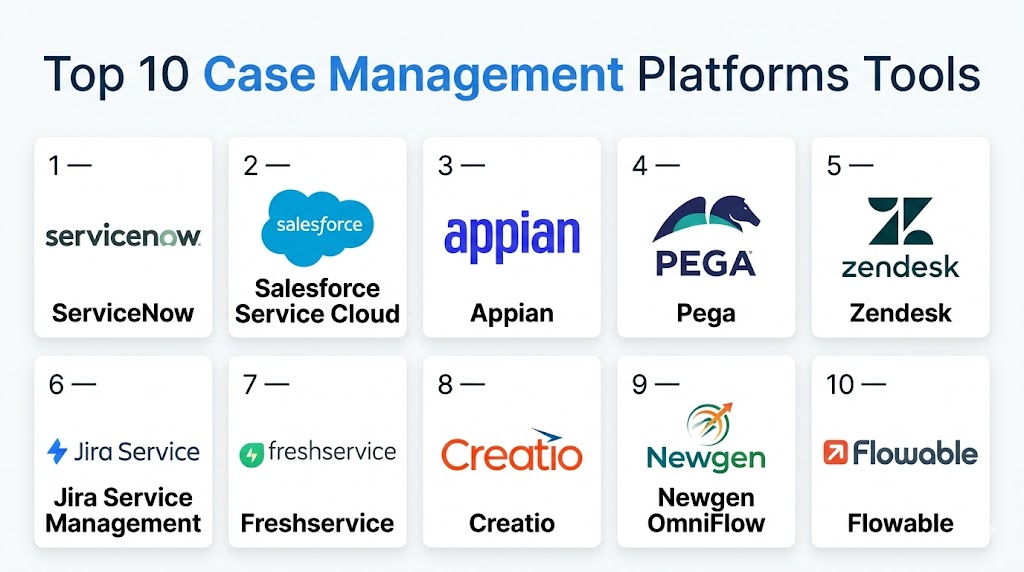
Introduction
Case Management Platforms help organizations track, manage, automate, and resolve complex work items known as “cases.” Unlike simple task tools, case management systems are built for dynamic processes where each request, complaint, claim, investigation, onboarding file, or service issue may follow a different path depending on data, approvals, documents, and human decisions. These platforms centralize information, improve collaboration, and create accountability across teams.
They matter because modern organizations need faster response times, better customer experiences, stronger compliance, and clear operational visibility. In sectors like customer service, legal, HR, healthcare, government, and financial services, poorly managed cases create delays, risk, and inconsistent outcomes.
Real-world use cases:
- Customer support escalations and complaint resolution
- HR employee requests and investigations
- Insurance claims handling
- Legal matter and document management
- Public sector citizen service requests
What buyers should evaluate:
- Workflow flexibility
- Automation capabilities
- Omnichannel intake
- Document management
- SLA tracking
- Analytics and dashboards
- Security and audit logs
- Integration ecosystem
- Scalability
- Total cost of ownership
Best for: Enterprises, service teams, operations leaders, HR departments, legal teams, healthcare organizations, and regulated industries managing high volumes of requests or complex case lifecycles.
Not ideal for: Very small teams with simple tickets or lightweight projects that can be handled by basic helpdesk or task management tools.
Key Trends in Case Management Platforms
- AI-assisted routing is improving triage and prioritization.
- Self-service portals are reducing manual intake workload.
- Low-code customization is speeding deployments.
- Unified workspaces are replacing disconnected tools.
- Analytics are moving from reporting to predictive insights.
- Cloud-first deployment is now the default for many buyers.
- Stronger auditability is essential in regulated sectors.
- Conversational interfaces are improving employee and customer access.
- Hyperautomation is connecting cases with RPA and workflows.
- Usage-based and modular pricing models are increasing.
How We Selected These Tools (Methodology)
We selected these tools using the following criteria:
- Strong market presence and brand credibility
- Broad case lifecycle management capabilities
- Ease of configuration and usability
- Workflow and automation depth
- Security and governance readiness
- API and integration ecosystem quality
- Fit across SMB, mid-market, and enterprise buyers
- Reporting, dashboards, and analytics maturity
- Deployment flexibility (cloud / hybrid / self-hosted)
- Long-term scalability and support options
Top 10 Case Management Platforms Tools
#1 — ServiceNow
Short description: Enterprise-grade case management platform for large organizations managing cross-functional service operations, employee workflows, and complex request handling.
Key Features
- Configurable case workflows
- AI-assisted routing
- Omnichannel intake
- SLA management
- Knowledge base integration
- Advanced reporting
- Strong governance controls
Pros
- Excellent enterprise scalability
- Broad platform ecosystem
- Strong automation depth
Cons
- Higher implementation cost
- Requires skilled admins
- Can be complex for small teams
Platforms / Deployment
Web / Cloud / Hybrid
Security & Compliance
SSO/SAML, MFA, encryption, audit logs, RBAC. Enterprise compliance options available.
Integrations & Ecosystem
Strong integration depth across enterprise IT, HR, CRM, and workflow systems.
- REST APIs
- Identity systems
- ERP tools
- Collaboration apps
- Third-party connectors
Support & Community
Large global community, strong documentation, enterprise support tiers, partner ecosystem.
#2 — Salesforce Service Cloud
Short description: Popular customer-centric case management platform built for support teams and organizations already invested in the Salesforce ecosystem.
Key Features
- Omnichannel case intake
- Automated routing
- CRM-linked case history
- AI recommendations
- Self-service portals
- Custom workflows
- Analytics dashboards
Pros
- Excellent CRM integration
- Highly customizable
- Strong ecosystem
Cons
- Add-on costs can grow quickly
- Advanced setup may require specialists
- Premium pricing at scale
Platforms / Deployment
Web / iOS / Android / Cloud
Security & Compliance
SSO, MFA, encryption, audit logs, RBAC. Enterprise compliance programs available.
Integrations & Ecosystem
Deep ecosystem with business apps and APIs.
- CRM modules
- Marketing tools
- Slack
- Data tools
- Custom apps
Support & Community
Extensive documentation, global community, partner consultants, premium support tiers.
#3 — Appian
Short description: Low-code automation platform with strong dynamic case management for organizations modernizing operations quickly.
Key Features
- Low-code app builder
- Dynamic case workflows
- Data fabric capabilities
- AI and automation tools
- Process monitoring
- Mobile access
- Rapid deployment tools
Pros
- Fast delivery cycles
- Strong process + case blend
- Good enterprise agility
Cons
- Proprietary platform learning curve
- Can be expensive
- Advanced customization needs expertise
Platforms / Deployment
Web / iOS / Android / Cloud / Hybrid
Security & Compliance
Enterprise controls available, encryption, access controls, logging.
Integrations & Ecosystem
Designed for enterprise orchestration and system unification.
- APIs
- Databases
- RPA tools
- Legacy systems
- Cloud apps
Support & Community
Strong enterprise onboarding, training resources, implementation partners.
#4 — Pega
Short description: Powerful platform for complex, rules-driven case management with AI decisioning and enterprise workflow orchestration.
Key Features
- Case lifecycle automation
- AI recommendations
- Decisioning engine
- Omnichannel workflows
- Real-time dashboards
- Low-code tools
- Enterprise governance
Pros
- Ideal for complex processes
- Strong automation intelligence
- Scales globally
Cons
- Premium cost
- Longer deployments possible
- Requires trained teams
Platforms / Deployment
Web / Cloud / Hybrid
Security & Compliance
SSO, MFA, audit logs, RBAC, encryption.
Integrations & Ecosystem
Strong enterprise integration support.
- APIs
- CRM systems
- ERP tools
- Data platforms
Support & Community
Enterprise support with partner-led delivery ecosystem.
#5 — Zendesk
Short description: User-friendly case management solution for customer support teams wanting fast deployment and efficient omnichannel service.
Key Features
- Ticket-to-case workflows
- Email, chat, voice intake
- SLA tools
- Knowledge base
- Macros and automation
- Reporting dashboards
- Agent workspace
Pros
- Easy to adopt
- Fast implementation
- Strong support use cases
Cons
- Less ideal for deep back-office cases
- Advanced customization can add cost
- Complex enterprise workflows may need alternatives
Platforms / Deployment
Web / iOS / Android / Cloud
Security & Compliance
SSO, encryption, access controls. Additional compliance varies by plan.
Integrations & Ecosystem
Large app marketplace and API ecosystem.
- CRM apps
- Collaboration tools
- Analytics apps
- Telephony tools
Support & Community
Strong documentation, active user community, multiple support tiers.
#6 — Jira Service Management
Short description: Strong choice for IT, internal service teams, and organizations already using Atlassian products.
Key Features
- Request and case workflows
- SLA tracking
- Automation rules
- Knowledge management
- DevOps integration
- Change workflows
- Portal experiences
Pros
- Great for IT teams
- Strong Atlassian integration
- Good value for growing teams
Cons
- Best experience inside Atlassian stack
- Some advanced security add-ons separate
- UI complexity for non-technical users
Platforms / Deployment
Web / iOS / Android / Cloud
Security & Compliance
2FA, SSO options, audit controls, role permissions.
Integrations & Ecosystem
Excellent for software and IT ecosystems.
- Jira Software
- Confluence
- CI/CD tools
- Chat tools
Support & Community
Large user base, extensive docs, strong community resources.
#7 — Freshservice
Short description: Modern service management platform with case management strengths for IT, HR, and internal operations teams.
Key Features
- Request management
- Workflow automation
- Knowledge base
- Asset management
- SLA controls
- AI assistance
- Dashboards
Pros
- Clean interface
- Good mid-market fit
- Faster onboarding
Cons
- Less customizable than some enterprise rivals
- Advanced enterprise needs may outgrow it
- Some premium features gated by plan
Platforms / Deployment
Web / iOS / Android / Cloud
Security & Compliance
Encryption, role controls, SSO options.
Integrations & Ecosystem
Broad SaaS integrations and API support.
Support & Community
Responsive support, growing community, onboarding resources.
#8 — Creatio
Short description: No-code platform combining CRM, service workflows, and case management for organizations needing tailored processes.
Key Features
- No-code workflow design
- Service case management
- CRM data integration
- Dashboards
- AI-assisted tools
- Marketplace add-ons
- Role-based experiences
Pros
- Highly customizable
- Strong process flexibility
- Good for tailored use cases
Cons
- Broad feature set can feel complex
- Better for mid-size and larger teams
- Requires planning for best results
Platforms / Deployment
Web / Mobile / Cloud
Security & Compliance
Access controls, encryption, enterprise security options.
Integrations & Ecosystem
Marketplace and API-driven integrations.
Support & Community
Training academy, docs, support tiers, partner assistance.
#9 — Newgen OmniFlow
Short description: Enterprise platform focused on document-heavy and regulated case processes such as banking, insurance, and government.
Key Features
- Case workflows
- Document management
- Process automation
- Analytics
- Low-code configuration
- Compliance controls
- Multi-channel experiences
Pros
- Strong regulated-sector fit
- Great for document-intensive cases
- Flexible deployment options
Cons
- Less mainstream mindshare globally
- Implementation planning required
- UI preferences may vary
Platforms / Deployment
Web / Cloud / Hybrid / On-premises
Security & Compliance
Enterprise controls vary by deployment.
Integrations & Ecosystem
Works with core systems, databases, and APIs.
Support & Community
Commercial support and implementation services available.
#10 — Flowable
Short description: Open standards platform supporting workflows, decisions, and case management for engineering-led teams.
Key Features
- CMMN case management
- BPMN workflows
- DMN decisions
- Open architecture
- Scalable engine
- Developer tooling
- Cloud-ready deployment
Pros
- Standards-based flexibility
- Strong developer control
- Good for custom solutions
Cons
- More technical than turnkey SaaS tools
- Business-user friendliness depends on setup
- Best with internal technical capability
Platforms / Deployment
Web / Cross-platform / Cloud / Self-hosted / Hybrid
Security & Compliance
Varies by deployment.
Integrations & Ecosystem
Strong for APIs, microservices, and custom systems.
Support & Community
Open-source community plus enterprise support options.
Comparison Table (Top 10)
| Tool Name | Best For | Platform(s) Supported | Deployment | Standout Feature | Public Rating |
|---|---|---|---|---|---|
| ServiceNow | Large enterprises | Web | Hybrid | Enterprise workflows | N/A |
| Salesforce Service Cloud | Customer support teams | Web, Mobile | Cloud | CRM-linked cases | N/A |
| Appian | Rapid modernization | Web, Mobile | Hybrid | Low-code delivery | N/A |
| Pega | Complex operations | Web | Hybrid | AI decisioning | N/A |
| Zendesk | Fast support teams | Web, Mobile | Cloud | Ease of use | N/A |
| Jira Service Management | IT teams | Web, Mobile | Cloud | Atlassian ecosystem | N/A |
| Freshservice | Mid-market internal teams | Web, Mobile | Cloud | Clean UX | N/A |
| Creatio | Custom workflows | Web, Mobile | Cloud | No-code flexibility | N/A |
| Newgen OmniFlow | Regulated sectors | Web | Hybrid | Document-heavy cases | N/A |
| Flowable | Developer-led teams | Cross-platform | Hybrid | Open standards | N/A |
Evaluation & Scoring of Case Management Platforms
| Tool Name | Core (25%) | Ease (15%) | Integrations (15%) | Security (10%) | Performance (10%) | Support (10%) | Value (15%) | Weighted Total (0–10) |
|---|---|---|---|---|---|---|---|---|
| ServiceNow | 9.5 | 7.0 | 9.0 | 9.0 | 9.0 | 9.0 | 6.5 | 8.5 |
| Salesforce | 9.0 | 8.0 | 9.5 | 8.5 | 8.5 | 9.0 | 6.5 | 8.5 |
| Appian | 8.8 | 8.0 | 8.5 | 8.5 | 8.5 | 8.5 | 7.0 | 8.3 |
| Pega | 9.0 | 7.0 | 8.5 | 8.5 | 8.5 | 8.5 | 6.5 | 8.1 |
| Zendesk | 8.0 | 9.0 | 8.0 | 8.0 | 8.0 | 8.5 | 8.0 | 8.2 |
| Jira SM | 8.2 | 7.8 | 9.0 | 8.0 | 8.3 | 8.3 | 8.5 | 8.3 |
| Freshservice | 8.0 | 8.8 | 8.0 | 8.0 | 8.0 | 8.2 | 8.5 | 8.2 |
| Creatio | 8.4 | 7.8 | 8.2 | 8.0 | 8.0 | 8.0 | 7.8 | 8.0 |
| Newgen | 8.2 | 7.2 | 8.0 | 8.2 | 8.0 | 7.8 | 7.8 | 7.9 |
| Flowable | 8.3 | 6.8 | 8.5 | 7.8 | 8.5 | 7.8 | 8.5 | 8.0 |
These scores are comparative, not absolute. Higher scores indicate stronger overall balance across the weighted criteria. Your best option depends on process complexity, user skill levels, existing systems, compliance needs, and budget.
Which Case Management Platform Tool Is Right for You?
Solo / Freelancer
Choose lightweight tools like Zendesk or simpler service platforms if you mainly need organized requests and communication.
SMB
Freshservice, Zendesk, and Jira Service Management offer strong value, fast deployment, and manageable complexity.
Mid-Market
Appian, Creatio, and Salesforce Service Cloud balance customization, integrations, and scalability.
Enterprise
ServiceNow, Pega, Salesforce, and Newgen are strong choices for large-scale governance and complex operations.
Budget vs Premium
- Budget/value: Jira Service Management, Freshservice
- Mid-tier flexibility: Zendesk, Creatio
- Premium enterprise: ServiceNow, Pega, Salesforce
Feature Depth vs Ease of Use
- Easier adoption: Zendesk, Freshservice
- Deep customization: ServiceNow, Appian, Pega
Integrations & Scalability
Salesforce, ServiceNow, Jira, and Appian are excellent for connected ecosystems.
Security & Compliance Needs
ServiceNow, Pega, Salesforce, and Newgen are strong candidates for regulated environments.
Frequently Asked Questions (FAQs)
What is a case management platform?
It is software used to manage complex requests, issues, or records from intake through resolution with workflows, collaboration, and reporting.
How is case management different from ticketing?
Ticketing often handles simpler support requests, while case management supports multi-step, document-heavy, decision-driven processes.
Which industries use case management most?
Customer support, HR, healthcare, insurance, banking, legal, and government are major users.
Are these platforms only for enterprises?
No. Many vendors offer SMB-friendly editions or mid-market pricing tiers.
Can I automate approvals and escalations?
Yes. Most platforms support rules, triggers, SLAs, escalations, and workflow automation.
Do I need coding skills?
Not always. Many tools now include low-code or no-code configuration options.
How long does implementation take?
It depends on complexity. Basic setups may take days or weeks, while enterprise programs can take months.
Are these platforms secure?
Most vendors provide encryption, role controls, logging, and identity integrations. Exact compliance features vary.
Can I integrate with CRM or ERP tools?
Yes. Most leading platforms support APIs, connectors, and marketplace integrations.
How do I choose the right one?
Start with your use case volume, workflow complexity, budget, user skills, and required integrations.
Conclusion
Case Management Platforms help organizations deliver faster, more consistent, and more transparent outcomes across customer, employee, and operational processes. The best platform depends on whether you prioritize enterprise governance, quick deployment, low-code flexibility, or ecosystem alignment. Shortlist two or three tools, run a pilot with a real workflow, and validate integrations, security, usability, and reporting before making a long-term decision.

One aspect I’d recommend adding is the importance of governance throughout the entire case lifecycle, not just during case creation and resolution. In large organizations, cases frequently move across departments, making it essential to maintain consistent data, complete audit trails, and standardized decision records. When evaluating these platforms, I’d also consider capabilities such as automated SLA breach detection, case aging analytics, duplicate case identification, and integration health monitoring to ensure information stays synchronized across CRM, ERP, and communication systems. From an operational perspective, these governance features reduce manual rework, improve compliance, and provide leadership with more reliable metrics for continuous process improvement.
One perspective I’d add is the importance of operational observability after a case management platform goes live. Managing cases efficiently isn’t just about workflow automation—it also requires visibility into where cases slow down, why SLA breaches occur, and how workload is distributed across teams. When evaluating these platforms, I’d look for capabilities such as real-time case aging analytics, bottleneck detection, integration health monitoring, and historical trend analysis to support continuous improvement. From an engineering and operations standpoint, these insights help organizations optimize processes proactively, improve resource planning, and maintain consistent service quality as case volumes and business requirements evolve.