MOTOSHARE 🚗🏍️
Rent Bikes & Cars Directly from Owners
Motoshare connects vehicle owners with people who need bikes and cars on rent. Owners earn from idle vehicles, and renters get flexible ride options.
Visit Motoshare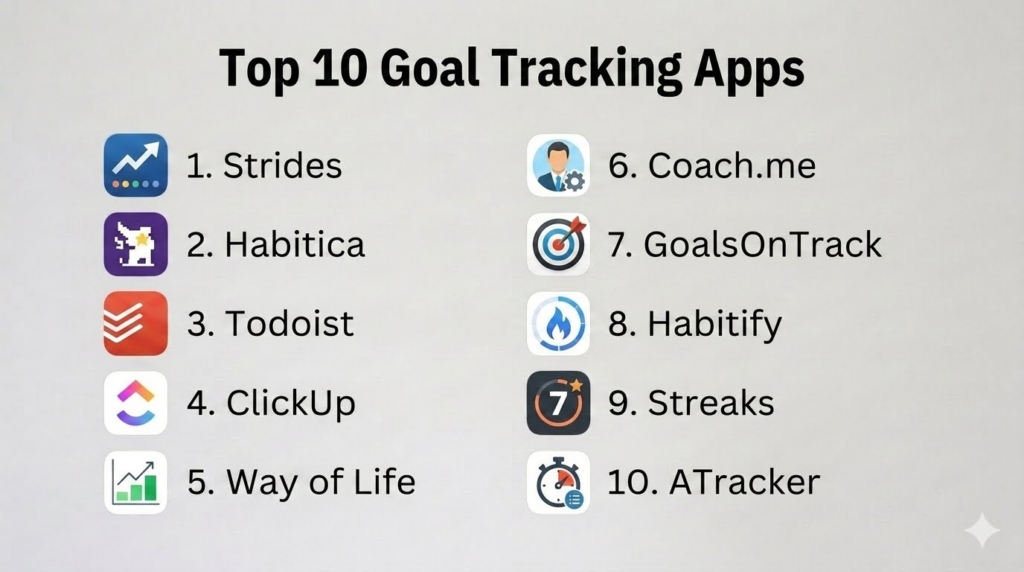
Introduction
Goal Tracking Apps help users define goals, break them into smaller actions, monitor progress, build habits, track milestones, stay accountable, and improve personal or professional productivity. These apps turn broad intentions like “get fit,” “save money,” “study daily,” or “finish a project” into measurable actions with reminders, streaks, dashboards, check-ins, and progress reports.
Goal tracking matters because many people set goals but struggle with consistency, clarity, motivation, and follow-through. A good goal tracking app helps users convert ambitions into daily routines, track visible progress, and stay focused even when motivation drops. Some apps are simple habit trackers, while others support project goals, OKRs, coaching, gamification, time tracking, or team accountability.
Real-world use cases include:
- Tracking personal goals such as fitness, reading, savings, or learning
- Building daily habits and maintaining streaks
- Breaking large goals into smaller milestones
- Monitoring productivity and time spent on priorities
- Managing team goals, OKRs, and project progress
Buyers evaluating Goal Tracking Apps should consider:
- Goal creation and milestone tracking
- Habit and streak tracking
- Reminder and notification quality
- Progress dashboards and analytics
- Task and project management support
- Accountability and coaching features
- Cross-device sync
- Ease of use and motivation design
- Privacy and personal data controls
- Free vs premium value
Best for: Students, professionals, entrepreneurs, freelancers, teams, productivity-focused users, habit builders, coaches, managers, and anyone who wants to turn goals into measurable progress.
Not ideal for: Users who only need a simple paper checklist, people who dislike digital reminders, or teams that require advanced enterprise performance management beyond lightweight goal tracking.
Key Trends in Goal Tracking Apps
- AI-assisted goal planning is helping users break broad goals into realistic milestones and daily actions.
- Habit streaks remain popular because visible progress helps users stay motivated.
- Gamified goal tracking is growing for users who prefer rewards, levels, challenges, and social accountability.
- OKR-style goal tracking is expanding from enterprise teams into smaller businesses and personal productivity workflows.
- Time tracking is becoming more connected with goal tracking so users can measure effort, not only completion.
- Cross-platform syncing is now expected because users track goals across phones, desktops, tablets, and wearables.
- Accountability features such as check-ins, coaches, and shared progress are becoming more important.
- Privacy controls matter because goals may reveal health, finances, work performance, personal struggles, and private routines.
- Users are moving away from overly complex productivity systems toward simpler goal trackers that are easy to maintain.
- Visual dashboards, charts, streaks, and progress bars are becoming essential for long-term motivation.
How We Selected These Tools
The apps in this list were selected based on goal tracking depth, habit support, usability, accountability features, platform availability, and practical value for different user types.
Selection criteria included:
- Strength of goal creation and progress tracking
- Habit, streak, milestone, and reminder capabilities
- Suitability for personal, professional, and team goals
- Dashboard and analytics quality
- Task management and project workflow support
- Accountability, coaching, and motivation features
- Cross-platform availability and sync
- Ease of onboarding for beginners
- Privacy and account control expectations
- Value across free, paid, and premium plans
Top 10 Goal Tracking Apps
1- Strides
Short description:
Strides is a flexible goal and habit tracking app designed for users who want detailed progress tracking across different goal types. It supports habits, targets, milestones, averages, streaks, and custom dashboards. Strides is especially useful for users who want to track multiple goals such as fitness, savings, productivity, learning, and personal routines in one structured system. It works best for Apple ecosystem users who value visual progress and customizable tracking.
Key Features
- Habit tracking
- Target-based goal tracking
- Milestone tracking
- Average-based tracking
- Progress charts and dashboards
- Streak monitoring
- Flexible reminders
Pros
- Very flexible tracking options
- Strong visual progress dashboards
- Good for multiple goal types
Cons
- Best suited for Apple users
- Can feel detailed for beginners
- Full functionality may require premium access
Platforms / Deployment
- iOS
- macOS
- Apple ecosystem
- Cloud
Security & Compliance
- Account-based controls
- Apple ecosystem privacy controls
- Detailed compliance is Not publicly stated
Integrations & Ecosystem
Strides works well for Apple-focused personal productivity and goal tracking workflows.
- Apple devices
- Apple Health-related workflows
- Reminder-based routines
- Goal dashboards
- Streak tracking
Support & Community
Strides provides app-based support resources and is popular among users who want flexible goal and habit tracking.
2- Habitica
Short description:
Habitica is a gamified goal and habit tracking app that turns tasks, habits, and daily routines into a role-playing game experience. Users earn rewards, level up characters, complete quests, and stay accountable through game mechanics. Habitica is especially useful for users who find traditional productivity apps boring and need motivation through fun, rewards, and social accountability. It works well for students, gamers, and habit builders.
Key Features
- Gamified task and habit tracking
- Rewards and character progression
- Daily tasks and to-do lists
- Social accountability groups
- Challenges and quests
- Habit scoring
- Custom rewards
Pros
- Fun and motivating for game-oriented users
- Strong community accountability
- Good for building daily habits
Cons
- Gamification may not suit everyone
- Interface can feel playful for professional users
- Less ideal for formal business goal tracking
Platforms / Deployment
- iOS
- Android
- Web
- Cloud
Security & Compliance
- Account-based controls
- Privacy settings
- Detailed compliance is Not publicly stated
Integrations & Ecosystem
Habitica supports goal tracking through game mechanics and community participation.
- Habit tracking
- Daily tasks
- Social groups
- Challenges
- Reward systems
Support & Community
Habitica has a strong community, active challenge ecosystem, and useful help resources for gamified productivity users.
3- Todoist
Short description:
Todoist is a task management app that can also work as a practical goal tracking system by breaking goals into projects, recurring tasks, labels, priorities, and reminders. It is especially useful for users who achieve goals through daily execution rather than separate goal dashboards. Todoist works well for professionals, freelancers, students, and small teams that want goals connected to actionable tasks.
Key Features
- Project-based task management
- Recurring tasks
- Priority levels
- Labels and filters
- Productivity tracking
- Reminders and due dates
- Collaboration features
Pros
- Excellent for turning goals into actions
- Clean and simple interface
- Strong cross-platform availability
Cons
- Not a dedicated goal tracker by default
- Goal dashboards require manual setup
- Advanced reminders and features may require paid plans
Platforms / Deployment
- iOS
- Android
- Windows
- macOS
- Web
- Cloud
Security & Compliance
- Account-based controls
- Team controls on selected plans
- Detailed compliance varies by plan
Integrations & Ecosystem
Todoist fits goal tracking into broader productivity and task management workflows.
- Calendar integrations
- Productivity apps
- Email workflows
- Recurring tasks
- Team task collaboration
Support & Community
Todoist has extensive documentation, templates, and a large productivity community.
4- ClickUp
Short description:
ClickUp is a productivity and work management platform that supports goals, tasks, dashboards, projects, documents, and team collaboration. It is useful for users and teams that want goal tracking connected with actual work execution. ClickUp is especially strong for project-based goals, team objectives, OKR-style planning, and productivity dashboards. It may be more than casual users need, but it is powerful for structured goal management.
Key Features
- Goal tracking
- Task and project management
- Dashboards and reporting
- OKR-style workflows
- Team collaboration
- Docs and notes
- Automation support
Pros
- Strong for team and project goals
- Highly customizable dashboards
- Combines goals with execution workflows
Cons
- Can feel complex for beginners
- Setup requires planning
- Too heavy for simple personal goals
Platforms / Deployment
- iOS
- Android
- Windows
- macOS
- Web
- Cloud
Security & Compliance
- SSO/SAML available on selected plans
- RBAC
- Audit logs on selected plans
- Encryption
- Compliance varies by plan
Integrations & Ecosystem
ClickUp integrates goal tracking with productivity, collaboration, and project management systems.
- Slack
- Google Workspace
- Microsoft Teams
- GitHub
- Calendar workflows
- Automation tools
Support & Community
ClickUp provides extensive documentation, templates, onboarding resources, and community content for teams and productivity users.
5- Way of Life
Short description:
Way of Life is a habit and goal tracking app focused on simple daily logging and visual trend analysis. It helps users track positive and negative habits, understand patterns, and maintain consistency. The app is especially useful for users who want quick daily check-ins without a complex productivity system. It works well for habits such as exercise, reading, spending control, sleep routines, and mindfulness.
Key Features
- Habit tracking
- Positive and negative habit logging
- Trend charts
- Daily reminders
- Notes and journaling support
- Streak tracking
- Visual progress summaries
Pros
- Simple daily tracking workflow
- Good visual habit analytics
- Useful for behavior awareness
Cons
- Limited project goal management
- Free plan may restrict number of tracked habits
- Less suitable for team goals
Platforms / Deployment
- iOS
- Android
- Cloud / Device-based workflows
Security & Compliance
- Account and device-based controls
- Privacy settings
- Detailed compliance is Not publicly stated
Integrations & Ecosystem
Way of Life focuses on habit visibility and behavior trend tracking.
- Daily habit logs
- Progress charts
- Reminders
- Notes
- Behavior tracking workflows
Support & Community
Way of Life provides practical app support and is used by people who want simple habit tracking with clear visual feedback.
6- Coach.me
Short description:
Coach.me is a goal and habit tracking app focused on personal growth, accountability, and coaching. Users can track habits, join communities, and access coaching support for specific goals. It is especially useful for people who want external accountability instead of relying only on self-reminders. Coach.me works well for personal development goals such as fitness, productivity, learning, wellness, and behavior change.
Key Features
- Habit tracking
- Goal check-ins
- Community accountability
- Coaching marketplace
- Progress tracking
- Reminder support
- Personal development focus
Pros
- Strong accountability focus
- Useful coaching options
- Good for behavior change goals
Cons
- Coaching quality may vary
- Less suited for detailed project management
- Community engagement may vary by goal
Platforms / Deployment
- iOS
- Android
- Web
- Cloud
Security & Compliance
- Account-based controls
- Privacy settings
- Detailed compliance is Not publicly stated
Integrations & Ecosystem
Coach.me supports goal tracking through accountability, coaching, and personal development workflows.
- Habit check-ins
- Coaching support
- Community goal groups
- Reminder routines
- Progress logs
Support & Community
Coach.me provides community-based support and access to coaches for users who want additional accountability.
7- GoalsOnTrack
Short description:
GoalsOnTrack is a goal setting and tracking platform focused on structured planning, SMART goals, action plans, habits, progress tracking, and journaling. It is designed for users who want a detailed system for turning long-term goals into measurable tasks and milestones. GoalsOnTrack is especially useful for users who prefer structured goal frameworks rather than simple habit streaks.
Key Features
- SMART goal planning
- Action plans
- Milestone tracking
- Habit tracking
- Progress dashboards
- Vision board support
- Goal journaling
Pros
- Strong structured goal planning
- Good for long-term personal goals
- Combines habits, milestones, and journaling
Cons
- Interface may feel less modern
- Less casual than simple habit apps
- Not ideal for users wanting quick lightweight tracking
Platforms / Deployment
- Web
- iOS
- Android
- Cloud
Security & Compliance
- Account-based controls
- Privacy settings
- Detailed compliance is Not publicly stated
Integrations & Ecosystem
GoalsOnTrack focuses on structured personal achievement workflows.
- SMART goal frameworks
- Action plans
- Habit tracking
- Journaling
- Progress dashboards
Support & Community
GoalsOnTrack provides help resources and is useful for users who prefer formal goal planning systems.
8- Habitify
Short description:
Habitify is a habit and goal tracking app designed for users who want clean routines, streaks, reminders, and progress analytics. It helps users build habits across areas such as health, productivity, learning, finance, and wellness. Habitify is especially useful for users who want a simple, visually clean habit tracker with cross-platform support. It is better for routine-based goals than complex project goals.
Key Features
- Habit tracking
- Daily reminders
- Streak tracking
- Habit categories
- Progress analytics
- Notes and reflections
- Cross-platform sync
Pros
- Clean and modern interface
- Good for daily routine tracking
- Strong cross-platform usability
Cons
- Less suited for project-based goals
- Advanced analytics may require premium access
- Accountability features are lighter than coaching apps
Platforms / Deployment
- iOS
- Android
- macOS
- Web
- Cloud
Security & Compliance
- Account-based controls
- Privacy settings
- Detailed compliance is Not publicly stated
Integrations & Ecosystem
Habitify supports daily habit formation and routine tracking.
- Reminders
- Streaks
- Progress analytics
- Habit categories
- Cross-device sync
Support & Community
Habitify provides support resources and is popular with users looking for a clean habit tracking experience.
9- Streaks
Short description:
Streaks is a simple habit and goal tracking app built for users who want to maintain daily streaks and complete repeatable actions. It is especially popular with Apple users who want a clean, focused habit tracker. Streaks is useful for goals such as exercise, reading, hydration, meditation, sleep routines, and avoiding negative habits. It is best for users who are motivated by consistency and visual streaks.
Key Features
- Habit streak tracking
- Daily task completion
- Apple Health integration
- Negative habit tracking
- Reminders
- Apple Watch support
- Simple progress visualization
Pros
- Very simple and focused
- Strong Apple ecosystem support
- Great for daily habits
Cons
- Apple-focused platform support
- Limited for complex goals
- Less flexible than broader goal tracking apps
Platforms / Deployment
- iOS
- macOS
- Apple Watch
- Apple ecosystem
Security & Compliance
- Apple device privacy controls
- Local and iCloud settings depend on user configuration
- Detailed compliance is Not publicly stated
Integrations & Ecosystem
Streaks works well for Apple users tracking repeatable habits and wellness routines.
- Apple Health
- Apple Watch
- iOS reminders
- Daily habit workflows
- Streak dashboards
Support & Community
Streaks has strong adoption among Apple users and offers practical support for simple habit tracking.
10- ATracker
Short description:
ATracker is a time tracking app that helps users understand how much time they spend on goals, tasks, projects, and daily routines. It is useful for users who want to measure effort rather than only completion. ATracker is especially helpful for freelancers, students, professionals, and productivity-focused users tracking study time, work blocks, exercise, hobbies, and personal development goals. It turns time usage into charts and reports.
Key Features
- Time tracking
- One-tap timers
- Goal-based time logs
- Visual charts
- Task categories
- Reports and summaries
- Calendar-style time views
Pros
- Excellent for tracking effort toward goals
- Good visual time reports
- Useful for productivity and accountability
Cons
- Not a traditional goal tracker
- Requires consistent timer usage
- Less useful for streak-based goals
Platforms / Deployment
- iOS
- Android
- Web
- Cloud
Security & Compliance
- Account-based controls
- Privacy settings
- Detailed compliance is Not publicly stated
Integrations & Ecosystem
ATracker supports goal tracking through time awareness and productivity measurement.
- Time logs
- Project categories
- Progress charts
- Calendar views
- Productivity routines
Support & Community
ATracker provides user documentation and is useful for people who want to understand time investment across goals.
Comparison Table
| Tool Name | Best For | Platform Supported | Deployment | Standout Feature | Public Rating |
|---|---|---|---|---|---|
| Strides | Flexible personal goal tracking | iOS, macOS | Cloud | Multiple tracker types | N/A |
| Habitica | Gamified goal tracking | iOS, Android, Web | Cloud | RPG-style motivation | N/A |
| Todoist | Goals through daily tasks | iOS, Android, Windows, macOS, Web | Cloud | Clean task-based execution | N/A |
| ClickUp | Team goals and projects | iOS, Android, Windows, macOS, Web | Cloud | Goals connected with project work | N/A |
| Way of Life | Habit trend analysis | iOS, Android | Cloud / Device workflows | Positive and negative habit tracking | N/A |
| Coach.me | Accountability and coaching | iOS, Android, Web | Cloud | Coaching-based goal support | N/A |
| GoalsOnTrack | Structured SMART goals | iOS, Android, Web | Cloud | Action plans and milestones | N/A |
| Habitify | Clean habit tracking | iOS, Android, macOS, Web | Cloud | Routine analytics and reminders | N/A |
| Streaks | Apple habit streaks | iOS, macOS, Apple Watch | Apple ecosystem | Simple streak tracking | N/A |
| ATracker | Time-based goal tracking | iOS, Android, Web | Cloud | Tracking effort by time spent | N/A |
Evaluation & Scoring of Goal Tracking Apps
| Tool Name | Core 25% | Ease 15% | Integrations 15% | Security 10% | Performance 10% | Support 10% | Value 15% | Weighted Total |
|---|---|---|---|---|---|---|---|---|
| Strides | 9 | 8 | 7 | 7 | 8 | 7 | 8 | 7.9 |
| Habitica | 8 | 8 | 7 | 7 | 8 | 8 | 9 | 8.0 |
| Todoist | 8 | 9 | 9 | 8 | 9 | 9 | 9 | 8.7 |
| ClickUp | 9 | 7 | 9 | 9 | 8 | 8 | 8 | 8.3 |
| Way of Life | 8 | 8 | 6 | 7 | 8 | 7 | 8 | 7.5 |
| Coach.me | 8 | 8 | 6 | 7 | 8 | 7 | 8 | 7.5 |
| GoalsOnTrack | 8 | 7 | 6 | 7 | 7 | 7 | 7 | 7.1 |
| Habitify | 8 | 9 | 7 | 7 | 8 | 7 | 8 | 7.8 |
| Streaks | 8 | 9 | 8 | 8 | 9 | 7 | 8 | 8.1 |
| ATracker | 8 | 8 | 7 | 7 | 8 | 7 | 8 | 7.7 |
These scores are comparative and should be interpreted based on goal type. A user building daily habits may prefer Streaks, Habitify, Way of Life, or Habitica. A professional managing project goals may prefer Todoist or ClickUp. Users who need structured goal planning may prefer GoalsOnTrack, while users who need accountability may prefer Coach.me.
Which Goal Tracking App Is Right for You?
Solo / Freelancer
Solo users should choose based on how they pursue goals. Todoist is excellent for turning goals into daily tasks, Strides is strong for visual goal tracking, and Habitify works well for daily routines. ATracker is useful for freelancers who want to understand where time goes. Habitica can help users who need fun and motivation.
SMB
Small businesses and teams often need goals connected to tasks, projects, and execution. ClickUp and Todoist are practical options because they combine goals with team workflows. Coaches and consultants may prefer Coach.me or GoalsOnTrack for personal development clients. SMBs should prioritize simplicity and accountability over complex performance systems.
Mid-Market
Mid-market teams may need more structured goal visibility, dashboards, and collaboration. ClickUp is useful for project and team goals, while Todoist can support lightweight team task execution. For personal development programs, Coach.me and Habitify may support habit-based progress. Mid-market buyers should evaluate adoption ease and reporting needs.
Enterprise
Enterprise organizations usually require more advanced OKR, performance management, and governance tools than lightweight goal tracking apps. However, ClickUp may support operational team goals, while Todoist can help with personal productivity. Enterprises should prioritize security, admin controls, permissions, and integration with existing work systems.
Budget vs Premium
Budget-conscious users can start with free versions of Todoist, Habitica, Way of Life, or Habitify. Premium plans may be worthwhile for advanced reminders, unlimited trackers, detailed analytics, dashboards, coaching, or team features. Users should pay only when premium features clearly improve consistency or accountability.
Feature Depth vs Ease of Use
Todoist and Habitify offer strong usability with practical features. Strides and GoalsOnTrack provide deeper goal structures but may require more setup. ClickUp is powerful but can feel complex. Streaks and Way of Life are simpler for routine tracking. The right balance depends on whether users want deep planning or quick daily check-ins.
Integrations & Scalability
Users should evaluate calendar sync, reminders, health data, team collaboration, automation, and cross-device support. Apple users may prefer Streaks or Strides. Teams may prefer ClickUp or Todoist. Habit-focused users may prefer Habitify, Habitica, or Way of Life. Strong integrations reduce manual effort and improve long-term adoption.
Security & Compliance Needs
Goal tracking data can reveal personal habits, work performance, health goals, financial goals, and private routines. Users should review account security, privacy settings, sharing controls, and team permissions. Businesses should avoid using personal goal data for inappropriate monitoring and should keep employee goal tracking transparent and voluntary where applicable.
Frequently Asked Questions
1. What are Goal Tracking Apps?
Goal Tracking Apps are digital tools that help users define, monitor, and complete personal or professional goals. They often include milestones, habits, reminders, streaks, dashboards, progress charts, and accountability features. Some apps focus on daily habits, while others support project goals, SMART goals, time tracking, or team objectives. Their main purpose is to make progress visible and easier to maintain.
2. How are goal tracking apps different from habit trackers?
Habit trackers focus on repeatable behaviors such as exercising, reading, drinking water, or meditating. Goal tracking apps may include habits but also support larger objectives such as saving money, completing a course, finishing a project, or launching a business. A habit is often a repeated action, while a goal usually has a target, milestone, or outcome. Many modern apps combine both approaches.
3. Which Goal Tracking App is best for beginners?
Todoist, Habitify, Way of Life, and Streaks are good beginner-friendly choices depending on the user’s device and goal style. Todoist is best for people who think in tasks, Habitify is good for routines, Way of Life is simple for daily behavior tracking, and Streaks is excellent for Apple users. Beginners should start with a small number of goals rather than tracking everything at once.
4. Which app is best for team goals?
ClickUp is one of the stronger options for team goals because it connects goals with projects, tasks, dashboards, and collaboration workflows. Todoist can also support small team execution through shared projects. For enterprise OKR programs, organizations may eventually need more specialized performance management tools. Teams should choose based on reporting needs, workflow complexity, and adoption ease.
5. Can goal tracking apps improve productivity?
Yes, goal tracking apps can improve productivity when they help users clarify priorities, break goals into actions, and review progress consistently. However, the app itself does not create discipline automatically. Users still need realistic goals, manageable routines, and regular review habits. The best apps reduce friction and make progress easier to see, which can improve motivation and follow-through.
6. What are common mistakes users make with goal tracking apps?
A common mistake is tracking too many goals at once, which creates overwhelm and reduces consistency. Another mistake is setting vague goals without measurable actions. Users also often spend more time customizing the app than working on the goal. The best approach is to start with a few meaningful goals, define clear actions, review progress weekly, and adjust when needed.
7. Are gamified goal tracking apps effective?
Gamified apps like Habitica can be effective for users who enjoy rewards, levels, challenges, and playful motivation. Gamification can make daily routines feel more engaging and reduce boredom. However, it may not work for users who prefer serious dashboards or professional productivity systems. The effectiveness depends on personality, goal type, and whether the game mechanics encourage real action.
8. Should I track goals daily or weekly?
Daily tracking works well for habits and routines such as exercise, reading, meditation, or hydration. Weekly tracking is better for larger goals such as career development, savings, learning projects, or business milestones. Many users benefit from a combination: daily actions plus weekly review. The best rhythm is the one that keeps progress visible without creating unnecessary pressure.
9. Are Goal Tracking Apps safe for privacy?
Goal tracking apps may store sensitive information about personal habits, health goals, financial targets, productivity, and work performance. Users should review privacy settings, account security, sharing permissions, and data export options. Team-based goal apps should be used transparently so employees understand what is tracked and who can see it. Private goals should not be shared unless the user chooses to share them.
10. How should users choose the right Goal Tracking App?
Users should first identify the type of goal they want to track: habits, tasks, milestones, time, accountability, or team objectives. Then they should choose an app that matches that workflow. Habit users may prefer Habitify, Streaks, Way of Life, or Habitica. Task-based users may prefer Todoist. Teams may prefer ClickUp. The right app should make action easier, not add more complexity.
Conclusion
Goal Tracking Apps help users turn ideas, ambitions, and long-term plans into visible, measurable progress. The best app depends on whether the user needs daily habit tracking, task-based execution, gamified motivation, structured SMART goals, time tracking, coaching, or team dashboards. Strides is strong for flexible personal tracking, Habitica is ideal for gamified motivation, Todoist is excellent for turning goals into daily actions, and ClickUp works well for team and project goals. Way of Life, Habitify, and Streaks are strong for routines and streaks, while Coach.me adds accountability, GoalsOnTrack supports structured planning, and ATracker helps measure time investment. Users should shortlist apps based on real goal types, test them with a few meaningful goals, review privacy settings, compare free and premium value, and choose the tool that supports consistent action without making goal tracking feel like another burden.
