MOTOSHARE 🚗🏍️
Rent Bikes & Cars Directly from Owners
Motoshare connects vehicle owners with people who need bikes and cars on rent. Owners earn from idle vehicles, and renters get flexible ride options.
Visit Motoshare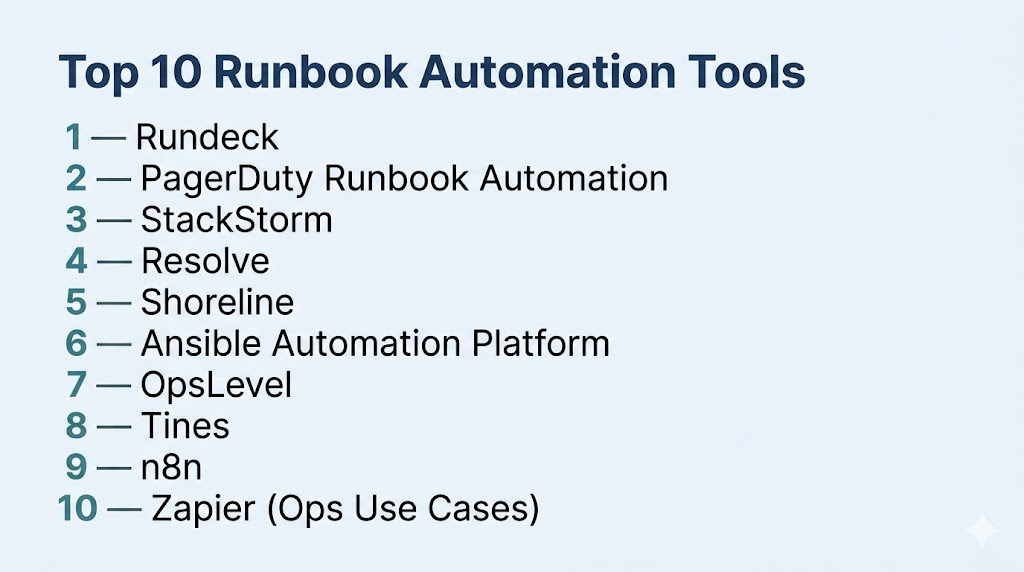
Introduction
When incidents hit, the worst time to rely on memory is during the crisis.
Teams scrambling through docs, guessing commands, or waiting for the one engineer who “knows the fix” create delays, outages, and expensive mistakes. That is exactly why Runbook Automation Tools have become essential.
These platforms turn manual operational procedures into repeatable, automated workflows. Instead of handling common tasks manually, teams can trigger pre-approved runbooks for remediation, diagnostics, deployments, restarts, access workflows, and incident response.
Modern DevOps teams use runbook automation to move from hero culture to systemized reliability.
The result? Faster recovery, fewer human errors, better compliance, and scalable operations.
Where runbook automation tools create real value:
- Automating incident remediation steps
- Restarting failed services automatically
- Running diagnostics and health checks
- Standardizing operational workflows
- Reducing MTTR during outages
- Removing repetitive manual toil
What buyers should evaluate before choosing:
- Workflow builder flexibility
- Role-based access and approvals
- Integration with monitoring and alerting tools
- Script execution support (Bash, PowerShell, Python, etc.)
- Audit trails and logging
- Scheduling and triggers
- Secrets management compatibility
- Ease of use for non-developers
- Scalability across teams
- Pricing and licensing model
Best for: DevOps teams, SREs, platform engineers, IT operations, security teams, and enterprises managing repeatable operational tasks.
Not ideal for: Tiny teams with simple environments and no recurring operational complexity.
Key Trends in Runbook Automation Tools
- Self-healing infrastructure becoming mainstream
- AI-assisted remediation suggestions gaining traction
- No-code workflow builders reducing engineering dependency
- Integrated incident response + automation platforms growing fast
- ChatOps-triggered runbooks through Slack and Teams
- Approval-based automation for controlled environments
- Cross-cloud automation workflows increasing
- Compliance-ready audit trails becoming mandatory
- Event-driven remediation replacing manual tickets
- Developer platform engineering integration accelerating adoption
How We Selected These Tools (Methodology)
- Prioritized widely adopted automation platforms
- Evaluated workflow power and execution reliability
- Assessed incident response and remediation value
- Reviewed security controls and approvals
- Analyzed integration ecosystems
- Compared ease of use vs technical depth
- Considered enterprise scalability
- Included cloud-native and traditional tools
- Evaluated support and documentation quality
- Ensured fit across SMB to enterprise teams
Top 10 Runbook Automation Tools
#1 — Rundeck
Short description: One of the best-known runbook automation platforms, built for operations teams needing controlled automation at scale.
Key Features
- Job scheduling and orchestration
- Role-based access controls
- Workflow automation across servers
- Approval workflows
- Audit logs and execution history
- Self-service operations portal
Pros
- Mature and trusted platform
- Excellent for operations governance
Cons
- UI feels dated to some users
- Advanced setup can take time
Platforms / Deployment
Web / Linux / Windows / Self-hosted / Cloud options
Security & Compliance
SSO/SAML, RBAC, audit logs (others not publicly stated)
Integrations & Ecosystem
Strong ecosystem for enterprise ops automation.
- APIs
- Jenkins
- Cloud platforms
- Monitoring tools
Support & Community
Strong enterprise support and open-source heritage.
#2 — PagerDuty Runbook Automation
Short description: A modern automation platform tightly integrated with incident response and on-call workflows.
Key Features
- Incident-triggered automation
- Workflow orchestration
- Remediation runbooks
- Role controls
- Execution logging
- PagerDuty integration
Pros
- Excellent incident-response alignment
- Strong enterprise workflows
Cons
- Premium pricing
- Best value inside PagerDuty ecosystem
Platforms / Deployment
Web / Cloud
Security & Compliance
SSO, RBAC (others not publicly stated)
Integrations & Ecosystem
- PagerDuty
- Monitoring tools
- APIs
- Slack
Support & Community
Strong enterprise-grade support.
#3 — StackStorm
Short description: An event-driven automation platform popular with engineering teams that want deep technical control.
Key Features
- Event-based automation
- Rules engine
- Workflow orchestration
- Infrastructure automation
- Extensive integrations
Pros
- Highly powerful and flexible
- Strong for advanced automation teams
Cons
- Steeper learning curve
- More engineering-heavy setup
Platforms / Deployment
Linux / Self-hosted / Cloud capable
Security & Compliance
Varies / Depends on deployment
Integrations & Ecosystem
- Cloud tools
- DevOps tools
- APIs
Support & Community
Strong technical community.
#4 — Resolve
Short description: A no-code/low-code automation platform built for IT operations and incident remediation.
Key Features
- Drag-and-drop workflows
- Incident remediation
- IT operations automation
- Integrations library
- Approvals and controls
Pros
- Easier for non-coders
- Strong enterprise workflows
Cons
- Premium pricing
- Less developer-first appeal
Platforms / Deployment
Cloud / Hybrid
Security & Compliance
RBAC (others not publicly stated)
Integrations & Ecosystem
- ITSM tools
- Monitoring tools
- APIs
Support & Community
Enterprise-focused support.
#5 — Shoreline
Short description: A modern operational automation platform focused on cloud remediation and incident resolution.
Key Features
- Automated remediation actions
- Fleet-wide operations
- Incident diagnostics
- Safe approvals
- Cloud-native automation
Pros
- Excellent for cloud operations
- Strong remediation speed
Cons
- Smaller ecosystem
- Premium market focus
Platforms / Deployment
Cloud / Hybrid
Security & Compliance
Not publicly stated
Integrations & Ecosystem
- Cloud providers
- Kubernetes
- APIs
Support & Community
Growing enterprise adoption.
#6 — Ansible Automation Platform
Short description: A leading enterprise automation solution that can also power repeatable runbooks.
Key Features
- Infrastructure automation
- Playbooks as runbooks
- RBAC and approvals
- Scheduling
- Large module ecosystem
Pros
- Massive ecosystem
- Strong enterprise trust
Cons
- Requires YAML skills
- More infra-focused than pure runbook UX
Platforms / Deployment
Linux / Cloud / Hybrid / Self-hosted
Security & Compliance
RBAC, auditability (others not publicly stated)
Integrations & Ecosystem
- AWS, Azure, GCP
- Linux systems
- Network devices
- APIs
Support & Community
Very large community and enterprise support.
#7 — OpsLevel
Short description: A platform engineering tool with growing operational workflow automation capabilities.
Key Features
- Service ownership workflows
- Operational tasks
- Developer portals
- Governance automation
- Integrations
Pros
- Great for platform teams
- Strong ownership visibility
Cons
- Not purely runbook-first
- Niche fit
Platforms / Deployment
Cloud
Security & Compliance
Not publicly stated
Integrations & Ecosystem
- GitHub
- APIs
- DevOps tools
Support & Community
Growing modern platform ecosystem.
#8 — Tines
Short description: A security and operations automation platform great for workflow-heavy runbooks.
Key Features
- No-code automation
- Workflow orchestration
- Security operations workflows
- Integrations
- Approval steps
Pros
- Excellent workflow builder
- Strong cross-team use cases
Cons
- Broad platform, not runbook-only
- Pricing may rise with scale
Platforms / Deployment
Cloud
Security & Compliance
RBAC (others not publicly stated)
Integrations & Ecosystem
- SaaS apps
- APIs
- Security tools
Support & Community
Strong modern SaaS support.
#9 — n8n
Short description: A flexible open-source workflow automation tool that can be adapted for runbook use cases.
Key Features
- Visual workflows
- Self-hosted option
- API automation
- Conditional logic
- Extensible nodes
Pros
- Strong value
- Highly flexible
Cons
- Needs customization for ops use
- Less purpose-built for incidents
Platforms / Deployment
Cloud / Self-hosted
Security & Compliance
Varies by deployment
Integrations & Ecosystem
- APIs
- SaaS apps
- Databases
Support & Community
Strong open-source momentum.
#10 — Zapier (Ops Use Cases)
Short description: Best known for business automation, but useful for lightweight operational workflows.
Key Features
- Trigger-action automations
- Large integration library
- Notifications
- Approvals via apps
- Fast setup
Pros
- Very easy to use
- Huge app ecosystem
Cons
- Limited deep infrastructure control
- Not ideal for complex remediation
Platforms / Deployment
Cloud
Security & Compliance
Not publicly stated
Integrations & Ecosystem
- SaaS tools
- Chat tools
- APIs
Support & Community
Large mainstream ecosystem.
Comparison Table (Top 10)
| Tool Name | Best For | Platform(s) Supported | Deployment | Standout Feature | Public Rating |
|---|---|---|---|---|---|
| Rundeck | Enterprise ops teams | Web/Linux/Windows | Hybrid | Governance + runbooks | N/A |
| PagerDuty | Incident-driven teams | Web | Cloud | Incident automation | N/A |
| StackStorm | Engineering teams | Linux | Self-hosted | Event-driven power | N/A |
| Resolve | IT ops teams | Web | Cloud/Hybrid | Low-code workflows | N/A |
| Shoreline | Cloud ops | Web | Cloud | Fast remediation | N/A |
| Ansible | Infra teams | Linux | Hybrid | Massive ecosystem | N/A |
| OpsLevel | Platform teams | Web | Cloud | Ownership workflows | N/A |
| Tines | Security + ops | Web | Cloud | Workflow builder | N/A |
| n8n | Budget teams | Web | Cloud/Self-hosted | Open-source flexibility | N/A |
| Zapier | Lightweight ops | Web | Cloud | Easy integrations | N/A |
Evaluation & Scoring of Runbook Automation Tools
| Tool Name | Core | Ease | Integrations | Security | Performance | Support | Value | Weighted Total |
|---|---|---|---|---|---|---|---|---|
| Rundeck | 10 | 7 | 9 | 9 | 9 | 9 | 8 | 8.8 |
| PagerDuty | 9 | 8 | 9 | 8 | 9 | 9 | 6 | 8.3 |
| StackStorm | 9 | 5 | 8 | 7 | 9 | 7 | 8 | 7.8 |
| Resolve | 8 | 8 | 8 | 8 | 8 | 8 | 6 | 7.8 |
| Shoreline | 8 | 8 | 7 | 7 | 9 | 7 | 7 | 7.8 |
| Ansible | 9 | 6 | 10 | 8 | 9 | 10 | 9 | 8.7 |
| OpsLevel | 7 | 8 | 7 | 7 | 8 | 7 | 7 | 7.3 |
| Tines | 8 | 8 | 9 | 8 | 8 | 8 | 7 | 8.0 |
| n8n | 7 | 8 | 8 | 6 | 7 | 7 | 10 | 7.7 |
| Zapier | 6 | 10 | 10 | 6 | 6 | 8 | 8 | 7.5 |
How to interpret scores:
These scores are comparative benchmarks. Higher totals indicate stronger all-around capability, but the right fit depends on your environment, skill level, governance needs, and automation maturity.
Which Runbook Automation Tool Is Right for You?
Solo / Freelancer
Use n8n or Zapier for lightweight operational workflows.
SMB
Choose Rundeck or Tines for strong capability without huge complexity.
Mid-Market
PagerDuty Runbook Automation or Rundeck offer balance and scale.
Enterprise
Rundeck and Ansible Automation Platform are top-tier choices.
Budget vs Premium
- Budget: n8n, Rundeck Community paths
- Premium: PagerDuty, Resolve, Shoreline
Feature Depth vs Ease of Use
- Advanced: StackStorm, Rundeck, Ansible
- Easy: Zapier, Resolve, Tines
Integrations & Scalability
Ansible and Rundeck lead overall.
Security & Compliance Needs
Prioritize RBAC, approvals, logs, secrets integrations, and auditability.
Frequently Asked Questions (FAQs)
1. What is a runbook automation tool?
It converts manual operational procedures into automated workflows teams can safely execute.
2. Why is it important?
It reduces human error, speeds response time, and removes repetitive operational toil.
3. What can be automated?
Restarts, diagnostics, failovers, patching, access workflows, deployments, alerts, and remediation steps.
4. Is coding required?
Some tools are code-heavy, while others provide no-code or low-code builders.
5. How does it help during incidents?
It lets responders run tested recovery workflows immediately instead of improvising.
6. Can approvals be added?
Yes, many tools support human approval gates before risky actions.
7. Is it secure?
Leading tools offer RBAC, logs, permissions, and secrets integrations.
8. What is the biggest mistake teams make?
Automating bad processes before standardizing them first.
9. Can small teams benefit too?
Yes, especially for repetitive maintenance and limited staffing coverage.
10. How do I choose the right tool?
Match the tool to your skill level, environment complexity, governance needs, and integration stack.
Conclusion
Runbook automation tools have become a core layer of modern operations because they replace fragile tribal knowledge and slow manual processes with repeatable, scalable workflows that improve speed, consistency, and reliability. As infrastructure grows more distributed and incidents become more costly, the ability to automate diagnostics, remediation, approvals, and routine operations gives teams a major operational advantage. The tools in this guide range from lightweight workflow platforms to enterprise-grade automation systems built for large-scale governance and complex environments, each suited to different maturity levels and use cases. There is no universal best option—the right choice depends on your infrastructure complexity, internal skills, risk tolerance, and automation goals. The smartest next step is to shortlist two or three tools, automate one painful recurring workflow first, and measure the gains in speed, accuracy, and operational resilience.

Well explained
Helpful and easy-to-read content. Looking forward to reading more from this blog.
A missing operational angle is runbook testing and drift control. Runbooks should be versioned, reviewed after incidents, and tested in lower environments, otherwise automation can silently become outdated and fail exactly when responders need it most.