MOTOSHARE 🚗🏍️
Rent Bikes & Cars Directly from Owners
Motoshare connects vehicle owners with people who need bikes and cars on rent. Owners earn from idle vehicles, and renters get flexible ride options.
Visit Motoshare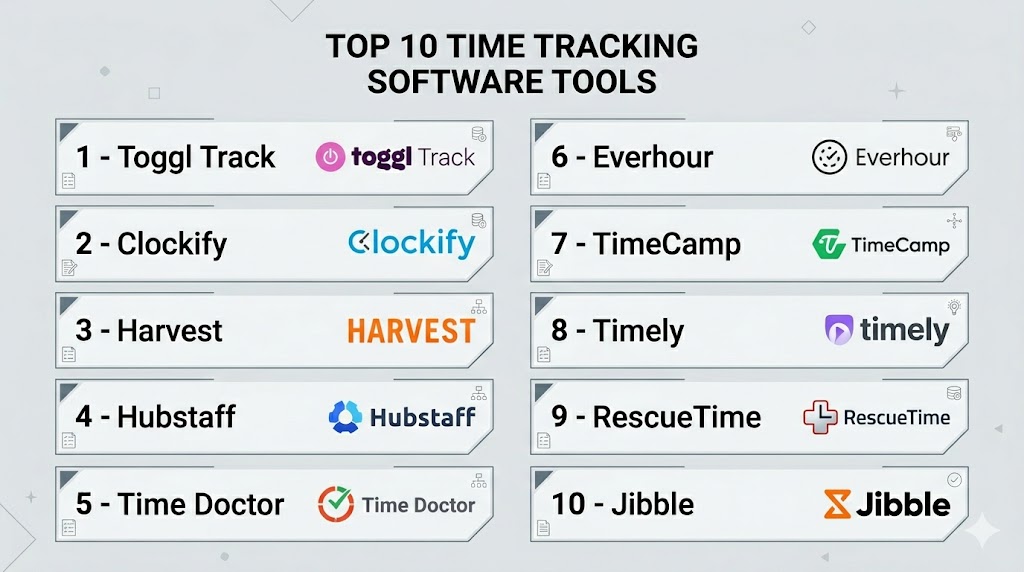
Introduction
Time Tracking Software helps individuals and teams record how time is spent across tasks, projects, clients, shifts, or internal operations. Instead of relying on spreadsheets or manual logs, these tools automate time capture through timers, timesheets, mobile clock-ins, activity tracking, and reporting dashboards.
As remote work, distributed teams, freelance billing, and productivity optimization continue to grow, accurate time data has become more valuable than ever. Businesses use time tracking to improve billing accuracy, manage payroll, understand team capacity, reduce wasted effort, and make smarter operational decisions. Modern platforms now include automation, AI suggestions, integrations, compliance tools, and workforce analytics.
Real-world use cases:
- Client billing and invoicing
- Employee attendance and payroll
- Productivity reporting
- Project budgeting
- Remote team management
- Shift and overtime tracking
- Capacity planning
- Freelancer time logging
What buyers should evaluate:
- Ease of time capture
- Timesheets and approvals
- Reporting quality
- Payroll/invoicing support
- Mobile apps
- Integrations
- Automation features
- Security controls
- Compliance tools
- Pricing model
Best for: Freelancers, agencies, consultants, HR teams, operations leaders, project managers, remote teams, and growing businesses that need accurate time data.
Not ideal for: Very small teams with simple schedules or users who only need a basic to-do list.
Key Trends in Time Tracking Software
- AI-assisted time entry is reducing manual logging.
- Automatic tracking from apps and calendars is growing.
- Privacy-focused monitoring is becoming more important.
- GPS and geofencing tools are expanding for field teams.
- Time tracking is increasingly tied to project profitability.
- Deeper payroll and HR integrations are now expected.
- Real-time dashboards replace static timesheet exports.
- Mobile-first clock-ins are essential for distributed teams.
- Flexible approvals support hybrid work environments.
- Usage-based and freemium pricing remains common.
How We Selected These Tools (Methodology)
We selected these tools using the following evaluation logic:
- Strong market adoption and brand recognition
- Reliable core time tracking functionality
- Ease of onboarding and daily usage
- Reporting and analytics depth
- Integrations with popular business tools
- Security and admin capabilities
- Fit across freelancers, SMBs, and enterprises
- Value for money
- Product maturity and ongoing innovation
- Real-world usefulness across industries
Top 10 Time Tracking Software Tools
#1 — Toggl Track
Short description: Toggl Track is one of the most recognized time tracking tools for freelancers, teams, and agencies. It is known for its clean interface, fast timer, and strong reporting.
Key Features
- One-click timer
- Manual and calendar entries
- Detailed reports
- Billable hours tracking
- Project budgets
- Idle detection
- 100+ integrations
Pros
- Excellent usability
- Strong free plan
- Great reporting experience
Cons
- Limited workforce monitoring
- Advanced features need paid plans
- Less focused on payroll workflows
Platforms / Deployment
Web / Windows / macOS / Linux / iOS / Android
Cloud
Security & Compliance
SSO on higher tiers, admin permissions, encryption. Other certifications vary / not publicly stated.
Integrations & Ecosystem
Connects with leading productivity and project tools.
- Asana
- Jira
- Trello
- Slack
- Calendar tools
- API access
Support & Community
Large user base, strong help center, onboarding resources.
#2 — Clockify
Short description: Clockify is a popular budget-friendly platform with unlimited users on its free tier, making it attractive for startups and growing teams.
Key Features
- Timer and timesheets
- Unlimited users
- Reports
- Approvals
- Kiosk mode
- Billable rates
- Audit logs
Pros
- Strong free plan
- Good scalability
- Useful reporting
Cons
- UI can feel busy
- Some advanced tools are paid
- Mobile experience varies
Platforms / Deployment
Web / Windows / macOS / Linux / iOS / Android
Cloud
Security & Compliance
Permissions, admin roles, audit logs. Additional certifications not publicly stated.
Integrations & Ecosystem
Works with common business apps and automation tools.
#3 — Harvest
Short description: Harvest combines time tracking, invoicing, expenses, and reporting. It is widely used by agencies, consultants, and client-service businesses.
Key Features
- Time tracking
- Invoicing
- Expense tracking
- Budget alerts
- Reports
- Team capacity insights
- Payments support
Pros
- Great for client billing
- Strong reporting
- Clean interface
Cons
- Free tier is limited
- Less suited for workforce monitoring
- Costs can grow with team size
Platforms / Deployment
Web / iOS / Android
Cloud
Security & Compliance
Permissions, encryption, admin controls. Other certifications not publicly stated.
Integrations & Ecosystem
Popular with finance and project workflows.
#4 — Hubstaff
Short description: Hubstaff is designed for remote teams needing time tracking plus workforce management features like activity monitoring, GPS, and payroll workflows.
Key Features
- Time tracking
- Screenshots
- Activity levels
- GPS tracking
- Payroll tools
- Scheduling
- Reports
Pros
- Strong remote team controls
- Useful payroll workflows
- Good field team features
Cons
- Monitoring may not suit every culture
- Premium features cost more
- Can feel heavy for simple teams
Platforms / Deployment
Web / Windows / macOS / Linux / iOS / Android
Cloud
Security & Compliance
Permissions, admin controls, role management. Other certifications vary / not publicly stated.
Integrations & Ecosystem
Integrates with project, payroll, and collaboration tools.
#5 — Time Doctor
Short description: Time Doctor focuses on productivity measurement, time tracking, and workforce analytics for distributed teams.
Key Features
- Time tracking
- Productivity analytics
- Screenshots
- Attendance
- Reports
- Website/app usage
- Payroll exports
Pros
- Strong productivity insights
- Useful for remote operations
- Detailed analytics
Cons
- Monitoring features may be sensitive
- Learning curve for admins
- Premium pricing tiers
Platforms / Deployment
Web / Windows / macOS / Linux / iOS / Android
Cloud
Security & Compliance
Permissions, admin controls. Additional certifications not publicly stated.
Integrations & Ecosystem
Supports business workflow integrations and exports.
#6 — Everhour
Short description: Everhour is a team-focused time tracker known for deep integrations with project management tools.
Key Features
- Embedded time tracking
- Budgeting
- Reporting
- Team capacity
- Timesheets
- Billing support
- Task-based tracking
Pros
- Great project tool integrations
- Easy for teams already using PM software
- Strong reporting
Cons
- Best value depends on connected tools
- Smaller ecosystem than larger rivals
- Less ideal for attendance tracking
Platforms / Deployment
Web
Cloud
Security & Compliance
Permissions and admin controls. Other details not publicly stated.
Integrations & Ecosystem
Strong integrations with project platforms.
- Asana
- Trello
- Jira
- Basecamp
- ClickUp
#7 — TimeCamp
Short description: TimeCamp offers automatic tracking, budgeting, invoicing, and productivity reporting for businesses of many sizes.
Key Features
- Automatic time tracking
- Project budgets
- Reports
- Attendance
- Invoicing
- Productivity analytics
- Integrations
Pros
- Strong automation
- Good value
- Useful business reporting
Cons
- Interface preferences vary
- Advanced setup may take time
- Some features tier-gated
Platforms / Deployment
Web / Windows / macOS / iOS / Android
Cloud
Security & Compliance
Permissions, admin controls. Additional certifications not publicly stated.
Integrations & Ecosystem
Broad integrations across work tools.
#8 — Timely
Short description: Timely focuses on automatic time capture and elegant reporting for professionals who dislike manual timers.
Key Features
- Automatic memory tracking
- Timesheets
- Team planning
- Reporting
- Project budgets
- Capacity insights
- Collaboration tools
Pros
- Minimal manual input
- Excellent UX
- Strong for creative teams
Cons
- Premium pricing
- Less ideal for strict attendance use cases
- Smaller admin depth than enterprise tools
Platforms / Deployment
Web / iOS / Android
Cloud
Security & Compliance
Permissions and encryption. Other details not publicly stated.
Integrations & Ecosystem
Connects with common calendars and workflow apps.
#9 — RescueTime
Short description: RescueTime is more focused on personal productivity and focus improvement than traditional payroll-oriented time tracking.
Key Features
- Automatic activity tracking
- Focus sessions
- Productivity scoring
- Goal setting
- Reports
- Website blocking
- Habit insights
Pros
- Great for individuals
- Strong focus tools
- Minimal setup
Cons
- Not built for payroll teams
- Limited client billing workflows
- Less team administration depth
Platforms / Deployment
Web / Windows / macOS / Linux / iOS / Android
Cloud
Security & Compliance
Not publicly stated.
Integrations & Ecosystem
Works with productivity ecosystems and calendars.
#10 — Jibble
Short description: Jibble is known for attendance tracking, GPS clock-ins, and shift/overtime workflows, especially for frontline teams.
Key Features
- Time clock
- GPS tracking
- Facial recognition kiosk
- Attendance reports
- Overtime rules
- Shift support
- Mobile clock-in
Pros
- Strong free offering
- Great for field teams
- Good attendance controls
Cons
- Less ideal for agencies
- UI preferences vary
- Advanced analytics more limited than enterprise tools
Platforms / Deployment
Web / iOS / Android
Cloud
Security & Compliance
Permissions, role controls. Additional certifications not publicly stated.
Integrations & Ecosystem
Supports HR, payroll, and workforce workflows.
Comparison Table (Top 10)
| Tool Name | Best For | Platform(s) Supported | Deployment | Standout Feature | Public Rating |
|---|---|---|---|---|---|
| Toggl Track | Freelancers & teams | Multi-platform | Cloud | Excellent usability | N/A |
| Clockify | Budget teams | Multi-platform | Cloud | Unlimited free users | N/A |
| Harvest | Agencies | Web / Mobile | Cloud | Billing + invoicing | N/A |
| Hubstaff | Remote teams | Multi-platform | Cloud | GPS + monitoring | N/A |
| Time Doctor | Productivity analytics | Multi-platform | Cloud | Workforce insights | N/A |
| Everhour | PM tool users | Web | Cloud | Deep PM integrations | N/A |
| TimeCamp | Automated tracking | Multi-platform | Cloud | Productivity reporting | N/A |
| Timely | Passive tracking | Web / Mobile | Cloud | Automatic capture | N/A |
| RescueTime | Personal productivity | Multi-platform | Cloud | Focus tools | N/A |
| Jibble | Attendance teams | Web / Mobile | Cloud | GPS clock-ins | N/A |
Evaluation & Scoring of Time Tracking Software
| Tool Name | Core | Ease | Integrations | Security | Performance | Support | Value | Weighted Total |
|---|---|---|---|---|---|---|---|---|
| Toggl Track | 9.1 | 9.3 | 8.8 | 8.1 | 8.8 | 8.6 | 8.5 | 8.8 |
| Clockify | 8.8 | 8.5 | 8.4 | 8.0 | 8.6 | 8.4 | 9.2 | 8.7 |
| Harvest | 8.7 | 8.8 | 8.2 | 8.0 | 8.5 | 8.4 | 8.0 | 8.4 |
| Hubstaff | 8.8 | 8.0 | 8.1 | 8.2 | 8.5 | 8.2 | 8.1 | 8.3 |
| Time Doctor | 8.6 | 7.8 | 8.0 | 8.1 | 8.4 | 8.1 | 7.8 | 8.1 |
| Everhour | 8.4 | 8.4 | 8.8 | 7.8 | 8.3 | 8.1 | 8.0 | 8.3 |
| TimeCamp | 8.5 | 8.1 | 8.2 | 7.9 | 8.4 | 8.0 | 8.7 | 8.3 |
| Timely | 8.3 | 8.8 | 7.8 | 7.8 | 8.4 | 8.0 | 7.5 | 8.1 |
| RescueTime | 7.9 | 8.7 | 7.2 | 7.5 | 8.2 | 7.9 | 8.3 | 8.0 |
| Jibble | 8.4 | 8.4 | 7.7 | 7.8 | 8.3 | 8.0 | 9.0 | 8.3 |
These scores are comparative rather than absolute. A higher score does not automatically mean a better fit for every team. Prioritize your workflow, team culture, reporting needs, privacy expectations, and budget.
Which Time Tracking Software Tool Is Right for You?
Solo / Freelancer
Toggl Track, RescueTime, and Timely are strong choices for simplicity and personal productivity.
SMB
Clockify, Harvest, Jibble, and TimeCamp offer strong value and easy deployment.
Mid-Market
Hubstaff, Everhour, and Time Doctor provide stronger analytics and team controls.
Enterprise
Hubstaff, Time Doctor, and large-scale custom deployments with Clockify or Harvest can work well.
Budget vs Premium
- Budget: Clockify, Jibble
- Mid-range: Toggl, Harvest, TimeCamp
- Premium: Hubstaff, Timely, Time Doctor
Feature Depth vs Ease of Use
- Easiest: Toggl, Harvest, Timely
- Deepest: Hubstaff, Time Doctor, Clockify
Integrations & Scalability
Toggl, Clockify, Everhour, Harvest, and TimeCamp stand out.
Security & Compliance Needs
Look for SSO, audit logs, role permissions, data retention controls, and admin governance.
Frequently Asked Questions (FAQs)
What is time tracking software?
It records time spent on tasks, projects, shifts, or clients using timers, manual logs, or automatic capture tools.
Who uses time tracking tools?
Freelancers, agencies, HR teams, consultants, field teams, and project-driven businesses.
Is free software enough?
Often yes for small teams. Larger teams usually need approvals, analytics, payroll, or admin controls.
Can these tools help payroll?
Many platforms export timesheets and integrate with payroll systems.
Do they support mobile tracking?
Yes, many tools include mobile apps for clock-ins and remote work.
Is employee monitoring required?
No. Some tools include it, while others focus only on time logs and reports.
Can I track billable hours?
Yes. Many tools support client billing, rates, invoices, and project budgets.
How long does setup take?
Basic setup can take hours. Larger rollouts may take days or weeks.
What integrations matter most?
Project management, payroll, HR, accounting, calendars, and collaboration apps.
How do I choose the right one?
Start with your use case: billing, payroll, productivity, attendance, or remote team oversight.
Conclusion
Time Tracking Software has evolved from simple timers into a core business operations layer for billing, payroll, productivity, and workforce planning. Some tools prioritize ease of use, others focus on analytics, automation, or compliance. The best choice depends on how your team works and what decisions you need time data to support. Shortlist two or three options, test them with real workflows, validate integrations, and choose the platform your team will consistently use.

One aspect that deserves more attention is the long-term quality and governance of time-tracking data. Capturing hours is only the first step—the real challenge is ensuring those records remain accurate and consistent as they flow into payroll, project accounting, client billing, and analytics platforms. When evaluating these tools, I’d also consider support for immutable audit trails, automated anomaly detection, configurable approval workflows, and reconciliation reports that identify missing or inconsistent entries before they affect downstream processes. These operational capabilities significantly reduce manual effort, improve financial accuracy, and make the platform far more sustainable as the organization grows.