MOTOSHARE 🚗🏍️
Rent Bikes & Cars Directly from Owners
Motoshare connects vehicle owners with people who need bikes and cars on rent. Owners earn from idle vehicles, and renters get flexible ride options.
Visit Motoshare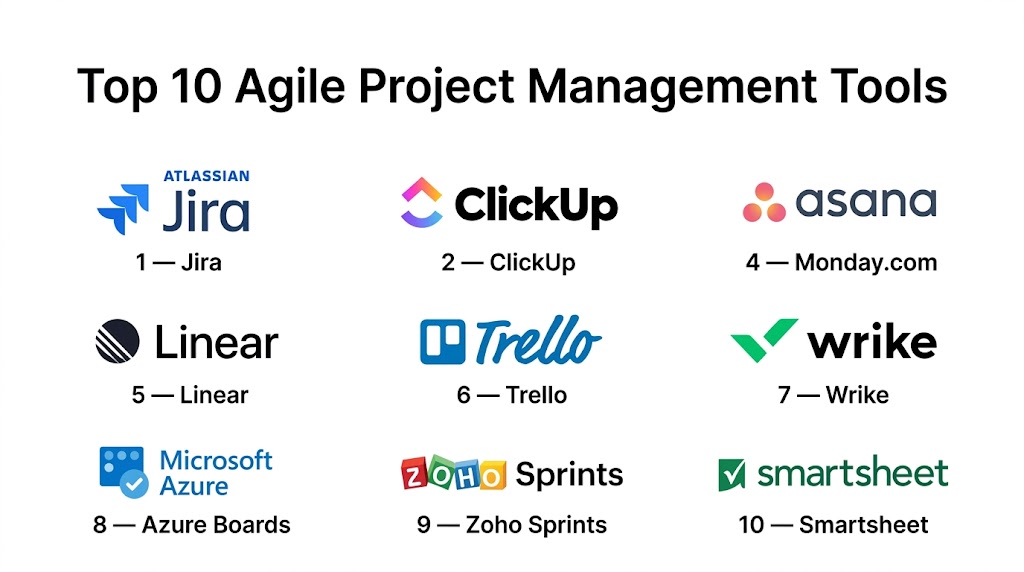
Introduction
Agile Project Management Tools help teams plan, prioritize, execute, and improve work through iterative delivery. Instead of managing projects with rigid long-term plans, agile teams work in short cycles such as sprints, continuously adapting based on feedback, changing priorities, and business needs. These platforms typically combine backlogs, boards, sprint planning, reporting, collaboration, and automation in one workspace.
They matter because modern organizations need faster delivery, tighter collaboration, and better visibility across distributed teams. Whether you build software, run marketing campaigns, manage product roadmaps, or coordinate operations, agile tools support rapid execution while keeping work aligned with goals.
Common use cases:
- Sprint planning and backlog management
- Scrum and Kanban workflows
- Product roadmap execution
- Cross-functional collaboration
- Bug and issue tracking
- Release planning
- Team workload balancing
- Continuous improvement through retrospectives
What buyers should evaluate:
- Sprint and backlog features
- Ease of use
- Reporting and dashboards
- Automation
- Integrations with dev/business tools
- Scalability
- Security controls
- Custom workflows
- Pricing
- Adoption curve
Best for: Product teams, engineering teams, startups, digital agencies, IT teams, operations teams, and growing businesses using iterative workflows.
Not ideal for: Very small teams with simple task lists, highly static projects with fixed requirements, or teams unwilling to adopt shared processes.
Key Trends in Agile Project Management Tools
- AI assistants now generate tasks, summaries, risks, and sprint insights automatically.
- Hybrid project management is growing, blending agile with traditional planning models.
- Teams expect multiple views: Kanban, Scrum, timeline, calendar, workload.
- Automation is replacing repetitive status updates and manual handoffs.
- Product and engineering tools are integrating more deeply with Git platforms.
- Real-time dashboards are replacing spreadsheet reporting.
- Capacity planning is becoming standard for scaling agile teams.
- Security governance matters more in enterprise buying decisions.
- Low-code customization is expanding admin flexibility.
- Mobile collaboration is improving for distributed teams.
How We Selected These Tools (Methodology)
We selected these tools using the following criteria:
- Market recognition and adoption
- Agile feature depth (Scrum, Kanban, backlog, sprint reporting)
- User experience and onboarding simplicity
- Automation and workflow flexibility
- Reporting and visibility capabilities
- Integration ecosystem strength
- Performance and reliability reputation
- Security and admin controls
- Fit for SMB, mid-market, and enterprise teams
- Long-term scalability and product maturity
Top 10 Agile Project Management Tools
#1 — Jira
Short description: One of the most widely used agile platforms for software teams. Best for engineering organizations needing deep workflow control, sprint planning, and issue tracking.
Key Features
- Scrum and Kanban boards
- Backlogs and sprint planning
- Custom workflows
- Roadmaps
- Burndown and velocity reports
- Bug tracking
- Massive marketplace ecosystem
Pros
- Excellent for software development teams
- Deep customization options
- Strong reporting and integrations
Cons
- Higher learning curve
- Can feel heavy for small teams
- Setup often needs admin expertise
Platforms / Deployment
Web / Windows / macOS / iOS / Android / Cloud / Self-hosted
Security & Compliance
SSO, MFA, permissions, audit logs, enterprise controls.
Integrations & Ecosystem
Extensive ecosystem across development and business tools.
- GitHub
- GitLab
- Slack
- Confluence
- Bitbucket
Support & Community
Large global community, strong documentation, training, and enterprise support options.
#2 — ClickUp
Short description: A feature-rich all-in-one work platform for teams wanting agile workflows plus docs, goals, dashboards, and collaboration.
Key Features
- Boards and lists
- Sprints
- Docs and whiteboards
- Dashboards
- Automation
- Goal tracking
- Time tracking
Pros
- Strong value for growing teams
- Broad feature coverage
- Highly customizable
Cons
- Can feel crowded initially
- Requires setup time
- Some teams use only part of the feature set
Platforms / Deployment
Web / Windows / macOS / Linux / iOS / Android / Cloud
Security & Compliance
Permissions, enterprise controls, SSO options.
Integrations & Ecosystem
Works with many productivity and engineering tools.
Support & Community
Large user base, templates, and active help resources.
#3 — Asana
Short description: A polished work management platform that supports agile teams needing structure, collaboration, and cross-functional visibility.
Key Features
- Boards and timelines
- Task dependencies
- Goals
- Portfolios
- Dashboards
- Workflow automation
- Templates
Pros
- Easy adoption across departments
- Strong visibility features
- Great UI and usability
Cons
- Advanced agile depth less technical than Jira
- Premium tiers for advanced features
- Can be expensive at scale
Platforms / Deployment
Web / Windows / macOS / iOS / Android / Cloud
Security & Compliance
SSO, MFA, admin controls, enterprise security options.
Integrations & Ecosystem
Broad ecosystem with productivity and communication tools.
Support & Community
Strong onboarding resources and widespread adoption.
#4 — Monday.com
Short description: A highly visual platform suited to teams needing agile workflows with customizable dashboards and no-code automation.
Key Features
- Agile boards
- Dashboards
- Timeline view
- Automation
- Forms
- Workload management
- Cross-team collaboration
Pros
- Very user-friendly
- Excellent dashboards
- Flexible use cases beyond engineering
Cons
- Pricing rises with team size
- Deep setups take planning
- Some advanced PM features depend on tier
Platforms / Deployment
Web / Windows / macOS / iOS / Android / Cloud
Security & Compliance
Enterprise permissions, governance, admin controls.
Integrations & Ecosystem
Large integration marketplace and workflow connectors.
Support & Community
Strong commercial support and onboarding materials.
#5 — Linear
Short description: A modern agile platform popular with startups and product teams that value speed, simplicity, and clean workflows.
Key Features
- Sprint cycles
- Roadmaps
- Keyboard-first UX
- Issue tracking
- Git integrations
- Fast interface
- Product planning tools
Pros
- Extremely fast and clean UX
- Loved by product-led teams
- Strong developer workflow fit
Cons
- Less ideal for heavy enterprise governance
- Fewer legacy PM features
- Smaller ecosystem than older rivals
Platforms / Deployment
Web / macOS / Windows / iOS / Android / Cloud
Security & Compliance
Permissions, workspace controls. Advanced details vary.
Integrations & Ecosystem
Strong links with engineering workflows and Git tools.
Support & Community
Popular in startup communities with growing adoption.
#6 — Trello
Short description: A simple Kanban-first platform ideal for lightweight agile workflows and fast onboarding.
Key Features
- Boards and cards
- Checklists
- Labels
- Due dates
- Butler automation
- Templates
- Calendar view
Pros
- Very easy to learn
- Great visual workflow tool
- Good free plan options
Cons
- Limited advanced sprint depth
- Reporting less robust
- Large projects can become cluttered
Platforms / Deployment
Web / Windows / macOS / iOS / Android / Cloud
Security & Compliance
Permissions and enterprise controls available on higher plans.
Integrations & Ecosystem
Large plugin and automation ecosystem.
Support & Community
Very broad adoption and strong documentation.
#7 — Wrike
Short description: Enterprise-grade project management software with agile capabilities for cross-functional organizations.
Key Features
- Boards and tasks
- Gantt + agile views
- Request forms
- Dashboards
- Resource planning
- Automation
- Reporting
Pros
- Strong for large organizations
- Excellent reporting
- Good workload visibility
Cons
- Higher learning curve
- Premium pricing tiers
- More complex than SMB tools
Platforms / Deployment
Web / Windows / macOS / iOS / Android / Cloud
Security & Compliance
Enterprise controls, permissions, admin governance.
Integrations & Ecosystem
Works with business and collaboration systems.
Support & Community
Strong support tiers and onboarding programs.
#8 — Azure Boards
Short description: Agile planning tool within the Microsoft ecosystem, strong for development teams already using Azure DevOps.
Key Features
- Backlogs
- Sprint planning
- Boards
- Dashboards
- Repo integration
- Pipelines connectivity
- Reporting
Pros
- Great for Microsoft-centric teams
- Strong DevOps alignment
- Enterprise-ready controls
Cons
- Best value inside Microsoft stack
- UI preference varies
- Less ideal for non-technical teams
Platforms / Deployment
Web / Windows / Cloud / Hybrid
Security & Compliance
Enterprise identity and access controls available.
Integrations & Ecosystem
Best with Azure DevOps and Microsoft services.
Support & Community
Strong enterprise support ecosystem.
#9 — Zoho Sprints
Short description: A budget-friendly agile tool built for Scrum teams and growing businesses.
Key Features
- Scrum boards
- Backlogs
- Epics
- Sprint reports
- Time tracking
- Team collaboration
- Custom workflows
Pros
- Affordable pricing
- Purpose-built agile features
- Good for SMB teams
Cons
- Smaller ecosystem than major rivals
- Enterprise depth more limited
- UI preference varies
Platforms / Deployment
Web / iOS / Android / Cloud
Security & Compliance
Standard business security controls. Details vary.
Integrations & Ecosystem
Works well with broader Zoho apps.
Support & Community
Good documentation and SMB-focused support.
#10 — Smartsheet
Short description: Spreadsheet-style work management platform with agile flexibility for operations-heavy teams.
Key Features
- Grid planning
- Dashboards
- Automation
- Resource management
- Board views
- Reporting
- Forms
Pros
- Familiar spreadsheet logic
- Strong enterprise reporting
- Great for structured teams
Cons
- Less developer-centric
- Can become complex
- UI less modern for some users
Platforms / Deployment
Web / iOS / Android / Cloud
Security & Compliance
Enterprise permissions and admin controls.
Integrations & Ecosystem
Strong compatibility with business software stacks.
Support & Community
Strong training resources and enterprise support.
Comparison Table (Top 10)
| Tool Name | Best For | Platform(s) Supported | Deployment | Standout Feature | Public Rating |
|---|---|---|---|---|---|
| Jira | Engineering teams | Multi-platform | Cloud / Self-hosted | Deep agile workflows | N/A |
| ClickUp | All-in-one teams | Multi-platform | Cloud | Broad feature set | N/A |
| Asana | Cross-functional teams | Multi-platform | Cloud | Visibility + goals | N/A |
| Monday.com | Visual agile teams | Multi-platform | Cloud | Dashboards + automation | N/A |
| Linear | Product startups | Multi-platform | Cloud | Fast modern UX | N/A |
| Trello | Lightweight agile | Multi-platform | Cloud | Kanban simplicity | N/A |
| Wrike | Enterprise teams | Multi-platform | Cloud | Resource visibility | N/A |
| Azure Boards | Microsoft dev teams | Web / Windows | Cloud / Hybrid | DevOps integration | N/A |
| Zoho Sprints | Budget Scrum teams | Web / Mobile | Cloud | Affordable agile features | N/A |
| Smartsheet | Ops-heavy teams | Web / Mobile | Cloud | Spreadsheet flexibility | N/A |
Evaluation & Scoring of Agile Project Management Tools
| Tool Name | Core | Ease | Integrations | Security | Performance | Support | Value | Weighted Total |
|---|---|---|---|---|---|---|---|---|
| Jira | 9.4 | 7.2 | 9.5 | 8.9 | 8.8 | 8.8 | 8.0 | 8.7 |
| ClickUp | 9.0 | 7.9 | 8.8 | 8.3 | 8.4 | 8.2 | 9.0 | 8.5 |
| Asana | 8.7 | 8.7 | 8.6 | 8.6 | 8.7 | 8.6 | 8.0 | 8.6 |
| Monday.com | 8.6 | 8.8 | 8.5 | 8.4 | 8.5 | 8.4 | 7.9 | 8.5 |
| Linear | 8.5 | 9.0 | 8.0 | 8.0 | 9.2 | 8.0 | 8.1 | 8.5 |
| Trello | 7.8 | 9.4 | 8.0 | 7.8 | 8.4 | 8.2 | 9.0 | 8.4 |
| Wrike | 8.5 | 7.5 | 8.2 | 8.7 | 8.5 | 8.3 | 7.5 | 8.2 |
| Azure Boards | 8.7 | 7.4 | 8.8 | 8.8 | 8.5 | 8.4 | 8.0 | 8.4 |
| Zoho Sprints | 8.0 | 8.2 | 7.6 | 7.8 | 8.0 | 7.8 | 9.1 | 8.1 |
| Smartsheet | 8.2 | 7.4 | 8.3 | 8.7 | 8.5 | 8.3 | 7.6 | 8.1 |
These scores are comparative, not absolute. Higher totals suggest stronger all-around capability, but the best choice depends on workflow style, team maturity, budget, and integration needs.
Which Agile Project Management Tool Is Right for You?
Solo / Freelancer
Choose Trello or Asana for simplicity and quick setup.
SMB
ClickUp, Monday.com, Zoho Sprints, and Asana offer strong value.
Mid-Market
Jira, Asana, Monday.com, and Wrike scale well across teams.
Enterprise
Jira, Azure Boards, Wrike, and Smartsheet are strong enterprise options.
Budget vs Premium
- Budget: Trello, Zoho Sprints
- Mid-range: ClickUp, Asana, Monday.com
- Premium: Jira Enterprise, Wrike, Smartsheet
Feature Depth vs Ease of Use
- Easier: Trello, Asana, Monday.com
- Deepest: Jira, ClickUp, Azure Boards
Integrations & Scalability
Jira, Asana, ClickUp, and Azure Boards lead here.
Security & Compliance Needs
Jira, Wrike, Azure Boards, and Smartsheet are strong candidates.
Frequently Asked Questions (FAQs)
What is an agile project management tool?
It is software that helps teams plan and deliver work iteratively using methods like Scrum or Kanban.
Which tool is best for software development?
Jira is a leading choice, while Linear and Azure Boards are also strong options.
Which tool is easiest for beginners?
Trello, Asana, and Monday.com are easier to learn quickly.
Can non-technical teams use agile tools?
Yes. Marketing, operations, HR, and creative teams often use agile boards and sprint workflows.
Are free plans enough?
They can work for individuals or small teams. Growing teams usually need paid automation and admin controls.
What is better: Scrum or Kanban?
It depends. Scrum suits structured sprint cycles, while Kanban suits continuous flow work.
Can I migrate from spreadsheets?
Yes. Many tools support CSV imports and templates.
Do these tools integrate with Slack and GitHub?
Most leading platforms integrate with collaboration and development tools.
Are agile tools secure?
Established vendors usually provide permissions, encryption, and enterprise controls.
How should I choose the right tool?
Match the tool to your team size, workflow complexity, required integrations, and budget.
Conclusion
Agile Project Management Tools help teams move faster, adapt to change, and improve delivery quality through iterative workflows. Some tools focus on developer depth, others on simplicity, cross-functional collaboration, or enterprise governance. There is no universal winner. Shortlist two or three tools, test them with a real workflow, and choose the platform your team will consistently adopt.

One area I’d recommend adding is how organizations should evaluate Agile tools based on the quality of engineering outcomes rather than the number of available features. In mature Agile environments, the platform should help teams identify delivery bottlenecks through metrics like cycle time, lead time, deployment frequency, escaped defects, and work item aging—not just sprint completion rates. It would also be valuable to assess how well each tool integrates with CI/CD pipelines, testing platforms, and observability systems to provide an end-to-end view of software delivery. In practice, these insights enable continuous improvement and informed decision-making, ensuring the tool supports Agile principles instead of becoming just another task tracker.