MOTOSHARE 🚗🏍️
Rent Bikes & Cars Directly from Owners
Motoshare connects vehicle owners with people who need bikes and cars on rent. Owners earn from idle vehicles, and renters get flexible ride options.
Visit Motoshare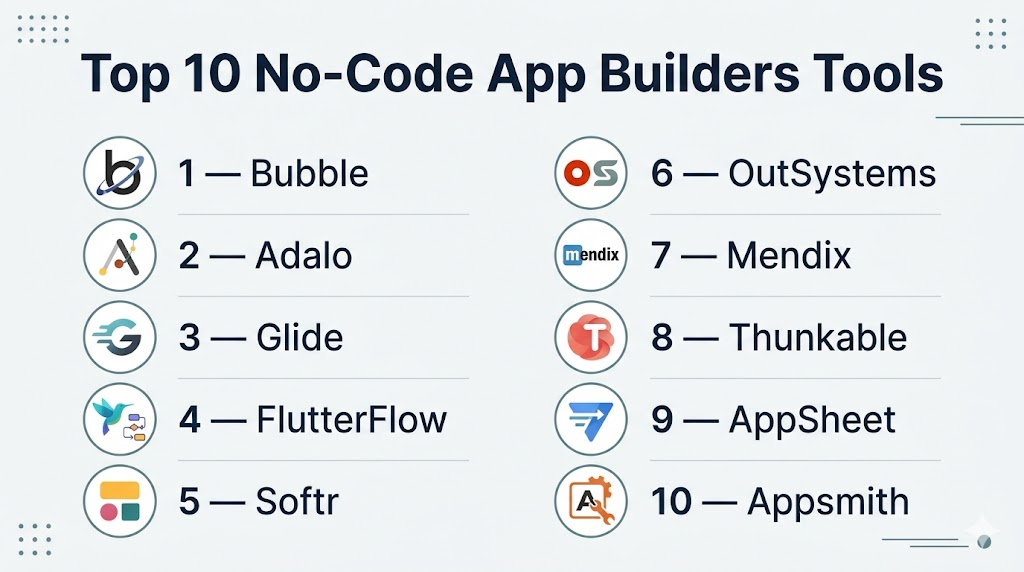
Introduction
No-Code App Builders are software platforms that let users create apps without traditional programming. Instead of writing code manually, users build applications using visual editors, drag-and-drop components, workflows, templates, and built-in databases. This allows faster development and lower technical barriers.
These tools matter more than ever because companies need to launch products quickly, automate operations, test new ideas, and reduce development costs. Startups use them for MVPs, SMBs use them for internal systems, and enterprises use them for workflow automation and departmental apps.
Common use cases include:
- Startup MVP creation
- Internal business tools
- Mobile apps
- Customer portals
- Booking systems
- Dashboards
- Workflow automation
- CRM-style systems
What buyers should evaluate:
- Ease of use
- Scalability
- Mobile support
- Workflow flexibility
- Database features
- Integrations
- Security controls
- Performance
- Pricing
- Vendor lock-in risk
Best for: Founders, freelancers, agencies, SMBs, operations teams, and enterprises that want faster app delivery with lower engineering dependency.
Not ideal for: Highly specialized systems, advanced gaming products, real-time engineering platforms, or applications needing deep custom infrastructure.
Key Trends in No-Code App Builders
- AI-assisted app creation is reducing setup time significantly.
- Hybrid no-code and low-code models offer more flexibility.
- Mobile-first platforms continue to grow in demand.
- Built-in automation features are replacing manual workflows.
- Better governance tools support enterprise adoption.
- API-first connectivity is becoming standard.
- Reusable templates accelerate launches.
- Built-in analytics help teams track usage and adoption.
- Community marketplaces are expanding plugin ecosystems.
- Security and access control features are now core buying factors.
How We Selected These Tools (Methodology)
We selected these platforms using practical buyer-focused criteria:
- Market adoption and awareness
- Product maturity and stability
- Core feature completeness
- Ease of use for non-technical users
- Scalability potential
- Mobile and web app support
- Integration ecosystem
- Security posture signals
- Support and community resources
- Overall value for money
Top 10 No-Code App Builders Tools
#1 — Bubble
Short description: A leading no-code platform for building SaaS apps, marketplaces, portals, and custom web applications with advanced workflows.
Key Features
- Visual drag-and-drop builder
- Built-in database
- Backend workflows
- Responsive editor
- Plugin marketplace
- API integrations
- Custom logic tools
Pros
- Powerful for complex web apps
- Strong ecosystem and templates
- Good long-term flexibility
Cons
- Learning curve for beginners
- Performance depends on app design
- Native mobile support varies
Platforms / Deployment
Web / Cloud
Security & Compliance
Role permissions, privacy controls, encryption features available. Additional certifications vary by plan.
Integrations & Ecosystem
Strong ecosystem for startups and growth teams.
- Payment tools
- APIs
- Automation tools
- Analytics tools
- Plugin marketplace
Support & Community
Large global community with courses, experts, forums, and templates.
#2 — Adalo
Short description: A beginner-friendly platform focused on mobile and web apps with easy publishing and quick MVP creation.
Key Features
- Drag-and-drop editor
- Native mobile app publishing
- Built-in database
- Templates
- Components marketplace
- Responsive layouts
- Custom actions
Pros
- Easy to learn
- Great for mobile MVPs
- Fast app launches
Cons
- Limited advanced customization
- Complex scaling needs review
- Smaller ecosystem than larger rivals
Platforms / Deployment
Web / iOS / Android / Cloud
Security & Compliance
Varies / Not publicly stated.
Integrations & Ecosystem
Useful for rapid app deployment.
- Payments
- APIs
- Forms tools
- Automation apps
Support & Community
Helpful beginner resources and growing community.
#3 — Glide
Short description: A fast platform for turning spreadsheets and structured data into modern internal tools and lightweight apps.
Key Features
- Spreadsheet app builder
- Glide Tables
- Role permissions
- Templates
- Clean UI components
- Automation tools
- Fast deployment
Pros
- Extremely fast setup
- Great for internal apps
- Very beginner-friendly
Cons
- Less suited for complex apps
- Advanced logic has limits
- Consumer apps may need more flexibility
Platforms / Deployment
Web / Cloud
Security & Compliance
Permissions and admin controls available. Additional compliance varies.
Integrations & Ecosystem
Strong for operational workflows.
- Google Sheets
- Excel
- APIs
- Automation tools
Support & Community
Strong documentation and active community.
#4 — FlutterFlow
Short description: A visual app builder based on Flutter, ideal for teams that want more control, mobile apps, and code export options.
Key Features
- Flutter-based builder
- Native mobile apps
- Code export
- Firebase integration
- Custom actions
- Responsive design
- Backend connectivity
Pros
- Strong mobile flexibility
- Code export available
- Better control than simpler tools
Cons
- Higher learning curve
- More technical setup
- Complex projects need planning
Platforms / Deployment
Web / iOS / Android / Cloud
Security & Compliance
Varies / Not publicly stated.
Integrations & Ecosystem
Good fit for technical teams.
- Firebase
- APIs
- Databases
- Custom code tools
Support & Community
Rapidly growing user base and learning resources.
#5 — Softr
Short description: A business-focused builder for portals, directories, internal tools, and client apps connected to external data sources.
Key Features
- Portal builder
- Data source connectors
- User permissions
- Templates
- Forms
- Dashboards
- Automation tools
Pros
- Great for business use cases
- Fast deployment
- Strong data integrations
Cons
- Less ideal for consumer apps
- Limited deep custom logic
- Design flexibility lower than UI-first tools
Platforms / Deployment
Web / Cloud
Security & Compliance
Permissions available. Additional certifications vary.
Integrations & Ecosystem
Business-focused connectivity.
- Airtable
- CRM tools
- Databases
- Google Sheets
Support & Community
Strong onboarding and business support resources.
#6 — OutSystems
Short description: Enterprise-grade low-code/no-code platform for mission-critical applications, automation, and digital transformation.
Key Features
- Enterprise app development
- Governance controls
- Security features
- Automation tools
- Lifecycle management
- Scalable deployment
- Integrations
Pros
- Built for enterprise scale
- Strong governance features
- High reliability potential
Cons
- Premium pricing
- More complex than SMB tools
- Overkill for small projects
Platforms / Deployment
Cloud / Self-hosted / Hybrid
Security & Compliance
SSO, RBAC, governance controls, enterprise security features available.
Integrations & Ecosystem
Strong enterprise ecosystem.
- ERP systems
- CRM systems
- APIs
- Identity tools
Support & Community
Professional support and partner network.
#7 — Mendix
Short description: A collaborative enterprise app platform for workflow solutions, internal systems, and scalable business apps.
Key Features
- Visual development
- Team collaboration
- Process automation
- Reusable components
- Cloud deployment
- Governance tools
- Integrations
Pros
- Strong enterprise collaboration
- Flexible deployment models
- Good governance capabilities
Cons
- Higher pricing tiers
- Requires structured rollout
- Too advanced for hobby users
Platforms / Deployment
Cloud / Hybrid / Self-hosted
Security & Compliance
Enterprise access controls and governance features available.
Integrations & Ecosystem
Strong corporate integrations.
- SAP
- CRM tools
- Databases
- APIs
Support & Community
Strong enterprise support options.
#8 — Thunkable
Short description: A beginner-friendly no-code mobile app builder using visual logic blocks and cross-platform publishing.
Key Features
- Drag-and-drop builder
- Mobile app focus
- Logic blocks
- Live preview
- Templates
- Device feature access
- Cross-platform support
Pros
- Great for beginners
- Fast mobile prototypes
- Easy logic building
Cons
- Less suited for enterprise scale
- Smaller ecosystem
- Advanced backend needs vary
Platforms / Deployment
Web / iOS / Android / Cloud
Security & Compliance
Varies / Not publicly stated.
Integrations & Ecosystem
Useful for simple mobile apps.
- APIs
- Device tools
- Cloud services
Support & Community
Helpful education-friendly community.
#9 — AppSheet
Short description: A business app builder designed for operations teams, workflow automation, and spreadsheet-driven apps.
Key Features
- Spreadsheet apps
- Workflow automation
- Dashboards
- Forms
- Data sync
- Permissions
- AI assistance
Pros
- Strong for operations teams
- Good automation features
- Works well with business data
Cons
- UI flexibility can be limited
- Consumer apps less ideal
- Design customization limited
Platforms / Deployment
Web / iOS / Android / Cloud
Security & Compliance
Business admin controls available. Compliance varies by workspace plan.
Integrations & Ecosystem
Strong business ecosystem.
- Spreadsheets
- Business data tools
- Automation tools
- APIs
Support & Community
Strong documentation for business users.
#10 — Appsmith
Short description: A developer-friendly open-source platform for internal dashboards, admin panels, and workflow tools.
Key Features
- Open-source option
- Self-hosting
- Database connectors
- APIs
- Custom widgets
- Internal dashboards
- Automation workflows
Pros
- Great for internal tools
- Self-hosting flexibility
- Strong for technical teams
Cons
- More technical than simple builders
- Less consumer-app focused
- Smaller mainstream visibility
Platforms / Deployment
Cloud / Self-hosted
Security & Compliance
Depends on deployment model and configuration.
Integrations & Ecosystem
Strong for internal systems.
- Databases
- APIs
- Internal services
Support & Community
Growing open-source community with active development.
Comparison Table (Top 10)
| Tool Name | Best For | Platform(s) Supported | Deployment | Standout Feature | Public Rating |
|---|---|---|---|---|---|
| Bubble | SaaS apps | Web | Cloud | Advanced workflows | N/A |
| Adalo | Mobile MVPs | Web, Mobile | Cloud | Native publishing | N/A |
| Glide | Internal tools | Web | Cloud | Spreadsheet apps | N/A |
| FlutterFlow | Mobile apps | Web, Mobile | Cloud | Code export | N/A |
| Softr | Portals | Web | Cloud | Data-driven apps | N/A |
| OutSystems | Enterprise apps | Multi-platform | Hybrid | Governance | N/A |
| Mendix | Business workflows | Multi-platform | Hybrid | Collaboration | N/A |
| Thunkable | Beginner mobile apps | Mobile | Cloud | Logic blocks | N/A |
| AppSheet | Operations teams | Multi-platform | Cloud | Workflow automation | N/A |
| Appsmith | Internal dashboards | Web | Self-hosted | Open-source | N/A |
Evaluation & Scoring of No-Code App Builders
| Tool Name | Core | Ease | Integrations | Security | Performance | Support | Value | Weighted Total |
|---|---|---|---|---|---|---|---|---|
| Bubble | 9 | 7 | 9 | 8 | 8 | 9 | 8 | 8.3 |
| Adalo | 8 | 9 | 7 | 7 | 7 | 8 | 8 | 7.9 |
| Glide | 8 | 10 | 8 | 8 | 8 | 8 | 8 | 8.4 |
| FlutterFlow | 9 | 7 | 8 | 7 | 8 | 8 | 8 | 8.0 |
| Softr | 8 | 9 | 8 | 8 | 8 | 8 | 8 | 8.2 |
| OutSystems | 10 | 6 | 9 | 9 | 9 | 9 | 6 | 8.4 |
| Mendix | 9 | 7 | 9 | 9 | 9 | 8 | 6 | 8.2 |
| Thunkable | 7 | 8 | 6 | 7 | 7 | 7 | 8 | 7.3 |
| AppSheet | 8 | 8 | 8 | 8 | 8 | 8 | 8 | 8.0 |
| Appsmith | 8 | 7 | 8 | 8 | 8 | 7 | 9 | 7.9 |
These scores are comparative rather than absolute.
Higher totals reflect a stronger overall balance across common buyer priorities.
Some users need simplicity, while others need scale and governance.
Always match the tool to your real business requirements.
Which No-Code App Builders Tool Is Right for You?
Solo / Freelancer
Choose Adalo, Glide, or Thunkable for fast launches and easy learning curves.
SMB
Bubble, Softr, FlutterFlow, and AppSheet offer strong value and flexibility.
Mid-Market
Bubble, Glide, and FlutterFlow balance scale with speed.
Enterprise
OutSystems and Mendix are stronger options for governance and large deployments.
Budget vs Premium
Budget tools are great for MVPs. Premium tools suit mission-critical systems.
Feature Depth vs Ease of Use
Simple builders are faster to learn. Advanced tools offer deeper customization.
Integrations & Scalability
Check APIs, databases, and automation support before deciding.
Security & Compliance Needs
Review permissions, audit controls, deployment options, and governance features.
Frequently Asked Questions (FAQs)
1. What is a no-code app builder?
It is a platform that lets users build apps visually without writing traditional code.
2. Are no-code apps suitable for real businesses?
Yes. Many companies use them for customer-facing apps and internal systems.
3. Which tool is best for beginners?
Adalo, Glide, and Thunkable are beginner-friendly choices.
4. Which tool is best for startups?
Bubble is a common choice for SaaS MVPs and custom web apps.
5. Which tool is best for mobile apps?
FlutterFlow, Adalo, and Thunkable are strong mobile-focused options.
6. Can no-code apps scale?
Yes, but platform choice matters. Some tools scale better than others.
7. Do these tools support integrations?
Most support APIs, databases, automation tools, and common business apps.
8. Are no-code platforms secure?
Many include permissions and admin controls. Enterprise tools go further.
9. How much do no-code app builders cost?
Pricing ranges from free plans to enterprise subscriptions.
10. Can I switch platforms later?
Yes, but migrations depend on data structure, workflows, and platform limitations.
Conclusion
No-Code App Builders have changed how apps are launched, tested, and scaled. Some platforms focus on speed, others on mobile experiences, and some on enterprise governance. There is no universal winner. The best choice depends on your budget, technical comfort, business goals, and future growth needs. Shortlist two or three platforms, run a pilot project, validate integrations and workflows, then choose the platform that best fits your long-term strategy.

One aspect worth adding is that no-code platforms should be evaluated not only on how quickly an app can be built, but also on how safely it can be operated and evolved over time. As usage grows, organizations often face challenges around version control, environment promotion, access governance, auditability, integration reliability, and recovery from failed changes. It’s also important to consider whether the platform supports CI/CD-style workflows, monitoring, backup strategies, and clear ownership boundaries between citizen developers and engineering teams. These operational capabilities often determine whether a no-code solution remains sustainable at scale or eventually becomes difficult to govern and maintain.