MOTOSHARE 🚗🏍️
Rent Bikes & Cars Directly from Owners
Motoshare connects vehicle owners with people who need bikes and cars on rent. Owners earn from idle vehicles, and renters get flexible ride options.
Visit Motoshare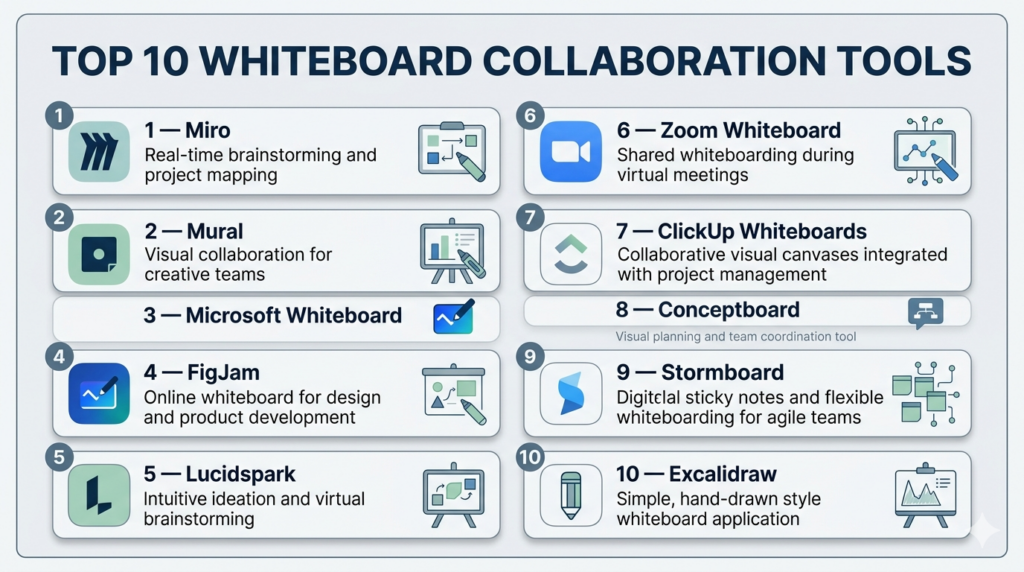
Introduction
Whiteboard collaboration tools are digital platforms that allow teams to brainstorm, plan, and collaborate visually in real time—replicating and enhancing the traditional whiteboard experience. These tools enable users to create diagrams, sticky notes, workflows, and visual maps while collaborating simultaneously from different locations.
In today’s remote and hybrid work environment, whiteboard collaboration tools have become essential for teams that need to communicate ideas quickly and effectively. Beyond brainstorming, modern tools now integrate with project management, design, and communication platforms—bridging the gap between ideation and execution.
Common Use Cases
- Brainstorming and ideation sessions
- Agile sprint planning and retrospectives
- Product design and user journey mapping
- Remote workshops and training
- Strategic planning and roadmapping
What Buyers Should Evaluate
- Real-time collaboration capabilities
- Ease of use and onboarding
- Template variety and customization
- Integration with productivity tools
- Performance with large boards and teams
- Security and access control features
- Cross-platform compatibility
- Scalability for growing teams
- Pricing and licensing models
Best for: Product teams, remote teams, educators, designers, consultants, and enterprises that rely on visual collaboration.
Not ideal for: Users who only need static diagrams, simple note-taking, or document-based workflows without visual interaction.
Key Trends in Whiteboard Collaboration Tools
- AI-assisted brainstorming: Automatic idea generation, clustering, and summarization
- Infinite canvas evolution: Larger, more structured workspaces with better navigation
- Hybrid collaboration features: Designed for both in-office and remote teams
- Embedded workflows: Linking whiteboards directly to tasks and execution tools
- Interactive elements: Voting, timers, reactions, and live cursors
- Template ecosystems: Pre-built frameworks for agile, design thinking, and strategy
- Cross-tool integrations: Deep connections with communication and project platforms
- Cloud-first architecture: Browser-based tools replacing legacy software
- Security improvements: Role-based access and enterprise-grade controls
- Multimedia support: Embedding videos, documents, and live data
How We Selected These Tools (Methodology)
- Evaluated global market adoption and brand recognition
- Assessed collaboration capabilities and real-time performance
- Compared feature depth across brainstorming and workflow use cases
- Reviewed integration capabilities with common business tools
- Considered ease of use for beginners and advanced users
- Evaluated scalability for teams of different sizes
- Assessed platform compatibility (web, desktop, mobile)
- Considered innovation in AI and automation features
- Reviewed support quality and community presence
Top 10 Whiteboard Collaboration Tools
#1 — Miro
Short description: A widely used collaborative whiteboard platform designed for teams that need scalable visual collaboration.
Key Features
- Infinite canvas workspace
- Real-time collaboration with live cursors
- AI-powered idea generation and clustering
- Extensive template library
- Voting, timers, and facilitation tools
- Presentation mode
Pros
- Highly scalable for teams
- Rich feature set
Cons
- Can feel overwhelming for beginners
- Subscription pricing
Platforms / Deployment
Web / Desktop / Mobile / Cloud
Security & Compliance
SSO and role-based access supported; additional details not publicly stated
Integrations & Ecosystem
Strong ecosystem with productivity and development tools.
- Project management platforms
- Communication tools
- Design tools
- APIs for extensibility
Support & Community
Extensive documentation, training resources, and large global community
#2 — Mural
Short description: A structured collaboration tool focused on workshops and team facilitation.
Key Features
- Pre-built workshop templates
- Sticky notes and diagram tools
- Facilitation controls (timers, voting)
- Real-time collaboration
- Presentation mode
Pros
- Excellent for structured sessions
- Strong facilitation features
Cons
- Learning curve for new users
- Subscription required
Platforms / Deployment
Web / Cloud
Security & Compliance
Not publicly stated
Integrations & Ecosystem
- Collaboration tools
- Workflow tools
Support & Community
Good support resources and onboarding materials
#3 — Microsoft Whiteboard
Short description: A simple whiteboard tool integrated into the Microsoft ecosystem.
Key Features
- Real-time collaboration
- Ink-to-shape recognition
- Sticky notes and drawing tools
- Templates
- Integration with communication tools
Pros
- Easy to use
- Seamless for Microsoft users
Cons
- Limited advanced features
- Best within its ecosystem
Platforms / Deployment
Web / Windows / Mobile / Cloud
Security & Compliance
Enterprise-grade controls; details not publicly stated
Integrations & Ecosystem
- Productivity suite tools
- Communication platforms
- Cloud storage
Support & Community
Strong enterprise support
#4 — FigJam
Short description: A collaborative whiteboard tool tailored for designers and product teams.
Key Features
- Sticky notes and drawing tools
- Real-time collaboration
- Templates
- Visual brainstorming features
- Design workflow integration
Pros
- Clean and intuitive interface
- Ideal for design teams
Cons
- Limited beyond design use cases
- Requires ecosystem familiarity
Platforms / Deployment
Web / Desktop / Cloud
Security & Compliance
Not publicly stated
Integrations & Ecosystem
- Design tools
- Collaboration platforms
Support & Community
Active design community and learning resources
#5 — Lucidspark
Short description: A collaborative whiteboard tool focused on structured brainstorming and idea organization.
Key Features
- Drag-and-drop interface
- Templates and frameworks
- Voting and commenting
- Real-time collaboration
- Integration with diagram tools
Pros
- Easy to use
- Good balance of features
Cons
- Limited deep customization
- Subscription required
Platforms / Deployment
Web / Cloud
Security & Compliance
Not publicly stated
Integrations & Ecosystem
- Diagramming tools
- Productivity platforms
Support & Community
Moderate support and resources
#6 — Zoom Whiteboard
Short description: A whiteboard tool integrated into video conferencing workflows.
Key Features
- Real-time collaboration
- Drawing and annotation tools
- Templates
- Meeting integration
- Easy sharing
Pros
- Seamless for meetings
- Simple interface
Cons
- Limited advanced capabilities
- Best within its ecosystem
Platforms / Deployment
Web / Desktop / Mobile / Cloud
Security & Compliance
Not publicly stated
Integrations & Ecosystem
- Video conferencing tools
- Collaboration platforms
Support & Community
Moderate
#7 — ClickUp Whiteboards
Short description: Whiteboard feature integrated into a broader productivity and project management platform.
Key Features
- Visual brainstorming
- Task linking and workflow integration
- Templates
- Real-time collaboration
- Drag-and-drop interface
Pros
- Connects ideas to execution
- Good for productivity-focused teams
Cons
- Requires learning the full platform
- Can feel complex
Platforms / Deployment
Web / Cloud
Security & Compliance
Not publicly stated
Integrations & Ecosystem
- Project management tools
- Collaboration platforms
Support & Community
Strong documentation and support
#8 — Conceptboard
Short description: A collaborative whiteboard tool focused on enterprise use and structured workflows.
Key Features
- Real-time collaboration
- Visual boards and comments
- File sharing
- Templates
- Feedback tools
Pros
- Enterprise-friendly
- Structured collaboration
Cons
- Less intuitive interface
- Smaller ecosystem
Platforms / Deployment
Web / Cloud
Security & Compliance
Not publicly stated
Integrations & Ecosystem
- File systems
- Collaboration tools
Support & Community
Moderate
#9 — Stormboard
Short description: A structured brainstorming platform with built-in reporting and workflow tracking.
Key Features
- Sticky notes
- Templates
- Reporting tools
- Collaboration features
- Workflow tracking
Pros
- Strong structure for business workflows
- Built-in reporting
Cons
- Less flexible canvas
- Subscription required
Platforms / Deployment
Web / Cloud
Security & Compliance
Not publicly stated
Integrations & Ecosystem
- Business tools
- Collaboration platforms
Support & Community
Moderate
#10 — Excalidraw
Short description: A lightweight, open-source whiteboard tool for quick sketches and simple collaboration.
Key Features
- Hand-drawn style diagrams
- Real-time collaboration
- Minimal interface
- Fast performance
- Open-source flexibility
Pros
- Free and simple
- Very fast to use
Cons
- Limited advanced features
- Not ideal for enterprise workflows
Platforms / Deployment
Web / Self-hosted
Security & Compliance
Not publicly stated
Integrations & Ecosystem
- Open-source ecosystem
- Basic integrations
Support & Community
Active developer community
Comparison Table (Top 10)
| Tool Name | Best For | Platform(s) Supported | Deployment | Standout Feature | Public Rating |
|---|---|---|---|---|---|
| Miro | Enterprise teams | Web, Desktop, Mobile | Cloud | Infinite canvas | N/A |
| Mural | Workshops | Web | Cloud | Facilitation tools | N/A |
| Whiteboard | Microsoft users | Web, Windows, Mobile | Cloud | Ecosystem integration | N/A |
| FigJam | Designers | Web, Desktop | Cloud | Design collaboration | N/A |
| Lucidspark | Teams | Web | Cloud | Structured brainstorming | N/A |
| Zoom Whiteboard | Meetings | Web, Desktop, Mobile | Cloud | Meeting integration | N/A |
| ClickUp | Productivity teams | Web | Cloud | Task integration | N/A |
| Conceptboard | Enterprise workflows | Web | Cloud | Secure collaboration | N/A |
| Stormboard | Structured planning | Web | Cloud | Workflow tracking | N/A |
| Excalidraw | Simplicity | Web | Self-hosted | Lightweight | N/A |
Evaluation & Scoring of Whiteboard Collaboration Tools
| Tool Name | Core | Ease | Integrations | Security | Performance | Support | Value | Weighted Total |
|---|---|---|---|---|---|---|---|---|
| Miro | 10 | 8 | 10 | 8 | 9 | 9 | 7 | 8.9 |
| Mural | 9 | 7 | 8 | 7 | 8 | 8 | 7 | 8.0 |
| Whiteboard | 7 | 9 | 8 | 7 | 8 | 8 | 9 | 8.2 |
| FigJam | 8 | 9 | 8 | 6 | 8 | 8 | 8 | 8.1 |
| Lucidspark | 8 | 8 | 8 | 6 | 8 | 7 | 7 | 7.8 |
| Zoom | 7 | 8 | 7 | 6 | 7 | 7 | 7 | 7.3 |
| ClickUp | 8 | 7 | 9 | 7 | 8 | 8 | 7 | 7.9 |
| Conceptboard | 7 | 7 | 7 | 7 | 7 | 7 | 7 | 7.1 |
| Stormboard | 7 | 7 | 7 | 6 | 7 | 7 | 7 | 7.0 |
| Excalidraw | 6 | 9 | 6 | 6 | 8 | 7 | 10 | 7.4 |
How to interpret scores:
- Scores are comparative across tools, not absolute
- Higher scores indicate a better balance of features and usability
- Enterprise tools score higher in integrations and scalability
- Simpler tools score higher in ease of use and value
Which Whiteboard Collaboration Tool Is Right for You?
Solo / Freelancer
- Best: Excalidraw, FigJam
- Focus on simplicity, speed, and low cost
SMB
- Best: Miro, Lucidspark
- Balance collaboration and usability
Mid-Market
- Best: Miro, ClickUp Whiteboards
- Require integrations and scalability
Enterprise
- Best: Miro, Mural
- Need advanced collaboration and control
Budget vs Premium
- Budget: Excalidraw
- Premium: Miro, Mural
Feature Depth vs Ease of Use
- Feature-rich: Miro
- Easy-to-use: FigJam
Integrations & Scalability
- Strong: Miro, ClickUp
- Limited: lightweight tools
Security & Compliance Needs
- Enterprise tools provide better controls
- Others: Not publicly stated
Frequently Asked Questions (FAQs)
What are whiteboard collaboration tools?
They are digital platforms for brainstorming and visual teamwork.
Which tool is best for teams?
Miro and Mural are widely used for team collaboration.
Are free tools available?
Yes, tools like Excalidraw offer free usage.
Can multiple users collaborate in real time?
Yes, most modern tools support live collaboration.
Are these tools secure?
Security varies by tool; enterprise platforms offer stronger controls.
Do I need internet access?
Most tools are cloud-based and require internet access.
Can I export whiteboards?
Yes, most tools support exporting to various formats.
Are these tools suitable for remote work?
Yes, they are designed specifically for remote and hybrid teams.
Can I integrate with other software?
Yes, many tools support integrations with productivity platforms.
How do I choose the right tool?
Evaluate based on features, team size, integrations, and budget.
Conclusion
Whiteboard collaboration tools have evolved into essential platforms for modern teamwork, enabling teams to visualize ideas, collaborate in real time, and turn concepts into actionable plans. Whether you need a simple sketching tool or a full-featured enterprise platform, there is a solution tailored to your needs.

One aspect that is often overlooked when evaluating whiteboard collaboration platforms is how effectively they preserve decisions and context after workshops or brainstorming sessions are completed. In many organizations, valuable discussions remain trapped inside whiteboard artifacts without clear ownership, action items, or links to delivery workflows. Features such as decision tracking, integration with project management tools, searchable history, and governance around board lifecycle management can significantly improve long-term collaboration effectiveness and reduce knowledge loss across distributed teams.