MOTOSHARE 🚗🏍️
Rent Bikes & Cars Directly from Owners
Motoshare connects vehicle owners with people who need bikes and cars on rent. Owners earn from idle vehicles, and renters get flexible ride options.
Visit Motoshare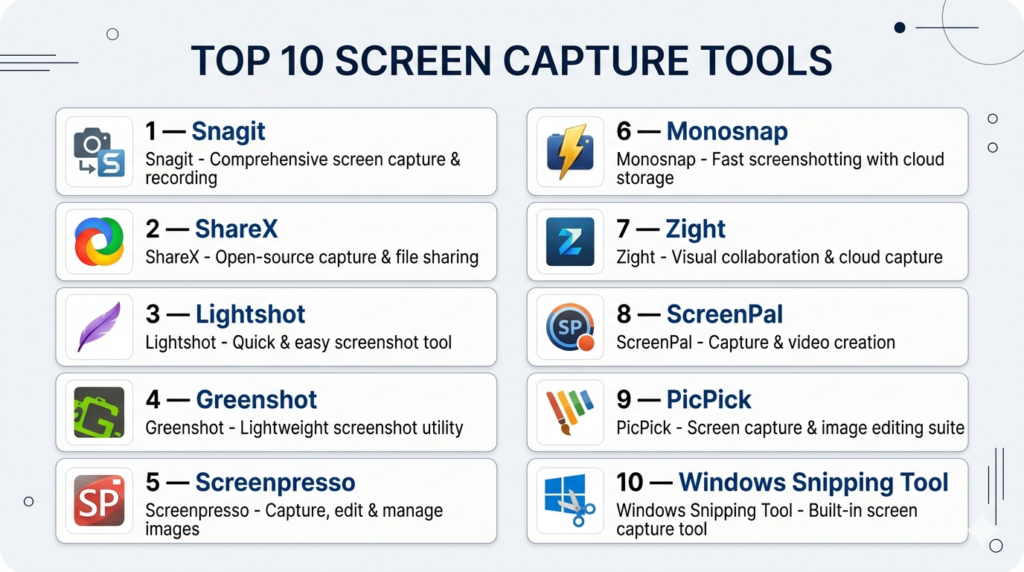
Introduction
Screen capture tools are software applications that allow users to take screenshots or capture specific areas of their screen, often with additional features like annotation, editing, and sharing. In simple terms, they replace or enhance the basic “Print Screen” function with smarter, faster, and more powerful capabilities.
With the rise of remote work, documentation, bug reporting, and visual communication, screen capture tools have become essential across industries. Modern tools now include instant sharing, cloud storage, annotation layers, OCR (text extraction), and even lightweight screen recording, making them far more than just screenshot utilities.
Common use cases include:
- Capturing screenshots for documentation and tutorials
- Reporting bugs with annotated visuals
- Sharing quick visual feedback in teams
- Creating how-to guides and product walkthroughs
- Saving web content or UI designs
Key evaluation criteria buyers should consider:
- Capture flexibility (full screen, region, scrolling capture)
- Annotation and editing tools
- Sharing options (links, cloud, integrations)
- Ease of use and speed
- OCR and automation features
- Cross-platform support
- Performance and lightweight usage
- File formats and export options
- Integration with productivity tools
- Pricing and licensing
Best for: Developers, testers, designers, educators, content creators, and remote teams needing fast visual communication.
Not ideal for: Users needing full video recording or advanced editing workflows—screen recording or video editing tools are better suited.
Key Trends in Screen Capture Tools
- AI-powered OCR: Extract text directly from screenshots
- Instant cloud sharing: Generate links immediately after capture
- Annotation-first workflows: Built-in arrows, blur, highlights, and callouts
- Lightweight tools: Minimal system impact for quick captures
- Cross-device syncing: Access captures across devices
- Browser-based capture: Extensions for quick web screenshots
- Automation workflows: Auto-save, auto-upload, and scripting
- Collaboration features: Team sharing and commenting
- GIF creation: Quick visual demonstrations
- Integration with dev tools: Bug tracking and documentation platforms
How We Selected These Tools (Methodology)
- Evaluated market adoption across professionals and teams
- Assessed core screenshot and capture capabilities
- Reviewed annotation and editing features
- Considered ease of use and speed of capture
- Evaluated sharing and collaboration workflows
- Assessed platform compatibility and accessibility
- Reviewed integration capabilities (cloud, dev tools)
- Considered performance and lightweight efficiency
- Evaluated community support and documentation
- Included a mix of free, open-source, and premium tools
Top 10 Screen Capture Tools
#1 — Snagit
Short description: A premium screen capture tool widely used for professional documentation, tutorials, and business communication.
Key Features
- Advanced screenshot capture (scrolling, region, full screen)
- Built-in image editor
- Annotation tools (arrows, text, blur)
- Screen recording support
- Template-based workflows
- File organization library
- Easy sharing options
Pros
- Highly polished and professional
- Excellent editing and annotation tools
Cons
- Paid software
- Heavier than lightweight tools
Platforms / Deployment
Windows / macOS — Self-hosted
Security & Compliance
Not publicly stated
Integrations & Ecosystem
- Productivity tools
- File sharing platforms
- Documentation workflows
Support & Community
Strong enterprise adoption with extensive documentation.
#2 — ShareX
Short description: A free, open-source screen capture tool with powerful automation and customization features.
Key Features
- Multiple capture modes
- Built-in annotation tools
- GIF recording
- Automation workflows
- OCR support
- Custom hotkeys
- File upload automation
Pros
- Completely free
- Highly customizable
Cons
- Complex interface
- Windows-only
Platforms / Deployment
Windows — Self-hosted
Security & Compliance
Not publicly stated
Integrations & Ecosystem
- Cloud storage services
- Automation workflows
- Developer tools
Support & Community
Active open-source community.
#3 — Lightshot
Short description: A simple and lightweight screenshot tool designed for quick captures and sharing.
Key Features
- Fast region capture
- Instant editing tools
- Quick sharing links
- Search similar images
- Cross-platform support
Pros
- Very easy to use
- Lightweight
Cons
- Limited advanced features
- Minimal editing capabilities
Platforms / Deployment
Windows / macOS / Browser — Self-hosted
Security & Compliance
Not publicly stated
Integrations & Ecosystem
- Browser extensions
- Image sharing tools
Support & Community
Popular among casual users.
#4 — Greenshot
Short description: A lightweight open-source screenshot tool focused on productivity and simplicity.
Key Features
- Region and window capture
- Annotation tools
- Export options
- Keyboard shortcuts
- Plugin support
Pros
- Free and efficient
- Easy to use
Cons
- Limited advanced features
- Basic UI
Platforms / Deployment
Windows / macOS — Self-hosted
Security & Compliance
Not publicly stated
Integrations & Ecosystem
- Productivity tools
- File export workflows
Support & Community
Active user base.
#5 — Screenpresso
Short description: A feature-rich screen capture tool with built-in editing and sharing capabilities.
Key Features
- Screenshot and video capture
- Built-in editor
- Workspace management
- Annotation tools
- Export and sharing
Pros
- Good balance of features
- Portable version available
Cons
- Limited free version
- Windows-focused
Platforms / Deployment
Windows — Self-hosted
Security & Compliance
Not publicly stated
Integrations & Ecosystem
- Documentation tools
- File sharing platforms
Support & Community
Moderate community support.
#6 — Monosnap
Short description: A cross-platform screen capture tool focused on quick sharing and cloud workflows.
Key Features
- Screenshot and video capture
- Annotation tools
- Cloud storage
- File sharing
- Blur and highlight tools
Pros
- Easy sharing
- Cross-platform
Cons
- Limited advanced features
- Cloud dependency
Platforms / Deployment
Windows / macOS — Cloud / Self-hosted
Security & Compliance
Not publicly stated
Integrations & Ecosystem
- Cloud storage
- Team collaboration tools
Support & Community
Growing user base.
#7 — Zight
Short description: A modern screen capture and sharing tool designed for teams and business communication.
Key Features
- Screen + webcam capture
- GIF creation
- Annotation tools
- Cloud sharing
- File storage
- Video messaging
Pros
- Strong collaboration features
- Fast sharing workflow
Cons
- Internet dependency
- Limited offline functionality
Platforms / Deployment
Windows / macOS / Linux / iOS / Web — Cloud
Security & Compliance
Not publicly stated
Integrations & Ecosystem
- Collaboration tools
- Cloud storage platforms
Support & Community
Business-focused support.
#8 — ScreenPal
Short description: A combined screen capture and recording tool with editing and hosting features.
Key Features
- Screenshot and video capture
- Built-in editor
- Image hosting
- Annotation tools
- Mobile support
Pros
- All-in-one tool
- Cross-platform support
Cons
- Free plan limitations
- Interface can feel basic
Platforms / Deployment
Windows / macOS / iOS / Android — Cloud / Self-hosted
Security & Compliance
Not publicly stated
Integrations & Ecosystem
- Hosting services
- Media tools
Support & Community
Widely used in education.
#9 — PicPick
Short description: A screen capture tool designed for designers and developers with built-in graphic utilities.
Key Features
- Screenshot capture modes
- Color picker
- Pixel ruler
- Image editor
- Annotation tools
Pros
- Great for designers
- Multiple utilities in one tool
Cons
- Windows-only
- Limited collaboration features
Platforms / Deployment
Windows — Self-hosted
Security & Compliance
Not publicly stated
Integrations & Ecosystem
- Design workflows
- Graphic tools
Support & Community
Niche but loyal user base.
#10 — Windows Snipping Tool
Short description: A built-in screen capture tool for Windows offering basic but effective screenshot functionality.
Key Features
- Multiple capture modes
- Basic annotation tools
- Screen recording support
- Simple interface
- No installation required
Pros
- Free and pre-installed
- Easy to use
Cons
- Limited advanced features
- Basic editing tools
Platforms / Deployment
Windows — Self-hosted
Security & Compliance
Not publicly stated
Integrations & Ecosystem
- Native OS integration
Support & Community
Widely used due to accessibility.
Comparison Table (Top 10)
| Tool Name | Best For | Platform(s) Supported | Deployment | Standout Feature | Public Rating |
|---|---|---|---|---|---|
| Snagit | Professionals | Win/macOS | Self-hosted | Advanced editing | N/A |
| ShareX | Developers | Windows | Self-hosted | Automation | N/A |
| Lightshot | Quick capture | Cross-platform | Self-hosted | Simplicity | N/A |
| Greenshot | Productivity | Win/macOS | Self-hosted | Lightweight | N/A |
| Screenpresso | Balanced use | Windows | Self-hosted | Built-in editor | N/A |
| Monosnap | Cloud sharing | Win/macOS | Hybrid | Fast sharing | N/A |
| Zight | Teams | Cross-platform | Cloud | Collaboration | N/A |
| ScreenPal | Education | Multi-platform | Hybrid | All-in-one | N/A |
| PicPick | Designers | Windows | Self-hosted | Design tools | N/A |
| Snipping Tool | Basic use | Windows | Self-hosted | Built-in | N/A |
Evaluation & Scoring of Screen Capture Tools
| Tool Name | Core | Ease | Integrations | Security | Performance | Support | Value | Weighted Total |
|---|---|---|---|---|---|---|---|---|
| Snagit | 10 | 9 | 9 | 6 | 9 | 9 | 7 | 8.9 |
| ShareX | 9 | 7 | 9 | 6 | 9 | 8 | 10 | 8.8 |
| Lightshot | 7 | 10 | 6 | 6 | 9 | 7 | 10 | 8.1 |
| Greenshot | 8 | 9 | 7 | 6 | 9 | 7 | 10 | 8.3 |
| Screenpresso | 8 | 8 | 7 | 6 | 8 | 7 | 8 | 7.8 |
| Monosnap | 7 | 9 | 8 | 6 | 8 | 7 | 8 | 7.9 |
| Zight | 8 | 9 | 8 | 6 | 8 | 8 | 8 | 8.2 |
| ScreenPal | 8 | 8 | 7 | 6 | 8 | 8 | 8 | 8.0 |
| PicPick | 7 | 8 | 6 | 6 | 9 | 7 | 9 | 7.8 |
| Snipping Tool | 6 | 10 | 5 | 6 | 9 | 6 | 10 | 7.8 |
How to interpret these scores:
- Scores are comparative within this category
- Core features carry the highest weight
- Higher scores indicate stronger overall capability
- Security reflects publicly available disclosures
- Value reflects cost vs feature balance
Which Screen Capture Tool Is Right for You?
Solo / Freelancer
- Best: Lightshot, Greenshot
- Fast and simple tools
SMB
- Best: Snagit, Screenpresso
- Balanced features and productivity
Mid-Market
- Best: Snagit, Zight
- Collaboration and documentation
Enterprise
- Best: Snagit, Zight
- Advanced workflows and sharing
Budget vs Premium
- Budget: ShareX, Greenshot
- Premium: Snagit
Feature Depth vs Ease of Use
- Easy: Lightshot
- Advanced: ShareX
Integrations & Scalability
- Strongest: Snagit, Zight
Security & Compliance Needs
- Most tools do not publicly disclose certifications; internal validation is recommended
Frequently Asked Questions (FAQs)
What is a screen capture tool?
It is software used to take screenshots of your screen.
What is the difference between screen capture and screen recording?
Screen capture takes images, while screen recording captures video.
Which tool is best for beginners?
Lightshot and Snipping Tool are easy to use.
Is there free screen capture software?
Yes, ShareX and Greenshot are popular free options.
Can I edit screenshots?
Most tools include basic editing features.
What is OCR in screen capture?
It extracts text from images or screenshots.
Can I share screenshots instantly?
Some tools offer instant link sharing.
Do screen capture tools support video?
Some tools include basic recording features.
Are these tools safe?
Most are safe, but check permissions and downloads.
Which tool is best for teams?
Zight and Snagit are good for collaboration.
Conclusion
Screen capture tools are essential for modern workflows, enabling faster communication, documentation, and collaboration. From simple tools like Lightshot to advanced solutions like Snagit and ShareX, the right choice depends on your needs and workflow.

One area that deserves more attention is how screen capture tools fit into engineering and support workflows at scale. In many organizations, screenshots are not just images—they become part of bug reports, incident timelines, audit records, and knowledge base documentation. Features like metadata retention, secure sharing, access controls, and integrations with issue tracking systems can make a significant difference once teams move beyond individual productivity and start managing large volumes of operational information.