MOTOSHARE 🚗🏍️
Rent Bikes & Cars Directly from Owners
Motoshare connects vehicle owners with people who need bikes and cars on rent. Owners earn from idle vehicles, and renters get flexible ride options.
Visit Motoshare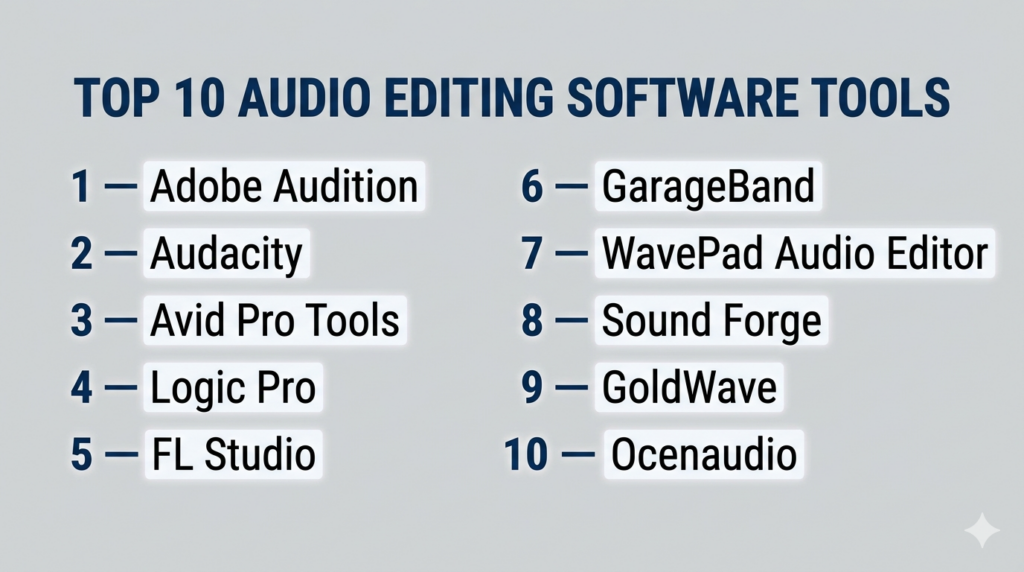
Introduction
Audio editing software is used to record, edit, clean, mix, and enhance sound files. In simple terms, it helps transform raw audio—such as voice recordings, music tracks, or interviews—into a polished and professional final output.
With the rapid growth of podcasts, streaming platforms, video content, and remote collaboration, high-quality audio has become essential across industries. Modern audio tools now offer AI-powered noise reduction, real-time processing, multi-track editing, and advanced automation, making professional-grade sound production more accessible than ever.
Common use cases include:
- Podcast production and editing
- Music production, mixing, and mastering
- Voice-over recording for videos and advertisements
- Audio cleanup for interviews and webinars
- Game audio design and sound effects
Key evaluation criteria buyers should consider:
- Multi-track editing capabilities
- Audio restoration and noise reduction tools
- Effects and plugin support (VST, AU)
- Real-time processing and playback
- Ease of use vs advanced functionality
- Integration with video and creative tools
- File format compatibility
- Automation and AI features
- Performance and latency
- Pricing and licensing flexibility
Best for: Podcasters, musicians, sound engineers, video editors, content creators, and media production teams.
Not ideal for: Users who only need basic playback tools or minimal audio adjustments.
Key Trends in Audio Editing Software
- AI-powered audio enhancement: Automatic noise removal, voice clarity, and mastering
- Cloud-based collaboration: Remote teams working on shared audio sessions
- Real-time editing and preview: Instant feedback on applied effects
- Integration with video workflows: Seamless sync with editing and post-production tools
- Automation tools: Silence detection, auto-leveling, and batch processing
- High-resolution audio support: Increasing demand for studio-quality output
- Plugin ecosystems expansion: Growing support for third-party effects and tools
- Mobile audio editing growth: Editing on smartphones and tablets
- Voice-first content demand: Rise of podcasts and audio platforms
- AI-assisted editing workflows: Faster editing using intelligent suggestions
How We Selected These Tools (Methodology)
- Evaluated market adoption across music, podcasting, and media industries
- Assessed feature completeness (recording, editing, mixing, mastering)
- Reviewed performance and system stability
- Considered AI capabilities and automation features
- Analyzed ease of use vs professional depth
- Evaluated plugin support and extensibility
- Reviewed integration with video and creative ecosystems
- Considered platform compatibility and deployment models
- Assessed community support and documentation quality
- Ensured a mix of free, open-source, and enterprise-grade tools
Top 10 Audio Editing Software Tools
#1 — Adobe Audition
Short description: A professional-grade audio editing and mixing software widely used in broadcasting, film production, and podcasting.
Key Features
- Multi-track editing and mixing
- Spectral frequency editing
- Advanced noise reduction and restoration
- Real-time effects processing
- Batch processing tools
- VST and plugin support
- Seamless workflow integration
Pros
- Industry-standard capabilities
- Powerful restoration tools
- Flexible multi-track editing
Cons
- Subscription-based pricing
- Steeper learning curve for beginners
Platforms / Deployment
Windows / macOS — Self-hosted
Security & Compliance
Not publicly stated
Integrations & Ecosystem
Adobe Audition fits well into professional production environments.
- Video editing workflows
- Motion graphics tools
- Plugin ecosystem
- Collaborative pipelines
Support & Community
Extensive documentation and a strong global community.
#2 — Audacity
Short description: A free, open-source audio editor popular for podcasting and basic audio editing tasks.
Key Features
- Multi-track editing
- Audio recording
- Noise reduction tools
- Effects and filters
- Cross-platform support
- Real-time preview
- Plugin support
Pros
- Completely free
- Easy to learn
- Active community support
Cons
- Basic interface
- Limited advanced production features
Platforms / Deployment
Windows / macOS / Linux — Self-hosted
Security & Compliance
Not publicly stated
Integrations & Ecosystem
- Plugin support
- Open-source ecosystem
Support & Community
Large community with extensive tutorials and forums.
#3 — Avid Pro Tools
Short description: A professional digital audio workstation widely used in music production and film audio.
Key Features
- Advanced multi-track recording
- Audio mixing and mastering
- Automation tools
- High-end plugin ecosystem
- Studio-grade audio processing
Pros
- Industry-standard in music production
- High-quality output
Cons
- Expensive
- Complex for beginners
Platforms / Deployment
Windows / macOS — Self-hosted
Security & Compliance
Not publicly stated
Integrations & Ecosystem
- Studio hardware integration
- Plugin ecosystem
- Production workflows
Support & Community
Strong professional ecosystem and training resources.
#4 — Logic Pro
Short description: A macOS-based audio production tool designed for musicians and sound designers.
Key Features
- Multi-track editing
- Built-in instruments and loops
- Advanced mixing tools
- Automation capabilities
- High-quality effects
Pros
- Rich feature set
- Optimized performance on Apple devices
Cons
- macOS only
- Learning curve
Platforms / Deployment
macOS — Self-hosted
Security & Compliance
Not publicly stated
Integrations & Ecosystem
- Apple ecosystem
- Plugin support
Support & Community
Large and active music production community.
#5 — FL Studio
Short description: A popular digital audio workstation focused on music creation, beat production, and editing.
Key Features
- Pattern-based workflow
- Multi-track editing
- MIDI support
- Virtual instruments
- Effects and automation
Pros
- Ideal for music production
- Flexible workflow
Cons
- Not optimized for pure audio editing
- Interface can be complex
Platforms / Deployment
Windows / macOS — Self-hosted
Security & Compliance
Not publicly stated
Integrations & Ecosystem
- Plugin ecosystem
- Music production tools
Support & Community
Large global user base.
#6 — GarageBand
Short description: A beginner-friendly audio editing and music production tool available for Apple users.
Key Features
- Multi-track editing
- Built-in instruments
- Audio recording tools
- Effects and loops
- Simple user interface
Pros
- Free for Apple users
- Easy to use
Cons
- Limited advanced features
- Apple-only platform
Platforms / Deployment
macOS / iOS — Self-hosted
Security & Compliance
Not publicly stated
Integrations & Ecosystem
- Apple ecosystem
- Music tools
Support & Community
Strong beginner-friendly community.
#7 — WavePad Audio Editor
Short description: A versatile audio editing software supporting multiple platforms and formats.
Key Features
- Standard editing tools (cut, copy, paste)
- Effects and filters
- Batch processing
- Multi-format support
- Plugin compatibility
Pros
- Cross-platform support
- Good feature range
Cons
- Interface not modern
- Limited high-end capabilities
Platforms / Deployment
Windows / macOS / Android / iOS — Self-hosted
Security & Compliance
Not publicly stated
Integrations & Ecosystem
- Plugin ecosystem
- Audio workflows
Support & Community
Moderate support and user base.
#8 — Sound Forge
Short description: A professional audio editing solution focused on recording, editing, and mastering.
Key Features
- High-quality audio recording
- Advanced editing tools
- Effects processing
- Mastering features
- High-resolution audio support
Pros
- Reliable performance
- Strong mastering tools
Cons
- Paid software
- Smaller ecosystem
Platforms / Deployment
Windows / macOS — Self-hosted
Security & Compliance
Not publicly stated
Integrations & Ecosystem
- Plugin support
- Audio production workflows
Support & Community
Professional user base.
#9 — GoldWave
Short description: A long-established audio editor known for stability and batch processing capabilities.
Key Features
- Real-time audio visualization
- Effects and filters
- Batch processing
- Multi-format support
- Plugin compatibility
Pros
- Stable performance
- Efficient batch processing
Cons
- Outdated interface
- Limited modern features
Platforms / Deployment
Windows / macOS / Web / Mobile — Self-hosted
Security & Compliance
Not publicly stated
Integrations & Ecosystem
- Plugin support
- Audio workflows
Support & Community
Established community base.
#10 — Ocenaudio
Short description: A lightweight and user-friendly audio editor designed for quick and simple editing tasks.
Key Features
- Real-time preview
- Multi-platform support
- Effects and filters
- Simple interface
- Fast processing
Pros
- Easy to use
- Lightweight performance
Cons
- Limited advanced tools
- Smaller ecosystem
Platforms / Deployment
Windows / macOS / Linux — Self-hosted
Security & Compliance
Not publicly stated
Integrations & Ecosystem
- Basic plugin support
- Simple workflows
Support & Community
Moderate community support.
Comparison Table (Top 10)
| Tool Name | Best For | Platform(s) Supported | Deployment | Standout Feature | Public Rating |
|---|---|---|---|---|---|
| Adobe Audition | Professional editing | Win/macOS | Self-hosted | Audio restoration | N/A |
| Audacity | Free editing | Cross-platform | Self-hosted | Open-source | N/A |
| Pro Tools | Studio production | Win/macOS | Self-hosted | Industry standard | N/A |
| Logic Pro | Music production | macOS | Self-hosted | Built-in instruments | N/A |
| FL Studio | Beat making | Win/macOS | Self-hosted | Pattern workflow | N/A |
| GarageBand | Beginners | macOS/iOS | Self-hosted | Easy interface | N/A |
| WavePad | General editing | Cross-platform | Self-hosted | Multi-format support | N/A |
| Sound Forge | Mastering | Win/macOS | Self-hosted | Audio processing | N/A |
| GoldWave | Batch editing | Multi-platform | Self-hosted | Batch processing | N/A |
| Ocenaudio | Lightweight editing | Cross-platform | Self-hosted | Fast processing | N/A |
Evaluation & Scoring of Audio Editing Software
| Tool Name | Core | Ease | Integrations | Security | Performance | Support | Value | Weighted Total |
|---|---|---|---|---|---|---|---|---|
| Adobe Audition | 10 | 8 | 10 | 6 | 9 | 10 | 7 | 9.0 |
| Audacity | 8 | 9 | 7 | 6 | 8 | 9 | 10 | 8.4 |
| Pro Tools | 10 | 6 | 9 | 6 | 10 | 9 | 6 | 8.7 |
| Logic Pro | 9 | 8 | 8 | 6 | 9 | 8 | 8 | 8.5 |
| FL Studio | 8 | 7 | 8 | 6 | 9 | 8 | 8 | 8.1 |
| GarageBand | 7 | 10 | 7 | 6 | 8 | 8 | 9 | 8.0 |
| WavePad | 7 | 8 | 7 | 6 | 8 | 7 | 8 | 7.6 |
| Sound Forge | 8 | 7 | 7 | 6 | 9 | 7 | 7 | 7.8 |
| GoldWave | 7 | 7 | 6 | 6 | 8 | 7 | 8 | 7.4 |
| Ocenaudio | 6 | 9 | 6 | 6 | 7 | 7 | 9 | 7.3 |
How to interpret these scores:
- Scores are relative comparisons within this category
- Core features have the highest impact
- Higher scores indicate stronger overall capability
- Security reflects publicly available information only
- Value represents cost vs feature balance
Which Audio Editing Software Is Right for You?
Solo / Freelancer
- Best: Audacity, GarageBand
- Focus on affordability and ease of use
SMB
- Best: Adobe Audition, WavePad
- Balanced performance and features
Mid-Market
- Best: Logic Pro, FL Studio
- Scalable for growing production needs
Enterprise
- Best: Pro Tools, Adobe Audition
- Advanced workflows and production pipelines
Budget vs Premium
- Budget: Audacity, Ocenaudio
- Premium: Pro Tools
Feature Depth vs Ease of Use
- Easy: GarageBand, Audacity
- Advanced: Pro Tools, Adobe Audition
Integrations & Scalability
- Strongest ecosystems: Adobe Audition, Pro Tools
Security & Compliance Needs
- Most tools do not publicly disclose certifications; internal validation is recommended
Frequently Asked Questions (FAQs)
What is audio editing software?
It is software used to record, edit, and enhance audio files.
Which software is best for beginners?
Audacity and GarageBand are beginner-friendly options.
Is there free audio editing software?
Yes, Audacity and Ocenaudio are popular free tools.
What is multi-track editing?
It allows editing multiple audio tracks simultaneously.
Do I need a powerful computer?
Yes, especially for multi-track and high-quality audio projects.
What are plugins in audio editing?
Plugins add additional effects and functionality to software.
Can I edit podcasts using these tools?
Yes, most tools support podcast production workflows.
What is audio mastering?
It is the final process of optimizing audio for distribution.
Are AI tools used in audio editing?
Yes, for noise reduction, enhancement, and automation.
Can I switch audio editing software easily?
Yes, but compatibility with projects and plugins may vary.
Conclusion
Audio editing software plays a critical role in modern content creation, enabling users to produce high-quality sound for podcasts, music, videos, and more. The market offers a wide range of tools—from beginner-friendly platforms to professional-grade solutions—ensuring there is an option for every use case.

One aspect that often gets overlooked when evaluating audio editing software is reproducibility of projects over time. Audio workflows frequently depend on third-party plugins, codecs, and specific software versions, which can make reopening older projects difficult after upgrades or system changes. For teams working on podcasts, films, or commercial productions, having a strategy for plugin management, project archiving, and environment consistency can prevent major issues when revisions are needed months or even years later.