MOTOSHARE 🚗🏍️
Rent Bikes & Cars Directly from Owners
Motoshare connects vehicle owners with people who need bikes and cars on rent. Owners earn from idle vehicles, and renters get flexible ride options.
Visit Motoshare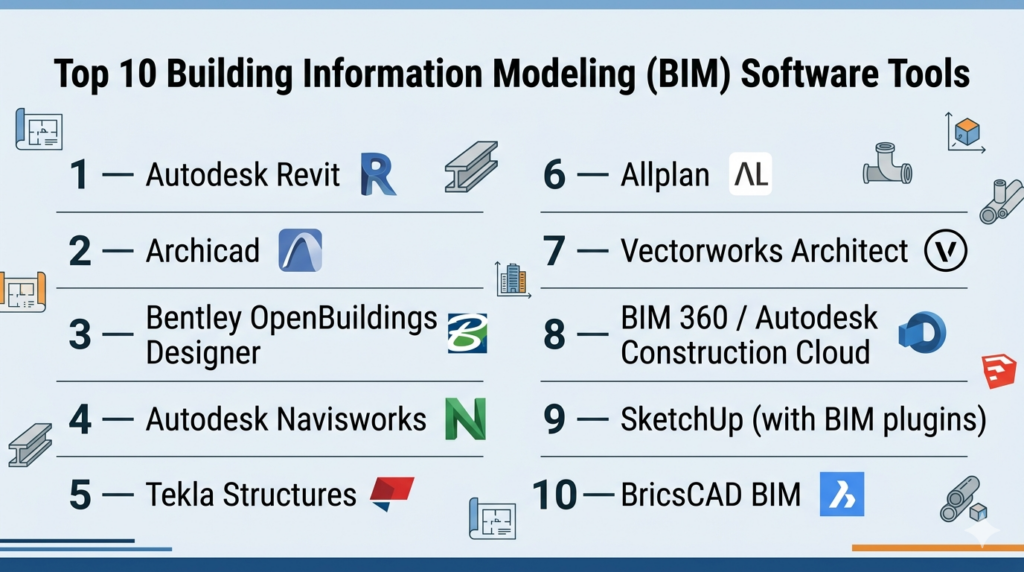
Introduction
Building Information Modeling (BIM) software is used to create, manage, and analyze digital representations of physical buildings and infrastructure. Unlike traditional CAD tools, BIM integrates geometry, materials, costs, timelines, and operational data into a single intelligent model—enabling better collaboration across architecture, engineering, and construction (AEC) teams.
The importance of BIM has grown significantly as the construction industry shifts toward digital transformation, sustainability, and data-driven decision-making. With increasing complexity in projects and the rise of smart buildings, BIM tools are becoming essential for planning, execution, and lifecycle management.
Common use cases include:
- Architectural design and visualization
- Structural and MEP (mechanical, electrical, plumbing) engineering
- Construction planning and scheduling (4D BIM)
- Cost estimation and budgeting (5D BIM)
- Facility management and digital twin creation
Key evaluation criteria:
- Modeling capabilities and accuracy
- Collaboration and version control
- Integration with CAD, GIS, and project management tools
- Cloud vs on-prem deployment
- Ease of use and training requirements
- Scalability for large projects
- Compliance with industry standards
- Automation and AI-assisted workflows
- Cost and licensing flexibility
Best for: Architects, engineers, construction firms, infrastructure planners, and enterprises managing complex building projects.
Not ideal for: Small teams needing simple drafting tools, or projects that do not require multi-disciplinary collaboration or lifecycle management.
Key Trends in Building Information Modeling (BIM) Software for 2026 and Beyond
- AI-assisted design and clash detection improving efficiency and reducing errors
- Cloud-based BIM collaboration platforms enabling real-time teamwork
- Digital twin integration for lifecycle management
- Interoperability standards (IFC) becoming more critical
- Mobile BIM applications for on-site access and updates
- Integration with IoT systems for smart building management
- Automation in cost estimation and scheduling (4D/5D BIM)
- Sustainability and energy analysis tools embedded within BIM platforms
- Subscription and SaaS pricing models replacing perpetual licenses
- Enhanced security and access control for enterprise deployments
How We Selected These Tools (Methodology)
- Evaluated market leadership and adoption in AEC industry
- Assessed feature depth across design, analysis, and collaboration
- Reviewed performance in handling large-scale BIM models
- Considered integration with CAD, GIS, and construction tools
- Analyzed ease of use and onboarding experience
- Examined cloud capabilities and collaboration features
- Evaluated vendor support and ecosystem strength
- Included tools suitable for freelancers to enterprises
- Prioritized tools with ongoing innovation and updates
Top 10 Building Information Modeling (BIM) Software Tools
#1 — Autodesk Revit
Short description: A leading BIM platform widely used for architectural, structural, and MEP design in professional environments.
Key Features
- Parametric 3D modeling
- Multi-discipline collaboration
- Clash detection tools
- 4D and 5D BIM capabilities
- Extensive libraries and templates
- Cloud collaboration via Autodesk ecosystem
Pros
- Industry standard in BIM
- Strong ecosystem and integrations
Cons
- High learning curve
- Expensive licensing
Platforms / Deployment
Windows / Cloud
Security & Compliance
Not publicly stated
Integrations & Ecosystem
Revit integrates deeply with the Autodesk ecosystem and third-party tools.
- AutoCAD, Navisworks
- BIM 360 / Autodesk Construction Cloud
- API and plugin support
Support & Community
Extensive documentation and large global user base.
#2 — Archicad
Short description: A BIM solution focused on architectural design with strong visualization and collaboration features.
Key Features
- Parametric modeling
- Real-time collaboration (BIMcloud)
- Advanced visualization tools
- Open BIM support (IFC)
- Integrated documentation tools
Pros
- User-friendly interface
- Strong architectural focus
Cons
- Limited engineering tools
- Smaller ecosystem than Autodesk
Platforms / Deployment
Windows / macOS / Cloud
Security & Compliance
Not publicly stated
Integrations & Ecosystem
- IFC compatibility
- Third-party plugins
- Visualization tools
Support & Community
Active community and solid documentation.
#3 — Bentley OpenBuildings Designer
Short description: A comprehensive BIM platform for large-scale infrastructure and building projects.
Key Features
- Multi-discipline BIM modeling
- Infrastructure integration
- Advanced simulation tools
- Large project scalability
- Digital twin support
Pros
- Strong for infrastructure projects
- Scalable for enterprise use
Cons
- Complex interface
- Requires training
Platforms / Deployment
Windows
Security & Compliance
Not publicly stated
Integrations & Ecosystem
- Bentley ecosystem
- GIS integration
- Infrastructure tools
Support & Community
Enterprise-level support with training resources.
#4 — Autodesk Navisworks
Short description: A project review and coordination tool for BIM models.
Key Features
- Model aggregation
- Clash detection
- Simulation tools
- Visualization and walkthroughs
- Collaboration features
Pros
- Excellent coordination tool
- Strong integration with Revit
Cons
- Not a modeling tool
- Requires other BIM software
Platforms / Deployment
Windows
Security & Compliance
Not publicly stated
Integrations & Ecosystem
- Revit, AutoCAD
- BIM 360
- Construction workflows
Support & Community
Strong enterprise support.
#5 — Tekla Structures
Short description: A BIM tool specialized in structural engineering and steel detailing.
Key Features
- Detailed structural modeling
- Steel and concrete workflows
- Fabrication-ready outputs
- Clash detection
- Large model handling
Pros
- Highly accurate structural modeling
- Industry-standard for fabrication
Cons
- Complex interface
- Niche focus
Platforms / Deployment
Windows
Security & Compliance
Not publicly stated
Integrations & Ecosystem
- Structural analysis tools
- CAD integrations
- Fabrication systems
Support & Community
Strong engineering-focused community.
#6 — Allplan
Short description: A BIM solution for architecture and civil engineering projects.
Key Features
- Parametric modeling
- Integrated cost estimation
- Collaboration tools
- Infrastructure design support
- Cloud connectivity
Pros
- Strong engineering features
- Flexible workflows
Cons
- Less popular globally
- Learning curve
Platforms / Deployment
Windows
Security & Compliance
Not publicly stated
Integrations & Ecosystem
- CAD tools
- BIM workflows
- Cloud integrations
Support & Community
Moderate community and support.
#7 — Vectorworks Architect
Short description: A design-focused BIM tool with strong visualization capabilities.
Key Features
- 2D/3D modeling
- Rendering tools
- BIM workflows
- Flexible design tools
- Cross-platform support
Pros
- Strong design flexibility
- Good visualization
Cons
- Less adoption in large enterprises
- Limited advanced BIM features
Platforms / Deployment
Windows / macOS
Security & Compliance
Not publicly stated
Integrations & Ecosystem
- Rendering tools
- CAD integrations
- Plugin ecosystem
Support & Community
Active design community.
#8 — BIM 360 / Autodesk Construction Cloud
Short description: A cloud-based BIM collaboration and project management platform.
Key Features
- Cloud collaboration
- Document management
- Field management tools
- Real-time updates
- Workflow automation
Pros
- Strong cloud collaboration
- Integration with Autodesk tools
Cons
- Subscription cost
- Requires ecosystem adoption
Platforms / Deployment
Web / Cloud
Security & Compliance
Not publicly stated
Integrations & Ecosystem
- Revit, Navisworks
- Project management tools
- APIs
Support & Community
Enterprise-grade support.
#9 — SketchUp (with BIM plugins)
Short description: A user-friendly modeling tool extended into BIM workflows via plugins.
Key Features
- Easy 3D modeling
- Plugin-based BIM capabilities
- Visualization tools
- Large asset library
- Cloud sharing
Pros
- Beginner-friendly
- Fast learning curve
Cons
- Limited native BIM features
- Requires plugins
Platforms / Deployment
Web / Windows / macOS
Security & Compliance
Not publicly stated
Integrations & Ecosystem
- Plugin marketplace
- CAD tools
- Rendering tools
Support & Community
Large global community.
#10 — BricsCAD BIM
Short description: A cost-effective BIM alternative with strong CAD compatibility.
Key Features
- AI-assisted modeling
- Native DWG support
- Parametric BIM workflows
- Automation tools
- Cost-effective licensing
Pros
- Affordable alternative
- Familiar CAD environment
Cons
- Smaller ecosystem
- Limited enterprise adoption
Platforms / Deployment
Windows / macOS / Linux
Security & Compliance
Not publicly stated
Integrations & Ecosystem
- CAD tools
- APIs
- BIM workflows
Support & Community
Growing community and support.
Comparison Table (Top 10)
| Tool Name | Best For | Platform(s) Supported | Deployment | Standout Feature | Public Rating |
|---|---|---|---|---|---|
| Revit | Full BIM workflows | Windows/Cloud | Hybrid | Industry standard | N/A |
| Archicad | Architects | Win/macOS/Cloud | Hybrid | Open BIM support | N/A |
| OpenBuildings | Infrastructure | Windows | Self-hosted | Large-scale BIM | N/A |
| Navisworks | Coordination | Windows | Self-hosted | Clash detection | N/A |
| Tekla | Structural | Windows | Self-hosted | Fabrication-ready models | N/A |
| Allplan | Engineering | Windows | Self-hosted | Cost estimation | N/A |
| Vectorworks | Design | Win/macOS | Self-hosted | Visualization | N/A |
| BIM 360 | Collaboration | Web | Cloud | Real-time teamwork | N/A |
| SketchUp | Beginners | Web/Win/macOS | Hybrid | Ease of use | N/A |
| BricsCAD | Budget BIM | Win/macOS/Linux | Self-hosted | CAD compatibility | N/A |
Evaluation & Scoring of Building Information Modeling (BIM) Software
| Tool Name | Core | Ease | Integrations | Security | Performance | Support | Value | Weighted Total |
|---|---|---|---|---|---|---|---|---|
| Revit | 10 | 7 | 10 | 6 | 9 | 9 | 6 | 8.7 |
| Archicad | 9 | 8 | 8 | 6 | 8 | 8 | 7 | 8.2 |
| OpenBuildings | 9 | 6 | 8 | 6 | 9 | 8 | 6 | 8.0 |
| Navisworks | 8 | 7 | 9 | 6 | 8 | 8 | 7 | 7.9 |
| Tekla | 9 | 6 | 8 | 6 | 9 | 8 | 6 | 8.0 |
| Allplan | 8 | 7 | 7 | 6 | 8 | 7 | 7 | 7.6 |
| Vectorworks | 7 | 8 | 7 | 5 | 7 | 7 | 7 | 7.3 |
| BIM 360 | 8 | 8 | 9 | 6 | 8 | 8 | 7 | 8.0 |
| SketchUp | 6 | 9 | 7 | 5 | 7 | 8 | 8 | 7.4 |
| BricsCAD | 8 | 7 | 7 | 5 | 8 | 7 | 9 | 7.8 |
How to interpret scores:
- Scores are comparative across tools
- Higher scores indicate stronger overall capability
- Core features and integrations carry the most weight
- Value reflects cost vs functionality
- Choose based on project requirements, not rankings alone
Which Building Information Modeling (BIM) Software Tool Is Right for You?
Solo / Freelancer
SketchUp or BricsCAD BIM are ideal due to ease of use and affordability.
SMB
Archicad and Vectorworks offer a balance of usability and features.
Mid-Market
Revit and Tekla provide advanced workflows and scalability.
Enterprise
OpenBuildings and BIM 360 are suited for large, complex projects.
Budget vs Premium
- Budget: SketchUp, BricsCAD
- Premium: Revit, OpenBuildings
Feature Depth vs Ease of Use
- Depth: Revit, Tekla
- Ease: SketchUp, Archicad
Integrations & Scalability
- Best: Revit, BIM 360
Security & Compliance Needs
Enterprise users should validate security controls separately.
Frequently Asked Questions (FAQs)
What is BIM software used for?
BIM software is used to create and manage digital building models for design, construction, and operations.
Is BIM different from CAD?
Yes, BIM includes data and collaboration features, while CAD focuses on drafting.
Which BIM tool is best for beginners?
SketchUp and Archicad are more beginner-friendly.
Is BIM required for construction projects?
Increasingly, yes—especially for large or government projects.
Can BIM software run on low-end hardware?
Some tools can, but most require powerful systems.
Are cloud BIM tools available?
Yes, platforms like BIM 360 provide cloud collaboration.
What industries use BIM?
Architecture, engineering, construction, and infrastructure.
How long does it take to learn BIM?
It varies from weeks to months depending on complexity.
Can BIM integrate with project management tools?
Yes, many tools support integrations.
Is BIM expensive?
Costs vary widely depending on the tool and licensing.
Conclusion
Building Information Modeling software is transforming how buildings and infrastructure are designed, built, and managed. From small design studios to global construction firms, BIM tools enable better collaboration, efficiency, and data-driven decision-making.
There is no single “best” BIM solution—your ideal choice depends on your project size, team structure, and workflow requirements.

One practical area I would add is what happens to BIM data after the design and construction phases are complete. A BIM model can become a valuable asset for facility management, but only if the data is accurate, structured, and properly handed over. In real projects, teams often struggle with outdated models, missing asset information, inconsistent naming, and disconnected maintenance systems. I would therefore evaluate BIM software not only on design and collaboration features, but also on how well it supports data validation, version control, interoperability, and the transition from construction into long-term facility operations. This can have a major impact on the model’s usefulness and the actual return on the BIM investment.