MOTOSHARE 🚗🏍️
Rent Bikes & Cars Directly from Owners
Motoshare connects vehicle owners with people who need bikes and cars on rent. Owners earn from idle vehicles, and renters get flexible ride options.
Visit Motoshare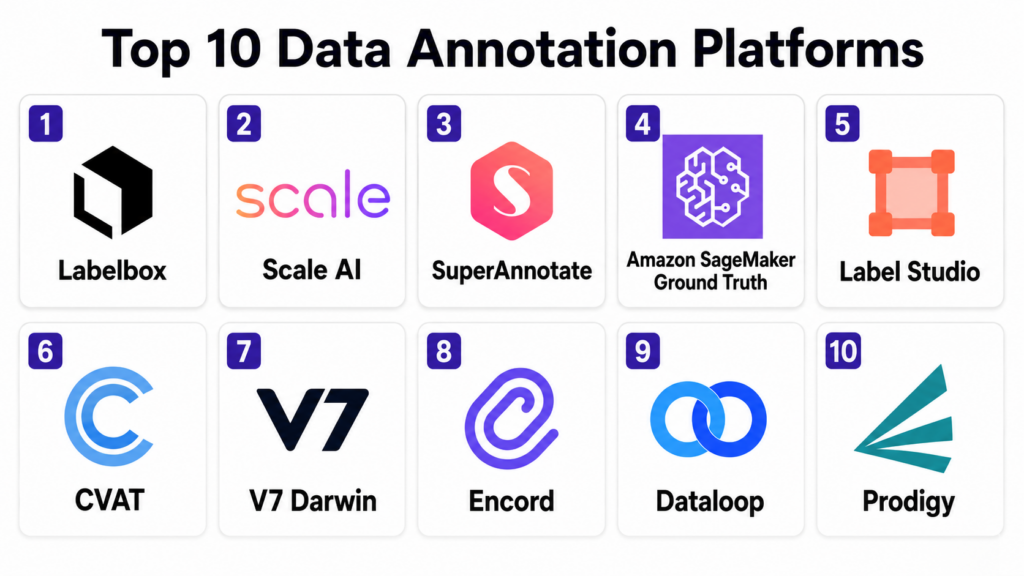
Introduction
Data Annotation Platforms help AI and machine learning teams label raw data so models can learn from it. In simple terms, these platforms turn images, videos, text, audio, documents, sensor data, and multimodal content into structured training data by adding labels, boxes, masks, tags, categories, relationships, rankings, scores, or human feedback.
Data annotation matters because AI models are only as good as the data used to train, fine-tune, test, and evaluate them. For computer vision, annotation may mean drawing bounding boxes around objects. For NLP, it may mean classifying text, tagging entities, or scoring responses. For generative AI, it may mean preference ranking, safety review, instruction tuning, prompt-response evaluation, or expert feedback.
Real world use cases include autonomous vehicle labeling, medical image annotation, ecommerce product tagging, document classification, chatbot evaluation, sentiment labeling, audio transcription, object detection, segmentation, OCR validation, RLHF data creation, model evaluation, and multimodal AI training.
Buyers should evaluate data type support, labeling workflows, workforce options, quality control, automation, AI-assisted labeling, annotation accuracy, review flows, security, compliance, integrations, APIs, model feedback loops, scalability, and cost transparency.
Best for: Data Annotation Platforms are best for AI teams, ML engineers, data scientists, computer vision teams, NLP teams, GenAI teams, product teams, autonomous systems teams, healthcare AI teams, research teams, and enterprises building or evaluating machine learning models.
Not ideal for: These platforms may not be necessary for very small experiments, simple classification tasks, or teams with only a few hundred examples. In those cases, spreadsheets, lightweight open-source tools, notebook workflows, or manual labeling scripts may be enough until data volume, accuracy, collaboration, and QA needs increase.
Key Trends in Data Annotation Platforms
- Generative AI evaluation is reshaping annotation: Teams now need preference ranking, rubric-based scoring, safety review, response comparison, instruction tuning data, and expert feedback workflows.
- Multimodal annotation is growing quickly: Platforms increasingly support images, video, text, audio, PDFs, documents, conversations, sensor data, and combined text-image tasks.
- AI-assisted labeling is becoming standard: Auto-labeling, pre-labeling, foundation model suggestions, segmentation assistance, OCR extraction, and active learning help reduce manual labeling effort.
- Human-in-the-loop quality control is still essential: Even with AI assistance, expert review, consensus checks, gold-standard tasks, adjudication, and QA workflows remain critical for reliable datasets.
- Domain expert annotation is more valuable: Healthcare, finance, legal, robotics, life sciences, and safety-sensitive AI often require trained experts instead of generic crowd workers.
- Data curation is now part of annotation: Teams increasingly want tools to select, filter, deduplicate, balance, and prioritize datasets before labeling begins.
- Model evaluation and annotation are converging: Annotation platforms increasingly support continuous evaluation datasets, benchmark creation, model output review, and feedback loops.
- Security and privacy expectations are stronger: Sensitive images, medical records, legal documents, customer data, and internal prompts require access control, audit logs, encryption, and strict reviewer governance.
- Open-source tools remain popular for technical teams: CVAT and Label Studio are widely used when teams want flexibility, self-hosting, and lower platform cost.
- Managed workforce plus platform models are common: Many enterprises prefer vendors that provide both labeling software and trained human annotation teams for large-scale projects.
How We Selected These Tools
The tools in this list were selected based on their relevance to data annotation, data labeling, AI training data creation, model evaluation, human-in-the-loop workflows, computer vision, NLP, generative AI feedback, and enterprise data operations.
Selection logic included:
- Recognition in data annotation, labeling, training data, GenAI evaluation, computer vision, or NLP workflows.
- Support for multiple data types such as images, videos, text, audio, documents, and multimodal data.
- Annotation features such as bounding boxes, polygons, segmentation masks, classification, NER, transcription, ranking, and response scoring.
- Quality control capabilities such as review workflows, consensus, gold tasks, audit trails, annotator performance, and issue tracking.
- AI-assisted labeling, active learning, automation, model pre-labeling, and human-in-the-loop workflows.
- Integrations with ML pipelines, cloud storage, data lakes, APIs, model training systems, and MLOps tools.
- Security and governance features such as SSO, RBAC, encryption, audit logs, private deployment, and compliance controls.
- Fit across SMB, mid-market, enterprise, research, regulated industries, and AI product teams.
- Availability of workforce services, expert annotation, managed labeling, or self-serve annotation options.
- Overall value for improving dataset quality, reducing labeling time, and supporting production AI development.
Top 10 Data Annotation Platforms
1- Labelbox
Short description:
Labelbox is a data annotation and AI data platform designed to help teams create, manage, curate, and improve training data for machine learning and generative AI systems. It supports workflows for computer vision, NLP, multimodal data, model evaluation, and human feedback. Labelbox is especially useful for teams that need strong collaboration, data curation, QA, and model improvement workflows. It is a strong fit for enterprises and AI teams building production-grade datasets.
Key Features
- Image, video, text, document, and multimodal annotation workflows.
- Dataset curation and data management features.
- Model-assisted labeling and automation workflows.
- Review, QA, and label quality management.
- Support for GenAI feedback and evaluation-style tasks.
- APIs and integrations for ML pipelines.
- Collaboration tools for internal and external labeling teams.
Pros
- Strong platform for enterprise AI data workflows.
- Useful for both annotation and dataset management.
- Good fit for teams that need quality review and model feedback loops.
Cons
- Pricing and scale should be evaluated carefully for large projects.
- May be more platform than small teams need.
- Complex workflows require good project design and annotation guidelines.
Platforms / Deployment
Web / APIs
Cloud / Enterprise deployment options may vary
Security & Compliance
Labelbox provides enterprise security controls such as access management, role-based permissions, auditability, and data governance features depending on plan. Specific compliance coverage should be validated during procurement.
Integrations & Ecosystem
Labelbox integrates with cloud storage, ML workflows, model development systems, APIs, and data pipelines. It is useful when annotation must connect directly with training, evaluation, and iteration cycles.
- Cloud storage systems
- ML pipelines
- APIs and SDKs
- Model-assisted labeling workflows
- Data curation workflows
- MLOps systems
Support & Community
Labelbox provides documentation, onboarding, customer support, enterprise services, and AI data workflow guidance. Its ecosystem is strong among enterprise AI and ML teams.
2- Scale AI
Short description:
Scale AI is a data annotation and AI data platform known for large-scale managed labeling, high-quality training data, and human feedback workflows for AI systems. It supports computer vision, NLP, autonomous systems, documents, generative AI evaluation, and model improvement workflows. Scale AI is especially useful for organizations that need both technology and managed human labeling operations. It is a strong fit for enterprises, AI labs, autonomous vehicle teams, and high-volume data programs.
Key Features
- Managed data labeling and annotation services.
- Image, video, text, document, and multimodal data support.
- Human feedback and GenAI evaluation workflows.
- Quality assurance and reviewer management.
- Data curation and model improvement workflows.
- Enterprise-grade labeling operations.
- Support for complex and high-volume annotation programs.
Pros
- Strong managed workforce and operations model.
- Useful for large-scale and complex annotation projects.
- Good fit for AI teams that need expert labeling support.
Cons
- May be more service-oriented and costly than self-serve tools.
- Smaller teams may prefer lighter annotation platforms.
- Buyers should validate workflow transparency and pricing model.
Platforms / Deployment
Web / Managed services / APIs
Cloud / Enterprise options may vary
Security & Compliance
Scale AI provides enterprise data security and access governance controls depending on engagement model. Specific certifications, reviewer controls, data handling, and compliance coverage should be validated during procurement.
Integrations & Ecosystem
Scale AI integrates with AI development workflows, cloud data storage, model evaluation pipelines, and enterprise data operations. It is useful when annotation work needs a managed service layer.
- Cloud storage
- Model training workflows
- Human feedback pipelines
- GenAI evaluation workflows
- Computer vision pipelines
- Enterprise AI operations
Support & Community
Scale AI provides enterprise support, managed operations, project management, annotation workforce coordination, and AI data expertise. Support strength is strongest for enterprise and high-volume labeling programs.
3- SuperAnnotate
Short description:
SuperAnnotate is a data annotation and AI data platform focused on building, curating, annotating, and evaluating datasets for computer vision, NLP, and generative AI use cases. It supports collaborative annotation workflows, automation, quality control, and expert-in-the-loop labeling. SuperAnnotate is especially useful for teams that need high-quality labeled data across images, videos, text, and multimodal workflows. It is a strong fit for enterprises building domain-specific AI systems and evaluation datasets.
Key Features
- Image, video, text, and multimodal annotation.
- AI-assisted labeling and automation.
- Data curation and dataset management.
- Annotation quality control and review workflows.
- GenAI evaluation and human feedback support.
- Collaboration tools for experts and labeling teams.
- APIs and integrations with ML workflows.
Pros
- Strong annotation workflow depth.
- Useful for expert-in-the-loop and multimodal AI projects.
- Good balance of platform, automation, and quality management.
Cons
- Enterprise workflows may require implementation planning.
- Pricing should be validated for project size and workforce needs.
- Teams need clear labeling guidelines to get best results.
Platforms / Deployment
Web / APIs
Cloud / Enterprise deployment options may vary
Security & Compliance
SuperAnnotate provides enterprise security and data governance features such as access controls, role management, and auditability depending on plan. Specific compliance coverage should be validated with the vendor.
Integrations & Ecosystem
SuperAnnotate integrates with cloud storage, model development workflows, data pipelines, and annotation operations. It is useful when data curation, annotation, and evaluation need to work together.
- Cloud storage
- ML pipelines
- AI-assisted labeling workflows
- GenAI evaluation workflows
- Dataset management systems
- APIs and SDKs
Support & Community
SuperAnnotate provides documentation, onboarding, support, customer success, and workflow guidance. Its ecosystem is strong among AI teams managing complex annotation projects.
4- Amazon SageMaker Ground Truth
Short description:
Amazon SageMaker Ground Truth is a managed data labeling service in the AWS ecosystem that helps teams create labeled datasets for machine learning. It supports human-in-the-loop labeling, automated labeling assistance, and workflows for different data types. It is especially useful for AWS-centered teams that want annotation connected with model training and cloud data storage. SageMaker Ground Truth is a strong fit for teams already using Amazon SageMaker, S3, and AWS ML workflows.
Key Features
- Managed data labeling service.
- Human-in-the-loop labeling workflows.
- Support for image, text, video, and other ML labeling tasks.
- Automated labeling assistance depending on task type.
- Integration with Amazon SageMaker and AWS storage.
- Workforce options depending on setup.
- Cloud-native ML pipeline integration.
Pros
- Strong fit for AWS ML teams.
- Useful for connecting labeling with training workflows.
- Managed service reduces some infrastructure burden.
Cons
- Best value depends on AWS adoption.
- Complex custom workflows may require AWS expertise.
- Teams should validate workforce, pricing, and task configuration needs.
Platforms / Deployment
Web / AWS services / APIs
Cloud
Security & Compliance
SageMaker Ground Truth uses AWS identity, access management, encryption options, networking controls, logging, and governance features. Specific compliance coverage depends on AWS region, account configuration, and workload design.
Integrations & Ecosystem
SageMaker Ground Truth integrates tightly with AWS ML and data services. It is useful when training data pipelines are already built inside AWS.
- Amazon SageMaker
- Amazon S3
- AWS IAM
- AWS Lambda workflows
- AWS data pipelines
- Model training workflows
Support & Community
AWS provides documentation, enterprise support, training resources, partner assistance, and a large developer community. Adoption benefits from AWS ML and cloud architecture expertise.
5- Label Studio
Short description:
Label Studio is an open-source data labeling platform that supports many annotation types across text, images, audio, video, time series, and multimodal data. It is especially useful for technical teams that want flexibility, customization, and self-hosting. Label Studio can support classification, NER, bounding boxes, segmentation, transcription, ranking, and many custom labeling interfaces. It is a strong fit for research teams, startups, and enterprises that want configurable annotation workflows.
Key Features
- Open-source data labeling platform.
- Support for text, image, audio, video, and multimodal annotation.
- Custom labeling interfaces.
- Classification, NER, bounding box, segmentation, and ranking support.
- Model-assisted labeling integrations.
- Self-hosted and enterprise options.
- API and ML backend integration support.
Pros
- Highly flexible and customizable.
- Strong open-source option for many data types.
- Good fit for teams needing self-hosting and control.
Cons
- Self-hosted operations require technical ownership.
- Enterprise governance may require paid or advanced setup.
- Quality management workflows need careful configuration.
Platforms / Deployment
Web / Python / APIs
Self-hosted / Cloud / Enterprise options may vary
Security & Compliance
Label Studio security depends on deployment model, access controls, authentication, data storage, and enterprise features. Specific compliance coverage should be validated based on self-hosted or commercial usage.
Integrations & Ecosystem
Label Studio integrates with ML backends, cloud storage, APIs, and data pipelines. It is useful when teams need custom annotation interfaces and flexible labeling workflows.
- ML backends
- Cloud storage
- Python workflows
- APIs and SDKs
- Data science notebooks
- MLOps pipelines
Support & Community
Label Studio has strong open-source documentation, community support, and enterprise support options through its vendor ecosystem. Its community is active among researchers, startups, and ML engineers.
6- CVAT
Short description:
CVAT is an open-source annotation tool focused primarily on computer vision labeling. It supports image and video annotation tasks such as bounding boxes, polygons, polylines, points, segmentation masks, and object tracking. CVAT is especially useful for teams building object detection, segmentation, tracking, and video analytics datasets. It is a strong fit for technical computer vision teams that want self-hosted annotation control.
Key Features
- Image and video annotation.
- Bounding boxes, polygons, masks, points, and polylines.
- Object tracking and interpolation support.
- Task management and review workflows.
- Export formats for popular computer vision frameworks.
- Self-hosted deployment and open-source flexibility.
- Integration with automated annotation models depending on setup.
Pros
- Strong open-source tool for computer vision annotation.
- Useful for video and object tracking workflows.
- Good option for teams needing self-hosted labeling.
Cons
- Less suitable for broad NLP or GenAI evaluation workflows.
- Requires technical setup and administration.
- Enterprise QA and workforce management may require additional tooling.
Platforms / Deployment
Web / Docker / Linux
Self-hosted / Cloud options may vary
Security & Compliance
CVAT security depends on deployment configuration, authentication, access controls, storage setup, and operational governance. Specific compliance coverage is not publicly stated and should be validated for regulated use cases.
Integrations & Ecosystem
CVAT integrates with computer vision pipelines, dataset formats, model training workflows, and storage systems. It is useful when annotation outputs feed object detection and segmentation models.
- Computer vision frameworks
- COCO and YOLO-style dataset workflows
- Cloud storage
- ML training pipelines
- Auto-annotation models
- Dataset export tools
Support & Community
CVAT has open-source documentation, community support, and commercial ecosystem options depending on deployment. Its community is strongest among computer vision engineers and research teams.
7- V7 Darwin
Short description:
V7 Darwin is a data annotation and AI training data platform focused on computer vision, image labeling, video annotation, medical imaging, and AI-assisted workflows. It supports segmentation, object detection, classification, review workflows, automation, and dataset management. V7 is especially useful for teams needing accurate visual annotation with collaboration and model-assisted labeling. It is a strong fit for healthcare AI, life sciences, industrial inspection, robotics, and computer vision teams.
Key Features
- Image and video annotation workflows.
- Segmentation, bounding boxes, polygons, and classification.
- AI-assisted labeling and automation.
- Review and quality control workflows.
- Dataset management and collaboration.
- Support for medical and visual AI use cases.
- API and integration capabilities.
Pros
- Strong computer vision and segmentation workflows.
- Useful for specialist visual annotation projects.
- Good fit for medical imaging and visual AI use cases.
Cons
- Less broad than general multimodal annotation platforms in some areas.
- Pricing and advanced features should be validated by project needs.
- Teams need clear QA standards for high-accuracy labeling.
Platforms / Deployment
Web / APIs
Cloud / Enterprise options may vary
Security & Compliance
V7 provides enterprise security controls and data governance features depending on plan and deployment. Specific compliance coverage, especially for healthcare or regulated data, should be validated during procurement.
Integrations & Ecosystem
V7 integrates with cloud storage, model workflows, dataset management, and computer vision pipelines. It is useful when annotation must support visual AI model iteration.
- Cloud storage
- Computer vision training pipelines
- Dataset export workflows
- API integrations
- AI-assisted labeling models
- Review and QA workflows
Support & Community
V7 provides documentation, support, onboarding, and customer success resources. Its ecosystem is strongest among computer vision, medical imaging, and visual AI teams.
8- Encord
Short description:
Encord is a data annotation and active learning platform focused on computer vision, medical imaging, video, image, and AI model evaluation workflows. It supports labeling, dataset management, model-assisted annotation, quality control, and data curation. Encord is especially useful for teams that need visual data annotation with strong QA and model feedback loops. It is a strong fit for healthcare AI, autonomous systems, robotics, geospatial imagery, and enterprise computer vision teams.
Key Features
- Image and video annotation.
- Segmentation, object detection, classification, and tracking.
- Active learning and model-assisted labeling.
- Quality control and review workflows.
- Dataset curation and model evaluation.
- Support for medical and specialist visual data.
- Collaboration tools for annotation teams.
Pros
- Strong visual annotation and active learning workflows.
- Useful for medical imaging and complex computer vision projects.
- Good dataset management and review capabilities.
Cons
- Best suited for visual AI rather than general text-only annotation.
- Enterprise setup and pricing should be validated.
- Requires strong annotation guidelines for specialist tasks.
Platforms / Deployment
Web / APIs
Cloud / Enterprise options may vary
Security & Compliance
Encord provides enterprise security and governance features depending on plan. Healthcare and regulated use cases should validate compliance coverage, access controls, auditability, and data handling requirements.
Integrations & Ecosystem
Encord integrates with cloud storage, model workflows, annotation pipelines, and dataset management processes. It is useful when model improvement depends on visual data quality.
- Cloud storage
- Computer vision model workflows
- Dataset curation
- Active learning loops
- Review workflows
- API-based integrations
Support & Community
Encord provides documentation, onboarding, customer support, and workflow guidance. Its ecosystem is strong among visual AI, medical AI, and computer vision teams.
9- Dataloop
Short description:
Dataloop is an AI data platform for annotation, data management, automation, model evaluation, and human-in-the-loop workflows. It supports image, video, text, and multimodal annotation while also helping teams manage datasets and production AI data pipelines. Dataloop is especially useful for organizations that want annotation connected with data operations and model lifecycle workflows. It is a strong fit for enterprise AI teams managing large datasets and continuous model improvement.
Key Features
- Data annotation for images, video, text, and multimodal data.
- Dataset management and curation workflows.
- Automation and pipeline orchestration.
- Human-in-the-loop model feedback.
- Quality control and review workflows.
- Integrations with ML and cloud environments.
- Support for production AI data operations.
Pros
- Strong platform approach beyond basic labeling.
- Useful for continuous AI data workflows.
- Good fit for enterprise teams managing data and models together.
Cons
- May require implementation planning for complex workflows.
- Smaller teams may not need the full platform depth.
- Pricing and deployment scope should be validated carefully.
Platforms / Deployment
Web / APIs
Cloud / Enterprise options may vary
Security & Compliance
Dataloop provides enterprise security and data governance capabilities depending on plan and deployment. Specific compliance coverage, access controls, and audit features should be validated during procurement.
Integrations & Ecosystem
Dataloop integrates with cloud storage, AI workflows, annotation operations, and model lifecycle systems. It is useful when annotation is part of a broader AI data engine.
- Cloud storage systems
- ML pipelines
- Human-in-the-loop workflows
- Data curation pipelines
- Model evaluation workflows
- APIs and SDKs
Support & Community
Dataloop provides documentation, onboarding, customer support, and enterprise workflow assistance. Its ecosystem is strongest among AI teams building continuous data and annotation operations.
10- Prodigy
Short description:
Prodigy is a scriptable annotation tool designed for data scientists and developers who want fast, customizable labeling workflows, especially for NLP and machine learning projects. It supports text classification, named entity recognition, span annotation, image tasks, and active learning workflows. Prodigy is especially useful for teams that prefer code-driven annotation and want tight control over data, models, and labeling interfaces. It is a strong fit for technical NLP teams, research teams, and custom ML workflows.
Key Features
- Scriptable annotation workflows.
- Strong NLP annotation support.
- Text classification, NER, spans, and custom tasks.
- Active learning and model-in-the-loop workflows.
- Local-first and developer-controlled setup.
- Python-based customization.
- Useful for rapid dataset creation and iteration.
Pros
- Very flexible for technical users.
- Strong fit for NLP and custom annotation workflows.
- Good for active learning and model-assisted iteration.
Cons
- Less suitable for large non-technical annotation workforces.
- Requires Python and workflow scripting skills.
- Not a full enterprise workforce management platform.
Platforms / Deployment
Python / Web app / Local or server deployment
Self-hosted
Security & Compliance
Prodigy security depends on local deployment, authentication setup, network access, storage, and operational practices. Specific enterprise compliance coverage is not publicly stated and should be validated for regulated environments.
Integrations & Ecosystem
Prodigy integrates well with Python ML workflows, spaCy, custom scripts, local datasets, and model-in-the-loop annotation. It is useful when annotation is part of an iterative data science workflow.
- spaCy
- Python ML workflows
- Local datasets
- Custom annotation recipes
- Active learning pipelines
- NLP model training workflows
Support & Community
Prodigy provides documentation, examples, and support resources through its vendor ecosystem. Its community is strongest among NLP practitioners, data scientists, and Python developers.
Comparison Table Top 10
| Tool Name | Best For | Platform Supported | Deployment | Standout Feature | Public Rating |
|---|---|---|---|---|---|
| Labelbox | Enterprise AI data workflows | Web, APIs | Cloud / Enterprise options may vary | Data curation, annotation, and model feedback workflows | N/A |
| Scale AI | Managed high-volume labeling and GenAI feedback | Web, managed services, APIs | Cloud / Enterprise options may vary | Managed workforce plus AI data operations | N/A |
| SuperAnnotate | Multimodal annotation and expert-in-loop workflows | Web, APIs | Cloud / Enterprise options may vary | Annotation, curation, and evaluation in one platform | N/A |
| Amazon SageMaker Ground Truth | AWS-native labeling workflows | Web, AWS services, APIs | Cloud | Managed labeling tied to AWS ML pipelines | N/A |
| Label Studio | Flexible open-source annotation | Web, Python, APIs | Self-hosted / Cloud / Enterprise options may vary | Custom labeling interfaces across many data types | N/A |
| CVAT | Computer vision image and video annotation | Web, Docker, Linux | Self-hosted / Cloud options may vary | Open-source image and video annotation depth | N/A |
| V7 Darwin | Visual AI and medical image annotation | Web, APIs | Cloud / Enterprise options may vary | AI-assisted visual annotation and segmentation | N/A |
| Encord | Active learning and visual data annotation | Web, APIs | Cloud / Enterprise options may vary | Visual data curation and model feedback workflows | N/A |
| Dataloop | AI data operations and annotation pipelines | Web, APIs | Cloud / Enterprise options may vary | Annotation connected with AI data lifecycle workflows | N/A |
| Prodigy | Scriptable NLP and custom annotation | Python, web app | Self-hosted | Developer-controlled active learning annotation | N/A |
Evaluation and Scoring of Data Annotation Platforms
The scoring below is comparative and based on annotation depth, ease of use, integrations, security posture signals, performance, support expectations, and overall value. These are not public ratings and should be used as directional evaluation scores only.
| Tool Name | Core 25% | Ease 15% | Integrations 15% | Security 10% | Performance 10% | Support 10% | Value 15% | Weighted Total 0–10 |
|---|---|---|---|---|---|---|---|---|
| Labelbox | 9 | 8 | 9 | 9 | 8 | 9 | 8 | 8.55 |
| Scale AI | 9 | 8 | 8 | 9 | 9 | 9 | 7 | 8.40 |
| SuperAnnotate | 9 | 8 | 9 | 8 | 8 | 8 | 8 | 8.45 |
| Amazon SageMaker Ground Truth | 8 | 7 | 10 | 9 | 8 | 9 | 8 | 8.40 |
| Label Studio | 8 | 8 | 8 | 7 | 8 | 7 | 10 | 8.05 |
| CVAT | 8 | 7 | 7 | 7 | 8 | 7 | 10 | 7.80 |
| V7 Darwin | 9 | 8 | 8 | 8 | 8 | 8 | 7 | 8.15 |
| Encord | 9 | 8 | 8 | 8 | 8 | 8 | 7 | 8.15 |
| Dataloop | 9 | 7 | 9 | 8 | 8 | 8 | 7 | 8.10 |
| Prodigy | 7 | 7 | 8 | 7 | 8 | 7 | 9 | 7.55 |
These scores should be interpreted by use case. Labelbox, SuperAnnotate, Dataloop, Scale AI, V7, and Encord are strong for enterprise and production AI data workflows. SageMaker Ground Truth is best for AWS-centered ML teams. Label Studio and CVAT are strong open-source options for teams that want self-hosting and control. Prodigy is excellent for technical NLP teams that want scriptable annotation workflows.
Which Data Annotation Platform Is Right for You?
Solo / Freelancer
Solo professionals should prioritize simplicity, low cost, and quick setup. Label Studio, CVAT, and Prodigy are practical choices depending on data type. Label Studio is flexible across multiple data types, CVAT is strong for computer vision, and Prodigy is useful for NLP and custom annotation workflows. If the work is for a client using AWS, SageMaker Ground Truth may fit the client’s stack. Freelancers should avoid expensive enterprise platforms unless the project has clear scale and security requirements.
SMB
SMBs should focus on ease of use, collaboration, QA, and cost control. Label Studio, CVAT, SuperAnnotate, Labelbox, V7, Encord, and SageMaker Ground Truth can all fit depending on the use case. Computer vision-heavy teams may prefer CVAT, V7, Encord, or SuperAnnotate. NLP and document labeling teams may prefer Label Studio, Labelbox, or Prodigy. SMBs should start with a small labeled dataset, measure model improvement, and then scale annotation.
Mid-Market
Mid-market companies often need stronger review workflows, multiple annotators, QA, model-assisted labeling, workforce management, data curation, and integrations with ML pipelines. Labelbox, SuperAnnotate, Scale AI, Encord, Dataloop, V7, and SageMaker Ground Truth are strong candidates. If the company has internal annotators, a self-serve platform may be enough. If the company lacks labeling capacity, a managed workforce provider may be better. Mid-market buyers should evaluate accuracy, turnaround time, and annotation guidelines.
Enterprise
Enterprises need security, scalability, auditability, reviewer management, role-based access, data governance, quality workflows, and integration with MLOps systems. Labelbox, Scale AI, SuperAnnotate, Dataloop, Encord, V7, and SageMaker Ground Truth are strong enterprise options depending on data type and operating model. Regulated teams should validate compliance, data residency, reviewer access, redaction, and privacy controls. Enterprise annotation programs should also track dataset versioning and model impact.
Budget vs Premium
Budget-focused teams can start with Label Studio, CVAT, Prodigy, or internal annotation workflows. These reduce platform cost but require more internal setup, QA, and workforce management. Premium platforms such as Labelbox, Scale AI, SuperAnnotate, Encord, V7, and Dataloop may justify cost when data quality, managed workforce, automation, security, and scale are important. Buyers should compare platform price, workforce cost, review effort, rework cost, and model performance gains.
Feature Depth vs Ease of Use
Feature depth matters when teams need video tracking, segmentation masks, multimodal tasks, GenAI ranking, expert review, active learning, consensus QA, and complex workflows. Labelbox, Scale AI, SuperAnnotate, Dataloop, Encord, and V7 provide strong depth. Ease of use matters when teams need fast setup and simple labeling. Label Studio, CVAT, SageMaker Ground Truth, and Prodigy can be easier for technical teams. The best choice depends on data type, team skill, and quality requirements.
Integrations and Scalability
Data annotation platforms become more valuable when they integrate with cloud storage, model training workflows, MLOps tools, data lakes, APIs, and evaluation systems. Buyers should test how data is imported, annotated, reviewed, exported, versioned, and reused for training. Scalability includes annotator volume, task complexity, data size, QA layers, review speed, and model feedback loops. A platform that works for 1,000 labels may need stronger governance for 10 million labels.
Security and Compliance Needs
Annotation platforms often handle sensitive images, documents, conversations, medical data, financial records, videos, and proprietary business content. Buyers should evaluate SSO, RBAC, audit logs, encryption, data residency, private deployment, reviewer controls, masking, redaction, and retention rules. If external annotators are used, workforce access and confidentiality controls are critical. Regulated industries should include legal, compliance, and security teams in vendor evaluation.
Frequently Asked Questions FAQs
1. What is a Data Annotation Platform?
A Data Annotation Platform is software used to label raw data for machine learning and AI systems. It helps teams add tags, boxes, masks, categories, transcripts, entities, rankings, or human feedback to data. The labeled data is then used to train, fine-tune, test, or evaluate AI models. These platforms often include task management, review workflows, quality control, and export options. They are essential when model performance depends on high-quality labeled examples.
2. How is data annotation different from data labeling?
Data annotation and data labeling are often used interchangeably, but annotation is sometimes broader. Labeling may refer to assigning a class or tag, while annotation can include bounding boxes, segmentation masks, entity spans, relationships, transcriptions, rankings, and detailed reviewer notes. In practice, most platforms support both terms. The goal is the same: to make raw data understandable for machine learning systems. The right workflow depends on model type and data format.
3. What pricing models are common for Data Annotation Platforms?
Pricing varies by platform and project. Some tools charge by users, seats, projects, tasks, storage, annotation volume, or enterprise contract. Managed labeling providers may charge by object, image, video minute, document, task, or workforce time. Open-source tools may reduce license cost but require hosting, QA, and workforce management. Buyers should include review cost, rework cost, data security cost, and project management effort. The cheapest label is not always the most valuable label.
4. How long does implementation usually take?
Implementation time depends on data type, task complexity, annotation guidelines, workforce availability, QA process, integrations, and security review. A simple text classification project can start quickly, while medical imaging, autonomous vehicle video, or GenAI preference evaluation may require more planning. The most important steps are defining labels, writing guidelines, training annotators, setting QA rules, and running a pilot batch. Teams should measure agreement and error rates before scaling. A rushed setup usually creates poor labels.
5. What are common mistakes when choosing a Data Annotation Platform?
A common mistake is choosing a platform before defining annotation guidelines and quality metrics. Another mistake is focusing only on speed while ignoring label accuracy and reviewer agreement. Some teams also underestimate workforce management, edge cases, rework, and QA cost. Others choose a computer vision tool for NLP tasks or a text tool for complex video labeling. Buyers should test real data, real annotators, and real export workflows before committing.
6. Are Data Annotation Platforms secure?
Data Annotation Platforms can be secure when configured with strong access controls, encryption, audit logs, SSO, reviewer permissions, data masking, and retention policies. However, annotation often involves sensitive raw data, so security must be reviewed carefully. If external annotators are used, organizations should evaluate confidentiality, workforce access, and data handling controls. Regulated sectors such as healthcare, finance, and legal need extra validation. Security should be part of the pilot, not an afterthought.
7. Can annotation platforms support generative AI and RLHF?
Yes, many modern annotation platforms support generative AI workflows such as prompt-response scoring, preference ranking, safety review, rubric-based evaluation, instruction tuning data, and human feedback. These workflows are different from traditional object detection or text classification because they require judgment, consistency, and domain-specific guidelines. Teams should evaluate whether the platform supports ranking, pairwise comparison, conversation review, and evaluator calibration. GenAI annotation usually needs stronger QA and expert review.
8. What is AI-assisted labeling?
AI-assisted labeling uses machine learning models to suggest annotations before humans review or correct them. For example, a model may draw object boxes, segment an image, classify text, extract entities, or pre-fill labels. This can reduce manual effort and speed up annotation. However, humans still need to review uncertain or high-risk cases because model suggestions can be wrong. AI-assisted labeling works best when teams track quality and avoid blindly accepting pre-labels.
9. What alternatives exist if a full annotation platform is not needed?
Alternatives include spreadsheets, simple web forms, notebooks, custom scripts, open-source tools, manual file naming, or lightweight survey tools. These can work for small experiments or simple labels. However, they become difficult when teams need multiple annotators, QA, review workflows, versioning, exports, and security. A dedicated annotation platform becomes valuable when label quality, scale, collaboration, and model iteration matter. The right alternative depends on data volume and task complexity.
10. How should buyers evaluate Data Annotation Platforms?
Buyers should evaluate data type support, annotation tools, QA workflows, workforce options, AI assistance, integrations, security, scalability, export formats, and pricing. They should test the platform with real data and real guidelines, not only a demo dataset. A good pilot should measure annotator agreement, review time, label quality, export compatibility, and model improvement. AI, data, product, security, and domain experts should all participate. The best platform is the one that produces reliable labels at the right cost and speed.
Conclusion
Data Annotation Platforms are essential for building high-quality AI systems because they turn raw data into structured training, testing, and evaluation signals. The right platform depends on data type, annotation complexity, workforce needs, security requirements, budget, and whether the team is building computer vision, NLP, multimodal, or generative AI systems. Labelbox is strong for enterprise AI data workflows, Scale AI is strong for managed large-scale labeling, SuperAnnotate is useful for multimodal annotation and expert-in-the-loop workflows, SageMaker Ground Truth fits AWS-centered teams, Label Studio and CVAT are strong open-source options, V7 and Encord are excellent for visual AI annotation, Dataloop supports broader AI data operations, and Prodigy is useful for scriptable NLP annotation. There is no universal best tool because a medical imaging team, autonomous vehicle team, chatbot evaluation team, ecommerce team, and research lab will all need different workflows.

Specialized artificial intelligence training set creation infrastructure software optimizes corporate machine learning asset preparation logistics, providing accelerated multi-modal semantic tagging tracking and seamless algorithmic development workflows.