MOTOSHARE 🚗🏍️
Rent Bikes & Cars Directly from Owners
Motoshare connects vehicle owners with people who need bikes and cars on rent. Owners earn from idle vehicles, and renters get flexible ride options.
Visit Motoshare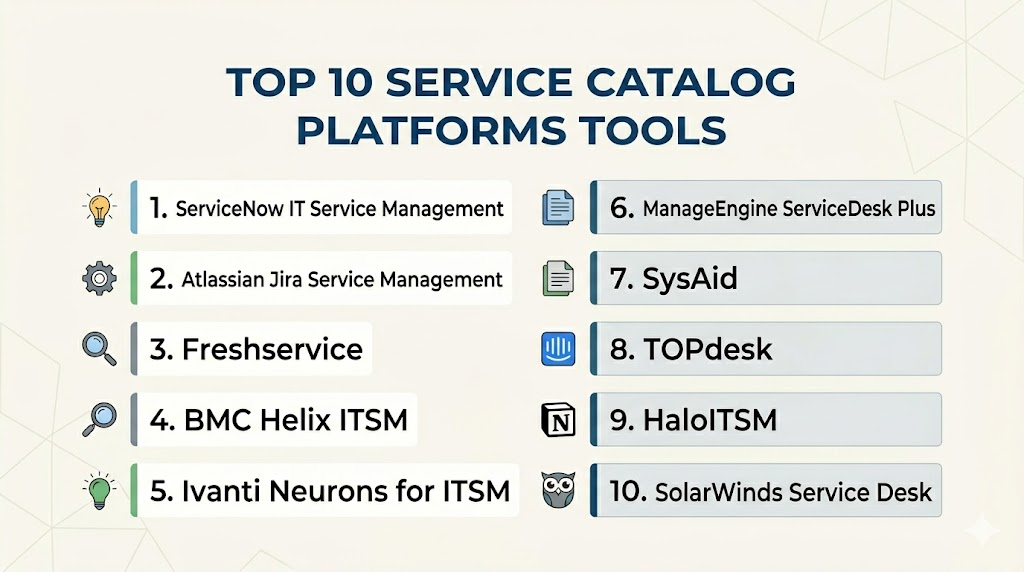
Introduction
Service Catalog Platforms help organizations present IT, HR, finance, facilities, security, and business services in a structured self-service portal. Instead of employees sending emails or messages to different teams, a service catalog allows users to request access, report issues, order equipment, ask for software, submit approvals, and track request status through one organized interface. In simple terms, it turns internal services into clear, requestable items with defined workflows.
Service catalog platforms matter because modern workplaces depend on many digital services, SaaS tools, remote employees, approval processes, and compliance requirements. Without a catalog, employees may not know where to request help, while service teams waste time handling unclear or incomplete requests.
Real-world use cases include IT service requests, software access approvals, laptop provisioning, employee onboarding, password help, HR document requests, facilities tickets, procurement intake, and security access reviews. Buyers should evaluate workflow automation, portal usability, approval routing, ITSM integration, knowledge base support, role-based access, analytics, security controls, scalability, and ease of administration.
Best for: Service Catalog Platforms are best for IT service management teams, enterprise service management teams, shared service centers, HR operations, facilities teams, finance operations, security teams, managed service providers, and companies that want standardized request management.
Not ideal for: They may not be necessary for very small teams with simple informal support needs, low request volume, or only one support function. In those cases, a basic helpdesk, shared inbox, ticket form, or project management tool may be enough.
Key Trends in Service Catalog Platforms
- Enterprise service management expansion: Service catalogs are moving beyond IT and becoming shared portals for HR, finance, legal, facilities, procurement, and security teams.
- AI-assisted request intake: Modern platforms are adding AI to help users find the right catalog item, summarize requests, recommend knowledge articles, and route tickets accurately.
- No-code workflow design: Admins increasingly want to build service request forms, approvals, routing rules, and fulfillment workflows without heavy developer dependency.
- Employee experience focus: Catalog portals are becoming simpler, more searchable, and more personalized so employees can request services without confusion.
- Integration with identity and access systems: Access requests, software provisioning, role changes, and onboarding workflows increasingly connect with identity governance and access management tools.
- Automation-first fulfillment: Service catalog platforms now trigger automated actions such as account creation, group assignment, software installation, asset allocation, and notification workflows.
- Knowledge and catalog convergence: Platforms are combining service requests with knowledge articles so users can solve issues before submitting tickets.
- Multi-department governance: Large organizations need catalog ownership, approval hierarchies, role-based visibility, compliance checks, and audit trails across departments.
- Data-driven service improvement: Teams use catalog analytics to identify high-volume requests, slow approvals, incomplete forms, bottlenecks, and automation opportunities.
- Hybrid work support: Remote and distributed teams need self-service portals for device requests, access support, collaboration tools, onboarding, and workplace service requests.
How We Selected These Tools
The tools in this list were selected based on their relevance to IT service catalogs, enterprise service management, workflow automation, request fulfillment, employee self-service, and service management maturity. The list includes enterprise ITSM platforms, modern service desk tools, and flexible workflow platforms that support catalog-driven service delivery.
Selection logic included:
- Market recognition in IT service management and enterprise service management.
- Strength of service catalog creation, request forms, approvals, and workflow automation.
- Ability to support IT, HR, facilities, finance, security, and cross-functional service delivery.
- Integration depth with identity systems, asset tools, collaboration apps, monitoring tools, and business systems.
- Portal usability for employees and service teams.
- Support for automation, knowledge base, ticket routing, and fulfillment workflows.
- Scalability for SMB, mid-market, enterprise, and managed service provider use cases.
- Administrative controls such as role-based access, permissions, audit logs, and governance.
- Reporting capabilities for request volume, SLA performance, bottlenecks, and catalog adoption.
- Practical value for reducing manual intake, improving employee experience, and standardizing services.
Top 10 Service Catalog Platforms Tools
1- ServiceNow IT Service Management
Short description:
ServiceNow IT Service Management is one of the most recognized enterprise platforms for ITSM, service catalogs, workflow automation, and enterprise service management. Its service catalog capabilities help organizations create structured request portals for IT, HR, facilities, security, and other internal services. It is especially useful for large organizations with complex workflows, approval chains, compliance requirements, and multiple service teams. ServiceNow is best suited for enterprises that need scalable, governed, and automation-ready service delivery.
Key Features
- Enterprise-grade service catalog and request management.
- Workflow automation for approvals, routing, and fulfillment.
- Service portal for employee self-service.
- Knowledge base and virtual agent support.
- Integration with incident, change, asset, and configuration management.
- Role-based access and catalog item visibility.
- Reporting for request volume, SLAs, fulfillment time, and service performance.
Pros
- Strong enterprise depth for complex service management.
- Scales well across IT and non-IT departments.
- Large ecosystem of integrations, partners, and workflow extensions.
Cons
- Implementation can be complex and resource-intensive.
- May be too advanced for small teams with simple catalog needs.
- Requires strong administration and governance to avoid catalog sprawl.
Platforms / Deployment
Web / Mobile experiences
Cloud
Security & Compliance
ServiceNow provides enterprise security controls such as SSO, MFA support, role-based access, audit capabilities, encryption options, and administrative governance. Specific compliance coverage depends on product, region, contract, and configuration.
Integrations & Ecosystem
ServiceNow has a broad enterprise ecosystem and is commonly integrated with identity systems, asset databases, monitoring tools, collaboration apps, HR systems, and business applications. Its service catalog becomes more powerful when connected with automated fulfillment workflows.
- Identity and access management systems
- Configuration management databases
- Asset management tools
- HR and employee service systems
- Microsoft Teams and Slack
- Enterprise automation and integration tools
Support & Community
ServiceNow has extensive documentation, training resources, certification programs, enterprise support tiers, implementation partners, and a large global community. Support strength is high, but successful adoption usually requires experienced platform ownership.
2- Atlassian Jira Service Management
Short description:
Jira Service Management is a modern service management platform that supports service catalogs, request portals, incident management, change management, asset workflows, and IT operations collaboration. It is especially useful for IT, DevOps, engineering, and business teams already using the Atlassian ecosystem. Its service catalog capabilities help teams create request types, workflows, approvals, and self-service experiences. Jira Service Management is a strong option for organizations that want flexible service management with collaboration across technical teams.
Key Features
- Service request portal and request type management.
- Catalog-style intake for IT and business services.
- Workflow automation and approval routing.
- Knowledge base integration with Confluence.
- Incident, change, problem, and asset management support.
- Collaboration with development and operations teams.
- Reporting for queues, SLAs, requests, and service performance.
Pros
- Strong fit for Atlassian and DevOps-oriented teams.
- Flexible workflows and request management.
- Good balance of usability and service management depth.
Cons
- Enterprise catalog governance may require careful configuration.
- Best value is achieved when the organization uses Atlassian tools.
- Complex cross-department catalogs may need process design and admin discipline.
Platforms / Deployment
Web / iOS / Android
Cloud / Data Center options may vary
Security & Compliance
Atlassian provides security controls such as SSO options, permissions, audit logs on selected plans, access policies, and administrative governance. Specific compliance coverage depends on product plan, deployment model, region, and configuration.
Integrations & Ecosystem
Jira Service Management integrates strongly with Atlassian products and many IT operations, collaboration, and automation tools. It is especially useful when service requests need to connect with engineering workflows.
- Confluence
- Jira Software
- Opsgenie-style incident workflows
- Slack and Microsoft Teams
- Monitoring and alerting tools
- Asset and configuration tools
Support & Community
Atlassian provides documentation, marketplace apps, training materials, community forums, partner services, and support plans. Its community is large and active, especially among IT, DevOps, and agile teams.
3- Freshservice
Short description:
Freshservice is a cloud-based IT service management platform that includes service catalog, incident management, asset management, change management, knowledge base, and workflow automation capabilities. It is known for its user-friendly interface and practical adoption for SMB and mid-market IT teams. Its service catalog helps employees request services, software, access, equipment, and support through a simple portal. Freshservice is a strong choice for organizations that want modern ITSM without excessive implementation complexity.
Key Features
- Service catalog with request forms and approval workflows.
- Employee self-service portal.
- Incident, problem, change, and asset management.
- Workflow automation for fulfillment and routing.
- Knowledge base and AI-assisted support capabilities.
- SLA management and request tracking.
- Reporting dashboards for IT service performance.
Pros
- User-friendly and faster to adopt than many enterprise-heavy platforms.
- Good fit for SMB and mid-market IT teams.
- Strong combination of service catalog, helpdesk, and asset workflows.
Cons
- Very complex enterprise requirements may need additional configuration.
- Some advanced capabilities depend on selected plan.
- Large multi-department catalog governance may require careful design.
Platforms / Deployment
Web / iOS / Android
Cloud
Security & Compliance
Freshservice provides security features such as role-based access, SSO options, audit logs, data protection controls, and administrative permissions depending on plan and configuration. Specific compliance needs should be validated during procurement.
Integrations & Ecosystem
Freshservice integrates with collaboration tools, identity systems, monitoring tools, asset systems, and business applications. Its catalog works well when connected with automation and employee support workflows.
- Microsoft Teams
- Slack
- Identity providers
- Asset management systems
- Monitoring tools
- Business applications
Support & Community
Freshservice provides documentation, customer support, onboarding resources, training materials, and an active Freshworks user community. It is especially practical for teams that need faster onboarding and straightforward administration.
4- BMC Helix ITSM
Short description:
BMC Helix ITSM is an enterprise IT service management platform that supports service catalog management, workflow automation, incident management, change management, asset management, and AI-driven service operations. It is well suited for large organizations with mature ITIL processes, complex operations, and enterprise service delivery requirements. Its service catalog capabilities help organizations standardize request intake and automate fulfillment across IT and business functions. BMC Helix is best for enterprises that need deep ITSM governance and scalability.
Key Features
- Enterprise service catalog and request management.
- Workflow automation and approval routing.
- Incident, problem, change, asset, and knowledge management.
- AI and automation capabilities for service operations.
- Employee self-service portal.
- Multi-team and multi-process service delivery support.
- Analytics for service performance and operational visibility.
Pros
- Strong enterprise ITSM and ITIL process depth.
- Suitable for complex and large-scale IT service environments.
- Supports mature governance, automation, and operational workflows.
Cons
- May require significant implementation and administration expertise.
- Can be more complex than needed for smaller teams.
- Optimization depends on strong process maturity and data governance.
Platforms / Deployment
Web
Cloud / Hybrid options may vary
Security & Compliance
BMC Helix provides enterprise security and administrative controls, including access management, role-based permissions, and governance features. Specific compliance certifications and deployment-level controls should be validated with the vendor.
Integrations & Ecosystem
BMC Helix integrates with IT operations, monitoring, asset, identity, and enterprise systems. It is especially useful in organizations with mature IT operations and complex service management architectures.
- IT operations tools
- Monitoring systems
- Asset and configuration systems
- Identity management tools
- Automation platforms
- Enterprise reporting systems
Support & Community
BMC provides enterprise support, documentation, professional services, training resources, and partner assistance. Its ecosystem is strongest among large IT organizations with mature service management practices.
5- Ivanti Neurons for ITSM
Short description:
Ivanti Neurons for ITSM is a service management platform that supports service catalog, incident, problem, change, asset, knowledge, and workflow automation capabilities. It is designed for IT teams that want to connect service management with endpoint, asset, and automation workflows. Its service catalog helps users request IT services and allows teams to automate approvals, assignments, and fulfillment processes. Ivanti is a strong option for organizations that value ITSM, asset visibility, and automation in one ecosystem.
Key Features
- Service catalog and request management.
- Workflow automation for approvals and fulfillment.
- Incident, problem, change, and knowledge management.
- Asset and endpoint management alignment.
- Self-service portal for employees.
- Automation and AI-assisted service capabilities.
- Reporting for service operations and request performance.
Pros
- Strong connection between service management and asset operations.
- Useful for IT teams managing endpoints, assets, and service workflows.
- Flexible platform for internal service delivery.
Cons
- Configuration may require experienced administration.
- User experience and complexity depend on implementation quality.
- Some advanced capabilities may depend on product scope and licensing.
Platforms / Deployment
Web
Cloud / Hybrid options may vary
Security & Compliance
Ivanti provides security and administrative controls such as permissions, role-based access, and governance capabilities. Specific compliance coverage, encryption details, and certification scope should be verified during procurement.
Integrations & Ecosystem
Ivanti integrates with IT asset, endpoint, identity, monitoring, and service management systems. It is especially relevant for organizations that want service requests connected with device and asset lifecycle workflows.
- Endpoint management tools
- Asset management systems
- Identity providers
- Monitoring platforms
- Collaboration tools
- Enterprise automation systems
Support & Community
Ivanti provides documentation, support services, implementation resources, and partner assistance. Its community is strongest among IT teams focused on endpoint, asset, and service management operations.
6- ManageEngine ServiceDesk Plus
Short description:
ManageEngine ServiceDesk Plus is an IT service management platform that includes service catalog, incident management, asset management, change management, project management, and knowledge base capabilities. It is popular among SMB, mid-market, and enterprise IT teams looking for practical ITSM functionality with flexible deployment options. Its service catalog helps organizations create standard request templates, approval workflows, and employee self-service forms. It is a strong choice for teams that want broad ITSM features without excessive complexity.
Key Features
- Service catalog with customizable request templates.
- Incident, problem, change, and asset management.
- Approval workflows and SLA management.
- Self-service portal and knowledge base.
- IT project and task management support.
- Reporting and analytics for service desk operations.
- Cloud and on-premise deployment options.
Pros
- Strong value for ITSM and service catalog functionality.
- Flexible deployment options for different IT environments.
- Practical for SMB, mid-market, and cost-conscious enterprises.
Cons
- Interface and workflow depth may require tuning for complex enterprises.
- Advanced automation and analytics may depend on edition.
- Catalog governance should be planned carefully as request types grow.
Platforms / Deployment
Web / Mobile apps
Cloud / Self-hosted options may vary
Security & Compliance
ManageEngine ServiceDesk Plus provides access controls, role-based permissions, authentication options, audit features, and administrative settings. Specific compliance coverage and security requirements should be validated based on deployment model and edition.
Integrations & Ecosystem
ServiceDesk Plus integrates with other ManageEngine products and third-party IT systems. It is useful for teams that want helpdesk, asset, monitoring, and identity workflows connected.
- ManageEngine ecosystem tools
- Active Directory and identity systems
- Monitoring platforms
- Endpoint and asset tools
- Collaboration tools
- Email and notification systems
Support & Community
ManageEngine provides documentation, support resources, training materials, forums, and product assistance. Its community is strong among IT administrators and service desk teams looking for practical ITSM implementation.
7- SysAid
Short description:
SysAid is an ITSM and helpdesk platform that includes service catalog, ticketing, automation, asset management, self-service, and AI-assisted support capabilities. It is designed for IT teams that want a manageable service desk solution with built-in automation and employee request workflows. SysAid’s service catalog helps organizations standardize common IT service requests and automate fulfillment steps. It is useful for SMB and mid-market IT departments that need service catalog functionality without a large enterprise platform.
Key Features
- Service catalog and self-service portal.
- Ticketing and incident management.
- Workflow automation for service requests.
- Asset management capabilities.
- Knowledge base and AI-assisted support features.
- SLA tracking and service desk reporting.
- Custom forms and request routing.
Pros
- Practical service desk and catalog capabilities for growing teams.
- Easier to manage than many enterprise-heavy ITSM platforms.
- Combines ticketing, assets, automation, and self-service.
Cons
- May not match the enterprise depth of larger ITSM suites.
- Advanced multi-department workflows may require extra configuration.
- Integration needs should be validated for complex IT environments.
Platforms / Deployment
Web
Cloud / Self-hosted options may vary
Security & Compliance
SysAid provides administrative controls, user permissions, authentication options, and security features for helpdesk workflows. Specific compliance certifications and enterprise security details should be validated with the vendor.
Integrations & Ecosystem
SysAid integrates with IT systems, identity tools, communication platforms, and service desk workflows. It is useful when IT teams want catalog requests connected with ticketing and asset visibility.
- Identity systems
- Email and notification tools
- Asset management workflows
- Remote support tools
- Collaboration platforms
- IT operations systems
Support & Community
SysAid provides documentation, customer support, onboarding resources, and product guidance. Its community is practical for IT service desk teams looking for manageable ITSM adoption.
8- TOPdesk
Short description:
TOPdesk is a service management platform that supports ITSM, enterprise service management, service catalogs, self-service portals, asset management, and workflow automation. It is used by IT, facilities, HR, and shared service teams to organize internal services and improve employee request handling. TOPdesk’s service catalog helps teams publish requestable services with clear forms, ownership, and workflows. It is a good fit for organizations that want structured service delivery across multiple departments.
Key Features
- Service catalog and self-service portal.
- Incident and request management.
- Asset and reservation management capabilities.
- Knowledge base support.
- Workflow automation and task assignment.
- Multi-department service management.
- Reporting for service performance and request trends.
Pros
- Good fit for enterprise service management beyond IT.
- User-friendly portal for employee requests.
- Supports multiple internal service teams in one platform.
Cons
- Complex enterprise customization should be validated during evaluation.
- Advanced automation depth may vary by configuration.
- Best results require service ownership and catalog governance.
Platforms / Deployment
Web
Cloud / Deployment options may vary
Security & Compliance
TOPdesk provides administrative and access control features for service management workflows. Specific security certifications, data protection details, and compliance coverage should be validated with the vendor.
Integrations & Ecosystem
TOPdesk integrates with business systems, identity tools, communication platforms, and service workflows. It is especially useful for organizations that want a shared catalog for IT and non-IT departments.
- Identity providers
- Email and collaboration systems
- Asset management tools
- HR and facilities workflows
- Reporting tools
- Business applications
Support & Community
TOPdesk provides documentation, support, implementation guidance, training resources, and customer success services. Its community is strong among service management teams focused on IT and shared services.
9- HaloITSM
Short description:
HaloITSM is an IT service management platform that supports service catalog, incident management, change management, problem management, asset management, automation, and self-service portals. It is designed for organizations that want a configurable and modern ITSM platform with strong workflow flexibility. Its service catalog helps IT teams publish services, manage requests, automate approvals, and track fulfillment. HaloITSM is suitable for mid-market, enterprise, and service provider environments that need adaptable service management.
Key Features
- Service catalog and self-service portal.
- Incident, problem, change, and asset management.
- Workflow automation and approval routing.
- SLA and service performance reporting.
- Knowledge base and request templates.
- Customizable forms and processes.
- Support for ITSM and broader service management workflows.
Pros
- Modern and flexible ITSM platform.
- Strong workflow configurability for service catalog use cases.
- Good fit for teams that need adaptable service management.
Cons
- Advanced configuration requires thoughtful process design.
- Buyers should validate ecosystem fit with existing tools.
- Enterprise-scale requirements should be reviewed carefully during evaluation.
Platforms / Deployment
Web
Cloud / Self-hosted options may vary
Security & Compliance
HaloITSM provides administrative security controls such as user permissions, authentication options, and access governance. Specific certifications, compliance coverage, and data protection details should be validated with the vendor.
Integrations & Ecosystem
HaloITSM integrates with identity, monitoring, collaboration, asset, and business systems. Its catalog capabilities are most useful when connected with automated workflows and clear service ownership.
- Identity systems
- Collaboration tools
- Monitoring platforms
- Asset management systems
- Email and notification tools
- Business applications
Support & Community
HaloITSM provides documentation, customer support, onboarding assistance, and implementation guidance. Its community is growing among ITSM teams and service providers that need flexible workflow design.
10- SolarWinds Service Desk
Short description:
SolarWinds Service Desk is a cloud-based IT service management platform that includes service catalog, incident management, asset management, knowledge base, change management, and employee self-service features. It is designed to help IT teams manage requests, automate workflows, and improve service visibility. Its service catalog allows employees to request standard services while IT teams manage routing, approvals, and fulfillment. It is a practical option for SMB and mid-market IT teams looking for a cloud ITSM solution.
Key Features
- Service catalog and employee self-service portal.
- Incident and request management.
- Asset management and change management support.
- Workflow automation and approval routing.
- Knowledge base for self-service support.
- SLA management and reporting.
- Cloud-based IT service desk operations.
Pros
- Practical ITSM features for SMB and mid-market teams.
- Combines service catalog, ticketing, assets, and knowledge.
- Cloud deployment supports faster access and administration.
Cons
- Very complex enterprise service management may require deeper tools.
- Advanced customization should be validated before purchase.
- Integration depth depends on existing IT environment and requirements.
Platforms / Deployment
Web
Cloud
Security & Compliance
SolarWinds Service Desk provides security and administrative controls for IT service desk workflows. Specific compliance certifications, access controls, and data protection details should be validated based on plan and procurement requirements.
Integrations & Ecosystem
SolarWinds Service Desk connects with IT management, monitoring, asset, identity, and collaboration workflows. It is particularly useful for teams already using SolarWinds or cloud-based IT operations tools.
- SolarWinds ecosystem tools
- Identity systems
- Asset management workflows
- Monitoring tools
- Email and notification systems
- Collaboration platforms
Support & Community
SolarWinds provides documentation, support resources, customer assistance, and community forums. Its ecosystem is familiar to many IT operations and service desk teams.
Comparison Table Top 10
| Tool Name | Best For | Platform Supported | Deployment | Standout Feature | Public Rating |
|---|---|---|---|---|---|
| ServiceNow IT Service Management | Enterprise service catalog and workflow automation | Web, mobile experiences | Cloud | Enterprise-grade service catalog governance | N/A |
| Atlassian Jira Service Management | IT, DevOps, and Atlassian-centered teams | Web, iOS, Android | Cloud / Data Center options may vary | Flexible request portals and workflow automation | N/A |
| Freshservice | SMB and mid-market ITSM teams | Web, iOS, Android | Cloud | User-friendly service catalog and ITSM workflows | N/A |
| BMC Helix ITSM | Large enterprises with mature ITIL processes | Web | Cloud / Hybrid options may vary | Deep enterprise ITSM process support | N/A |
| Ivanti Neurons for ITSM | ITSM plus asset and endpoint-aligned workflows | Web | Cloud / Hybrid options may vary | Service management connected with asset operations | N/A |
| ManageEngine ServiceDesk Plus | Cost-conscious IT teams needing broad ITSM | Web, mobile apps | Cloud / Self-hosted options may vary | Strong value with flexible deployment | N/A |
| SysAid | SMB and mid-market helpdesk automation | Web | Cloud / Self-hosted options may vary | Practical catalog, ticketing, and asset management | N/A |
| TOPdesk | Enterprise service management across departments | Web | Cloud / Deployment options may vary | Multi-department service catalog support | N/A |
| HaloITSM | Flexible ITSM and service provider workflows | Web | Cloud / Self-hosted options may vary | Configurable workflows and catalog forms | N/A |
| SolarWinds Service Desk | Cloud ITSM for SMB and mid-market teams | Web | Cloud | Cloud service desk with catalog and assets | N/A |
Evaluation and Scoring of Service Catalog Platforms
The scoring below is comparative and based on service catalog depth, workflow automation, ease of use, integration ecosystem, security posture signals, performance, support expectations, and value. These are not public ratings and should not be treated as universal rankings. A platform with a lower score may still be the best choice if it matches your current IT stack, budget, and workflow maturity.
| Tool Name | Core 25% | Ease 15% | Integrations 15% | Security 10% | Performance 10% | Support 10% | Value 15% | Weighted Total 0–10 |
|---|---|---|---|---|---|---|---|---|
| ServiceNow IT Service Management | 10 | 7 | 10 | 9 | 9 | 9 | 7 | 8.75 |
| Atlassian Jira Service Management | 9 | 8 | 9 | 8 | 8 | 8 | 8 | 8.40 |
| Freshservice | 8 | 9 | 8 | 8 | 8 | 8 | 9 | 8.30 |
| BMC Helix ITSM | 9 | 7 | 9 | 9 | 9 | 8 | 7 | 8.30 |
| Ivanti Neurons for ITSM | 8 | 7 | 8 | 8 | 8 | 8 | 8 | 7.80 |
| ManageEngine ServiceDesk Plus | 8 | 8 | 8 | 8 | 8 | 8 | 9 | 8.15 |
| SysAid | 7 | 8 | 7 | 7 | 8 | 8 | 8 | 7.50 |
| TOPdesk | 8 | 8 | 7 | 8 | 8 | 8 | 8 | 7.85 |
| HaloITSM | 8 | 8 | 8 | 8 | 8 | 8 | 8 | 8.00 |
| SolarWinds Service Desk | 7 | 8 | 7 | 8 | 8 | 8 | 8 | 7.65 |
These scores should be interpreted as a structured comparison, not a final buying decision. Enterprise teams may prioritize governance, automation depth, auditability, and integration maturity, while SMB teams may value usability, fast setup, and cost effectiveness. The best platform depends on whether the organization needs a simple request portal, a full ITSM solution, or a cross-department enterprise service catalog. Buyers should test workflows using real request forms, approval rules, and fulfillment processes before selecting a platform.
Which Service Catalog Platform Tool Is Right for You?
Solo / Freelancer
Solo professionals usually do not need a dedicated Service Catalog Platform. A simple form builder, shared inbox, project board, or ticketing tool may be enough for basic client or internal requests. If a freelancer manages repeatable service packages, a lightweight helpdesk or request form can standardize intake. Full service catalog platforms are usually more valuable once there are multiple users, departments, approval rules, or recurring service requests.
SMB
SMBs should prioritize ease of setup, simple request forms, basic approvals, self-service portals, and affordable licensing. Freshservice, ManageEngine ServiceDesk Plus, SysAid, SolarWinds Service Desk, and HaloITSM can be practical options depending on the team’s service maturity. SMBs should avoid overbuilding a large catalog too early. The best starting point is to publish common requests such as password help, software access, equipment requests, onboarding support, and general IT assistance.
Mid-Market
Mid-market organizations usually need stronger workflow automation, SLA tracking, role-based access, reporting, and integrations with identity, asset, and collaboration systems. Jira Service Management, Freshservice, ManageEngine ServiceDesk Plus, HaloITSM, TOPdesk, and Ivanti can be strong choices. If the company has DevOps and engineering workflows, Jira Service Management may fit well. If the company wants broader enterprise service management across departments, TOPdesk or Freshservice may be suitable.
Enterprise
Enterprises need governance, scalability, auditability, advanced workflows, multi-department support, and strong integration with identity, asset, HR, security, and operations systems. ServiceNow IT Service Management and BMC Helix ITSM are strong candidates for large, mature ITSM environments. Ivanti, Jira Service Management, and TOPdesk may also fit depending on architecture and departmental needs. Enterprise buyers should validate catalog governance, service ownership, access controls, approval routing, automation, and reporting requirements.
Budget vs Premium
Budget-focused teams should choose platforms that solve the most common service request problems without excessive implementation cost. ManageEngine ServiceDesk Plus, SysAid, SolarWinds Service Desk, Freshservice, and HaloITSM may offer practical value depending on requirements. Premium platforms such as ServiceNow and BMC Helix are better suited for organizations that need enterprise-scale workflows, governance, integrations, and service management maturity. Buyers should compare total cost, including configuration, administration, training, and long-term maintenance.
Feature Depth vs Ease of Use
Feature depth matters when service catalogs must support complex approvals, multiple departments, automation, audit requirements, and advanced integrations. ServiceNow, BMC Helix, Jira Service Management, and Ivanti offer strong depth. Ease of use matters when teams need quick adoption and simple service intake. Freshservice, ManageEngine, SysAid, HaloITSM, and SolarWinds Service Desk may be more practical for teams that want faster setup. The best choice depends on workflow complexity and admin resources.
Integrations and Scalability
A service catalog becomes more valuable when it connects with identity systems, asset databases, collaboration tools, HR systems, procurement workflows, endpoint management, and automation platforms. Integration quality affects fulfillment speed and data accuracy. For example, a software access request should ideally trigger approvals, identity changes, license assignment, and notifications. Buyers should test key integrations during evaluation rather than assuming they will work easily.
Security and Compliance Needs
Service Catalog Platforms may handle access requests, employee data, device information, software entitlements, security approvals, and internal service workflows. Buyers should evaluate SSO, MFA, role-based access, catalog item visibility, audit logs, encryption, admin controls, and data retention. Large organizations should also define who owns each catalog item and who can approve sensitive requests. Strong governance helps prevent unauthorized access and reduces compliance risk.
Frequently Asked Questions FAQs
1. What is a Service Catalog Platform?
A Service Catalog Platform is software that allows organizations to publish internal services in a structured self-service portal. Employees can request services such as software access, laptop provisioning, onboarding support, facilities help, HR documents, or security approvals. Each service item usually includes a form, approval workflow, fulfillment steps, and tracking. The goal is to make internal services easy to find and easy to request. It also helps service teams standardize intake and reduce unclear email-based requests.
2. How is a service catalog different from a helpdesk?
A helpdesk mainly focuses on handling support tickets, incidents, and user issues. A service catalog is more structured because it lists predefined services that users can request through forms and workflows. For example, “reset my password” may be a helpdesk issue, while “request a new laptop” or “request access to CRM” may be a catalog item. Many ITSM platforms include both helpdesk and service catalog capabilities. Together, they improve both reactive support and planned service delivery.
3. What pricing models are common for Service Catalog Platforms?
Service Catalog Platforms usually use subscription pricing based on agents, users, modules, assets, service volume, or product tiers. Enterprise platforms often use custom pricing because requirements vary by company size, workflow complexity, integrations, and support needs. Some vendors may include service catalog features in an ITSM package, while others offer them as part of higher-tier plans. Buyers should ask about implementation, admin training, integrations, automation limits, and support costs. Total cost matters more than license price alone.
4. How long does implementation usually take?
Implementation depends on catalog size, workflow complexity, approval rules, integrations, and organizational readiness. A small IT team can start with a few basic catalog items faster than an enterprise building a multi-department service portal. The most time-consuming work is usually defining services, writing clear request forms, assigning owners, mapping approvals, and testing fulfillment workflows. A phased rollout is recommended. Start with high-volume requests, measure adoption, and expand the catalog over time.
5. What are common mistakes when building a service catalog?
A common mistake is creating too many catalog items without clear ownership or governance. Another mistake is writing confusing service names that employees do not understand. Some organizations also build forms that ask for too much information, which discourages adoption. Poor approval design can slow down fulfillment and frustrate users. A good service catalog should be simple, searchable, clearly owned, regularly reviewed, and connected to real fulfillment workflows.
6. Are Service Catalog Platforms secure?
Service Catalog Platforms can be secure when configured with proper access controls, authentication, permissions, audit logs, and approval rules. Security is important because catalog requests may involve software access, employee data, device information, and internal business systems. Buyers should evaluate SSO, MFA, role-based access, catalog visibility, approval history, encryption, and administrative governance. Sensitive service items should be visible only to the right users. Security review should be part of every service catalog implementation.
7. Can Service Catalog Platforms integrate with identity and access systems?
Yes, many service catalog platforms can integrate with identity and access management systems. This is useful for workflows such as software access requests, role changes, onboarding, offboarding, and group membership updates. A well-integrated catalog can collect the request, route approvals, trigger access changes, and notify the user. However, integration depth varies by platform and environment. Buyers should test identity-related workflows carefully because access automation has security and compliance impact.
8. Can a service catalog support non-IT departments?
Yes, many modern service catalog platforms support enterprise service management across HR, finance, legal, facilities, procurement, and security teams. For example, HR can publish employee document requests, facilities can publish room or equipment requests, and finance can publish expense or vendor intake workflows. This helps employees use one portal instead of contacting different departments manually. However, each department needs clear service ownership and workflow design. Without governance, a multi-department catalog can become confusing.
9. What alternatives exist if a full Service Catalog Platform is not needed?
Alternatives include helpdesk request forms, shared inboxes, simple ticketing tools, form builders, project management boards, knowledge bases, or workflow automation tools. These can work well for small teams with limited request types and low volume. However, they may become difficult to manage as approval rules, departments, users, and service types increase. A dedicated service catalog platform becomes more useful when standardization, tracking, automation, and governance become important. The right alternative depends on request complexity and growth plans.
10. How should buyers evaluate Service Catalog Platforms?
Buyers should evaluate service catalog usability, form design, workflow automation, approval routing, ITSM integration, reporting, role-based access, security controls, and long-term scalability. They should test real catalog items such as software access, device requests, onboarding, and facilities requests. It is important to involve IT, HR, finance, security, and end users during evaluation. A good platform should be easy for employees to use and easy for admins to maintain. The best choice is the one that standardizes service delivery without creating unnecessary complexity.
Conclusion
Service Catalog Platforms help organizations standardize internal service delivery, improve employee self-service, reduce unclear request intake, and automate repeatable workflows across IT and business departments. The best platform depends on company size, service maturity, existing ITSM stack, workflow complexity, security needs, and budget. ServiceNow and BMC Helix are strong for large enterprise environments, Jira Service Management fits Atlassian and DevOps-centered teams, Freshservice is practical for SMB and mid-market ITSM, and tools like ManageEngine ServiceDesk Plus, SysAid, TOPdesk, HaloITSM, Ivanti, and SolarWinds Service Desk offer useful options for different service management needs. There is no single universal winner because a small IT team, a global enterprise, a shared service center, and a DevOps-heavy organization may all need different catalog capabilities.
