MOTOSHARE 🚗🏍️
Rent Bikes & Cars Directly from Owners
Motoshare connects vehicle owners with people who need bikes and cars on rent. Owners earn from idle vehicles, and renters get flexible ride options.
Visit Motoshare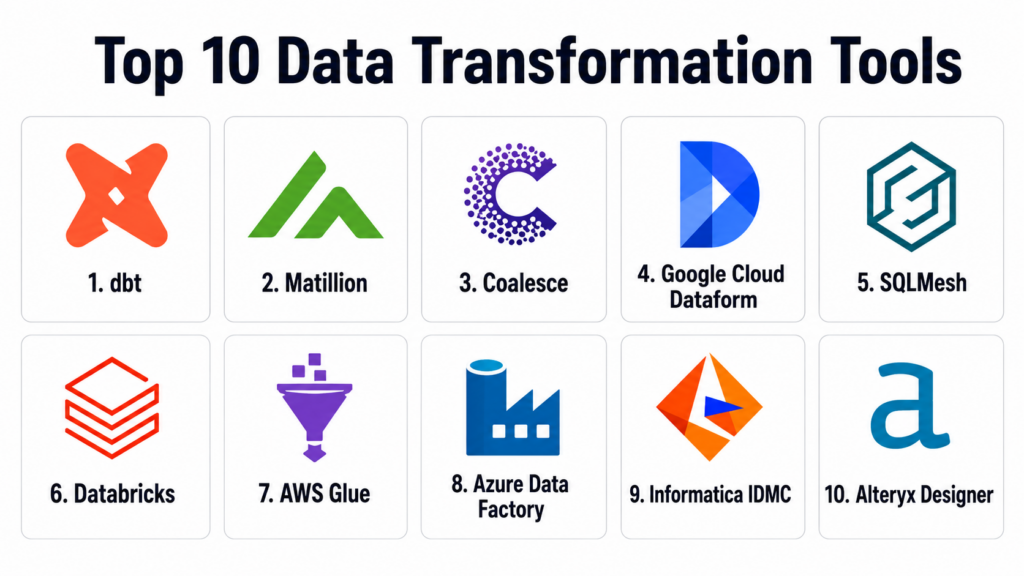
Introduction
Data Transformation Tools help teams clean, structure, enrich, standardize, validate, and model raw data into usable business-ready datasets. In simple terms, these tools take messy data from sources such as applications, APIs, databases, files, warehouses, and data lakes, then convert it into reliable tables, metrics, models, and analytics layers that teams can use for reporting, AI, machine learning, and decision-making.
Data transformation matters because modern businesses collect data from many systems, but raw data is rarely ready for analysis. It may contain duplicates, inconsistent formats, missing values, incorrect joins, unclear business logic, and changing schemas. Without proper transformation, dashboards become unreliable, data teams lose trust, and business users make decisions on poor-quality information.
Real world use cases include ELT transformations, SQL modeling, data cleansing, schema standardization, customer 360 modeling, financial reporting models, marketing attribution tables, product analytics datasets, ML feature preparation, and data quality validation.
Buyers should evaluate warehouse support, transformation language, version control, testing, lineage, scheduling, governance, collaboration, scalability, developer experience, security controls, and integration with the modern data stack.
Best for: Data Transformation Tools are best for data engineers, analytics engineers, BI teams, data analysts, data platform teams, ML teams, finance analytics teams, marketing analytics teams, and enterprises building trusted data models for reporting and AI.
Not ideal for: These tools may not be necessary for very small teams with simple spreadsheets, limited data sources, or basic reporting needs. In those cases, spreadsheet formulas, BI tool calculations, warehouse-native SQL scripts, or simple ELT platform transformations may be enough until data complexity increases.
Key Trends in Data Transformation Tools
- ELT has become the default modern pattern: Teams increasingly load raw data into cloud warehouses first, then transform it using SQL, Python, or visual modeling tools.
- SQL-first transformation remains dominant: Many modern transformation tools use SQL because analytics engineers and analysts can understand, review, and maintain business logic more easily.
- Data quality testing is now expected: Teams want built-in tests for uniqueness, freshness, null values, referential integrity, accepted values, and custom business rules.
- Lineage and documentation are critical: Buyers want to know where every metric comes from, which models depend on each other, and what will break when a source changes.
- AI-ready data models are becoming a priority: Clean, governed, and well-documented transformations are essential for AI agents, semantic layers, ML features, and enterprise copilots.
- Visual and code-first tools are converging: Business-friendly platforms are adding code support, while code-first tools are improving documentation, lineage, and collaboration.
- Warehouse-native execution is growing: Tools increasingly push transformations into Snowflake, BigQuery, Redshift, Databricks, and other platforms instead of moving data elsewhere.
- Git-based development is becoming standard: Teams want pull requests, code review, environment promotion, CI/CD, rollback, and versioned transformation logic.
- Data contracts and semantic governance are rising: Organizations want consistent definitions for revenue, customers, churn, active users, product usage, and financial KPIs.
- Managed transformation platforms are gaining traction: Many teams prefer cloud-hosted tools to reduce infrastructure management, scheduling effort, and production operations overhead.
How We Selected These Tools
The tools in this list were selected based on their relevance to data transformation, SQL modeling, ELT workflows, analytics engineering, cloud warehouse transformation, data quality, documentation, lineage, and modern data stack adoption.
Selection logic included:
- Recognition in data transformation, ELT, analytics engineering, data modeling, or modern data platform workflows.
- Ability to transform raw data into analytics-ready datasets, models, metrics, and business logic layers.
- Support for SQL, Python, visual transformations, or warehouse-native transformation execution.
- Integration with cloud warehouses, data lakes, orchestration tools, BI platforms, and ingestion tools.
- Support for testing, documentation, lineage, version control, and collaboration.
- Fit across SMB, mid-market, enterprise, analytics teams, engineering teams, and business users.
- Security and governance capabilities such as RBAC, SSO, audit logs, secrets management, and environment controls.
- Scalability for production data pipelines, large warehouses, and complex dependency graphs.
- Developer experience for local development, CI/CD, code review, modular modeling, and deployment.
- Overall value for improving data trust, reducing manual SQL work, and making analytics more reliable.
Top 10 Data Transformation Tools
1- dbt
Short description:
dbt is one of the most widely adopted data transformation tools for analytics engineering and modern ELT workflows. It lets teams write modular SQL models, test data, document transformations, and manage business logic using software engineering practices. dbt is especially useful when raw data is already loaded into a cloud warehouse and needs to be modeled into reliable analytics tables. It is a strong fit for data teams that want version-controlled, tested, and documented transformations.
Key Features
- SQL-based transformation modeling.
- Modular models with dependencies.
- Built-in data testing and validation.
- Auto-generated documentation and lineage.
- Git-based development workflow.
- Support for common warehouses and lakehouse platforms.
- Strong open-source and managed cloud options.
Pros
- Strong standard for analytics engineering teams.
- Excellent for version-controlled SQL transformation workflows.
- Large ecosystem, community, and package library.
Cons
- Does not extract or load data by itself.
- Requires SQL and analytics engineering discipline.
- Complex projects need strong modeling standards to avoid technical debt.
Platforms / Deployment
Web / CLI / SQL / Python support may vary by setup
Cloud / Self-hosted through dbt Core / Managed options may vary
Security & Compliance
dbt security depends on deployment model and connected warehouse permissions. dbt Cloud provides access controls, environment management, secrets handling, and enterprise governance features depending on plan. Specific compliance coverage should be validated during procurement.
Integrations & Ecosystem
dbt integrates with cloud warehouses, orchestration tools, BI platforms, data quality tools, and ingestion platforms. It is especially useful when transformation logic needs to live close to the warehouse.
- Snowflake
- BigQuery
- Redshift
- Databricks
- Airflow and Dagster
- BI and semantic layer workflows
Support & Community
dbt has a large analytics engineering community, strong documentation, open-source resources, training materials, and commercial support through dbt Labs. Community strength is one of its biggest advantages.
2- Matillion
Short description:
Matillion is a cloud-native data integration and transformation platform that helps teams build visual ELT and transformation pipelines for cloud data warehouses and lakehouse platforms. It is especially useful for teams that prefer low-code or visual pipeline design while still supporting SQL-based transformation logic. Matillion helps users design data flows, transform data, orchestrate jobs, and manage warehouse workloads. It is a strong fit for enterprise and mid-market teams that want visual transformation with cloud data platform alignment.
Key Features
- Visual data transformation pipeline design.
- ELT workflows for cloud warehouses and lakehouses.
- SQL and component-based transformation support.
- Job orchestration and scheduling capabilities.
- Integration with major cloud data platforms.
- Reusable components and pipeline templates.
- Monitoring and operational visibility.
Pros
- Good for teams that prefer visual transformation workflows.
- Strong fit for cloud warehouse ELT patterns.
- Helps business and technical teams collaborate on transformation logic.
Cons
- May be less code-native than dbt for engineering-heavy teams.
- Cost and usage model should be evaluated carefully.
- Complex visual jobs can become difficult to govern without standards.
Platforms / Deployment
Web / Cloud data platforms
Cloud
Security & Compliance
Matillion provides enterprise access controls, secrets management, role-based permissions, and operational governance features depending on plan and deployment. Specific certifications and compliance coverage should be validated with the vendor.
Integrations & Ecosystem
Matillion integrates with cloud warehouses, cloud storage, APIs, databases, and transformation workflows. It is useful when teams want a visual ELT layer connected to modern cloud data platforms.
- Snowflake
- BigQuery
- Redshift
- Databricks
- Cloud storage systems
- APIs and database sources
Support & Community
Matillion provides documentation, customer support, training resources, partner services, and enterprise assistance. Its community is strong among cloud data engineering and low-code ELT teams.
3- Coalesce
Short description:
Coalesce is a data transformation platform designed to help teams build, manage, and scale SQL transformations with strong metadata, automation, documentation, and column-level lineage. It is especially known for Snowflake-focused transformation workflows and metadata-driven development. Coalesce helps teams accelerate data modeling while improving governance and visibility. It is a strong fit for teams that want more automation and structure around warehouse transformations.
Key Features
- SQL-based transformation development.
- Metadata-driven modeling and automation.
- Column-level lineage and documentation.
- Visual development support for transformation workflows.
- Environment management and deployment controls.
- Strong support for warehouse-native execution.
- Collaboration features for data engineering teams.
Pros
- Strong lineage and metadata-driven transformation experience.
- Useful for accelerating SQL model development.
- Good fit for Snowflake-centered data teams.
Cons
- Best value depends on supported warehouse and team workflow fit.
- May require process changes for teams coming from dbt or manual SQL.
- Buyers should validate multi-platform requirements carefully.
Platforms / Deployment
Web / SQL
Cloud
Security & Compliance
Coalesce provides enterprise controls such as access management, environment controls, and governance features depending on plan. Specific compliance coverage and security documentation should be validated during evaluation.
Integrations & Ecosystem
Coalesce integrates with cloud data warehouses, Git workflows, orchestration tools, and documentation processes. It is useful when teams want structured warehouse transformation development with strong lineage.
- Snowflake
- Git-based workflows
- Data orchestration tools
- BI platforms
- Data governance workflows
- Warehouse analytics environments
Support & Community
Coalesce provides documentation, customer support, training resources, and vendor-led guidance. Its community is growing among teams focused on governed SQL transformation and warehouse modeling.
4- Google Cloud Dataform
Short description:
Google Cloud Dataform is a data transformation tool for building, testing, documenting, and deploying SQL-based workflows in BigQuery. It helps teams create reliable data models, manage dependencies, run assertions, and maintain transformation logic using software development practices. Dataform is especially useful for organizations standardized on Google Cloud and BigQuery. It is a strong option for teams that want native SQL transformation management within the Google Cloud data ecosystem.
Key Features
- SQL-based transformation workflows for BigQuery.
- Dependency management for data models.
- Assertions for data quality checks.
- Version control and development workflow support.
- Scheduling and execution within Google Cloud workflows.
- Documentation and model management.
- Integration with BigQuery and Google Cloud ecosystem.
Pros
- Strong fit for BigQuery-centered data teams.
- Native alignment with Google Cloud data workflows.
- Good for SQL transformation and dependency management.
Cons
- Best suited for Google Cloud and BigQuery environments.
- Less useful for multi-warehouse strategies.
- Teams should validate advanced governance and orchestration needs.
Platforms / Deployment
Web / SQL / BigQuery
Cloud
Security & Compliance
Dataform uses Google Cloud identity, access management, project governance, and BigQuery security controls. Specific compliance coverage depends on Google Cloud configuration, region, project policies, and implementation.
Integrations & Ecosystem
Dataform integrates tightly with BigQuery and Google Cloud data workflows. It is useful when transformations need to stay native to Google Cloud.
- BigQuery
- Google Cloud IAM
- Cloud Composer workflows
- Google Cloud Storage
- Data analytics workflows
- BI and reporting layers
Support & Community
Google provides documentation, cloud support, training resources, and ecosystem support. Community strength is strongest among BigQuery and Google Cloud data teams.
5- SQLMesh
Short description:
SQLMesh is an open-source data transformation framework focused on SQL model development, environment-aware deployments, efficient planning, and data pipeline reliability. It helps teams build and deploy transformations with a strong emphasis on correctness, testing, and safe changes. SQLMesh is especially useful for teams that want code-first transformation workflows with advanced environment and deployment control. It is a strong fit for technical data teams that need scalable and reliable transformation management.
Key Features
- SQL-first transformation framework.
- Environment-aware planning and deployment.
- Support for incremental models and efficient execution.
- Testing and validation workflows.
- Version-controlled model development.
- Multi-engine support depending on configuration.
- Strong focus on safe data changes and reproducibility.
Pros
- Strong engineering-focused transformation workflow.
- Useful for teams needing safe deployment and environment control.
- Open-source flexibility for technical data teams.
Cons
- Smaller ecosystem than dbt.
- Requires engineering maturity and SQL modeling discipline.
- Business users may find it less approachable than visual tools.
Platforms / Deployment
CLI / SQL / Python workflows
Self-hosted / Cloud execution depends on data platform
Security & Compliance
SQLMesh security depends on deployment architecture, repository controls, warehouse permissions, secrets management, and operational governance. Specific compliance coverage depends on hosting and implementation.
Integrations & Ecosystem
SQLMesh integrates with warehouses, SQL engines, version control, and orchestration workflows. It is useful for teams building controlled transformation workflows around code.
- Snowflake
- BigQuery
- Databricks
- Redshift
- Git workflows
- Orchestration tools
Support & Community
SQLMesh has open-source documentation and community resources, with ecosystem support depending on vendor and deployment model. It is strongest among technical data engineering teams.
6- Databricks
Short description:
Databricks is a lakehouse data and AI platform that supports large-scale data transformation using Spark, SQL, Delta Lake, notebooks, jobs, workflows, and governed data pipelines. It is especially useful for teams transforming large volumes of structured, semi-structured, and unstructured data in a lakehouse environment. Databricks can support batch, streaming, ML feature engineering, and AI-ready transformation workloads. It is a strong fit for enterprise data engineering, analytics, and AI teams.
Key Features
- Spark-based large-scale data transformation.
- SQL, Python, Scala, and notebook-based workflows.
- Delta Lake for reliable data storage and transformation.
- Workflow scheduling and job orchestration.
- Streaming and batch transformation support.
- Governance through Unity Catalog.
- Strong support for ML and AI feature preparation.
Pros
- Excellent for large-scale lakehouse transformations.
- Strong support for batch, streaming, and ML workflows.
- Good fit for enterprise data and AI platforms.
Cons
- Requires platform and Spark expertise for best results.
- Cost governance is important for large workloads.
- May be more platform than needed for simple warehouse SQL transformations.
Platforms / Deployment
Web / SQL / Python / Spark / Notebooks
Cloud / Lakehouse platform
Security & Compliance
Databricks provides access controls, workspace governance, identity integration, audit logs, encryption options, and Unity Catalog governance depending on plan and cloud environment. Specific compliance coverage should be validated during procurement.
Integrations & Ecosystem
Databricks integrates with cloud storage, BI tools, orchestration platforms, ML workflows, data catalogs, and lakehouse systems. It is useful when transformations are part of a broader data and AI platform.
- AWS, Azure, and Google Cloud
- Delta Lake
- Unity Catalog
- ML workflows
- BI tools
- Orchestration platforms
Support & Community
Databricks provides documentation, enterprise support, training, partner services, and a large Spark and lakehouse community. Its ecosystem is strong for enterprise data engineering and AI.
7- AWS Glue
Short description:
AWS Glue is a serverless data integration and ETL service that helps teams discover, prepare, transform, and move data across AWS and related environments. It supports Spark-based jobs, visual ETL, Python, data cataloging, crawlers, and integration with AWS analytics services. AWS Glue is especially useful for AWS-centered teams transforming data in S3, Redshift, data lakes, and analytics workflows. It is a strong option for teams wanting serverless ETL and transformation inside the AWS ecosystem.
Key Features
- Serverless ETL and data transformation.
- Spark-based transformation jobs.
- Visual ETL and code-based development.
- AWS Glue Data Catalog integration.
- Data crawlers and schema discovery.
- Integration with AWS storage and analytics services.
- Job scheduling and monitoring features.
Pros
- Strong fit for AWS data lake and analytics environments.
- Reduces infrastructure management for ETL jobs.
- Supports both visual and code-based transformation approaches.
Cons
- Best value depends on AWS adoption.
- Spark job tuning may still require expertise.
- Cross-cloud or multi-platform use cases may need additional tooling.
Platforms / Deployment
Web / Python / Spark / AWS services
Cloud
Security & Compliance
AWS Glue uses AWS IAM, encryption, VPC networking options, logging, and cloud governance controls. Specific compliance coverage depends on AWS account configuration, region, data architecture, and connected services.
Integrations & Ecosystem
AWS Glue integrates with AWS data, analytics, catalog, and storage services. It is especially useful for AWS-native lakehouse and data pipeline workflows.
- Amazon S3
- Amazon Redshift
- AWS Lake Formation
- AWS Glue Data Catalog
- Amazon Athena
- Amazon CloudWatch
Support & Community
AWS provides documentation, enterprise support, training resources, partner services, and a large cloud developer community. Adoption benefits from AWS data engineering expertise.
8- Azure Data Factory
Short description:
Azure Data Factory is Microsoft’s cloud data integration and transformation service for building pipelines across data sources, cloud platforms, warehouses, and analytics systems. It supports visual pipeline design, data movement, mapping data flows, orchestration, and integration with Azure services. ADF is especially useful for Microsoft-centered organizations that want low-code data transformation and movement workflows. It is a strong fit for enterprises using Azure Synapse, Microsoft Fabric, SQL Server, and Azure storage.
Key Features
- Visual data pipeline and transformation design.
- Mapping data flows for code-free transformations.
- Data movement across many sources and destinations.
- Scheduling, triggers, and orchestration.
- Integration with Azure analytics and storage services.
- Monitoring and operational dashboards.
- Support for hybrid data movement through integration runtime.
Pros
- Strong fit for Azure and Microsoft data environments.
- Useful low-code experience for data integration and transformation.
- Good for hybrid enterprise data movement.
Cons
- Complex pipelines can become difficult to maintain without standards.
- Advanced transformation performance may require tuning.
- Best value depends on Azure ecosystem alignment.
Platforms / Deployment
Web / Azure services / Hybrid integration runtime
Cloud / Hybrid
Security & Compliance
Azure Data Factory uses Microsoft identity, access controls, managed identities, network controls, encryption, monitoring, and Azure governance features. Specific compliance coverage depends on tenant configuration, region, and implementation.
Integrations & Ecosystem
ADF integrates with Microsoft and third-party data systems, cloud services, warehouses, and analytics platforms. It is useful when organizations need low-code pipelines across Azure and hybrid systems.
- Azure SQL
- Azure Synapse
- Microsoft Fabric workflows
- Azure Data Lake Storage
- Snowflake and other warehouses
- On-premise databases
Support & Community
Microsoft provides documentation, enterprise support, partner services, training resources, and a large Azure data community. Support strength is high for Microsoft-centered enterprises.
9- Informatica Intelligent Data Management Cloud
Short description:
Informatica Intelligent Data Management Cloud is an enterprise data management platform that includes data integration, data transformation, data quality, governance, cataloging, and cloud data management capabilities. It is especially useful for large organizations with complex hybrid data estates, compliance needs, and enterprise governance requirements. Informatica supports visual data transformation, cloud data integration, and broad enterprise data operations. It is a strong fit for regulated enterprises and large data teams needing mature governance.
Key Features
- Enterprise data integration and transformation.
- Visual data mapping and transformation design.
- Data quality and governance capabilities.
- Cloud, hybrid, and multi-source data support.
- Metadata management and catalog integration.
- Automation and AI-assisted data management features.
- Enterprise security and administrative controls.
Pros
- Strong enterprise-grade data management depth.
- Useful for regulated and hybrid data environments.
- Combines transformation with quality, governance, and catalog capabilities.
Cons
- May be too complex for small teams.
- Commercial pricing and implementation effort should be evaluated carefully.
- Requires strong data governance ownership for best results.
Platforms / Deployment
Web / Cloud / Hybrid data environments
Cloud / Hybrid options may vary
Security & Compliance
Informatica provides enterprise access controls, governance, auditability, encryption options, and administrative controls depending on deployment and modules. Specific compliance coverage should be validated during procurement.
Integrations & Ecosystem
Informatica integrates with databases, cloud platforms, warehouses, applications, data lakes, governance tools, and enterprise systems. It is useful when transformations must operate inside broader enterprise data management.
- Cloud warehouses
- Enterprise applications
- Data lakes
- Databases
- Data governance tools
- Data quality workflows
Support & Community
Informatica provides enterprise support, documentation, training, professional services, partner assistance, and a mature customer ecosystem. It is strongest in large enterprise data management programs.
10- Alteryx Designer
Short description:
Alteryx Designer is a visual analytics and data preparation platform that helps business users, analysts, and data teams transform, blend, cleanse, enrich, and automate data workflows. It is especially useful for teams that need no-code or low-code transformation without writing complex SQL or Python. Alteryx can support analytics preparation, spreadsheet replacement workflows, business reporting, predictive analytics preparation, and repeatable transformation automation. It is a strong fit for business analysts and citizen data teams.
Key Features
- Visual drag-and-drop data transformation.
- Data blending from multiple sources.
- Cleansing, parsing, joining, and enrichment tools.
- Repeatable analytic workflow automation.
- Support for business user and analyst workflows.
- Integration with databases, files, and analytics platforms.
- Advanced analytics and preparation capabilities depending on modules.
Pros
- Excellent for non-engineers and business analysts.
- Helps replace manual spreadsheet transformation work.
- Strong visual workflow experience for repeatable analytics.
Cons
- May be less suitable for code-first engineering teams.
- Enterprise governance requires careful administration.
- Large warehouse-native transformation workflows may be better served by SQL-first tools.
Platforms / Deployment
Windows / Web options may vary
Desktop / Server / Cloud options may vary
Security & Compliance
Alteryx provides administrative controls, access management, workflow governance, and enterprise deployment features depending on product and plan. Specific compliance coverage should be validated with the vendor.
Integrations & Ecosystem
Alteryx integrates with files, databases, warehouses, BI tools, and enterprise analytics systems. It is useful when business teams need repeatable transformation workflows without writing extensive code.
- Excel and file-based sources
- Databases
- Cloud warehouses
- BI tools
- Analytics workflows
- Enterprise reporting processes
Support & Community
Alteryx has extensive documentation, training resources, certification programs, customer support, and a large analyst community. It is especially strong among business analysts and analytics operations teams.
Comparison Table Top 10
| Tool Name | Best For | Platform Supported | Deployment | Standout Feature | Public Rating |
|---|---|---|---|---|---|
| dbt | SQL-first analytics engineering | Web, CLI, SQL | Cloud / Self-hosted / Managed options may vary | Modular SQL models with tests, docs, and lineage | N/A |
| Matillion | Visual cloud ELT transformations | Web, cloud data platforms | Cloud | Low-code visual transformation pipelines | N/A |
| Coalesce | Governed warehouse transformation | Web, SQL | Cloud | Metadata-driven modeling and column-level lineage | N/A |
| Google Cloud Dataform | BigQuery-native SQL transformations | Web, SQL, BigQuery | Cloud | Native BigQuery transformation workflow management | N/A |
| SQLMesh | Code-first safe SQL deployments | CLI, SQL, Python workflows | Self-hosted / Cloud execution varies | Environment-aware SQL transformation planning | N/A |
| Databricks | Lakehouse-scale transformations | Web, SQL, Python, Spark, notebooks | Cloud / Lakehouse platform | Large-scale Spark and Delta Lake transformation | N/A |
| AWS Glue | AWS-native serverless ETL | Web, Python, Spark, AWS services | Cloud | Serverless ETL and Glue Data Catalog integration | N/A |
| Azure Data Factory | Microsoft-centered data transformation | Web, Azure services, hybrid runtime | Cloud / Hybrid | Visual pipelines and mapping data flows | N/A |
| Informatica IDMC | Enterprise hybrid data management | Web, cloud, hybrid data environments | Cloud / Hybrid options may vary | Transformation with governance and data quality | N/A |
| Alteryx Designer | Business-user data preparation | Windows, web options may vary | Desktop / Server / Cloud options may vary | Visual no-code analytics transformation | N/A |
Evaluation and Scoring of Data Transformation Tools
The scoring below is comparative and based on transformation depth, ease of use, integrations, security posture signals, performance, support expectations, and overall value. These are not public ratings and should be used as directional evaluation scores only.
| Tool Name | Core 25% | Ease 15% | Integrations 15% | Security 10% | Performance 10% | Support 10% | Value 15% | Weighted Total 0–10 |
|---|---|---|---|---|---|---|---|---|
| dbt | 10 | 8 | 10 | 8 | 9 | 9 | 10 | 9.20 |
| Matillion | 9 | 9 | 9 | 8 | 8 | 8 | 8 | 8.55 |
| Coalesce | 9 | 8 | 8 | 8 | 8 | 8 | 8 | 8.25 |
| Google Cloud Dataform | 8 | 8 | 9 | 9 | 8 | 8 | 9 | 8.35 |
| SQLMesh | 8 | 7 | 8 | 8 | 9 | 7 | 9 | 8.00 |
| Databricks | 10 | 7 | 9 | 9 | 10 | 9 | 8 | 8.95 |
| AWS Glue | 8 | 7 | 10 | 9 | 8 | 9 | 8 | 8.40 |
| Azure Data Factory | 8 | 8 | 10 | 9 | 8 | 9 | 8 | 8.55 |
| Informatica IDMC | 9 | 7 | 10 | 9 | 9 | 9 | 7 | 8.55 |
| Alteryx Designer | 8 | 10 | 8 | 8 | 7 | 9 | 8 | 8.30 |
These scores should be interpreted by use case. dbt is a strong default for SQL-first analytics engineering and warehouse transformation. Databricks is strongest for large-scale lakehouse and Spark transformations. Matillion and Azure Data Factory are useful for visual pipeline teams. Informatica is strong for enterprise governance and hybrid data management. Alteryx is ideal for business-user data preparation, while SQLMesh and Coalesce fit technical teams seeking stronger modeling control and lineage.
Which Data Transformation Tool Is Right for You?
Solo / Freelancer
Solo professionals should prioritize tools that are easy to start, low-cost, and simple to maintain. dbt Core, SQLMesh, Alteryx Designer, or warehouse-native SQL may be practical depending on skill set. If the freelancer works mostly with cloud warehouses and SQL, dbt is a strong choice. If the work is business-user data preparation, Alteryx may be easier. If the client uses BigQuery, Dataform can be practical.
SMB
SMBs should focus on tools that reduce manual reporting work and help standardize data definitions without creating too much platform overhead. dbt, Matillion, Dataform, AWS Glue, Azure Data Factory, and Alteryx can all fit depending on stack and team skills. SQL-first teams may prefer dbt. Low-code teams may prefer Matillion, Azure Data Factory, or Alteryx. AWS and Azure-centered teams should evaluate native services first.
Mid-Market
Mid-market organizations usually need better testing, lineage, documentation, scheduling, environment promotion, and team collaboration. dbt, Coalesce, Matillion, Databricks, Dataform, SQLMesh, and Azure Data Factory are strong candidates. If the company is Snowflake-centered, dbt, Coalesce, and Matillion are worth evaluating. If the company is BigQuery-centered, Dataform and dbt may fit well. If transformations include large-scale data engineering and ML preparation, Databricks may be stronger.
Enterprise
Enterprises need security, governance, compliance, auditability, access controls, environment separation, data quality, lineage, and support at scale. Informatica IDMC, Databricks, dbt Cloud, Matillion, Azure Data Factory, AWS Glue, and Coalesce can all fit enterprise needs depending on architecture. Large companies may use more than one transformation tool because business users, analysts, engineers, and ML teams often need different experiences. Enterprises should standardize governance and metric definitions across tools.
Budget vs Premium
Budget-focused teams can start with dbt Core, SQLMesh, Dataform, AWS Glue, Azure Data Factory, or warehouse-native SQL depending on their existing stack. Premium platforms such as Informatica, Matillion, Coalesce, Databricks, Alteryx Server or Cloud, and managed dbt can justify cost when teams need stronger support, governance, visual development, automation, and enterprise controls. Buyers should compare license cost, compute cost, engineering time, support, and operational risk.
Feature Depth vs Ease of Use
Feature depth matters when teams need testing, lineage, CI/CD, large-scale Spark processing, governance, metadata management, and multi-environment deployments. dbt, Databricks, Informatica, Coalesce, and SQLMesh provide strong depth in different ways. Ease of use matters when teams need faster onboarding and business-user adoption. Matillion, Azure Data Factory, Alteryx, and Dataform can be easier for some teams. The best choice depends on whether the organization is engineering-led, analyst-led, or business-led.
Integrations and Scalability
Data transformation tools must integrate with warehouses, data lakes, BI platforms, orchestration tools, catalogs, quality checks, Git repositories, and ingestion platforms. Buyers should test real workflows with Snowflake, BigQuery, Databricks, Redshift, Azure, AWS, BI tools, and orchestration systems. Scalability also includes model count, dependency depth, execution time, environment management, and governance. A tool that works for 20 models may need stronger structure when it reaches 2,000 models.
Security and Compliance Needs
Data transformation tools often access sensitive customer, finance, product, and operational data. Buyers should evaluate SSO, RBAC, audit logs, secrets management, encryption, warehouse permissions, environment isolation, approval workflows, and production deployment controls. Regulated teams should also check lineage, documentation, data quality evidence, and change history. Security should be aligned with warehouse access policies and data governance standards.
Frequently Asked Questions FAQs
1. What is a Data Transformation Tool?
A Data Transformation Tool helps convert raw data into clean, structured, analytics-ready datasets. It may remove duplicates, standardize formats, join tables, calculate metrics, validate quality, and build business models. These tools are commonly used after data has been loaded into a warehouse or lakehouse. They help data teams make reports, dashboards, AI workflows, and analysis more reliable. A good transformation tool improves trust in data and reduces manual SQL work.
2. How is data transformation different from data integration?
Data integration focuses on moving data from sources into a destination such as a warehouse, lake, or database. Data transformation focuses on changing that data into a useful format after or during movement. For example, integration may copy Salesforce data into Snowflake, while transformation may build customer revenue tables from that raw data. Many tools do both, but modern ELT stacks often separate loading and transformation. This separation gives teams more flexibility and governance.
3. What pricing models are common for Data Transformation Tools?
Pricing varies by tool type. Open-source tools may be free to use but require internal setup, hosting, and maintenance. Managed platforms may charge by users, jobs, runs, compute, data volume, cloud usage, or enterprise contracts. Visual ETL platforms and enterprise suites usually use subscription or custom pricing. Buyers should include warehouse compute cost because transformations often run inside the data platform. Total cost should include licenses, support, compute, engineering time, and governance effort.
4. How long does implementation usually take?
Implementation time depends on data stack complexity, number of sources, model count, team skills, governance needs, and migration scope. A small team can start transforming a few warehouse tables quickly, while an enterprise may need months to standardize models, tests, environments, and lineage. Important steps include defining naming standards, modeling patterns, testing rules, deployment process, and ownership. Teams should start with high-value business datasets first. A phased rollout is safer than rewriting everything at once.
5. What are common mistakes when choosing a Data Transformation Tool?
A common mistake is choosing a tool based only on popularity without checking team skills and data architecture. Some teams choose code-first tools when most users need visual workflows, while others choose low-code tools when engineers need CI/CD and version control. Another mistake is ignoring testing, documentation, and lineage. Teams also create too many models without clear ownership. The best tool should match the organization’s data maturity, warehouse strategy, and governance needs.
6. Are Data Transformation Tools secure?
Data Transformation Tools can be secure when configured with proper access controls, secrets management, warehouse permissions, audit logs, and environment separation. However, they often connect to sensitive business data, so configuration matters. Buyers should check SSO, RBAC, encryption, credential storage, production deployment controls, and user permissions. Security also depends on the data warehouse or lakehouse where transformations run. Regulated teams should review compliance, lineage, and change history requirements carefully.
7. Can Data Transformation Tools work with dbt?
Yes, many tools either integrate with dbt or compete with dbt depending on the workflow. Matillion can work alongside dbt workflows, Fivetran supports dbt-based transformations, and orchestration tools such as Airflow and Dagster can trigger dbt jobs. Some teams use dbt as the main transformation layer and use other tools for ingestion or orchestration. Others use visual tools instead of dbt for business-friendly transformation. The right approach depends on SQL skills, governance, and platform strategy.
8. What is the difference between code-first and visual transformation tools?
Code-first tools let teams define transformations using SQL, Python, YAML, or other code-based workflows. They are strong for version control, testing, CI/CD, modularity, and engineering governance. Visual tools use drag-and-drop interfaces and are easier for business users or teams that prefer low-code workflows. Visual tools can speed up onboarding but may become harder to govern if pipelines grow too complex. Many organizations use both for different user groups.
9. What alternatives exist if a full transformation platform is not needed?
Alternatives include warehouse-native SQL scripts, BI tool calculated fields, spreadsheet formulas, database views, stored procedures, cloud functions, or lightweight Python scripts. These can work for small teams and simple use cases. However, they become difficult to maintain when dependencies, tests, documentation, and lineage become important. A dedicated transformation tool becomes valuable when many reports depend on shared business logic. The right alternative depends on data complexity and team maturity.
10. How should buyers evaluate Data Transformation Tools?
Buyers should evaluate warehouse support, language support, testing, documentation, lineage, scheduling, orchestration, version control, security, performance, and collaboration. They should test real transformation workflows, not only demo examples. A good pilot should include raw source tables, incremental models, data tests, documentation, deployment to production, and BI consumption. Data engineers, analysts, business users, security, and governance teams should all participate. The best tool is the one that makes trusted data easier to build and maintain.
Conclusion
Data Transformation Tools are essential for turning raw operational data into trusted analytics, reporting, AI, and business decision layers. The right tool depends on the organization’s warehouse, team skills, governance needs, budget, and preferred development style. dbt is a strong standard for SQL-first analytics engineering, Matillion is useful for visual cloud ELT transformation, Coalesce adds metadata-driven modeling and lineage, Dataform fits BigQuery-native teams, SQLMesh offers code-first safe deployment workflows, Databricks is strong for lakehouse-scale transformation, AWS Glue and Azure Data Factory fit cloud-native transformation inside their ecosystems, Informatica IDMC supports enterprise hybrid governance, and Alteryx Designer is excellent for business-user data preparation. There is no universal best tool because a startup, enterprise, analytics team, ML platform team, and finance reporting team may all need different transformation patterns.

Utilizing comprehensive unified data pipeline layout reshaping schema integration software optimizes corporate warehouse architecture logistics, ensuring accelerated enterprise structural format conversion tracking and seamless analytics ingestion workflows.