MOTOSHARE 🚗🏍️
Rent Bikes & Cars Directly from Owners
Motoshare connects vehicle owners with people who need bikes and cars on rent. Owners earn from idle vehicles, and renters get flexible ride options.
Visit Motoshare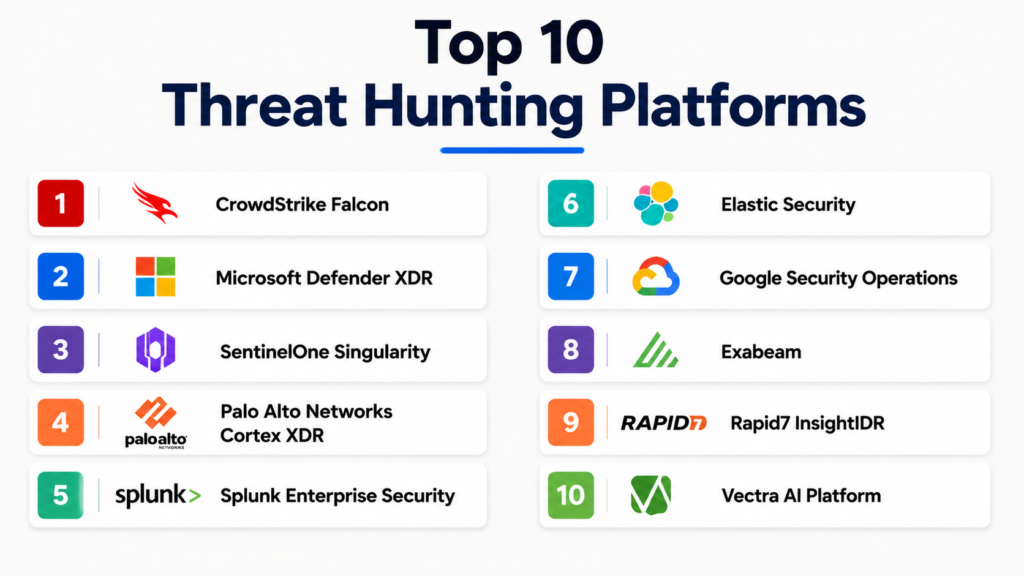
Introduction
Threat Hunting Platforms help security teams proactively search for hidden cyber threats across endpoints, networks, cloud systems, identities, logs, and business applications. In simple terms, these platforms help analysts find suspicious activity before it becomes a serious breach. Instead of waiting for alerts, threat hunters use data, hypotheses, behavior patterns, threat intelligence, and investigation workflows to uncover attackers that may already be inside the environment.Threat hunting matters because modern attackers often use stealthy techniques such as stolen credentials, living-off-the-land commands, cloud abuse, privilege escalation, lateral movement, and fileless malware. Traditional alerts may miss these behaviors, especially when attackers look like normal users or administrators. Threat Hunting Platforms give SOC teams deeper visibility, faster investigation, and better detection logic.
Real-world use cases include:
- Endpoint threat hunting: Detect suspicious processes, scripts, malware behavior, and attacker tools on workstations and servers.
- Cloud threat hunting: Search for risky activity across cloud accounts, workloads, containers, and permissions.
- Identity threat hunting: Investigate impossible travel, privilege misuse, compromised accounts, and suspicious login patterns.
- Network threat hunting: Detect command-and-control activity, lateral movement, beaconing, and unusual traffic.
- Incident response support: Use historical telemetry, timelines, and queries to understand scope and impact.
What buyers should evaluate:
- Telemetry coverage across endpoint, cloud, network, identity, and SaaS
- Query language and investigation flexibility
- MITRE ATT&CK mapping
- Threat intelligence enrichment
- Behavioral analytics and anomaly detection
- Case management and investigation workflows
- Automation and response actions
- Integration with SIEM, SOAR, EDR, XDR, and ticketing tools
- Data retention and search performance
- Ease of use for SOC analysts and threat hunters
Best for: Threat Hunting Platforms are best for SOC teams, security analysts, incident responders, threat intelligence teams, cloud security teams, MDR providers, and enterprises that need proactive detection beyond standard alerting. They are especially useful for mid-market and enterprise organizations with sensitive data, regulated operations, hybrid infrastructure, or high risk of targeted attacks.
Not ideal for: Very small teams without security analysts may struggle to use advanced threat hunting platforms effectively. If an organization lacks logs, endpoint telemetry, cloud visibility, or incident response maturity, a simpler managed detection and response service may be a better starting point. Threat hunting platforms are most valuable when teams have clear use cases, skilled analysts, and reliable data sources.
Key Trends in Threat Hunting Platforms
- AI-assisted investigations: Platforms are adding AI copilots, natural language search, automatic summaries, detection recommendations, and guided investigation workflows.
- XDR-driven hunting: Threat hunting is moving beyond endpoints into identity, email, cloud, network, and SaaS telemetry.
- Cloud-native threat hunting: Security teams now need hunting capabilities across AWS, Microsoft Azure, Google Cloud, Kubernetes, containers, and serverless workloads.
- Identity-based hunting: Compromised credentials, session hijacking, privilege misuse, and risky service accounts are becoming major hunting priorities.
- MITRE ATT&CK alignment: Mature platforms map detections and hunting queries to attacker tactics, techniques, and procedures.
- Longer telemetry retention: Threat hunters need historical data to investigate dwell time, lateral movement, and delayed breach discovery.
- Behavioral analytics: Platforms increasingly use user, entity, endpoint, and network behavior baselines to surface subtle anomalies.
- Automation with human control: Threat hunting platforms are adding automated enrichment and response while keeping analysts in control of high-impact actions.
- Threat intelligence integration: External and internal intelligence is being used to guide hunts, enrich indicators, and prioritize campaigns.
- Convergence with SIEM and security data lakes: Many organizations want threat hunting, detection engineering, log analytics, and investigation in one scalable environment.
How We Selected These Tools
- We selected platforms widely recognized for threat hunting, XDR, SIEM, EDR, security analytics, cloud detection, or investigation workflows.
- We prioritized tools that provide strong telemetry search, behavioral analysis, detection logic, and investigation support.
- We considered platforms suitable for enterprise SOCs, mid-market teams, MDR providers, and cloud-first organizations.
- We evaluated support for endpoint, identity, cloud, network, SaaS, and log-based hunting.
- We considered integration depth with SIEM, SOAR, EDR, XDR, ticketing, threat intelligence, and cloud platforms.
- We prioritized tools with strong analyst workflows, query flexibility, and response capabilities.
- We included a balanced mix of endpoint-first, SIEM-first, XDR-first, cloud-first, and analytics-first tools.
- We avoided invented public ratings and used N/A where ratings are uncertain.
- We used “Not publicly stated” where compliance, certification, or security claims are not confidently known.
- We selected tools based on practical buyer fit rather than declaring one universal winner.
Top 10 Threat Hunting Platforms
1- CrowdStrike Falcon
Short description:
CrowdStrike Falcon is a cloud-native endpoint security and XDR platform that supports proactive threat hunting through endpoint telemetry, behavioral detection, threat intelligence, and managed hunting options. It is widely used by security teams that need fast visibility into endpoint activity and advanced attacker behavior. Falcon helps analysts investigate suspicious processes, lateral movement, credential abuse, malware execution, and hands-on-keyboard activity. It is especially strong for organizations prioritizing endpoint-led detection and response.
Key Features
- Endpoint detection and response
- XDR telemetry and investigation workflows
- Behavioral detection and threat intelligence
- Real-time endpoint visibility
- Managed threat hunting options
- Incident investigation timelines
- Automated response actions
Pros
- Strong endpoint visibility and response capabilities
- Useful for detecting advanced attacker behavior
- Mature threat intelligence and hunting ecosystem
Cons
- Advanced capabilities may require additional modules
- Best value depends on deployment coverage across endpoints
- Smaller teams may need managed services to use full hunting depth
Platforms / Deployment
Windows / macOS / Linux
Cloud
Security & Compliance
Supports role-based access, audit logging, endpoint telemetry protection, policy controls, and enterprise security administration. Specific certifications and compliance details should be verified during procurement.
Integrations & Ecosystem
CrowdStrike integrates with SIEM, SOAR, cloud, identity, ticketing, and security analytics workflows. It is commonly used as a core endpoint and XDR telemetry source for SOC operations.
- SIEM platforms
- SOAR tools
- Cloud security tools
- Identity systems
- Threat intelligence workflows
- ITSM and ticketing platforms
Support & Community
CrowdStrike provides documentation, support plans, training, threat research, and enterprise services. Organizations with mature SOC teams can use it directly, while smaller teams may benefit from managed hunting or MDR support.
2- Microsoft Defender XDR
Short description:
Microsoft Defender XDR is Microsoft’s extended detection and response platform covering endpoints, identities, email, cloud apps, and Microsoft cloud environments. It is highly relevant for threat hunting because it provides advanced hunting queries, cross-domain telemetry, investigation graphs, and integration with Microsoft Sentinel. Defender XDR is especially useful for organizations already using Microsoft 365, Windows, Entra ID, and Azure. It helps analysts search across identity, endpoint, email, and cloud signals from one security ecosystem.
Key Features
- Advanced hunting with query-based investigation
- Endpoint, identity, email, and cloud app telemetry
- Integration with Microsoft Sentinel
- Automated investigation and response
- Incident correlation across Microsoft security products
- Threat analytics and detection logic
- Identity and device risk visibility
Pros
- Strong fit for Microsoft-centric organizations
- Broad cross-domain visibility across users, devices, and email
- Good integration with Microsoft security ecosystem
Cons
- Best value is realized in Microsoft-heavy environments
- Query and investigation depth may require analyst training
- Licensing can be complex for advanced capabilities
Platforms / Deployment
Windows / macOS / Linux / iOS / Android / Web
Cloud
Security & Compliance
Supports SSO, MFA through Microsoft identity, audit logs, role-based access, encryption, conditional access integrations, and enterprise security controls. Specific compliance coverage depends on Microsoft licensing and tenant configuration.
Integrations & Ecosystem
Microsoft Defender XDR integrates deeply with Microsoft Sentinel, Entra ID, Microsoft 365, Intune, Defender for Cloud, and many third-party security tools. It is a strong option for teams standardizing on Microsoft security.
- Microsoft Sentinel
- Microsoft Entra ID
- Microsoft 365
- Microsoft Intune
- Defender for Cloud
- Third-party SIEM and SOAR tools
Support & Community
Microsoft offers extensive documentation, training, admin guidance, support plans, and partner services. The community is large, but advanced hunting requires strong knowledge of queries, Microsoft telemetry, and security operations.
3- SentinelOne Singularity
Short description:
SentinelOne Singularity is an AI-powered endpoint, cloud, and XDR platform that supports threat hunting through behavioral telemetry, automated detection, storyline visualization, and response actions. It helps analysts investigate endpoint and workload activity with context around processes, users, devices, and attack chains. SentinelOne is well suited for organizations that want strong endpoint and workload protection with automated investigation support. It is especially useful for teams that need faster triage and response with less manual correlation.
Key Features
- Endpoint detection and response
- XDR investigation workflows
- Behavioral AI detection
- Storyline-based attack visualization
- Automated response and rollback options
- Cloud workload protection options
- Threat hunting queries and telemetry search
Pros
- Strong automation and behavioral detection
- Useful visual context for investigation timelines
- Good fit for endpoint and workload-focused hunting
Cons
- Advanced XDR depth may require additional configuration
- Best results depend on sensor coverage and policy tuning
- Some organizations may need SIEM integration for broader hunting
Platforms / Deployment
Windows / macOS / Linux
Cloud
Security & Compliance
Supports role-based access, policy controls, endpoint telemetry, audit features, and secure administration. Specific certifications and compliance claims should be verified during procurement.
Integrations & Ecosystem
SentinelOne integrates with SIEM, SOAR, cloud platforms, identity systems, threat intelligence, and IT operations tools. It is commonly used as an endpoint and XDR foundation.
- SIEM tools
- SOAR platforms
- Cloud security systems
- Threat intelligence feeds
- Ticketing systems
- API-based automation workflows
Support & Community
SentinelOne provides documentation, support resources, threat research, customer success, and partner services. It is suitable for both internal SOC teams and organizations working with managed security providers.
4- Palo Alto Networks Cortex XDR
Short description:
Palo Alto Networks Cortex XDR is an extended detection and response platform that correlates data from endpoints, networks, cloud, and security infrastructure. It helps threat hunters investigate attacks across multiple telemetry sources and understand attacker behavior in context. Cortex XDR is especially valuable for organizations already using Palo Alto Networks firewalls, Prisma Cloud, or broader Palo Alto security tools. It supports threat hunting, detection engineering, incident investigation, and response workflows.
Key Features
- Endpoint and network threat detection
- XDR correlation across multiple telemetry sources
- Behavioral analytics and anomaly detection
- Incident investigation and root cause analysis
- Threat intelligence integration
- Automated response workflows
- MITRE ATT&CK-aligned detection context
Pros
- Strong fit for Palo Alto Networks environments
- Good cross-domain correlation across endpoint and network signals
- Useful for SOC teams needing XDR-driven investigation
Cons
- Best value often depends on broader Palo Alto ecosystem adoption
- May require tuning and integration planning
- Smaller teams may find advanced workflows complex
Platforms / Deployment
Windows / macOS / Linux / Web
Cloud
Security & Compliance
Supports role-based access, audit logs, endpoint controls, policy management, and secure administration. Specific compliance details should be validated based on product modules and deployment.
Integrations & Ecosystem
Cortex XDR integrates with Palo Alto Networks products, third-party security tools, cloud environments, and SOC workflows. It is most effective when used as part of a connected security operations architecture.
- Palo Alto Networks firewalls
- Prisma Cloud
- SIEM and SOAR platforms
- Endpoint telemetry
- Network security tools
- Threat intelligence sources
Support & Community
Palo Alto Networks provides documentation, support services, training, threat research, and partner implementation resources. Enterprises with Palo Alto infrastructure may find strong ecosystem alignment.
5- Splunk Enterprise Security
Short description:
Splunk Enterprise Security is a SIEM and security analytics platform used by SOC teams for log analysis, detection engineering, correlation, and threat hunting. It provides flexible search, dashboards, investigations, risk-based alerting, and broad data ingestion. Splunk is especially strong for organizations that need to hunt across many log sources and custom data sets. It is a powerful platform for mature security teams that want deep query flexibility and long-term data analysis.
Key Features
- Centralized log collection and search
- Threat hunting with flexible query language
- Correlation searches and risk-based alerting
- Dashboards and security analytics
- Investigation workflows
- Threat intelligence enrichment
- Broad data source integration
Pros
- Very flexible for custom threat hunting
- Strong fit for mature SOC and detection engineering teams
- Supports broad data ingestion across enterprise systems
Cons
- Can require skilled administrators and analysts
- Cost and data volume management need planning
- Setup and tuning may be complex for smaller teams
Platforms / Deployment
Web
Cloud / Self-hosted / Hybrid options may vary
Security & Compliance
Supports role-based access, audit logs, encryption options, administrative controls, and enterprise security workflows. Specific certifications and compliance details depend on deployment model and service package.
Integrations & Ecosystem
Splunk has a large ecosystem for ingesting logs, alerts, events, and telemetry from security and IT systems. Its flexibility makes it useful for advanced threat hunting and custom detections.
- Endpoint security tools
- Network devices
- Cloud platforms
- Identity systems
- Threat intelligence feeds
- SOAR and ticketing tools
Support & Community
Splunk provides documentation, training, professional services, support plans, and a large practitioner community. It is strongest when the organization has skilled analysts and data engineering support.
6- Elastic Security
Short description:
Elastic Security combines SIEM, endpoint security, observability data, and search analytics for threat detection and hunting. It is useful for teams that want flexible search, customizable detections, and scalable data exploration. Elastic Security is especially attractive for organizations that already use the Elastic Stack for logging, observability, or search. It can support endpoint telemetry, cloud data, network logs, and investigation workflows in a single analytics environment.
Key Features
- SIEM and security analytics
- Endpoint security capabilities
- Flexible search and query-based hunting
- Detection rules and alerting
- Timeline-based investigations
- Cloud and infrastructure log analysis
- Open ecosystem and extensibility
Pros
- Strong search and data exploration capabilities
- Useful for teams already using Elastic Stack
- Flexible for custom detection and threat hunting workflows
Cons
- Requires tuning and data engineering discipline
- Advanced deployments may require technical expertise
- Best value depends on clean data pipelines and retention planning
Platforms / Deployment
Web / Windows / macOS / Linux
Cloud / Self-hosted / Hybrid
Security & Compliance
Supports role-based access, audit logging, encryption options, endpoint controls, and security analytics workflows. Specific compliance details should be verified based on deployment model and subscription.
Integrations & Ecosystem
Elastic Security integrates with logs, endpoint agents, cloud services, network data, threat intelligence, and observability sources. It is a strong option for teams that want flexibility and control.
- Cloud platforms
- Endpoint telemetry
- Network logs
- Identity systems
- Threat intelligence sources
- Observability and infrastructure data
Support & Community
Elastic has extensive documentation, community resources, support plans, and professional services. It is especially suitable for technical teams comfortable with search, pipelines, and custom analytics.
7- Google Security Operations
Short description:
Google Security Operations, built around Google’s security analytics and threat intelligence capabilities, supports high-scale log analytics, detection, investigation, and threat hunting. It is designed for organizations that need fast search across large security data sets and strong intelligence context. Google Security Operations is especially relevant for teams that need scalable security data lakes, detection engineering, and cloud-native analytics. It can help analysts investigate threats across logs, endpoints, cloud, network, and identity signals.
Key Features
- High-scale security data analytics
- Threat hunting and investigation workflows
- Threat intelligence enrichment
- Detection engineering support
- Security data lake capabilities
- Timeline and entity-based investigation
- Integration with cloud and security tools
Pros
- Strong scalability for large security data volumes
- Useful threat intelligence context
- Good fit for cloud-native and data-heavy security teams
Cons
- May require mature SOC processes to maximize value
- Implementation depends on data onboarding quality
- Pricing and architecture should be carefully evaluated
Platforms / Deployment
Web
Cloud
Security & Compliance
Supports enterprise access controls, audit capabilities, secure data handling, and security analytics workflows. Specific compliance details should be verified based on contract, region, and deployment configuration.
Integrations & Ecosystem
Google Security Operations can integrate with cloud platforms, security tools, endpoint data, identity systems, and threat intelligence workflows. It is designed for broad security telemetry analysis.
- Google Cloud
- Endpoint and network telemetry
- SIEM and SOAR workflows
- Threat intelligence sources
- Identity and access data
- API-based integrations
Support & Community
Google provides documentation, support plans, security guidance, and partner services. The platform is most useful for teams that can manage large-scale security data and advanced investigation workflows.
8- Exabeam
Short description:
Exabeam is a security operations platform with SIEM, behavioral analytics, and investigation capabilities that support threat hunting across users, entities, logs, and security events. It is especially useful for detecting suspicious behavior that may not trigger traditional alerts. Exabeam helps analysts build timelines, investigate anomalies, and understand user and entity activity. It is a strong option for teams focused on user behavior analytics and security operations modernization.
Key Features
- SIEM and security analytics
- User and entity behavior analytics
- Threat hunting and investigation workflows
- Automated timelines
- Anomaly detection
- Incident prioritization
- Threat intelligence and enrichment support
Pros
- Strong behavioral analytics for user and entity activity
- Helpful investigation timelines
- Good fit for identity-driven threat hunting
Cons
- Requires good log quality and data onboarding
- May require tuning to reduce noise
- Best value comes with mature SOC workflows
Platforms / Deployment
Web
Cloud / Hybrid options may vary
Security & Compliance
Supports role-based access, audit logging, secure administration, behavioral analytics, and investigation workflows. Specific compliance details should be verified with the vendor.
Integrations & Ecosystem
Exabeam integrates with identity systems, endpoint tools, network devices, cloud platforms, SIEM sources, and threat intelligence feeds. It is useful for teams that want behavior analytics connected to investigations.
- Identity providers
- Endpoint security tools
- Cloud platforms
- Network security devices
- Threat intelligence feeds
- Ticketing and response workflows
Support & Community
Exabeam provides documentation, support resources, training, customer success, and security operations guidance. It is suitable for SOC teams focused on analytics-led investigation.
9- Rapid7 InsightIDR
Short description:
Rapid7 InsightIDR is a cloud-based SIEM and XDR platform focused on detection, investigation, user behavior analytics, and response. It supports threat hunting across logs, endpoints, users, cloud sources, and network activity. InsightIDR is practical for mid-market and enterprise teams that want faster detection and simpler security operations compared with heavy traditional SIEM deployments. It is especially useful for teams seeking a balance of usability, analytics, and incident response support.
Key Features
- Cloud SIEM and XDR capabilities
- User behavior analytics
- Endpoint and log-based detection
- Threat hunting search
- Deception and attacker behavior detection options
- Investigation timelines
- Response and automation workflows
Pros
- User-friendly compared with many traditional SIEM tools
- Good fit for mid-market SOC teams
- Useful blend of detection, hunting, and investigation
Cons
- May not offer the same customization depth as large SIEM platforms
- Advanced environments may need additional integrations
- Data retention and ingestion planning remain important
Platforms / Deployment
Web
Cloud
Security & Compliance
Supports role-based access, audit features, security analytics, and response workflows. Specific certifications and compliance details should be verified directly during procurement.
Integrations & Ecosystem
InsightIDR integrates with endpoint tools, cloud platforms, identity providers, logs, network sources, and security workflows. It is built for practical security operations.
- Endpoint agents and telemetry
- Cloud services
- Identity providers
- Network logs
- Ticketing systems
- Threat intelligence sources
Support & Community
Rapid7 provides documentation, customer support, onboarding resources, training, and security research. It is a strong option for teams that want practical SOC capabilities without excessive operational complexity.
10- Vectra AI Platform
Short description:
Vectra AI Platform focuses on AI-driven threat detection and hunting across network, identity, cloud, and SaaS environments. It helps detect attacker behaviors such as lateral movement, command-and-control activity, privilege misuse, and suspicious account behavior. Vectra is especially useful for organizations that need network detection and response with identity and cloud context. It supports threat hunting by surfacing high-risk behaviors and helping analysts investigate attacker progression.
Key Features
- Network detection and response
- AI-driven behavioral detection
- Identity and cloud threat detection
- Lateral movement detection
- Command-and-control behavior analysis
- Investigation prioritization
- Integration with SOC workflows
Pros
- Strong network and behavior-based detection
- Useful for finding stealthy attacker movement
- Good fit for hybrid and enterprise environments
Cons
- Not a full SIEM replacement
- Requires integration with other tools for broader response workflows
- Best value depends on network visibility and telemetry coverage
Platforms / Deployment
Web
Cloud / Hybrid options may vary
Security & Compliance
Supports role-based access, detection workflows, investigation visibility, and enterprise security operations controls. Specific compliance details should be confirmed with the vendor.
Integrations & Ecosystem
Vectra integrates with SIEM, SOAR, EDR, identity, cloud, and ticketing tools. It is commonly used to strengthen SOC visibility into network and identity-based attacker behavior.
- SIEM platforms
- SOAR tools
- EDR and XDR tools
- Identity providers
- Cloud platforms
- Ticketing and response systems
Support & Community
Vectra provides documentation, customer support, onboarding guidance, and threat research resources. It is best suited for teams that want AI-driven detection and network-focused hunting support.
Comparison Table
| Tool Name | Best For | Platform Supported | Deployment | Standout Feature | Public Rating |
|---|---|---|---|---|---|
| CrowdStrike Falcon | Endpoint-led threat hunting | Windows, macOS, Linux | Cloud | Endpoint telemetry and managed hunting | N/A |
| Microsoft Defender XDR | Microsoft-centric SOC teams | Windows, macOS, Linux, iOS, Android, Web | Cloud | Cross-domain Microsoft hunting | N/A |
| SentinelOne Singularity | AI-powered endpoint and XDR hunting | Windows, macOS, Linux | Cloud | Storyline-based investigation | N/A |
| Palo Alto Networks Cortex XDR | XDR across endpoint and network | Windows, macOS, Linux, Web | Cloud | Cross-source XDR correlation | N/A |
| Splunk Enterprise Security | Advanced log-based threat hunting | Web | Cloud, Self-hosted, Hybrid varies | Flexible security search | N/A |
| Elastic Security | Search-driven detection and hunting | Web, Windows, macOS, Linux | Cloud, Self-hosted, Hybrid | Flexible data exploration | N/A |
| Google Security Operations | Large-scale security analytics | Web | Cloud | High-scale threat hunting analytics | N/A |
| Exabeam | Behavior-based hunting and SIEM | Web | Cloud / Hybrid varies | User and entity behavior analytics | N/A |
| Rapid7 InsightIDR | Mid-market SIEM and XDR hunting | Web | Cloud | Practical cloud SIEM workflows | N/A |
| Vectra AI Platform | Network and identity threat hunting | Web | Cloud / Hybrid varies | AI-driven attacker behavior detection | N/A |
Evaluation & Scoring of Threat Hunting Platforms
| Tool Name | Core 25% | Ease 15% | Integrations 15% | Security 10% | Performance 10% | Support 10% | Value 15% | Weighted Total 0–10 |
|---|---|---|---|---|---|---|---|---|
| CrowdStrike Falcon | 9 | 8 | 9 | 9 | 9 | 9 | 8 | 8.70 |
| Microsoft Defender XDR | 9 | 8 | 9 | 9 | 8 | 8 | 9 | 8.60 |
| SentinelOne Singularity | 9 | 8 | 8 | 9 | 9 | 8 | 8 | 8.50 |
| Palo Alto Networks Cortex XDR | 9 | 7 | 9 | 9 | 8 | 8 | 7 | 8.25 |
| Splunk Enterprise Security | 9 | 6 | 10 | 9 | 8 | 8 | 7 | 8.20 |
| Elastic Security | 8 | 7 | 9 | 8 | 8 | 8 | 8 | 8.00 |
| Google Security Operations | 9 | 7 | 9 | 9 | 9 | 8 | 7 | 8.35 |
| Exabeam | 8 | 7 | 8 | 8 | 8 | 8 | 7 | 7.75 |
| Rapid7 InsightIDR | 8 | 8 | 8 | 8 | 8 | 8 | 8 | 8.00 |
| Vectra AI Platform | 8 | 7 | 8 | 8 | 9 | 8 | 7 | 7.90 |
These scores are comparative and should be used as a practical evaluation model, not a final buying decision. A platform with a high score may still be the wrong fit if it does not match your telemetry sources or analyst workflows. Endpoint-heavy teams may prefer CrowdStrike, SentinelOne, or Microsoft Defender XDR. Log-heavy SOCs may prefer Splunk, Elastic, Google Security Operations, or Exabeam. Network-focused teams may prefer Vectra, while Palo Alto customers may get strong value from Cortex XDR.
Which Threat Hunting Platforms Tool Is Right for You?
Solo / Freelancer
Solo security consultants and independent analysts usually do not need a large enterprise threat hunting platform unless they are managing client environments. For small-scale work, endpoint telemetry, open-source hunting tools, log search, and cloud-native security dashboards may be enough. If a freelancer supports multiple clients, Rapid7 InsightIDR, Elastic Security, or Microsoft Defender XDR may be practical depending on client environments. The priority should be affordability, quick setup, and clear investigation workflows.
SMB
SMBs should focus on platforms that reduce analyst workload and do not require heavy customization. Microsoft Defender XDR is a strong option for Microsoft-based organizations. Rapid7 InsightIDR can be a practical choice for teams that want cloud SIEM and detection workflows. SentinelOne and CrowdStrike are strong if endpoint protection and managed hunting are priorities. SMBs should avoid overly complex data platforms unless they have the staff to manage ingestion, tuning, and detections.
Mid-Market
Mid-market teams often need a balance of endpoint visibility, identity context, log analytics, and response workflows. CrowdStrike Falcon, SentinelOne Singularity, Microsoft Defender XDR, Rapid7 InsightIDR, Elastic Security, and Cortex XDR are strong shortlist options. If the organization already uses Microsoft, Palo Alto, or Elastic, ecosystem alignment should guide the decision. Mid-market teams should prioritize automation, integrations, detection coverage, and analyst usability.
Enterprise
Enterprises usually need layered threat hunting across endpoint, identity, cloud, SaaS, logs, and network telemetry. Splunk Enterprise Security, Google Security Operations, Microsoft Defender XDR, CrowdStrike Falcon, Cortex XDR, Elastic Security, Exabeam, and Vectra AI can each play important roles. Large organizations should evaluate data retention, search scale, integration depth, detection engineering workflows, threat intelligence enrichment, RBAC, and global SOC operations. Enterprises may use more than one platform depending on telemetry and team specialization.
Budget vs Premium
Budget-conscious teams should start with the security tools they already own and assess whether built-in hunting features are sufficient. Microsoft Defender XDR may offer strong value for Microsoft-heavy environments. Elastic Security can be cost-effective for technical teams that can manage deployment and data pipelines. Premium buyers should evaluate CrowdStrike, SentinelOne, Cortex XDR, Splunk, Google Security Operations, and Vectra based on detection depth, support, and response workflows. The most expensive platform is not always the best if the team cannot operationalize it.
Feature Depth vs Ease of Use
Splunk and Elastic provide strong flexibility, but they require more technical expertise. CrowdStrike, SentinelOne, Microsoft Defender XDR, and Rapid7 InsightIDR often offer more guided workflows for analysts. Google Security Operations is powerful for large data volumes but requires strong data strategy. Vectra provides focused attacker behavior detection but is not a full SIEM replacement. Buyers should decide whether they need broad customization or faster operational usability.
Integrations & Scalability
Threat hunting platforms must integrate with endpoint tools, identity systems, cloud platforms, network devices, threat intelligence feeds, SIEM, SOAR, and ticketing tools. Scalability depends on telemetry volume, query speed, data retention, and analyst workflows. Splunk, Google Security Operations, and Elastic are strong for high-scale data analytics. CrowdStrike, SentinelOne, Microsoft Defender XDR, and Cortex XDR are strong for XDR-led workflows. Integration testing should be part of every pilot.
Security & Compliance Needs
Security and compliance-focused buyers should validate RBAC, audit logs, data retention, encryption, tenant controls, administrator permissions, and reporting exports. Regulated industries may need clear investigation records, access controls, and evidence preservation. Organizations with global operations should also evaluate data residency and privacy requirements. Threat hunting platforms often handle highly sensitive security telemetry, so governance around who can search, export, and respond is critical.
Frequently Asked Questions
1. What is a Threat Hunting Platform?
A Threat Hunting Platform is a security tool that helps analysts proactively search for hidden attackers, suspicious behavior, and unknown threats across IT environments. It collects or analyzes telemetry from endpoints, networks, cloud systems, identity providers, logs, and applications. Instead of waiting for alerts, analysts use hypotheses, queries, threat intelligence, and behavioral patterns to find attacker activity. These platforms support investigation, enrichment, timelines, and response actions. They are most valuable for teams that want to move from reactive security to proactive detection.
2. How is threat hunting different from regular alert monitoring?
Regular alert monitoring is reactive because analysts respond to alerts generated by security tools. Threat hunting is proactive because analysts actively search for signs of compromise that may not have triggered an alert. Hunting often starts with a hypothesis, such as “attackers may be using PowerShell for lateral movement” or “an account may be logging in from unusual locations.” The analyst then searches telemetry to validate or reject that hypothesis. Good platforms support both alert investigation and proactive hunting workflows.
3. What data sources are important for threat hunting?
Important data sources include endpoint telemetry, identity logs, cloud activity logs, DNS logs, firewall logs, network traffic, email security data, authentication events, SaaS activity, and threat intelligence. Endpoint data helps detect suspicious processes and malware behavior. Identity data helps find compromised accounts and privilege misuse. Cloud logs help detect risky administrative actions and workload abuse. Network data helps identify lateral movement, beaconing, and command-and-control behavior. The more complete the telemetry, the stronger the hunting program.
4. Do small businesses need Threat Hunting Platforms?
Small businesses may not need a full enterprise threat hunting platform if they do not have dedicated security analysts. However, they still need strong detection and response capabilities. For many SMBs, managed detection and response, endpoint protection, and cloud security monitoring may be a better starting point. If an SMB has regulated data, remote users, or high cyber risk, a simpler XDR or cloud SIEM platform can help. The key is choosing a tool that matches team capacity, not just feature depth.
5. What skills are needed for threat hunting?
Threat hunters need knowledge of attacker behavior, operating systems, networking, cloud environments, identity systems, malware behavior, and log analysis. They should understand frameworks such as MITRE ATT&CK and be comfortable writing queries. Strong analytical thinking is important because hunting often involves forming and testing hypotheses. Communication skills are also needed to document findings and guide response teams. AI features can assist, but human judgment remains critical.
6. How do Threat Hunting Platforms use AI?
Threat Hunting Platforms use AI for anomaly detection, behavioral analytics, alert prioritization, investigation summaries, natural language search, and detection recommendations. AI can help analysts find unusual patterns across large amounts of telemetry. It can also reduce manual work by summarizing timelines or suggesting related events. However, AI should not be treated as a replacement for skilled analysts. Teams should validate AI-generated findings before taking major response actions.
7. What is the difference between SIEM, EDR, XDR, and threat hunting?
SIEM platforms collect and analyze logs from many sources. EDR tools focus on endpoint detection and response. XDR platforms correlate telemetry across endpoints, identity, cloud, email, and network sources. Threat hunting is a proactive security practice that can use SIEM, EDR, XDR, cloud security, and threat intelligence tools. A Threat Hunting Platform may be SIEM-based, EDR-based, XDR-based, or analytics-based. The best choice depends on where your most important telemetry lives.
8. How long should threat hunting data be retained?
Data retention depends on risk level, compliance needs, budget, and investigation requirements. Many attackers remain hidden for weeks or months, so short retention can limit investigations. Endpoint, identity, cloud, and authentication logs are especially useful for historical hunting. Longer retention helps analysts investigate dwell time, lateral movement, and earlier stages of compromise. However, storage costs can be significant, so teams should prioritize high-value telemetry and define retention policies carefully.
9. What are common mistakes when buying a Threat Hunting Platform?
A common mistake is buying a powerful platform without having analysts who can use it effectively. Another mistake is collecting too much data without a clear detection and hunting strategy. Some teams focus only on endpoint visibility and ignore identity, cloud, and network telemetry. Others fail to tune detections, document hunts, or integrate findings into response workflows. Buyers should define use cases, required data sources, staffing needs, and success metrics before purchasing.
10. How should teams measure threat hunting success?
Teams should measure threat hunting success using metrics such as number of validated hunts, new detections created, time to investigate, time to contain, reduced false positives, coverage against MITRE ATT&CK techniques, and incidents discovered before damage occurs. They should also track repeatable playbooks, analyst productivity, and improvements in visibility. Success is not only about finding active attackers. A good hunting program also improves detections, closes visibility gaps, and strengthens incident response readiness.
Conclusion
Threat Hunting Platforms help organizations move beyond reactive alert monitoring and actively search for hidden attackers across endpoints, cloud, identity, network, and logs. The best platform depends on the environment, team maturity, and telemetry priorities. CrowdStrike Falcon and SentinelOne Singularity are strong for endpoint-led hunting, Microsoft Defender XDR is ideal for Microsoft-centric security programs, Cortex XDR fits Palo Alto Networks environments, Splunk and Elastic are powerful for flexible log-based hunting, Google Security Operations supports high-scale analytics, Exabeam is strong for behavior-driven investigations, Rapid7 InsightIDR is practical for mid-market SOCs, and Vectra AI strengthens network and identity-based detection. The right next step is to shortlist tools based on your current telemetry, run a pilot with real hunting scenarios, validate integrations and data retention, test analyst workflows, and then scale the chosen platform with clear playbooks, trained hunters, and continuous detection improvement.

Deploying comprehensive unified proactive cyber hazard discovery exploration architecture software optimizes corporate digital threat investigation logistics, ensuring accelerated enterprise telemetry analysis, tracking, and seamless incident isolation workflows.
Threat hunting tools are most useful when teams also maintain a hunt library with owners, version control, and review cycles, otherwise good queries often become outdated silently