MOTOSHARE 🚗🏍️
Rent Bikes & Cars Directly from Owners
Motoshare connects vehicle owners with people who need bikes and cars on rent. Owners earn from idle vehicles, and renters get flexible ride options.
Visit Motoshare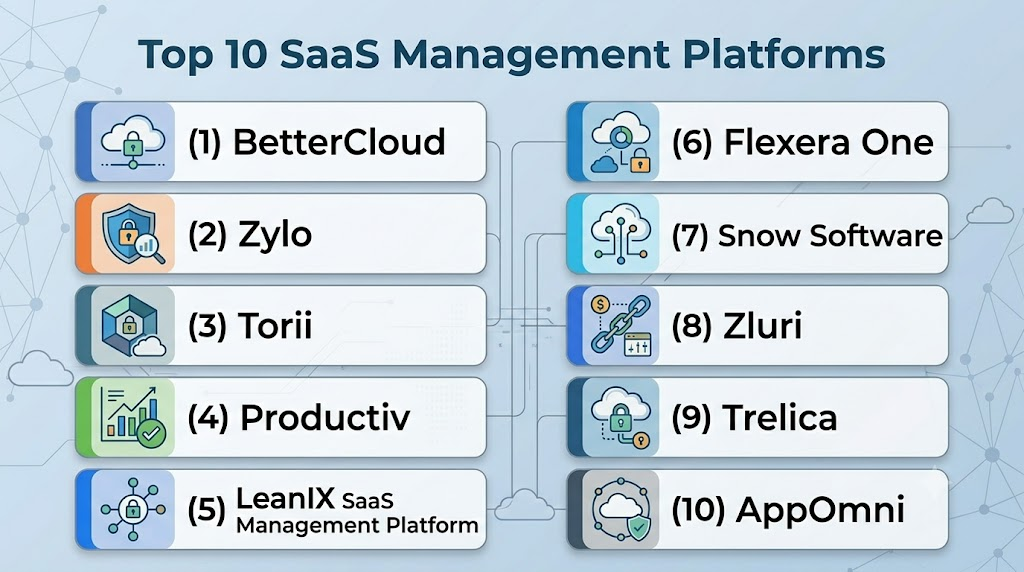
Introduction
SaaS Management Platforms help organizations discover, manage, secure, and optimize the cloud software applications used across the business. In simple terms, they show IT, finance, procurement, and security teams which SaaS tools are being used, who is using them, how much they cost, whether licenses are wasted, and whether access is safe.
These platforms matter because most modern companies now run on SaaS tools for communication, CRM, project management, HR, finance, analytics, DevOps, marketing, and customer support. Without a centralized system, SaaS usage becomes difficult to control. This can lead to duplicate apps, unused licenses, shadow IT, risky permissions, unmanaged renewals, and unnecessary spending.
Real-world use cases include SaaS discovery, license optimization, renewal tracking, employee onboarding and offboarding, access governance, shadow IT detection, SaaS spend management, and security posture monitoring.
What buyers should evaluate:
- SaaS discovery accuracy
- License usage analytics
- Spend and renewal management
- User lifecycle automation
- Security and compliance visibility
- Integrations with identity, HR, finance, and ITSM tools
- Workflow automation
- Reporting and dashboards
- Ease of implementation
- Scalability for growing app portfolios
Best for: SaaS Management Platforms are best for IT teams, finance teams, procurement leaders, security teams, SaaS operations managers, and business operations teams in SMB, mid-market, and enterprise organizations. They are especially useful for companies using many SaaS apps across departments, remote teams, or multiple business units.
Not ideal for: Very small businesses with only a few SaaS subscriptions may not need a dedicated SaaS management platform. In such cases, spreadsheets, billing records, identity provider reports, or simple expense tools may be enough. These platforms may also be less useful if the organization does not yet have clear ownership for SaaS procurement, app governance, and license management.
Key Trends in SaaS Management Platforms
- AI-driven SaaS optimization: Platforms are increasingly using AI to identify unused licenses, duplicate apps, risky access patterns, and renewal savings opportunities.
- Shadow IT visibility is becoming essential: Companies want to detect SaaS apps purchased outside IT or finance approval to reduce risk and control spending.
- SaaS security posture is merging with SaaS management: Buyers now expect visibility into permissions, admin roles, app configurations, risky OAuth grants, and compliance gaps.
- License reclamation automation is growing: Tools are helping teams automatically reclaim inactive licenses and reassign them before buying more seats.
- Finance and IT collaboration is improving: Modern SMPs are built for shared workflows between IT, finance, procurement, security, and department owners.
- Renewal intelligence is becoming a major value driver: Organizations want early alerts before contract renewals so they can renegotiate, right-size, or cancel unused tools.
- Employee lifecycle automation is expanding: Joiner, mover, and leaver workflows are becoming central to SaaS governance.
- Integration depth is a key differentiator: Strong platforms connect with identity providers, HRIS, ERP, expense systems, ITSM tools, security tools, and collaboration apps.
- Usage-based SaaS buying is changing management needs: As more vendors use consumption or seat-based pricing, companies need better usage analytics.
- SaaS rationalization is becoming strategic: Companies are reducing duplicate tools across departments to simplify operations, improve security, and reduce spend.
How We Selected These Tools
- We prioritized platforms with strong recognition in SaaS management, SaaS operations, SaaS spend, and SaaS governance.
- We considered feature completeness across discovery, spend management, license optimization, access visibility, and automation.
- We evaluated practical fit across SMB, mid-market, and enterprise organizations.
- We considered integration coverage with identity providers, HR systems, finance systems, ITSM platforms, and major SaaS applications.
- We looked for platforms that help both IT and finance teams collaborate effectively.
- We considered tools with security posture, compliance visibility, and governance capabilities where relevant.
- We included tools focused on SaaS operations, SaaS spend, SaaS security, and vendor management to reflect the broader market.
- We avoided public ratings unless they can be confidently verified, so ratings are marked as N/A.
- We avoided invented certifications and used “Not publicly stated” where exact details are uncertain.
- We selected tools that are practical for modern SaaS-heavy organizations.
Top 10 SaaS Management Platforms
1- BetterCloud
Short description:
BetterCloud is a SaaS management and SaaS operations platform designed to help IT teams manage users, applications, files, policies, and automation across cloud apps. It is especially useful for companies that need strong control over SaaS access, employee lifecycle workflows, and app governance. BetterCloud focuses heavily on automation, security policies, and operational efficiency. It is a strong choice for IT teams managing many SaaS applications and frequent employee changes.
Key Features
- SaaS application discovery and management
- User lifecycle automation for onboarding and offboarding
- Policy enforcement across connected SaaS apps
- File security and access monitoring
- Workflow automation for IT operations
- App usage visibility and reporting
- Integration with identity and productivity platforms
Pros
- Strong automation for IT and SaaS operations teams
- Good fit for managing access across multiple cloud apps
- Useful for reducing manual onboarding and offboarding work
Cons
- Advanced workflows may require setup and planning
- Smaller teams may not need the full feature depth
- Best value comes when many SaaS apps are connected
Platforms / Deployment
Web
Cloud
Security & Compliance
Supports SSO, audit logs, role-based administration, policy controls, and security-focused SaaS governance features. Specific certifications and compliance details should be verified during procurement.
Integrations & Ecosystem
BetterCloud integrates with major SaaS applications, identity providers, collaboration tools, and IT workflows. Its value increases when connected to core productivity, communication, and identity systems.
- Google Workspace
- Microsoft 365
- Okta
- Slack
- Salesforce
- ServiceNow and IT workflow tools
Support & Community
BetterCloud provides documentation, onboarding resources, customer support, and implementation guidance. Support levels may vary by plan and customer size. It is strongest for IT teams with defined SaaS operations processes.
2- Zylo
Short description:
Zylo is a SaaS management platform focused on SaaS inventory, spend visibility, license optimization, and renewal management. It helps IT, finance, and procurement teams understand where SaaS money is going and how applications are being used. Zylo is especially useful for organizations with large SaaS portfolios and recurring renewal challenges. It is a strong fit for companies trying to reduce waste and improve vendor governance.
Key Features
- SaaS application discovery
- SaaS spend tracking and analytics
- License usage and optimization insights
- Renewal calendar and contract visibility
- Vendor management workflows
- Department-level SaaS reporting
- Finance and procurement collaboration tools
Pros
- Strong focus on SaaS spend visibility
- Useful for renewal planning and vendor management
- Helps identify unused or underused licenses
Cons
- Less focused on deep SaaS security posture than some security-first platforms
- Requires finance and procurement data integration for best results
- May be more valuable for mid-market and enterprise teams than very small businesses
Platforms / Deployment
Web
Cloud
Security & Compliance
Supports access controls, reporting, and governance workflows. Specific security certifications, encryption details, and compliance claims should be verified during vendor review.
Integrations & Ecosystem
Zylo connects with financial systems, expense systems, identity providers, HR tools, and SaaS application data sources. These integrations help teams connect spend, ownership, and usage data.
- Identity providers
- Finance and ERP systems
- Expense management tools
- HR systems
- SaaS application usage data
- Procurement workflows
Support & Community
Zylo offers customer support, onboarding assistance, documentation, and customer success resources. Support depth may vary by plan and organization size.
3- Torii
Short description:
Torii is a SaaS management platform built for IT teams that need visibility, automation, license optimization, and app lifecycle management. It helps organizations discover SaaS tools, understand usage, automate workflows, and manage renewals. Torii is useful for companies that want a practical balance between IT operations, finance visibility, and SaaS governance. It is especially valuable for growing organizations with expanding SaaS portfolios.
Key Features
- Automated SaaS discovery
- License usage tracking
- Renewal and contract management
- Workflow automation
- User onboarding and offboarding support
- App owner management
- Integration with HR, identity, and finance tools
Pros
- Good balance of usability and automation
- Helpful for discovering shadow IT and unmanaged apps
- Strong fit for SaaS operations and IT teams
Cons
- Advanced governance needs may require careful configuration
- Security posture depth may depend on integrations
- Full value requires connecting multiple systems
Platforms / Deployment
Web
Cloud
Security & Compliance
Supports access governance workflows, reporting, app ownership visibility, and integration-based access insights. Exact compliance certifications should be confirmed directly with the vendor.
Integrations & Ecosystem
Torii integrates with identity providers, HR systems, financial tools, collaboration apps, and many SaaS applications. These integrations help automate workflows and centralize SaaS inventory.
- Okta and Microsoft Entra ID
- Google Workspace and Microsoft 365
- HRIS tools
- Finance and expense platforms
- Slack and collaboration tools
- ITSM and workflow tools
Support & Community
Torii provides documentation, onboarding support, customer success guidance, and product resources. Support options may vary by plan and deployment size.
4- Productiv
Short description:
Productiv is a SaaS intelligence and management platform focused on application engagement, spend optimization, and portfolio visibility. It helps organizations understand how employees actually use SaaS tools, not just whether they have licenses. Productiv is useful for IT, finance, procurement, and business leaders who want to make better renewal and rationalization decisions. It is particularly strong for usage-based insights and app adoption analysis.
Key Features
- SaaS application engagement analytics
- License utilization monitoring
- Renewal and spend insights
- Application portfolio visibility
- App rationalization support
- User and team-level usage reporting
- Collaboration between IT, finance, and business owners
Pros
- Strong usage and adoption analytics
- Helpful for renewal negotiations and app rationalization
- Useful for understanding actual business value from SaaS tools
Cons
- Less focused on deep IT workflow automation than some platforms
- Security governance may require complementary tools
- Requires quality usage data for best insights
Platforms / Deployment
Web
Cloud
Security & Compliance
Supports reporting, access insights, and enterprise controls. Specific compliance certifications and security details should be verified during procurement.
Integrations & Ecosystem
Productiv connects with SaaS applications, identity providers, HR systems, finance tools, and collaboration platforms. Its analytics become stronger when many business-critical apps are connected.
- Identity providers
- Collaboration platforms
- HR systems
- Finance and procurement tools
- Productivity suites
- Business application usage data
Support & Community
Productiv provides onboarding, documentation, customer support, and account guidance. Support depth may vary by customer tier and implementation scope.
5- LeanIX SaaS Management Platform
Short description:
LeanIX SaaS Management Platform helps organizations manage SaaS applications, spend, usage, ownership, and renewals as part of a broader enterprise architecture and IT portfolio view. It is useful for companies that want SaaS management connected with application portfolio management and technology governance. LeanIX is especially relevant for larger organizations with complex IT landscapes. It helps teams understand SaaS tools in relation to business capabilities, ownership, and technology strategy.
Key Features
- SaaS application inventory
- Spend and usage visibility
- Renewal and contract tracking
- Application ownership mapping
- Portfolio rationalization support
- Enterprise architecture alignment
- Reporting and dashboards for IT leaders
Pros
- Strong fit for enterprise IT portfolio management
- Useful for SaaS rationalization and business capability mapping
- Helps align SaaS decisions with broader architecture strategy
Cons
- May be more complex than needed for smaller teams
- SaaS operations automation may not be the primary focus
- Best value comes in larger IT governance environments
Platforms / Deployment
Web
Cloud
Security & Compliance
Supports role-based access, governance workflows, reporting, and enterprise portfolio visibility. Specific compliance details should be verified based on the selected product and deployment.
Integrations & Ecosystem
LeanIX integrates with IT management, enterprise architecture, SaaS data, and business systems. Its ecosystem is useful for organizations that want SaaS management connected to broader IT strategy.
- IT portfolio systems
- Enterprise architecture tools
- SaaS application data sources
- Finance and procurement systems
- Collaboration tools
- Reporting and analytics workflows
Support & Community
LeanIX provides documentation, onboarding resources, enterprise support, and partner services. It is well suited for organizations with established IT architecture, governance, and portfolio management practices.
6- Flexera One
Short description:
Flexera One is a technology spend and asset management platform that includes SaaS management capabilities alongside software asset management, cloud cost management, and IT visibility. It is designed for organizations that need to manage technology investments across SaaS, cloud, software, hardware, and enterprise IT assets. Flexera One is a strong option for enterprises that want SaaS management as part of a wider IT asset and cost optimization strategy. It is particularly useful for finance, procurement, IT asset management, and cloud governance teams.
Key Features
- SaaS spend and usage management
- Software asset management
- Cloud cost visibility
- License optimization
- Vendor and contract insights
- Technology inventory visibility
- Reporting for IT and finance teams
Pros
- Strong fit for broader IT asset and spend management
- Useful for enterprises managing SaaS and traditional software together
- Helps connect technology spend across cloud, software, and SaaS
Cons
- May be more platform-heavy than needed for SaaS-only needs
- Implementation can require planning and data integration
- Smaller teams may prefer simpler SaaS-focused tools
Platforms / Deployment
Web
Cloud
Security & Compliance
Supports enterprise access controls, reporting, and governance capabilities. Specific certifications, compliance frameworks, and security controls should be verified directly during procurement.
Integrations & Ecosystem
Flexera One integrates with IT asset systems, procurement tools, cloud providers, software vendors, and enterprise data sources. It is useful when SaaS management must connect with broader technology spend operations.
- Cloud providers
- IT asset management tools
- Procurement and finance systems
- Software vendor data
- SaaS usage data
- Reporting and analytics tools
Support & Community
Flexera provides enterprise support, documentation, customer success resources, and implementation services. It is best suited for organizations with mature IT asset management or technology business management programs.
7- Snow Software
Short description:
Snow Software provides technology intelligence, software asset management, SaaS management, and cloud cost visibility capabilities. It helps organizations understand software usage, license position, SaaS spend, and technology risk. Snow is useful for companies that need a broader view of software and SaaS investments across hybrid IT environments. It is commonly considered by enterprises with strong IT asset management and compliance needs.
Key Features
- SaaS application discovery and visibility
- Software asset management
- License usage analysis
- Spend and contract insights
- Cloud and hybrid IT visibility
- Reporting and governance dashboards
- Technology risk and optimization insights
Pros
- Strong fit for enterprise software asset management
- Useful for connecting SaaS usage with broader software governance
- Helps identify waste and compliance risk
Cons
- May require implementation effort for complete visibility
- SaaS-only buyers may find it broader than required
- Best results depend on strong data integration
Platforms / Deployment
Web
Cloud / Hybrid options may vary
Security & Compliance
Supports access controls, governance reporting, and software compliance workflows. Specific compliance certifications and security details should be validated during vendor assessment.
Integrations & Ecosystem
Snow Software integrates with enterprise IT systems, software data sources, cloud platforms, and business systems. It is valuable for organizations that want SaaS insights within a larger technology intelligence program.
- IT asset systems
- Software inventory tools
- Cloud platforms
- SaaS application sources
- Finance and procurement systems
- Reporting tools
Support & Community
Snow provides documentation, support services, implementation guidance, and partner resources. It is most suitable for organizations with structured IT asset management and software governance functions.
8- Zluri
Short description:
Zluri is a SaaS management platform designed to help IT teams discover apps, manage users, automate access workflows, and optimize SaaS spending. It focuses on SaaS visibility, app governance, license management, and employee lifecycle operations. Zluri is especially useful for growing businesses that want to reduce SaaS sprawl and improve access control. It is a practical option for IT teams looking for automation without relying only on manual tracking.
Key Features
- SaaS discovery and inventory
- License management and optimization
- Employee onboarding and offboarding workflows
- Access reviews and app ownership tracking
- Renewal and contract visibility
- Workflow automation
- Security and compliance insights
Pros
- Good mix of SaaS management and lifecycle automation
- Useful for reducing shadow IT and unused licenses
- Practical for growing mid-market teams
Cons
- Advanced enterprise governance needs may require validation
- Integration quality may vary by application
- Requires clean ownership data for best results
Platforms / Deployment
Web
Cloud
Security & Compliance
Supports access reviews, user lifecycle workflows, audit visibility, and governance controls. Specific certifications and compliance details should be confirmed with the vendor.
Integrations & Ecosystem
Zluri integrates with identity providers, HR systems, SaaS applications, finance systems, and collaboration tools. It is built to centralize SaaS visibility across different business functions.
- Google Workspace and Microsoft 365
- Okta and Microsoft Entra ID
- HRIS tools
- Finance and expense tools
- Slack and collaboration platforms
- ITSM and workflow tools
Support & Community
Zluri provides onboarding resources, product documentation, customer support, and implementation assistance. Support availability may vary by plan and company size.
9- Trelica
Short description:
Trelica is a SaaS management platform focused on SaaS discovery, app inventory, license optimization, renewals, and access workflows. It helps IT and operations teams understand SaaS usage and manage applications more efficiently. Trelica is well suited for organizations that need clean SaaS visibility and practical automation without unnecessary complexity. It can support IT, finance, and security collaboration around SaaS governance.
Key Features
- SaaS application discovery
- License and usage analytics
- Renewal and contract management
- User access visibility
- Workflow automation
- App ownership management
- Reporting and dashboards
Pros
- Practical and focused SaaS management capabilities
- Useful for license optimization and renewals
- Good fit for IT and operations teams
Cons
- May not offer the same depth as larger enterprise suites
- Security posture features may require complementary tools
- Best value depends on connected SaaS app coverage
Platforms / Deployment
Web
Cloud
Security & Compliance
Supports access visibility, reporting, governance workflows, and app management controls. Specific compliance and certification details should be verified during procurement.
Integrations & Ecosystem
Trelica integrates with identity systems, SaaS applications, HR systems, and finance tools. Its integrations help teams connect ownership, usage, cost, and access data.
- Identity providers
- HR systems
- Finance platforms
- SaaS applications
- Collaboration tools
- Workflow and reporting tools
Support & Community
Trelica provides documentation, onboarding support, and customer assistance. Community visibility may be smaller than larger enterprise platforms, but support resources are available.
10- AppOmni
Short description:
AppOmni is a SaaS security posture management platform that helps organizations secure SaaS applications, detect risky configurations, monitor permissions, and reduce exposure. While it is not a traditional spend-focused SaaS management platform, it is highly relevant for SaaS governance and security. AppOmni is best for security teams that need visibility into SaaS misconfigurations, risky user access, and compliance exposure. It complements SMPs that focus mainly on cost and license optimization.
Key Features
- SaaS security posture management
- Risky permission and access detection
- Configuration monitoring
- Compliance and audit visibility
- SaaS app security insights
- Identity and access risk analysis
- Security workflow integrations
Pros
- Strong focus on SaaS security risk
- Useful for compliance-driven organizations
- Helps detect risky configurations and excessive access
Cons
- Less focused on SaaS spend and license management
- Best used alongside broader SMP or IT operations tools
- Security teams may need to coordinate with app owners for remediation
Platforms / Deployment
Web
Cloud
Security & Compliance
Supports SaaS security monitoring, audit visibility, access risk detection, and configuration assessment. Specific certifications and compliance support should be verified directly during vendor evaluation.
Integrations & Ecosystem
AppOmni integrates with major SaaS applications, identity providers, SIEM tools, and security workflows. It is especially useful when security teams need deeper insight into business-critical SaaS applications.
- Salesforce
- Microsoft 365
- Google Workspace
- Okta and identity providers
- SIEM and security operations tools
- Ticketing and remediation workflows
Support & Community
AppOmni provides documentation, onboarding, support resources, and security-focused customer guidance. It is most useful for organizations with mature SaaS security and governance ownership.
Comparison Table
| Tool Name | Best For | Platform Supported | Deployment | Standout Feature | Public Rating |
|---|---|---|---|---|---|
| BetterCloud | IT-led SaaS operations and automation | Web | Cloud | SaaS lifecycle automation | N/A |
| Zylo | SaaS spend and renewal management | Web | Cloud | SaaS cost visibility | N/A |
| Torii | SaaS discovery and workflow automation | Web | Cloud | Automated SaaS operations | N/A |
| Productiv | SaaS usage and engagement analytics | Web | Cloud | App adoption intelligence | N/A |
| LeanIX SaaS Management Platform | Enterprise IT portfolio governance | Web | Cloud | SaaS portfolio alignment | N/A |
| Flexera One | Enterprise technology spend management | Web | Cloud | SaaS plus IT asset visibility | N/A |
| Snow Software | Software asset and SaaS governance | Web | Cloud / Hybrid varies | Hybrid software intelligence | N/A |
| Zluri | SaaS lifecycle and access workflows | Web | Cloud | App discovery and access automation | N/A |
| Trelica | Practical SaaS inventory and renewals | Web | Cloud | Clean SaaS management workflows | N/A |
| AppOmni | SaaS security posture management | Web | Cloud | SaaS risk and configuration monitoring | N/A |
Evaluation & Scoring of SaaS Management Platforms
| Tool Name | Core 25% | Ease 15% | Integrations 15% | Security 10% | Performance 10% | Support 10% | Value 15% | Weighted Total 0–10 |
|---|---|---|---|---|---|---|---|---|
| BetterCloud | 9 | 8 | 9 | 8 | 8 | 8 | 7 | 8.30 |
| Zylo | 9 | 8 | 8 | 7 | 8 | 8 | 8 | 8.15 |
| Torii | 8 | 8 | 8 | 7 | 8 | 8 | 8 | 7.85 |
| Productiv | 8 | 8 | 8 | 7 | 8 | 8 | 7 | 7.75 |
| LeanIX SaaS Management Platform | 8 | 7 | 8 | 7 | 8 | 8 | 7 | 7.65 |
| Flexera One | 8 | 7 | 8 | 8 | 8 | 8 | 7 | 7.75 |
| Snow Software | 8 | 7 | 8 | 7 | 8 | 8 | 7 | 7.65 |
| Zluri | 8 | 8 | 8 | 7 | 8 | 7 | 8 | 7.80 |
| Trelica | 7 | 8 | 7 | 7 | 8 | 7 | 8 | 7.40 |
| AppOmni | 8 | 7 | 8 | 9 | 8 | 8 | 7 | 7.95 |
The scoring is comparative and should be used as a decision-support model, not a final buying verdict. A higher score means the tool is strong across the selected criteria, but the best option depends on the organization’s goals. For example, BetterCloud may fit IT automation needs, Zylo may fit spend optimization, and AppOmni may fit SaaS security posture. Buyers should adjust the weightings if security, cost control, or workflow automation is more important to their business.
Which SaaS Management Platforms Tool Is Right for You?
Solo / Freelancer
Solo professionals usually do not need a full SaaS Management Platform. A simple spreadsheet, expense tracker, password manager, and built-in admin dashboards may be enough. If a freelancer manages many tools for clients, a lightweight SaaS inventory process can help. Full SMPs are usually only worth it when there are multiple users, multiple departments, and recurring renewal decisions.
SMB
SMBs should look for tools that are easy to deploy and provide quick visibility into apps, users, licenses, and spend. Torii, Zluri, Trelica, and BetterCloud can be useful depending on the level of automation required. The priority should be discovering SaaS apps, removing unused licenses, tracking renewals, and managing onboarding and offboarding. SMBs should avoid overbuying complex enterprise suites unless compliance or rapid growth requires it.
Mid-Market
Mid-market companies often need stronger SaaS governance because app ownership becomes distributed across teams. BetterCloud, Zylo, Torii, Productiv, and Zluri are strong shortlist options. These organizations should prioritize license optimization, renewal management, workflow automation, app ownership, and identity provider integrations. If SaaS security risk is a concern, AppOmni can be added to the evaluation list.
Enterprise
Enterprises usually need a combination of SaaS management, security posture, IT asset management, and portfolio governance. BetterCloud, Zylo, Productiv, Flexera One, Snow Software, LeanIX, and AppOmni may each fit different parts of the enterprise SaaS program. Large companies should evaluate integration depth, reporting flexibility, governance workflows, scalability, audit requirements, and procurement alignment. Enterprise buyers should also test how well the platform handles complex departments, subsidiaries, and global application ownership.
Budget vs Premium
Budget-conscious teams should start with SaaS discovery, renewal tracking, and license optimization. Trelica, Zluri, Torii, or similar focused tools may provide faster value. Premium buyers with complex needs should consider BetterCloud, Zylo, Flexera One, Snow Software, Productiv, or LeanIX depending on whether the goal is automation, spend governance, IT asset management, or portfolio rationalization. AppOmni is a premium consideration when SaaS security posture is a major priority.
Feature Depth vs Ease of Use
If ease of use is the priority, buyers should look for simple onboarding, clean dashboards, and fast SaaS discovery. If feature depth is the priority, they should evaluate automation workflows, renewal intelligence, app ownership mapping, access governance, and security posture insights. BetterCloud and Flexera One provide deeper operational and enterprise capabilities. Torii, Zluri, and Trelica can be more approachable for teams that want faster adoption.
Integrations & Scalability
Strong integrations are essential for SaaS management success. Buyers should verify connections with identity providers, HR systems, finance tools, expense platforms, SaaS applications, ITSM tools, and security platforms. A platform with weak integrations may create incomplete visibility and unreliable reports. Scalable platforms should support many applications, departments, users, owners, workflows, and renewal cycles without requiring excessive manual work.
Security & Compliance Needs
For security-driven teams, SaaS management should include access visibility, app risk, audit logs, offboarding controls, and risky permission monitoring. BetterCloud and AppOmni are strong options for security-focused SaaS governance. Flexera One and Snow Software can help with broader software governance and compliance visibility. Companies in regulated industries should validate data retention, audit reporting, access controls, encryption, vendor compliance, and role-based administration before purchasing.
Frequently Asked Questions
1. What is a SaaS Management Platform?
A SaaS Management Platform is a tool that helps organizations manage all the cloud software applications used across the business. It provides visibility into SaaS apps, users, licenses, spend, renewals, contracts, and usage patterns. These platforms help IT, finance, procurement, and security teams work from a single source of truth. They are especially useful when companies have many departments buying and using software independently. A good SMP reduces waste, improves governance, and helps secure SaaS access.
2. Why do companies need SaaS Management Platforms?
Companies need SaaS Management Platforms because SaaS usage often grows faster than internal controls. Teams may buy tools without IT approval, employees may keep unused licenses, and contracts may renew without proper review. This creates cost waste, security risk, and operational confusion. SMPs centralize SaaS data so teams can make better decisions. They help organizations reduce shadow IT, reclaim licenses, manage renewals, and improve accountability.
3. How do SaaS Management Platforms reduce software costs?
SaaS Management Platforms reduce costs by identifying unused licenses, duplicate tools, inactive users, and upcoming renewals. They show which applications are underused and where teams are paying for more seats than needed. Some platforms can automate license reclamation or recommend right-sizing before renewal. Finance and procurement teams can use this data to negotiate better contracts. Over time, these savings can become one of the strongest business cases for adopting an SMP.
4. What is shadow IT in SaaS management?
Shadow IT refers to software applications used by employees or departments without formal approval from IT, security, or procurement. In SaaS environments, shadow IT is common because teams can buy cloud tools quickly using credit cards or departmental budgets. This creates visibility gaps, security risk, duplicate spending, and compliance concerns. SaaS Management Platforms help detect these apps through integrations with finance, identity, browser, and usage data. Once discovered, teams can decide whether to approve, consolidate, secure, or remove the app.
5. How long does it take to implement a SaaS Management Platform?
Implementation time depends on company size, number of SaaS apps, available integrations, and data quality. A smaller company may get initial visibility quickly by connecting identity, finance, and productivity systems. Larger organizations may need more time to map app owners, normalize contract data, and build governance workflows. The best approach is to start with discovery and high-value renewals first. After that, teams can expand into automation, access reviews, and advanced reporting.
6. What integrations are most important in a SaaS Management Platform?
The most important integrations are usually identity providers, HR systems, finance tools, expense platforms, ITSM tools, and major SaaS applications. Identity integrations show who has access to which tools. HR integrations help automate onboarding and offboarding. Finance and expense integrations reveal spend and shadow IT. ITSM integrations support approval workflows and service requests. Direct SaaS app integrations provide usage and license data for optimization.
7. Can SaaS Management Platforms improve security?
Yes, SaaS Management Platforms can improve security by showing which apps exist, who has access, which users are inactive, and where offboarding gaps may exist. Some tools also detect risky permissions, unmanaged applications, and weak governance processes. Security-focused platforms can monitor SaaS configurations, OAuth grants, admin roles, and compliance issues. However, an SMP should not replace identity security, endpoint security, or SIEM tools. It should work alongside them as part of a broader security program.
8. What is the difference between SaaS management and SaaS security posture management?
SaaS management focuses on app inventory, spend, licenses, renewals, usage, and operational workflows. SaaS security posture management focuses on security configurations, risky permissions, compliance gaps, app misconfigurations, and identity-related exposure inside SaaS applications. Some tools overlap, but many organizations use both categories together. A spend-focused SMP helps reduce waste, while an SSPM tool helps reduce security risk. The right choice depends on whether the main business problem is cost, operations, or security.
9. How should companies choose the best SaaS Management Platform?
Companies should start by defining their main pain point. If the problem is overspending, prioritize spend visibility, renewal management, and license optimization. If the problem is manual IT work, prioritize workflow automation and lifecycle management. If the problem is security, prioritize app risk, access visibility, and posture monitoring. Buyers should also evaluate integrations, reporting quality, ease of use, scalability, and support. A pilot with real app, user, and finance data is the best way to validate fit.
10. Are SaaS Management Platforms only for enterprises?
No, SaaS Management Platforms are useful for SMBs, mid-market companies, and enterprises, but the level of need varies. SMBs may use them to control app growth, track renewals, and remove unused licenses. Mid-market companies often need stronger automation and app ownership workflows. Enterprises need advanced governance, procurement alignment, security visibility, and portfolio rationalization. Very small teams may not need a dedicated platform until SaaS usage becomes difficult to manage manually.
11. What common mistakes should buyers avoid?
Buyers should avoid choosing a platform based only on feature lists without understanding their own SaaS management goals. Another mistake is ignoring data quality, app ownership, contract accuracy, and integration readiness. Some companies buy an SMP but do not define who owns renewals, license reclamation, or workflow approvals. Others focus only on cost savings and ignore security or offboarding risk. A successful rollout needs clear ownership, connected systems, and repeatable processes.
12. What are the alternatives to SaaS Management Platforms?
Alternatives include spreadsheets, finance reports, expense tools, identity provider dashboards, IT asset management systems, and manual renewal calendars. These may work for very small teams or early-stage companies. However, they often become unreliable as SaaS usage grows across departments. Manual processes usually miss shadow IT, inactive licenses, and app ownership gaps. Once SaaS spend, security risk, or renewal volume becomes difficult to control, a dedicated platform becomes more practical.
Conclusion
SaaS Management Platforms help organizations bring control, visibility, and structure to fast-growing SaaS environments. The right platform can reduce wasted licenses, improve renewal planning, detect shadow IT, strengthen user lifecycle processes, and support better collaboration between IT, finance, procurement, and security teams. There is no single best tool for every company because each platform has a different strength. BetterCloud is strong for SaaS operations and automation, Zylo is strong for spend and renewal visibility, Torii and Zluri are practical for growing IT teams, Productiv is useful for engagement analytics, Flexera One and Snow Software fit broader technology asset management needs, LeanIX supports enterprise portfolio governance, Trelica provides focused SaaS management workflows, and AppOmni strengthens SaaS security posture. The best next step is to shortlist three to five tools based on your main problem, connect real SaaS and finance data in a pilot, validate integrations and reporting accuracy, then scale the chosen platform with clear ownership, renewal processes, and ongoing governance.

Utilizing comprehensive unified enterprise software subscription asset management platform software optimizes corporate cloud application ecosystem logistics, ensuring accelerated digital service utilization tracking and seamless operational expense allocation workflows.