MOTOSHARE 🚗🏍️
Rent Bikes & Cars Directly from Owners
Motoshare connects vehicle owners with people who need bikes and cars on rent. Owners earn from idle vehicles, and renters get flexible ride options.
Visit Motoshare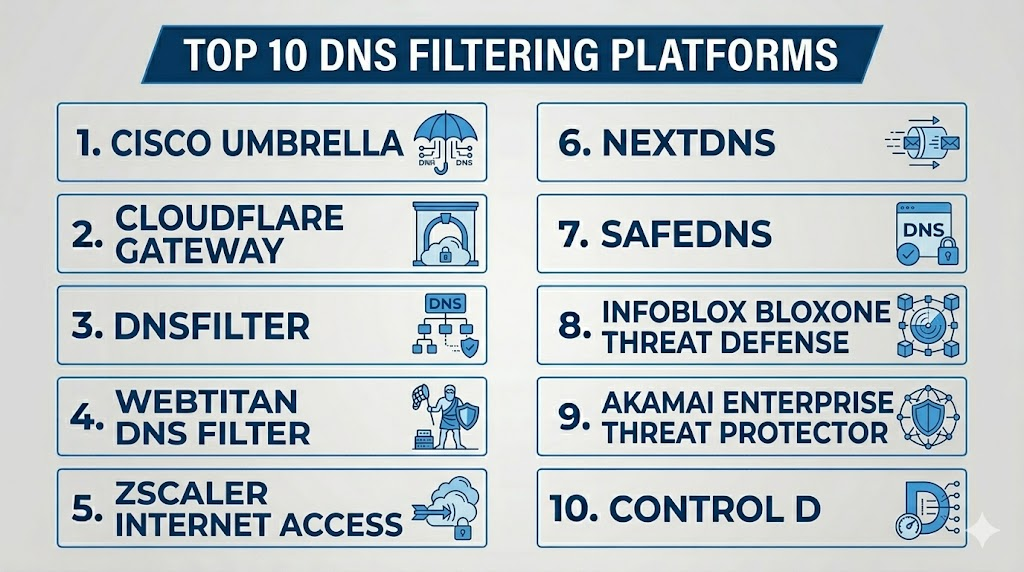
Introduction
DNS Filtering Platforms help organizations block access to malicious, risky, inappropriate, or unwanted websites by controlling DNS requests. When a user tries to visit a domain, the DNS filtering platform checks that request against threat intelligence, category rules, security policies, user groups, and device context. If the domain is dangerous or violates policy, the request is blocked before the browser or application connects to the destination.DNS filtering matters because many cyberattacks depend on users or devices connecting to risky domains. Phishing pages, malware command-and-control servers, ransomware infrastructure, fake login sites, botnet domains, and newly registered suspicious domains often rely on DNS lookups. By filtering DNS traffic, organizations can reduce risk early in the connection process without requiring heavy endpoint changes.
Real-world use cases include:
- Blocking phishing, malware, ransomware, and command-and-control domains
- Protecting remote workers outside the office network
- Enforcing web usage policies by category
- Reducing access to adult, gambling, proxy, or productivity-risk websites
- Supporting schools, MSPs, SMBs, and enterprises with safer browsing controls
Evaluation Criteria for Buyers:
- Threat intelligence quality
- Malware and phishing domain detection
- Category filtering accuracy
- Remote worker protection
- Roaming client or agent availability
- Integration with identity providers and directories
- Reporting and visibility
- Policy granularity by user, group, device, or location
- Ease of deployment and management
- Pricing, support, and MSP readiness
Best for: IT teams, security teams, MSPs, schools, SMBs, mid-market companies, enterprises, healthcare providers, financial organizations, and any business that needs simple but effective web threat prevention.
Not ideal for: Organizations that need full HTTPS content inspection, advanced browser isolation, deep DLP, or full secure web gateway controls as the only requirement. DNS filtering is powerful, but it should be used as part of a layered security strategy.
Key Trends in DNS Filtering Platforms
- DNS filtering is moving from office-only protection to roaming protection, helping secure users on home networks, public Wi-Fi, and mobile work setups.
- AI and machine learning are being used to classify new and suspicious domains faster, especially newly registered domains used in phishing and malware campaigns.
- MSP-focused DNS filtering is growing, with multi-tenant dashboards, customer-level reporting, and simplified policy templates.
- DNS filtering is becoming part of broader SSE and SASE platforms, combining DNS security with SWG, CASB, ZTNA, and cloud firewall capabilities.
- DoH and encrypted DNS visibility are becoming important, because unmanaged encrypted DNS can bypass traditional network controls.
- User-based policy enforcement is replacing simple network-wide filtering, allowing different rules for employees, students, guests, executives, and contractors.
- Threat intelligence quality is becoming a major differentiator, especially for detecting phishing, malware, botnet, and suspicious newly created domains.
- Education and compliance use cases are expanding, especially where organizations need content filtering, safe browsing, and audit-ready reports.
- Cloud-first deployment is now common, reducing the need for heavy appliances and simplifying remote worker coverage.
- DNS filtering and endpoint security are becoming more connected, giving security teams better visibility across device, user, and domain activity.
How We Selected These Tools
The platforms below were selected based on category relevance, market recognition, feature maturity, deployment flexibility, and practical value for different buyer segments.
- Market adoption and mindshare across SMB, enterprise, MSP, education, healthcare, nonprofit, and regulated environments
- Feature completeness, including domain blocking, category filtering, threat intelligence, reporting, and roaming protection
- Security depth, including phishing, malware, ransomware, botnet, command-and-control, and newly registered domain detection
- Ease of deployment, including cloud setup, DNS forwarding, roaming clients, and policy templates
- Integration strength with identity providers, directories, SIEM tools, endpoint security, and broader security stacks
- Remote workforce support, including off-network filtering and device-level enforcement
- Policy granularity, including user, group, location, network, and device-based controls
- MSP readiness, including multi-tenant management and customer reporting
- Performance and reliability, including resolver speed, uptime expectations, and global coverage
- Support and documentation quality, including onboarding, troubleshooting, and admin resources
Top 10 DNS Filtering Platforms
1- Cisco Umbrella
Short description:
Cisco Umbrella is a widely recognized DNS security and secure internet gateway platform used by organizations that need DNS-layer protection, threat intelligence, and cloud-delivered security controls. It helps block malicious domains, phishing sites, malware destinations, command-and-control activity, and unwanted web categories before users connect. Cisco Umbrella is especially relevant for enterprises, distributed teams, and organizations already using Cisco security products. It is a strong option for buyers that want DNS filtering connected to a broader security ecosystem.
Key Features
- DNS-layer security and domain filtering
- Malware, phishing, and command-and-control blocking
- Category-based web filtering
- Roaming client support for off-network users
- Cloud-delivered security policies
- Reporting and investigation workflows
- Integration with Cisco security ecosystem
Pros
- Strong fit for enterprise and Cisco-centric environments
- Mature DNS-layer security and threat intelligence
- Useful for distributed users and branch offices
Cons
- May be more complex than smaller teams need
- Full value may require broader Cisco ecosystem alignment
- Advanced secure web gateway capabilities may depend on package
Platforms / Deployment
Cloud / Hybrid
Windows / macOS / Mobile / Network-level deployment
Security & Compliance
Enterprise controls may include role-based access, logging, reporting, policy controls, and security integrations. Buyers should validate exact SSO, audit logs, encryption, data retention, and compliance requirements directly.
Integrations & Ecosystem
Cisco Umbrella works best when DNS filtering is connected to broader security operations. It can support identity-aware policies, network protection, endpoint visibility, and threat investigation workflows.
- Cisco security products
- Directory services
- SIEM workflows
- Endpoint security tools
- Network security systems
- Security operations processes
Support & Community
Cisco provides enterprise documentation, support, partner services, and a large technical ecosystem. Support level may vary by contract and deployment model.
2- Cloudflare Gateway
Short description:
Cloudflare Gateway is a DNS filtering and secure web gateway capability within Cloudflare’s Zero Trust platform. It helps organizations block malicious domains, enforce web policies, protect users from phishing, and secure traffic across office, remote, and hybrid environments. Cloudflare Gateway is especially useful for teams already using Cloudflare services or looking for fast, cloud-native security controls. It is a strong option for organizations that want DNS filtering as part of a broader Zero Trust and edge security strategy.
Key Features
- DNS filtering and secure web gateway capabilities
- Malware, phishing, and suspicious domain blocking
- Category-based filtering
- User and device-aware policies
- Cloudflare edge network performance
- Integration with Zero Trust access workflows
- Logging and analytics dashboard
Pros
- Strong fit for Cloudflare and Zero Trust environments
- Global edge architecture can support performance
- Good option for cloud-first and remote-first teams
Cons
- Best value is often inside the Cloudflare ecosystem
- Advanced policy design may require Zero Trust knowledge
- Some features may depend on plan level
Platforms / Deployment
Cloud
Windows / macOS / Linux / iOS / Android / Network-level deployment
Security & Compliance
Security controls may include identity-aware policies, logging, admin controls, access rules, and encryption. Buyers should validate SSO, RBAC, audit logs, data residency, and compliance needs directly.
Integrations & Ecosystem
Cloudflare Gateway fits into broader Zero Trust, secure access, and cloud security programs. It is useful when DNS filtering must work with identity, device posture, and network routing policies.
- Cloudflare Zero Trust
- Identity providers
- Endpoint agents
- SIEM workflows
- Network security policies
- Secure access workflows
Support & Community
Cloudflare provides documentation, support tiers, community resources, and enterprise assistance. Support depth depends on plan and contract.
3- DNSFilter
Short description:
DNSFilter is a cloud-based DNS filtering platform built for businesses, MSPs, schools, and distributed teams. It focuses on fast deployment, AI-assisted domain categorization, threat protection, roaming clients, and easy policy management. DNSFilter is especially strong for MSPs and SMBs that need practical filtering without heavy enterprise complexity. It helps block malware, phishing, botnet domains, adult content, proxy sites, and other unwanted destinations through simple cloud-based controls.
Key Features
- DNS filtering and threat blocking
- AI-assisted domain categorization
- Roaming client support
- Category-based content filtering
- MSP multi-tenant management
- Reporting and analytics
- Policy management by user, group, or location
Pros
- Strong fit for MSPs, SMBs, and schools
- Easy deployment and administration
- Good balance of security filtering and usability
Cons
- May not replace a full secure web gateway for deep traffic inspection
- Advanced enterprise workflows may require additional tools
- Policy design still needs careful planning
Platforms / Deployment
Cloud
Windows / macOS / iOS / Android / Chromebook / Network-level deployment
Security & Compliance
Security and compliance controls should be validated directly. Buyers should review SSO, RBAC, audit logs, encryption, policy controls, and data retention based on plan.
Integrations & Ecosystem
DNSFilter is designed to fit easily into managed IT, school, business, and MSP environments. It is useful when teams need quick DNS-layer security and simple content policy enforcement.
- MSP management workflows
- Directory services
- SIEM and reporting tools
- Roaming clients
- Network routers and firewalls
- Education filtering programs
Support & Community
DNSFilter provides documentation, support resources, onboarding help, and MSP-oriented guidance. Support level may vary by plan and partner model.
4- WebTitan DNS Filter
Short description:
WebTitan DNS Filter is a DNS filtering and web content control platform from TitanHQ, widely used by MSPs, SMBs, schools, and organizations that need cloud-based web filtering. It helps block malware, phishing, ransomware domains, adult content, unsafe websites, and productivity-draining categories. WebTitan is especially attractive for service providers because of its multi-tenant management and customer-friendly reporting. It is a practical choice for teams that want reliable DNS filtering without overly complex security architecture.
Key Features
- DNS filtering and web content control
- Malware, phishing, and ransomware domain blocking
- Category-based filtering
- MSP multi-tenant management
- Cloud-based policy administration
- Reporting and customer-level visibility
- Roaming user protection options
Pros
- Strong fit for MSPs and SMBs
- Practical content filtering and threat protection
- Multi-tenant management supports service provider workflows
Cons
- May not provide full enterprise SSE depth
- Advanced integrations should be validated
- User experience depends on policy and network setup
Platforms / Deployment
Cloud / Hybrid
Windows / macOS / Network-level deployment
Security & Compliance
Not publicly stated in full detail. Buyers should validate SSO, RBAC, audit logs, encryption, data retention, and compliance requirements directly.
Integrations & Ecosystem
WebTitan fits well in MSP, SMB, education, and compliance-driven browsing control programs. It is useful when organizations need DNS-layer filtering and simple reporting.
- MSP dashboards
- Directory services
- Network routers and firewalls
- Customer reporting workflows
- Education filtering programs
- Security monitoring processes
Support & Community
WebTitan provides vendor support, documentation, and MSP-focused resources. Support options should be reviewed by plan and partner model.
5- Zscaler Internet Access
Short description:
Zscaler Internet Access is a cloud security platform that includes DNS security, secure web gateway, cloud firewall, sandboxing, URL filtering, and broader internet access protection. It is not only a DNS filtering tool, but it is highly relevant for enterprises that want DNS filtering inside a larger secure internet access architecture. Zscaler is best suited for large organizations, distributed workforces, and cloud-first enterprises. It provides deeper controls than simple DNS filtering, especially when secure web gateway and inspection capabilities are required.
Key Features
- DNS security and URL filtering
- Secure web gateway capabilities
- Malware and phishing protection
- Cloud firewall and internet access controls
- Sandboxing and advanced threat protection
- User and application-aware policies
- Enterprise reporting and analytics
Pros
- Strong fit for large enterprises and cloud-first security programs
- Broad security coverage beyond DNS filtering
- Useful for global and distributed workforces
Cons
- May be too complex for SMBs
- Deployment and policy design require experienced teams
- Pricing and licensing can be more involved than DNS-only tools
Platforms / Deployment
Cloud
Windows / macOS / Linux / iOS / Android / Enterprise network deployment
Security & Compliance
Enterprise controls may include SSO, RBAC, audit logs, encryption, policy controls, data protection features, and compliance support depending on licensing. Buyers should validate exact requirements directly.
Integrations & Ecosystem
Zscaler Internet Access works best as part of a broader SSE or SASE strategy. DNS filtering can be combined with secure web gateway, cloud firewall, CASB, and identity-aware access controls.
- Identity providers
- SIEM and SOAR workflows
- Endpoint agents
- CASB and DLP workflows
- Cloud firewall policies
- Enterprise security operations
Support & Community
Zscaler offers enterprise support, documentation, partner services, and implementation guidance. Support depth may vary by contract and region.
6- NextDNS
Short description:
NextDNS is a cloud-based DNS filtering and privacy-focused DNS service used by individuals, families, small teams, developers, and businesses that want customizable domain-level filtering. It offers blocklists, allowlists, analytics, parental controls, security protections, and privacy controls. NextDNS is especially useful for lightweight filtering, personal device protection, small office setups, and technical users who want flexible DNS-level control. It is less enterprise-heavy than platforms like Cisco or Zscaler, but it is powerful for simple and customizable filtering needs.
Key Features
- Custom DNS filtering profiles
- Security and privacy blocklists
- Category-based filtering
- Parental control and safe browsing options
- Analytics and logs
- Device-specific configuration
- Encrypted DNS support
Pros
- Easy to use and highly customizable
- Good fit for individuals, families, developers, and small teams
- Strong value for lightweight DNS filtering
Cons
- Not a full enterprise security platform
- Limited advanced MSP and SOC workflows
- May require technical setup for multi-device environments
Platforms / Deployment
Cloud
Windows / macOS / Linux / iOS / Android / Router-level deployment
Security & Compliance
Not publicly stated in full enterprise detail. Buyers should validate privacy controls, logging settings, encryption options, and compliance needs before business use.
Integrations & Ecosystem
NextDNS is flexible and can be configured across devices, routers, browsers, and operating systems. It is most useful where simple DNS filtering and privacy controls are needed.
- Routers
- Mobile devices
- Desktop systems
- Browser-level configurations
- Encrypted DNS setups
- Personal and small business networks
Support & Community
NextDNS has documentation and user community resources. Enterprise-style onboarding and support may be more limited than larger business-focused vendors.
7- SafeDNS
Short description:
SafeDNS is a DNS filtering and web content filtering platform used by businesses, schools, libraries, nonprofits, and families. It helps block malicious websites, adult content, gambling, social media, proxy sites, and other categories based on policy. SafeDNS is especially relevant for education and public access environments where content control and safe browsing are important. It is a practical choice for buyers that need category filtering, simple setup, and policy-based internet access control.
Key Features
- DNS-based content filtering
- Category-based web blocking
- Malware and phishing protection
- Policy controls by network or user group
- Reporting and analytics
- Safe browsing controls for schools and public environments
- Cloud-based management
Pros
- Good fit for education, nonprofits, and family-safe browsing
- Simple category filtering and administration
- Useful for content compliance and acceptable use policies
Cons
- May not provide deep enterprise security features
- Advanced integrations may be limited
- Less suitable for complex SOC-driven environments
Platforms / Deployment
Cloud
Windows / macOS / Linux / iOS / Android / Router-level deployment
Security & Compliance
Not publicly stated in full detail. Buyers should validate audit logs, admin controls, data handling, and compliance requirements directly.
Integrations & Ecosystem
SafeDNS works well for organizations needing straightforward DNS content filtering and reporting. It is useful in environments where safe browsing and category control are the main priorities.
- School networks
- Public Wi-Fi
- Router-level filtering
- Business networks
- Family safety setups
- Admin reporting workflows
Support & Community
SafeDNS provides vendor documentation and support resources. Buyers should validate onboarding and support availability based on plan.
8- Infoblox BloxOne Threat Defense
Short description:
Infoblox BloxOne Threat Defense is a DNS security and threat defense platform designed for organizations that need strong DNS visibility, threat intelligence, and network security integration. It is especially relevant for enterprises, network security teams, and organizations already using Infoblox for DNS, DHCP, and IP address management. The platform helps detect and block malicious domains, command-and-control activity, data exfiltration attempts, and suspicious DNS behavior. It is a strong choice for network-centric security teams that want DNS security connected to core infrastructure.
Key Features
- DNS security and threat defense
- Malicious domain and command-and-control blocking
- DNS visibility and analytics
- Threat intelligence integration
- Integration with DDI environments
- Policy and reporting controls
- Network security workflow support
Pros
- Strong fit for enterprises with complex network infrastructure
- Valuable for teams already using Infoblox DDI
- Good DNS visibility and security analytics
Cons
- May be too complex for small organizations
- Best value comes with network security maturity
- Deployment may require DNS and infrastructure expertise
Platforms / Deployment
Cloud / Hybrid
Enterprise network environments
Security & Compliance
Enterprise controls may include logging, policy management, access control, and security integrations depending on deployment. Buyers should validate SSO, RBAC, audit logs, encryption, and compliance needs directly.
Integrations & Ecosystem
Infoblox BloxOne Threat Defense works well with DNS infrastructure, network security tools, SIEM platforms, and enterprise security operations. It is most useful when DNS security is part of a larger network visibility strategy.
- Infoblox DDI
- SIEM workflows
- Network security tools
- Threat intelligence platforms
- Firewalls and enforcement points
- Security operations processes
Support & Community
Infoblox provides enterprise support, technical documentation, professional services, and partner assistance. Support depth may vary by contract.
9- Akamai Enterprise Threat Protector
Short description:
Akamai Enterprise Threat Protector is a DNS-based security solution designed to block malware, phishing, ransomware, command-and-control domains, and risky internet destinations. It benefits from Akamai’s global infrastructure and security intelligence. The platform is suitable for enterprises that need scalable DNS-layer security, policy enforcement, and visibility across distributed users and locations. It is especially relevant for organizations already using Akamai security or edge services.
Key Features
- DNS-layer threat protection
- Malware and phishing domain blocking
- Command-and-control detection
- Category-based policy enforcement
- Reporting and threat visibility
- Cloud-based deployment
- Enterprise policy controls
Pros
- Strong fit for enterprise DNS security use cases
- Benefits from global edge and threat intelligence capabilities
- Useful for distributed organizations
Cons
- May be more enterprise-focused than SMB buyers need
- Advanced setup may require security expertise
- Best value may come within the Akamai ecosystem
Platforms / Deployment
Cloud
Enterprise network and remote user environments
Security & Compliance
Not publicly stated in full detail. Buyers should validate SSO, RBAC, audit logs, encryption, retention, and compliance requirements directly.
Integrations & Ecosystem
Akamai Enterprise Threat Protector fits into enterprise web, DNS, and edge security programs. It is useful where DNS-layer security must work alongside global traffic and threat protection.
- Akamai security services
- Enterprise DNS environments
- SIEM workflows
- Threat intelligence platforms
- Network security systems
- Remote user protection workflows
Support & Community
Akamai provides enterprise support, documentation, and professional services. Support level depends on contract and region.
10- Control D
Short description:
Control D is a customizable DNS filtering and privacy-focused DNS service used by individuals, families, developers, and businesses that want control over domain categories, ads, trackers, malware, and unwanted destinations. It offers flexible DNS profiles, geographic routing features, blocklists, allowlists, and device-level configuration. Control D is especially useful for technical users and smaller teams that need customizable DNS filtering without full enterprise complexity. It can also support organizations looking for privacy-oriented filtering and lightweight policy control.
Key Features
- Custom DNS filtering profiles
- Malware, phishing, ads, and tracker blocking
- Category-based blocking
- Device-level configuration
- Encrypted DNS support
- Flexible routing options
- Analytics and policy controls
Pros
- Highly customizable and flexible
- Good fit for technical users, families, and small teams
- Useful for privacy and lightweight filtering needs
Cons
- Not a full enterprise DNS security platform
- Limited SOC and MSP workflow depth compared with business-focused platforms
- Advanced enterprise administration should be validated
Platforms / Deployment
Cloud
Windows / macOS / Linux / iOS / Android / Router-level deployment
Security & Compliance
Not publicly stated in full enterprise detail. Buyers should validate privacy settings, logging options, admin controls, and compliance needs before business deployment.
Integrations & Ecosystem
Control D works well for device-level, router-level, and profile-based DNS filtering. It is useful when customization and privacy controls are more important than enterprise security operations.
- Desktop devices
- Mobile devices
- Routers
- Encrypted DNS setups
- Personal networks
- Small business environments
Support & Community
Control D provides documentation and support resources. Community and enterprise support depth may be more limited than larger enterprise DNS security vendors.
Comparison Table
| Tool Name | Best For | Platforms Supported | Deployment | Standout Feature | Public Rating |
|---|---|---|---|---|---|
| Cisco Umbrella | Enterprise DNS security | Windows, macOS, Mobile, Network | Cloud / Hybrid | DNS-layer security with Cisco threat intelligence | N/A |
| Cloudflare Gateway | Zero Trust and cloud-first teams | Windows, macOS, Linux, iOS, Android, Network | Cloud | Fast edge-based DNS filtering and policy control | N/A |
| DNSFilter | MSPs, SMBs, and schools | Windows, macOS, iOS, Android, Chromebook, Network | Cloud | AI-assisted domain categorization and MSP readiness | N/A |
| WebTitan DNS Filter | SMBs, MSPs, and education | Windows, macOS, Network | Cloud / Hybrid | MSP-friendly web content filtering | N/A |
| Zscaler Internet Access | Enterprise internet security | Windows, macOS, Linux, iOS, Android | Cloud | DNS filtering within full secure internet access stack | N/A |
| NextDNS | Individuals, developers, and small teams | Windows, macOS, Linux, iOS, Android, Router | Cloud | Custom privacy and DNS filtering profiles | N/A |
| SafeDNS | Education, nonprofits, and public networks | Windows, macOS, Linux, iOS, Android, Router | Cloud | Simple category filtering for safe browsing | N/A |
| Infoblox BloxOne Threat Defense | Network-centric enterprises | Enterprise networks | Cloud / Hybrid | DNS security connected with DDI infrastructure | N/A |
| Akamai Enterprise Threat Protector | Distributed enterprises | Enterprise networks, Remote users | Cloud | DNS-layer protection backed by global edge intelligence | N/A |
| Control D | Technical users and small teams | Windows, macOS, Linux, iOS, Android, Router | Cloud | Flexible DNS filtering and privacy controls | N/A |
Evaluation and Scoring of DNS Filtering Platforms
| Tool Name | Core 25% | Ease 15% | Integrations 15% | Security 10% | Performance 10% | Support 10% | Value 15% | Weighted Total 0–10 |
|---|---|---|---|---|---|---|---|---|
| Cisco Umbrella | 9.2 | 8.0 | 9.0 | 9.0 | 8.8 | 8.7 | 8.0 | 8.69 |
| Cloudflare Gateway | 8.8 | 8.5 | 9.0 | 8.7 | 9.2 | 8.3 | 8.6 | 8.75 |
| DNSFilter | 8.7 | 9.0 | 8.4 | 8.4 | 8.8 | 8.5 | 8.8 | 8.68 |
| WebTitan DNS Filter | 8.3 | 8.7 | 8.2 | 8.2 | 8.4 | 8.7 | 8.6 | 8.44 |
| Zscaler Internet Access | 9.0 | 7.6 | 9.0 | 9.0 | 8.8 | 8.6 | 7.8 | 8.54 |
| NextDNS | 8.0 | 9.0 | 7.5 | 8.0 | 8.8 | 7.5 | 9.0 | 8.28 |
| SafeDNS | 7.8 | 8.8 | 7.5 | 7.8 | 8.2 | 8.0 | 8.8 | 8.11 |
| Infoblox BloxOne Threat Defense | 8.8 | 7.3 | 9.0 | 8.8 | 8.5 | 8.5 | 7.6 | 8.34 |
| Akamai Enterprise Threat Protector | 8.6 | 7.8 | 8.3 | 8.7 | 9.0 | 8.4 | 7.8 | 8.36 |
| Control D | 7.8 | 8.8 | 7.2 | 7.8 | 8.7 | 7.5 | 9.0 | 8.10 |
These scores are comparative, not absolute. A higher score means the platform performs strongly across the selected criteria, but it does not mean the tool is best for every organization. Cisco Umbrella may fit large enterprises, DNSFilter may fit MSPs and SMBs, Cloudflare Gateway may fit Zero Trust teams, and NextDNS or Control D may fit lightweight filtering needs. Buyers should test DNS resolution performance, block accuracy, false positives, roaming protection, reporting, and integration requirements before choosing.
Which DNS Filtering Platform Is Right for You?
Solo / Freelancer
Solo users and freelancers usually need simple protection against malware domains, phishing sites, ads, trackers, and unwanted content. NextDNS and Control D are practical options because they are flexible, lightweight, and easy to configure on individual devices or routers. Freelancers handling client-sensitive work may also consider Cloudflare Gateway if they already use Cloudflare services. The focus should be simplicity, privacy controls, and reliable blocking rather than enterprise reporting. A full enterprise DNS security platform is usually unnecessary unless client contracts require it.
SMB
SMBs should prioritize easy deployment, strong phishing and malware blocking, content category controls, and simple dashboards. DNSFilter, WebTitan DNS Filter, Cisco Umbrella, and Cloudflare Gateway are strong options depending on budget and team skill. SMBs with remote workers should choose a platform with a roaming client or agent. Businesses with strict acceptable-use policies should evaluate reporting and category accuracy. The best SMB tool should reduce risk without creating heavy administrative work.
Mid-Market
Mid-market organizations usually need better policy segmentation, directory integration, remote user protection, reporting, and support. DNSFilter, Cisco Umbrella, Cloudflare Gateway, WebTitan, and Akamai Enterprise Threat Protector are practical candidates. If the organization already uses Cisco or Cloudflare, ecosystem alignment may make deployment easier. Mid-market buyers should test user group policies, remote filtering, SIEM exports, and category exceptions. DNS filtering should fit into broader security operations, not operate as a disconnected tool.
Enterprise
Enterprises need scalable DNS security, advanced reporting, integration with SIEM and identity systems, strong threat intelligence, and global reliability. Cisco Umbrella, Zscaler Internet Access, Infoblox BloxOne Threat Defense, Akamai Enterprise Threat Protector, and Cloudflare Gateway are strong enterprise candidates. Enterprises should also evaluate whether they need DNS-only filtering or a broader secure web gateway and SASE platform. Policy delegation, data retention, audit logs, and support quality become especially important at enterprise scale.
Budget vs Premium
Budget-conscious buyers may start with NextDNS, Control D, SafeDNS, or DNSFilter depending on organization type. Premium buyers with enterprise security needs may evaluate Cisco Umbrella, Zscaler Internet Access, Infoblox, Akamai, or Cloudflare Gateway. Lower-cost tools can provide strong DNS-layer control, but premium platforms often provide deeper integrations, better enterprise reporting, stronger support, and broader security stack alignment. Buyers should compare value based on risk reduction, management time, and integration needs rather than price alone.
Feature Depth vs Ease of Use
If ease of use is the priority, DNSFilter, WebTitan, NextDNS, SafeDNS, and Control D are easier starting points. If feature depth matters more, Cisco Umbrella, Zscaler Internet Access, Infoblox BloxOne Threat Defense, and Akamai Enterprise Threat Protector provide stronger enterprise capabilities. Cloudflare Gateway sits between simplicity and advanced Zero Trust capability depending on configuration. Buyers should choose a tool their team can actually manage well. A simpler tool with consistent policies can outperform a powerful platform that is poorly configured.
Integrations & Scalability
DNS filtering should integrate with identity providers, directories, SIEM tools, endpoint security, firewalls, routers, and broader security operations. MSPs need multi-tenant dashboards and customer-level reporting. Enterprises need API access, audit logs, policy delegation, high availability, and global resolver performance. Remote-first companies need roaming clients or device agents. Scalability is not only about DNS query volume; it also includes policy complexity, reporting needs, support coverage, and operational manageability.
Security & Compliance Needs
Security and compliance buyers should validate logging, retention, audit trails, role-based access, encryption, data handling, and regional privacy requirements. Schools may need safe browsing and content category controls. Healthcare and finance teams may need stronger reporting and policy evidence. Enterprises should review how the tool handles malicious domains, newly registered domains, encrypted DNS, bypass attempts, and remote users. DNS filtering should support governance while keeping administration simple enough for consistent enforcement.
Common Mistakes to Avoid When Buying DNS Filtering Platforms
- Choosing a platform only because it is cheap, without testing block accuracy
- Assuming DNS filtering replaces endpoint security, SWG, or firewall protection
- Not protecting remote workers outside the office network
- Ignoring encrypted DNS bypass risks
- Using only network-wide policies instead of user or group-based controls
- Not reviewing false positives for business-critical websites
- Forgetting to configure guest, student, contractor, and BYOD policies separately
- Not integrating DNS logs with security monitoring workflows
- Overbuying a full enterprise suite when DNS-only filtering is enough
- Underestimating the importance of reporting and admin usability
- Not reviewing data retention and privacy requirements
- Failing to test DNS performance across regions and locations
Implementation Playbook
First Phase
Start by mapping current DNS infrastructure, network locations, remote users, device types, and existing security tools. Identify whether DNS filtering is needed for offices, remote workers, mobile devices, schools, public Wi-Fi, guests, or servers. Define the main goals, such as blocking phishing, stopping malware domains, enforcing acceptable use, protecting students, or improving security reporting. Review current DNS settings on routers, firewalls, endpoints, and cloud environments. Choose a small pilot group and define success metrics such as blocked threats, false positives, user complaints, and reporting visibility.
Second Phase
Deploy DNS filtering gradually. Configure DNS forwarding, roaming clients, policies, category blocks, allowlists, blocklists, and admin roles. Start with monitoring or moderate policies before enforcing strict rules. Test with different user groups such as employees, executives, students, contractors, guests, and remote workers. Review logs daily during the early rollout to identify false positives and business-critical exceptions. Train administrators on policy management, reporting, troubleshooting, and bypass controls. Document escalation steps for blocked sites that users need for work.
Third Phase
Move toward mature DNS security operations. Integrate DNS logs with SIEM or security monitoring where appropriate. Apply stricter policies to high-risk users, unmanaged devices, guest networks, or sensitive departments. Review blocked categories, malware detections, phishing attempts, and suspicious domain activity regularly. Add user awareness when employees repeatedly try to access risky sites. Reassess policies as the business changes, new apps are adopted, and attackers shift tactics. DNS filtering should become part of a layered security program alongside email security, endpoint protection, identity controls, and secure web access.
Frequently Asked Questions
1- What are DNS Filtering Platforms?
DNS Filtering Platforms are security tools that control which domains users and devices can access. When a user tries to visit a website or when an app tries to connect to a domain, the DNS filtering platform checks whether that domain is safe, allowed, blocked, or suspicious. If the domain is risky, the platform blocks the request before the connection is completed. These tools are used to stop phishing, malware, ransomware, command-and-control traffic, adult content, proxy sites, and other unwanted destinations. They are commonly deployed in businesses, schools, MSP environments, and remote work setups. DNS filtering is simple but powerful because it protects users early in the connection process.
2- How does DNS filtering work?
DNS filtering works by inspecting DNS requests and comparing them against threat intelligence, category databases, and company policies. If a domain is categorized as malicious, phishing, adult, gambling, proxy, or otherwise blocked, the platform prevents the DNS resolution. Users may see a block page or simply be unable to connect. Policies can be applied by network, user group, device, location, or roaming client depending on the platform. DNS filtering can work at the router, firewall, endpoint, or cloud resolver level. It is effective for stopping many domain-based threats, but it does not inspect full webpage content like a secure web gateway.
3- Is DNS filtering enough for business security?
DNS filtering is an important security layer, but it is not enough by itself for complete business protection. It can block many malicious domains, phishing sites, and unwanted destinations before users connect. However, it cannot fully inspect encrypted web content, file downloads, application behavior, or endpoint activity. Businesses should combine DNS filtering with email security, endpoint protection, MFA, firewalls, secure web gateway tools, user training, and incident response processes. For many SMBs, DNS filtering provides strong value because it is simple to deploy and reduces risk quickly. For enterprises, it is usually part of a broader security architecture.
4- What is the difference between DNS filtering and secure web gateway?
DNS filtering blocks or allows domain lookups before a connection happens. A secure web gateway inspects web traffic at the HTTP or HTTPS layer and can provide deeper controls such as URL path filtering, file scanning, content inspection, DLP, and user activity analysis. DNS filtering is usually simpler, faster, and easier to deploy. Secure web gateways are more powerful but can be more complex to configure and manage. Many modern platforms combine both capabilities. Buyers should choose DNS filtering for quick domain-level protection and secure web gateway controls when deeper web inspection is required.
5- Can DNS filtering protect remote workers?
Yes, DNS filtering can protect remote workers if the platform supports roaming clients, endpoint agents, VPN integration, or device-level DNS configuration. This is important because remote users often work from home networks, hotels, public Wi-Fi, and mobile hotspots. Without roaming protection, DNS filtering may only work inside the office network. A good platform should enforce policies consistently whether the user is on-site or remote. Buyers should test the roaming client on Windows, macOS, mobile devices, and unmanaged network conditions. Remote protection is one of the most important buying criteria for modern organizations.
6- How much do DNS Filtering Platforms cost?
Pricing varies based on number of users, devices, DNS queries, locations, feature tier, support level, and whether the buyer is an MSP or direct customer. Lightweight tools may be inexpensive for small teams, while enterprise platforms may use custom pricing and broader security bundles. Buyers should compare total value, not only monthly subscription cost. Important cost factors include deployment time, support quality, reporting needs, integrations, and whether additional secure web gateway features are required. MSPs should also evaluate multi-tenant pricing and customer management features. A pilot can help estimate both cost and operational value.
7- What features should buyers look for?
Buyers should look for malware and phishing blocking, category filtering, roaming clients, reporting, allowlists, blocklists, user-based policies, group-based policies, and reliable threat intelligence. MSPs should look for multi-tenant dashboards and customer reporting. Enterprises should evaluate SIEM integration, API access, identity provider support, audit logs, admin roles, and global resolver performance. Schools and nonprofits should prioritize content categories and safe browsing controls. Remote-first teams should prioritize off-network enforcement. The best platform should be easy to manage while still providing strong protection.
8- Can users bypass DNS filtering?
Users may try to bypass DNS filtering by changing DNS settings, using VPNs, using proxies, using encrypted DNS, or accessing blocked content through alternative methods. Strong platforms reduce bypass risk through endpoint agents, firewall rules, router enforcement, identity-aware controls, and encrypted DNS management. Organizations should also lock down local DNS settings where possible. DNS filtering should be supported by firewall policies and endpoint controls. It is also important to monitor logs for unusual DNS behavior. No control is perfect, but good implementation makes bypass much harder.
9- What are common alternatives to DNS filtering?
Common alternatives include secure web gateways, firewalls, endpoint protection platforms, browser isolation tools, CASB tools, parental control systems, and native router-level filtering. Some organizations use DNS filtering together with these controls. Secure web gateways provide deeper inspection, while endpoint security detects threats directly on devices. Browser isolation can protect users from risky web content by running sites remotely. DNS filtering remains attractive because it is simple, fast, and effective at blocking known bad domains. The right alternative depends on the threat model, budget, compliance requirements, and team skill level.
10- How should a company switch DNS filtering platforms?
Switching DNS filtering platforms should start with an inventory of current DNS settings, policies, domains, allowlists, blocklists, user groups, reports, and roaming clients. The new platform should be tested with a pilot group before changing DNS settings organization-wide. Teams should compare block accuracy, false positives, reporting, roaming client behavior, and performance. It is important to migrate allowlists and business-critical exceptions carefully. Keep rollback instructions ready in case users experience access issues. After migration, review logs daily and tune policies based on real user behavior.
Conclusion
DNS Filtering Platforms are one of the most practical security controls for blocking phishing domains, malware destinations, ransomware infrastructure, unwanted content, proxy sites, and risky web activity before users connect. The best platform depends on organization size, security maturity, remote workforce needs, budget, compliance requirements, and existing security ecosystem. Cisco Umbrella is strong for enterprise and Cisco-centric environments, Cloudflare Gateway fits Zero Trust and edge-first teams, DNSFilter and WebTitan are strong for MSPs and SMBs, Zscaler and Infoblox support advanced enterprise needs, while NextDNS, SafeDNS, and Control D fit lightweight or specialized filtering scenarios. Buyers should avoid choosing based only on price or brand name.
