MOTOSHARE 🚗🏍️
Rent Bikes & Cars Directly from Owners
Motoshare connects vehicle owners with people who need bikes and cars on rent. Owners earn from idle vehicles, and renters get flexible ride options.
Visit Motoshare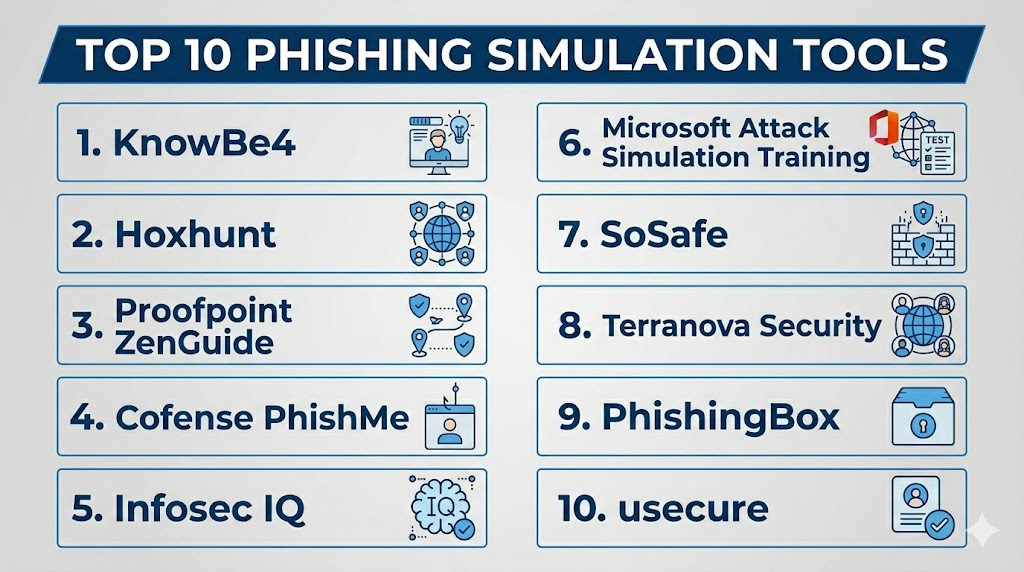
Introduction
Phishing Simulation Tools help organizations test how employees respond to realistic phishing emails, fake login pages, suspicious attachments, QR code scams, impersonation attempts, and social engineering messages. These platforms are used to measure human risk, train users, reduce risky clicks, improve reporting behavior, and build a stronger security culture. Instead of waiting for a real phishing attack, companies can safely simulate attacks and use the results for awareness training.
Phishing simulation matters because attackers continue to target people, not just systems. Even strong firewalls, email filters, and MFA cannot fully stop users from clicking malicious links or sharing credentials. A good phishing simulation tool helps security teams identify risky departments, repeat clickers, training gaps, and users who need targeted coaching.
Real-world use cases include:
- Testing employee response to phishing emails and fake login pages
- Training users with just-in-time awareness content
- Measuring click rates, report rates, and credential submission risk
- Reducing business email compromise and credential theft risk
- Supporting compliance and audit readiness through training records
Evaluation Criteria for Buyers:
- Realistic phishing templates
- Ease of campaign creation
- Automated user training
- Reporting and analytics quality
- Integration with Microsoft 365 and Google Workspace
- User reporting button support
- Multi-language training content
- Risk-based targeting
- Compliance reporting
- Support and onboarding quality
Best for: Security teams, IT administrators, compliance teams, SOC teams, MSPs, schools, healthcare organizations, banks, SaaS companies, and enterprises that need to reduce human-related email security risk.
Not ideal for: Very small teams with limited email risk, organizations that only need basic security awareness posters, or companies that are not ready to run simulations responsibly with clear policies, communication, and training follow-up.
Key Trends in Phishing Simulation Tools
- AI-powered personalization is growing, helping platforms adapt phishing difficulty and training content based on user behavior.
- QR code phishing simulations are becoming more important because attackers increasingly use QR codes to bypass traditional link detection.
- Smishing and vishing simulations are expanding, giving teams ways to test SMS and voice-based social engineering risk.
- Just-in-time training is replacing generic training only, so users receive learning content immediately after risky behavior.
- Risk-based training is becoming standard, allowing high-risk users and departments to receive more focused campaigns.
- Reporting buttons are now essential, because organizations want employees to report suspicious emails instead of ignoring them.
- SOC integration is improving, with reported phishing emails routed into triage, SIEM, or incident response workflows.
- Gamified awareness programs are becoming more common, especially for improving participation and long-term behavior change.
- Compliance dashboards are improving, helping teams show auditors that training is active, tracked, and measurable.
- Managed simulation services are growing, especially for organizations without dedicated security awareness staff.
How We Selected These Tools
The tools below were selected based on practical buyer relevance, market recognition, feature maturity, phishing simulation depth, training quality, and operational fit.
- Market adoption and mindshare across SMB, mid-market, enterprise, MSP, education, healthcare, and regulated industries
- Feature completeness, including phishing campaigns, training modules, templates, reporting, automation, and user risk scoring
- Realism of simulations, including email phishing, credential harvesting simulations, attachments, QR codes, and impersonation scenarios
- Ease of campaign management for IT, security, and awareness teams
- Integration strength with Microsoft 365, Google Workspace, directory services, SSO, LMS, SIEM, and reporting workflows
- Training content quality, including role-based, multilingual, and short-format learning options
- Security posture signals, including access controls, audit logs, admin roles, and data protection where clearly available
- Customer fit across segments, from small businesses to large global enterprises
- Reporting quality, including click rates, report rates, repeat offenders, department risk, and campaign trends
- Support and onboarding, including templates, managed services, documentation, and customer success
Top 10 Phishing Simulation Tools
1- KnowBe4
Short description:
KnowBe4 is one of the most widely recognized security awareness and phishing simulation platforms. It helps organizations run simulated phishing campaigns, train employees, measure human risk, and improve security behavior over time. The platform is used by SMBs, mid-market companies, enterprises, schools, healthcare organizations, and government-style environments. It is especially strong for teams that want a large content library, automation, reporting, and ongoing user awareness programs.
Key Features
- Phishing simulation campaign management
- Large security awareness training library
- Automated training assignments
- User risk scoring and reporting
- Phishing report button support
- Templates for phishing, social engineering, and security awareness
- Support for ongoing awareness programs
Pros
- Strong brand recognition and broad adoption
- Large training content library for many user types
- Good fit for structured security awareness programs
Cons
- Content volume may feel overwhelming without a clear program plan
- Advanced features may depend on package level
- Requires thoughtful campaign design to avoid user fatigue
Platforms / Deployment
Cloud
Web / Microsoft 365 / Google Workspace / Enterprise email environments
Security & Compliance
Security and compliance details vary by package and customer agreement. Buyers should validate SSO, RBAC, audit logs, encryption, data retention, and compliance needs directly.
Integrations & Ecosystem
KnowBe4 fits well into security awareness, IT training, compliance, and email security workflows. It is most useful when phishing simulation results are connected to user training and executive reporting.
- Microsoft 365
- Google Workspace
- Directory services
- SSO providers
- LMS workflows
- User reporting workflows
Support & Community
KnowBe4 provides documentation, templates, onboarding resources, customer support, and a broad awareness training ecosystem. Support level may vary by subscription and region.
2- Hoxhunt
Short description:
Hoxhunt is a phishing simulation and human risk management platform focused on behavior change, personalized training, and employee engagement. It uses realistic simulations and adaptive learning to help users build stronger reporting habits. Hoxhunt is especially relevant for mid-market and enterprise organizations that want phishing simulations to feel continuous, personalized, and measurable. It is a strong choice for teams that care about engagement, gamification, and long-term security culture.
Key Features
- Personalized phishing simulations
- Adaptive training based on user behavior
- Gamified user experience
- Phishing reporting workflows
- Human risk analytics
- Multi-language awareness content
- SOC and security workflow support
Pros
- Strong focus on employee engagement
- Good fit for continuous behavior change programs
- Useful analytics for human risk tracking
Cons
- May require program maturity to get full value
- Pricing and packaging should be validated directly
- Some organizations may prefer more traditional training libraries
Platforms / Deployment
Cloud
Web / Microsoft 365 / Google Workspace / Enterprise email environments
Security & Compliance
Not publicly stated in full detail. Buyers should validate SSO, RBAC, audit logs, encryption, privacy controls, and data processing requirements directly.
Integrations & Ecosystem
Hoxhunt integrates into email and security awareness workflows where user reporting, behavioral analytics, and continuous training are important.
- Microsoft 365
- Google Workspace
- SSO providers
- User reporting workflows
- Security operations processes
- Awareness program dashboards
Support & Community
Hoxhunt provides vendor-led onboarding, documentation, and customer success support. Support structure should be validated by contract and region.
3- Proofpoint ZenGuide
Short description:
Proofpoint ZenGuide is a security awareness and phishing simulation solution from Proofpoint, designed to help organizations reduce human risk through training, simulation, and measurable behavior change. It is especially relevant for enterprises already using Proofpoint email security products. The platform helps teams educate users, run simulations, identify risky behavior, and align awareness programs with real email threats. It is a strong option for organizations that want awareness training connected to enterprise email threat intelligence.
Key Features
- Phishing simulation campaigns
- Security awareness training content
- Human risk reporting
- Targeted user education
- Integration with Proofpoint email security ecosystem
- User behavior analytics
- Compliance and awareness reporting
Pros
- Strong fit for Proofpoint security customers
- Good alignment between email security and awareness training
- Useful for enterprise risk reduction programs
Cons
- Best value may come inside the Proofpoint ecosystem
- Enterprise setup may require security awareness planning
- Buyers should validate package-level capabilities
Platforms / Deployment
Cloud
Web / Microsoft 365 / Google Workspace / Enterprise email environments
Security & Compliance
Enterprise controls may include access management, auditability, and security administration features depending on configuration. Buyers should validate exact controls and compliance needs directly.
Integrations & Ecosystem
Proofpoint ZenGuide works well when awareness training is part of a broader email threat defense strategy. It can connect simulated phishing behavior with real-world threat education and reporting.
- Proofpoint email security products
- Microsoft 365
- Google Workspace
- Directory services
- Awareness program reporting
- Security operations workflows
Support & Community
Proofpoint provides enterprise support, customer success, documentation, and implementation assistance. Support level may depend on contract and product package.
4- Cofense PhishMe
Short description:
Cofense PhishMe is a phishing simulation and awareness platform designed to help organizations train employees to recognize and report suspicious emails. It is known for connecting simulations with real phishing defense workflows, especially through reporting and response capabilities. Cofense is a good fit for security teams that want simulation, user reporting, and phishing triage to work together. It is especially relevant for enterprises and SOC-driven organizations.
Key Features
- Phishing simulation campaigns
- Realistic phishing templates
- User reporting button support
- Just-in-time education
- Reporting and analytics dashboards
- Integration with phishing triage workflows
- Enterprise awareness program support
Pros
- Strong fit for SOC-connected phishing defense
- Good user reporting and response workflow alignment
- Useful for organizations focused on measurable reporting behavior
Cons
- May be more complex than basic training tools
- Best value comes when reporting and triage workflows are implemented
- Smaller teams may not need the full workflow depth
Platforms / Deployment
Cloud
Web / Microsoft 365 / Google Workspace / Enterprise email environments
Security & Compliance
Not publicly stated in full detail. Buyers should validate access controls, audit logs, encryption, data handling, SSO, and compliance needs directly.
Integrations & Ecosystem
Cofense fits into phishing defense programs where employee-reported emails become part of security operations. It is valuable when simulations are linked to real phishing investigation.
- Microsoft 365
- Google Workspace
- Cofense reporting workflows
- SIEM and SOC workflows
- Email security tools
- Incident response processes
Support & Community
Cofense provides enterprise support, onboarding, documentation, and security program guidance. Public community depth is limited compared with broader training platforms.
5- Infosec IQ
Short description:
Infosec IQ is a security awareness and phishing simulation platform designed to help organizations train users, run realistic phishing campaigns, and track security behavior over time. It offers awareness training content, templates, campaign automation, and reporting for security and compliance teams. Infosec IQ is suitable for SMBs, mid-market companies, enterprises, and managed awareness programs. It is a good fit for teams that want structured training and simulation without overly complex operations.
Key Features
- Phishing simulation campaigns
- Security awareness training library
- Campaign automation
- User risk and progress reporting
- Role-based training options
- Phishing reporting support
- Compliance-focused training records
Pros
- Good balance of training content and simulation features
- Practical for SMB, mid-market, and enterprise teams
- Useful reporting for awareness program tracking
Cons
- Training effectiveness depends on campaign quality
- Some organizations may need more advanced SOC integrations
- Buyers should validate package-level content and features
Platforms / Deployment
Cloud
Web / Microsoft 365 / Google Workspace / Enterprise email environments
Security & Compliance
Not publicly stated in full detail. Buyers should validate SSO, RBAC, encryption, audit logs, privacy controls, and compliance requirements during evaluation.
Integrations & Ecosystem
Infosec IQ works well for organizations building structured security awareness programs. It can support training, simulations, user reporting, and compliance documentation.
- Microsoft 365
- Google Workspace
- Directory services
- LMS workflows
- SSO providers
- Compliance reporting processes
Support & Community
Infosec IQ provides customer support, documentation, training resources, and onboarding assistance. Support level may vary by plan.
6- Microsoft Attack Simulation Training
Short description:
Microsoft Attack Simulation Training is a phishing simulation capability available within Microsoft’s security ecosystem for eligible Microsoft 365 customers. It helps organizations simulate phishing attacks, train users, and measure awareness outcomes inside Microsoft environments. The tool is especially useful for companies already using Microsoft Defender for Office 365 and Microsoft security products. It is a practical choice for Microsoft-first organizations that want built-in simulation capabilities without adding a separate platform immediately.
Key Features
- Phishing simulation campaigns
- Payload and template options
- User training assignments
- Reporting and insights
- Microsoft 365 integration
- Support for security awareness workflows
- Alignment with Microsoft Defender ecosystem
Pros
- Native fit for Microsoft 365 environments
- Convenient for teams already using Microsoft security tools
- Reduces need for separate tooling in some cases
Cons
- Best suited for Microsoft-first organizations
- Advanced awareness content may be more limited than specialist platforms
- Licensing requirements should be validated carefully
Platforms / Deployment
Cloud
Microsoft 365 / Microsoft Defender for Office 365 environments
Security & Compliance
Supports Microsoft security administration, tenant controls, role-based access, and reporting based on configuration and licensing. Buyers should validate exact compliance and access controls by license.
Integrations & Ecosystem
Microsoft Attack Simulation Training works best within Microsoft 365 security operations. It can support awareness programs linked to Microsoft Defender and Microsoft security reporting.
- Microsoft 365
- Microsoft Defender for Office 365
- Microsoft Entra ID
- Microsoft security dashboards
- User training workflows
- Admin reporting tools
Support & Community
Microsoft provides documentation, admin guidance, partner support, and enterprise support options. Community knowledge is strong due to Microsoft’s broad ecosystem.
7- SoSafe
Short description:
SoSafe is a human risk management and security awareness platform that includes phishing simulations, training content, analytics, and behavior-focused learning. It is designed for organizations that want to build security culture and reduce risky employee behavior. SoSafe is especially relevant for European and global organizations that need scalable awareness programs, multilingual content, and measurable training outcomes. It is a strong option for teams that want phishing simulation as part of broader human risk management.
Key Features
- Phishing simulation campaigns
- Security awareness training modules
- Human risk analytics
- Personalized learning paths
- Multilingual training content
- Reporting and compliance dashboards
- Behavior-focused awareness programs
Pros
- Strong fit for awareness and culture-building programs
- Useful for multilingual and distributed organizations
- Good focus on human risk measurement
Cons
- Buyers should validate regional content and feature fit
- May require program planning to maximize value
- Security operations integrations should be reviewed during procurement
Platforms / Deployment
Cloud
Web / Microsoft 365 / Google Workspace / Enterprise email environments
Security & Compliance
Not publicly stated in full detail. Buyers should validate SSO, audit logs, RBAC, encryption, privacy controls, and regional compliance requirements.
Integrations & Ecosystem
SoSafe fits into security awareness, compliance, HR learning, and human risk programs. It is useful where phishing simulation is part of a wider behavior change strategy.
- Microsoft 365
- Google Workspace
- SSO providers
- LMS workflows
- HR learning programs
- Awareness reporting dashboards
Support & Community
SoSafe provides vendor-led support, onboarding, documentation, and customer success resources. Support details may vary by region and contract.
8- Terranova Security
Short description:
Terranova Security provides security awareness training and phishing simulation capabilities, including content used in Microsoft Attack Simulation Training. It helps organizations educate employees, run simulations, and measure improvement in security behavior. The platform is suitable for businesses that need structured awareness content, phishing testing, and compliance-oriented training programs. It is a strong option for organizations that value education-first awareness programs.
Key Features
- Phishing simulation campaigns
- Security awareness training content
- Multilingual training options
- Campaign reporting and analytics
- User learning paths
- Compliance training support
- Integration with Microsoft security workflows
Pros
- Strong training-oriented approach
- Useful for multilingual awareness programs
- Good fit for Microsoft-connected simulation workflows
Cons
- Buyers should validate standalone platform requirements
- May be less SOC-focused than some phishing response platforms
- Feature availability can depend on deployment model
Platforms / Deployment
Cloud
Web / Microsoft 365 / Enterprise email environments
Security & Compliance
Not publicly stated in full detail. Buyers should validate SSO, RBAC, audit logs, encryption, privacy, and compliance requirements directly.
Integrations & Ecosystem
Terranova Security is useful for organizations that want awareness training and phishing simulation connected to Microsoft or broader training workflows.
- Microsoft 365
- Microsoft security ecosystem
- LMS workflows
- Awareness training programs
- Compliance reporting
- User education campaigns
Support & Community
Support is vendor-led with training resources, documentation, and program guidance. Buyers should confirm onboarding and support options during evaluation.
9- PhishingBox
Short description:
PhishingBox is a phishing simulation and security awareness training platform used by organizations that need practical campaign creation, user testing, and awareness reporting. It is often considered by SMBs, mid-market companies, MSPs, and training providers. The platform supports phishing templates, training modules, reporting, and program management. It is a good option for teams looking for a focused phishing simulation tool with manageable administration.
Key Features
- Phishing simulation campaigns
- Template creation and customization
- Security awareness training content
- Reporting and analytics
- User and group targeting
- Training assignment workflows
- MSP and multi-tenant use cases
Pros
- Practical option for SMBs and MSPs
- Focused phishing simulation capabilities
- Useful reporting for training progress
Cons
- May not match enterprise platforms for advanced automation
- Content and integration depth should be validated
- Requires program management for strong results
Platforms / Deployment
Cloud
Web / Microsoft 365 / Google Workspace / Enterprise email environments
Security & Compliance
Not publicly stated in full detail. Buyers should validate SSO, RBAC, encryption, audit logs, and compliance requirements directly.
Integrations & Ecosystem
PhishingBox fits into awareness training and phishing testing workflows where teams need practical campaign execution and reporting.
- Microsoft 365
- Google Workspace
- Directory services
- Training workflows
- MSP management workflows
- Reporting dashboards
Support & Community
PhishingBox provides documentation and support resources. Buyers should validate support response times, onboarding options, and managed service availability.
10- usecure
Short description:
usecure is a security awareness and human risk management platform that includes phishing simulation, policy management, training, and user risk scoring. It is designed for SMBs, MSPs, and growing organizations that need practical awareness tools with manageable administration. The platform helps teams run phishing campaigns, assign training, track risk, and improve employee security behavior. It is a strong option for organizations that want simplicity, automation, and awareness program structure.
Key Features
- Phishing simulation campaigns
- Automated security awareness training
- User risk scoring
- Policy management support
- Reporting and analytics
- MSP-friendly features
- Security behavior tracking
Pros
- Good fit for SMBs and MSPs
- Simple awareness program management
- Useful combination of phishing, training, and policies
Cons
- May not provide the same enterprise depth as larger platforms
- Advanced integrations should be validated
- Best suited for straightforward awareness programs
Platforms / Deployment
Cloud
Web / Microsoft 365 / Google Workspace / Enterprise email environments
Security & Compliance
Not publicly stated in full detail. Buyers should validate SSO, audit logs, encryption, admin controls, and compliance needs directly.
Integrations & Ecosystem
usecure fits into SMB and MSP security awareness workflows. It is useful when teams want phishing simulations and training automation without heavy complexity.
- Microsoft 365
- Google Workspace
- MSP workflows
- Training programs
- Policy management workflows
- Awareness reporting dashboards
Support & Community
usecure provides vendor-led support, onboarding resources, and documentation. Support depth should be reviewed by plan and service model.
Comparison Table
| Tool Name | Best For | Platforms Supported | Deployment | Standout Feature | Public Rating |
|---|---|---|---|---|---|
| KnowBe4 | Broad security awareness programs | Microsoft 365, Google Workspace, Enterprise email | Cloud | Large training library and phishing simulation scale | N/A |
| Hoxhunt | Behavior change and engagement | Microsoft 365, Google Workspace, Enterprise email | Cloud | Personalized and gamified phishing training | N/A |
| Proofpoint ZenGuide | Enterprise awareness tied to email security | Microsoft 365, Google Workspace, Enterprise email | Cloud | Awareness training aligned with Proofpoint ecosystem | N/A |
| Cofense PhishMe | SOC-connected phishing defense | Microsoft 365, Google Workspace, Enterprise email | Cloud | User reporting and phishing response workflows | N/A |
| Infosec IQ | Structured awareness and compliance training | Microsoft 365, Google Workspace, Enterprise email | Cloud | Training content with phishing simulation automation | N/A |
| Microsoft Attack Simulation Training | Microsoft-first organizations | Microsoft 365 | Cloud | Native Microsoft phishing simulation workflow | N/A |
| SoSafe | Human risk management programs | Microsoft 365, Google Workspace, Enterprise email | Cloud | Human risk analytics and multilingual training | N/A |
| Terranova Security | Education-first awareness programs | Microsoft 365, Enterprise email | Cloud | Security awareness content and Microsoft alignment | N/A |
| PhishingBox | SMB, MSP, and focused simulation programs | Microsoft 365, Google Workspace, Enterprise email | Cloud | Practical phishing campaign management | N/A |
| usecure | SMB and MSP awareness programs | Microsoft 365, Google Workspace, Enterprise email | Cloud | Phishing, training, policy, and risk scoring in one platform | N/A |
Evaluation and Scoring of Phishing Simulation Tools
| Tool Name | Core 25% | Ease 15% | Integrations 15% | Security 10% | Performance 10% | Support 10% | Value 15% | Weighted Total 0–10 |
|---|---|---|---|---|---|---|---|---|
| KnowBe4 | 9.3 | 8.5 | 8.7 | 8.3 | 8.8 | 8.6 | 8.3 | 8.70 |
| Hoxhunt | 8.9 | 8.7 | 8.5 | 8.2 | 8.7 | 8.5 | 8.1 | 8.56 |
| Proofpoint ZenGuide | 8.8 | 8.0 | 8.7 | 8.6 | 8.6 | 8.5 | 8.0 | 8.48 |
| Cofense PhishMe | 8.8 | 8.0 | 8.6 | 8.4 | 8.5 | 8.4 | 8.0 | 8.42 |
| Infosec IQ | 8.5 | 8.5 | 8.3 | 8.1 | 8.3 | 8.3 | 8.4 | 8.37 |
| Microsoft Attack Simulation Training | 8.2 | 8.4 | 9.0 | 8.7 | 8.4 | 8.2 | 8.7 | 8.51 |
| SoSafe | 8.4 | 8.5 | 8.2 | 8.2 | 8.3 | 8.3 | 8.2 | 8.31 |
| Terranova Security | 8.2 | 8.3 | 8.1 | 8.1 | 8.2 | 8.2 | 8.2 | 8.20 |
| PhishingBox | 8.0 | 8.5 | 8.0 | 7.8 | 8.0 | 8.0 | 8.5 | 8.16 |
| usecure | 8.0 | 8.6 | 8.0 | 7.9 | 8.0 | 8.0 | 8.6 | 8.19 |
These scores are comparative, not absolute. A higher score means the tool performs strongly across the selected criteria, but it may not be the best option for every organization. KnowBe4 may be strong for broad awareness programs, Microsoft Attack Simulation Training may be best for Microsoft-first teams, and Cofense may be stronger when phishing reports need to connect with SOC workflows. Buyers should test tools with real user groups, email platforms, reporting needs, and training goals before making a decision.
Which Phishing Simulation Tool Is Right for You?
Solo / Freelancer
Solo users and freelancers usually do not need a full phishing simulation platform. Basic security awareness, MFA, password managers, and secure email settings may be enough. However, freelancers who manage client email security or run small IT services may benefit from simple platforms like usecure or PhishingBox. The priority should be easy setup, low administrative burden, and clear reporting. Avoid enterprise platforms unless you are managing phishing simulations for multiple clients or a growing team.
SMB
SMBs should prioritize simplicity, automation, and practical training. usecure, PhishingBox, Infosec IQ, and KnowBe4 are useful options depending on budget and training needs. Microsoft-first SMBs may start with Microsoft Attack Simulation Training if licensing supports it. SMB buyers should focus on campaign templates, automatic training, user reporting, and simple dashboards. The tool should help improve behavior without requiring a full-time awareness manager.
Mid-Market
Mid-market organizations usually need more structured programs, better reporting, and integration with Microsoft 365, Google Workspace, SSO, and compliance workflows. KnowBe4, Hoxhunt, Infosec IQ, SoSafe, and Proofpoint ZenGuide are strong candidates. Mid-market buyers should evaluate training quality, multilingual content, user risk scoring, and campaign automation. They should also check whether the platform supports role-based training for finance, HR, executives, and IT teams.
Enterprise
Enterprises need scalable phishing simulation, advanced reporting, delegated administration, compliance evidence, and integration with security operations. KnowBe4, Hoxhunt, Proofpoint ZenGuide, Cofense PhishMe, SoSafe, and Microsoft Attack Simulation Training are strong enterprise options. Enterprises should look for global language support, SSO, audit logs, role-based access, risk analytics, and SOC integration. A mature program should measure reporting behavior, improvement over time, high-risk departments, and executive-level risk.
Budget vs Premium
Budget-focused buyers should evaluate usecure, PhishingBox, or native Microsoft simulation capabilities if already licensed. Premium buyers should consider KnowBe4, Hoxhunt, Proofpoint ZenGuide, Cofense PhishMe, or SoSafe depending on program goals. Lower-cost tools can be effective for basic campaigns and training, but premium platforms often provide better automation, content libraries, analytics, and user engagement. Buyers should compare total value, not just subscription cost.
Feature Depth vs Ease of Use
If ease of use is the priority, usecure, PhishingBox, and Microsoft Attack Simulation Training may be easier starting points. If feature depth matters more, KnowBe4, Hoxhunt, Proofpoint ZenGuide, Cofense PhishMe, and Infosec IQ may provide broader capabilities. Organizations should avoid buying a complex tool if they lack the team to manage it. A simple tool used consistently can produce better outcomes than a powerful platform used poorly.
Integrations & Scalability
Phishing simulation tools should integrate with email platforms, directories, SSO providers, LMS systems, SIEM tools, and user reporting workflows. Microsoft 365 and Google Workspace integration should be validated carefully. Larger organizations should check delegated administration, department-level reporting, multi-language campaigns, and global scalability. SOC-driven teams should prioritize Cofense or Proofpoint-style workflows where reported phishing emails can support investigation. MSPs should prioritize multi-tenant management.
Security & Compliance Needs
Security and compliance teams should validate how the platform stores user data, campaign results, credential submission simulation data, and reporting logs. Important controls include SSO, RBAC, audit logs, encryption, privacy settings, data retention, and administrator permissions. Regulated organizations should also check training evidence, completion reports, and audit-ready dashboards. Phishing simulation should be handled ethically with clear policies and leadership approval. The goal is education and risk reduction, not employee punishment.
Common Mistakes to Avoid When Buying Phishing Simulation Tools
- Running simulations without explaining the purpose to leadership and employees
- Using overly tricky campaigns that damage trust instead of building awareness
- Measuring only click rate and ignoring report rate
- Not providing immediate training after risky behavior
- Running one campaign per year and expecting long-term behavior change
- Ignoring high-risk groups such as finance, HR, executives, and IT admins
- Not integrating user reporting with security operations
- Choosing a tool only by content volume instead of behavior change value
- Failing to localize content for different languages or regions
- Not reviewing privacy, HR, and legal concerns before launch
- Punishing users instead of coaching them
- Not tracking improvement trends over time
Implementation Playbook
First Phase
Start by defining the purpose of the phishing simulation program. Decide whether the goal is awareness, compliance, behavior change, SOC reporting improvement, or executive risk reduction. Get approval from leadership, security, HR, legal, and communications teams. Choose a small pilot group before launching company-wide. Configure the platform, connect email systems, set up user groups, and prepare baseline campaigns. Make sure users understand that the program is designed to educate, not punish.
Second Phase
Run the first campaigns with realistic but fair phishing templates. Track click rates, report rates, credential submission rates, and training completion. Assign short learning content immediately after risky behavior. Compare results by department, role, region, and risk level. Avoid aggressive naming and shaming. Focus on coaching, positive reinforcement, and clear guidance. Review whether emails are being delivered properly and whether users can report suspicious messages easily.
Third Phase
Move toward continuous phishing resilience. Run campaigns regularly, adjust difficulty over time, target high-risk groups, and measure improvement trends. Integrate reported phishing emails with SOC or helpdesk workflows. Provide executive dashboards showing risk reduction, participation, reporting improvements, and training completion. Add advanced simulations such as QR phishing, attachment lures, business email compromise, smishing, or vishing if relevant. Continue refining the program based on real attacks and employee behavior.
Frequently Asked Questions
1- What are Phishing Simulation Tools?
Phishing Simulation Tools are platforms that send safe, fake phishing emails to employees to test how they respond. They help measure who clicks links, opens attachments, reports suspicious emails, or enters credentials into simulated pages. The purpose is not to punish users but to identify risk and provide training. These tools usually include templates, campaign scheduling, analytics, and training modules. They help organizations build better security habits over time. A strong program combines simulations with education, reporting workflows, and leadership support.
2- Why do companies need phishing simulation?
Companies need phishing simulation because phishing is one of the most common ways attackers trick employees. Even strong email filters cannot block every malicious message. Employees must learn how to recognize suspicious senders, fake login pages, urgent payment requests, and malicious attachments. Simulations provide safe practice before real attacks happen. They also help security teams measure human risk by department, role, and user group. Over time, phishing simulation can improve reporting behavior and reduce risky clicks.
3- How often should phishing simulations be run?
Most organizations benefit from regular phishing simulations rather than one-time annual testing. Monthly or quarterly campaigns are common depending on company size, risk level, and awareness maturity. High-risk departments such as finance, HR, executives, and IT may need more frequent or targeted simulations. The key is to avoid user fatigue while maintaining consistent learning. Campaigns should gradually increase in difficulty as users improve. Results should be reviewed over time, not judged from a single campaign.
4- Are phishing simulations safe for employees?
Phishing simulations are safe when they are designed ethically and professionally. The goal should be education, not embarrassment or punishment. Organizations should avoid overly sensitive lures involving personal tragedy, salary issues, health scares, or fear-based manipulation. HR, legal, and communications teams should review the program before launch. Users should receive helpful training after mistakes and positive reinforcement for reporting suspicious emails. A respectful program builds trust and improves security culture.
5- What features should buyers look for?
Buyers should look for realistic templates, campaign automation, user reporting buttons, just-in-time training, dashboards, user risk scoring, and integration with email platforms. Multi-language content is important for global teams. Enterprises should also look for SSO, RBAC, audit logs, delegated administration, compliance reports, and SOC workflow integration. Microsoft 365 and Google Workspace support should be tested carefully. The best tools make it easy to create campaigns, train users, track improvement, and report results to leadership. Ease of use matters as much as content depth.
6- Can phishing simulation tools reduce real phishing risk?
Yes, phishing simulation tools can reduce risk when used as part of a consistent awareness program. They teach users to recognize suspicious emails and encourage reporting behavior. However, simulations alone are not enough. Organizations also need email security filters, MFA, endpoint protection, domain authentication, incident response, and clear business processes. A good phishing simulation program helps reduce human error and improves early detection. The strongest results come from regular testing, targeted training, and continuous improvement.
7- What is the difference between phishing simulation and security awareness training?
Phishing simulation tests how users respond to realistic phishing messages, while security awareness training teaches users about broader security topics. Many platforms combine both. A user who clicks a simulated phishing link may receive a short training module explaining what they missed. Awareness training can also cover passwords, MFA, data protection, social engineering, mobile security, and safe browsing. Simulation measures behavior, while training builds knowledge. Both are needed for a strong human risk program.
8- Can these tools integrate with Microsoft 365 and Google Workspace?
Yes, most leading phishing simulation tools support Microsoft 365 and Google Workspace environments. Integration usually involves email delivery setup, allowlisting, directory synchronization, user reporting buttons, and admin access. Microsoft-first organizations may also use Microsoft Attack Simulation Training if their licensing supports it. Buyers should test integration before full rollout because email filters can block or alter simulation emails. Proper setup is important for accurate results. Security teams should also validate SSO, user group sync, and reporting workflows.
9- What are common alternatives to phishing simulation tools?
Alternatives include traditional security awareness training, email security gateways, endpoint protection, MFA, DMARC enforcement, password managers, and manual awareness campaigns. These controls are useful, but they do not measure employee behavior in the same way phishing simulations do. Some organizations use native Microsoft or Google security features instead of a separate platform. Small teams may start with basic training before investing in a full tool. Larger organizations usually need dedicated simulation, reporting, and training automation. The best approach is layered security.
10- How should a company switch from one phishing simulation tool to another?
Switching tools should start with an inventory of existing campaigns, user groups, templates, training records, reports, and integration settings. The new platform should be tested with a small pilot group before company-wide migration. Teams should compare email delivery, reporting quality, admin usability, and training content. Historical data may not transfer perfectly, so buyers should export important reports before switching. Communicate changes clearly to administrators and stakeholders. After migration, run baseline campaigns to rebuild performance trends in the new system.
Conclusion
Phishing Simulation Tools are essential for reducing human-related email security risk because they help organizations test employee behavior, deliver targeted training, improve reporting habits, and measure awareness improvement over time. The best tool depends on company size, email platform, budget, compliance needs, culture, and security maturity. KnowBe4 is strong for broad awareness programs, Hoxhunt is strong for engagement and behavior change, Proofpoint ZenGuide fits enterprise email security ecosystems, Cofense PhishMe is useful for SOC-connected reporting, and Microsoft Attack Simulation Training is practical for Microsoft-first organizations. SMBs and MSPs may prefer usecure, PhishingBox, or Infosec IQ, while larger global teams may evaluate SoSafe or Terranova Security.
