MOTOSHARE 🚗🏍️
Rent Bikes & Cars Directly from Owners
Motoshare connects vehicle owners with people who need bikes and cars on rent. Owners earn from idle vehicles, and renters get flexible ride options.
Visit Motoshare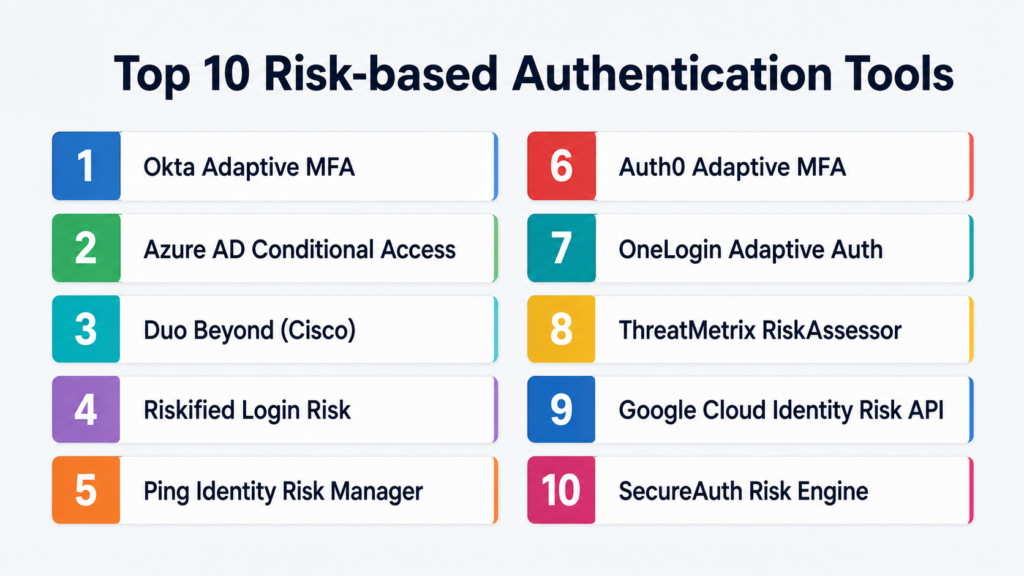
Introduction
Risk‑based authentication (RBA) tools help organizations make smarter access decisions by evaluating contextual and behavioral signals during login, payment, account changes, API calls, or sensitive workflows. Instead of treating every login equally, RBA tools assign a risk score based on factors such as device profile, IP reputation, location change, velocity, user behavior, session history, authentication history, and device context. If the risk exceeds a threshold, the system triggers additional verification (e.g., MFA challenge, email verification) or blocks the attempt.RBA matters now more than ever because traditional username/password authentication is no longer strong enough on its own. Attackers use stolen credentials, credential stuffing, bots, session replay, account takeover (ATO), and social engineering tactics to compromise accounts. RBA adds an intelligence layer that balances security with user experience — only step up when risk is high.
Real‑world use cases include login risk scoring, sensitive transaction validation, payment risk controls, API access risk, multi‑party session risk evaluation, password reset risk checks, account settings changes, fraud detection triggers, and progressive trust decisions. Buyers should evaluate risk signal breadth, machine learning models, false trigger rates, integration flexibility, latency, compliance (e.g., PSD2 SCA), multi‑factor challenge orchestration, analytics, workflow automation, and vendor support.
Best for: SaaS platforms, financial services, banks, ecommerce merchants, digital wallets, gaming platforms, enterprise portals, identity providers, marketplaces, and any system where strong but friction‑smart authentication matters. Not ideal for: simple internal systems with very low risk, legacy applications where central authentication can’t be upgraded, or environments where basic MFA is sufficient without context.
Key Trends in Risk‑based Authentication Tools
- Adaptive MFA is the standard, where contextual risk determines when an additional authentication challenge is needed.
- Behavioral biometrics and anomaly detection increasingly feed risk engines (e.g., typing patterns, mouse movement, touch metrics).
- Device and network intelligence such as IP reputation, VPN detection, and device fingerprinting are standard signals.
- API‑first and webhook support enable real‑time risk decisions in modern microservices and mobile apps.
- Machine learning models replace static rule sets to recognize evolving attack patterns.
- Cross‑channel risk aggregation combines web, mobile, and API signals for a unified trust score.
- Privacy‑first risk scoring helps companies align with GDPR and data minimization principles.
- Friction optimization — legitimate users rarely see additional challenges while high‑risk events get stepped up.
- Regulatory compliance integration, especially PSD2 SCA in Europe, mandates risk scoring as part of payment authentication.
- Threat intelligence feeds are integrated natively to enrich risk decisions.
How We Selected These Tools
- Focused on tools that provide real‑time risk scoring, adaptive authentication flows, and decisioning APIs.
- Prioritized vendors supporting machine learning or intelligence‑driven risk models over basic static rules.
- Considered integration flexibility such as SDKs, REST APIs, webhook triggers, and support for web, mobile, and API flows.
- Emphasized tools with connector capability to common identity providers, identity stores, and IAM systems.
- Evaluated suitability across industries: fintech, banking, ecommerce, SaaS, gaming, and enterprise access.
- Looked at offerings that support additional workflows such as fraud alerts, session risk, continuous authentication, and MFA orchestration.
- Avoided public ratings because consistent universal ratings are not reliably published for risk engines.
- Used “Not publicly stated” where security and compliance certifications weren’t available publicly.
- Scoring is comparative and tied to real product signals rather than marketing hype.
- Included tools that span from developer‑friendly APIs to enterprise‑grade identity platforms.
Top 10 Risk‑based Authentication Tools
1 — Okta Adaptive MFA
Short description:
Okta Adaptive MFA is a widely used identity and access management platform with strong risk‑based authentication capabilities. It evaluates user context — device, location, behavior, network — and dynamically triggers additional verification steps. It’s a strong choice for enterprises standardizing authentication across internal and external applications and needing a balance of security with user experience.
Key Features
- Contextual risk scoring during login and sensitive workflows.
- Machine learning and threat intelligence‑based risk evaluation.
- Integration with common MFA methods (SMS, email, authenticator apps, push).
- Adaptive policy configuration based on risk levels.
- Integration with user directories (LDAP, Active Directory, HRIS).
- API and SDK support for web, mobile, and API flows.
- Preconfigured compliance templates for PSD2 and similar standards.
Pros
- Enterprise‑grade IAM with robust adaptive MFA.
- Centralized policy engine for risk and trust decisions.
- Mature ecosystem and support for many enterprise apps.
Cons
- Pricing and complexity are geared toward larger organizations.
- Smaller teams may find it over‑featured for simple login controls.
- Requires experienced identity architects for optimal setup.
Platforms / Deployment
Web / iOS / Android / API / SDK.
Cloud / Hybrid.
Security & Compliance
- Supports SSO, MFA, risk‑based policies.
- SOC 2, ISO 27001, GDPR compliance generally supported.
- Not publicly stated: specific certifications vary by region and contract.
Integrations & Ecosystem
Okta is often a central IAM hub integrating with downstream apps and identity stores.
- Active Directory / Azure AD
- SAML / OIDC applications
- HR systems
- Custom APIs
- MFA factors and challenge flows
- Risk analytics dashboards
Support & Community
Extensive enterprise documentation, training, and support tiers. Large community and partner ecosystem.
2 — Microsoft Azure AD Conditional Access
Short description:
Azure AD Conditional Access helps organizations apply risk‑based policies during authentication based on user behavior, location, device state, and risk signals from Microsoft’s Intelligent Security Graph. It is widely used by enterprises invested in the Azure ecosystem to protect logins and enforce adaptive controls.
Key Features
- Conditional policies driven by risk signals and device posture.
- Integration with MFA challenges based on risk.
- Microsoft security threat intelligence signals.
- Device compliance and compliance posture evaluation.
- Support for web, API, and mobile scenarios via OAuth/OIDC.
- Integration with endpoint management (Intune).
- Audit logging and reporting.
Pros
- Deep integration with Microsoft identity and security ecosystem.
- Strong device and conditional policy controls.
- Scales well for enterprise customers.
Cons
- Best value for organizations already in Azure ecosystem.
- Complexity can be high depending on policy strategy.
- Less API‑centric than some developer‑first risk engines.
Platforms / Deployment
Web / API / Mobile via OIDC / SAML.
Cloud.
Security & Compliance
- Enterprise security posture and risk policies.
- Certifications include ISO 27001, SOC, GDPR compliance (not exhaustive).
- Vendor documentation should be reviewed for details.
Integrations & Ecosystem
Azure AD ties into Microsoft ecosystem and broader corporate identity infrastructure.
- Microsoft 365 apps
- Azure services
- Intune and endpoint compliance
- Security Information and Event Management (SIEM)
- Conditional access policies
- OAuth/OIDC protected APIs
Support & Community
Enterprise support, documentation, and Microsoft Premier services. Large user base and community guidance.
3 — Duo Beyond (Cisco)
Short description:
Duo Beyond is Cisco’s adaptive authentication and zero‑trust access platform. It evaluates risk signals from devices, network context, and user behavior to determine whether to enforce stronger authentication, allow access, or block the login event. Duo’s strength is ease of use combined with robust contextual evaluation and MFA integration.
Key Features
- Risk‑based adaptive authentication policies.
- Device posture checks (OS version, security status).
- Geographic and IP risk evaluation.
- MFA challenges based on contextual risk.
- User and entity behavior insights.
- Detailed logs and admin dashboards.
- Support for SAML/OIDC applications.
Pros
- Strong zero‑trust approach with adaptive access logic.
- Easy implementation relative to enterprise competitors.
- Multi‑platform support (web, mobile, apps).
Cons
- Advanced analytics and behavior modeling may be less mature than pure risk engines.
- Best fit within Cisco security ecosystem.
- Highly customizable policies require planning.
Platforms / Deployment
Web / Mobile / API / SDK.
Cloud / Hybrid.
Security & Compliance
- MFA, device posture, adaptive access.
- Compliance certifications vary by contract.
- Not publicly stated: specifics vary.
Integrations & Ecosystem
Duo integrates well with applications, identity providers, and security stacks.
- SAML / OIDC apps
- Cloud VPNs
- Network access controls
- Endpoint systems
- Admin portal and audit logs
Support & Community
Cisco support tiers, enterprise SLAs, and partner ecosystem.
4 — Riskified (Riskified Login Risk)
Short description:
Riskified is known for ecommerce fraud tools but also offers login and account risk scoring, focusing on suspicious login and account takeover prevention. It analyzes behavioral signals, device attributes, IP risk, session context, and historical patterns to evaluate login risk and protect ecommerce customer accounts.
Key Features
- Risk scoring for account logins.
- Device fingerprinting and session context signals.
- Behavioral anomalies (velocity, pattern changes).
- IP reputation analytics.
- Challenge or block decisions based on score.
- Dashboard and event logs.
Pros
- Ecommerce‑oriented risk model tailored to customer accounts.
- Useful for platforms with login fraud and ATO risks.
- Integrates with fraud and checkout protection workflows.
Cons
- Not a general IAM risk engine (best for login/ATO scenarios).
- Requires integration with risk strategy.
- Not as broad as enterprise IAM platforms.
Platforms / Deployment
Web / API.
Cloud.
Security & Compliance
Security details should be validated against enterprise needs. Not publicly stated: specific certifications vary.
Integrations & Ecosystem
Often paired with ecommerce platforms and fraud decisioning.
- Login flows
- Session risk decisioning
- MFA triggers
- Fraud dashboards
- Customer behavior signals
Support & Community
Documentation and merchant support for ecommerce risk workflows.
5 — Ping Identity Risk Manager
Short description:
Ping Identity Risk Manager is an enterprise risk engine that evaluates authentication and access risk using contextual signals, device posture, location, session characteristics, and behavioral analytics. It integrates with PingFederate and other IAM solutions to enforce adaptive login and step‑up policies.
Key Features
- Real‑time risk scoring for access attempts.
- Contextual signals: location, device posture, network.
- Behavioral analytics and anomaly detection.
- Step‑up authentication workflows.
- Integration with enterprise IAM and SSO.
- Policy configuration and logging.
Pros
- Strong enterprise risk decisioning framework.
- Flexible policies and adaptive access control.
- Works well with broader identity and access infrastructure.
Cons
- Best for organizations already invested in Ping ecosystem.
- Deployment and tuning can be complex.
- Developer‑first APIs may be less rich than dedicated risk engines.
Platforms / Deployment
Web / API / SSO integration.
Cloud / On‑prem (depending on license).
Security & Compliance
Part of enterprise IAM security stack. Specific certifications depend on deployment.
Integrations & Ecosystem
Integrates with identity services and adaptive access workflows.
- SSO apps
- MFA services
- Access policies
- Directory systems
- Audit and logging systems
Support & Community
Enterprise documentation and vendor support paths.
6 — Auth0 Adaptive MFA
Short description:
Auth0’s Adaptive MFA adds context‑aware risk scoring to authentication, allowing step‑up verification when suspicious signals occur. It combines device, location, unusual login patterns, and anomaly signals to trigger additional authenticators. It’s ideal for teams that want developer‑friendly risk APIs and integration‑centric adaptive login logic.
Key Features
- Adaptive risk policy triggers MFA challenges.
- Device and IP risk signals.
- Custom policies and rules engine.
- SDKs for web and mobile.
- Integration with broader Auth0 identity services.
- Logging and review dashboards.
Pros
- Developer‑centric experience and extensibility.
- Easy integration through SDKs and hosted pages.
- Good for app teams needing contextual login decisions.
Cons
- Part of overall identity platform (not a standalone risk‑only engine).
- Advanced signals may be more limited than pure risk vendors.
- Can be expensive at scale.
Platforms / Deployment
Web / iOS / Android / API / SDK.
Cloud.
Security & Compliance
Inherited security from identity platform, privacy controls available. Specific certifications not publicly stated.
Integrations & Ecosystem
Auth0’s ecosystem supports identity, login, MFA, and risk logic.
- Applications via SDKs
- Rules and hooks
- Logs and analytics
- Identity store integrations
- MFA factors
Support & Community
Strong developer community, documentation, and support paths.
7 — Conditional Access by OneLogin
Short description:
OneLogin’s Adaptive Authentication uses risk policies to assess login attempts and trigger MFA or blocking. It evaluates device, location, IP reputation, velocity, user group, and other signals to make trust decisions. It’s suitable for mid‑market to enterprise organizations seeking adaptive identity control with intuitive policy configuration.
Key Features
- Risk scores tied to login and access attempts.
- Policy engine for contextual triggers.
- Device and IP signals.
- MFA step‑ups.
- Admin logging and reporting.
- Integration with SSO, directory systems, and apps.
Pros
- Easy‑to‑use policy builder.
- Good balance of signals and usability.
- Integrates with directory services.
Cons
- Signals breadth may be lower than advanced risk engines.
- Better focused on IAM use cases than broad API risk.
Platforms / Deployment
Web / API / SAML / OIDC.
Cloud.
Security & Compliance
Identity and authentication security but not enumerated publicly.
Integrations & Ecosystem
OneLogin integrates with apps, SSO, MFA tools, and IAM workflows.
- Identity providers
- MFA systems
- Directory stores
- Secure applications
Support & Community
Documentation and enterprise support options.
8 — RiskAssessor by ThreatMetrix
Short description:
RiskAssessor (ThreatMetrix) combines device fingerprinting, network signals, behavior analysis, and global intelligence to produce a risk score for authentication and transaction events. It’s widely used by enterprises to detect fraud, credential stuffing, and risky login attempts. The tool is part of a broader fraud and digital identity suite.
Key Features
- Device fingerprinting and network profiling.
- Behavioral and reputation signals.
- Global digital identity graph.
- Risk score for login and transaction events.
- Fraud and authentication decisioning.
- Policy rules engine.
Pros
- Rich signals from device and behavior profiling.
- Useful for detecting sophisticated ATO and bot attacks.
- Enterprise maturity.
Cons
- Implementation can be complex.
- Pricing and architecture better suited for large orgs.
- Heavy emphasis on fraud use cases vs pure IAM.
Platforms / Deployment
Web / API / SDK.
Cloud.
Security & Compliance
Part of enterprise risk and fraud portfolio; certifications vary.
Integrations & Ecosystem
ThreatMetrix integrates with authentication services, fraud platforms, and web applications.
- Login flows
- API calls
- Transaction scoring
- Device risk checks
- Fraud dashboards
Support & Community
Enterprise vendor support and consulting options.
9 — Google Cloud Identity Risk API
Short description:
Google’s Cloud Identity Risk API provides contextual risk signals based on user, device, session, and behavior data within the Google Cloud identity ecosystem. It can help teams implement conditional access decisions, adaptive MFA, and risk‑based policies.
Key Features
- Machine learning‑driven risk signals.
- Signals based on account history, device, and behavior.
- Integration with Cloud Identity and Workspace ecosystems.
- Supports conditional triggers and policy evaluation.
- Scalable Google Cloud infrastructure.
Pros
- Strong machine learning signals.
- Tight integration with Google identity services.
- Useful for cloud‑centric enterprises.
Cons
- Best fit for organizations leveraging Google Cloud.
- Broader IAM context needed for full adaptive access.
Platforms / Deployment
Web / API / SDK.
Cloud.
Security & Compliance
Google’s enterprise security certifications apply; specific risk APIs vary by product.
Integrations & Ecosystem
Works within Google identity and security services.
- Cloud Identity
- Workspace
- Conditional policies
- Endpoint management
- Admin dashboards
Support & Community
Google enterprise support tiers and documentation.
10 — SecureAuth Risk Engine
Short description:
SecureAuth Risk Engine is an adaptive authentication and risk analytics product that calculates risk scores based on network, device, behavior, geography, and custom signals. It integrates with MFA, IAM, and directory systems to enforce stepped‑up authentication when needed.
Key Features
- Risk scoring based on multiple signals.
- Integration with MFA and access policies.
- Policy builder for adaptive triggers.
- Device and network context checks.
- Admin reporting and analytics.
Pros
- Flexible risk policy configuration.
- Integrates with authentication systems.
- Useful for enterprise identity control.
Cons
- Interface and implementation may be less modern than developer‑first APIs.
- Best fit within SecureAuth IAM ecosystem.
- Not a pure API risk service.
Platforms / Deployment
Web / API / Identity integrations.
Cloud / Hybrid.
Security & Compliance
Governed by enterprise IAM controls; certifications not publicly stated.
Integrations & Ecosystem
SecureAuth integrates with IAM and access management environments.
- Directory stores
- MFA factors
- Access policies
- Analytics and reporting
Support & Community
Vendor support and enterprise documentation.
Comparison Table
| Tool Name | Best For | Platforms Supported | Deployment | Standout Feature | Public Rating |
|---|---|---|---|---|---|
| Okta Adaptive MFA | Enterprise IAM with adaptive risk | Web / Mobile / API / SDK | Cloud / Hybrid | Strong contextual policies | N/A |
| Azure AD Conditional Access | Microsoft ecosystem enterprises | Web / API / mobile apps | Cloud | Microsoft threat intelligence | N/A |
| Duo Beyond (Cisco) | Zero‑trust adaptive MFA | Web / Mobile / API | Cloud / Hybrid | Device posture + risk signals | N/A |
| Riskified Login Risk | Ecommerce login & ATO risk | Web / API | Cloud | Ecommerce account risk scoring | N/A |
| Ping Identity Risk Manager | Enterprise access risk | Web / API / SSO | Cloud / On‑prem | Policy flexibility in IAM | N/A |
| Auth0 Adaptive MFA | Developer‑friendly adaptive login | Web / Mobile / API | Cloud | SDK + auth platform integration | N/A |
| OneLogin Adaptive Auth | Mid‑market identity risk | Web / API / SSO | Cloud | Intuitive policy builder | N/A |
| ThreatMetrix RiskAssessor | Device + behavior risk signals | Web / API / SDK | Cloud | Global digital identity graph | N/A |
| Google Cloud Identity Risk API | Cloud identity risk scoring | Web / API | Cloud | Cloud‑native risk signals | N/A |
| SecureAuth Risk Engine | Enterprise access risk | Web / API / IAM | Cloud / Hybrid | Flexible risk policy controls | N/A |
Evaluation & Scoring of Risk‑based Authentication Tools
| Tool Name | Core 25% | Ease 15% | Integrations 15% | Security 10% | Performance 10% | Support 10% | Value 15% | Weighted Total |
|---|---|---|---|---|---|---|---|---|
| Okta Adaptive MFA | 9 | 7 | 9 | 9 | 9 | 8 | 8 | 8.50 |
| Azure AD Conditional Access | 9 | 7 | 8 | 9 | 9 | 8 | 8 | 8.40 |
| Duo Beyond | 8 | 8 | 8 | 9 | 8 | 8 | 8 | 8.20 |
| Riskified Login Risk | 7 | 8 | 7 | 8 | 7 | 7 | 8 | 7.50 |
| Ping Identity Risk Manager | 8 | 6 | 8 | 9 | 8 | 7 | 7 | 7.70 |
| Auth0 Adaptive MFA | 8 | 9 | 8 | 8 | 8 | 8 | 8 | 8.30 |
| OneLogin Adaptive Auth | 7 | 8 | 7 | 8 | 7 | 7 | 8 | 7.40 |
| ThreatMetrix RiskAssessor | 9 | 6 | 8 | 9 | 9 | 7 | 7 | 7.90 |
| Google Cloud Identity Risk API | 8 | 7 | 7 | 9 | 8 | 8 | 7 | 8.00 |
| SecureAuth Risk Engine | 8 | 6 | 7 | 8 | 8 | 7 | 7 | 7.40 |
Interpreting Scores:
These comparative scores help you evaluate how these tools balance core risk logic, ease of use, integrations, security posture, performance, support infrastructure, and value. A higher score doesn’t mean universal superiority — different businesses require different risk strategies, identity architectures, and signal sources. Use scores as a guide, not a definitive ranking.
Which Risk‑based Authentication Tool Is Right for You?
Solo / Freelancer
Solo apps with basic authentication needs should start with developer‑centric tools that support adaptive triggers via SDKs. Auth0 Adaptive MFA is a strong option because it combines risk logic with easy integration and hosted login pages. Tools focused on IAM or enterprise workflows may be too heavy. Start small and scale risk policies as usage grows.
SMB
Small and mid‑sized businesses can benefit from risk scoring without heavy identity infrastructure. Auth0 Adaptive MFA, Duo Beyond, and OneLogin offer good policy flexibility paired with MFA workflows. If your app uses third‑party identity providers, choose a risk tool that integrates cleanly via API or webhook.
Mid‑Market
Mid‑market companies often need enterprise‑grade controls but without enterprise complexity. Okta Adaptive MFA, Azure AD Conditional Access, or Duo Beyond are strong choices, especially if multiple apps and mobile clients rely on the same identity layer. These tools provide risk policies, MFA orchestration, and logging needed for compliance and scaling.
Enterprise
Enterprises need centralized identity governance, advanced risk signals, policy orchestration, and integration with directories, security analytics, and compliance controls. Okta Adaptive MFA, Azure AD Conditional Access, Ping Identity Risk Manager, and ThreatMetrix RiskAssessor are powerful options. They support contextual risk, SSO, device posture, and wide ecosystem coverage.
Budget vs Premium
Budget‑conscious teams should evaluate how quickly they can reduce risk without major implementation cost. Developer‑friendly tools like Auth0 Adaptive MFA and Duo Beyond offer good early ROI. Premium enterprise tools such as Okta Adaptive MFA, Azure AD Conditional Access, and ThreatMetrix bring deeper signals and governance but require bigger operational investment.
Feature Depth vs Ease of Use
Feature‑rich enterprise tools may overwhelm smaller teams. Auth0 Adaptive MFA and Duo Beyond balance feature depth with developer usability. Okta Adaptive MFA and Azure AD Conditional Access offer the deepest enterprise federation and policy controls. Tools like Riskified Login Risk are niche‑specific and best where login risk and ATO are acute.
Integrations & Scalability
Risk tools must integrate with identity providers, application login flows, API gateways, mobile apps, SIEM systems, and MFA services. Evaluate ecosystem compatibility, SDK support, and webhook flexibility. Scalable tools should handle peak traffic without introducing latency or blocking legitimate customers.
Security & Compliance Needs
Adaptive risk decisions complement MFA, SSO, device management, and IAM governance. Evaluate support for enterprise security standards, audit logging, separation of duties, encryption, and compliance obligations (e.g., PSD2, SOC 2, ISO 27001).
Frequently Asked Questions (FAQs)
Q1: What is Risk‑based Authentication (RBA)?
Risk‑based authentication (RBA) builds a trust score based on contextual signals during access events (like login or transaction approval). Instead of treating every attempt the same, RBA evaluates risk signals such as device fingerprint, location anomalies, IP reputation, session behavior, login velocity, and more. When risk is low, authentication proceeds normally; when risk is high, the system triggers additional verification steps or blocks access. RBA improves security while preserving user experience by reducing unnecessary friction for trusted users.
Q2: How does RBA differ from traditional MFA?
Traditional MFA requires additional authentication (like an OTP or push approval) every time, regardless of context. RBA selectively applies MFA only when risk‑indicating signals appear. For example, a login from a known device and normal location might proceed without MFA, while a login from an unfamiliar country triggers an MFA challenge. RBA reduces friction for legitimate users while maintaining strong defenses against risky attempts.
Q3: What signals do RBA tools use to score risk?
Risk scoring tools use many signals, including:
- Device fingerprint or attributes (browser, OS, device model)
- IP reputation and geographic anomalies
- Behavioral patterns (typing dynamics, velocity)
- Login history and session context
- Network context (VPN, proxy, TOR detection)
- Known fraud lists or threat intelligence
- Authentication history and credential age
Different vendors combine these signals with machine learning models to produce a trust score.
Q4: Can RBA reduce fraud without blocking legitimate users?
Yes — the main benefit of RBA is reducing false positives while identifying real risks. By combining anomaly detection, behavioral patterns, and ML signals, RBA can alert or step up authentication only when risk rises, keeping most legitimate users friction‑free. Good implementation often includes manual review workflows and incremental policy configuration to balance security and user experience.
Q5: Do RBA tools support APIs and mobile SDKs?
Most modern RBA tools expose REST APIs, webhooks, and SDKs for web and mobile integration. Enterprise IAM platforms like Okta, Azure AD Conditional Access, and Auth0 Adaptive MFA provide SDKs and identity‑centric APIs. Dedicated risk engines and fraud tools often provide APIs that return risk scores your code can act upon during login or sensitive workflow decisions.
Q6: How do RBA tools help with compliance?
RBA supports compliance frameworks that require contextual access controls or stepped‑up authentication such as PSD2’s SCA (Strong Customer Authentication). It also helps with SOC 2, ISO standards, and general risk controls by documenting risk decisions, enabling secure access policies, and providing audit logs. However, compliance depends on how the tool is implemented and governed, not just vendor claims.
Q7: Will RBA slow down login experiences?
When implemented well, RBA should not add noticeable latency. Most modern tools score risk in milliseconds and return a risk value that your code can evaluate quickly. Serverside caching of less frequent signals and asynchronous enrichment of lower‑priority signals help maintain snappy login flows.
Q8: What are common mistakes when deploying RBA solutions?
Common mistakes include:
- Not collecting enough or the right signals
- Overly aggressive risk thresholds that trigger MFA too often
- Lack of feedback loops to tune models based on false positives
- Ignoring user context such as device classification or geolocation changes
- Not documenting decision policies for audit and compliance
Planning, testing, tuning, and monitoring are essential to a successful RBA rollout.
Q9: Do RBA tools replace IAM or MFA systems?
Not exactly. RBA typically augments IAM and MFA systems. It provides intelligence that can feed into an IAM that can enforce policy decisions (e.g., require MFA if risk > threshold). RBA doesn’t replace identity stores, directory services, or session management, but it enhances authentication decisioning.
Q10: Is machine learning required for good RBA?
Machine learning improves RBA by recognizing subtle and evolving risk patterns that static rules can’t capture. However, models need good data, labeling, and tuning. Many effective RBA deployments combine machine learning with configurable rules so teams can adjust behavior while benefiting from automated risk evaluation.
Conclusion
Risk‑based Authentication Tools help businesses protect access, reduce fraud, improve login security, and create a balanced user experience by evaluating contextual and behavioral signals. Enterprise identity platforms like Okta Adaptive MFA and Azure AD Conditional Access provide deep IAM ties and adaptive policies. Duo Beyond and Auth0 Adaptive MFA balance developer ease with strong contextual signals. Risk engines like ThreatMetrix RiskAssessor and cloud‑centric tools such as Google Cloud Identity Risk API provide rich signals, while ecommerce‑oriented solutions like Riskified Login Risk focus on login abuse and account takeover. Mid‑market options like OneLogin and SecureAuth provide flexible policies for adaptive access.
