MOTOSHARE 🚗🏍️
Rent Bikes & Cars Directly from Owners
Motoshare connects vehicle owners with people who need bikes and cars on rent. Owners earn from idle vehicles, and renters get flexible ride options.
Visit Motoshare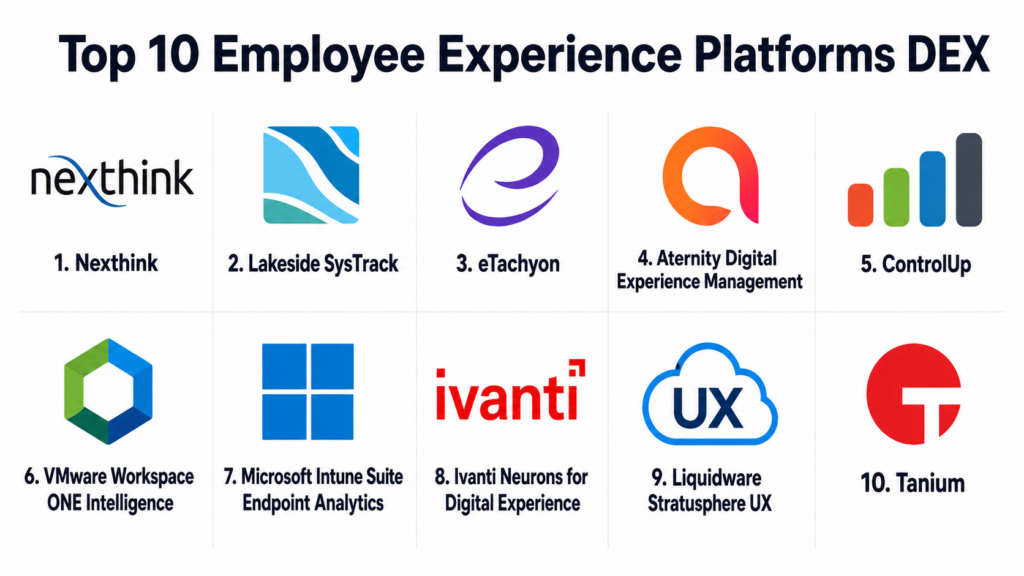
Introduction
Employee Experience Platforms, often called DEX platforms, help organizations measure, improve, and manage the digital experience employees have while using workplace technology. In simple terms, these platforms monitor how well devices, applications, networks, collaboration tools, and IT services perform from the employee’s point of view. They help IT teams understand why employees face slow laptops, application crashes, login issues, network delays, poor collaboration tool performance, or repeated support problems.DEX platforms matter because modern employees depend on digital tools every day, whether they work in offices, remotely, or in hybrid environments. Poor digital experience reduces productivity, increases support tickets, frustrates employees, and makes IT teams reactive. A strong DEX platform helps businesses detect issues early, automate fixes, improve device health, reduce downtime, and create a smoother employee technology experience.
Real world use cases include endpoint health monitoring, employee sentiment tracking, remote work support, application performance visibility, automated remediation, IT ticket reduction, device lifecycle planning, and digital workplace analytics.
Buyers should evaluate:
- Endpoint and device experience monitoring
- Application performance visibility
- Employee sentiment and feedback collection
- Automated remediation capabilities
- IT service desk integration
- Security and access controls
- Remote and hybrid workforce support
- Analytics and experience scoring
- Scalability across regions and device types
- Integration with ITSM, endpoint management, and collaboration tools
Best for: Employee Experience Platforms DEX are best for IT operations teams, digital workplace teams, CIO offices, employee experience leaders, service desk managers, endpoint management teams, HR technology teams, and enterprises with large remote, hybrid, or distributed workforces.
Not ideal for: Very small businesses with simple IT environments and limited employee device issues may not need a full DEX platform. Basic endpoint management, helpdesk tools, or employee survey software may be enough when the workforce is small, digital systems are simple, and IT support volume is low.
Key Trends in Employee Experience Platforms DEX
- Proactive IT support: DEX platforms are moving IT teams from reactive ticket handling to proactive detection of device, application, and network issues.
- AI-powered remediation: Modern platforms increasingly use automation and AI to recommend fixes, run scripts, close common issues, and reduce manual IT effort.
- Employee sentiment plus telemetry: Buyers want both technical telemetry and employee feedback so IT can understand performance problems and user frustration together.
- Remote work visibility: Hybrid work has made it essential to monitor digital experience outside the corporate network and across home office environments.
- Experience scoring: DEX tools are using experience scores to summarize endpoint health, application quality, service reliability, and employee impact.
- ITSM integration: DEX platforms are being connected with service desks to create tickets automatically, enrich incidents, and reduce resolution time.
- Endpoint management convergence: DEX is increasingly linked with UEM, endpoint security, patching, asset management, and device lifecycle planning.
- Collaboration tool performance tracking: Teams want visibility into tools like video meetings, messaging apps, browsers, and productivity suites.
- Automation for common problems: Scripted remediation, self-healing actions, and policy-based fixes are becoming key differentiators.
- Experience-driven IT reporting: CIOs and IT leaders want dashboards that connect digital friction with productivity, support cost, and employee satisfaction.
How We Selected These Tools
The tools below were selected using a practical buyer-focused evaluation approach:
- Market recognition in digital employee experience, endpoint analytics, IT operations, workplace technology, and endpoint management.
- Feature completeness across device telemetry, application visibility, employee sentiment, automation, analytics, and remediation.
- Fit for enterprise and mid-market IT teams, especially organizations supporting hybrid, remote, and distributed users.
- Endpoint visibility depth, including device health, boot times, crashes, resource usage, application performance, and network indicators.
- Automation capability, including self-healing scripts, guided remediation, workflow triggers, and ITSM ticket enrichment.
- Integration ecosystem with ITSM, UEM, endpoint security, identity, collaboration, and monitoring tools.
- Employee experience analytics, including experience scores, trends, sentiment data, and productivity impact indicators.
- Security and governance signals, including RBAC, SSO, audit logs, data protection, and administrative controls.
- Scalability for multiple regions, business units, device types, and operating systems.
- Implementation practicality, including agent deployment, onboarding, dashboard usability, and long-term administration.
Top 10 Employee Experience Platforms DEX
1- Nexthink
Short description:
Nexthink is one of the most recognized Digital Employee Experience platforms for enterprise IT teams. It helps organizations monitor endpoint health, application performance, employee sentiment, and digital workplace issues across large device environments. The platform is designed to identify employee-impacting problems before they become major support tickets. Nexthink is especially useful for large enterprises that want proactive IT operations, experience scoring, automation, and better visibility into how employees experience technology.
Key Features
- Endpoint experience monitoring
- Digital experience scoring
- Employee sentiment and feedback collection
- Application performance visibility
- Automated remediation and self-healing actions
- IT analytics and executive dashboards
- ITSM and endpoint management integrations
Pros
- Strong DEX market recognition and enterprise focus
- Combines technical telemetry with employee sentiment
- Useful for proactive IT support and experience improvement
Cons
- May require planning and process maturity for best value
- Can be more advanced than smaller teams need
- Implementation and tuning may require dedicated ownership
Platforms / Deployment
Web-based platform.
Cloud deployment.
Endpoint agent coverage varies by operating system and customer environment.
Security & Compliance
Supports enterprise access controls, role-based permissions, audit-friendly administration, and secure endpoint data handling. Specific certifications and compliance coverage should be validated during vendor review.
Integrations & Ecosystem
Nexthink integrates with ITSM, endpoint management, collaboration, and enterprise IT systems. It is often used as a digital experience intelligence layer across workplace technology.
- ServiceNow
- Microsoft Intune
- Microsoft Teams
- Splunk
- Endpoint management platforms
- IT operations tools
Support & Community
Nexthink provides enterprise onboarding, documentation, customer success resources, professional services, and support options. Support depth may vary by contract and deployment scope.
2- Lakeside SysTrack
Short description:
Lakeside SysTrack is a long-standing endpoint analytics and digital employee experience platform used by IT teams to monitor device performance, application usage, resource consumption, and employee technology experience. It helps organizations identify root causes behind slow devices, application issues, login delays, and infrastructure performance problems. Lakeside is especially useful for enterprises managing complex endpoint environments, virtual desktops, and distributed workforces. It provides deep telemetry that supports IT operations, planning, and proactive support.
Key Features
- Endpoint performance monitoring
- Device health analytics
- Application usage and performance insights
- User experience scoring
- Root cause analysis support
- Virtual desktop and workplace analytics
- IT operations reporting
Pros
- Deep endpoint and workplace analytics
- Strong fit for complex enterprise environments
- Useful for root cause analysis and device optimization
Cons
- May require technical expertise to fully use
- User experience can depend on dashboard and reporting setup
- Smaller teams may not need the depth of telemetry
Platforms / Deployment
Web-based management interface.
Cloud and enterprise deployment options may vary.
Endpoint coverage should be validated based on environment.
Security & Compliance
Supports enterprise administration, permissions, access controls, and endpoint data governance features. Specific compliance documentation should be confirmed directly during procurement.
Integrations & Ecosystem
Lakeside integrates with ITSM, endpoint management, virtual desktop, and IT operations environments. It is valuable where endpoint analytics must support workplace planning and service improvement.
- ServiceNow
- Microsoft endpoint tools
- Virtual desktop platforms
- IT operations tools
- Reporting platforms
- Enterprise analytics systems
Support & Community
Lakeside provides documentation, support services, implementation assistance, and customer success resources. Support depth may vary by contract and region.
3- 1E Tachyon
Short description:
1E Tachyon is a digital employee experience and endpoint automation platform focused on real-time endpoint visibility, remediation, software management, and IT automation. It helps IT teams detect and resolve endpoint issues quickly across distributed environments. The platform is especially useful for organizations that want to reduce service desk tickets through automation and real-time endpoint actions. 1E is a strong option for enterprises focused on proactive remediation, endpoint control, and digital workplace reliability.
Key Features
- Real-time endpoint visibility
- Digital employee experience analytics
- Automated endpoint remediation
- Software deployment and management support
- IT automation workflows
- Device health and performance insights
- Service desk integration
Pros
- Strong automation and remediation focus
- Useful for reducing repetitive IT support tickets
- Good fit for large distributed endpoint environments
Cons
- Best value depends on automation maturity
- Advanced configuration may require skilled IT admins
- Smaller organizations may not need full endpoint automation depth
Platforms / Deployment
Web-based management console.
Cloud and enterprise deployment patterns may vary.
Endpoint support should be validated by operating system and environment.
Security & Compliance
Supports role-based access, administrative controls, endpoint action governance, and audit-related capabilities. Specific certifications and compliance documentation should be verified directly.
Integrations & Ecosystem
1E Tachyon integrates with endpoint management, service desk, IT operations, and automation workflows. It is often used to connect endpoint insights with immediate remediation actions.
- ServiceNow
- Microsoft endpoint management tools
- ITSM systems
- Endpoint operations platforms
- Automation workflows
- Reporting tools
Support & Community
1E provides documentation, implementation support, customer success resources, and enterprise support options. Support levels may vary by contract and service package.
4- Aternity Digital Experience Management
Short description:
Aternity Digital Experience Management provides visibility into employee device performance, application experience, and end-user digital productivity. It helps IT teams detect slow applications, endpoint issues, network problems, and service disruptions that affect employee work. Aternity is especially useful for enterprises that need experience monitoring across business applications, remote users, and distributed endpoints. The platform supports IT operations teams that want to improve user experience through analytics and performance insights.
Key Features
- End-user experience monitoring
- Application performance visibility
- Endpoint health analytics
- User journey and productivity insights
- Device and network performance indicators
- Experience scoring and dashboards
- IT operations and service desk integration
Pros
- Strong application and endpoint experience visibility
- Good fit for enterprise digital workplace teams
- Useful for identifying employee-impacting performance issues
Cons
- May require careful configuration for business application tracking
- Full value depends on integration and analytics adoption
- Smaller teams may prefer simpler endpoint monitoring tools
Platforms / Deployment
Web-based platform.
Cloud and enterprise deployment options may vary.
Endpoint coverage should be validated by environment.
Security & Compliance
Supports enterprise access controls, permissions, secure administration, and endpoint data governance features. Specific compliance coverage should be confirmed during vendor evaluation.
Integrations & Ecosystem
Aternity integrates with IT operations, service management, endpoint tools, and enterprise monitoring environments. It is useful where employee experience data needs to support service management and application performance improvement.
- ITSM tools
- Endpoint management tools
- Application performance systems
- Enterprise monitoring tools
- Reporting platforms
- Collaboration environments
Support & Community
Aternity provides documentation, implementation support, enterprise customer support, and service resources. Support depth may vary by contract and deployment type.
5- ControlUp
Short description:
ControlUp is a digital employee experience and IT operations platform focused on monitoring, troubleshooting, and optimizing physical endpoints, virtual desktops, applications, and remote work environments. It is especially strong for organizations using virtual desktop infrastructure, digital workspaces, and hybrid workplace technologies. ControlUp helps IT teams detect performance issues, analyze user sessions, and automate remediation. It is a practical choice for IT teams that need real-time visibility into employee experience across endpoint and virtual environments.
Key Features
- Endpoint and virtual desktop monitoring
- User experience analytics
- Real-time troubleshooting
- Automated remediation scripts
- Application and session performance visibility
- Remote workforce monitoring
- IT operations dashboards
Pros
- Strong fit for VDI and digital workspace environments
- Useful real-time troubleshooting capabilities
- Good automation options for IT operations teams
Cons
- Best value depends on workplace infrastructure use case
- May be more specialized than general DEX tools
- Advanced optimization may require technical expertise
Platforms / Deployment
Web-based management console.
Cloud and enterprise deployment options may vary.
Endpoint and virtual environment support should be validated.
Security & Compliance
Supports administrative controls, role-based access, secure operations, and audit-related features. Specific compliance documentation should be validated directly.
Integrations & Ecosystem
ControlUp integrates with virtual desktop platforms, endpoint environments, ITSM tools, and operations workflows. It is especially useful for digital workspace and EUC teams.
- Citrix
- VMware Horizon
- Microsoft Azure Virtual Desktop
- ServiceNow
- Endpoint management tools
- Monitoring and automation tools
Support & Community
ControlUp provides documentation, support resources, onboarding assistance, and customer success options. Community strength is notable among EUC and virtual desktop professionals.
6- VMware Workspace ONE Intelligence
Short description:
VMware Workspace ONE Intelligence provides analytics, automation, and experience insights for organizations using Workspace ONE endpoint and digital workspace management. It helps IT teams understand device compliance, app performance, security posture, and employee experience trends. The platform is especially useful for companies already invested in VMware Workspace ONE for unified endpoint management. It supports workplace intelligence, automation, and operational visibility across managed devices and applications.
Key Features
- Device and application analytics
- Employee experience insights
- Automation workflows
- Unified endpoint management visibility
- Compliance and risk indicators
- Workspace reporting dashboards
- Integration with VMware Workspace ONE ecosystem
Pros
- Strong fit for Workspace ONE customers
- Combines endpoint management and experience analytics
- Useful automation and compliance visibility
Cons
- Best value depends on VMware ecosystem adoption
- May be less suitable outside Workspace ONE environments
- DEX depth should be validated against specialist platforms
Platforms / Deployment
Web-based platform.
Cloud deployment.
Device support depends on Workspace ONE environment and managed endpoints.
Security & Compliance
Supports enterprise access controls, device compliance visibility, administrative permissions, and security-related governance within the Workspace ONE ecosystem. Specific compliance details should be validated during procurement.
Integrations & Ecosystem
Workspace ONE Intelligence integrates tightly with VMware Workspace ONE and related digital workspace tools. It can also connect with ITSM and automation workflows depending on configuration.
- Workspace ONE UEM
- VMware ecosystem tools
- ServiceNow
- Identity systems
- Endpoint security tools
- Automation workflows
Support & Community
VMware provides documentation, support plans, partner services, and enterprise assistance. Support depth may vary based on licensing, contract, and product environment.
7- Microsoft Intune Suite Endpoint Analytics
Short description:
Microsoft Intune Suite with Endpoint Analytics helps IT teams understand device performance, startup performance, application reliability, device health, and user experience signals across managed endpoints. It is especially useful for organizations already using Microsoft Intune, Microsoft Entra ID, and Microsoft 365. While it may not replace every specialist DEX platform, it provides practical experience analytics inside the Microsoft endpoint management ecosystem. It is a strong option for Microsoft-centric IT teams seeking endpoint insights and device improvement recommendations.
Key Features
- Endpoint analytics and device health insights
- Startup performance monitoring
- Application reliability indicators
- Device readiness and performance reporting
- Proactive remediation scripts
- Integration with Microsoft endpoint management
- Cloud-based endpoint administration
Pros
- Strong fit for Microsoft-managed environments
- Practical endpoint health and remediation capabilities
- Good value for teams already using Microsoft tools
Cons
- DEX depth may be lower than specialist platforms
- Best value depends on Microsoft licensing and adoption
- Advanced experience analytics may require additional tools
Platforms / Deployment
Web-based Microsoft admin experience.
Cloud deployment.
Endpoint support depends on Microsoft Intune and operating system configuration.
Security & Compliance
Supports Microsoft identity, RBAC, audit logs, device compliance controls, and secure administration. Specific compliance coverage depends on Microsoft licensing, region, and configuration.
Integrations & Ecosystem
Microsoft Intune Endpoint Analytics integrates deeply with Microsoft endpoint, identity, security, and productivity ecosystems. It is most useful for organizations standardizing on Microsoft workplace tools.
- Microsoft Intune
- Microsoft Entra ID
- Microsoft 365
- Microsoft Defender
- Microsoft Teams
- Endpoint management workflows
Support & Community
Microsoft provides documentation, training resources, partner support, support plans, and a large admin community. Support depth depends on licensing and enterprise agreement.
8- Ivanti Neurons for Digital Experience
Short description:
Ivanti Neurons for Digital Experience helps IT teams measure, analyze, and improve employee digital experience across endpoints, applications, and IT services. It combines device intelligence, automation, sentiment, and service management context to help organizations reduce friction and improve productivity. Ivanti is especially useful for companies that want DEX capabilities connected with ITSM, endpoint management, and automation. It fits IT teams focused on proactive support, endpoint health, and service experience improvement.
Key Features
- Digital experience scoring
- Endpoint and device health analytics
- Employee sentiment and survey support
- Automated remediation workflows
- ITSM and service context integration
- Application and performance insights
- Workplace experience dashboards
Pros
- Strong connection between DEX, ITSM, and endpoint management
- Useful for proactive support and automation
- Good fit for organizations using Ivanti ecosystem tools
Cons
- Best value depends on broader Ivanti adoption
- Advanced setup may require process planning
- DEX feature depth should be validated for specific needs
Platforms / Deployment
Web-based platform.
Cloud and hybrid deployment options may vary.
Endpoint coverage should be validated by customer environment.
Security & Compliance
Supports role-based access, administrative permissions, endpoint governance, and secure workflow management. Specific certifications and compliance documentation should be confirmed directly.
Integrations & Ecosystem
Ivanti integrates with ITSM, endpoint management, security, identity, and automation workflows. It is especially valuable when digital experience data needs to connect with service management and remediation.
- Ivanti ITSM
- Ivanti endpoint management tools
- Service desk platforms
- Identity systems
- Automation workflows
- Reporting and analytics tools
Support & Community
Ivanti provides documentation, customer support, implementation services, training resources, and partner assistance. Support depth may vary by contract and region.
9- Liquidware Stratusphere UX
Short description:
Liquidware Stratusphere UX is a user experience monitoring and diagnostics platform focused on digital workspace environments, virtual desktops, application performance, and endpoint experience. It helps IT teams understand user session quality, resource usage, login performance, and application behavior. Stratusphere UX is especially useful for organizations managing VDI, desktop transformation, and hybrid workspace environments. It supports IT teams that need detailed visibility into user experience before, during, and after workspace changes.
Key Features
- User experience monitoring
- Virtual desktop and workspace analytics
- Login and session performance tracking
- Application and resource usage visibility
- Endpoint diagnostics
- Workspace assessment and planning
- Reporting for EUC teams
Pros
- Strong for VDI and workspace transformation projects
- Useful for diagnosing user session performance issues
- Good fit for EUC and desktop engineering teams
Cons
- More specialized than broad DEX platforms
- May not be ideal for general employee sentiment tracking
- Technical expertise may be needed for full value
Platforms / Deployment
Web-based management and reporting.
Cloud and enterprise deployment options may vary.
Endpoint and workspace coverage should be validated.
Security & Compliance
Supports administrative access controls and secure workspace analytics workflows. Specific security and compliance details should be verified directly during evaluation.
Integrations & Ecosystem
Stratusphere UX integrates with virtual desktop, endpoint, and workspace environments. It is especially relevant for EUC teams that need detailed visibility into user sessions and workspace performance.
- Citrix
- VMware Horizon
- Microsoft virtual desktop environments
- Endpoint systems
- Workspace analytics workflows
- IT reporting tools
Support & Community
Liquidware provides documentation, support resources, partner assistance, and implementation guidance. Community strength is strongest among EUC, VDI, and workspace transformation teams.
10- Tanium
Short description:
Tanium is an endpoint management and security platform that provides real-time visibility across large endpoint environments. While it is broader than a traditional DEX platform, it supports many employee experience use cases by helping IT teams understand device health, software inventory, patch status, configuration issues, and endpoint performance factors. Tanium is especially useful for large enterprises that need fast endpoint answers and operational control at scale. It works well where DEX improvement depends on strong endpoint visibility and actionability.
Key Features
- Real-time endpoint visibility
- Device inventory and software visibility
- Patch and vulnerability insights
- Configuration and compliance monitoring
- Endpoint query and investigation
- IT operations automation
- Large-scale endpoint management
Pros
- Strong endpoint visibility at enterprise scale
- Useful for both IT operations and security teams
- Helps identify device issues affecting employee experience
Cons
- Not a dedicated employee sentiment platform
- Requires operational maturity and skilled administration
- Smaller teams may not need full platform depth
Platforms / Deployment
Web-based management console.
Cloud and enterprise deployment options may vary.
Endpoint coverage should be validated by environment.
Security & Compliance
Supports role-based access, audit capabilities, secure endpoint management, and administrative controls. Specific compliance documentation should be verified during vendor review.
Integrations & Ecosystem
Tanium integrates with IT operations, endpoint management, vulnerability management, service management, and security systems. It is useful where endpoint experience must connect with operational control.
- ITSM platforms
- Vulnerability management tools
- Endpoint management systems
- Security analytics platforms
- Compliance reporting tools
- Enterprise operations workflows
Support & Community
Tanium provides enterprise support, professional services, documentation, training, and customer success assistance. Support depth depends on contract and deployment scope.
Comparison Table
| Tool Name | Best For | Platform Supported | Deployment | Standout Feature | Public Rating |
|---|---|---|---|---|---|
| Nexthink | Enterprise digital employee experience | Web, endpoint agents | Cloud | Experience scoring with telemetry and sentiment | N/A |
| Lakeside SysTrack | Deep endpoint and workplace analytics | Web, endpoint agents | Cloud, enterprise options vary | Detailed endpoint performance analytics | N/A |
| 1E Tachyon | Endpoint automation and remediation | Web, endpoint agents | Cloud, enterprise options vary | Real-time endpoint remediation | N/A |
| Aternity Digital Experience Management | Application and endpoint experience visibility | Web, endpoint agents | Cloud, enterprise options vary | End-user experience monitoring | N/A |
| ControlUp | VDI and digital workspace teams | Web, endpoint and workspace agents | Cloud, enterprise options vary | Real-time workspace troubleshooting | N/A |
| VMware Workspace ONE Intelligence | Workspace ONE customers | Web, managed endpoints | Cloud | Endpoint analytics inside VMware ecosystem | N/A |
| Microsoft Intune Suite Endpoint Analytics | Microsoft-managed environments | Web, managed endpoints | Cloud | Endpoint analytics and proactive remediation | N/A |
| Ivanti Neurons for Digital Experience | ITSM-connected DEX improvement | Web, endpoint agents | Cloud, hybrid options vary | DEX connected with automation and ITSM | N/A |
| Liquidware Stratusphere UX | EUC and VDI experience diagnostics | Web, endpoint and workspace data | Cloud, enterprise options vary | Workspace and session experience analytics | N/A |
| Tanium | Large-scale endpoint visibility | Web, endpoint agents | Cloud, enterprise options vary | Real-time endpoint visibility at scale | N/A |
Evaluation & Scoring of Employee Experience Platforms DEX
| Tool Name | Core 25% | Ease 15% | Integrations 15% | Security 10% | Performance 10% | Support 10% | Value 15% | Weighted Total 0–10 |
|---|---|---|---|---|---|---|---|---|
| Nexthink | 9.5 | 8.2 | 9.0 | 8.8 | 9.0 | 8.6 | 8.0 | 8.76 |
| Lakeside SysTrack | 9.0 | 7.8 | 8.5 | 8.6 | 8.9 | 8.3 | 8.0 | 8.45 |
| 1E Tachyon | 8.8 | 8.0 | 8.5 | 8.5 | 8.8 | 8.2 | 8.2 | 8.43 |
| Aternity Digital Experience Management | 8.7 | 8.0 | 8.4 | 8.4 | 8.6 | 8.1 | 8.0 | 8.34 |
| ControlUp | 8.6 | 8.1 | 8.3 | 8.3 | 8.8 | 8.2 | 8.2 | 8.37 |
| VMware Workspace ONE Intelligence | 8.2 | 8.2 | 8.7 | 8.7 | 8.4 | 8.3 | 8.1 | 8.36 |
| Microsoft Intune Suite Endpoint Analytics | 8.0 | 8.5 | 8.8 | 8.8 | 8.3 | 8.4 | 8.6 | 8.45 |
| Ivanti Neurons for Digital Experience | 8.4 | 8.1 | 8.4 | 8.4 | 8.4 | 8.2 | 8.2 | 8.31 |
| Liquidware Stratusphere UX | 8.2 | 7.8 | 8.0 | 8.1 | 8.5 | 8.0 | 8.1 | 8.10 |
| Tanium | 8.5 | 7.6 | 8.6 | 8.8 | 9.0 | 8.4 | 7.8 | 8.40 |
The scores are comparative and should be used as a practical evaluation guide, not as fixed market ratings. Enterprises with mature digital workplace teams may prioritize experience analytics, automation, and sentiment more heavily. Microsoft or VMware customers may get strong value from tools already connected to their endpoint ecosystem. VDI-heavy teams may prefer ControlUp or Liquidware, while large enterprises focused on endpoint visibility may consider Tanium. The best choice depends on workforce size, device environment, IT maturity, integration needs, and budget.
Which Employee Experience Platform DEX Is Right for You?
Solo / Freelancer
Solo professionals usually do not need a dedicated DEX platform. Basic device management, antivirus, backup, and productivity monitoring are usually enough. A freelancer’s main need is keeping devices reliable, secure, and updated.
If a freelancer manages devices for clients, basic endpoint management and remote support tools may be more practical than a full DEX platform. DEX becomes useful only when there are multiple users, recurring issues, and a need to measure technology experience across endpoints.
SMB
SMBs should focus on easy deployment, endpoint health visibility, proactive remediation, and simple reporting. Microsoft Intune Endpoint Analytics, Sophos-style endpoint tools, or lightweight endpoint management options may be enough if the business is already standardized on Microsoft.
For SMBs with recurring device issues or remote teams, DEX tools that offer automated fixes and clear dashboards are useful. The goal should be practical visibility without creating a heavy IT administration burden.
Mid-Market
Mid-market organizations often need stronger visibility into employee device performance, application issues, and support trends. Nexthink, 1E Tachyon, ControlUp, Ivanti, Microsoft Intune Endpoint Analytics, and VMware Workspace ONE Intelligence can be relevant depending on the existing IT stack.
These organizations should prioritize integrations with ITSM, endpoint management, identity, and collaboration tools. They should also evaluate whether the platform can reduce ticket volume through proactive remediation.
Enterprise
Enterprises should prioritize scalability, endpoint telemetry depth, automation, employee sentiment, experience scoring, ITSM integration, security controls, and multi-region deployment. Nexthink, Lakeside SysTrack, Aternity, 1E Tachyon, ControlUp, Tanium, and Ivanti are strong enterprise candidates.
Large organizations should define ownership between IT operations, digital workplace, service desk, endpoint engineering, and employee experience teams. A DEX platform works best when insights lead to real remediation actions and measurable service improvement.
Budget vs Premium
Budget-focused buyers should first check whether existing endpoint management tools already include basic experience analytics. Microsoft Intune Endpoint Analytics or Workspace ONE Intelligence may provide strong value for organizations already using those ecosystems.
Premium DEX platforms are better when the business needs deep telemetry, sentiment, automated remediation, executive reporting, and experience scoring across large employee populations. Nexthink, Lakeside, 1E, Aternity, and ControlUp may justify investment when digital friction affects productivity at scale.
Feature Depth vs Ease of Use
Feature-rich DEX platforms provide deeper endpoint telemetry, application monitoring, automated remediation, sentiment analysis, and advanced reporting. These are valuable for enterprises but require configuration, ownership, and process maturity.
Ease-of-use tools are better for smaller teams that want simple health checks and basic improvement recommendations. The right choice depends on whether the company needs deep experience transformation or practical device performance visibility.
Integrations & Scalability
DEX platforms should integrate with ITSM, endpoint management, UEM, identity, security, collaboration, and monitoring tools. Strong integrations help IT teams turn insights into tickets, automation, remediation, and executive reporting.
Scalability matters for organizations with thousands of employees, remote workers, contractors, multiple device types, and regional IT teams. Buyers should validate agent deployment, data retention, dashboard performance, permission models, and automation governance before rollout.
Security & Compliance Needs
DEX platforms collect endpoint, user experience, application, device health, and sometimes sentiment data. Buyers should review how this data is collected, stored, accessed, and retained.
Important security features include SSO, MFA, RBAC, audit logs, encryption, administrator permissions, privacy controls, and data governance. Organizations should involve IT security, legal, HR, and compliance teams when employee monitoring or sentiment data is involved.
Frequently Asked Questions
1. What is an Employee Experience Platform DEX?
An Employee Experience Platform DEX helps organizations measure and improve the digital experience employees have with workplace technology. It monitors devices, applications, networks, and sometimes employee feedback to identify technology friction. These platforms help IT teams find issues before employees raise tickets. They can also automate fixes and provide dashboards for digital workplace leaders. The goal is to improve productivity, reduce frustration, and make workplace technology more reliable.
2. How is DEX different from endpoint management?
Endpoint management focuses on managing devices, policies, patches, applications, and configurations. DEX focuses on how employees actually experience those devices and applications. For example, endpoint management may show that a laptop is compliant, while DEX may show that the laptop is slow, crashing, or causing poor user experience. Many organizations use both together. Endpoint management controls the device, while DEX measures and improves the employee experience.
3. What pricing models do DEX platforms use?
Most DEX platforms use subscription pricing based on number of endpoints, users, modules, analytics depth, automation features, and support requirements. Some platforms may bundle DEX with endpoint management, ITSM, or security tools. Enterprise contracts may include implementation support, professional services, premium integrations, and customer success resources. Buyers should evaluate total cost of ownership, not only license price. Deployment, training, integrations, remediation design, and ongoing administration can affect the final cost.
4. How long does DEX implementation usually take?
Implementation depends on endpoint volume, operating systems, agent deployment method, integrations, and reporting requirements. A smaller rollout can begin with basic endpoint health dashboards and experience scores. Larger enterprises may need phased deployment across regions, device groups, business units, and remote users. Integration with ITSM, UEM, identity, and collaboration platforms can add time. The best approach is to start with a pilot group, validate insights, build remediation workflows, and then scale gradually.
5. What are common mistakes when choosing a DEX platform?
A common mistake is buying a DEX platform without defining what employee experience problems need solving. Some teams need device performance visibility, while others need app monitoring, sentiment, or automation. Another mistake is collecting data but not acting on it. DEX works best when insights lead to remediation, ticket reduction, and measurable improvement. Buyers should define success metrics, ownership, privacy rules, and remediation processes before rollout.
6. Are Employee Experience Platforms secure?
DEX platforms can be secure, but buyers should carefully review how data is collected and controlled. These platforms may collect endpoint telemetry, device health, application performance, user experience signals, and employee feedback. Important controls include SSO, MFA, role-based access, audit logs, encryption, data retention, privacy settings, and administrator permissions. Because employee-related data may be sensitive, HR, legal, security, and compliance teams should be involved. Buyers should validate vendor documentation before deployment.
7. Can DEX platforms integrate with ITSM tools?
Yes, many DEX platforms integrate with ITSM tools such as service desks and ticketing systems. These integrations help create tickets automatically, enrich incidents with device data, and trigger remediation workflows. This reduces troubleshooting time because agents can see device health, application issues, and experience history inside the ticket. Strong ITSM integration is important for turning DEX insights into operational action. Buyers should confirm whether integrations are native, API-based, connector-based, or custom.
8. Do DEX platforms support AI and automation?
Many modern DEX platforms include automation and some AI-assisted capabilities. Automation may detect common problems and run remediation actions such as clearing cache, restarting services, fixing configurations, or prompting users. AI may help identify patterns, summarize issues, recommend fixes, or predict experience degradation. However, automation should be governed carefully to avoid unintended disruption. Buyers should test remediation workflows in pilot groups before enabling them broadly across the organization.
9. When should a business adopt a DEX platform?
A business should consider a DEX platform when employees frequently report slow devices, application crashes, remote work issues, repeated support tickets, or poor collaboration tool performance. DEX is also useful when IT leaders lack visibility into how technology affects employee productivity. It becomes more important as the workforce grows, becomes hybrid, or depends heavily on digital tools. Enterprises with many endpoints can gain major value from proactive issue detection. DEX is most effective when IT is ready to act on the insights.
10. What alternatives exist if we do not need a full DEX platform?
Alternatives include endpoint management tools, device monitoring, helpdesk analytics, employee surveys, application performance monitoring, remote support tools, and basic IT asset management. These may work for smaller teams with simple environments. However, they may not connect technical telemetry with employee experience in a structured way. A dedicated DEX platform is better when IT needs proactive visibility, experience scoring, sentiment, and automated remediation. The right alternative depends on workforce size, device complexity, and support maturity.
Conclusion
Employee Experience Platforms DEX help organizations understand and improve how employees experience workplace technology every day. They give IT teams visibility into device health, application performance, remote work friction, support patterns, employee sentiment, and opportunities for automation. Nexthink, Lakeside SysTrack, 1E Tachyon, Aternity, ControlUp, Ivanti, Tanium, Microsoft Intune Endpoint Analytics, VMware Workspace ONE Intelligence, and Liquidware Stratusphere UX each serve different needs across digital workplace, endpoint analytics, virtual desktop monitoring, and proactive IT operations. There is no single universal winner because the best platform depends on existing tools, workforce size, device environment, remote work model, automation maturity, and budget. The best next step is to shortlist three to five platforms, run a pilot across real employee devices, validate ITSM and endpoint management integrations, review privacy and security controls, measure experience improvements, and then scale the selected platform with clear remediation ownership and reporting goals.
