MOTOSHARE 🚗🏍️
Rent Bikes & Cars Directly from Owners
Motoshare connects vehicle owners with people who need bikes and cars on rent. Owners earn from idle vehicles, and renters get flexible ride options.
Visit Motoshare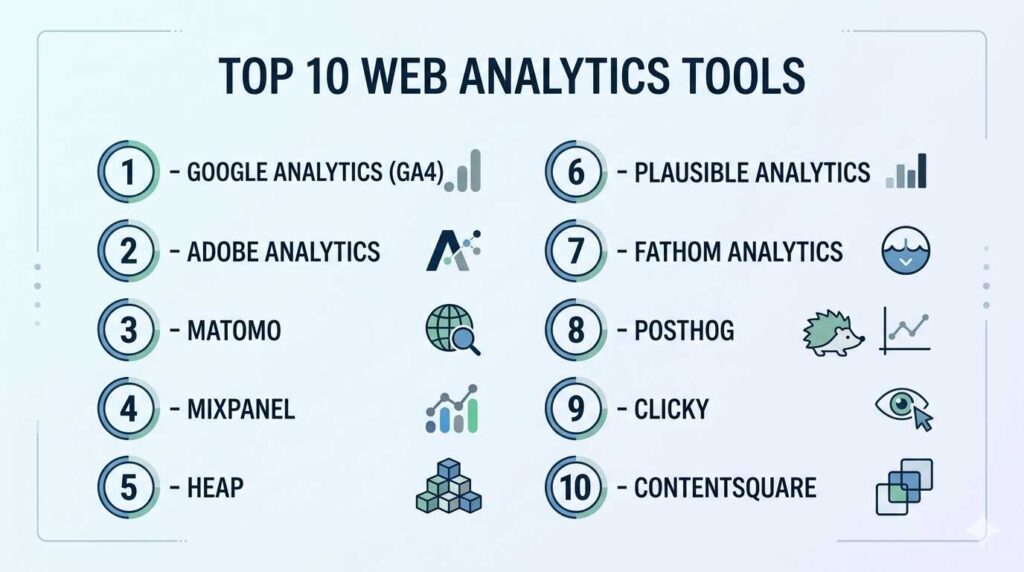
Introduction
Web Analytics Tools are software platforms that help businesses track, measure, and analyze user behavior across websites and applications. These tools collect data such as traffic sources, user journeys, engagement metrics, and conversions—turning raw data into actionable insights.
Modern web analytics has evolved beyond simple page views. Today’s platforms incorporate event-based tracking, AI-driven insights, session replay, and predictive analytics, enabling teams to understand both what users do and why they do it.
These tools are critical for improving marketing ROI, optimizing user experience, and driving growth in digital-first businesses.
Common use cases include:
- Monitoring website traffic and engagement
- Measuring campaign performance and attribution
- Understanding user journeys and funnels
- Improving UX/UI through behavior insights
- Tracking conversions and revenue metrics
What buyers should evaluate:
- Tracking model (event-based vs session-based)
- Data accuracy and sampling limitations
- Ease of implementation and usability
- Privacy compliance (GDPR, cookieless tracking)
- Real-time vs batch data processing
- Integration with marketing, CRM, and data tools
- Custom dashboards and reporting flexibility
- AI-driven insights and automation
- Scalability for high-traffic environments
Best for: Marketers, product managers, growth teams, SaaS companies, eCommerce businesses, and enterprises managing digital experiences.
Not ideal for: Static websites with minimal traffic or users needing only basic visitor counters.
Key Trends in Web Analytics Tools
- Privacy-first analytics: Shift toward cookieless tracking and compliance-focused data collection
- Event-based tracking models: More granular tracking of user interactions instead of sessions
- AI-driven insights: Automated anomaly detection, forecasting, and recommendations
- Session replay and heatmaps: Visual understanding of user behavior
- Server-side tracking: Improved accuracy and control over data collection
- Unified analytics stacks: Combining product, marketing, and behavioral analytics
- Real-time analytics: Faster decision-making with live dashboards
- Composable architectures: API-first analytics integrated into modern data stacks
- Cross-platform tracking: Unified data across web and mobile apps
- Attribution modeling advancements: Better understanding of multi-touch journeys
How We Selected These Tools (Methodology)
- Evaluated market adoption and industry relevance
- Assessed core analytics capabilities (tracking, reporting, dashboards)
- Reviewed AI, automation, and behavioral analytics features
- Analyzed integration ecosystems (CRM, marketing, and data tools)
- Considered ease of use vs technical flexibility
- Included tools for SMB, mid-market, and enterprise use cases
- Evaluated privacy compliance and data governance features
- Reviewed performance and scalability under high traffic
- Balanced open-source, freemium, and enterprise solutions
Top 10 Web Analytics Tools
#1 — Google Analytics (GA4)
Short description: A widely used analytics platform offering comprehensive tracking for websites and mobile apps with a strong focus on event-based analytics.
Key Features
- Event-based tracking model
- Cross-platform tracking (web + mobile)
- Custom reports and dashboards
- Funnel and conversion tracking
- AI-driven insights and predictions
- Integration with advertising platforms
Pros
- Free tier with extensive capabilities
- Strong ecosystem integration
Cons
- Complex interface for beginners
- Data privacy concerns in some regions
Platforms / Deployment
Web / Mobile
Cloud
Security & Compliance
Encryption, access controls; compliance varies
Integrations & Ecosystem
Deep integration with marketing and advertising tools enables end-to-end campaign tracking.
- Advertising platforms
- Search tools
- APIs and data pipelines
Support & Community
Very large global community with extensive documentation
#2 — Adobe Analytics
Short description: An enterprise-grade analytics solution focused on deep customer journey analysis and advanced segmentation.
Key Features
- Advanced segmentation and reporting
- Real-time data processing
- Predictive analytics
- Attribution modeling
- Custom dashboards
- AI-powered insights
Pros
- Highly customizable
- Strong enterprise capabilities
Cons
- Expensive
- Requires specialized expertise
Platforms / Deployment
Web
Cloud
Security & Compliance
Enterprise-grade security; details vary
Integrations & Ecosystem
- Digital experience platforms
- APIs
- Marketing automation tools
Support & Community
Enterprise-level support and onboarding
#3 — Matomo
Short description: A privacy-focused analytics platform offering full data ownership with both cloud and self-hosted options.
Key Features
- Self-hosted or cloud deployment
- GDPR-compliant tracking
- Heatmaps and session recording
- E-commerce tracking
- Custom reports
- A/B testing
Pros
- Full control over data
- Strong privacy compliance
Cons
- Setup complexity for self-hosted version
- Interface less modern
Platforms / Deployment
Web
Cloud / Self-hosted
Security & Compliance
GDPR-compliant; full data ownership
Integrations & Ecosystem
- CMS platforms
- APIs
- Data tools
Support & Community
Strong open-source community
#4 — Mixpanel
Short description: A product analytics platform focused on event tracking, user behavior, and retention analysis.
Key Features
- Event-based tracking
- Funnel and retention analysis
- User segmentation
- Real-time dashboards
- A/B testing
- Cohort analysis
Pros
- Strong product analytics capabilities
- Intuitive data visualization
Cons
- Limited traditional web analytics features
- Pricing scales with usage
Platforms / Deployment
Web
Cloud
Security & Compliance
Varies / Not publicly stated
Integrations & Ecosystem
- Data pipelines
- APIs
- CRM tools
Support & Community
Good documentation and support
#5 — Heap
Short description: An analytics platform that automatically captures user interactions without manual event tracking.
Key Features
- Automatic event capture
- Funnel and journey analysis
- Session replay
- Data visualization
- Behavioral insights
- No-code setup
Pros
- Easy implementation
- Reduces manual tracking work
Cons
- Can generate excessive data
- Higher pricing tiers
Platforms / Deployment
Web
Cloud
Security & Compliance
Varies / Not publicly stated
Integrations & Ecosystem
- CRM systems
- APIs
- Data warehouses
Support & Community
Strong customer support
#6 — Plausible Analytics
Short description: A lightweight, privacy-first analytics tool designed for simplicity and speed.
Key Features
- Cookieless tracking
- Real-time analytics
- Simple dashboard
- Lightweight script
- Open-source option
- Privacy-focused reporting
Pros
- Very easy to use
- Fast performance
Cons
- Limited advanced features
- Minimal customization
Platforms / Deployment
Web
Cloud / Self-hosted
Security & Compliance
Privacy-focused; GDPR-compliant
Integrations & Ecosystem
- APIs
- Developer tools
Support & Community
Active open-source community
#7 — Fathom Analytics
Short description: A simple analytics tool focused on privacy and ease of use with a clean interface.
Key Features
- Cookieless tracking
- Real-time insights
- Simple reporting
- Lightweight script
- Privacy compliance
Pros
- Clean and intuitive UI
- Privacy-friendly
Cons
- Limited feature set
- Not suitable for advanced analytics
Platforms / Deployment
Web
Cloud
Security & Compliance
Privacy-focused; compliance varies
Integrations & Ecosystem
- APIs
- Basic integrations
Support & Community
Moderate support
#8 — PostHog
Short description: An open-source product analytics platform offering advanced tracking and experimentation tools.
Key Features
- Event-based analytics
- Session replay
- Feature flags
- A/B testing
- Data pipelines
- Self-hosting support
Pros
- Highly flexible
- Developer-friendly
Cons
- Steeper learning curve
- Requires technical setup
Platforms / Deployment
Web
Cloud / Self-hosted
Security & Compliance
Varies / Not publicly stated
Integrations & Ecosystem
- APIs
- Data tools
- Developer ecosystem
Support & Community
Strong open-source community
#9 — Clicky
Short description: A real-time web analytics tool offering detailed visitor tracking and heatmaps.
Key Features
- Real-time analytics
- Heatmaps
- Visitor-level tracking
- Goal tracking
- Mobile access
Pros
- Immediate insights
- Simple interface
Cons
- Limited scalability
- Basic UI
Platforms / Deployment
Web / Mobile
Cloud
Security & Compliance
Varies / Not publicly stated
Integrations & Ecosystem
- APIs
- Basic integrations
Support & Community
Moderate support
#10 — Contentsquare
Short description: A digital experience analytics platform focused on understanding user behavior and optimizing UX.
Key Features
- Heatmaps and session replay
- Customer journey analysis
- Experience analytics
- AI-driven insights
- Conversion optimization tools
Pros
- Deep UX insights
- Enterprise-grade capabilities
Cons
- Expensive
- Complex implementation
Platforms / Deployment
Web
Cloud
Security & Compliance
Enterprise-grade; details vary
Integrations & Ecosystem
- CRM systems
- APIs
- Marketing platforms
Support & Community
Enterprise-level support
Comparison Table (Top 10)
| Tool Name | Best For | Platform(s) Supported | Deployment | Standout Feature | Public Rating |
|---|---|---|---|---|---|
| Google Analytics | General analytics | Web/Mobile | Cloud | Free + powerful | N/A |
| Adobe Analytics | Enterprise | Web | Cloud | Advanced segmentation | N/A |
| Matomo | Privacy-focused | Web | Hybrid | Data ownership | N/A |
| Mixpanel | Product analytics | Web | Cloud | Event tracking | N/A |
| Heap | No-code tracking | Web | Cloud | Auto event capture | N/A |
| Plausible | Simplicity | Web | Hybrid | Lightweight | N/A |
| Fathom | Privacy | Web | Cloud | Clean UI | N/A |
| PostHog | Developers | Web | Hybrid | Open-source flexibility | N/A |
| Clicky | Real-time data | Web/Mobile | Cloud | Live tracking | N/A |
| Contentsquare | UX analytics | Web | Cloud | Behavior insights | N/A |
Evaluation & Scoring of Web Analytics Tools
| Tool Name | Core (25%) | Ease (15%) | Integrations (15%) | Security (10%) | Performance (10%) | Support (10%) | Value (15%) | Weighted Total |
|---|---|---|---|---|---|---|---|---|
| Google Analytics | 10 | 7 | 10 | 8 | 9 | 9 | 10 | 9.1 |
| Adobe Analytics | 10 | 6 | 9 | 9 | 9 | 9 | 6 | 8.6 |
| Matomo | 9 | 7 | 8 | 9 | 8 | 8 | 9 | 8.4 |
| Mixpanel | 9 | 8 | 9 | 8 | 9 | 8 | 7 | 8.5 |
| Heap | 9 | 9 | 8 | 8 | 8 | 8 | 7 | 8.4 |
| Plausible | 7 | 10 | 7 | 9 | 9 | 7 | 9 | 8.3 |
| Fathom | 7 | 10 | 7 | 9 | 9 | 7 | 8 | 8.1 |
| PostHog | 9 | 7 | 9 | 8 | 8 | 8 | 8 | 8.3 |
| Clicky | 8 | 8 | 7 | 7 | 9 | 7 | 8 | 7.9 |
| Contentsquare | 9 | 7 | 8 | 9 | 9 | 8 | 6 | 8.2 |
How to interpret scores:
- Higher scores indicate stronger overall capability
- Enterprise tools excel in depth and scalability
- Simpler tools score higher in ease of use
- Value reflects cost-effectiveness relative to features
- Scores are comparative, not absolute benchmarks
Which Web Analytics Tool Is Right for You?
Solo / Freelancer
Plausible or Fathom are ideal for simple, privacy-focused analytics with minimal setup.
SMB
Google Analytics or Matomo provide a strong balance between features, scalability, and cost.
Mid-Market
Mixpanel or Heap are suitable for deeper behavioral analytics and product insights.
Enterprise
Adobe Analytics or Contentsquare offer advanced capabilities, scalability, and enterprise-grade analytics.
Budget vs Premium
- Budget: Google Analytics, Plausible, Fathom
- Premium: Adobe Analytics, Contentsquare
Feature Depth vs Ease of Use
- Advanced: Adobe Analytics, Mixpanel
- Easy: Plausible, Fathom
Integrations & Scalability
- Best: Google Analytics, Adobe Analytics
Security & Compliance Needs
- Strong: Matomo, Adobe Analytics
Frequently Asked Questions (FAQs)
What is web analytics?
Web analytics is the process of collecting and analyzing website data to understand user behavior and improve performance.
Is Google Analytics free?
Yes, it offers a free version with extensive features, along with enterprise options.
What is event-based tracking?
It tracks specific user actions such as clicks, scrolls, and conversions instead of sessions.
Are privacy-friendly analytics tools available?
Yes, tools like Plausible and Matomo focus on privacy and compliance.
Do these tools require coding?
Some require technical setup, but many offer no-code or low-code implementation.
Can I track mobile apps with these tools?
Yes, several platforms support cross-platform tracking for web and mobile apps.
What are heatmaps?
Heatmaps visually represent where users click, scroll, or interact on a page.
Are these tools scalable?
Yes, most tools are designed to handle increasing traffic and data volumes.
Can I switch analytics tools easily?
Switching is possible but may require reimplementation and data migration.
How do I choose the right tool?
Evaluate based on your budget, technical expertise, data needs, and integration requirements.
Conclusion
Web Analytics Tools are essential for understanding user behavior, optimizing digital experiences, and driving business growth. From simple traffic tracking to advanced behavioral analytics, the right tool depends on your goals and technical requirements.

Web analytics platforms provide valuable insights, but the biggest challenge in real-world environments is ensuring that the collected data is accurate and actionable. Poor event tracking implementation, inconsistent naming conventions, duplicate events, and missing user journeys can lead teams to make decisions based on unreliable information. Engineering teams should establish analytics governance practices with clear event ownership, automated tracking validation, schema management, and monitoring for data quality issues. Another important consideration is website performance, as excessive tracking scripts and third-party dependencies can affect page speed and user experience. Future web analytics platforms will need stronger integration with engineering workflows, real-time data quality monitoring, privacy-aware tracking models, and automated insights that help teams connect user behavior with measurable product improvements.