MOTOSHARE 🚗🏍️
Rent Bikes & Cars Directly from Owners
Motoshare connects vehicle owners with people who need bikes and cars on rent. Owners earn from idle vehicles, and renters get flexible ride options.
Visit Motoshare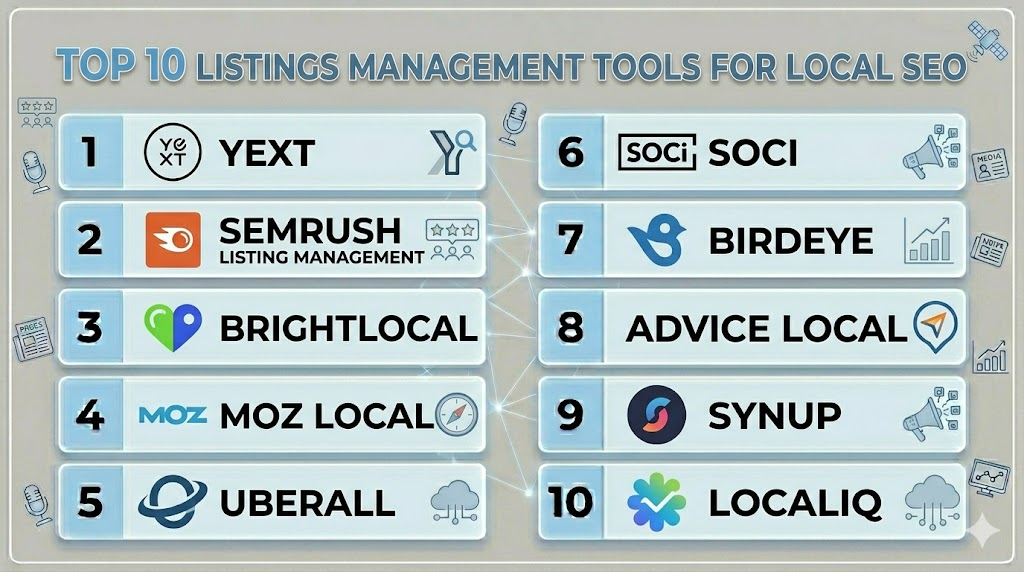
Introduction
Listings Management Tools help businesses manage their local business information across search engines, maps, directories, review sites, voice assistants, and local discovery platforms. These tools ensure that key business details such as name, address, phone number, website, hours, categories, services, photos, and location data remain accurate and consistent across the web.Local SEO depends heavily on accurate business listings because inconsistent or outdated information can reduce customer trust, hurt local search visibility, and create poor customer experiences. Modern listings management platforms now combine location data management, review monitoring, local SEO analytics, duplicate suppression, Google Business Profile workflows, multi-location governance, and reporting dashboards.Common use cases include managing Google Business Profiles, updating store hours, fixing duplicate listings, improving map visibility, managing franchise locations, tracking local rankings, and maintaining accurate location data across directories.Buyers should evaluate directory coverage, Google Business Profile support, duplicate management, multi-location workflows, review integration, analytics quality, reporting flexibility, API access, governance controls, and pricing structure.
Best for: Local businesses, franchises, agencies, retail chains, healthcare groups, restaurants, service businesses, hospitality brands, and enterprises managing many physical locations.
Not ideal for: Fully online businesses with no local presence, companies that do not depend on local discovery, or teams only needing basic website SEO tools.
Key Trends in Listings Management Tools Local SEO
- Google Business Profile optimization is becoming central to local SEO workflows.
- Multi-location listing governance is becoming more important for franchises and chains.
- Duplicate listing detection and suppression are now critical for data accuracy.
- Local SEO reporting is shifting toward visibility, engagement, and conversion metrics.
- Review management is increasingly bundled with listings management platforms.
- AI-assisted listing recommendations are helping teams improve location content quality.
- Voice search and map-based discovery are increasing the importance of structured location data.
- Local rank tracking is becoming more integrated with listing management dashboards.
- Store locator and location page optimization are becoming part of broader local SEO strategies.
- API-based location data updates are becoming important for enterprise and agency workflows.
How We Selected These Tools
The tools in this list were selected using practical local SEO, listings accuracy, and multi-location management evaluation criteria.
- Market adoption and industry reputation
- Directory coverage and local data distribution capabilities
- Google Business Profile management depth
- Duplicate detection and listing cleanup workflows
- Multi-location and franchise management capabilities
- Review monitoring and reputation workflow support
- Analytics, reporting, and local SEO insights
- Ease of onboarding and usability
- Security and governance readiness
- Overall balance between automation, accuracy, usability, and value
Top 10 Listings Management Tools Local SEO
1- Yext
Short Description: Yext is a leading listings management and digital presence platform designed for brands managing location data across search engines, maps, directories, and voice discovery platforms. It helps businesses update business information, manage local pages, suppress duplicates, and maintain consistent location data at scale. Yext is especially strong for enterprise and multi-location businesses that need centralized governance over hundreds or thousands of listings.
Key Features
- Listings management across directories
- Google Business Profile support
- Duplicate listing suppression
- Local pages and store locator workflows
- Multi-location management
- Analytics dashboards
- API-based location data updates
Pros
- Strong enterprise scalability
- Broad listings distribution capabilities
- Good governance for multi-location teams
Cons
- Premium pricing structure
- Smaller businesses may not need full platform depth
- Advanced workflows may require onboarding
Platforms / Deployment
- Web
- Cloud
Security & Compliance
Supports secure authentication, encrypted workflows, user permissions, governance controls, and enterprise administration features.
Integrations & Ecosystem
Yext integrates with local search, analytics, CRM, and digital experience workflows for location data management.
- Google Business Profile
- Apple Maps workflows
- Analytics systems
- API integrations
Support & Community
Provides onboarding assistance, enterprise implementation support, documentation, customer success services, and local SEO workflow guidance.
2- Semrush Listing Management
Short Description: Semrush Listing Management helps businesses distribute and maintain accurate local business information across important directories and search platforms. It is useful for SMBs, agencies, and marketers who want listings management alongside broader SEO workflows. The platform helps monitor listing consistency, update business details, track local visibility, and identify local SEO improvement opportunities.
Key Features
- Local listings distribution
- Business data accuracy monitoring
- Google Business Profile support
- Local visibility tracking
- Review monitoring
- Duplicate listing checks
- SEO dashboard integration
Pros
- Good fit for SEO-focused teams
- Useful for agencies and SMBs
- Combines listings with broader SEO workflows
Cons
- Enterprise multi-location depth may be lighter
- Advanced local automation varies by plan
- Some workflows depend on supported directories
Platforms / Deployment
- Web
- Cloud
Security & Compliance
Supports secure account access, encrypted workflows, and administrative controls.
Integrations & Ecosystem
Semrush Listing Management integrates with local SEO, analytics, and search visibility workflows.
- Google Business Profile
- Local directory networks
- SEO reporting workflows
- Analytics systems
Support & Community
Provides documentation, onboarding guidance, training resources, and customer support for SEO and marketing teams.
3- BrightLocal
Short Description: BrightLocal is a local SEO and listings management platform designed for agencies, consultants, and businesses managing local search visibility. It helps users audit local listings, monitor rankings, manage reviews, and track local SEO performance. BrightLocal is especially useful for agencies serving multiple local business clients because it combines reporting, auditing, citation tracking, and review workflows in one platform.
Key Features
- Local citation tracking
- Listings audits
- Local rank tracking
- Review monitoring
- Google Business Profile insights
- Agency reporting dashboards
- Citation building support
Pros
- Strong local SEO reporting
- Good agency-focused workflows
- Practical citation audit capabilities
Cons
- Enterprise governance depth is lighter
- Distribution workflows may be less automated than large platforms
- Requires local SEO knowledge for best results
Platforms / Deployment
- Web
- Cloud
Security & Compliance
Supports secure account management, encrypted workflows, and user access controls.
Integrations & Ecosystem
BrightLocal integrates with local SEO, reporting, review, and Google Business Profile workflows.
- Google Business Profile
- Google Analytics workflows
- Review platforms
- Reporting exports
- Local SEO workflows
Support & Community
Provides local SEO resources, onboarding support, documentation, agency guidance, and customer assistance.
4- Moz Local
Short Description: Moz Local is a listings management tool focused on helping businesses improve local search visibility by maintaining accurate location data across directories and search platforms. It helps businesses distribute listings, detect inconsistencies, manage duplicates, and monitor local reputation signals. Moz Local is especially useful for SMBs and agencies that want a straightforward local SEO listings solution.
Key Features
- Listings distribution
- Duplicate listing management
- Local data consistency monitoring
- Google Business Profile support
- Review monitoring
- Location dashboard
- Local SEO reporting
Pros
- Easy to use for SMBs
- Good local SEO credibility
- Practical listing consistency workflows
Cons
- Enterprise customization may be limited
- Advanced analytics depth is lighter
- Directory coverage varies by plan and region
Platforms / Deployment
- Web
- Cloud
Security & Compliance
Supports secure account workflows, encryption, and administrative access controls.
Integrations & Ecosystem
Moz Local integrates with local search and listing networks to improve data consistency.
- Google Business Profile
- Local directories
- Review monitoring workflows
- Reporting dashboards
Support & Community
Provides documentation, customer support, educational resources, and local SEO workflow guidance.
5- Uberall
Short Description: Uberall is a local digital marketing and listings management platform designed for businesses managing multiple locations across local search, maps, directories, and social platforms. It helps organizations update location data, manage reviews, improve local visibility, and create location-based customer engagement workflows. Uberall is especially useful for retail chains, franchises, restaurants, and enterprises with distributed local operations.
Key Features
- Listings management
- Multi-location management
- Local SEO analytics
- Review management
- Store locator workflows
- Local social engagement
- Duplicate suppression
Pros
- Strong multi-location capabilities
- Good local customer engagement workflows
- Useful for franchise and retail brands
Cons
- Premium pricing for smaller teams
- Implementation may require planning
- Advanced workflows may exceed SMB needs
Platforms / Deployment
- Web
- Cloud
Security & Compliance
Supports secure authentication, encrypted workflows, permission management, and enterprise governance features.
Integrations & Ecosystem
Uberall integrates with maps, directories, review platforms, and enterprise local marketing workflows.
- Google Business Profile
- Apple Maps workflows
- Review platforms
- API integrations
Support & Community
Provides onboarding, enterprise implementation guidance, documentation, and customer success support.
6- SOCi
Short Description: SOCi is a localized marketing platform that includes listings management, review management, social workflows, and local engagement tools for multi-location brands. It helps franchises, retail chains, and enterprise brands manage local visibility and customer communication from one centralized system. SOCi is especially strong for organizations needing local marketing governance across many locations.
Key Features
- Listings management
- Multi-location governance
- Review management
- Local social workflows
- Analytics dashboards
- Brand compliance controls
- Customer engagement tools
Pros
- Strong franchise and multi-location support
- Good localized marketing workflows
- Useful governance and brand control features
Cons
- Premium enterprise pricing
- Setup can be complex for smaller teams
- Businesses without many locations may not need full scope
Platforms / Deployment
- Web
- Cloud
Security & Compliance
Supports secure authentication, encrypted workflows, user permissions, approval controls, and enterprise governance features.
Integrations & Ecosystem
SOCi integrates with local listings, review platforms, social channels, and analytics workflows.
- Google Business Profile
- Local directory workflows
- Review systems
- API integrations
Support & Community
Provides enterprise onboarding, implementation support, workflow training, and customer success guidance.
7- Birdeye
Short Description: Birdeye is a customer experience and reputation platform that includes listings management, reviews, messaging, surveys, and local SEO workflows. It helps businesses maintain accurate listings, collect reviews, monitor reputation, and improve local visibility. Birdeye is especially useful for service businesses, healthcare groups, local businesses, and multi-location organizations that want reputation and listings in one platform.
Key Features
- Listings management
- Review management
- Automated review requests
- Multi-location support
- Customer messaging
- Local SEO reporting
- Analytics dashboards
Pros
- Strong reputation and listings combination
- Good fit for service businesses
- Useful automation workflows
Cons
- Premium pricing for smaller businesses
- Advanced workflows may require onboarding
- Full platform may exceed basic listing needs
Platforms / Deployment
- Web / iOS / Android
- Cloud
Security & Compliance
Supports secure authentication, encrypted workflows, permissions management, and administrative controls.
Integrations & Ecosystem
Birdeye integrates with local search, CRM, review, and customer communication systems.
- Google Business Profile
- Salesforce
- HubSpot
- API integrations
Support & Community
Provides onboarding assistance, customer success support, workflow documentation, and implementation guidance.
8- Advice Local
Short Description: Advice Local is a listings management and local presence platform focused on helping businesses and agencies distribute accurate business data across directories, search engines, and local discovery platforms. It supports citation management, local data distribution, duplicate suppression, and agency workflows. Advice Local is especially useful for agencies managing local SEO services for multiple clients.
Key Features
- Listings distribution
- Citation management
- Duplicate suppression
- Agency dashboard workflows
- Local data management
- Reporting tools
- Location data audits
Pros
- Strong agency-focused workflows
- Useful citation management support
- Practical local data distribution features
Cons
- Enterprise brand marketing depth is lighter
- Interface may require local SEO knowledge
- Broader reputation features may be limited
Platforms / Deployment
- Web
- Cloud
Security & Compliance
Supports secure account access, encrypted workflows, and user permission controls.
Integrations & Ecosystem
Advice Local integrates with local directories, maps, search platforms, and agency reporting workflows.
- Google Business Profile workflows
- Local directories
- Reporting exports
- Agency dashboards
- Data distribution systems
Support & Community
Provides agency support, onboarding resources, documentation, and local SEO service guidance.
9- Synup
Short Description: Synup is a local marketing and listings management platform designed to help businesses manage local presence, reviews, rankings, and analytics. It supports listing updates, review monitoring, local SEO tracking, and multi-location workflows. Synup is especially useful for agencies, local businesses, and brands that want listings management with local marketing insights.
Key Features
- Listings management
- Review monitoring
- Local rank tracking
- Multi-location support
- Analytics dashboards
- Store locator workflows
- Local SEO reporting
Pros
- Good balance of listings and local SEO tools
- Useful for agencies and multi-location brands
- Practical reporting capabilities
Cons
- Advanced enterprise governance may vary
- Some workflows require setup planning
- Directory coverage may vary by region
Platforms / Deployment
- Web
- Cloud
Security & Compliance
Supports secure account workflows, encryption, and administrative permissions.
Integrations & Ecosystem
Synup integrates with local search, review, reporting, and marketing workflows.
- Google Business Profile
- Local directories
- Review platforms
- API integrations
Support & Community
Provides onboarding support, documentation, customer assistance, and local SEO workflow guidance.
10- LocaliQ
Short Description: LocaliQ provides local marketing solutions that include listings management, local SEO, advertising, reputation workflows, and lead generation support. It helps small and mid-sized businesses improve local visibility across search and digital channels. LocaliQ is especially useful for businesses that want listings management as part of a broader local marketing service package.
Key Features
- Listings management
- Local SEO support
- Reputation management
- Advertising workflows
- Lead generation support
- Analytics dashboards
- Digital marketing services
Pros
- Useful all-in-one local marketing support
- Good for SMBs needing managed services
- Practical visibility and lead generation workflows
Cons
- Less self-service depth than specialist tools
- Advanced enterprise governance is limited
- Businesses needing only listings may not need full package
Platforms / Deployment
- Web
- Cloud
Security & Compliance
Supports secure account workflows and standard digital marketing platform protections.
Integrations & Ecosystem
LocaliQ connects local marketing workflows across listings, advertising, and reputation systems.
- Google Business Profile workflows
- Local directory networks
- Advertising platforms
- Reputation workflows
- Reporting systems
Support & Community
Provides managed service support, onboarding guidance, reporting assistance, and local marketing expertise.
Comparison Table
| Tool Name | Best For | Platform(s) Supported | Deployment | Standout Feature | Public Rating |
|---|---|---|---|---|---|
| Yext | Enterprise location data management | Web | Cloud | Broad listings distribution | N/A |
| Semrush Listing Management | SEO-focused SMBs and agencies | Web | Cloud | Listings inside SEO workflow | N/A |
| BrightLocal | Local SEO agencies | Web | Cloud | Citation audits and local reports | N/A |
| Moz Local | SMB listing consistency | Web | Cloud | Simple local listing management | N/A |
| Uberall | Multi-location local marketing | Web | Cloud | Enterprise local presence workflows | N/A |
| SOCi | Franchise and chain brands | Web | Cloud | Localized marketing governance | N/A |
| Birdeye | Reputation plus listings | Web, iOS, Android | Cloud | Reviews and listings in one platform | N/A |
| Advice Local | Agency citation management | Web | Cloud | Local data distribution workflows | N/A |
| Synup | Local SEO and review workflows | Web | Cloud | Listings plus local analytics | N/A |
| LocaliQ | SMB local marketing services | Web | Cloud | Listings with managed marketing support | N/A |
Evaluation & Scoring of Listings Management Tools Local SEO
| Tool Name | Core (25%) | Ease (15%) | Integrations (15%) | Security (10%) | Performance (10%) | Support (10%) | Value (15%) | Weighted Total |
|---|---|---|---|---|---|---|---|---|
| Yext | 9.6 | 8.0 | 9.3 | 9.0 | 9.2 | 8.8 | 7.6 | 8.8 |
| Semrush Listing Management | 8.6 | 8.8 | 8.5 | 8.3 | 8.6 | 8.4 | 8.7 | 8.6 |
| BrightLocal | 8.5 | 8.9 | 8.2 | 8.1 | 8.4 | 8.5 | 9.0 | 8.5 |
| Moz Local | 8.4 | 9.0 | 8.1 | 8.2 | 8.3 | 8.3 | 8.8 | 8.4 |
| Uberall | 9.2 | 8.1 | 8.9 | 8.8 | 9.0 | 8.7 | 7.9 | 8.7 |
| SOCi | 9.1 | 8.2 | 8.8 | 8.7 | 8.8 | 8.6 | 8.0 | 8.6 |
| Birdeye | 8.9 | 8.6 | 8.7 | 8.6 | 8.7 | 8.6 | 8.2 | 8.6 |
| Advice Local | 8.2 | 8.5 | 8.0 | 8.0 | 8.2 | 8.4 | 8.8 | 8.3 |
| Synup | 8.6 | 8.6 | 8.3 | 8.2 | 8.5 | 8.4 | 8.6 | 8.5 |
| LocaliQ | 8.0 | 8.4 | 7.8 | 8.0 | 8.1 | 8.6 | 8.5 | 8.2 |
These scores are comparative and intended to help buyers evaluate listings management tools based on operational fit. Enterprise tools generally score higher in scalability, governance, and multi-location data control, while SMB and agency-focused tools often perform better in ease of use and value. Buyers should prioritize listings accuracy, Google Business Profile support, duplicate management, reporting quality, and local SEO workflow fit.
Which Listings Management Tool Local SEO Is Right for You?
Solo / Freelancer
Solo consultants and freelancers managing one or two locations usually need simple listing accuracy checks, Google Business Profile support, and basic local SEO reporting. Moz Local, BrightLocal, and Semrush Listing Management are practical choices because they are easier to use and do not require enterprise-level setup. Simplicity and affordability should be the main priorities.
SMB
SMBs often need listings distribution, review monitoring, duplicate cleanup, and local visibility tracking without complex governance workflows. Moz Local, BrightLocal, Semrush Listing Management, Synup, and Birdeye are strong options for small businesses and local service brands. SMB buyers should prioritize ease of use, review support, and listing consistency.
Mid-Market
Mid-market organizations usually require stronger reporting, multi-location workflows, integrations, and local SEO analytics. Birdeye, Synup, Uberall, SOCi, and Yext are strong choices depending on location count and operational complexity. At this stage, teams should focus on workflow automation, local dashboards, and centralized reporting.
Enterprise
Enterprise organizations managing many locations need governance, permissions, bulk updates, API workflows, duplicate suppression, and local performance reporting. Yext, Uberall, SOCi, and Birdeye are especially strong for enterprise local presence management. Large teams should evaluate approval workflows, permissions, scale, and reporting customization carefully.
Budget vs Premium
Budget-conscious users may prefer Moz Local, BrightLocal, Advice Local, or Semrush Listing Management. Premium buyers needing multi-location governance and broad distribution may benefit more from Yext, Uberall, SOCi, or Birdeye. The best choice depends on how many locations you manage and how complex your local SEO operations are.
Feature Depth vs Ease of Use
Yext, Uberall, and SOCi provide deeper location governance and enterprise workflows but require more planning. Moz Local, BrightLocal, and Semrush Listing Management are easier to deploy and better for lean local SEO teams. Buyers should choose depth when scale is high and simplicity when speed matters more.
Integrations & Scalability
Businesses with CRM, analytics, review, or location page workflows should evaluate integration flexibility carefully. Multi-location brands should also check bulk update capabilities, API access, store locator support, local page workflows, and reporting automation before choosing a tool.
Security & Compliance Needs
Organizations managing sensitive business data across many locations should review authentication, user permissions, approval workflows, encryption, auditability, and governance controls. Franchises and enterprises should also evaluate role-based access for corporate and local teams.
Frequently Asked Questions
1. What is a Listings Management Tool?
A Listings Management Tool helps businesses update and maintain accurate business information across search engines, maps, directories, review sites, and local discovery platforms. These tools manage details such as business name, address, phone number, website, hours, categories, and services. Accurate listings help improve customer trust and local search visibility.
2. Why is listings management important for local SEO?
Listings management is important because search engines use business information consistency as one signal for local trust and relevance. Inconsistent details across directories can confuse customers and weaken local visibility. Accurate listings also help users find the correct address, phone number, operating hours, and service information.
3. What is the difference between listings management and local SEO?
Listings management focuses on keeping business information accurate across directories and platforms. Local SEO is broader and includes listings, Google Business Profile optimization, local content, reviews, location pages, local backlinks, and ranking improvements. Listings management is one important part of a complete local SEO strategy.
4. What features should buyers prioritize first?
Buyers should prioritize directory coverage, Google Business Profile support, duplicate detection, bulk updates, review monitoring, local SEO reporting, integrations, and multi-location management. Enterprises should also evaluate permissions, approval workflows, API access, and governance controls before selecting a platform.
5. Are listings management tools useful for small businesses?
Yes, small businesses benefit because accurate listings help customers find them online and visit the correct location. Tools like Moz Local, BrightLocal, and Semrush Listing Management are useful for SMBs because they simplify listing updates and local visibility tracking. Small businesses should focus on accuracy, reviews, and Google Business Profile optimization.
6. What are duplicate listings?
Duplicate listings happen when the same business location appears multiple times on a directory or search platform with slightly different details. This can confuse customers and search engines. Listings management tools help identify and suppress duplicates so each location has clean and consistent business information.
7. How do listings management tools help multi-location businesses?
Multi-location businesses use listings management tools to update hundreds or thousands of locations from one dashboard. They can manage hours, addresses, phone numbers, photos, categories, and special announcements consistently. These platforms also help corporate teams maintain governance while allowing local teams to manage location-specific updates.
8. Do these tools manage Google Business Profile?
Many listings management tools support Google Business Profile workflows, including business information updates, review monitoring, photos, categories, and insights. Since Google Business Profile is one of the most important local discovery channels, buyers should confirm how deeply each platform supports it before choosing a solution.
9. What are common mistakes in listings management?
A common mistake is updating business information in one place but ignoring other directories. Another issue is failing to remove duplicate listings or outdated phone numbers. Businesses also often forget to update holiday hours, photos, categories, and service descriptions. Good listings management requires regular audits and consistent data governance.
10. What alternatives exist if a business does not need a full listings platform?
Alternatives include manually updating Google Business Profile, using spreadsheets, working with a local SEO agency, or managing only the most important directories directly. Very small businesses with one location may start manually, but as locations and directories increase, a listings management tool becomes more useful.
Conclusion
Listings Management Tools Local SEO help businesses maintain accurate location data, improve local search visibility, reduce customer confusion, and strengthen digital trust across search engines, maps, directories, and review platforms. Modern platforms now combine listings distribution, Google Business Profile workflows, duplicate suppression, review monitoring, local SEO analytics, and multi-location governance into unified systems for local marketing teams. The best platform depends on location count, budget, reporting needs, directory coverage, local SEO maturity, and governance requirements. Enterprise and franchise brands often benefit most from Yext, Uberall, SOCi, or Birdeye because of their scale and workflow depth, while SMBs and agencies may prefer BrightLocal, Moz Local, Semrush Listing Management, Synup, or Advice Local for practical listing accuracy and local SEO reporting. Before selecting a tool, businesses should audit current listing accuracy, identify duplicate issues, test Google Business Profile workflows, compare reporting dashboards, review integration needs, and run a pilot across a few locations before scaling listings management across the full organization.
