MOTOSHARE 🚗🏍️
Rent Bikes & Cars Directly from Owners
Motoshare connects vehicle owners with people who need bikes and cars on rent. Owners earn from idle vehicles, and renters get flexible ride options.
Visit Motoshare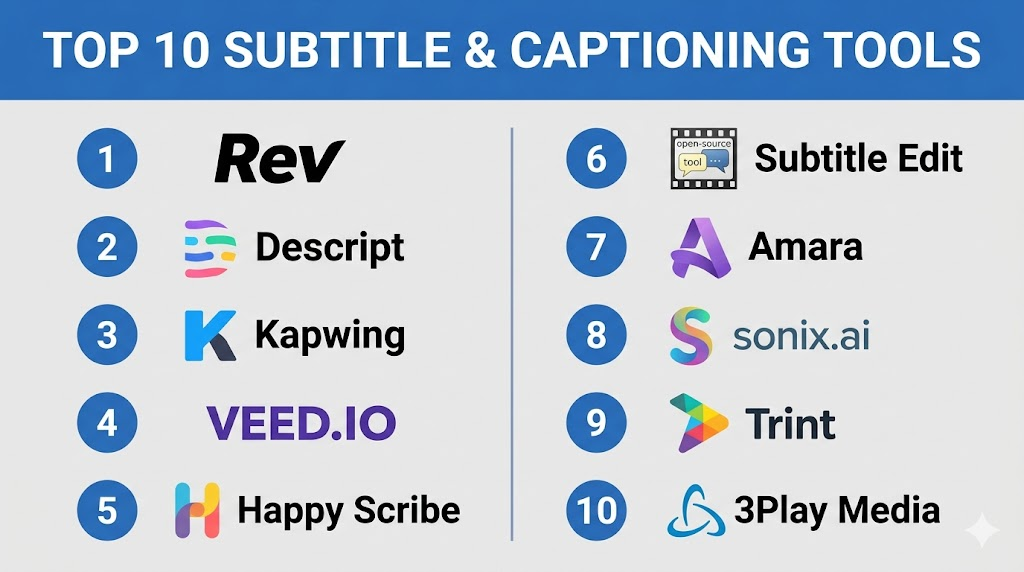
Introduction
Subtitle and Captioning Tools help creators, businesses, educators, media teams, and enterprises create, edit, translate, synchronize, and publish captions or subtitles for video and audio content. These tools improve accessibility, viewer engagement, search visibility, and content reach across websites, learning platforms, social media, streaming services, webinars, and internal communication channels.As video usage grows across marketing, education, entertainment, customer support, and workplace training, captions have become essential rather than optional. Captions help viewers understand content in noisy environments, support people with hearing difficulties, improve multilingual distribution, and make videos easier to search and repurpose. Modern tools now include AI transcription, speaker detection, multilingual translation, style customization, collaboration workflows, quality review, and export support for multiple subtitle formats.
Common real-world use cases include:
- Adding captions to training and onboarding videos
- Creating subtitles for YouTube, social media, and webinars
- Translating videos into multiple languages
- Making enterprise and educational content more accessible
- Preparing caption files for streaming and media platforms
Buyers evaluating Subtitle & Captioning Tools should focus on:
- Transcription accuracy
- Subtitle timing and synchronization quality
- Multilingual translation support
- Manual editing experience
- Export format support
- Speaker identification
- Collaboration and review workflows
- Accessibility compliance support
- Integration with video platforms
- Pricing flexibility and usage limits
Best for: Content creators, educators, media teams, marketing teams, eLearning providers, video editors, broadcasters, enterprises, podcasters, and organizations that need accessible or multilingual video content.
Not ideal for: Teams that only publish occasional short videos and do not require accuracy, accessibility, translation, or scalable caption workflows.
Key Trends in Subtitle & Captioning Tools
- AI transcription is reducing the time required to create captions and subtitles.
- Multilingual subtitle generation is becoming more important for global content distribution.
- Speaker identification is improving usability for interviews, webinars, podcasts, and panel discussions.
- Accessibility-first captioning workflows are becoming standard for education and enterprise content.
- Real-time captioning is growing for live webinars, events, meetings, and broadcasts.
- Video editing platforms are adding built-in subtitle generation to reduce workflow switching.
- Human review remains important for legal, medical, educational, and brand-sensitive content.
- Subtitle styling and burned-in captions are increasingly used for social media videos.
- Collaboration workflows are helping distributed teams review captions faster.
- Export flexibility across SRT, VTT, ASS, SCC, and other formats remains a key buying requirement.
How We Selected These Tools
The tools in this list were selected using a practical evaluation framework focused on accuracy, usability, scalability, and workflow fit.
- Evaluated overall market adoption and recognition
- Compared transcription accuracy and editing quality
- Reviewed subtitle timing and synchronization controls
- Assessed multilingual translation capabilities
- Compared export formats and publishing workflows
- Evaluated collaboration and team review features
- Considered suitability for creators, SMBs, and enterprises
- Reviewed accessibility and compliance support
- Compared integrations with video platforms and editors
- Included AI-first, editor-first, enterprise, and creator-friendly options
Top 10 Subtitle & Captioning Tools
1- Rev
Short Description:
Rev is a popular captioning and transcription platform used by media teams, enterprises, educators, creators, and legal professionals. It offers both AI-generated and human-reviewed transcription services, making it useful for teams that need speed as well as accuracy. Rev is especially valuable when content quality, speaker clarity, and accessibility standards matter.
Key Features
- AI transcription
- Human captioning services
- Subtitle file exports
- Speaker identification
- Foreign subtitle support
- Audio and video transcription
- Enterprise workflow options
Pros
- Strong accuracy with human review options
- Good for professional and compliance-sensitive content
- Easy ordering and file delivery workflow
Cons
- Human-reviewed services cost more
- Turnaround depends on service type
- Less focused on full video editing
Platforms / Deployment
- Web
- Cloud
Security & Compliance
- Encryption
- Enterprise security options
- Not publicly stated for all certifications
Integrations & Ecosystem
Rev works well with professional video, education, podcast, and enterprise content workflows.
- Video hosting platforms
- Podcast workflows
- Learning content workflows
- Media production tools
- Enterprise content systems
Support & Community
Rev provides customer support, enterprise options, documentation, and service-based onboarding for larger teams.
2- Descript
Short Description:
Descript is an audio and video editing platform with strong transcription, captioning, subtitle editing, and content repurposing capabilities. It allows users to edit video by editing text, making it highly useful for podcasters, marketers, educators, YouTubers, and business content teams. Descript is especially strong for teams that want captioning and editing in one workflow.
Key Features
- AI transcription
- Text-based video editing
- Subtitle generation
- Speaker labeling
- Screen recording
- Social clip creation
- Collaboration workflows
Pros
- Very easy editing experience
- Great for podcasts and video creators
- Strong content repurposing features
Cons
- Accuracy may require manual cleanup
- Advanced features can have a learning curve
- Not ideal for broadcast-grade caption workflows
Platforms / Deployment
- Web / Windows / macOS
- Cloud
Security & Compliance
- MFA
- Team permissions
- Encryption
- Not publicly stated for broader certifications
Integrations & Ecosystem
Descript supports creator, podcast, marketing, and internal communication workflows.
- Podcast publishing workflows
- Video editing workflows
- Screen recording workflows
- Collaboration tools
- Social media content workflows
Support & Community
Strong creator community, tutorials, documentation, and support resources are available.
3- Kapwing
Short Description:
Kapwing is an online video editing platform with automatic subtitle generation, caption styling, translation, resizing, and social media video creation tools. It is designed for creators, social media teams, educators, and marketers who need quick browser-based captioning and editing workflows. Kapwing is especially useful for short-form content and branded social videos.
Key Features
- Automatic subtitle generation
- Subtitle styling
- Video resizing
- Translation support
- Team collaboration
- Social media templates
- Browser-based editing
Pros
- Easy to use
- Strong for social media videos
- No heavy software installation required
Cons
- Less suitable for long enterprise workflows
- AI captions may need review
- Advanced export options may require paid plans
Platforms / Deployment
- Web
- Cloud
Security & Compliance
- Team permissions
- Not publicly stated for broader certifications
Integrations & Ecosystem
Kapwing fits well into fast content production and social media workflows.
- Social media platforms
- Marketing content workflows
- Education content workflows
- Browser-based creative workflows
- Team collaboration processes
Support & Community
Kapwing offers documentation, templates, tutorials, and support resources for creators and teams.
4- VEED
Short Description:
VEED is an online video editing and captioning platform built for creators, marketers, educators, and businesses. It supports automatic subtitles, translation, caption styling, screen recording, and social media content creation. VEED is useful for teams that want a simple browser-based tool for fast captioned video production.
Key Features
- Auto subtitles
- Subtitle translation
- Caption styling
- Video editing
- Screen recording
- Social media formatting
- Team workspaces
Pros
- Simple user interface
- Good for social and marketing videos
- Fast browser-based workflow
Cons
- AI captions require review
- Not ideal for advanced broadcast workflows
- Some features depend on paid plans
Platforms / Deployment
- Web
- Cloud
Security & Compliance
- Team access controls
- Not publicly stated for advanced compliance frameworks
Integrations & Ecosystem
VEED supports creator, marketing, education, and business communication workflows.
- Social media workflows
- Video marketing workflows
- Browser editing workflows
- Team collaboration processes
- Online publishing workflows
Support & Community
VEED provides tutorials, documentation, customer support, and creator-focused resources.
5- Happy Scribe
Short Description:
Happy Scribe is a transcription, subtitle, and translation platform designed for creators, educators, media teams, journalists, and businesses. It offers automatic transcription, human transcription services, subtitle editing, and multilingual translation. The platform is useful for teams that need accurate subtitle workflows across multiple languages.
Key Features
- Automatic transcription
- Human transcription option
- Subtitle editor
- Multilingual subtitles
- Translation workflows
- Speaker identification
- Export format support
Pros
- Strong multilingual support
- Human review option available
- Useful subtitle editing interface
Cons
- Human services cost more
- AI output may need correction
- Advanced enterprise workflow depth is limited
Platforms / Deployment
- Web
- Cloud
Security & Compliance
- Encryption
- Not publicly stated for all advanced compliance frameworks
Integrations & Ecosystem
Happy Scribe fits well into media, education, research, and multilingual content workflows.
- Video editing workflows
- Podcast workflows
- Education platforms
- Media production teams
- Translation workflows
Support & Community
Good documentation, customer support, and resources for transcription and subtitle workflows.
6- Subtitle Edit
Short Description:
Subtitle Edit is a powerful open-source subtitle editor designed for users who need detailed control over subtitle timing, formatting, synchronization, and conversion. It is commonly used by subtitle professionals, video editors, translators, and technical users. The tool is especially strong for manual correction and format conversion workflows.
Key Features
- Subtitle timing editor
- Format conversion
- Waveform and audio visualization
- Spell checking
- Translation support
- Synchronization tools
- Open-source flexibility
Pros
- Free and powerful
- Excellent format support
- Great for detailed manual subtitle editing
Cons
- Interface is less modern
- Requires manual workflow knowledge
- Not cloud-collaboration focused
Platforms / Deployment
- Windows
- Self-hosted
Security & Compliance
- Depends on local deployment
- Not publicly stated
Integrations & Ecosystem
Subtitle Edit works well in desktop editing, translation, and professional subtitle correction workflows.
- Video editing workflows
- Translation workflows
- Local media production
- Subtitle conversion processes
- Broadcast preparation workflows
Support & Community
Large open-source community, user guides, forums, and community-driven support resources.
7- Amara
Short Description:
Amara is a subtitle and captioning platform focused on accessibility, collaboration, and community-based translation. It is often used by educational organizations, nonprofits, media projects, and teams that need collaborative subtitle workflows. Amara is especially useful when multiple contributors review or translate captions.
Key Features
- Collaborative subtitle editing
- Translation workflows
- Accessibility-focused captions
- Team review tools
- Subtitle publishing support
- Community contribution workflows
- Multi-language management
Pros
- Strong collaborative subtitle workflow
- Good for accessibility projects
- Useful for community translation
Cons
- Interface may feel less modern
- Not a full video editing platform
- Enterprise customization may be limited
Platforms / Deployment
- Web
- Cloud
Security & Compliance
- Team permissions
- Not publicly stated for advanced certifications
Integrations & Ecosystem
Amara works well for education, nonprofit, accessibility, and multilingual content workflows.
- Video publishing platforms
- Education content workflows
- Community translation projects
- Accessibility programs
- Subtitle collaboration workflows
Support & Community
Strong community orientation with documentation, support resources, and collaborative project workflows.
8- Sonix
Short Description:
Sonix is an AI transcription and subtitle platform designed for businesses, creators, researchers, journalists, and media teams. It provides fast transcription, searchable transcripts, subtitle generation, translation, and editing tools. Sonix is particularly useful for teams managing large amounts of recorded audio and video content.
Key Features
- AI transcription
- Subtitle generation
- Translation tools
- Searchable transcripts
- Speaker labeling
- Collaboration features
- Export format support
Pros
- Fast transcription workflows
- Good searchable transcript experience
- Useful for research and media teams
Cons
- AI accuracy varies by audio quality
- Human review may still be needed
- Less focused on advanced video editing
Platforms / Deployment
- Web
- Cloud
Security & Compliance
- MFA
- Encryption
- Team permissions
- Not publicly stated for all certifications
Integrations & Ecosystem
Sonix supports research, media, podcast, and business content workflows.
- Video editing workflows
- Podcast workflows
- Cloud storage workflows
- Research workflows
- Media production processes
Support & Community
Sonix provides documentation, support resources, and business-focused onboarding materials.
9- Trint
Short Description:
Trint is an AI transcription, captioning, and content collaboration platform used by journalists, media teams, marketers, and enterprise content teams. It helps teams convert speech into editable transcripts, create captions, collaborate on story production, and translate content. Trint is especially useful for newsroom and content operations.
Key Features
- AI transcription
- Caption generation
- Collaborative transcript editing
- Speaker identification
- Translation support
- Searchable content library
- Team workflows
Pros
- Strong collaboration features
- Good for media and newsroom workflows
- Helpful searchable transcript tools
Cons
- Pricing may be high for occasional users
- AI output requires review
- Less suited for advanced video styling
Platforms / Deployment
- Web / iOS
- Cloud
Security & Compliance
- Team permissions
- Encryption
- Not publicly stated for all advanced certifications
Integrations & Ecosystem
Trint supports newsroom, marketing, research, and enterprise content workflows.
- Media production workflows
- Editorial collaboration
- Podcast workflows
- Cloud storage workflows
- Enterprise content processes
Support & Community
Trint offers documentation, customer support, onboarding resources, and enterprise assistance.
10- 3Play Media
Short Description:
3Play Media is a professional captioning, transcription, audio description, and accessibility platform designed for education, enterprise, media, and government-related content workflows. It is especially useful for organizations that require higher accuracy, accessibility support, and structured captioning services at scale.
Key Features
- Professional captioning
- Transcription services
- Audio description
- Live captioning
- Translation services
- Accessibility workflow support
- Enterprise account management
Pros
- Strong accessibility focus
- Good for enterprise and education use cases
- Professional service quality
Cons
- More expensive than basic AI tools
- Less creator-focused editing flexibility
- Best value for structured accessibility needs
Platforms / Deployment
- Web
- Cloud
Security & Compliance
- Enterprise security controls
- Access management
- Not publicly stated for all certifications
Integrations & Ecosystem
3Play Media integrates with education, enterprise video, and accessibility workflows.
- Learning management systems
- Enterprise video platforms
- Media publishing workflows
- Video hosting platforms
- Accessibility compliance workflows
Support & Community
Strong professional support, account services, onboarding guidance, and enterprise accessibility expertise.
Comparison Table
| Tool Name | Best For | Platform(s) Supported | Deployment | Standout Feature | Public Rating |
|---|---|---|---|---|---|
| Rev | Professional captioning | Web | Cloud | Human-reviewed caption services | N/A |
| Descript | Creators and podcasters | Web, Windows, macOS | Cloud | Text-based video editing | N/A |
| Kapwing | Social media videos | Web | Cloud | Fast browser-based captions | N/A |
| VEED | Marketing and creator videos | Web | Cloud | Styled auto subtitles | N/A |
| Happy Scribe | Multilingual subtitles | Web | Cloud | Translation and human review | N/A |
| Subtitle Edit | Manual subtitle editing | Windows | Self-hosted | Advanced subtitle timing control | N/A |
| Amara | Collaborative subtitle projects | Web | Cloud | Community translation workflows | N/A |
| Sonix | AI transcription workflows | Web | Cloud | Searchable transcripts | N/A |
| Trint | Media and newsroom teams | Web, iOS | Cloud | Collaborative transcript editing | N/A |
| 3Play Media | Accessibility-focused captioning | Web | Cloud | Professional accessibility services | N/A |
Evaluation & Scoring of Subtitle & Captioning Tools
| Tool Name | Core (25%) | Ease (15%) | Integrations (15%) | Security (10%) | Performance (10%) | Support (10%) | Value (15%) | Weighted Total |
|---|---|---|---|---|---|---|---|---|
| Rev | 9 | 8 | 7 | 7 | 9 | 9 | 7 | 8.1 |
| Descript | 8 | 9 | 8 | 7 | 8 | 8 | 8 | 8.1 |
| Kapwing | 7 | 9 | 6 | 6 | 7 | 7 | 8 | 7.3 |
| VEED | 7 | 9 | 6 | 6 | 7 | 7 | 8 | 7.3 |
| Happy Scribe | 8 | 8 | 7 | 7 | 8 | 8 | 8 | 7.8 |
| Subtitle Edit | 8 | 6 | 6 | 5 | 8 | 7 | 10 | 7.4 |
| Amara | 7 | 7 | 6 | 6 | 7 | 7 | 8 | 7.0 |
| Sonix | 8 | 8 | 7 | 7 | 8 | 7 | 8 | 7.7 |
| Trint | 8 | 8 | 7 | 7 | 8 | 8 | 7 | 7.7 |
| 3Play Media | 9 | 7 | 8 | 8 | 9 | 9 | 6 | 8.1 |
These scores are comparative and should be interpreted based on workflow needs. Tools with human review options usually score higher in accuracy and accessibility support, while creator-focused tools often score higher in ease of use and speed. Open-source tools can provide excellent value but may require manual expertise. The best choice depends on whether the priority is accuracy, multilingual support, social video styling, enterprise accessibility, or fast content production.
Which Subtitle & Captioning Tool Is Right for You?
Solo / Freelancer
Freelancers, YouTubers, coaches, and independent creators usually need fast, affordable, and easy subtitle workflows. Descript, Kapwing, VEED, and Subtitle Edit are strong options depending on whether the user prefers browser-based editing, text-based video editing, or manual subtitle control.
SMB
SMBs should prioritize simplicity, transcription quality, export flexibility, and pricing predictability. Happy Scribe, Sonix, Descript, and VEED are practical choices for marketing videos, training clips, podcasts, and social media content. Teams that need higher accuracy may consider Rev.
Mid-Market
Mid-market organizations usually require collaboration, multilingual workflows, and stronger content operations. Trint, Happy Scribe, Sonix, and Rev are strong options for teams managing recurring video and audio content across departments.
Enterprise
Enterprises, universities, media organizations, and regulated teams should prioritize accuracy, accessibility, permissions, service reliability, and integration readiness. Rev, 3Play Media, Trint, and professional captioning workflows are strong choices for larger-scale captioning needs.
Budget vs Premium
Budget-focused users may prefer Subtitle Edit, Kapwing, VEED, or AI-first tools with flexible plans. Premium buyers may prefer Rev or 3Play Media when accuracy, accessibility, and professional review matter more than cost. The right choice depends on content sensitivity and publishing requirements.
Feature Depth vs Ease of Use
Browser-based tools are easier for quick captioning and social content, while professional captioning platforms offer deeper quality assurance and accessibility support. Subtitle Edit provides deep manual control but requires more skill. Descript offers a strong middle ground for creators who also need editing.
Integrations & Scalability
Teams working with video platforms, learning systems, podcasts, and enterprise content workflows should evaluate export formats, API support, and integration options. Enterprises should also check user permissions, review workflows, and bulk upload capabilities before choosing a tool.
Security & Compliance Needs
Organizations in education, healthcare, legal, finance, and government-related workflows should prioritize tools with stronger access control, encryption, auditability, and professional review options. For sensitive content, human-reviewed captioning and controlled workflows are often safer than relying only on automated captions.
Frequently Asked Questions
1. What are Subtitle & Captioning Tools used for?
Subtitle and Captioning Tools are used to create text versions of spoken audio in videos, webinars, podcasts, courses, meetings, and broadcasts. They help viewers understand content even when audio is muted or difficult to hear. These tools also improve accessibility, multilingual reach, and content searchability. Businesses use them for training, marketing, education, customer support, and media publishing.
2. What is the difference between captions and subtitles?
Captions usually include spoken dialogue as well as important sound cues such as music, laughter, or background noise. They are often designed for accessibility. Subtitles usually translate or display spoken dialogue for viewers who may not understand the spoken language. In business usage, both terms are sometimes used interchangeably, but accessibility-focused workflows often require proper captions.
3. Are AI captions accurate enough?
AI captions are useful and fast, but accuracy depends on audio quality, speaker clarity, accents, background noise, and technical vocabulary. For casual videos, AI captions may be sufficient after basic review. For legal, medical, educational, compliance-sensitive, or public-facing enterprise content, human review is strongly recommended. Accuracy matters because incorrect captions can create confusion or reduce accessibility quality.
4. Which subtitle format should I use?
SRT and VTT are two of the most common subtitle formats for online video platforms. SRT is widely supported and simple, while VTT is commonly used for web video and may support additional formatting. Broadcast and professional workflows may require formats such as SCC or other specialized caption files. The best format depends on the destination platform and publishing workflow.
5. Can these tools translate subtitles into multiple languages?
Yes. Many modern captioning tools support subtitle translation into multiple languages. However, machine translation should be reviewed carefully for tone, cultural accuracy, technical terms, and brand-sensitive messaging. For professional or global campaigns, human translation review is recommended. Multilingual subtitles can significantly improve reach and accessibility for international audiences.
6. What are common mistakes when creating captions?
Common mistakes include publishing AI captions without review, ignoring timing issues, using poor line breaks, failing to identify speakers, and not checking punctuation. Another mistake is treating captions only as text rather than an accessibility feature. Captions should be readable, accurate, properly synchronized, and easy to follow. Quality review is especially important for training, education, and public communication.
7. Are captions important for accessibility?
Yes. Captions are essential for accessibility because they help people who are deaf or hard of hearing understand video content. They also help viewers in noisy environments or situations where audio cannot be played. Many organizations use captions to support accessibility goals and inclusive communication. For formal accessibility requirements, caption quality and accuracy should be carefully reviewed.
8. Which tool is best for social media videos?
Kapwing, VEED, and Descript are strong options for social media videos because they offer fast subtitle generation, styling, resizing, and browser-based editing. These tools help creators add burned-in captions, customize fonts, and prepare content for different social platforms. Social videos often benefit from bold, readable captions because many users watch without sound.
9. Which tool is best for enterprise captioning?
Rev, 3Play Media, Trint, and Happy Scribe are strong options for enterprise captioning depending on accuracy, workflow, and accessibility needs. Enterprises should prioritize security controls, team review workflows, export options, and support quality. Human-reviewed services are often better for sensitive or compliance-heavy content. The best choice depends on content volume and required accuracy level.
10. How should businesses choose the right captioning tool?
Businesses should start by identifying content volume, accuracy needs, languages required, publishing platforms, and review workflows. Social media teams may prioritize speed and styling, while education and enterprise teams may prioritize accessibility and accuracy. Teams should test tools using real audio and video samples before committing. The right tool should balance accuracy, usability, workflow fit, pricing, and scalability.
Conclusion
Subtitle & Captioning Tools have become essential for modern video, audio, education, marketing, media, and enterprise communication workflows. They improve accessibility, increase engagement, support multilingual distribution, and make content easier to search, understand, and reuse. The best tool depends on the type of content being produced, the required accuracy level, the publishing destination, and the size of the team. Creator-focused tools like Descript, Kapwing, and VEED are excellent for fast social and marketing workflows, while platforms like Rev, 3Play Media, Trint, and Happy Scribe are stronger for professional captioning, multilingual workflows, and enterprise requirements. Open-source tools like Subtitle Edit remain highly valuable for users who need detailed manual control. Instead of choosing only based on price or speed, organizations should evaluate transcription accuracy, subtitle timing, export formats, collaboration, accessibility support, security, and scalability. The best next step is to shortlist a few tools, test them with real video samples, review caption quality carefully, validate export compatibility, and choose the platform that best supports long-term content accessibility and publishing needs.
