MOTOSHARE 🚗🏍️
Rent Bikes & Cars Directly from Owners
Motoshare connects vehicle owners with people who need bikes and cars on rent. Owners earn from idle vehicles, and renters get flexible ride options.
Visit Motoshare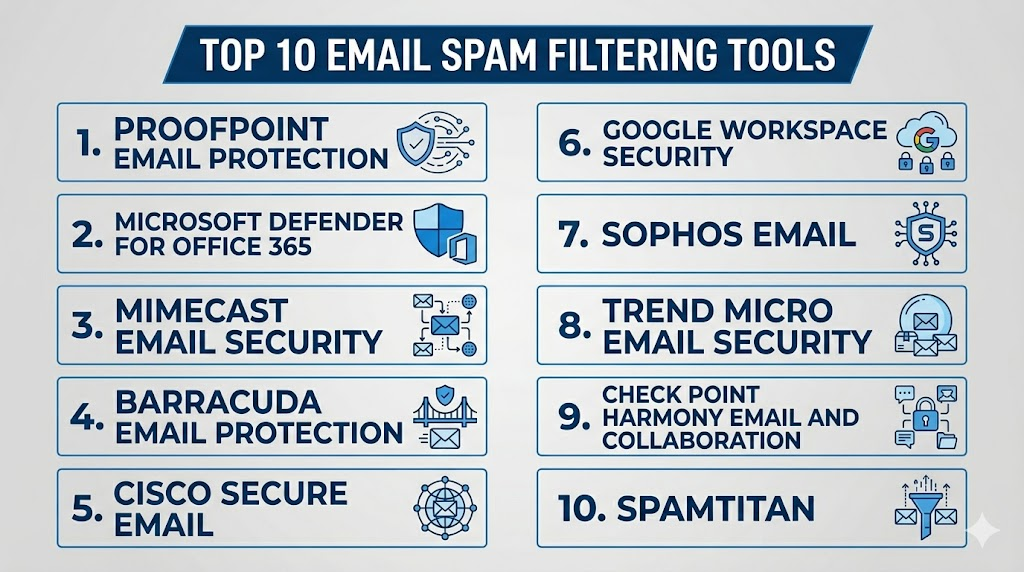
Introduction
Email Spam Filtering Tools help organizations detect, block, quarantine, and manage unwanted or harmful emails before they reach employee inboxes. These tools go beyond simple spam blocking by identifying phishing messages, malware attachments, business email compromise, suspicious URLs, impersonation attempts, spoofed domains, graymail, and bulk unwanted messages. Modern spam filtering platforms use a mix of reputation intelligence, content analysis, attachment scanning, sandboxing, URL rewriting, AI-based detection, sender authentication, and user reporting workflows.Email spam filtering matters because email is still one of the most common entry points for cyberattacks. Attackers use fake invoices, credential theft pages, malicious attachments, QR code phishing, brand impersonation, and social engineering to bypass traditional defenses. A strong spam filtering tool helps reduce inbox risk, protect employees, support compliance, and improve productivity.
Real-world use cases include:
- Blocking spam, phishing, and malicious attachments
- Protecting Microsoft 365 and Google Workspace users
- Reducing business email compromise risk
- Quarantining suspicious emails for administrator review
- Supporting email continuity, archiving, encryption, and compliance workflows
Evaluation Criteria for Buyers:
- Spam and phishing detection accuracy
- Malware and attachment scanning
- URL protection and time-of-click analysis
- Impersonation and spoofing detection
- Microsoft 365 and Google Workspace integration
- Admin console usability
- Quarantine and policy management
- Security awareness and user reporting options
- Email continuity and backup support
- Compliance, logging, and audit controls
Best for: IT teams, security teams, MSPs, SMBs, mid-market companies, enterprises, schools, healthcare organizations, financial institutions, and any business that relies heavily on email communication.
Not ideal for: Very small teams that only need basic mailbox-level spam controls, personal users with low risk exposure, or organizations that already have a fully managed secure email gateway with strong phishing and malware protection.
Key Trends in Email Spam Filtering Tools
- AI-powered phishing detection is becoming more important as attackers use better-written emails, fake branding, and personalized social engineering.
- Cloud email security is now the default choice for many organizations using Microsoft 365 or Google Workspace.
- Business email compromise protection is expanding, with more tools detecting impersonation, lookalike domains, and abnormal sender behavior.
- Post-delivery remediation is becoming essential, allowing security teams to remove malicious emails even after they land in inboxes.
- URL protection is moving toward real-time analysis, checking links at the moment users click instead of only during delivery.
- Attachment sandboxing is now common in enterprise tools, helping detect hidden malware, ransomware, and suspicious file behavior.
- Security awareness workflows are being bundled, including phishing reporting buttons, user training, and simulated phishing campaigns.
- Email security and collaboration security are merging, covering tools such as Teams, Slack, SharePoint, OneDrive, and Google Drive.
- DMARC, SPF, and DKIM visibility is becoming more important, especially for preventing spoofing and protecting brand trust.
- MSP-friendly email filtering platforms are growing, giving service providers centralized management across many customer tenants.
How We Selected These Tools
The tools below were selected using practical buyer-focused criteria, not just popularity. The list includes enterprise platforms, cloud-native tools, SMB-friendly solutions, and security platforms widely used for spam filtering, phishing protection, and email threat defense.
- Market adoption and recognition across SMB, mid-market, enterprise, MSP, and regulated industries
- Feature completeness, including spam filtering, phishing protection, malware scanning, URL defense, and quarantine management
- Integration strength with Microsoft 365, Google Workspace, directory services, SIEM tools, and security workflows
- Security posture signals, including encryption, access control, audit logs, policy controls, and enterprise administration features
- Detection depth for phishing, business email compromise, spoofing, malware, graymail, and suspicious attachments
- Operational usability for IT administrators and security teams
- Scalability for organizations with high email volume or multiple domains
- Support for compliance-related workflows, such as archiving, retention, DLP, and audit trails where available
- Customer fit across segments, from small businesses to complex enterprises
- Value for real-world email security operations, including reporting, remediation, and user education
Top 10 Email Spam Filtering Tools
1- Proofpoint Email Protection
Short description:
Proofpoint Email Protection is an enterprise email security platform built to defend organizations from spam, phishing, malware, ransomware, business email compromise, and targeted email attacks. It is widely used by large enterprises, regulated industries, and security-conscious organizations that need advanced threat intelligence and layered protection. The platform focuses on stopping malicious emails before delivery while also supporting investigation and remediation workflows. It is a strong option for organizations that want deep email threat protection rather than only basic spam filtering.
Key Features
- Advanced spam, phishing, and malware filtering
- Business email compromise and impersonation detection
- URL defense and attachment protection
- Threat intelligence-driven email analysis
- Quarantine and policy management
- Email fraud defense and domain protection options
- Security awareness and user reporting integrations
Pros
- Strong fit for enterprise email security requirements
- Deep protection against phishing and targeted attacks
- Useful for regulated industries and large security teams
Cons
- May be more complex than small businesses need
- Enterprise-level configuration can require experienced administrators
- Pricing and packaging may vary depending on modules
Platforms / Deployment
Cloud / Hybrid
Microsoft 365 / Google Workspace / Enterprise email environments
Security & Compliance
Enterprise controls may include encryption, admin roles, audit logs, policy management, and integration with security workflows. Specific certifications and compliance support should be validated directly by buyers.
Integrations & Ecosystem
Proofpoint fits into enterprise security ecosystems where email security must connect with identity, awareness training, SIEM, SOAR, and incident response workflows. It is most effective when deployed as part of a wider email threat defense strategy.
- Microsoft 365
- Google Workspace
- SIEM and SOAR workflows
- Security awareness training
- Directory and identity systems
- Incident response processes
Support & Community
Proofpoint offers enterprise support, documentation, customer success, and implementation assistance. Support depth may vary by contract and product package.
2- Microsoft Defender for Office 365
Short description:
Microsoft Defender for Office 365 is a cloud-native email security solution designed for organizations using Microsoft 365. It protects users from spam, phishing, malware, unsafe links, malicious attachments, impersonation, and account-based threats. The tool is especially valuable for businesses already standardized on Microsoft security and productivity products. It works well when email protection needs to connect with identity, endpoint, SIEM, and cloud security workflows inside the Microsoft ecosystem.
Key Features
- Anti-spam and anti-phishing protection
- Safe Links and Safe Attachments
- Impersonation and spoofing protection
- Threat Explorer and investigation tools
- Automated investigation and response capabilities
- Integration with Microsoft security ecosystem
- User reporting and phishing simulation options
Pros
- Strong fit for Microsoft 365 customers
- Deep integration with Microsoft security tools
- Good centralized visibility for Microsoft-first environments
Cons
- Best value is achieved inside the Microsoft ecosystem
- Configuration can be complex for teams without Microsoft security expertise
- Some advanced features depend on licensing level
Platforms / Deployment
Cloud
Microsoft 365 / Exchange Online
Security & Compliance
Supports Microsoft security administration, policy controls, audit capabilities, role-based access, and integration with Microsoft compliance and security tools. Buyers should validate exact compliance needs by license and tenant configuration.
Integrations & Ecosystem
Microsoft Defender for Office 365 works best when connected with Microsoft Entra ID, Microsoft Defender XDR, Microsoft Sentinel, and Microsoft Purview. It is well suited for organizations that want email security within one unified Microsoft security stack.
- Microsoft 365
- Microsoft Entra ID
- Microsoft Defender XDR
- Microsoft Sentinel
- Microsoft Purview
- Exchange Online
Support & Community
Microsoft provides documentation, admin guidance, partner support, and enterprise support options. Community knowledge is strong because of the broad Microsoft ecosystem.
3- Mimecast Email Security
Short description:
Mimecast Email Security is a cloud-based email protection platform focused on defending organizations against spam, phishing, malware, impersonation, ransomware, and business email compromise. It is commonly used by SMBs, mid-market companies, enterprises, and regulated organizations. Mimecast is known for combining email security with continuity, archiving, awareness training, and resilience capabilities. It is a strong option for businesses that want layered email security and operational continuity in one platform.
Key Features
- Spam, malware, and phishing protection
- Impersonation and domain spoofing detection
- URL and attachment protection
- Email continuity and archiving options
- User awareness and reporting workflows
- Policy-based quarantine management
- Data protection and compliance-focused features
Pros
- Strong email security and continuity combination
- Useful for Microsoft 365 and Google Workspace environments
- Good fit for mid-market and enterprise buyers
Cons
- Feature depth can make configuration more involved
- Some advanced capabilities may require additional modules
- Admin experience may require training for best results
Platforms / Deployment
Cloud
Microsoft 365 / Google Workspace / Enterprise email environments
Security & Compliance
Mimecast commonly supports enterprise email security controls such as policy management, encryption options, logging, and administration features. Buyers should validate specific certifications, compliance support, and regional requirements directly.
Integrations & Ecosystem
Mimecast integrates into email, identity, archiving, continuity, and security operations workflows. It is useful for organizations that want protection, resilience, and compliance-oriented email management.
- Microsoft 365
- Google Workspace
- Directory services
- SIEM workflows
- Email archiving
- Security awareness programs
Support & Community
Mimecast provides documentation, customer support, onboarding resources, and partner-led support options. Support quality may vary by plan and region.
4- Barracuda Email Protection
Short description:
Barracuda Email Protection is a cloud email security platform designed to protect organizations from spam, phishing, malware, ransomware, account takeover, impersonation, and data loss. It is popular among SMBs, mid-market companies, MSPs, and enterprises that need practical email security with manageable administration. Barracuda combines inbound protection, outbound protection, incident response, encryption, archiving, and Microsoft 365 protection options. It is a strong choice for buyers who want a broad email security suite without extreme complexity.
Key Features
- Spam, phishing, and malware filtering
- Account takeover protection
- Impersonation and business email compromise detection
- Email encryption and DLP options
- Incident response and post-delivery remediation
- Backup and archiving options
- MSP-friendly management capabilities
Pros
- Good fit for SMBs, MSPs, and mid-market teams
- Broad email protection features in one platform
- Practical administration and deployment options
Cons
- Advanced tuning may still require experienced administrators
- Some features may be packaged separately
- Large enterprises may need deeper customization
Platforms / Deployment
Cloud / Hybrid
Microsoft 365 / Google Workspace / Enterprise email environments
Security & Compliance
Barracuda offers enterprise security administration and email protection controls. Buyers should validate SSO, audit logs, RBAC, encryption, archiving, DLP, and compliance needs based on selected modules.
Integrations & Ecosystem
Barracuda works well for businesses that want email protection connected with backup, archiving, incident response, and MSP service delivery. It is especially useful for Microsoft 365-focused organizations.
- Microsoft 365
- Google Workspace
- MSP management consoles
- Backup workflows
- Email archiving
- Incident response workflows
Support & Community
Barracuda provides vendor support, partner support, documentation, and MSP-focused resources. Support options may vary by plan and partner model.
5- Cisco Secure Email
Short description:
Cisco Secure Email is an email security solution designed to block spam, phishing, malware, ransomware, and advanced email threats. It is suitable for enterprises and security teams that already use Cisco security products or need strong protection across complex email environments. Cisco Secure Email supports threat intelligence, content filtering, outbreak filtering, malware defense, and policy-based controls. It is a strong option for organizations that want email security connected with a broader network and security ecosystem.
Key Features
- Spam and phishing protection
- Malware and attachment scanning
- URL filtering and threat intelligence
- Outbreak filtering for emerging threats
- Data loss prevention options
- Policy-based email controls
- Integration with Cisco security ecosystem
Pros
- Strong fit for Cisco-centric security environments
- Enterprise-ready policy and threat defense capabilities
- Useful for organizations with complex security operations
Cons
- May require skilled administration for best results
- Smaller teams may find it more complex than needed
- Some capabilities may depend on deployment model and licensing
Platforms / Deployment
Cloud / Hybrid / Appliance-based options may vary
Microsoft 365 / Google Workspace / Enterprise email environments
Security & Compliance
Cisco Secure Email supports enterprise-grade email security controls, policy management, logging, and security integrations. Buyers should validate SSO, RBAC, encryption, audit logs, and compliance requirements directly.
Integrations & Ecosystem
Cisco Secure Email fits well into organizations using Cisco security products. It can connect email threat intelligence with broader security monitoring and response workflows.
- Cisco security products
- Microsoft 365
- Google Workspace
- SIEM workflows
- Threat intelligence workflows
- Enterprise policy systems
Support & Community
Cisco provides enterprise support, documentation, partner services, and a large technical ecosystem. Support strength is generally strong for organizations already invested in Cisco.
6- Google Workspace Security
Short description:
Google Workspace Security includes built-in spam filtering, phishing protection, malware detection, suspicious attachment scanning, and admin policy controls for Gmail and Google Workspace environments. It is ideal for organizations already using Gmail as their business email platform. Google’s security model uses large-scale threat signals, machine learning, sender authentication, and administrator policies to reduce unwanted and malicious email. It is especially useful for companies that want native protection without adding a separate gateway immediately.
Key Features
- Built-in Gmail spam filtering
- Phishing and malware detection
- Suspicious attachment scanning
- Security sandboxing options for some editions
- Admin policies and quarantine controls
- Data protection and compliance tools
- Integration with Google security and admin ecosystem
Pros
- Native protection for Gmail and Google Workspace
- Simple administration for Google-first organizations
- Strong baseline spam filtering without extra infrastructure
Cons
- Advanced enterprise controls may depend on edition
- Organizations with complex security needs may still need additional tools
- Best suited for Google Workspace environments
Platforms / Deployment
Cloud
Google Workspace / Gmail business environments
Security & Compliance
Google Workspace includes admin controls, access management, logging, policy configuration, and security settings. Buyers should validate exact compliance and security capabilities by edition.
Integrations & Ecosystem
Google Workspace Security works best inside the Google ecosystem. It integrates with Gmail, Google Admin, Google Drive, endpoint controls, identity policies, and security investigation tools depending on edition.
- Gmail
- Google Admin Console
- Google Drive
- Google Cloud security workflows
- Identity and access controls
- Security investigation tools
Support & Community
Google provides documentation, admin resources, partner support, and community support. Enterprise support options depend on subscription and support package.
7- Sophos Email
Short description:
Sophos Email is a cloud email security solution that protects organizations from spam, phishing, malware, ransomware, impersonation, and unwanted email. It is well suited for SMBs, mid-market organizations, schools, nonprofits, and companies already using Sophos security products. Sophos Email offers straightforward administration, policy controls, encryption options, and integration with the Sophos Central management platform. It is a practical option for teams that want email security without overly complex operations.
Key Features
- Spam and phishing filtering
- Malware and ransomware protection
- Impersonation protection
- Email encryption options
- Data loss prevention policies
- Quarantine management
- Sophos Central administration
Pros
- Good fit for SMB and mid-market environments
- Simple management through Sophos Central
- Useful for organizations already using Sophos security tools
Cons
- May not offer the same depth as some large enterprise-focused platforms
- Advanced customization may be limited compared with specialist tools
- Best value is often within the Sophos ecosystem
Platforms / Deployment
Cloud
Microsoft 365 / Google Workspace / Enterprise email environments
Security & Compliance
Sophos Email supports policy controls, encryption options, quarantine, and administration features. Buyers should validate SSO, audit logs, compliance requirements, and specific controls by plan.
Integrations & Ecosystem
Sophos Email works well as part of the Sophos security stack. It can support email protection, endpoint security, cloud management, and security operations in a unified environment.
- Microsoft 365
- Google Workspace
- Sophos Central
- Endpoint security workflows
- DLP policies
- Admin reporting workflows
Support & Community
Sophos provides documentation, support resources, partner support, and a broad security community. Support quality may vary by region and plan.
8- Trend Micro Email Security
Short description:
Trend Micro Email Security protects organizations from spam, phishing, malware, ransomware, business email compromise, and advanced email threats. It is commonly used by businesses that want cloud-based email protection with threat intelligence and integrated security capabilities. Trend Micro is especially relevant for organizations already using Trend Micro endpoint, cloud, or XDR products. It provides strong protection for email environments while supporting broader security operations.
Key Features
- Spam and phishing filtering
- Malware and ransomware protection
- Business email compromise detection
- URL analysis and attachment scanning
- Threat intelligence integration
- Policy and quarantine management
- Integration with broader Trend Micro security products
Pros
- Strong fit for Trend Micro security customers
- Useful email threat protection for cloud email environments
- Good balance of detection and admin controls
Cons
- Best value may come when used with broader Trend Micro ecosystem
- Advanced configuration may require security expertise
- Public details may vary by region and product edition
Platforms / Deployment
Cloud
Microsoft 365 / Google Workspace / Enterprise email environments
Security & Compliance
Trend Micro Email Security supports enterprise email protection controls and administrative features. Buyers should validate SSO, audit logs, encryption, RBAC, and compliance requirements directly.
Integrations & Ecosystem
Trend Micro Email Security fits into broader email, endpoint, cloud, and XDR workflows. It is useful for security teams that want email threat signals connected to wider detection and response.
- Microsoft 365
- Google Workspace
- Trend Micro security products
- SIEM workflows
- XDR workflows
- Threat intelligence systems
Support & Community
Trend Micro provides enterprise support, technical documentation, partner services, and security research resources. Support depth may depend on plan and region.
9- Check Point Harmony Email and Collaboration
Short description:
Check Point Harmony Email and Collaboration, also known through Avanan technology, protects cloud email and collaboration environments from phishing, malware, spam, business email compromise, account takeover, and malicious files. It is designed for Microsoft 365, Google Workspace, and collaboration tools. The platform is especially useful for organizations that want API-based email security rather than only traditional gateway-based filtering. It is a strong fit for cloud-first companies that need protection across email and collaboration apps.
Key Features
- Spam, phishing, and malware protection
- Business email compromise detection
- API-based cloud email security
- Protection for collaboration platforms
- Account takeover and suspicious activity detection
- Attachment and URL inspection
- Policy management and admin controls
Pros
- Strong fit for cloud email and collaboration security
- API-based model can improve deployment flexibility
- Useful for Microsoft 365 and Google Workspace environments
Cons
- Buyers should validate fit for complex legacy email environments
- Advanced workflows may require tuning
- Some capabilities may vary by package
Platforms / Deployment
Cloud
Microsoft 365 / Google Workspace / Collaboration platforms
Security & Compliance
Security controls vary by edition and deployment. Buyers should validate SSO, RBAC, audit logs, encryption, data handling, and compliance requirements directly.
Integrations & Ecosystem
Harmony Email and Collaboration integrates with cloud email and collaboration platforms to protect users from threats that move across inboxes, shared files, and communication tools.
- Microsoft 365
- Google Workspace
- Collaboration platforms
- Cloud file-sharing tools
- Security operations workflows
- Incident response processes
Support & Community
Check Point provides enterprise support, documentation, partner resources, and security research. Support level may vary by region and customer agreement.
10- SpamTitan
Short description:
SpamTitan is an email spam filtering and security solution designed for SMBs, MSPs, schools, nonprofits, and organizations that need reliable email protection without excessive complexity. It focuses on blocking spam, phishing, malware, viruses, and unwanted email before they reach users. SpamTitan is especially attractive for service providers and smaller organizations that need centralized management and strong filtering at a practical cost. It is a good choice for teams that want focused spam filtering rather than a large enterprise security suite.
Key Features
- Spam and virus filtering
- Phishing and malware protection
- Quarantine and policy controls
- Email allowlisting and blocklisting
- Reporting and admin dashboard
- MSP and multi-tenant management options
- Cloud-based and gateway-style deployment options
Pros
- Strong fit for SMBs and MSPs
- Practical spam filtering without unnecessary complexity
- Good option for cost-conscious organizations
Cons
- May not match enterprise platforms for advanced threat defense
- Less suitable for complex global security operations
- Advanced collaboration security features may be limited
Platforms / Deployment
Cloud / Gateway-style deployment options
Microsoft 365 / Google Workspace / Enterprise email environments
Security & Compliance
Not publicly stated in full detail. Buyers should validate encryption, admin controls, audit logging, access control, and compliance requirements directly.
Integrations & Ecosystem
SpamTitan is commonly used in email gateway, MSP, and SMB email protection workflows. It is useful when organizations need practical spam filtering and simple administration.
- Microsoft 365
- Google Workspace
- MSP management workflows
- Email gateway environments
- Admin reporting tools
- Quarantine workflows
Support & Community
SpamTitan provides vendor support, documentation, and MSP-focused resources. Support options should be validated based on plan and deployment type.
Comparison Table
| Tool Name | Best For | Platforms Supported | Deployment | Standout Feature | Public Rating |
|---|---|---|---|---|---|
| Proofpoint Email Protection | Enterprise email threat defense | Microsoft 365, Google Workspace, Enterprise email | Cloud / Hybrid | Advanced threat intelligence and phishing defense | N/A |
| Microsoft Defender for Office 365 | Microsoft 365 organizations | Microsoft 365, Exchange Online | Cloud | Native Microsoft email security integration | N/A |
| Mimecast Email Security | Mid-market and enterprise resilience | Microsoft 365, Google Workspace, Enterprise email | Cloud | Email security with continuity and archiving options | N/A |
| Barracuda Email Protection | SMB, MSP, and mid-market email security | Microsoft 365, Google Workspace, Enterprise email | Cloud / Hybrid | Broad email protection and incident response | N/A |
| Cisco Secure Email | Cisco-centric enterprise security | Microsoft 365, Google Workspace, Enterprise email | Cloud / Hybrid | Enterprise email protection with Cisco security ecosystem | N/A |
| Google Workspace Security | Google Workspace users | Gmail, Google Workspace | Cloud | Native Gmail spam and phishing protection | N/A |
| Sophos Email | SMB and mid-market security teams | Microsoft 365, Google Workspace, Enterprise email | Cloud | Simple email protection through Sophos Central | N/A |
| Trend Micro Email Security | Trend Micro security customers | Microsoft 365, Google Workspace, Enterprise email | Cloud | Email security connected to broader threat intelligence | N/A |
| Check Point Harmony Email and Collaboration | Cloud email and collaboration security | Microsoft 365, Google Workspace, Collaboration apps | Cloud | API-based email and collaboration protection | N/A |
| SpamTitan | SMBs and MSPs | Microsoft 365, Google Workspace, Email gateways | Cloud / Gateway-style | Practical spam filtering for SMB and MSP use cases | N/A |
Evaluation and Scoring of Email Spam Filtering Tools
| Tool Name | Core 25% | Ease 15% | Integrations 15% | Security 10% | Performance 10% | Support 10% | Value 15% | Weighted Total 0–10 |
|---|---|---|---|---|---|---|---|---|
| Proofpoint Email Protection | 9.4 | 8.0 | 8.8 | 9.0 | 9.0 | 8.7 | 8.0 | 8.74 |
| Microsoft Defender for Office 365 | 8.9 | 8.4 | 9.2 | 9.0 | 8.8 | 8.5 | 8.4 | 8.76 |
| Mimecast Email Security | 8.9 | 8.2 | 8.7 | 8.7 | 8.7 | 8.5 | 8.2 | 8.56 |
| Barracuda Email Protection | 8.6 | 8.5 | 8.5 | 8.4 | 8.5 | 8.4 | 8.6 | 8.50 |
| Cisco Secure Email | 8.8 | 7.8 | 8.6 | 8.8 | 8.7 | 8.5 | 8.0 | 8.45 |
| Google Workspace Security | 8.3 | 8.8 | 8.8 | 8.7 | 8.5 | 8.2 | 8.7 | 8.56 |
| Sophos Email | 8.2 | 8.6 | 8.2 | 8.3 | 8.3 | 8.3 | 8.7 | 8.40 |
| Trend Micro Email Security | 8.4 | 8.1 | 8.4 | 8.5 | 8.5 | 8.3 | 8.2 | 8.34 |
| Check Point Harmony Email and Collaboration | 8.7 | 8.2 | 8.8 | 8.7 | 8.6 | 8.3 | 8.1 | 8.52 |
| SpamTitan | 8.0 | 8.7 | 8.0 | 8.0 | 8.2 | 8.2 | 8.8 | 8.28 |
These scores are comparative, not absolute. A higher total means the tool performs strongly across the selected criteria, but it does not automatically mean it is best for every organization. Microsoft-first companies may prefer Microsoft Defender for Office 365, while MSPs may prefer Barracuda or SpamTitan. Enterprises with advanced phishing risk may evaluate Proofpoint, Mimecast, Cisco, or Check Point. Buyers should run a pilot, test real mail flow, review false positives, validate admin workflows, and confirm security requirements before making a final decision.
Which Email Spam Filtering Tool Is Right for You?
Solo / Freelancer
Solo users and freelancers usually do not need a full enterprise email security gateway. Native Gmail, Google Workspace, Outlook, or Microsoft 365 spam protection may be enough for basic protection. If the user manages a small domain or business mailbox, a simple cloud filtering service can add value. The focus should be on phishing protection, suspicious attachment detection, and easy quarantine handling. Avoid complex platforms that require security administration unless there is a clear business risk.
SMB
SMBs should prioritize easy deployment, strong spam filtering, phishing protection, and simple administration. Barracuda Email Protection, Sophos Email, SpamTitan, and Microsoft Defender for Office 365 are practical options depending on the email environment. Google Workspace users may start with native Google security and add an extra layer only if risk increases. SMBs should avoid overcomplicating email security but should not rely only on basic mailbox settings if they face frequent phishing or invoice fraud.
Mid-Market
Mid-market organizations usually need stronger policies, reporting, quarantine workflows, impersonation protection, and post-delivery remediation. Mimecast, Barracuda, Check Point Harmony Email and Collaboration, Trend Micro Email Security, and Microsoft Defender for Office 365 are strong candidates. These teams should evaluate ease of administration, integration with identity providers, user reporting workflows, and support quality. Mid-market buyers should also look for email continuity, archiving, and security awareness capabilities if those are important to operations.
Enterprise
Enterprises should evaluate email spam filtering as part of a wider email security and threat defense program. Proofpoint, Microsoft Defender for Office 365, Mimecast, Cisco Secure Email, and Check Point Harmony Email and Collaboration are strong enterprise options. Large organizations need advanced phishing protection, malware scanning, URL defense, compliance reporting, role-based administration, SIEM integration, and incident response workflows. Enterprises should conduct a formal pilot across real users, high-risk departments, and executive mailboxes before selecting a platform.
Budget vs Premium
Budget-focused buyers should start with native Microsoft or Google protection, then add a practical tool like SpamTitan, Sophos Email, or Barracuda if needed. Premium buyers should evaluate Proofpoint, Mimecast, Cisco, Check Point, or advanced Microsoft licensing depending on risk level. Lower-cost tools may handle common spam well, but premium tools usually provide stronger phishing defense, investigation workflows, and advanced threat intelligence. The right budget decision should consider fraud loss, downtime risk, support needs, and administrator workload.
Feature Depth vs Ease of Use
If ease of use is the top priority, Google Workspace Security, Sophos Email, Barracuda, or SpamTitan may be more comfortable for smaller teams. If deep feature coverage matters more, Proofpoint, Mimecast, Microsoft Defender for Office 365, Cisco Secure Email, and Check Point Harmony Email and Collaboration provide stronger enterprise capabilities. Buyers should choose based on team maturity. A powerful tool that is poorly configured may perform worse than a simpler tool managed well.
Integrations & Scalability
Email spam filtering tools should integrate with Microsoft 365, Google Workspace, identity providers, SIEM tools, endpoint security, awareness training, ticketing, and incident response workflows. Scalability matters for organizations with multiple domains, global employees, high email volume, or distributed IT teams. Microsoft-first organizations may benefit from Defender integration, while Cisco or Trend Micro customers may prefer ecosystem alignment. MSPs should prioritize multi-tenant management, centralized policies, and customer-level reporting.
Security & Compliance Needs
Security and compliance requirements should be reviewed early. Buyers should validate encryption, audit logs, role-based access, quarantine controls, retention, archiving, DLP, admin permissions, and data processing requirements. Regulated industries may need stronger reporting, legal hold, eDiscovery, and data governance features. It is also important to review how the tool handles suspicious attachments, malicious links, user-reported emails, and post-delivery removal. A tool should protect the inbox while also supporting governance and audit needs.
Common Mistakes to Avoid When Buying Email Spam Filtering Tools
- Choosing a tool only because it blocks basic spam, while ignoring phishing and business email compromise
- Not testing the platform with real mail flow before rollout
- Ignoring false positives that may block important business emails
- Failing to configure SPF, DKIM, and DMARC properly
- Not training users to report suspicious emails
- Overlooking post-delivery remediation capabilities
- Not integrating email security with SIEM or incident response workflows
- Buying enterprise tools without enough admin capacity to manage them
- Assuming Microsoft or Google native protection is always enough for every risk profile
- Not reviewing quarantine workflows and administrator alert fatigue
- Ignoring mobile email usage and executive mailbox protection
- Not validating compliance, audit, archiving, and retention requirements
Implementation Playbook
First Phase
Start by reviewing the current email environment, domain setup, mail routing, security gaps, and existing spam issues. Identify whether the organization uses Microsoft 365, Google Workspace, hybrid Exchange, or another email platform. Document common threats such as phishing, invoice fraud, malware, spoofing, executive impersonation, and unwanted bulk mail. Review current SPF, DKIM, and DMARC status. Define success metrics such as reduced spam volume, fewer phishing clicks, lower false positives, and faster remediation.
Second Phase
Deploy the selected spam filtering tool in a controlled manner. Start with monitoring or limited enforcement before applying aggressive blocking rules. Configure policies for inbound filtering, outbound filtering, quarantine, URL rewriting, attachment scanning, impersonation protection, and user reporting. Test mail flow for different departments, especially finance, HR, executives, sales, and customer support. Review false positives daily during the early rollout. Train administrators on dashboard usage, quarantine release, reporting, and policy adjustment.
Third Phase
Move toward mature operations after the platform stabilizes. Enable stronger policies for high-risk users, integrate alerts with SIEM or ticketing systems, and configure post-delivery remediation workflows. Add security awareness training and phishing reporting if available. Review email threat reports monthly to identify trends and policy gaps. Continue tuning allowlists, blocklists, impersonation rules, and quarantine settings. Reassess the tool regularly as the organization grows, attack patterns change, and compliance requirements evolve.
Frequently Asked Questions
1- What are Email Spam Filtering Tools?
Email Spam Filtering Tools are security solutions that detect and block unwanted, suspicious, or harmful emails before they reach users. They protect against spam, phishing, malware, ransomware, spoofing, impersonation, and unwanted bulk messages. Modern tools use reputation checks, content scanning, URL analysis, attachment inspection, AI detection, and policy rules. They often include quarantine dashboards and admin controls. These tools are important because email remains a common entry point for cyberattacks. They work best when combined with user training, domain authentication, and incident response workflows.
2- How do Email Spam Filtering Tools work?
Email Spam Filtering Tools inspect incoming and outgoing messages using several checks. They may analyze the sender reputation, domain authentication, email content, attachments, links, headers, language patterns, and user behavior signals. Suspicious messages can be blocked, quarantined, tagged, or delivered with warnings. Advanced platforms also scan links when users click them and analyze attachments in safe environments. Some tools remove malicious emails after delivery if a threat is discovered later. The goal is to reduce inbox risk while avoiding unnecessary blocking of legitimate business email.
3- Are native Microsoft 365 or Google Workspace filters enough?
Native Microsoft 365 and Google Workspace filters provide a strong baseline for many organizations. For small teams with low risk, native filtering may be enough if configured properly. However, businesses facing targeted phishing, business email compromise, malware, executive impersonation, or compliance pressure may need an additional layer. Advanced third-party tools can add stronger threat intelligence, policy controls, reporting, archiving, continuity, or post-delivery remediation. The decision depends on business risk, email volume, user behavior, and security maturity. A pilot can help determine whether native protection is enough.
4- What is the difference between spam filtering and phishing protection?
Spam filtering focuses on blocking unwanted bulk emails, promotional junk, suspicious senders, and low-quality messages. Phishing protection focuses on detecting emails designed to steal credentials, deliver malware, impersonate trusted people, or trick users into taking harmful actions. Many phishing emails are carefully written and may not look like traditional spam. Modern email security tools must handle both problems. A good platform should detect basic spam, advanced phishing, spoofing, malicious links, suspicious attachments, and business email compromise. Buyers should not choose a tool that only handles simple junk mail.
5- How much do Email Spam Filtering Tools cost?
Pricing varies based on number of users, email volume, included modules, deployment model, support level, and advanced features. SMB-focused tools may offer simpler per-user pricing, while enterprise platforms may use custom pricing based on modules and requirements. Additional features such as archiving, encryption, awareness training, DLP, backup, continuity, or advanced threat defense may cost extra. Buyers should compare total cost, not just base subscription price. It is also important to consider administrator time, implementation effort, and support quality. The best value is the tool that reduces risk without creating unnecessary complexity.
6- How long does implementation take?
Implementation time depends on email platform, domain setup, routing changes, security policies, and internal approval processes. A small cloud email environment may be configured quickly, while a large enterprise with multiple domains and compliance needs will take longer. Teams must plan DNS changes, policy setup, quarantine testing, admin training, and user communication. It is best to start with monitoring and gradual enforcement before applying aggressive blocking rules. False-positive review is important during the early stages. A phased rollout helps reduce disruption and improves confidence.
7- What security features should buyers look for?
Buyers should look for spam filtering, phishing protection, malware scanning, URL defense, attachment sandboxing, impersonation detection, quarantine workflows, and post-delivery remediation. For enterprise use, important features include SSO, RBAC, audit logs, encryption, reporting, SIEM integration, DLP, and compliance support. Microsoft 365 and Google Workspace integration should be tested carefully. Buyers should also check user reporting options and security awareness features. Strong tools should protect both inbound and outbound email. The platform should also support clear policies and easy investigation workflows.
8- Can spam filtering tools stop business email compromise?
Email spam filtering tools can reduce business email compromise risk, but they cannot stop every case by themselves. BEC attacks often use social engineering, trusted-looking senders, compromised accounts, and urgent payment requests. Strong tools can detect impersonation, lookalike domains, suspicious sender behavior, and abnormal message content. However, businesses also need user training, payment verification processes, MFA, and strong account security. Finance, HR, and executive users should receive extra protection. The best defense is layered security, not only filtering.
9- What are common alternatives to dedicated spam filtering tools?
Alternatives include native Microsoft 365 or Google Workspace filtering, secure email gateways, DNS-based email authentication, endpoint protection, user awareness training, and manual mailbox rules. Some organizations also use email security features built into broader security suites. However, alternatives may not provide the same depth of phishing detection, post-delivery remediation, reporting, or quarantine control. Smaller teams may start with native controls, while larger teams often need dedicated tools. The right choice depends on risk exposure and operational capacity. Dedicated tools are most valuable when email threats are frequent or business-critical.
10- How should a company switch from one email filtering tool to another?
Switching email filtering tools should be handled carefully because mail flow disruption can affect the entire business. Start by documenting current routing, policies, allowlists, blocklists, quarantine rules, DNS records, and user reporting workflows. Run the new tool in monitoring mode or limited enforcement before fully switching traffic. Compare detection quality, false positives, admin usability, and user experience. Communicate changes to employees and train administrators before cutover. Keep rollback options ready in case mail flow issues occur. After migration, review reports frequently and tune policies based on real results.
Conclusion
Email Spam Filtering Tools are essential for protecting organizations from unwanted mail, phishing, malware, impersonation, business email compromise, and risky attachments. The best tool depends on the organization’s size, email platform, security maturity, compliance needs, budget, and threat profile. Microsoft-first businesses may prefer Microsoft Defender for Office 365, Google Workspace users may start with native Google protections, SMBs and MSPs may evaluate Barracuda, Sophos, or SpamTitan, while enterprises may shortlist Proofpoint, Mimecast, Cisco, Trend Micro, or Check Point. Buyers should avoid choosing only by brand name or feature count.
