Find the Best Cosmetic Hospitals — Choose with Confidence
Discover top cosmetic hospitals in one place and take the next step toward the look you’ve been dreaming of.
“Your confidence is your power — invest in yourself, and let your best self shine.”
Compare • Shortlist • Decide smarter — works great on mobile too.
Introduction
A/B Testing Tools (also known as experimentation platforms) enable teams to compare different versions of web pages, apps, or product features to determine which performs better. By splitting traffic between variations and measuring outcomes such as conversions, clicks, or engagement, businesses can make data-driven decisions instead of relying on assumptions.
These tools are essential for optimizing digital experiences. From marketing landing pages to in-product features, A/B testing helps improve performance, reduce churn, and increase revenue.
Modern A/B testing platforms go beyond simple split testing. They now include multivariate testing, feature flagging, personalization, AI-driven experimentation, and server-side testing, making them central to growth and product optimization strategies.
Common use cases include:
- Optimizing landing pages and conversion funnels
- Testing UI/UX changes in web and mobile apps
- Improving onboarding experiences
- Validating product feature releases
- Personalizing user experiences
What buyers should evaluate:
- Client-side vs server-side testing capabilities
- Statistical significance and experiment reliability
- Ease of experiment setup (visual editor vs code)
- Feature flags and rollout capabilities
- Targeting and segmentation options
- Integration with analytics and data tools
- Performance impact (latency, flicker issues)
- Collaboration and workflow features
- Pricing model and scalability
Best for: Product managers, growth teams, marketers, and SaaS companies focused on optimization and experimentation.
Not ideal for: Very small websites with low traffic (insufficient data for meaningful results) or teams without experimentation workflows.
Key Trends in A/B Testing Tools
- Shift to server-side experimentation: Better performance and flexibility
- Integration with feature flags: Unified experimentation and release management
- AI-driven experimentation: Automated test creation and optimization
- Personalization engines: Tailored user experiences at scale
- Experimentation platforms (full-stack): Combining analytics + testing
- Privacy-first experimentation: Compliance with global data regulations
- Real-time experimentation insights: Faster iteration cycles
- Cross-platform testing: Web, mobile, and backend experiments
- Statistical innovation: Bayesian and sequential testing models
- Low-code/no-code testing tools: Accessible to non-technical teams
How We Selected These Tools (Methodology)
- Evaluated market adoption and experimentation capabilities
- Assessed core testing features (A/B, multivariate, feature flags)
- Reviewed statistical reliability and reporting accuracy
- Analyzed integration ecosystems (analytics, data, DevOps tools)
- Considered ease of use for marketers and developers
- Included tools for SMB, mid-market, and enterprise users
- Evaluated performance impact and scalability
- Reviewed security, compliance, and deployment flexibility
- Balanced visual tools and developer-first platforms
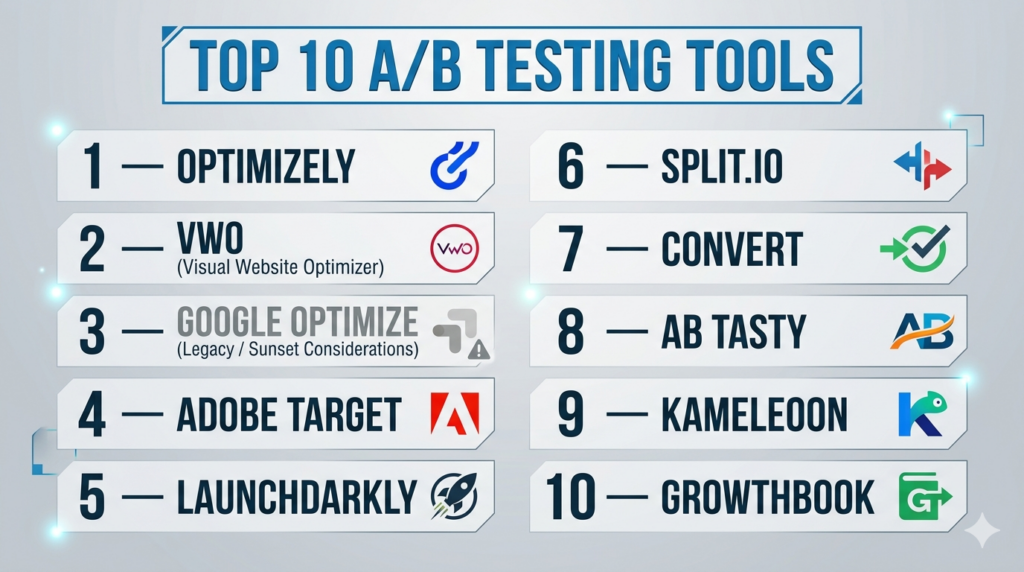
Top 10 A/B Testing Tools
#1 — Optimizely
Short description: A leading experimentation platform offering full-stack A/B testing, feature flags, and personalization for enterprises.
Key Features
- Client-side and server-side experimentation
- Feature flagging and rollouts
- Multivariate testing
- Personalization engine
- Advanced targeting and segmentation
- Experiment analytics and reporting
Pros
- Enterprise-grade capabilities
- Strong experimentation ecosystem
Cons
- Expensive
- Requires setup and expertise
Platforms / Deployment
Web / Mobile
Cloud
Security & Compliance
Enterprise-grade security; details vary
Integrations & Ecosystem
Optimizely integrates deeply with marketing and product ecosystems.
- Analytics platforms
- Data warehouses
- APIs
Support & Community
Strong enterprise support
#2 — VWO (Visual Website Optimizer)
Short description: A popular A/B testing platform with a visual editor, heatmaps, and user behavior insights.
Key Features
- Visual A/B testing editor
- Heatmaps and session recordings
- Funnel analysis
- Behavioral targeting
- Multivariate testing
- Personalization
Pros
- Easy to use for marketers
- All-in-one optimization suite
Cons
- Limited server-side testing
- Pricing can scale quickly
Platforms / Deployment
Web
Cloud
Security & Compliance
Varies / Not publicly stated
Integrations & Ecosystem
- CRM tools
- Analytics platforms
- APIs
Support & Community
Good support and onboarding
#3 — Google Optimize (Legacy / Sunset Considerations)
Short description: A previously popular A/B testing tool integrated with analytics platforms; alternatives are now more widely used.
Key Features
- A/B and multivariate testing
- Integration with analytics tools
- Visual editor
- Targeting capabilities
Pros
- Easy integration
- Simple interface
Cons
- Limited features compared to modern tools
- Availability varies
Platforms / Deployment
Web
Cloud
Security & Compliance
Varies / Not publicly stated
Integrations & Ecosystem
- Analytics tools
- APIs
Support & Community
Limited / transitioning
#4 — Adobe Target
Short description: An enterprise personalization and testing platform for advanced experimentation and targeting.
Key Features
- A/B and multivariate testing
- AI-driven personalization
- Audience segmentation
- Automated optimization
- Omnichannel testing
- Real-time targeting
Pros
- Powerful personalization
- Enterprise scalability
Cons
- Complex setup
- High cost
Platforms / Deployment
Web / Mobile
Cloud
Security & Compliance
Enterprise-grade; details vary
Integrations & Ecosystem
- Experience platforms
- APIs
- Marketing tools
Support & Community
Enterprise support
#5 — LaunchDarkly
Short description: A feature management platform with strong experimentation capabilities focused on developers.
Key Features
- Feature flags
- Progressive rollouts
- Experimentation tools
- Real-time monitoring
- Targeting and segmentation
- SDK support
Pros
- Developer-friendly
- Strong feature flagging
Cons
- Not a traditional visual A/B tool
- Requires technical setup
Platforms / Deployment
Web / Mobile
Cloud
Security & Compliance
Enterprise-grade; details vary
Integrations & Ecosystem
- DevOps tools
- APIs
- Data platforms
Support & Community
Strong support
#6 — Split.io
Short description: A feature delivery and experimentation platform combining feature flags with analytics.
Key Features
- Feature flags
- Experimentation tools
- Real-time metrics
- Data-driven rollouts
- SDK integrations
- Monitoring
Pros
- Strong engineering focus
- Reliable experimentation
Cons
- Less marketing-friendly
- Requires technical expertise
Platforms / Deployment
Web / Mobile
Cloud
Security & Compliance
Varies / Not publicly stated
Integrations & Ecosystem
- Data tools
- APIs
- DevOps systems
Support & Community
Good support
#7 — Convert
Short description: A privacy-focused A/B testing platform designed for compliance and performance.
Key Features
- A/B and multivariate testing
- Privacy-first tracking
- Visual editor
- Audience targeting
- Real-time reporting
Pros
- Strong privacy compliance
- Lightweight performance
Cons
- Smaller ecosystem
- Limited advanced features
Platforms / Deployment
Web
Cloud
Security & Compliance
Privacy-focused; GDPR-ready
Integrations & Ecosystem
- Analytics tools
- APIs
Support & Community
Moderate support
#8 — AB Tasty
Short description: A customer experience optimization platform combining A/B testing and personalization.
Key Features
- A/B and multivariate testing
- Personalization campaigns
- Feature experimentation
- Visual editor
- Audience targeting
Pros
- Easy to use
- Strong personalization features
Cons
- Pricing
- Limited developer flexibility
Platforms / Deployment
Web
Cloud
Security & Compliance
Varies / Not publicly stated
Integrations & Ecosystem
- Marketing tools
- APIs
Support & Community
Good support
#9 — Kameleoon
Short description: An AI-powered experimentation platform focused on personalization and predictive targeting.
Key Features
- A/B testing
- AI-driven personalization
- Predictive targeting
- Feature flags
- Cross-channel testing
Pros
- Strong AI capabilities
- Good personalization
Cons
- Complex setup
- Higher cost
Platforms / Deployment
Web / Mobile
Cloud
Security & Compliance
Varies / Not publicly stated
Integrations & Ecosystem
- Data platforms
- APIs
Support & Community
Enterprise support
#10 — GrowthBook
Short description: An open-source experimentation platform designed for teams using modern data stacks.
Key Features
- A/B testing
- Feature flags
- Bayesian statistics
- Data warehouse integration
- Open-source flexibility
Pros
- Highly customizable
- Cost-effective
Cons
- Requires technical expertise
- Limited UI features
Platforms / Deployment
Web
Cloud / Self-hosted
Security & Compliance
Varies; supports self-hosting
Integrations & Ecosystem
- Data warehouses
- APIs
- Developer tools
Support & Community
Growing open-source community
Comparison Table (Top 10)
| Tool Name | Best For | Platform(s) Supported | Deployment | Standout Feature | Public Rating |
|---|---|---|---|---|---|
| Optimizely | Enterprise | Web/Mobile | Cloud | Full-stack experimentation | N/A |
| VWO | Marketers | Web | Cloud | Visual testing | N/A |
| Google Optimize | Basic testing | Web | Cloud | Simplicity | N/A |
| Adobe Target | Enterprise | Web/Mobile | Cloud | AI personalization | N/A |
| LaunchDarkly | Developers | Web/Mobile | Cloud | Feature flags | N/A |
| Split.io | Engineering teams | Web/Mobile | Cloud | Experiment + rollout | N/A |
| Convert | Privacy-first | Web | Cloud | GDPR focus | N/A |
| AB Tasty | CX teams | Web | Cloud | Personalization | N/A |
| Kameleoon | AI-driven testing | Web/Mobile | Cloud | Predictive targeting | N/A |
| GrowthBook | Data teams | Web | Hybrid | Open-source | N/A |
Evaluation & Scoring of A/B Testing Tools
| Tool Name | Core (25%) | Ease (15%) | Integrations (15%) | Security (10%) | Performance (10%) | Support (10%) | Value (15%) | Weighted Total |
|---|---|---|---|---|---|---|---|---|
| Optimizely | 10 | 7 | 9 | 9 | 9 | 9 | 6 | 8.8 |
| VWO | 9 | 9 | 8 | 8 | 8 | 8 | 8 | 8.5 |
| Adobe Target | 10 | 6 | 9 | 9 | 9 | 9 | 6 | 8.7 |
| LaunchDarkly | 9 | 7 | 9 | 9 | 9 | 8 | 7 | 8.6 |
| Split.io | 9 | 7 | 9 | 8 | 9 | 8 | 7 | 8.4 |
| Convert | 8 | 8 | 7 | 9 | 8 | 7 | 8 | 8.0 |
| AB Tasty | 8 | 9 | 7 | 8 | 8 | 8 | 7 | 8.1 |
| Kameleoon | 9 | 7 | 8 | 8 | 9 | 8 | 7 | 8.3 |
| GrowthBook | 8 | 6 | 9 | 8 | 8 | 7 | 9 | 8.1 |
| Google Optimize | 7 | 9 | 8 | 7 | 7 | 6 | 9 | 7.8 |
How to interpret scores:
- Enterprise tools score higher in depth and scalability
- Developer tools excel in flexibility and integrations
- Visual tools score higher in ease of use
- Value reflects cost vs capabilities
- Scores are comparative benchmarks, not absolute
Which A/B Testing Tool Is Right for You?
Solo / Freelancer
VWO or Convert for easy setup and visual testing.
SMB
VWO or AB Tasty for balanced features and usability.
Mid-Market
LaunchDarkly or Split.io for experimentation with feature flags.
Enterprise
Optimizely or Adobe Target for advanced experimentation and personalization.
Budget vs Premium
- Budget: GrowthBook, Convert
- Premium: Optimizely, Adobe Target
Feature Depth vs Ease of Use
- Advanced: Optimizely, Adobe Target
- Easy: VWO, AB Tasty
Integrations & Scalability
- Best: LaunchDarkly, Optimizely
Security & Compliance Needs
- Strong: Convert, Optimizely
Frequently Asked Questions (FAQs)
What is A/B testing?
It compares two versions of a page or feature to determine which performs better.
How much traffic is needed?
Sufficient traffic is required to reach statistical significance.
What is multivariate testing?
Testing multiple variables simultaneously to find optimal combinations.
Can I test mobile apps?
Yes, many tools support mobile experimentation.
What are feature flags?
They allow controlled rollout of features without full deployment.
Is A/B testing expensive?
Costs vary depending on tool and usage.
How long should tests run?
Until statistically significant results are achieved.
Do I need developers?
Some tools require coding; others offer no-code editors.
Can I personalize experiences?
Yes, many tools include personalization features.
How do I choose the best tool?
Based on technical needs, budget, and experimentation goals.
Conclusion
A/B Testing Tools are essential for optimizing digital experiences and driving growth through data-driven decisions. Whether you need simple visual testing or full-scale experimentation platforms, the right tool depends on your team’s expertise and goals.
